
README
StableSwarmUI
StableSwarmUI 0.5.4 Alpha.
A Modular Stable Diffusion Web-User-Interface, with an emphasis on making powertools easily accessible, high performance, and extensibility.
You can take it for a test-drive on Google Colab
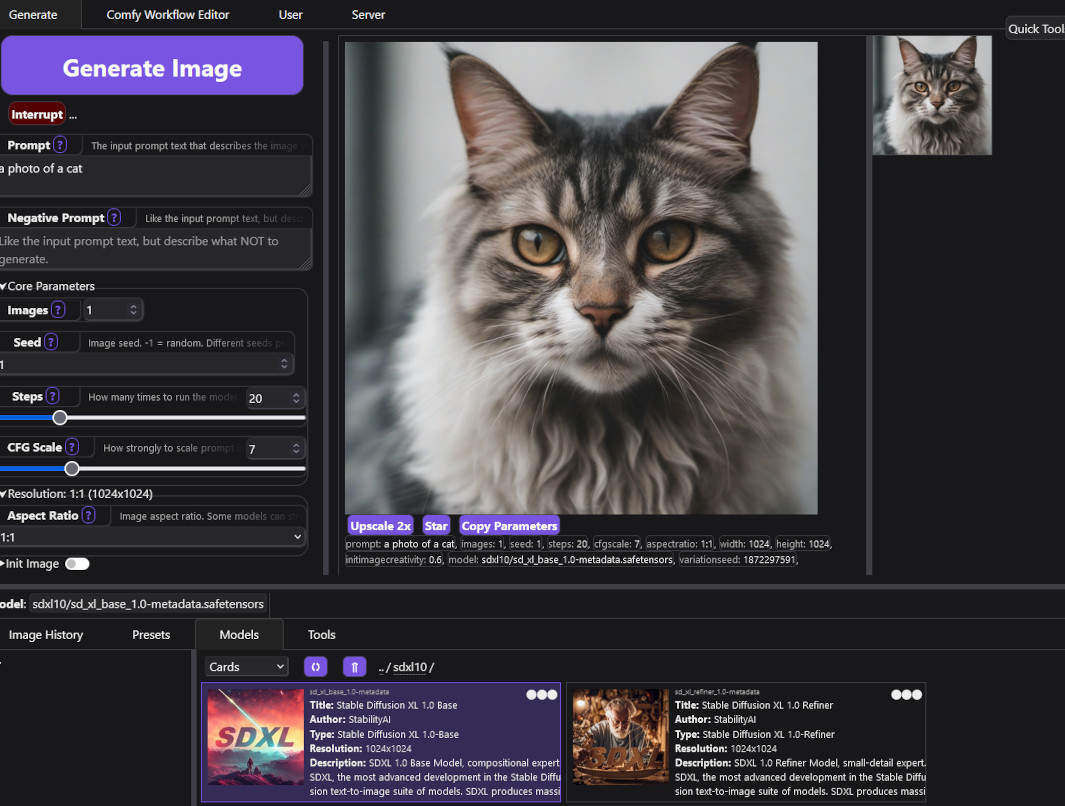
Follow the Feature Announcements Thread for updates on new features.
Status
This project is in ALPHA status. That means all the basic features work, but there's a wide range of core features not yet implemented, and there are many bugs and not-too-great-quality-of-life issues throughout.
Powerusers and developers are encouraged to try it out and help build it, but general/beginner users are advised caution.
Those interested in helping push from Alpha to Beta to Full Release are welcome to submit PRs (read the Contributing document first), and you can contact us here on GitHub or on Discord in the stableswarmui channel. I highly recommended reaching out to ask about plans for a feature before PRing it. There may already be specific plans or even a work in progress.
Key feature targets not yet implemented:
- Image editing tools
- Internal TIs (already supported as a listing, and indirectly as all compatible backends specify these via text anyway, but a handler for them should be present)
- Text prompt tools (CLIP token counter, wildcards, etc) (some tools like prompt weighting already implicitly supported via backends)
- Localization / automatic translation
- LAN usage reliability
- Mobile browser formatting
- Self-contained internal mini-backend for simple usages
- Simple box grids for batches (eg 2x2 squares of images when you generate a batch of 4)
- Properly display ModelSpec usage-hint/trigger-phrase/etc. (need full detail "Current Model" display in UI, separate from the model selector - probably as a tab within the batch sidebar?)
- ComfyUI custom workflow metadata edit (ie to reconfigure which parameters to send over or not)
Installing on Windows
- Download The Install-Windows.bat file, store it somewhere you want to install at (not
Program Files), and run it.- It should open a command prompt and install itself.
- If it closes without going further, try running it again, it sometimes needs to run twice. (TODO: Fix that)
- It will place an icon on your desktop that you can use to re-launch the server at any time.
- When the installer completes, it will automatically launch the StableSwarmUI server, and open a browser window to the install page.
- Follow the install instructions on the page.
- After you submit, be patient, some of the install processing take a few minutes (downloading models and etc).
(TODO): Even easier self-contained pre-installer, a .msi or .exe that provides a general install screen and lets you pick folder and all.
Installing on Linux
- Install
git,python3via your OS package manager if they are not already installed. - Install DotNET 7 using the instructions at https://dotnet.microsoft.com/en-us/download/dotnet/7.0 (you need
dotnet-sdk-7.0, as that includes all relevant sub-packages)- Some users have said that certain Linux distros expect
aspnet-runtimeto be installed separately
- Some users have said that certain Linux distros expect
- Open a shell terminal and
cdto a directory you want to install into - Run shell commands:
git clone https://github.com/Stability-AI/StableSwarmUI- cd
StableSwarmUI ./launch-linux.sh
- open
http://localhost:7801/Install - Follow the install instructions on-page.
(TODO): Maybe outlink a dedicated document with per-distro details and whatever. Maybe also make a one-click installer for Linux?
Installing on Mac
Note: You can only run StableSwarmUI on Mac computers with M1 or M2 (Mx) Apple silicon processors.
- Open Terminal.
- Ensure your
brewpackages are updated withbrew update. - Verify your
brewinstallation withbrew doctor. You should not see any error in the command output. - Install .NET for macOS:
brew install dotnet. - Change the directory (
cd) to the folder where you want to install StableSwarmUI. - Clone the StableSwarmUI GitHub repository:
git clone https://github.com/Stability-AI/StableSwarmUI. cd StableSwarmUIand run the installation script:./launch-macos.sh.
The installation starts now and downloads the Stable Diffusion models from the internet. Depending on your internet connection, this may take several minutes. Wait for your web browser to open the StableSwarmUI window.
Important: During the StableSwarmUI installation, you are prompted for the type of backend you want to use. For Mac computers with M1 or M2, you can safely choose the ComfyUI backend and choose the Stable Diffusion XL Base and Refiner models in the Download Models screen.
Documentation
Motivations
The "Swarm" name is in reference to the original key function of the UI: enabling a 'swarm' of GPUs to all generate images for the same user at once (especially for large grid generations).
See the motivations document for motivations on technical choices.
Legal
This project:
- embeds a copy of 7-zip (LGPL).
- has the ability to auto-install ComfyUI (GPL).
- has the option to use as a backend AUTOMATIC1111/stable-diffusion-webui (AGPL).
- can automatically install christophschuhmann/improved-aesthetic-predictor (Apache2).
- can automatically install yuvalkirstain/PickScore (MIT).
- can automatically install git-for-windows (GPLv2).
- embeds copies of web assets from BootStrap (MIT), Select2 (MIT), JQuery (MIT).
- has the option to connect to remote servers to use the Stability.ai API as a backend.
- supports user-built extensions which may have their own licenses or legal conditions.
Copyright (C) 2023 Stability.AI
Licensed under the PolyForm Noncommercial License 1.0.0, view LICENSE.txt for details.
(In short: personal usage is free, commercial usage is not)
This license is an initial selection, particularly for the Alpha stage of the project, that is subject to change in the future.
Similar repos


Languages
C#
52.6%
JavaScript
33.8%
HTML
7.6%
CSS
4.1%
Python
1.0%
README
StableSwarmUI
StableSwarmUI 0.5.4 Alpha.
A Modular Stable Diffusion Web-User-Interface, with an emphasis on making powertools easily accessible, high performance, and extensibility.
You can take it for a test-drive on Google Colab
Follow the Feature Announcements Thread for updates on new features.
Status
This project is in ALPHA status. That means all the basic features work, but there's a wide range of core features not yet implemented, and there are many bugs and not-too-great-quality-of-life issues throughout.
Powerusers and developers are encouraged to try it out and help build it, but general/beginner users are advised caution.
Those interested in helping push from Alpha to Beta to Full Release are welcome to submit PRs (read the Contributing document first), and you can contact us here on GitHub or on Discord in the stableswarmui channel. I highly recommended reaching out to ask about plans for a feature before PRing it. There may already be specific plans or even a work in progress.
Key feature targets not yet implemented:
- Image editing tools
- Internal TIs (already supported as a listing, and indirectly as all compatible backends specify these via text anyway, but a handler for them should be present)
- Text prompt tools (CLIP token counter, wildcards, etc) (some tools like prompt weighting already implicitly supported via backends)
- Localization / automatic translation
- LAN usage reliability
- Mobile browser formatting
- Self-contained internal mini-backend for simple usages
- Simple box grids for batches (eg 2x2 squares of images when you generate a batch of 4)
- Properly display ModelSpec usage-hint/trigger-phrase/etc. (need full detail "Current Model" display in UI, separate from the model selector - probably as a tab within the batch sidebar?)
- ComfyUI custom workflow metadata edit (ie to reconfigure which parameters to send over or not)
Installing on Windows
- Download The Install-Windows.bat file, store it somewhere you want to install at (not
Program Files), and run it.- It should open a command prompt and install itself.
- If it closes without going further, try running it again, it sometimes needs to run twice. (TODO: Fix that)
- It will place an icon on your desktop that you can use to re-launch the server at any time.
- When the installer completes, it will automatically launch the StableSwarmUI server, and open a browser window to the install page.
- Follow the install instructions on the page.
- After you submit, be patient, some of the install processing take a few minutes (downloading models and etc).
(TODO): Even easier self-contained pre-installer, a .msi or .exe that provides a general install screen and lets you pick folder and all.
Installing on Linux
- Install
git,python3via your OS package manager if they are not already installed. - Install DotNET 7 using the instructions at https://dotnet.microsoft.com/en-us/download/dotnet/7.0 (you need
dotnet-sdk-7.0, as that includes all relevant sub-packages)- Some users have said that certain Linux distros expect
aspnet-runtimeto be installed separately
- Some users have said that certain Linux distros expect
- Open a shell terminal and
cdto a directory you want to install into - Run shell commands:
git clone https://github.com/Stability-AI/StableSwarmUI- cd
StableSwarmUI ./launch-linux.sh
- open
http://localhost:7801/Install - Follow the install instructions on-page.
(TODO): Maybe outlink a dedicated document with per-distro details and whatever. Maybe also make a one-click installer for Linux?
Installing on Mac
Note: You can only run StableSwarmUI on Mac computers with M1 or M2 (Mx) Apple silicon processors.
- Open Terminal.
- Ensure your
brewpackages are updated withbrew update. - Verify your
brewinstallation withbrew doctor. You should not see any error in the command output. - Install .NET for macOS:
brew install dotnet. - Change the directory (
cd) to the folder where you want to install StableSwarmUI. - Clone the StableSwarmUI GitHub repository:
git clone https://github.com/Stability-AI/StableSwarmUI. cd StableSwarmUIand run the installation script:./launch-macos.sh.
The installation starts now and downloads the Stable Diffusion models from the internet. Depending on your internet connection, this may take several minutes. Wait for your web browser to open the StableSwarmUI window.
Important: During the StableSwarmUI installation, you are prompted for the type of backend you want to use. For Mac computers with M1 or M2, you can safely choose the ComfyUI backend and choose the Stable Diffusion XL Base and Refiner models in the Download Models screen.
Documentation
Motivations
The "Swarm" name is in reference to the original key function of the UI: enabling a 'swarm' of GPUs to all generate images for the same user at once (especially for large grid generations).
See the motivations document for motivations on technical choices.
Legal
This project:
- embeds a copy of 7-zip (LGPL).
- has the ability to auto-install ComfyUI (GPL).
- has the option to use as a backend AUTOMATIC1111/stable-diffusion-webui (AGPL).
- can automatically install christophschuhmann/improved-aesthetic-predictor (Apache2).
- can automatically install yuvalkirstain/PickScore (MIT).
- can automatically install git-for-windows (GPLv2).
- embeds copies of web assets from BootStrap (MIT), Select2 (MIT), JQuery (MIT).
- has the option to connect to remote servers to use the Stability.ai API as a backend.
- supports user-built extensions which may have their own licenses or legal conditions.
Copyright (C) 2023 Stability.AI
Licensed under the PolyForm Noncommercial License 1.0.0, view LICENSE.txt for details.
(In short: personal usage is free, commercial usage is not)
This license is an initial selection, particularly for the Alpha stage of the project, that is subject to change in the future.
Similar repos
Languages
C#
52.6%
JavaScript
33.8%
HTML
7.6%
CSS
4.1%
Python
1.0%