
Open-source alternative to Intercom, Fin and Linear. Support, projects, CRM, meetings, and docs in one workspace—with AI agents that use customer history to answer questions, plan work, and follow up.
See the codeSee what people are saying
README
Helpin
An open-source alternative to Intercom and Linear.
AI agents that do more than answer.
Helpin brings support, projects, CRM, meetings, and docs into one connected workspace. Your team and AI agents use a shared customer history to answer questions, plan work, and follow up—with approvals where you need them.
Website · Open Helpin Cloud · Get started · Contribute
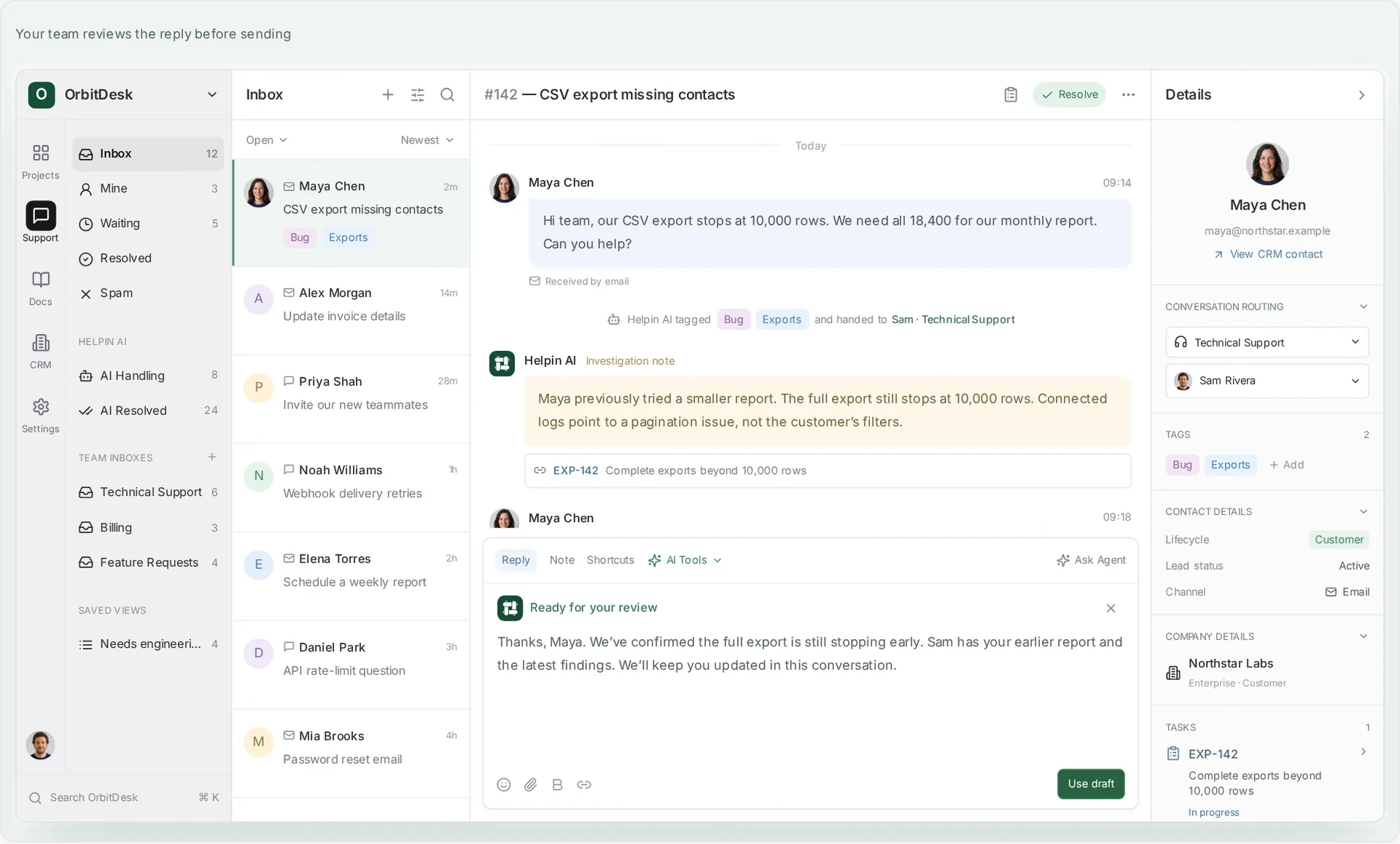
Product preview with fictional data. The conversation, the existing task, and the customer record stay in view, and the drafted reply waits for your team. Available modules depend on your deployment.
Get started
Use Helpin Cloud
Open a managed workspace and explore the product without operating the infrastructure. See Cloud plans for capacity, agent capabilities, and AI usage.
Run Helpin yourself
Community 0.2 beta includes support chat, the shared inbox, and the help center, together with Docs, Projects, CRM, automation, and AI agents, including coding agents. Read the release scope and known limitations before choosing a deployment.
You need Linux or macOS on amd64 or arm64, Docker Engine or Docker Desktop,
Compose v2, Bash, OpenSSL, curl, and sha256sum or shasum.
Start with 8 GiB RAM and 20 GiB free disk for evaluation; source builds need
more. These are starting points, not production capacity limits.
Install with the CLI. Once a Community release with CLI assets is published, run the installer from the website:
curl -fsSL https://helpin.ai/install.sh | bash
"$HOME/.local/bin/helpin" install
Choose local or public server setup. The CLI downloads and verifies the bundle, guides configuration, and starts Helpin. For local setup, open http://localhost:8085, sign up, and create an organization and workspace.
- CLI options: versions, install directory, server setup, and unattended installation.
- Manual bundle installation: download a release and use
setup.sh. - Build from source: requires access to the separate Agent Runtime repository at the pinned revision.
Send your first message
- In workspace settings, allow your website’s origin, including its scheme and port. The widget refuses visitor requests while the origin list is empty.
- Copy the generated support installation snippet into that website.
- Send a visitor message, then reply from the staff inbox. Seeing that reply in the widget confirms the conversation works in both directions.
- Optionally publish a help-center article or configure a shared connection and workspace default under Settings → AI.
AI is optional for human chat and published articles. Your team operates a self-hosted installation; connected AI, email, and meeting services may still process data outside it and charge for usage. Before public hosting, configure DNS and HTTPS and backups.
Why Helpin?
A customer asks a question. Support investigates. Product decides what to build. Engineering delivers the change. Someone still needs to tell the customer what happened.
That is one piece of work, even when several teams take part.
Helpin keeps the conversations, decisions, and related work connected. The next teammate or agent can see what was asked, what was tried, and what still needs attention.
The earlier conversation should change the next action—not disappear at the handoff.
What you can do
This is the broader Helpin workspace. Community 0.2 enables Support, Docs, Projects, CRM, automation, and agents by default; Cloud plans and configured integrations determine which additional capabilities you can use.
| Product | What it gives your team |
|---|---|
| Support | Chat and email in a shared inbox, with customer history, agent assistance, and linked work. Email delivery needs a configured provider. |
| Projects | Tasks, epics, sprints, roadmaps, dependencies, and objectives for product development and internal work. |
| CRM | Contacts, companies, and deals alongside the conversations and work behind the relationship. |
| Meetings | Meeting records, decisions, and next steps connected to the relevant work. |
| Knowledge | Customer-facing guides and internal docs, with selected sources available to agents. |
| AI agents | Help with investigation, planning, code changes, documentation, and follow-up through configured tools. |
Projects also supports maintenance, infrastructure, and internal initiatives. Link customer context when it is relevant.

Projects · Agents prepare and review the change. A teammate approves the merge. |

CRM · Contacts, companies, and deals next to the conversations behind them. |

Meetings · Commitments from the call become linked next steps. |

Knowledge · Help-center guides, internal docs, and an API reference. |
Product previews with fictional data.
See the difference in one request
An illustrative workflow; available actions depend on your configuration.
A customer writes:
“The smaller export worked, but I still need the full contact list.”
The history matters. Recommending the same workaround again will not resolve the request.
The team and agents can review the earlier attempt, attach findings to the existing export task, and prepare the next step without creating duplicate work. Once the team has reviewed the change and confirmed its release, the customer update can explain what changed and what to try next.
Customer question
  → Earlier conversation and existing task
  → Investigation and proposed work
  → Team review and release confirmation
  → Customer follow-up
A task marked complete is not the same as a confirmed release. A drafted reply is not a sent message.
Ask Agent and the specialists
Ask Agent is where your team starts: ask about an account, investigate a request, or prepare a plan. Specialist agents handle focused work when needed.
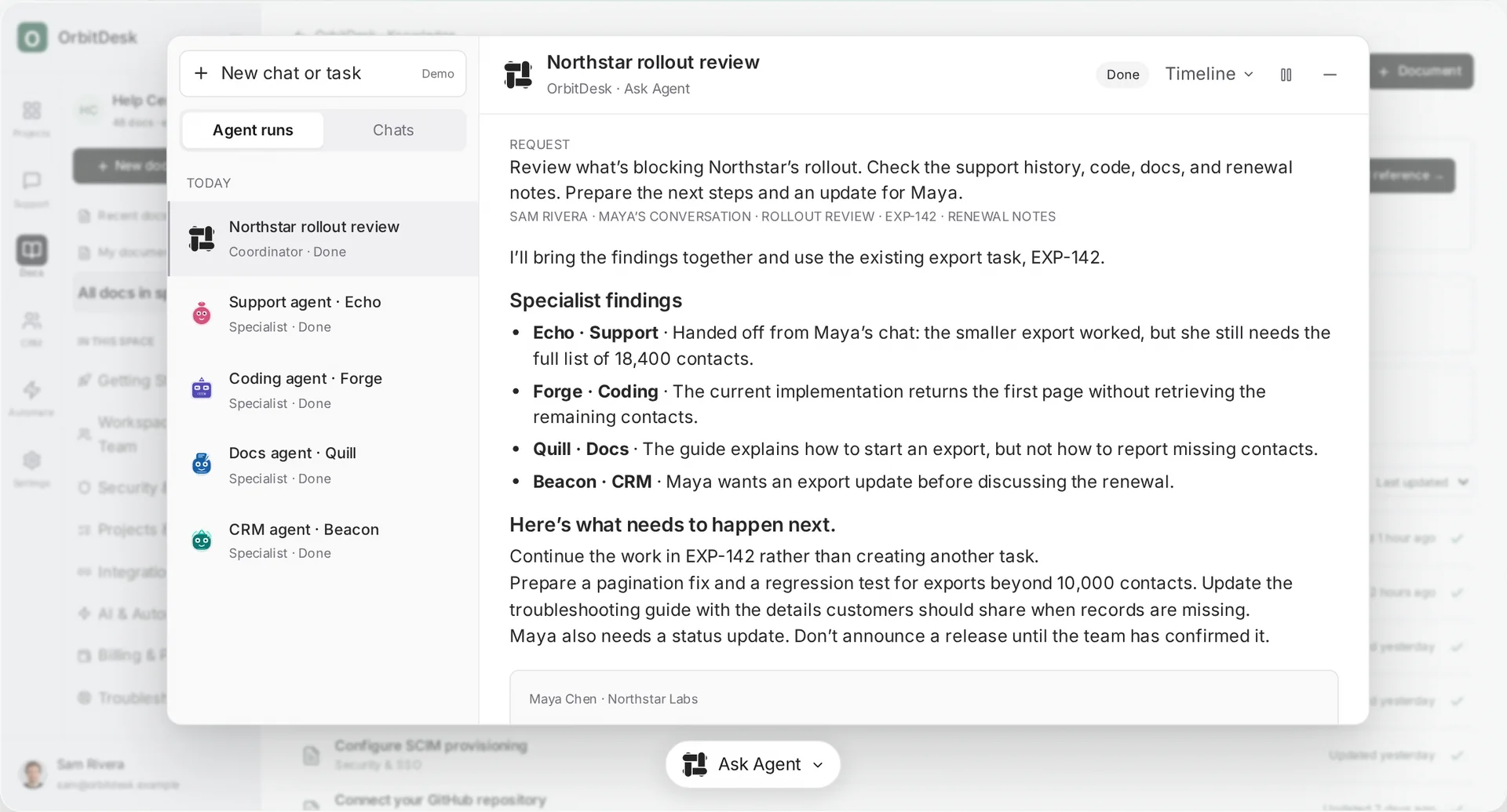
“What is blocking this customer’s rollout, and what have we already tried?”
“Review the linked task and propose the next steps.”
“Prepare an update using the latest confirmed release status.”
Choose the tools an agent can use and the actions that require review. Your team still decides priorities, scope, and customer commitments. See agents and automation for how the pieces connect.
Helpin and Agent Runtime
Helpin is the product your team works in: customer records, conversations, projects, and the interface for doing the work.
Agent Runtime is the separate execution project for developers adding agent runs to their own applications. Helpin owns its customer history and product workflows; the runtime executes agents through configured interfaces. Repository access is required to build the runtime from source.
Build with Helpin
Embed support in your application, connect customer data, and extend your team’s workflows. Start with the JavaScript SDK, React integration, or MCP integration.
Keep identity verification, account authorization, and agent tool permissions separate. Identifying a customer does not grant access to every record or connected system.
For development and operations, use the documentation index, architecture overview, and local development guide. See support for questions and reproducible bug reports.
Contributing
Start with a reproducible bug report, a documentation correction, or a small improvement to an everyday workflow. For larger changes, open an issue describing the problem and proposed approach before implementation.
Read the contributor guide for setup, checks, and the contribution agreement that applies to your changes. Follow the code of conduct.
Security
Do not post credentials, private customer data, or sensitive vulnerability details in public issues. Use the private reporting channel in the security policy.
License
The Community application is AGPL-3.0-only. The public SDK and widget
packages listed in LICENSE are Apache-2.0. Code in ee/
directories uses the Helpin Enterprise License; production use
requires a commercial agreement.
Read the license for exact scopes, third-party exceptions, and trademark terms.
One customer history. A shared workspace for your team and AI agents.
Similar repos


Languages
Go
50.8%
TypeScript
42.9%
CSS
1.7%
PLpgSQL
1.3%
Open-source alternative to Intercom, Fin and Linear. Support, projects, CRM, meetings, and docs in one workspace—with AI agents that use customer history to answer questions, plan work, and follow up.
See the codeSee what people are saying
README
Helpin
An open-source alternative to Intercom and Linear.
AI agents that do more than answer.
Helpin brings support, projects, CRM, meetings, and docs into one connected workspace. Your team and AI agents use a shared customer history to answer questions, plan work, and follow up—with approvals where you need them.
Website · Open Helpin Cloud · Get started · Contribute
Product preview with fictional data. The conversation, the existing task, and the customer record stay in view, and the drafted reply waits for your team. Available modules depend on your deployment.
Get started
Use Helpin Cloud
Open a managed workspace and explore the product without operating the infrastructure. See Cloud plans for capacity, agent capabilities, and AI usage.
Run Helpin yourself
Community 0.2 beta includes support chat, the shared inbox, and the help center, together with Docs, Projects, CRM, automation, and AI agents, including coding agents. Read the release scope and known limitations before choosing a deployment.
You need Linux or macOS on amd64 or arm64, Docker Engine or Docker Desktop,
Compose v2, Bash, OpenSSL, curl, and sha256sum or shasum.
Start with 8 GiB RAM and 20 GiB free disk for evaluation; source builds need
more. These are starting points, not production capacity limits.
Install with the CLI. Once a Community release with CLI assets is published, run the installer from the website:
curl -fsSL https://helpin.ai/install.sh | bash
"$HOME/.local/bin/helpin" install
Choose local or public server setup. The CLI downloads and verifies the bundle, guides configuration, and starts Helpin. For local setup, open http://localhost:8085, sign up, and create an organization and workspace.
- CLI options: versions, install directory, server setup, and unattended installation.
- Manual bundle installation: download a release and use
setup.sh. - Build from source: requires access to the separate Agent Runtime repository at the pinned revision.
Send your first message
- In workspace settings, allow your website’s origin, including its scheme and port. The widget refuses visitor requests while the origin list is empty.
- Copy the generated support installation snippet into that website.
- Send a visitor message, then reply from the staff inbox. Seeing that reply in the widget confirms the conversation works in both directions.
- Optionally publish a help-center article or configure a shared connection and workspace default under Settings → AI.
AI is optional for human chat and published articles. Your team operates a self-hosted installation; connected AI, email, and meeting services may still process data outside it and charge for usage. Before public hosting, configure DNS and HTTPS and backups.
Why Helpin?
A customer asks a question. Support investigates. Product decides what to build. Engineering delivers the change. Someone still needs to tell the customer what happened.
That is one piece of work, even when several teams take part.
Helpin keeps the conversations, decisions, and related work connected. The next teammate or agent can see what was asked, what was tried, and what still needs attention.
The earlier conversation should change the next action—not disappear at the handoff.
What you can do
This is the broader Helpin workspace. Community 0.2 enables Support, Docs, Projects, CRM, automation, and agents by default; Cloud plans and configured integrations determine which additional capabilities you can use.
| Product | What it gives your team |
|---|---|
| Support | Chat and email in a shared inbox, with customer history, agent assistance, and linked work. Email delivery needs a configured provider. |
| Projects | Tasks, epics, sprints, roadmaps, dependencies, and objectives for product development and internal work. |
| CRM | Contacts, companies, and deals alongside the conversations and work behind the relationship. |
| Meetings | Meeting records, decisions, and next steps connected to the relevant work. |
| Knowledge | Customer-facing guides and internal docs, with selected sources available to agents. |
| AI agents | Help with investigation, planning, code changes, documentation, and follow-up through configured tools. |
Projects also supports maintenance, infrastructure, and internal initiatives. Link customer context when it is relevant.
|
Projects · Agents prepare and review the change. A teammate approves the merge. |
CRM · Contacts, companies, and deals next to the conversations behind them. |
|
Meetings · Commitments from the call become linked next steps. |
Knowledge · Help-center guides, internal docs, and an API reference. |
Product previews with fictional data.
See the difference in one request
An illustrative workflow; available actions depend on your configuration.
A customer writes:
“The smaller export worked, but I still need the full contact list.”
The history matters. Recommending the same workaround again will not resolve the request.
The team and agents can review the earlier attempt, attach findings to the existing export task, and prepare the next step without creating duplicate work. Once the team has reviewed the change and confirmed its release, the customer update can explain what changed and what to try next.
Customer question
  → Earlier conversation and existing task
  → Investigation and proposed work
  → Team review and release confirmation
  → Customer follow-up
A task marked complete is not the same as a confirmed release. A drafted reply is not a sent message.
Ask Agent and the specialists
Ask Agent is where your team starts: ask about an account, investigate a request, or prepare a plan. Specialist agents handle focused work when needed.
“What is blocking this customer’s rollout, and what have we already tried?”
“Review the linked task and propose the next steps.”
“Prepare an update using the latest confirmed release status.”
Choose the tools an agent can use and the actions that require review. Your team still decides priorities, scope, and customer commitments. See agents and automation for how the pieces connect.
Helpin and Agent Runtime
Helpin is the product your team works in: customer records, conversations, projects, and the interface for doing the work.
Agent Runtime is the separate execution project for developers adding agent runs to their own applications. Helpin owns its customer history and product workflows; the runtime executes agents through configured interfaces. Repository access is required to build the runtime from source.
Build with Helpin
Embed support in your application, connect customer data, and extend your team’s workflows. Start with the JavaScript SDK, React integration, or MCP integration.
Keep identity verification, account authorization, and agent tool permissions separate. Identifying a customer does not grant access to every record or connected system.
For development and operations, use the documentation index, architecture overview, and local development guide. See support for questions and reproducible bug reports.
Contributing
Start with a reproducible bug report, a documentation correction, or a small improvement to an everyday workflow. For larger changes, open an issue describing the problem and proposed approach before implementation.
Read the contributor guide for setup, checks, and the contribution agreement that applies to your changes. Follow the code of conduct.
Security
Do not post credentials, private customer data, or sensitive vulnerability details in public issues. Use the private reporting channel in the security policy.
License
The Community application is AGPL-3.0-only. The public SDK and widget
packages listed in LICENSE are Apache-2.0. Code in ee/
directories uses the Helpin Enterprise License; production use
requires a commercial agreement.
Read the license for exact scopes, third-party exceptions, and trademark terms.
One customer history. A shared workspace for your team and AI agents.
Similar repos
Languages
Go
50.8%
TypeScript
42.9%
CSS
1.7%
PLpgSQL
1.3%