Unofficial API Wrapper for Perplexity.ai + Account Generator with Web Interface
See the code


Perplexity AI is a Python module that leverages Emailnator to generate new accounts for unlimited pro queries. It supports both synchronous and asynchronous APIs, as well as a web interface for users who prefer a GUI-based approach.
uv sync
Installs the perplexity-mcp command globally without a local virtual environment. The MCP server is an optional extra, so include [mcp] when installing as a tool:
uv tool install '.[mcp]'
uv sync --extra mcp
uv sync --extra driver
uv run patchright install chromium
uv sync --extra dev
This includes testing tools (pytest, pytest-cov, pytest-asyncio), linting (flake8, black, isort, mypy), and all optional dependencies.
These instructions use uv. If you prefer
pip, replaceuv syncwithpip install -e .anduv run <tool>with the tool command directly.
This project includes an MCP (Model Context Protocol) server that exposes Perplexity search as tools for Claude Code and other MCP clients. It works without an API key by using the same reverse-engineered web interface as the rest of this library.
uv sync --extra mcp
# or, to use as a standalone tool:
uv tool install '.[mcp]'
The server supports two transports, controlled by the MCP_TRANSPORT environment variable (default: stdio).
Used by local MCP clients like Claude Code and Claude Desktop. The client spawns the process directly.
perplexity-mcp
Add to Claude Code:
claude mcp add perplexity -- perplexity-mcp
Manual config:
{
  "mcpServers": {
    "perplexity": {
      "command": "perplexity-mcp",
      "env": {
        "PERPLEXITY_COOKIES": "{\"next-auth.session-token\": \"...\"}"
      }
    }
  }
}
Runs a persistent HTTP server that multiple clients can connect to over the network. Use this when you want to share one server instance across multiple clients or machines.
1. Start the server:
MCP_TRANSPORT=http perplexity-mcp
Defaults to 127.0.0.1:8000. To bind to all interfaces or change the port:
MCP_TRANSPORT=http MCP_HOST=0.0.0.0 MCP_PORT=9000 perplexity-mcp
To include cookies:
MCP_TRANSPORT=http PERPLEXITY_COOKIES='{"next-auth.session-token": "..."}' perplexity-mcp
The MCP endpoint will be available at http://<host>:<port>/mcp.
2. Add to Claude Code:
claude mcp add --transport http perplexity http://127.0.0.1:8000/mcp
Adjust the URL if you changed the host or port. For a remote machine, replace 127.0.0.1 with its address.
3. Verify:
claude mcp list
The PERPLEXITY_COOKIES environment variable is optional for both transports. If not set, the server runs anonymously with access to free (auto mode) queries only. Set it to a JSON string of your Perplexity cookies to enable pro, reasoning, and deep research modes. See How To Get Cookies for instructions.
| Tool | Mode | Description |
|---|---|---|
perplexity_ask | auto | General-purpose question answering |
perplexity_research | deep research | In-depth research on a topic |
perplexity_research_start | deep research | Start background research and return a stable local ID |
perplexity_research_list | local journal | Search this server's research records by query/status |
perplexity_research_get | local journal | Read delivery status and a persisted completed result |
perplexity_reason | reasoning | Step-by-step reasoning through a problem |
perplexity_search | pro + web sources | Web search |
The three journal tools are available only on an authenticated server. They cover
research launched through that MCP server, not the provider account's history. A
start is stored in a private SQLite journal before its bounded background worker is
scheduled, so an MCP disconnect does not cancel the worker. Pass an
idempotency_key to perplexity_research_start when a lost start response may be
retried; reusing it for another query is rejected.
The original perplexity_research(query) Python function remains synchronous and
answer-only. MCP registers an async adapter for that tool, so cancelling its MCP
request abandons a nonblocking poller while the server-owned job continues; long
answer waiters do not occupy the executor used by list and get. If journal setup
fails, research fails closed and is not silently resubmitted outside the journal.
delivery_state describes the local server's work (queued, running,
completed, failed, or interrupted). provider_state remains unknown
because the web SSE endpoint exposes no verified provider job-status contract.
Observed provider IDs may be returned as diagnostics only; they are not recovery
handles. A result becomes completed only after this server receives an explicit
terminal SSE marker and a usable final answer. If its provider connection dies,
the answer cannot later be fetched from the local journal. A restart marks stale
active work interrupted and never resubmits it automatically.
The journal defaults to
$XDG_STATE_HOME/perplexity-ai/research-jobs.sqlite3 (or
~/.local/state/perplexity-ai/research-jobs.sqlite3). Directories created by this
feature and its database/lock files use owner-only permissions; an existing
operator-managed parent directory is never chmodded. One server process exclusively
owns a journal. All authenticated MCP clients of that server share the same journal
boundary; it is not a per-caller account store. Configure PERPLEXITY_RESEARCH_DB,
PERPLEXITY_RESEARCH_MAX_QUEUE (1–100, default 8), and
PERPLEXITY_RESEARCH_PROVIDER_TIMEOUT (30–3600 seconds, default 900) if needed.
The provider timeout bounds the SSE transport and is independent of any MCP client
or proxy wait timeout.
The private journal and its four research tools are supported on POSIX systems.
They fail closed and are not registered on Windows because the Python standard
library cannot establish and verify the required owner-only ACL for the database
and lock files there. Authenticated Windows servers still register
perplexity_ask, perplexity_reason, and perplexity_search.
Jobs launched before this feature was enabled were never recorded and cannot be recovered retroactively.
The official @perplexity-ai/mcp-server requires a paid Perplexity API key. This server uses the reverse-engineered web interface instead. As a result, the following features available in the official MCP are not supported here:
| Feature | Official MCP | This server |
|---|---|---|
| No API key required | No | Yes |
messages array input | Yes | No (single query string only) |
search_recency_filter | Yes | No |
search_domain_filter | Yes | No |
search_context_size | Yes | No |
reasoning_effort | Yes | No |
strip_thinking | Yes | No |
| Structured search results (citations, images) | Yes | No (plain text answer only) |
import perplexity

# Create client
client = perplexity.Client()

# Make a query
response = client.search("What is artificial intelligence?")
print(response['answer'])
import perplexity

# Your Perplexity cookies
cookies = {
    'next-auth.csrf-token': 'your-token',
    'next-auth.session-token': 'your-session',
}

client = perplexity.Client(cookies)

# Use enhanced modes
response = client.search(
    "Complex query here",
    mode='pro',
    model='gpt-5.2',
    sources=['scholar']
)
for chunk in client.search("Explain quantum computing", stream=True):
    if 'answer' in chunk:
        print(chunk['answer'], end='', flush=True)
import asyncio
import perplexity_async

async def main():
    client = await perplexity_async.Client()
    response = await client.search("What is machine learning?")
    print(response['answer'])

asyncio.run(main())
The web interface automates account creation and usage in a browser. Patchright uses "Chrome User Data Directory" to be completely undetected, it's C:\Users\YourName\AppData\Local\Google\Chrome\User Data for Windows, as shown below:
import os
from perplexity.driver import Driver

cli = Driver()
cli.run(rf'C:\\Users\\{os.getlogin()}\\AppData\\Local\\Google\\Chrome\\User Data')
To use your own Chrome instance, enable remote debugging (it may enter dead loop in Cloudflare):
--remote-debugging-port=9222 to Chrome's shortcut target.Driver.run() method:cli.run(rf'C:\\Users\\{os.getlogin()}\\AppData\\Local\\Google\\Chrome\\User Data', port=9222)
Below is an example code for simple usage, without using your own account or generating new accounts.
import perplexity

perplexity_cli = perplexity.Client()

# model = model for mode, which can only be used in own accounts, that is {
#     'auto': [None],
#     'pro': [None, 'sonar', 'gpt5', 'gpt-5.2', 'claude-4.5-sonnet', 'grok-4.1'],
#     'reasoning': [None, 'o3', 'o3-mini', 'gpt5', 'gpt-5.2-thinking', 'claude-4.5-sonnet-thinking', 'gemini-3.0-pro', 'kimi-k2-thinking', 'grok-4.1-reasoning'],
#     'deep research': [None]
# }
# sources = ['web', 'scholar', 'social']
# files = a dictionary which has keys as filenames and values as file data
# stream = returns a generator when enabled and just final response when disabled
# language = ISO 639 code of language you want to use
# follow_up = last query info for follow-up queries, you can directly pass response from a query, look at second example below
# incognito = Enables incognito mode, for people who are using their own account
resp = perplexity_cli.search('Your query here', mode='auto', model=None, sources=['web'], files={}, stream=False, language='en-US', follow_up=None, incognito=False)
print(resp)

# second example to show how to use follow-up queries and stream response
for i in perplexity_cli.search('Your query here', stream=True, follow_up=resp):
    print(i)
And this is how you use your own account, you need to get your cookies in order to use your own account. Look at How To Get Cookies,
import perplexity

perplexity_cookies = {
    <your cookies here>
}

perplexity_cli = perplexity.Client(perplexity_cookies)

resp = perplexity_cli.search('Your query here', mode='reasoning', model='gpt-5.2-thinking', sources=['web'], files={'myfile.txt': open('file.txt').read()}, stream=False, language='en-US', follow_up=None, incognito=False)
print(resp)
And finally account generating, you need to get cookies for Emailnator to use this feature. Look at How To Get Cookies,
import perplexity

emailnator_cookies = {
    <your cookies here>
}

perplexity_cli = perplexity.Client()
perplexity_cli.create_account(emailnator_cookies) # Creates a new gmail, so your 5 pro queries will be renewed.

resp = perplexity_cli.search('Your query here', mode='reasoning', model=None, sources=['web'], files={'myfile.txt': open('file.txt').read()}, stream=False, language='en-US', follow_up=None, incognito=False)
print(resp)
Below is an example code for simple usage, without using your own account or generating new accounts.
import asyncio
import perplexity_async

async def test():
    perplexity_cli = await perplexity_async.Client()

    # mode = ['auto', 'pro', 'reasoning', 'deep research']
    # model = model for mode, which can only be used in own accounts, that is {
    #     'auto': [None],
    #     'pro': [None, 'sonar', 'gpt5', 'gpt-5.2', 'claude-4.5-sonnet', 'grok-4.1'],
    #     'reasoning': [None, 'o3', 'o3-mini', 'gpt5', 'gpt-5.2-thinking', 'claude-4.5-sonnet-thinking', 'gemini-3.0-pro', 'kimi-k2-thinking', 'grok-4.1-reasoning'],
    #     'deep research': [None]
    # }
    # sources = ['web', 'scholar', 'social']
    # files = a dictionary which has keys as filenames and values as file data
    # stream = returns a generator when enabled and just final response when disabled
    # language = ISO 639 code of language you want to use
    # follow_up = last query info for follow-up queries, you can directly pass response from a query, look at second example below
    # incognito = Enables incognito mode, for people who are using their own account
    resp = await perplexity_cli.search('Your query here', mode='auto', model=None, sources=['web'], files={}, stream=False, language='en-US', follow_up=None, incognito=False)
    print(resp)

    # second example to show how to use follow-up queries and stream response
    async for i in await perplexity_cli.search('Your query here', stream=True, follow_up=resp):
        print(i)

asyncio.run(test())
And this is how you use your own account, you need to get your cookies in order to use your own account. Look at How To Get Cookies,
import asyncio
import perplexity_async

perplexity_cookies = {
    <your cookies here>
}

async def test():
    perplexity_cli = await perplexity_async.Client(perplexity_cookies)

    resp = await perplexity_cli.search('Your query here', mode='reasoning', model='gpt-5.2-thinking', sources=['web'], files={'myfile.txt': open('file.txt').read()}, stream=False, language='en-US', follow_up=None, incognito=False)
    print(resp)

asyncio.run(test())
And finally account generating, you need to get cookies for emailnator to use this feature. Look at How To Get Cookies,
import asyncio
import perplexity_async

emailnator_cookies = {
    <your cookies here>
}

async def test():
    perplexity_cli = await perplexity_async.Client()
    await perplexity_cli.create_account(emailnator_cookies) # Creates a new gmail, so your 5 pro queries will be renewed.

    resp = await perplexity_cli.search('Your query here', mode='reasoning', model=None, sources=['web'], files={'myfile.txt': open('file.txt').read()}, stream=False, language='en-US', follow_up=None, incognito=False)
    print(resp)

asyncio.run(test())
Ctrl + Shift + I to open inspector.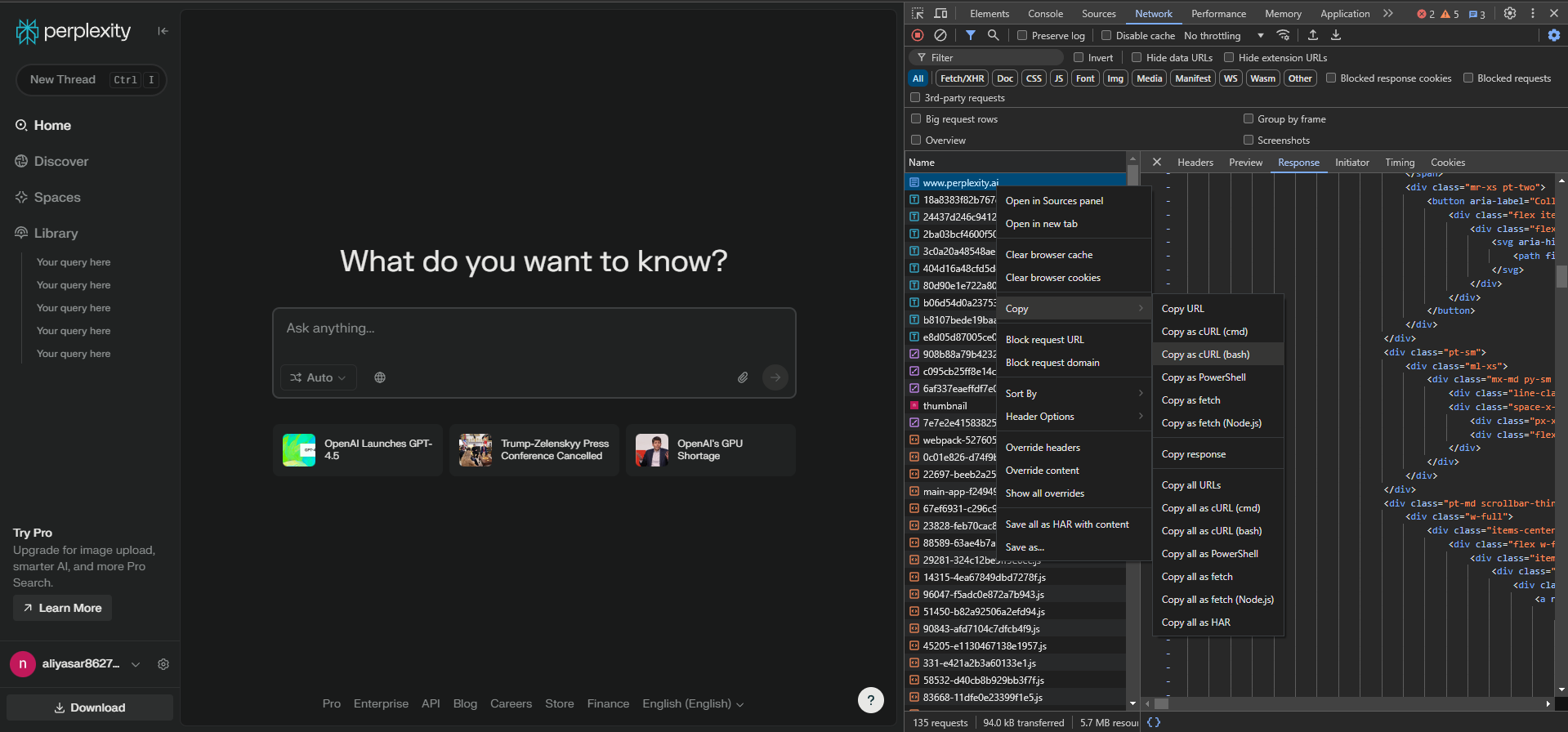
Ctrl + Shift + I to open inspector.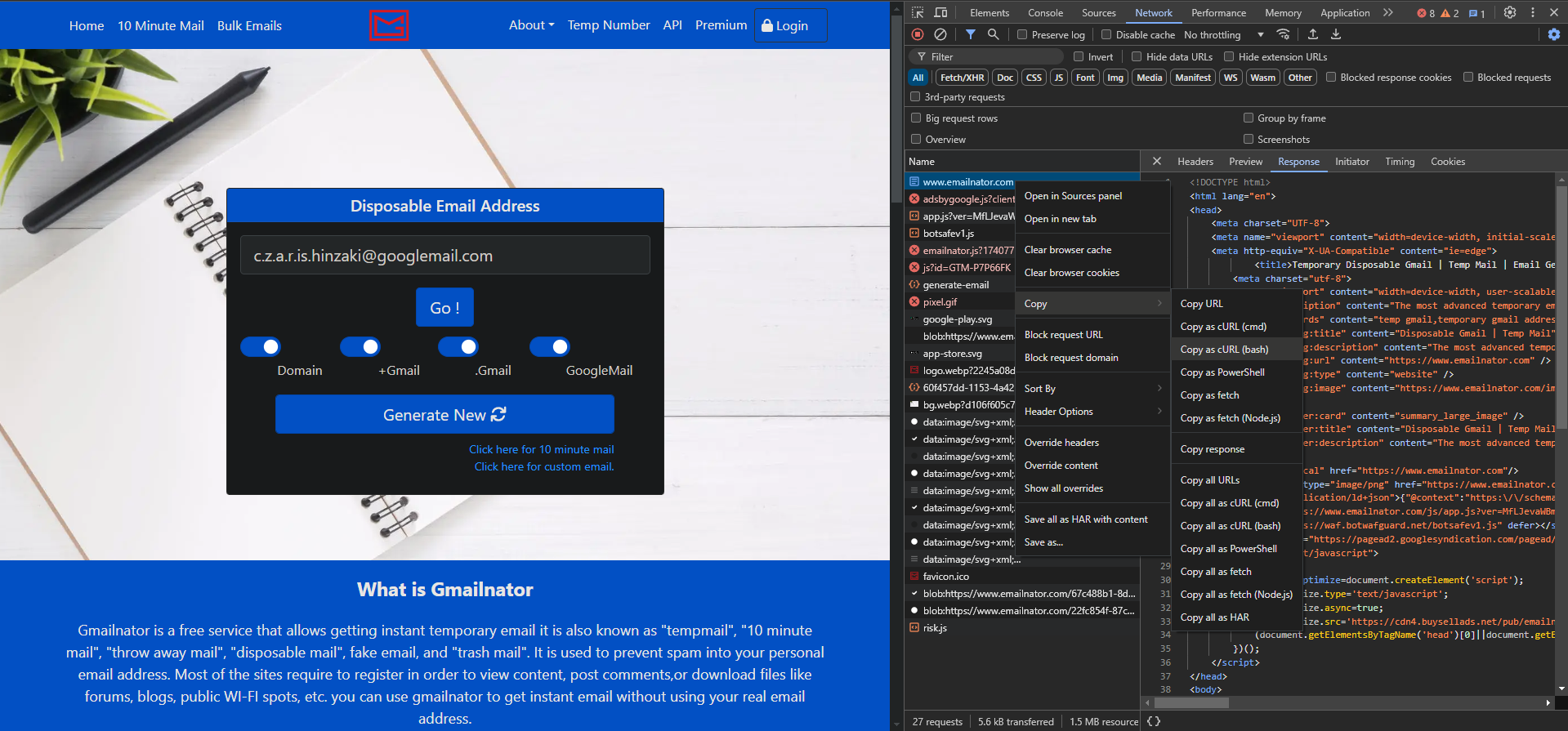
class Client:
    def __init__(self, cookies: Optional[Dict[str, str]] = None):
        """
        Initialize Perplexity client.

        Args:
            cookies: Optional Perplexity account cookies for enhanced features
        """

    def search(
        self,
        query: str,
        mode: str = 'auto',
        model: Optional[str] = None,
        sources: List[str] = ['web'],
        files: Dict[str, Union[str, bytes]] = {},
        stream: bool = False,
        language: str = 'en-US',
        follow_up: Optional[Dict] = None,
        incognito: bool = False
    ) -> Union[Dict, Generator]:
        """
        Search with Perplexity AI.

        Args:
            query: Search query
            mode: Search mode ('auto', 'pro', 'reasoning', 'deep research')
            model: Model to use (depends on mode)
            sources: Information sources (['web', 'scholar', 'social'])
            files: Files to upload {filename: content}
            stream: Enable streaming responses
            language: ISO 639 language code
            follow_up: Previous query for context
            incognito: Enable incognito mode

        Returns:
            Response dict with 'answer' key, or generator if stream=True
        """

    def create_account(self, emailnator_cookies: Dict[str, str]):
        """
        Create new account using Emailnator.

        Args:
            emailnator_cookies: Emailnator cookies for account creation
        """
{
    'auto': [None],
    'pro': [None, 'sonar', 'gpt5', 'gpt-5.2', 'claude-4.5-sonnet', 'grok-4.1'],
    'reasoning': [None, 'o3', 'o3-mini', 'gpt5', 'gpt-5.2-thinking', 'claude-4.5-sonnet-thinking', 'gemini-3.0-pro', 'kimi-k2-thinking', 'grok-4.1-reasoning'],
    'deep research': [None]
}
from perplexity.exceptions import (
    PerplexityError,          # Base exception
    AuthenticationError,      # Authentication failed
    RateLimitError,          # Rate limit exceeded
    NetworkError,            # Network issues
    ValidationError,         # Invalid parameters
    ResponseParseError,      # Failed to parse response
    AccountCreationError,    # Account creation failed
    FileUploadError,         # File upload failed
)
uv run pytest tests/ -v
uv run pytest tests/ --cov=perplexity --cov=perplexity_async --cov-report=html
uv run pytest tests/test_utils.py -v
uv run pytest tests/test_config.py -v
# Clone repository
git clone https://github.com/yourusername/perplexity-ai.git
cd perplexity-ai

# Install in development mode
uv sync --extra dev

# Run tests
uv run pytest

# Format code
uv run black perplexity perplexity_async

# Check types
uv run mypy perplexity perplexity_async

# Lint
uv run flake8 perplexity perplexity_async
git checkout -b feature/amazing-feature)git commit -m 'Add amazing feature')git push origin feature/amazing-feature)Issue: Response returns None
Issue: Account creation fails
Issue: File upload fails
Issue: Rate limiting
See CHANGELOG.md for detailed changes and bug fixes.
See IMPROVEMENTS.md for planned improvements and features.
This project is licensed under the MIT License. See the LICENSE file for details.
This is an unofficial API wrapper. Use responsibly and respect Perplexity.ai's terms of service. This project is for educational purposes only.
1,027 followers · starred Apr 2025
64 followers · starred Jun 2025
335 followers · starred Sep 2023
41 followers · starred Sep 2026
Unofficial API Wrapper for Perplexity.ai + Account Generator with Web Interface
See the code
Perplexity AI is a Python module that leverages Emailnator to generate new accounts for unlimited pro queries. It supports both synchronous and asynchronous APIs, as well as a web interface for users who prefer a GUI-based approach.
uv sync
Installs the perplexity-mcp command globally without a local virtual environment. The MCP server is an optional extra, so include [mcp] when installing as a tool:
uv tool install '.[mcp]'
uv sync --extra mcp
uv sync --extra driver
uv run patchright install chromium
uv sync --extra dev
This includes testing tools (pytest, pytest-cov, pytest-asyncio), linting (flake8, black, isort, mypy), and all optional dependencies.
These instructions use uv. If you prefer
pip, replaceuv syncwithpip install -e .anduv run <tool>with the tool command directly.
This project includes an MCP (Model Context Protocol) server that exposes Perplexity search as tools for Claude Code and other MCP clients. It works without an API key by using the same reverse-engineered web interface as the rest of this library.
uv sync --extra mcp
# or, to use as a standalone tool:
uv tool install '.[mcp]'
The server supports two transports, controlled by the MCP_TRANSPORT environment variable (default: stdio).
Used by local MCP clients like Claude Code and Claude Desktop. The client spawns the process directly.
perplexity-mcp
Add to Claude Code:
claude mcp add perplexity -- perplexity-mcp
Manual config:
{
  "mcpServers": {
    "perplexity": {
      "command": "perplexity-mcp",
      "env": {
        "PERPLEXITY_COOKIES": "{\"next-auth.session-token\": \"...\"}"
      }
    }
  }
}
Runs a persistent HTTP server that multiple clients can connect to over the network. Use this when you want to share one server instance across multiple clients or machines.
1. Start the server:
MCP_TRANSPORT=http perplexity-mcp
Defaults to 127.0.0.1:8000. To bind to all interfaces or change the port:
MCP_TRANSPORT=http MCP_HOST=0.0.0.0 MCP_PORT=9000 perplexity-mcp
To include cookies:
MCP_TRANSPORT=http PERPLEXITY_COOKIES='{"next-auth.session-token": "..."}' perplexity-mcp
The MCP endpoint will be available at http://<host>:<port>/mcp.
2. Add to Claude Code:
claude mcp add --transport http perplexity http://127.0.0.1:8000/mcp
Adjust the URL if you changed the host or port. For a remote machine, replace 127.0.0.1 with its address.
3. Verify:
claude mcp list
The PERPLEXITY_COOKIES environment variable is optional for both transports. If not set, the server runs anonymously with access to free (auto mode) queries only. Set it to a JSON string of your Perplexity cookies to enable pro, reasoning, and deep research modes. See How To Get Cookies for instructions.
| Tool | Mode | Description |
|---|---|---|
perplexity_ask | auto | General-purpose question answering |
perplexity_research | deep research | In-depth research on a topic |
perplexity_research_start | deep research | Start background research and return a stable local ID |
perplexity_research_list | local journal | Search this server's research records by query/status |
perplexity_research_get | local journal | Read delivery status and a persisted completed result |
perplexity_reason | reasoning | Step-by-step reasoning through a problem |
perplexity_search | pro + web sources | Web search |
The three journal tools are available only on an authenticated server. They cover
research launched through that MCP server, not the provider account's history. A
start is stored in a private SQLite journal before its bounded background worker is
scheduled, so an MCP disconnect does not cancel the worker. Pass an
idempotency_key to perplexity_research_start when a lost start response may be
retried; reusing it for another query is rejected.
The original perplexity_research(query) Python function remains synchronous and
answer-only. MCP registers an async adapter for that tool, so cancelling its MCP
request abandons a nonblocking poller while the server-owned job continues; long
answer waiters do not occupy the executor used by list and get. If journal setup
fails, research fails closed and is not silently resubmitted outside the journal.
delivery_state describes the local server's work (queued, running,
completed, failed, or interrupted). provider_state remains unknown
because the web SSE endpoint exposes no verified provider job-status contract.
Observed provider IDs may be returned as diagnostics only; they are not recovery
handles. A result becomes completed only after this server receives an explicit
terminal SSE marker and a usable final answer. If its provider connection dies,
the answer cannot later be fetched from the local journal. A restart marks stale
active work interrupted and never resubmits it automatically.
The journal defaults to
$XDG_STATE_HOME/perplexity-ai/research-jobs.sqlite3 (or
~/.local/state/perplexity-ai/research-jobs.sqlite3). Directories created by this
feature and its database/lock files use owner-only permissions; an existing
operator-managed parent directory is never chmodded. One server process exclusively
owns a journal. All authenticated MCP clients of that server share the same journal
boundary; it is not a per-caller account store. Configure PERPLEXITY_RESEARCH_DB,
PERPLEXITY_RESEARCH_MAX_QUEUE (1–100, default 8), and
PERPLEXITY_RESEARCH_PROVIDER_TIMEOUT (30–3600 seconds, default 900) if needed.
The provider timeout bounds the SSE transport and is independent of any MCP client
or proxy wait timeout.
The private journal and its four research tools are supported on POSIX systems.
They fail closed and are not registered on Windows because the Python standard
library cannot establish and verify the required owner-only ACL for the database
and lock files there. Authenticated Windows servers still register
perplexity_ask, perplexity_reason, and perplexity_search.
Jobs launched before this feature was enabled were never recorded and cannot be recovered retroactively.
The official @perplexity-ai/mcp-server requires a paid Perplexity API key. This server uses the reverse-engineered web interface instead. As a result, the following features available in the official MCP are not supported here:
| Feature | Official MCP | This server |
|---|---|---|
| No API key required | No | Yes |
messages array input | Yes | No (single query string only) |
search_recency_filter | Yes | No |
search_domain_filter | Yes | No |
search_context_size | Yes | No |
reasoning_effort | Yes | No |
strip_thinking | Yes | No |
| Structured search results (citations, images) | Yes | No (plain text answer only) |
import perplexity

# Create client
client = perplexity.Client()

# Make a query
response = client.search("What is artificial intelligence?")
print(response['answer'])
import perplexity

# Your Perplexity cookies
cookies = {
    'next-auth.csrf-token': 'your-token',
    'next-auth.session-token': 'your-session',
}

client = perplexity.Client(cookies)

# Use enhanced modes
response = client.search(
    "Complex query here",
    mode='pro',
    model='gpt-5.2',
    sources=['scholar']
)
for chunk in client.search("Explain quantum computing", stream=True):
    if 'answer' in chunk:
        print(chunk['answer'], end='', flush=True)
import asyncio
import perplexity_async

async def main():
    client = await perplexity_async.Client()
    response = await client.search("What is machine learning?")
    print(response['answer'])

asyncio.run(main())
The web interface automates account creation and usage in a browser. Patchright uses "Chrome User Data Directory" to be completely undetected, it's C:\Users\YourName\AppData\Local\Google\Chrome\User Data for Windows, as shown below:
import os
from perplexity.driver import Driver

cli = Driver()
cli.run(rf'C:\\Users\\{os.getlogin()}\\AppData\\Local\\Google\\Chrome\\User Data')
To use your own Chrome instance, enable remote debugging (it may enter dead loop in Cloudflare):
--remote-debugging-port=9222 to Chrome's shortcut target.Driver.run() method:cli.run(rf'C:\\Users\\{os.getlogin()}\\AppData\\Local\\Google\\Chrome\\User Data', port=9222)
Below is an example code for simple usage, without using your own account or generating new accounts.
import perplexity

perplexity_cli = perplexity.Client()

# model = model for mode, which can only be used in own accounts, that is {
#     'auto': [None],
#     'pro': [None, 'sonar', 'gpt5', 'gpt-5.2', 'claude-4.5-sonnet', 'grok-4.1'],
#     'reasoning': [None, 'o3', 'o3-mini', 'gpt5', 'gpt-5.2-thinking', 'claude-4.5-sonnet-thinking', 'gemini-3.0-pro', 'kimi-k2-thinking', 'grok-4.1-reasoning'],
#     'deep research': [None]
# }
# sources = ['web', 'scholar', 'social']
# files = a dictionary which has keys as filenames and values as file data
# stream = returns a generator when enabled and just final response when disabled
# language = ISO 639 code of language you want to use
# follow_up = last query info for follow-up queries, you can directly pass response from a query, look at second example below
# incognito = Enables incognito mode, for people who are using their own account
resp = perplexity_cli.search('Your query here', mode='auto', model=None, sources=['web'], files={}, stream=False, language='en-US', follow_up=None, incognito=False)
print(resp)

# second example to show how to use follow-up queries and stream response
for i in perplexity_cli.search('Your query here', stream=True, follow_up=resp):
    print(i)
And this is how you use your own account, you need to get your cookies in order to use your own account. Look at How To Get Cookies,
import perplexity

perplexity_cookies = {
    <your cookies here>
}

perplexity_cli = perplexity.Client(perplexity_cookies)

resp = perplexity_cli.search('Your query here', mode='reasoning', model='gpt-5.2-thinking', sources=['web'], files={'myfile.txt': open('file.txt').read()}, stream=False, language='en-US', follow_up=None, incognito=False)
print(resp)
And finally account generating, you need to get cookies for Emailnator to use this feature. Look at How To Get Cookies,
import perplexity

emailnator_cookies = {
    <your cookies here>
}

perplexity_cli = perplexity.Client()
perplexity_cli.create_account(emailnator_cookies) # Creates a new gmail, so your 5 pro queries will be renewed.

resp = perplexity_cli.search('Your query here', mode='reasoning', model=None, sources=['web'], files={'myfile.txt': open('file.txt').read()}, stream=False, language='en-US', follow_up=None, incognito=False)
print(resp)
Below is an example code for simple usage, without using your own account or generating new accounts.
import asyncio
import perplexity_async

async def test():
    perplexity_cli = await perplexity_async.Client()

    # mode = ['auto', 'pro', 'reasoning', 'deep research']
    # model = model for mode, which can only be used in own accounts, that is {
    #     'auto': [None],
    #     'pro': [None, 'sonar', 'gpt5', 'gpt-5.2', 'claude-4.5-sonnet', 'grok-4.1'],
    #     'reasoning': [None, 'o3', 'o3-mini', 'gpt5', 'gpt-5.2-thinking', 'claude-4.5-sonnet-thinking', 'gemini-3.0-pro', 'kimi-k2-thinking', 'grok-4.1-reasoning'],
    #     'deep research': [None]
    # }
    # sources = ['web', 'scholar', 'social']
    # files = a dictionary which has keys as filenames and values as file data
    # stream = returns a generator when enabled and just final response when disabled
    # language = ISO 639 code of language you want to use
    # follow_up = last query info for follow-up queries, you can directly pass response from a query, look at second example below
    # incognito = Enables incognito mode, for people who are using their own account
    resp = await perplexity_cli.search('Your query here', mode='auto', model=None, sources=['web'], files={}, stream=False, language='en-US', follow_up=None, incognito=False)
    print(resp)

    # second example to show how to use follow-up queries and stream response
    async for i in await perplexity_cli.search('Your query here', stream=True, follow_up=resp):
        print(i)

asyncio.run(test())
And this is how you use your own account, you need to get your cookies in order to use your own account. Look at How To Get Cookies,
import asyncio
import perplexity_async

perplexity_cookies = {
    <your cookies here>
}

async def test():
    perplexity_cli = await perplexity_async.Client(perplexity_cookies)

    resp = await perplexity_cli.search('Your query here', mode='reasoning', model='gpt-5.2-thinking', sources=['web'], files={'myfile.txt': open('file.txt').read()}, stream=False, language='en-US', follow_up=None, incognito=False)
    print(resp)

asyncio.run(test())
And finally account generating, you need to get cookies for emailnator to use this feature. Look at How To Get Cookies,
import asyncio
import perplexity_async

emailnator_cookies = {
    <your cookies here>
}

async def test():
    perplexity_cli = await perplexity_async.Client()
    await perplexity_cli.create_account(emailnator_cookies) # Creates a new gmail, so your 5 pro queries will be renewed.

    resp = await perplexity_cli.search('Your query here', mode='reasoning', model=None, sources=['web'], files={'myfile.txt': open('file.txt').read()}, stream=False, language='en-US', follow_up=None, incognito=False)
    print(resp)

asyncio.run(test())
Ctrl + Shift + I to open inspector.
Ctrl + Shift + I to open inspector.
class Client:
    def __init__(self, cookies: Optional[Dict[str, str]] = None):
        """
        Initialize Perplexity client.

        Args:
            cookies: Optional Perplexity account cookies for enhanced features
        """

    def search(
        self,
        query: str,
        mode: str = 'auto',
        model: Optional[str] = None,
        sources: List[str] = ['web'],
        files: Dict[str, Union[str, bytes]] = {},
        stream: bool = False,
        language: str = 'en-US',
        follow_up: Optional[Dict] = None,
        incognito: bool = False
    ) -> Union[Dict, Generator]:
        """
        Search with Perplexity AI.

        Args:
            query: Search query
            mode: Search mode ('auto', 'pro', 'reasoning', 'deep research')
            model: Model to use (depends on mode)
            sources: Information sources (['web', 'scholar', 'social'])
            files: Files to upload {filename: content}
            stream: Enable streaming responses
            language: ISO 639 language code
            follow_up: Previous query for context
            incognito: Enable incognito mode

        Returns:
            Response dict with 'answer' key, or generator if stream=True
        """

    def create_account(self, emailnator_cookies: Dict[str, str]):
        """
        Create new account using Emailnator.

        Args:
            emailnator_cookies: Emailnator cookies for account creation
        """
{
    'auto': [None],
    'pro': [None, 'sonar', 'gpt5', 'gpt-5.2', 'claude-4.5-sonnet', 'grok-4.1'],
    'reasoning': [None, 'o3', 'o3-mini', 'gpt5', 'gpt-5.2-thinking', 'claude-4.5-sonnet-thinking', 'gemini-3.0-pro', 'kimi-k2-thinking', 'grok-4.1-reasoning'],
    'deep research': [None]
}
from perplexity.exceptions import (
    PerplexityError,          # Base exception
    AuthenticationError,      # Authentication failed
    RateLimitError,          # Rate limit exceeded
    NetworkError,            # Network issues
    ValidationError,         # Invalid parameters
    ResponseParseError,      # Failed to parse response
    AccountCreationError,    # Account creation failed
    FileUploadError,         # File upload failed
)
uv run pytest tests/ -v
uv run pytest tests/ --cov=perplexity --cov=perplexity_async --cov-report=html
uv run pytest tests/test_utils.py -v
uv run pytest tests/test_config.py -v
# Clone repository
git clone https://github.com/yourusername/perplexity-ai.git
cd perplexity-ai

# Install in development mode
uv sync --extra dev

# Run tests
uv run pytest

# Format code
uv run black perplexity perplexity_async

# Check types
uv run mypy perplexity perplexity_async

# Lint
uv run flake8 perplexity perplexity_async
git checkout -b feature/amazing-feature)git commit -m 'Add amazing feature')git push origin feature/amazing-feature)Issue: Response returns None
Issue: Account creation fails
Issue: File upload fails
Issue: Rate limiting
See CHANGELOG.md for detailed changes and bug fixes.
See IMPROVEMENTS.md for planned improvements and features.
This project is licensed under the MIT License. See the LICENSE file for details.
This is an unofficial API wrapper. Use responsibly and respect Perplexity.ai's terms of service. This project is for educational purposes only.
1,027 followers · starred Apr 2025
64 followers · starred Jun 2025
335 followers · starred Sep 2023
41 followers · starred Sep 2026




