
README
Benchmark suite for graph libraries
Intro
This project was developed as part of the Google Summer of Code 2018. Feel free to open an issue :)
Results
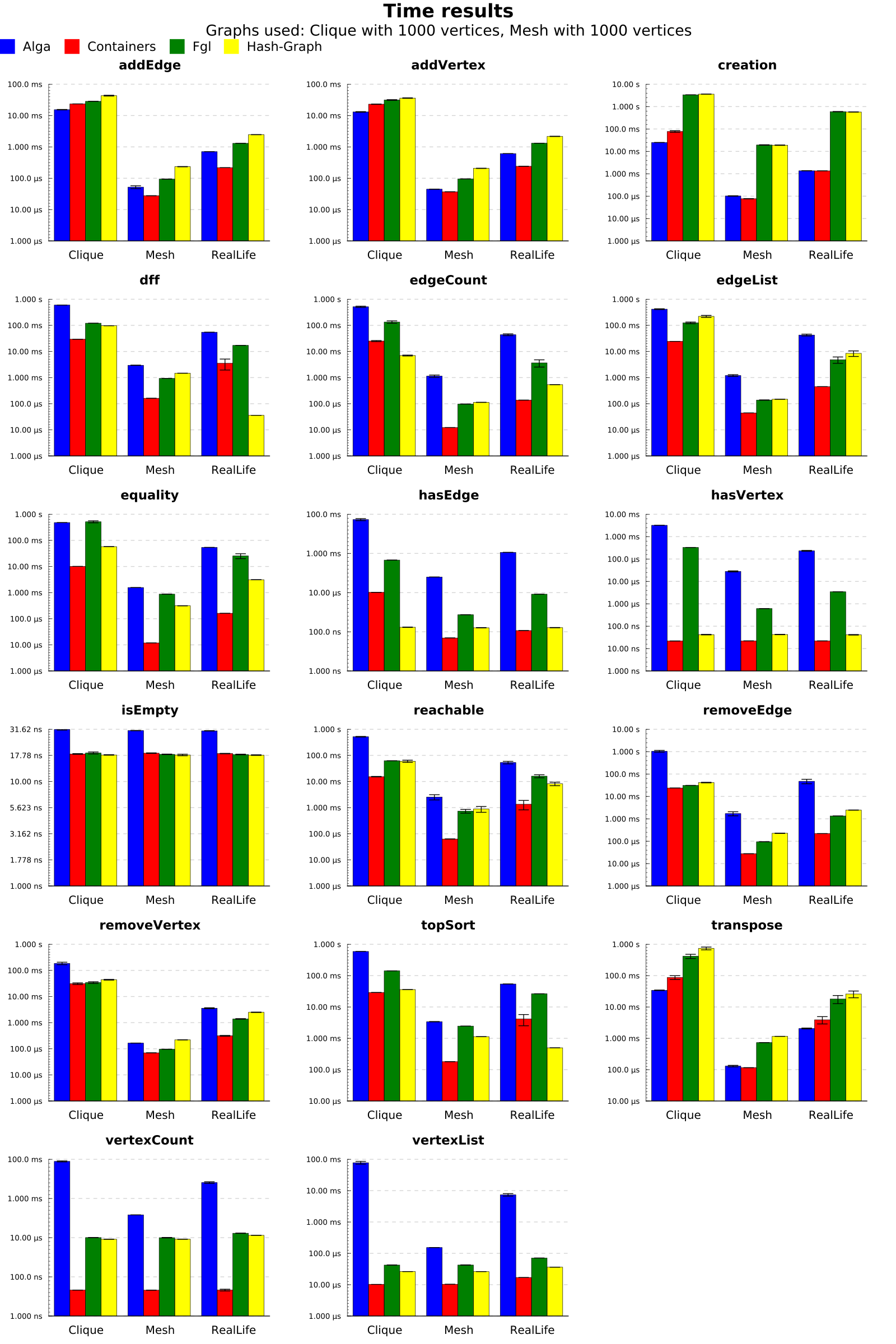
Current results of cabal bench time and cabal bench space can be found here: https://travis-ci.org/haskell-perf/graphs
Results on bigger graphs and with more beautiful output can be found here: https://github.com/haskell-perf/graphs/tree/master/results
Build
We support both cabal and stack to build the project. Please note that using stack will allow to download and build libraries not yet on Hackage.
You can customize your build using several cabal flags.
Suites
- Time: will produce a benchmark suite using
criterion. - Space: will produce a benchmark suite using
weigh. - Datasize: will produce a benchmark suite using
ghc-datasize(disabled by default).
Libraries
By default, we benchmark containers, fgl and alga. hash-graph can be added using the HashGraph flag.
You can disable the three last (and thus avoid depending on them) by disabling the flags:
- Fgl
- Alga
- HashGraph
Other flags
-
RealLife: Allow to benchmark against "reallife graphs" (see below). The compilation can take time when this is on. Disabling the flag will remove this build-step, and obviously the abilty to benchmark using such graphs.
-
Chart: Allow to produce a chart with the results. Since it can require many dependencies to be downloaded and built, this option is not suitable for builds in a Travis instance. Disabling it will remove the dependecies on the
Chartpackage, and obviously the ability to create charts whith the results.
Usage
Time
The benchmark suite time will run all queued benchmark using Criterion.
To run benchmarks, use time run. It comes with several options to customize the run (you can select libraries to compare, etc...).
To list benchmarks, use time list.
Space
The benchmark suite space will run all queued benchmark using weigh.
To run benchmarks, use space run. It came with several options to customize the run (you can select libraries to compare, etc...).
Please note that the benchmarks will all run before any print, so it can take a long time before anything is print on-screen, mostly with big graphs.
To list benchmarks, use space list.
Data size
The benchmark suite datasize will use ghc-datasize to calculate size of graphs.
Arguments
Command-line arguments are self-explaining, but the --graph "(String,Int)" requires some explanations:
Standards graphs are built with ten-powers vertices. The Int supplied is the upper-bound of these ten-powers. So "(Path,3)" will generate three Path with 1, 10 and 100 vertices. You can specify several graphs.
You can force the suite to use only bigger graphs with the -i flag.
The default is: [("Mesh",3),("Clique",3)].
For real-life graphs (see below) you cannot use an integer greater than 4.
Real-life graphs
We also provide a set of "real-life" graphs, which currently includes protein-interaction networks.
They are generated from a text file for the first compilation, so it can take some time.
To force the haskell-graph representation to be re-generated, you can safely delete src/BenchGraph/ReaLife/Generated.hs. This will trigger the re-build.
Graphs name
The following graphs are supported:
- Path
- Circuit
- Mesh
- Complete
- Clique
- RealLife (Note that because we have a limited set, you cannot request more than 4 real-life graphs)
Raw results
You can output the raw results using the -r option. It will produce a JSON file with:
- The graphs arguments used
- The data
- For Criterion, it will be the computed time and the standard deviation (in this order).
using the Result data-type from BenchGraph.Render.Result.
Note that the produced JSON is forgetting some things (ie. the arguments used to test functions).
Producing charts
The raw results can be used to produce charts, please see the help of related space and time executables.
Charts
One can produce a chart from the results, use:
-f,--chartfile FILENAME Output file WITHOUT extension
About implementation
The GraphImpl class
All libraries are required to provide a GraphImpl instance:
type Edges = [(Int,Int)]

class GraphImpl g where
    mkGraph :: Edges -> g
    mkVertex :: g
It allows to convert Edges (a list of edges) to the graph representation of the library.
When the list is empty, it is guaranteed that the graph will be built using mkVertex which is producing a graph with a single vertex 0.
The Named type
type Named a = (String,a)
We highly use this type, don't be surprised.
The Suite g data
All functions to bench are encapsulated inside a Suite data:
data Suite g = forall i o. NFData o => Suite
  { name :: String
  , desc :: String
  , algorithm :: i -> g -> o
  , inputs    :: Edges -> [Named i] }
nameidentifies the benchmarked function. Same function from different libraries (for examplehasEdge) will be given the samenameto allow comparison.descdescribes the Suite, will be used only in the output.algorithmis the actual function to be benchmarked. It takes an argument, a graph, and produce something.inputswill receive the actual graph, and will be used to generate inputs for the algorithm.
BenchGraph.Suites
This module defines common builders for Suite, and particularly provides stable names for standard operations on graphs, and thus allows for simpler comparison (remember, benchmarks are identified by their name).
Benchmarking with creation?
We provide two ways of benchmarking:
- By default, we build a graph, then use
DeepSeqto force it to Normal Form, and then pass it to the benchmarked function. - However, with the
-boption, you will also benchmark the creation, that is we will only force a generic representation (a list of edges), and then benchmark both the graph creation function and the algorithm.
In fact, we have:
if benchCreation
   then nf (algorithm argument . mkGraph) $!! edges
   else nf (algorithm argument) $!! mkGraph edges
And if I don't care and only want to add a benchmark?
Follow the instructions starting in bench/YourLib/Graph.hs
Contributors


Similar repos


Languages
Haskell
100.0%
README
Benchmark suite for graph libraries
Intro
This project was developed as part of the Google Summer of Code 2018. Feel free to open an issue :)
Results
Current results of cabal bench time and cabal bench space can be found here: https://travis-ci.org/haskell-perf/graphs
Results on bigger graphs and with more beautiful output can be found here: https://github.com/haskell-perf/graphs/tree/master/results
Build
We support both cabal and stack to build the project. Please note that using stack will allow to download and build libraries not yet on Hackage.
You can customize your build using several cabal flags.
Suites
- Time: will produce a benchmark suite using
criterion. - Space: will produce a benchmark suite using
weigh. - Datasize: will produce a benchmark suite using
ghc-datasize(disabled by default).
Libraries
By default, we benchmark containers, fgl and alga. hash-graph can be added using the HashGraph flag.
You can disable the three last (and thus avoid depending on them) by disabling the flags:
- Fgl
- Alga
- HashGraph
Other flags
-
RealLife: Allow to benchmark against "reallife graphs" (see below). The compilation can take time when this is on. Disabling the flag will remove this build-step, and obviously the abilty to benchmark using such graphs.
-
Chart: Allow to produce a chart with the results. Since it can require many dependencies to be downloaded and built, this option is not suitable for builds in a Travis instance. Disabling it will remove the dependecies on the
Chartpackage, and obviously the ability to create charts whith the results.
Usage
Time
The benchmark suite time will run all queued benchmark using Criterion.
To run benchmarks, use time run. It comes with several options to customize the run (you can select libraries to compare, etc...).
To list benchmarks, use time list.
Space
The benchmark suite space will run all queued benchmark using weigh.
To run benchmarks, use space run. It came with several options to customize the run (you can select libraries to compare, etc...).
Please note that the benchmarks will all run before any print, so it can take a long time before anything is print on-screen, mostly with big graphs.
To list benchmarks, use space list.
Data size
The benchmark suite datasize will use ghc-datasize to calculate size of graphs.
Arguments
Command-line arguments are self-explaining, but the --graph "(String,Int)" requires some explanations:
Standards graphs are built with ten-powers vertices. The Int supplied is the upper-bound of these ten-powers. So "(Path,3)" will generate three Path with 1, 10 and 100 vertices. You can specify several graphs.
You can force the suite to use only bigger graphs with the -i flag.
The default is: [("Mesh",3),("Clique",3)].
For real-life graphs (see below) you cannot use an integer greater than 4.
Real-life graphs
We also provide a set of "real-life" graphs, which currently includes protein-interaction networks.
They are generated from a text file for the first compilation, so it can take some time.
To force the haskell-graph representation to be re-generated, you can safely delete src/BenchGraph/ReaLife/Generated.hs. This will trigger the re-build.
Graphs name
The following graphs are supported:
- Path
- Circuit
- Mesh
- Complete
- Clique
- RealLife (Note that because we have a limited set, you cannot request more than 4 real-life graphs)
Raw results
You can output the raw results using the -r option. It will produce a JSON file with:
- The graphs arguments used
- The data
- For Criterion, it will be the computed time and the standard deviation (in this order).
using the Result data-type from BenchGraph.Render.Result.
Note that the produced JSON is forgetting some things (ie. the arguments used to test functions).
Producing charts
The raw results can be used to produce charts, please see the help of related space and time executables.
Charts
One can produce a chart from the results, use:
-f,--chartfile FILENAME Output file WITHOUT extension
About implementation
The GraphImpl class
All libraries are required to provide a GraphImpl instance:
type Edges = [(Int,Int)]

class GraphImpl g where
    mkGraph :: Edges -> g
    mkVertex :: g
It allows to convert Edges (a list of edges) to the graph representation of the library.
When the list is empty, it is guaranteed that the graph will be built using mkVertex which is producing a graph with a single vertex 0.
The Named type
type Named a = (String,a)
We highly use this type, don't be surprised.
The Suite g data
All functions to bench are encapsulated inside a Suite data:
data Suite g = forall i o. NFData o => Suite
  { name :: String
  , desc :: String
  , algorithm :: i -> g -> o
  , inputs    :: Edges -> [Named i] }
nameidentifies the benchmarked function. Same function from different libraries (for examplehasEdge) will be given the samenameto allow comparison.descdescribes the Suite, will be used only in the output.algorithmis the actual function to be benchmarked. It takes an argument, a graph, and produce something.inputswill receive the actual graph, and will be used to generate inputs for the algorithm.
BenchGraph.Suites
This module defines common builders for Suite, and particularly provides stable names for standard operations on graphs, and thus allows for simpler comparison (remember, benchmarks are identified by their name).
Benchmarking with creation?
We provide two ways of benchmarking:
- By default, we build a graph, then use
DeepSeqto force it to Normal Form, and then pass it to the benchmarked function. - However, with the
-boption, you will also benchmark the creation, that is we will only force a generic representation (a list of edges), and then benchmark both the graph creation function and the algorithm.
In fact, we have:
if benchCreation
   then nf (algorithm argument . mkGraph) $!! edges
   else nf (algorithm argument) $!! mkGraph edges
And if I don't care and only want to add a benchmark?
Follow the instructions starting in bench/YourLib/Graph.hs
Similar repos
Contributors
Languages
Haskell
100.0%