Built on top of LoRA-Edit — we extend the original pipeline with a dual-LoRA inference strategy that enables high-quality foreground motion transfer from I2V-generated videos (containing the desired foreground motion) while preserving the exact background trajectory of the original video.
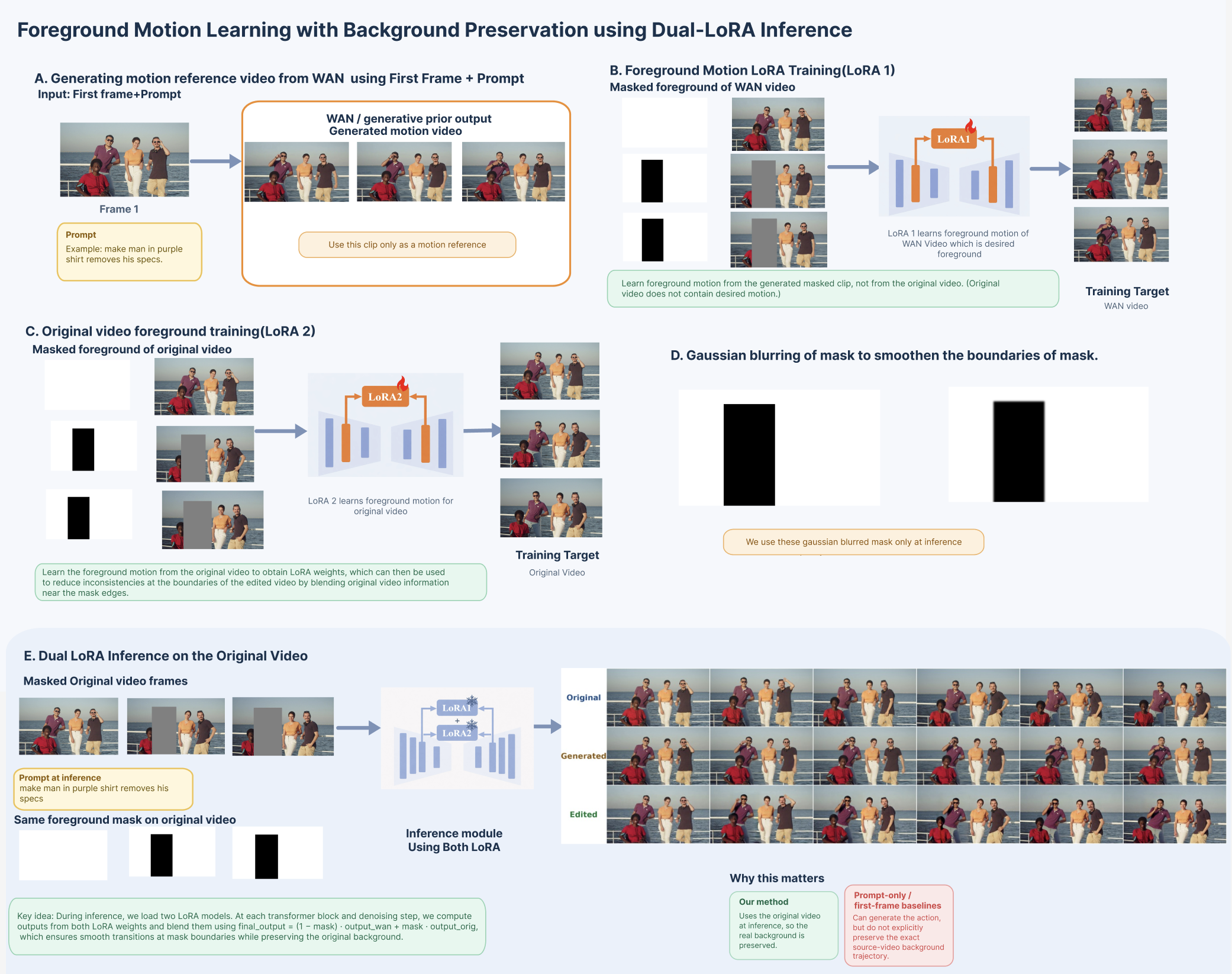
Our method addresses a key limitation of existing I2V editing pipelines: generated videos do not preserve the original video's background motion. We solve this with a two-LoRA approach:
| Component | Role |
|---|---|
| LoRA 1 | Trained on the masked foreground of the I2V-generated video (which contains the desired foreground motion) — learns the target motion |
| LoRA 2 | Trained on the masked foreground of the original video — learns original scene motion |
| Dual-LoRA Inference | Both LoRAs run simultaneously; outputs are blended using a Gaussian-smoothed mask at each transformer block and denoising step |
At inference, for each transformer block:
final_output = output_wan × mask + output_orig × (1 - mask)
The mask is Gaussian-blurred to smooth boundary transitions, which eliminates border jitter while preserving the original background trajectory exactly.
Each group below shows (left → right): original video frames, WAN-generated motion prior, and final dual-LoRA edited output.
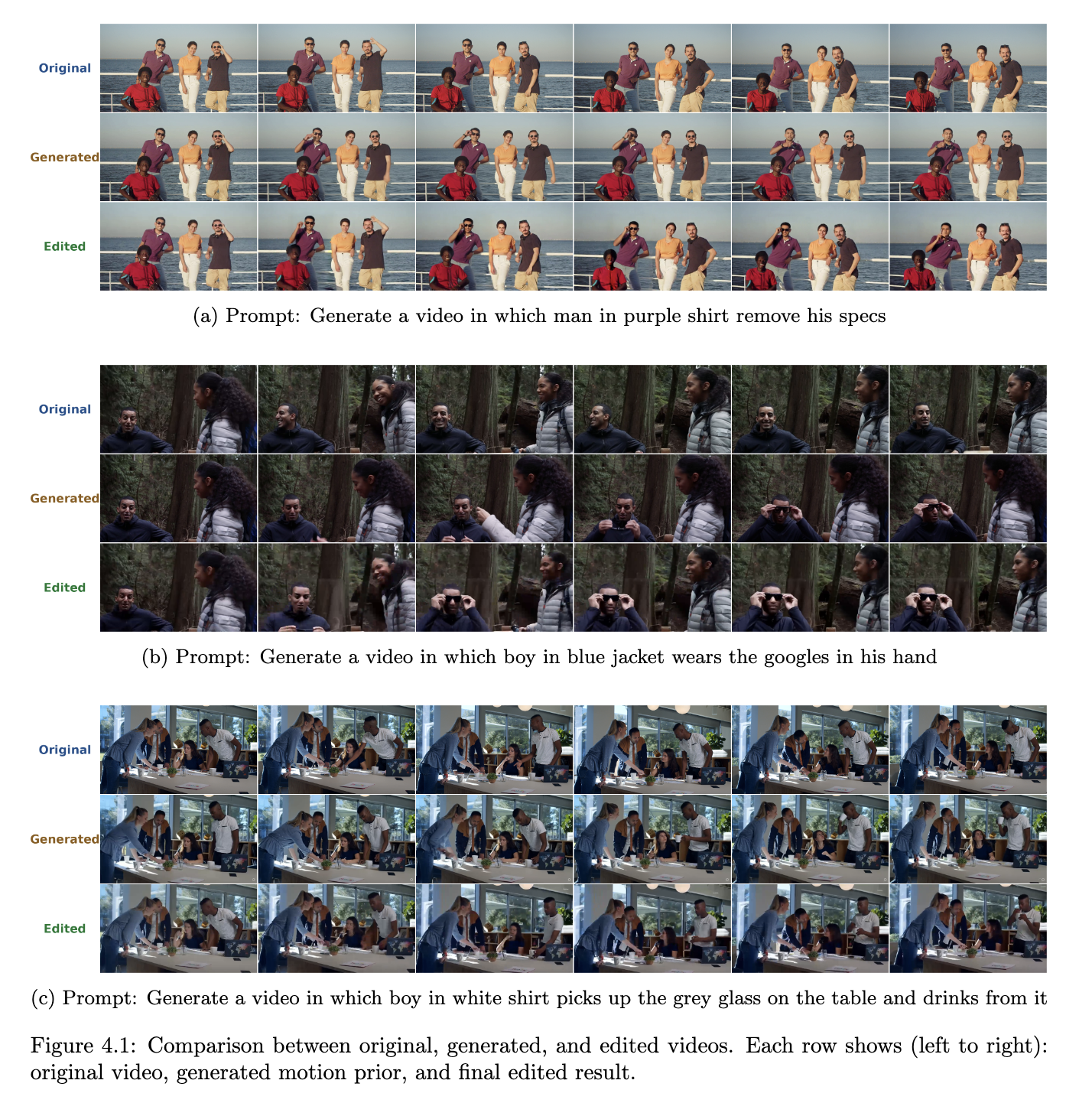
Row legend: 🔵 Original — 🟠 Generated (motion prior) — 🟢 Edited (our output)
git clone --recurse-submodules https://github.com/harshit08042006/LoRAEdit.git
cd LoRAEdit

# If you already cloned without submodules:
# git submodule init && git submodule update
Choose the command matching your CUDA version (PyTorch official):
# CUDA 11.8
pip install torch torchvision torchaudio --index-url https://download.pytorch.org/whl/cu118

# CUDA 12.1
pip install torch torchvision torchaudio --index-url https://download.pytorch.org/whl/cu121

# CUDA 12.4
pip install torch torchvision torchaudio --index-url https://download.pytorch.org/whl/cu124
pip install -r requirements.txt
Note: Model weights are not included in this repository (they are too large for GitHub). You must download them separately before running anything.
pip install huggingface_hub
huggingface-cli download Wan-AI/Wan2.1-I2V-14B-480P --local-dir ./Wan2.1-I2V-14B-480P
mkdir -p models_sam
wget https://dl.fbaipublicfiles.com/segment_anything_2/072824/sam2_hiera_large.pt \
     -O models_sam/sam2_hiera_large.pt
Step A-1: Generate the I2V Reference Video
Use any Image-to-Video (I2V) model (WAN 2.1, VEO, etc.) with the first frame of the original video + your edit prompt to generate a video that contains the desired foreground motion. This video is used only as a motion reference — not as the final output.
Example prompt: "make the man in the purple shirt remove his specs"
Step A-2: Foreground Selection & Data Preprocessing
Launch the preprocessing interface and upload the I2V-generated video. Select the foreground object (the one performing the desired motion).
python predata_app.py --port 8890 --checkpoint_dir models_sam/sam2_hiera_large.pt
Step A-3: Set the Inference Prompt
After preprocessing, write your edit prompt into the prefix.txt file inside the generated sequence folder. This prompt is used during dual-LoRA inference.
# Example:
echo "Generate a video in which man in purple shirt removes his specs" \
  > ./processed_data/<generated_sequence>/prefix.txt
⚠️ This step is required. The inference script reads
prefix.txtas the conditioning prompt. Without it, inference will fail or produce incorrect results.
Step A-4: LoRA 1 Training
NCCL_P2P_DISABLE="1" NCCL_IB_DISABLE="1" \
  deepspeed --num_gpus=1 train.py --deepspeed \
  --config ./processed_data/<generated_sequence>/configs/training.toml
Replace
<generated_sequence>with the folder name generated underprocessed_data/.
Step B-1: Foreground Selection & Data Preprocessing
Launch the preprocessing interface again with the original video. Select the same foreground region as Phase A.
python predata_app.py --port 8890 --checkpoint_dir models_sam/sam2_hiera_large.pt
Step B-2: LoRA 2 Training
NCCL_P2P_DISABLE="1" NCCL_IB_DISABLE="1" \
  deepspeed --num_gpus=1 train.py --deepspeed \
  --config ./processed_data/<original_sequence>/configs/training.toml
Replace
<original_sequence>with the folder name generated underprocessed_data/.
After both trainings are complete, copy the original video's inference_rgb.mp4 into the generated video's processed data folder, replacing the generated one:
cp ./processed_data/<original_sequence>/inference_rgb.mp4 \
   ./processed_data/<generated_sequence>/inference_rgb.mp4
This ensures the dual-LoRA inference runs on the original video's RGB frames (preserving the real background), while using the generated video's mask.
python inference_dual_lora.py \
    --model_root_dir ./Wan2.1-I2V-14B-480P \
    --wan_data_dir   ./processed_data/<generated_sequence> \
    --orig_data_dir  ./processed_data/<original_sequence> \
    --border_sigma   3.0
| Argument | Description |
|---|---|
--model_root_dir | Path to the Wan2.1-I2V-14B-480P model weights |
--wan_data_dir | Processed data folder for the generated/edited video (LoRA 1) |
--orig_data_dir | Processed data folder for the original video (LoRA 2) |
--border_sigma | Gaussian blur sigma for mask boundary smoothing (default 3.0, increase to soften transitions) |
The output video will be saved inside --wan_data_dir.
All benchmarks on a single RTX 4090 (24 GB) at 480P (832×480).
| Stage | Time |
|---|---|
| LoRA training (per LoRA, 100 steps) | ~45 minutes |
| Dual-LoRA inference (41 frames) | ~5 minutes |
The pipeline runs two separate LoRA trainings (one for the I2V reference video, one for the original video), so total training time is approximately ~90 minutes before inference.
LoRAEdit/
├── predata_app.py              # Interactive foreground segmentation & preprocessing
├── train.py                    # LoRA training script
├── inference.py                # Single-LoRA inference (original LoRA-Edit)
├── inference_dual_lora.py      # Dual-LoRA inference (our method)
├── dual_lora_utils.py          # Blending utilities for dual-LoRA
├── custom_wan_pipe.py          # Modified WAN pipeline with dual-LoRA hooks
├── models_sam/
│   └── sam2_hiera_large.pt     # SAM2 checkpoint
├── Wan2.1-I2V-14B-480P/        # WAN model weights
├── processed_data/
│   ├── <generated_sequence>/   # LoRA 1 data (edited/generated video)
│   │   ├── source_frames/
│   │   ├── traindata/
│   │   ├── configs/
│   │   ├── lora/
│   │   ├── inference_rgb.mp4   # ← replaced with original video's RGB
│   │   └── inference_mask.mp4
│   └── <original_sequence>/    # LoRA 2 data (original video)
│       ├── source_frames/
│       ├── traindata/
│       ├── configs/
│       ├── lora/
│       ├── inference_rgb.mp4
│       └── inference_mask.mp4
└── requirements.txt
This project is built upon the excellent LoRA-Edit codebase (paper: arXiv:2506.10082). We thank the original authors for open-sourcing their work.
Built on top of LoRA-Edit — we extend the original pipeline with a dual-LoRA inference strategy that enables high-quality foreground motion transfer from I2V-generated videos (containing the desired foreground motion) while preserving the exact background trajectory of the original video.
Our method addresses a key limitation of existing I2V editing pipelines: generated videos do not preserve the original video's background motion. We solve this with a two-LoRA approach:
| Component | Role |
|---|---|
| LoRA 1 | Trained on the masked foreground of the I2V-generated video (which contains the desired foreground motion) — learns the target motion |
| LoRA 2 | Trained on the masked foreground of the original video — learns original scene motion |
| Dual-LoRA Inference | Both LoRAs run simultaneously; outputs are blended using a Gaussian-smoothed mask at each transformer block and denoising step |
At inference, for each transformer block:
final_output = output_wan × mask + output_orig × (1 - mask)
The mask is Gaussian-blurred to smooth boundary transitions, which eliminates border jitter while preserving the original background trajectory exactly.
Each group below shows (left → right): original video frames, WAN-generated motion prior, and final dual-LoRA edited output.
Row legend: 🔵 Original — 🟠 Generated (motion prior) — 🟢 Edited (our output)
git clone --recurse-submodules https://github.com/harshit08042006/LoRAEdit.git
cd LoRAEdit

# If you already cloned without submodules:
# git submodule init && git submodule update
Choose the command matching your CUDA version (PyTorch official):
# CUDA 11.8
pip install torch torchvision torchaudio --index-url https://download.pytorch.org/whl/cu118

# CUDA 12.1
pip install torch torchvision torchaudio --index-url https://download.pytorch.org/whl/cu121

# CUDA 12.4
pip install torch torchvision torchaudio --index-url https://download.pytorch.org/whl/cu124
pip install -r requirements.txt
Note: Model weights are not included in this repository (they are too large for GitHub). You must download them separately before running anything.
pip install huggingface_hub
huggingface-cli download Wan-AI/Wan2.1-I2V-14B-480P --local-dir ./Wan2.1-I2V-14B-480P
mkdir -p models_sam
wget https://dl.fbaipublicfiles.com/segment_anything_2/072824/sam2_hiera_large.pt \
     -O models_sam/sam2_hiera_large.pt
Step A-1: Generate the I2V Reference Video
Use any Image-to-Video (I2V) model (WAN 2.1, VEO, etc.) with the first frame of the original video + your edit prompt to generate a video that contains the desired foreground motion. This video is used only as a motion reference — not as the final output.
Example prompt: "make the man in the purple shirt remove his specs"
Step A-2: Foreground Selection & Data Preprocessing
Launch the preprocessing interface and upload the I2V-generated video. Select the foreground object (the one performing the desired motion).
python predata_app.py --port 8890 --checkpoint_dir models_sam/sam2_hiera_large.pt
Step A-3: Set the Inference Prompt
After preprocessing, write your edit prompt into the prefix.txt file inside the generated sequence folder. This prompt is used during dual-LoRA inference.
# Example:
echo "Generate a video in which man in purple shirt removes his specs" \
  > ./processed_data/<generated_sequence>/prefix.txt
⚠️ This step is required. The inference script reads
prefix.txtas the conditioning prompt. Without it, inference will fail or produce incorrect results.
Step A-4: LoRA 1 Training
NCCL_P2P_DISABLE="1" NCCL_IB_DISABLE="1" \
  deepspeed --num_gpus=1 train.py --deepspeed \
  --config ./processed_data/<generated_sequence>/configs/training.toml
Replace
<generated_sequence>with the folder name generated underprocessed_data/.
Step B-1: Foreground Selection & Data Preprocessing
Launch the preprocessing interface again with the original video. Select the same foreground region as Phase A.
python predata_app.py --port 8890 --checkpoint_dir models_sam/sam2_hiera_large.pt
Step B-2: LoRA 2 Training
NCCL_P2P_DISABLE="1" NCCL_IB_DISABLE="1" \
  deepspeed --num_gpus=1 train.py --deepspeed \
  --config ./processed_data/<original_sequence>/configs/training.toml
Replace
<original_sequence>with the folder name generated underprocessed_data/.
After both trainings are complete, copy the original video's inference_rgb.mp4 into the generated video's processed data folder, replacing the generated one:
cp ./processed_data/<original_sequence>/inference_rgb.mp4 \
   ./processed_data/<generated_sequence>/inference_rgb.mp4
This ensures the dual-LoRA inference runs on the original video's RGB frames (preserving the real background), while using the generated video's mask.
python inference_dual_lora.py \
    --model_root_dir ./Wan2.1-I2V-14B-480P \
    --wan_data_dir   ./processed_data/<generated_sequence> \
    --orig_data_dir  ./processed_data/<original_sequence> \
    --border_sigma   3.0
| Argument | Description |
|---|---|
--model_root_dir | Path to the Wan2.1-I2V-14B-480P model weights |
--wan_data_dir | Processed data folder for the generated/edited video (LoRA 1) |
--orig_data_dir | Processed data folder for the original video (LoRA 2) |
--border_sigma | Gaussian blur sigma for mask boundary smoothing (default 3.0, increase to soften transitions) |
The output video will be saved inside --wan_data_dir.
All benchmarks on a single RTX 4090 (24 GB) at 480P (832×480).
| Stage | Time |
|---|---|
| LoRA training (per LoRA, 100 steps) | ~45 minutes |
| Dual-LoRA inference (41 frames) | ~5 minutes |
The pipeline runs two separate LoRA trainings (one for the I2V reference video, one for the original video), so total training time is approximately ~90 minutes before inference.
LoRAEdit/
├── predata_app.py              # Interactive foreground segmentation & preprocessing
├── train.py                    # LoRA training script
├── inference.py                # Single-LoRA inference (original LoRA-Edit)
├── inference_dual_lora.py      # Dual-LoRA inference (our method)
├── dual_lora_utils.py          # Blending utilities for dual-LoRA
├── custom_wan_pipe.py          # Modified WAN pipeline with dual-LoRA hooks
├── models_sam/
│   └── sam2_hiera_large.pt     # SAM2 checkpoint
├── Wan2.1-I2V-14B-480P/        # WAN model weights
├── processed_data/
│   ├── <generated_sequence>/   # LoRA 1 data (edited/generated video)
│   │   ├── source_frames/
│   │   ├── traindata/
│   │   ├── configs/
│   │   ├── lora/
│   │   ├── inference_rgb.mp4   # ← replaced with original video's RGB
│   │   └── inference_mask.mp4
│   └── <original_sequence>/    # LoRA 2 data (original video)
│       ├── source_frames/
│       ├── traindata/
│       ├── configs/
│       ├── lora/
│       ├── inference_rgb.mp4
│       └── inference_mask.mp4
└── requirements.txt
This project is built upon the excellent LoRA-Edit codebase (paper: arXiv:2506.10082). We thank the original authors for open-sourcing their work.