
Local OpenAI-compatible API server and Chrome extension that relays chat requests to the claude.ai web UI over WebSocket.
JavaScript
1
12 commits
updated Oct 7, 2026
See what people are saying
README
Claude Bridge Server
A local OpenAI-compatible API server and Chrome extension that relays chat requests to the Claude web interface over WebSocket.
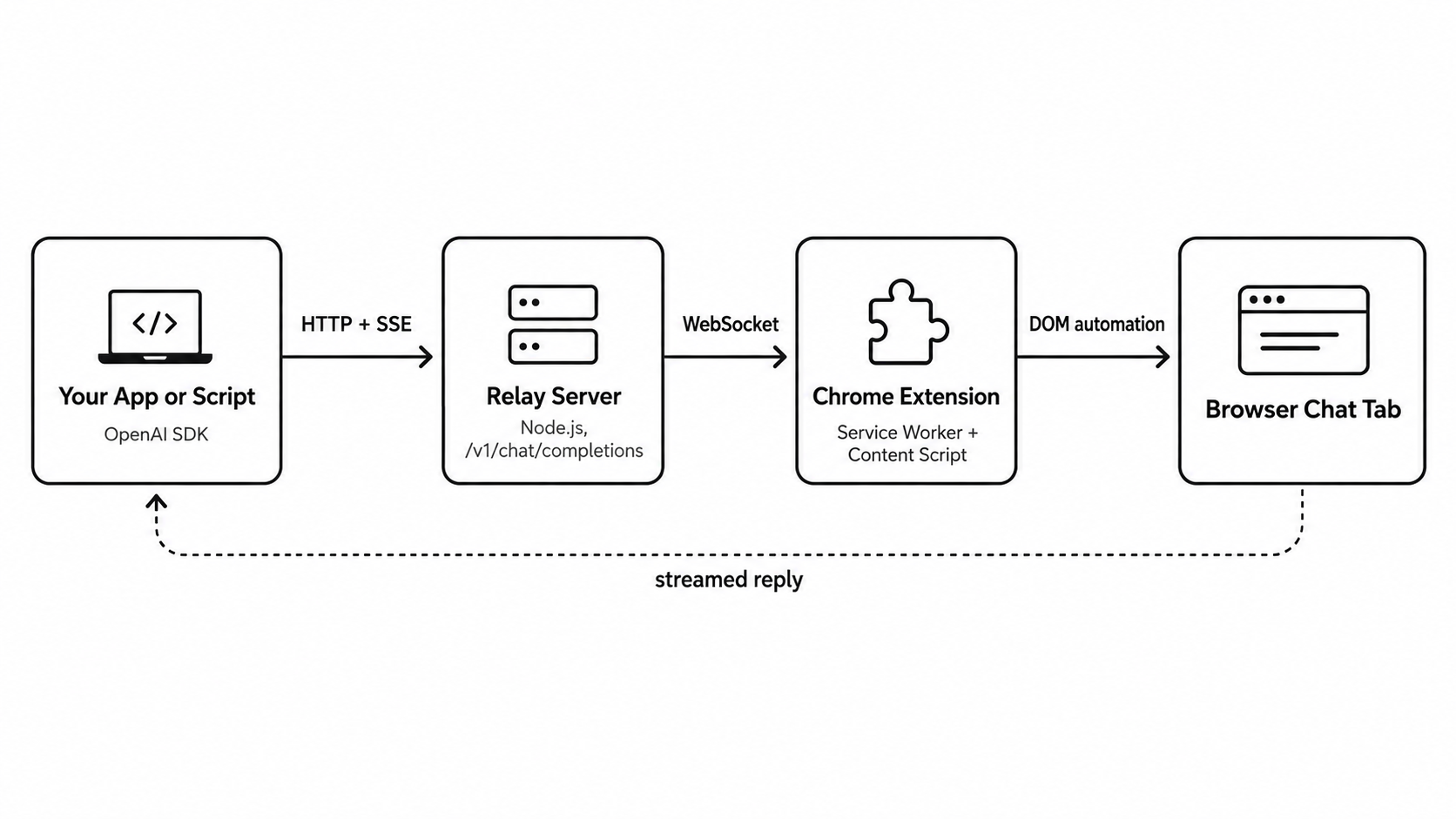
How it works
Any OpenAI-compatible client sends a request to the relay server. The server forwards it over a WebSocket to the Chrome extension, which types the prompt into a claude.ai tab you already have open and streams the reply back the same way.
Project structure
.
|-- server/       Node relay server (OpenAI-compatible HTTP + WebSocket)
|-- extension/    Chrome extension (service worker + content script)
|-- OpenAI Streaming Architecture Diagram.png
Quick start
- Start the server:
cd server, thennpm installandnode server.js. It listens onhttp://127.0.0.1:8787. - Open
chrome://extensions, enable Developer mode, choose "Load unpacked" and select theextension/folder. Keep a claude.ai tab open. - Use
http://127.0.0.1:8787/v1as the base URL in any OpenAI-compatible client, with the model nameclaude-web.
Hosted deployment
The server can run on a host such as Render. Set the root directory to server, the build command to npm install and the start command to node server.js. Set an API_KEY environment variable there, then set WS_URL in extension/background.js to wss://YOUR-HOST/ws?key=YOUR_KEY in your local copy and reload the extension. Clients then use https://YOUR-HOST/v1 with Authorization: Bearer YOUR_KEY. The browser with the claude.ai tab must stay open.
Security notes
- Always set
API_KEYwhen the server is reachable beyond localhost. Anyone with the key can use the connected Claude account. - Never commit your real key. Keep the edited
WS_URL(with?key=...) in your local copy only. - Requests go to whichever chat is open in the claude.ai tab, one at a time.
Disclaimer and Responsible Use
This project is an independent, community-developed tool and is not affiliated with, endorsed by, sponsored by, or officially connected to Anthropic or Claude.
This software is provided for personal, educational, and research purposes. Users are responsible for ensuring that their use complies with all applicable laws, regulations, and the terms of service governing any service or account they access.
Use this software only with accounts and systems that you are authorized to access. Do not use it to bypass authentication, access controls, rate limits, usage restrictions, or other technical safeguards.
The maintainers do not provide access to Claude accounts, credentials, paid services, or third-party content. The software is provided "as is," without warranties of any kind. The maintainers are not responsible for account suspension, service interruption, data loss, or other consequences resulting from use of this project.
Before using this software, review the current terms and policies of the relevant service. Those terms may change over time.
Trademarks
“Claude,” “Anthropic,” and related names and logos are trademarks of their respective owners. Their use in this project is for identification and descriptive purposes only and does not imply endorsement.
Similar repos


Local OpenAI-compatible API server and Chrome extension that relays chat requests to the claude.ai web UI over WebSocket.
JavaScript
1
12 commits
updated Oct 7, 2026
See what people are saying
README
Claude Bridge Server
A local OpenAI-compatible API server and Chrome extension that relays chat requests to the Claude web interface over WebSocket.
How it works
Any OpenAI-compatible client sends a request to the relay server. The server forwards it over a WebSocket to the Chrome extension, which types the prompt into a claude.ai tab you already have open and streams the reply back the same way.
Project structure
.
|-- server/       Node relay server (OpenAI-compatible HTTP + WebSocket)
|-- extension/    Chrome extension (service worker + content script)
|-- OpenAI Streaming Architecture Diagram.png
Quick start
- Start the server:
cd server, thennpm installandnode server.js. It listens onhttp://127.0.0.1:8787. - Open
chrome://extensions, enable Developer mode, choose "Load unpacked" and select theextension/folder. Keep a claude.ai tab open. - Use
http://127.0.0.1:8787/v1as the base URL in any OpenAI-compatible client, with the model nameclaude-web.
Hosted deployment
The server can run on a host such as Render. Set the root directory to server, the build command to npm install and the start command to node server.js. Set an API_KEY environment variable there, then set WS_URL in extension/background.js to wss://YOUR-HOST/ws?key=YOUR_KEY in your local copy and reload the extension. Clients then use https://YOUR-HOST/v1 with Authorization: Bearer YOUR_KEY. The browser with the claude.ai tab must stay open.
Security notes
- Always set
API_KEYwhen the server is reachable beyond localhost. Anyone with the key can use the connected Claude account. - Never commit your real key. Keep the edited
WS_URL(with?key=...) in your local copy only. - Requests go to whichever chat is open in the claude.ai tab, one at a time.
Disclaimer and Responsible Use
This project is an independent, community-developed tool and is not affiliated with, endorsed by, sponsored by, or officially connected to Anthropic or Claude.
This software is provided for personal, educational, and research purposes. Users are responsible for ensuring that their use complies with all applicable laws, regulations, and the terms of service governing any service or account they access.
Use this software only with accounts and systems that you are authorized to access. Do not use it to bypass authentication, access controls, rate limits, usage restrictions, or other technical safeguards.
The maintainers do not provide access to Claude accounts, credentials, paid services, or third-party content. The software is provided "as is," without warranties of any kind. The maintainers are not responsible for account suspension, service interruption, data loss, or other consequences resulting from use of this project.
Before using this software, review the current terms and policies of the relevant service. Those terms may change over time.
Trademarks
“Claude,” “Anthropic,” and related names and logos are trademarks of their respective owners. Their use in this project is for identification and descriptive purposes only and does not imply endorsement.