IDE-like refactoring for agents - ~2x faster with ~50% less tokens. Works with TS, Vue, React & more
TypeScript
108
111 commits
updated Oct 12, 2026


Typesafe IDE-like refactoring for agents.
Made possible by my Sponsor Program 💖
Follow me @harlan_zw 🐦 • Join Discord for help
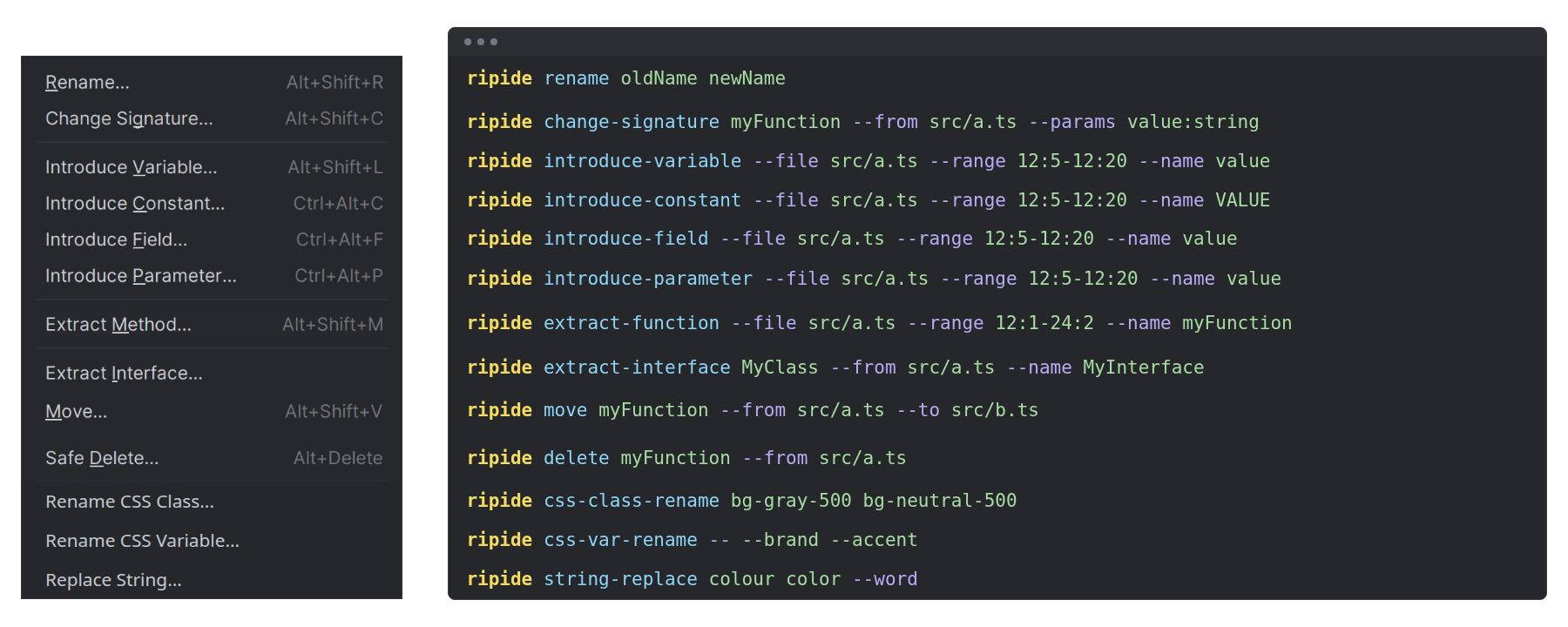
When you rename a function in your IDE, it updates the references for you. RipIDE aims to bring that same refactoring magic to your agent.
One command handles the references and edits. Recorded source-slice tasks used fewer total tokens. Results depend on the task and model.
Requires Node 22.13+.
Install RipIDE:
npm install -g ripide
Install the RipIDE Agent Skill in your project with your preferred installer:
With skilld:
npx skilld add ripide
Or with skills.sh:
npx skills add harlan-zw/ripide --skill ripast
Optionally install ripgrep for faster searches.
Ask your coding agent:
Find better names for functions.
Run commands from your project root. Commands preview changes by default; pass --apply to write.
Use --profile full to see the full diff in an agent environment.
Find matching identifiers, strings, properties, and JSX references. The scan includes Vue template interpolations and directive expressions.
ripide scan useStore
ripide scan useStore --kind identifier-reference,import-specifier
ripide scan useStore --graph mermaid
--graph mermaid|dot draws relative import/export edges between hit files for quick triage.
Rename references using the native TypeScript 7 language server, including imports, JSX, types, and aliases. Property keys change only when they refer to the same symbol.
# Preview the changes
ripide rename useStore useAppStore

# Write changes after type checking
ripide rename useStore useAppStore --apply

# Ambiguous declarations? Pick one or rename all
ripide rename useStore useAppStore --scope src/store.ts --apply
ripide rename useStore useAppStore --all --apply
Imports and references change together. The unrelated string keeps its spelling:
# src/store.ts
-export function useStore() { return 1 }
+export function useAppStore() { return 1 }
# src/consumer.ts
-import { useStore } from './store.js'
-export const value = useStore()
+import { useAppStore } from './store.js'
+export const value = useAppStore()
 export const label = 'useStore'
Replace an imported binding with a project export, such as replacing eventHandler(...) with defineAdminApiHandler(...).
RipIDE updates references and imports, then removes the old import.
It preserves the call arguments and function body.
New imports preserve the replaced relative import's extension policy.
For package imports, they follow relative imports in the consumer, then nearby project files.
Without a local policy, they use extensionless paths.
JavaScript paths keep emitted .js, .mjs, or .cjs endings for TypeScript targets.
Review mixed import policies in the dry run before applying.
ripide replace eventHandler defineAdminApiHandler
ripide replace eventHandler defineAdminApiHandler --apply

# Ambiguous target exports? Pick the declaring file
ripide replace eventHandler defineAdminApiHandler --target-scope layers/admin/server/utils/admin-api.ts --apply

# Route an existing binding through a named barrel and a framework alias
ripide replace getSiteConfig getSiteConfig --target-scope ../nuxt-site-config/src/runtime/server/index.ts --target-import '#site-config/server' --apply
--target-scope can select a named re-export barrel outside the consumer project.
--target-import sets its import path explicitly, including Nuxt aliases.
Value and type exports retain their import kind. Existing imports from that path merge safely.
Default discovery still selects direct declarations and keeps the relative import policy.
Run nuxi prepare first to generate Nuxt's type declarations.
RipIDE uses these files to resolve auto-imported composables, utilities, and components used in pages and other consumers.
If a move requires an explicit import in a Vue file without a script block, RipIDE refuses it.
# A composable used in pages with no explicit import
ripide rename useCounter useTally --tsconfig .nuxt/tsconfig.json --apply

# Moving out of utils/composables/components adds explicit imports to consumers
ripide move format --from utils/format.ts --to lib/format.ts --apply
Move a top-level export and update its imports.
RipIDE splits declarations such as export const a = 1, b = 2 and preserves aliases.
It copies required imports and removes unused ones. If the symbol depends on a local, unexported helper, it refuses the move.
ripide move helper --from src/utils/a.ts --to src/utils/helpers.ts --apply
Update import paths when moving or renaming a file. The Vue adapter also updates component tags in PascalCase and kebab-case.
ripide rename-file src/utils.ts src/lib/helpers.ts --apply
Delete a top-level declaration after checking for references, then remove imports used only by that declaration.
If references remain, RipIDE prints their locations and refuses the deletion.
Omit --apply to preview the changes.
ripide delete helper --from src/utils.ts
ripide delete helper --from src/utils.ts --apply
Rename class tokens in string literals, Vue class and :class attributes, and CSS @apply directives.
RipIDE preserves variant prefixes (hover:, dark:md:), ! important markers, and arbitrary values.
# Single pair
ripide css-class-rename bg-gray-500 bg-neutral-500 --apply

# Bulk design-token migration
ripide css-class-rename --map tokens.json --apply

# Seed the map by listing every class in the repo
ripide css-class-scan --json > tokens.raw.json

# Find barely used classes to clean up
ripide css-class-scan --sort count-asc

# Find files introducing the most unique class tokens
ripide css-class-scan --by file
List declarations by file. Use --exports exported for exports or --exports local for declarations without exports.
ripide tree --exports exported
ripide tree --exports local --glob '*.ts'
In agent environments (std-env's isAgent), defaults to a compact architecture summary.
Report top-level declarations with no semantic project references. Review each result before deleting it. External callers, frameworks, dynamic registries, and entrypoints may still use these declarations.
ripide unused
ripide unused --exports local
ripide unused --exports all --json
--json emits the same contract in terminals and detected agent environments.
The default JSON profile is compact. Use --profile full for complete source content.
Every response contains _tag, command, base, and data.
Mutation tags are Preview, Applied, Refused, or Empty. Discovery uses Result; failures use Error.
For mutating commands, compact JSON returns [path, lines] tuples inside data instead of full source files.
If line ranges shift, tuples include both ranges: [path, beforeLines, afterLines].
Lines are one-based and inclusive. "3,10-12" identifies separate ranges; "3+" marks a gap after line 3.
File moves appear separately as moves: [[from, to]].
The _tag identifies the outcome. The data.verification field reports checks. Empty warnings and regressions are omitted.
Verification entries use [checker, scope, files, newErrors].
An optional fifth number counts errors excluded from the result.
Skipped checks return "disabled", "no-changes", or "not-applicable".
After applying, earlier file reads are outdated. Read changed ranges only when you need current code.
If an editing tool requires a fresh read, follow that requirement.
Use --profile full --json for complete before/after content.
If verification finds new type errors, the command refuses --apply and exits with a non-zero status.
ripide rename useStore useAppStore --apply --profile agent --json
# {
#   "_tag": "Applied", "command": "rename", "base": "/project",
#   "data": {
#     "changes": [["src/store.ts", "12"], ["src/app.ts", "1,8"]],
#     "verification": [["typescript", "touched", 2, 0]]
#   }
# }
rename, replace, move, delete, and rename-file enable verification by default.
They compare type errors before and after the change, then refuse --apply if new errors appear.
The receipt identifies the checker, scope, checked file count, and new error count.
Full JSON uses named check fields. Compact JSON uses the tuples shown above.
typescript uses TypeScript's native language server diagnostics. vue uses the Vue adapter's diagnostics.
These checks compare error diagnostics against proposed content before writing files.
They do not run tsc --noEmit, a build, or tests.
If the receipt covers your required scope, do not repeat that diagnostic check without another edit.
Replacement defaults to project checks. Other refactors default to touched files in both the CLI and SDK.
Use --verify-mode project for broader checks, including unchanged Vue consumers.
Project verification respects file discovery ignores. Refactor globs limit edits without narrowing project verification.
Use --verify-mode none to skip verification. The SDK accepts verifyMode: 'none' | 'touched' | 'project'.
The boolean SDK verify option and CLI --verify / --no-verify flags are removed.
CSS class renames do not run a typecheck.
--profile auto|agent|full controls output verbosity.
For text, auto uses std-env's isAgent detection.
Agents get compact summaries; terminals get full diffs and trees. JSON auto always uses compact output.
See API contract migration for JSON consumers and SDK formatting imports.
| Command | Purpose |
|---|---|
ripide scan <pattern> | Classify every occurrence (identifier vs string vs property vs JSX). Optional --graph mermaid|dot. |
ripide tree | Print a project declaration tree, grouped by file. |
ripide unused | Find unreferenced top-level declarations. |
ripide rename <from> <to> | Scope-aware symbol rename via the native TypeScript server. |
ripide replace <from> <to> | Replace an imported symbol with another project export; rewrites imports and references. |
ripide move <symbol> --from <a> --to <b> | Move a top-level export and rewrite every import site. |
ripide delete <symbol> --from <file> | Delete an unused top-level declaration; refuses if references remain. |
ripide rename-file <old> <new> | Rename a file and rewrite every import site (including .vue consumers). |
ripide css-class-rename <from> <to> | --map <file.json> | Rename tailwind/CSS utility class tokens repo-wide. |
ripide css-class-scan | List class tokens; use --sort count-asc for rare tokens or --by file for files with the most unique classes. |
Run ripide --help for all commands, or ripide <command> --help for its options.
The SDK uses an isolated engine. Core supports TypeScript and JavaScript without framework dependencies.
import { createEngine } from 'ripide-api'

const engine = createEngine()
const hits = engine.scan('useStore', { cwd: process.cwd() })
const result = await engine.rename('useStore', 'useAppStore', { cwd: process.cwd() })
engine.commit(result)
Supply framework extensions explicitly:
import { createEngine } from 'ripide-api'
import { createVueExtension } from 'ripide-vue'

const engine = createEngine({ extensions: [createVueExtension()] })
const result = await engine.rename('useStore', 'useAppStore', { cwd: process.cwd() })
engine.commit(result)
The CLI loads relevant optional packages. The SDK never loads optional packages automatically. Read the extension contract and migration guide before adding a language.
Reuse declaration analysis during repeated SDK inspection:
import { buildDeclarationTree, createDeclarationCache } from 'ripide-api'

const cache = createDeclarationCache({ maxEntries: 1024, maxBytes: 16 * 1024 * 1024 })
const tree = buildDeclarationTree({ cwd: process.cwd(), cache })
const exported = buildDeclarationTree({ cwd: process.cwd(), cache, exports: 'exported' })
console.log(cache.stats())
cache.clear()
Each inspection discovers files again and checks their current content.
The cache retains declaration metadata, imports, and re-exports. It does not retain type or reference results.
It also works with buildUnusedDeclarations; only declaration analysis is cached.
Instances belong to the caller. Independent CLI processes do not share this cache.
Scoping with --glob. Pass comma-separated patterns. Prefix a pattern with ! to exclude matching files:
ripide tree --exports exported --glob '*.ts,*.vue,!.nuxt/**,!**/*.d.ts,!**/dist/**'
Nuxt projects. Point --tsconfig at the generated config so path aliases and layer references resolve correctly:
# After `nuxi prepare`
ripide rename useFoo useBar --tsconfig .nuxt/tsconfig.json --apply
ripide tree --exports exported --glob '*.ts,*.vue,!.nuxt/**'
ripide components reads .nuxt/components.d.ts when available. Without it, the command discovers components from file paths.
Encoding. RipIDE assumes UTF-8 + LF. CRLF and BOM files are untested; convert with dos2unix / strip BOM before running mutating commands.
.vue rename and diagnostics.Licensed under the MIT license.
Forty runs compared RipIDE with ordinary editing on ten matched source-slice tasks using both models. Five tasks renamed TypeScript symbols. Five migrated static Vue class tokens. RipIDE passed 20/20 runs. Ordinary editing passed 19/20.
| Model | Completed pairs | Fewer total tokens | Less total time |
|---|---|---|---|
| GPT-6 Luna, medium | 9 | 60.4% | 15.4% |
| GLM 5.3 Flash | 10 | 73.9% | 55.4% |
Percentages compare completed pairs within each model. One run per combination used source slices, with fixed method order per model. Total tokens include cached input once. Installation, Skill loading, generated state, and full builds were excluded. These observations do not establish architecture gains or dollar savings. See full results, methods, and limits and the recovery protocol.
6,142 followers · starred Oct 2026
84 followers · starred Oct 2026
IDE-like refactoring for agents - ~2x faster with ~50% less tokens. Works with TS, Vue, React & more
TypeScript
108
111 commits
updated Oct 12, 2026
Typesafe IDE-like refactoring for agents.
Made possible by my Sponsor Program 💖
Follow me @harlan_zw 🐦 • Join Discord for help
When you rename a function in your IDE, it updates the references for you. RipIDE aims to bring that same refactoring magic to your agent.
One command handles the references and edits. Recorded source-slice tasks used fewer total tokens. Results depend on the task and model.
Requires Node 22.13+.
Install RipIDE:
npm install -g ripide
Install the RipIDE Agent Skill in your project with your preferred installer:
With skilld:
npx skilld add ripide
Or with skills.sh:
npx skills add harlan-zw/ripide --skill ripast
Optionally install ripgrep for faster searches.
Ask your coding agent:
Find better names for functions.
Run commands from your project root. Commands preview changes by default; pass --apply to write.
Use --profile full to see the full diff in an agent environment.
Find matching identifiers, strings, properties, and JSX references. The scan includes Vue template interpolations and directive expressions.
ripide scan useStore
ripide scan useStore --kind identifier-reference,import-specifier
ripide scan useStore --graph mermaid
--graph mermaid|dot draws relative import/export edges between hit files for quick triage.
Rename references using the native TypeScript 7 language server, including imports, JSX, types, and aliases. Property keys change only when they refer to the same symbol.
# Preview the changes
ripide rename useStore useAppStore

# Write changes after type checking
ripide rename useStore useAppStore --apply

# Ambiguous declarations? Pick one or rename all
ripide rename useStore useAppStore --scope src/store.ts --apply
ripide rename useStore useAppStore --all --apply
Imports and references change together. The unrelated string keeps its spelling:
# src/store.ts
-export function useStore() { return 1 }
+export function useAppStore() { return 1 }
# src/consumer.ts
-import { useStore } from './store.js'
-export const value = useStore()
+import { useAppStore } from './store.js'
+export const value = useAppStore()
 export const label = 'useStore'
Replace an imported binding with a project export, such as replacing eventHandler(...) with defineAdminApiHandler(...).
RipIDE updates references and imports, then removes the old import.
It preserves the call arguments and function body.
New imports preserve the replaced relative import's extension policy.
For package imports, they follow relative imports in the consumer, then nearby project files.
Without a local policy, they use extensionless paths.
JavaScript paths keep emitted .js, .mjs, or .cjs endings for TypeScript targets.
Review mixed import policies in the dry run before applying.
ripide replace eventHandler defineAdminApiHandler
ripide replace eventHandler defineAdminApiHandler --apply

# Ambiguous target exports? Pick the declaring file
ripide replace eventHandler defineAdminApiHandler --target-scope layers/admin/server/utils/admin-api.ts --apply

# Route an existing binding through a named barrel and a framework alias
ripide replace getSiteConfig getSiteConfig --target-scope ../nuxt-site-config/src/runtime/server/index.ts --target-import '#site-config/server' --apply
--target-scope can select a named re-export barrel outside the consumer project.
--target-import sets its import path explicitly, including Nuxt aliases.
Value and type exports retain their import kind. Existing imports from that path merge safely.
Default discovery still selects direct declarations and keeps the relative import policy.
Run nuxi prepare first to generate Nuxt's type declarations.
RipIDE uses these files to resolve auto-imported composables, utilities, and components used in pages and other consumers.
If a move requires an explicit import in a Vue file without a script block, RipIDE refuses it.
# A composable used in pages with no explicit import
ripide rename useCounter useTally --tsconfig .nuxt/tsconfig.json --apply

# Moving out of utils/composables/components adds explicit imports to consumers
ripide move format --from utils/format.ts --to lib/format.ts --apply
Move a top-level export and update its imports.
RipIDE splits declarations such as export const a = 1, b = 2 and preserves aliases.
It copies required imports and removes unused ones. If the symbol depends on a local, unexported helper, it refuses the move.
ripide move helper --from src/utils/a.ts --to src/utils/helpers.ts --apply
Update import paths when moving or renaming a file. The Vue adapter also updates component tags in PascalCase and kebab-case.
ripide rename-file src/utils.ts src/lib/helpers.ts --apply
Delete a top-level declaration after checking for references, then remove imports used only by that declaration.
If references remain, RipIDE prints their locations and refuses the deletion.
Omit --apply to preview the changes.
ripide delete helper --from src/utils.ts
ripide delete helper --from src/utils.ts --apply
Rename class tokens in string literals, Vue class and :class attributes, and CSS @apply directives.
RipIDE preserves variant prefixes (hover:, dark:md:), ! important markers, and arbitrary values.
# Single pair
ripide css-class-rename bg-gray-500 bg-neutral-500 --apply

# Bulk design-token migration
ripide css-class-rename --map tokens.json --apply

# Seed the map by listing every class in the repo
ripide css-class-scan --json > tokens.raw.json

# Find barely used classes to clean up
ripide css-class-scan --sort count-asc

# Find files introducing the most unique class tokens
ripide css-class-scan --by file
List declarations by file. Use --exports exported for exports or --exports local for declarations without exports.
ripide tree --exports exported
ripide tree --exports local --glob '*.ts'
In agent environments (std-env's isAgent), defaults to a compact architecture summary.
Report top-level declarations with no semantic project references. Review each result before deleting it. External callers, frameworks, dynamic registries, and entrypoints may still use these declarations.
ripide unused
ripide unused --exports local
ripide unused --exports all --json
--json emits the same contract in terminals and detected agent environments.
The default JSON profile is compact. Use --profile full for complete source content.
Every response contains _tag, command, base, and data.
Mutation tags are Preview, Applied, Refused, or Empty. Discovery uses Result; failures use Error.
For mutating commands, compact JSON returns [path, lines] tuples inside data instead of full source files.
If line ranges shift, tuples include both ranges: [path, beforeLines, afterLines].
Lines are one-based and inclusive. "3,10-12" identifies separate ranges; "3+" marks a gap after line 3.
File moves appear separately as moves: [[from, to]].
The _tag identifies the outcome. The data.verification field reports checks. Empty warnings and regressions are omitted.
Verification entries use [checker, scope, files, newErrors].
An optional fifth number counts errors excluded from the result.
Skipped checks return "disabled", "no-changes", or "not-applicable".
After applying, earlier file reads are outdated. Read changed ranges only when you need current code.
If an editing tool requires a fresh read, follow that requirement.
Use --profile full --json for complete before/after content.
If verification finds new type errors, the command refuses --apply and exits with a non-zero status.
ripide rename useStore useAppStore --apply --profile agent --json
# {
#   "_tag": "Applied", "command": "rename", "base": "/project",
#   "data": {
#     "changes": [["src/store.ts", "12"], ["src/app.ts", "1,8"]],
#     "verification": [["typescript", "touched", 2, 0]]
#   }
# }
rename, replace, move, delete, and rename-file enable verification by default.
They compare type errors before and after the change, then refuse --apply if new errors appear.
The receipt identifies the checker, scope, checked file count, and new error count.
Full JSON uses named check fields. Compact JSON uses the tuples shown above.
typescript uses TypeScript's native language server diagnostics. vue uses the Vue adapter's diagnostics.
These checks compare error diagnostics against proposed content before writing files.
They do not run tsc --noEmit, a build, or tests.
If the receipt covers your required scope, do not repeat that diagnostic check without another edit.
Replacement defaults to project checks. Other refactors default to touched files in both the CLI and SDK.
Use --verify-mode project for broader checks, including unchanged Vue consumers.
Project verification respects file discovery ignores. Refactor globs limit edits without narrowing project verification.
Use --verify-mode none to skip verification. The SDK accepts verifyMode: 'none' | 'touched' | 'project'.
The boolean SDK verify option and CLI --verify / --no-verify flags are removed.
CSS class renames do not run a typecheck.
--profile auto|agent|full controls output verbosity.
For text, auto uses std-env's isAgent detection.
Agents get compact summaries; terminals get full diffs and trees. JSON auto always uses compact output.
See API contract migration for JSON consumers and SDK formatting imports.
| Command | Purpose |
|---|---|
ripide scan <pattern> | Classify every occurrence (identifier vs string vs property vs JSX). Optional --graph mermaid|dot. |
ripide tree | Print a project declaration tree, grouped by file. |
ripide unused | Find unreferenced top-level declarations. |
ripide rename <from> <to> | Scope-aware symbol rename via the native TypeScript server. |
ripide replace <from> <to> | Replace an imported symbol with another project export; rewrites imports and references. |
ripide move <symbol> --from <a> --to <b> | Move a top-level export and rewrite every import site. |
ripide delete <symbol> --from <file> | Delete an unused top-level declaration; refuses if references remain. |
ripide rename-file <old> <new> | Rename a file and rewrite every import site (including .vue consumers). |
ripide css-class-rename <from> <to> | --map <file.json> | Rename tailwind/CSS utility class tokens repo-wide. |
ripide css-class-scan | List class tokens; use --sort count-asc for rare tokens or --by file for files with the most unique classes. |
Run ripide --help for all commands, or ripide <command> --help for its options.
The SDK uses an isolated engine. Core supports TypeScript and JavaScript without framework dependencies.
import { createEngine } from 'ripide-api'

const engine = createEngine()
const hits = engine.scan('useStore', { cwd: process.cwd() })
const result = await engine.rename('useStore', 'useAppStore', { cwd: process.cwd() })
engine.commit(result)
Supply framework extensions explicitly:
import { createEngine } from 'ripide-api'
import { createVueExtension } from 'ripide-vue'

const engine = createEngine({ extensions: [createVueExtension()] })
const result = await engine.rename('useStore', 'useAppStore', { cwd: process.cwd() })
engine.commit(result)
The CLI loads relevant optional packages. The SDK never loads optional packages automatically. Read the extension contract and migration guide before adding a language.
Reuse declaration analysis during repeated SDK inspection:
import { buildDeclarationTree, createDeclarationCache } from 'ripide-api'

const cache = createDeclarationCache({ maxEntries: 1024, maxBytes: 16 * 1024 * 1024 })
const tree = buildDeclarationTree({ cwd: process.cwd(), cache })
const exported = buildDeclarationTree({ cwd: process.cwd(), cache, exports: 'exported' })
console.log(cache.stats())
cache.clear()
Each inspection discovers files again and checks their current content.
The cache retains declaration metadata, imports, and re-exports. It does not retain type or reference results.
It also works with buildUnusedDeclarations; only declaration analysis is cached.
Instances belong to the caller. Independent CLI processes do not share this cache.
Scoping with --glob. Pass comma-separated patterns. Prefix a pattern with ! to exclude matching files:
ripide tree --exports exported --glob '*.ts,*.vue,!.nuxt/**,!**/*.d.ts,!**/dist/**'
Nuxt projects. Point --tsconfig at the generated config so path aliases and layer references resolve correctly:
# After `nuxi prepare`
ripide rename useFoo useBar --tsconfig .nuxt/tsconfig.json --apply
ripide tree --exports exported --glob '*.ts,*.vue,!.nuxt/**'
ripide components reads .nuxt/components.d.ts when available. Without it, the command discovers components from file paths.
Encoding. RipIDE assumes UTF-8 + LF. CRLF and BOM files are untested; convert with dos2unix / strip BOM before running mutating commands.
.vue rename and diagnostics.Licensed under the MIT license.
Forty runs compared RipIDE with ordinary editing on ten matched source-slice tasks using both models. Five tasks renamed TypeScript symbols. Five migrated static Vue class tokens. RipIDE passed 20/20 runs. Ordinary editing passed 19/20.
| Model | Completed pairs | Fewer total tokens | Less total time |
|---|---|---|---|
| GPT-6 Luna, medium | 9 | 60.4% | 15.4% |
| GLM 5.3 Flash | 10 | 73.9% | 55.4% |
Percentages compare completed pairs within each model. One run per combination used source slices, with fixed method order per model. Total tokens include cached input once. Installation, Skill loading, generated state, and full builds were excluded. These observations do not establish architecture gains or dollar savings. See full results, methods, and limits and the recovery protocol.
6,142 followers · starred Oct 2026
84 followers · starred Oct 2026