Unite is an extension that makes GNOME Shell look like Ubuntu Unity Shell.
JavaScript
1,092
1,086 commits
updated Sep 3, 2026
Unite is a GNOME Shell extension which makes a few layout tweaks to the top panel and removes window decorations to make it look like Ubuntu Unity Shell.
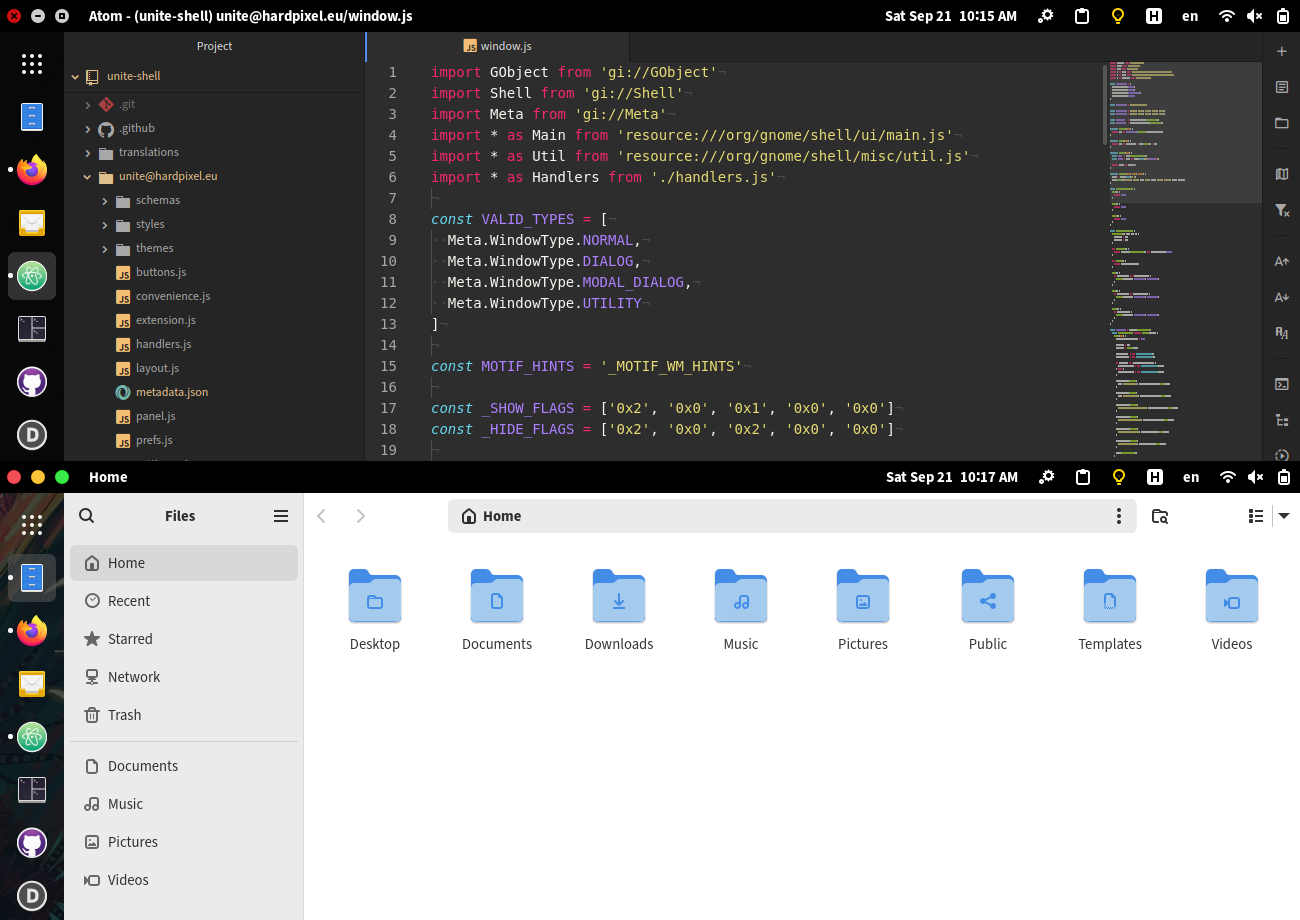
Unite running with the default options.
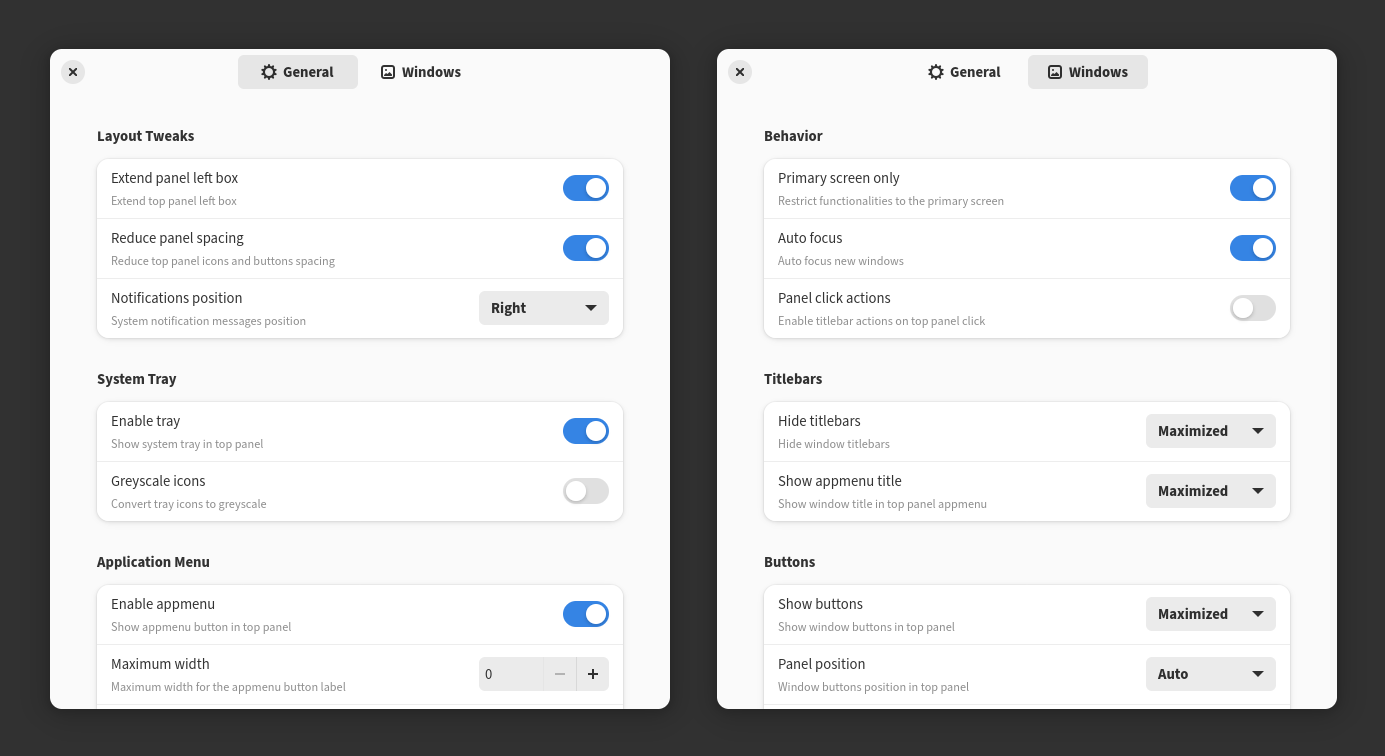
Settings window available in gnome extensions application.
Before installing the extension, make sure you have installed xprop.
| Distribution | Package Name | Install Command |
|---|---|---|
| Debian, Ubuntu | x11-utils | apt install x11-utils |
| Fedora, RHEL | xprop | dnf install xprop |
| Fedora Silverblue | xprop | rpm-ostree install xprop |
| Arch Linux, Manjaro, EndeavourOS | xorg-xprop | pacman -S xorg-xprop |
Then install the latest version using the commands below.
wget https://github.com/hardpixel/unite-shell/releases/download/v85/unite-v85.zip
gnome-extensions install --force unite-v85.zip
To get notifications for new releases you can watch this repository.
For the complete Ubuntu Unity layout, you can combine it with Dash to Dock extension and Gnome HUD menu.
For Gnome versions up to 44 you can install the extension from the official extensions resource page here.
Arch Linux: AUR package
Bug reports and pull requests are welcome on GitHub at https://github.com/hardpixel/unite-shell.
Unite Shell is available as open source under the terms of the GPLv3
This extension is inspired from Pixel Saver, TopIcons Plus, Extend Left Box.
62 followers · starred Apr 2021
576 followers · starred May 2019
39 followers · starred May 2026
441 followers · starred Feb 2025
Unite is an extension that makes GNOME Shell look like Ubuntu Unity Shell.
JavaScript
1,092
1,086 commits
updated Sep 3, 2026
Unite is a GNOME Shell extension which makes a few layout tweaks to the top panel and removes window decorations to make it look like Ubuntu Unity Shell.
Unite running with the default options.
Settings window available in gnome extensions application.
Before installing the extension, make sure you have installed xprop.
| Distribution | Package Name | Install Command |
|---|---|---|
| Debian, Ubuntu | x11-utils | apt install x11-utils |
| Fedora, RHEL | xprop | dnf install xprop |
| Fedora Silverblue | xprop | rpm-ostree install xprop |
| Arch Linux, Manjaro, EndeavourOS | xorg-xprop | pacman -S xorg-xprop |
Then install the latest version using the commands below.
wget https://github.com/hardpixel/unite-shell/releases/download/v85/unite-v85.zip
gnome-extensions install --force unite-v85.zip
To get notifications for new releases you can watch this repository.
For the complete Ubuntu Unity layout, you can combine it with Dash to Dock extension and Gnome HUD menu.
For Gnome versions up to 44 you can install the extension from the official extensions resource page here.
Arch Linux: AUR package
Bug reports and pull requests are welcome on GitHub at https://github.com/hardpixel/unite-shell.
Unite Shell is available as open source under the terms of the GPLv3
This extension is inspired from Pixel Saver, TopIcons Plus, Extend Left Box.
62 followers · starred Apr 2021
576 followers · starred May 2019
39 followers · starred May 2026
441 followers · starred Feb 2025



