ICML 2024 - Official Repository for EXO: Towards Efficient Exact Optimization of Language Model Alignment
See the codeThis is the official pytorch implementation of the EXO algorithm for efficient exact optimization of aligning language models (LMs) with human preferences, as described in our ICML 2024 paper Towards Efficient Exact Optimization of Language Model Alignment.
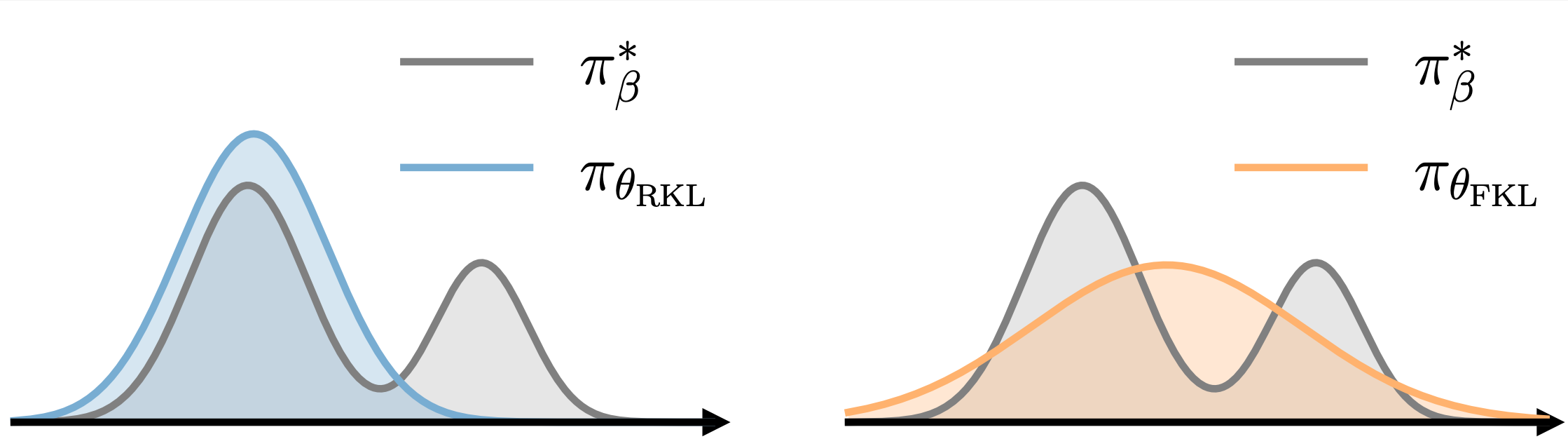
EXO essentially minimizes the reverse KL between the empirical distributions defined by the policy and the reward. As a comparison, DPO corresponds to minimizing the forward KL. The above figure illustrates the distinct behavior of policies obtained by minimizing (a) the reverse KL and (b) the forward KL.
python >= 3.9.0
transformers >= 4.34.1
deepspeed >= 0.11.2
It is recommended to precomplie the required extensions when installing deepspeed (For more details refer to the installation guideline of deepspeed):
DS_BUILD_FUSED_ADAM=1 DS_BUILD_TRANSFORMER=1 DS_BUILD_TRANSFORMER_INFERENCE=1 pip install deepspeed
EXO supports the settings of (i) training directly on the preference data and (ii) training with the supervision provided by a learned reward model. The pipeline is comprised of the following stages:
Supervised fine-tuning (SFT) stage:
train_sft.sh.inference_sft.sh.Reward Model (RM) stage:
train_rm.sh.inference_rm.sh.Alignment stage:
train_exo.sh.inference_sft.sh.To train on a custom dataset, one should create a dataset class by inheriting from the base class PromptRawDataset located in src/utils/data/raw_datasets.py. Then, simply add a few lines of code to the get_raw_dataset method in src/utils/data/data_utils.py to utilize the custom dataset.
In the SFT stage, the LM is fine-tuned with supervised MLE on the data that is supposed to be obtained from the same distribution as the preference data. One can simply finetune on the chosen texts of the preference data if no such data is available.
{
  "prompt": "prompt",
  "chosen": "chosen text"
}
# Any causal HuggingFace model (`AutoModelForCausalLM` class)
INIT_MODEL_NAME=custom-model
# local path to the checkpoint of the initial model
INIT_MODEL_PATH=/local/path/to/init/model
# type of the model
MODEL_TYPE=sft
# name of the sft data, default format: "name/sft", should be added to `src/utils/data/data_utils.py`
DATA_NAME=custom-data/sft
# local path to the sft data
DATA_PATH=/local/path/to/sft/data

bash exp/custom_exp/train_sft.sh $INIT_MODEL_NAME $INIT_MODEL_PATH $MODEL_TYPE $DATA_NAME $DATA_PATH
Other hyperparameters for training can be specified in exp/custom_exp/train_sft.sh. The SFT model will be saved in models/custom-model_custom-data/sft.
(Optional but recommended) To utilize supervision of the reward model for alignment, one need to sample from the SFT model and later use the reward model to score the inference results.
# comma separated device ids
DEVICE_IDS=0,1,2,3
# data name and data path concatenated by colon
DATA_NAME_PATH=custom_data/sft:/local/path/to/sft/data
# local path to SFT model
MODEL_PATH=models/custom-model_custom-data/sft


# inference on train set
SPLIT=train
bash exp/custom_exp/inference_sft.sh $DEVICE_IDS $DATA_NAME_PATH $SPLIT $MODEL_PATH

# inference on test set
SPLIT=test
bash exp/custom_exp/inference_sft.sh $DEVICE_IDS $DATA_NAME_PATH $SPLIT $MODEL_PATH
Other hyperparameters for decoding can be specified in exp/custom_exp/inference_sft.sh. The inference results will be saved under the same root directory of the SFT data.
{
  "prompt": "prompt",
  "completions": ["text A", "text B", ...]
}
(Optional but recommended) In order to utilize the continuous preference signal, one can train a reward model on the preference data to predict the human preference.
{
  "prompt": "prompt",
  "chosen": "chosen text",
  "rejected": "rejected text"
}
# Any HuggingFace model (`AutoModel` class), use the last position of the sequence for prediction
INIT_MODEL_NAME=custom-model
# local path to the checkpoint of the initial model
INIT_MODEL_PATH=/local/path/to/init/model
# type of the model
MODEL_TYPE=rm
# name of the preference data, default format: "name/pref", should be added to `src/utils/data/data_utils.py`
DATA_NAME=custom-data/pref
# local path to the pref data
DATA_PATH=/local/path/to/pref/data

bash exp/custom_exp/train_rm.sh $INIT_MODEL_NAME $INIT_MODEL_PATH $MODEL_TYPE $DATA_NAME $DATA_PATH
Other hyperparameters for training can be specified in exp/custom_exp/train_rm.sh. The SFT model will be saved in models/custom-model_custom-data/rm.
(Optional but recommended) Then use the reward model to score the SFT generated data with continuous reward.
# comma separated device ids
DEVICE_IDS=0,1,2,3
# local path to the sft generated data
DATA_PATH=/local/path/to/sft/gen/data
# local path to the reward model
MODEL_PATH=models/custom-model_custom-data/rm

# inference on train set
SPLIT=train
bash exp/custom_exp/inference_rm.sh $DEVICE_IDS $DATA_NAME_PATH $SPLIT $MODEL_PATH

# inference on test set
SPLIT=test
bash exp/custom_exp/inference_rm.sh $DEVICE_IDS $DATA_NAME_PATH $SPLIT $MODEL_PATH
Other hyperparameters for inference can be specified in exp/custom_exp/inference_rm.sh. The inference results will be saved under the same root directory of the SFT data.
{
  "prompt": "prompt",
  "completions": ["text A", "text B", ...],
  "rewards": [reward A, reward B, ...]
}
In the alignment stage, the SFT model is fine-tuned to align with human preferences by training on either the preference data or the RM labeled data.
Before training, the preference dataset should be converted to the same format as the RM labeled data:
python src/utils/data/pref_to_rw.py /local/path/to/preference/data
To train the policy using the EXO algorithm, run the following commands:
# Any causal HuggingFace model (`AutoModelForCausalLM` class)
INIT_MODEL_NAME=custom-model
# local path to the SFT model
INIT_MODEL_PATH=/local/path/to/sft/model
# type of the model
MODEL_TYPE=align
# name of the reward data, default format: "name/rw", should be added to `src/utils/data/data_utils.py`
DATA_NAME=custom-data/rw
# local path to the reward data or preference data
DATA_PATH=/local/path/to/rw/data
# supported loss type: exo-pref / exo-rw / dpo-pref / dpo-rw
LOSS_TYPE="exo-pref"
# number of contrastive samples, should not be greater than the number of completion candidates in the dataset.
NUM_CONTRASTIVE=2


bash exp/custom_exp/train_exo.sh $INIT_MODEL_NAME $INIT_MODEL_PATH $MODEL_TYPE $DATA_NAME $DATA_PATH $LOSS_TYPE $NUM_CONTRASTIVE
Other hyperparameters for training can be specified in exp/custom_exp/train_exo.sh.
To train the policy using the DPO algorithm, simply change the LOSS_TYPE to either dpo-pref or dpo-rw.
We also provide guidelines to reproduce the experiments on the three public datasets: IMDB, TL;DR and Anthropic-HH to facilitate future study:
@article{Ji2024TowardsExact,
  title={Towards Efficient Exact Optimization of Language Model Alignment},
  author={Haozhe Ji, Cheng Lu, Yilin Niu, Pei Ke, Hongning Wang, Jun Zhu, Jie Tang, Minlie Huang},
  year={2024},
  journal={The Forty-first International Conference on Machine Learning},
  url={https://arxiv.org/abs/2402.00856}
}
Please kindly cite our work if you find the paper or this repository useful :)
ICML 2024 - Official Repository for EXO: Towards Efficient Exact Optimization of Language Model Alignment
See the codeThis is the official pytorch implementation of the EXO algorithm for efficient exact optimization of aligning language models (LMs) with human preferences, as described in our ICML 2024 paper Towards Efficient Exact Optimization of Language Model Alignment.
EXO essentially minimizes the reverse KL between the empirical distributions defined by the policy and the reward. As a comparison, DPO corresponds to minimizing the forward KL. The above figure illustrates the distinct behavior of policies obtained by minimizing (a) the reverse KL and (b) the forward KL.
python >= 3.9.0
transformers >= 4.34.1
deepspeed >= 0.11.2
It is recommended to precomplie the required extensions when installing deepspeed (For more details refer to the installation guideline of deepspeed):
DS_BUILD_FUSED_ADAM=1 DS_BUILD_TRANSFORMER=1 DS_BUILD_TRANSFORMER_INFERENCE=1 pip install deepspeed
EXO supports the settings of (i) training directly on the preference data and (ii) training with the supervision provided by a learned reward model. The pipeline is comprised of the following stages:
Supervised fine-tuning (SFT) stage:
train_sft.sh.inference_sft.sh.Reward Model (RM) stage:
train_rm.sh.inference_rm.sh.Alignment stage:
train_exo.sh.inference_sft.sh.To train on a custom dataset, one should create a dataset class by inheriting from the base class PromptRawDataset located in src/utils/data/raw_datasets.py. Then, simply add a few lines of code to the get_raw_dataset method in src/utils/data/data_utils.py to utilize the custom dataset.
In the SFT stage, the LM is fine-tuned with supervised MLE on the data that is supposed to be obtained from the same distribution as the preference data. One can simply finetune on the chosen texts of the preference data if no such data is available.
{
  "prompt": "prompt",
  "chosen": "chosen text"
}
# Any causal HuggingFace model (`AutoModelForCausalLM` class)
INIT_MODEL_NAME=custom-model
# local path to the checkpoint of the initial model
INIT_MODEL_PATH=/local/path/to/init/model
# type of the model
MODEL_TYPE=sft
# name of the sft data, default format: "name/sft", should be added to `src/utils/data/data_utils.py`
DATA_NAME=custom-data/sft
# local path to the sft data
DATA_PATH=/local/path/to/sft/data

bash exp/custom_exp/train_sft.sh $INIT_MODEL_NAME $INIT_MODEL_PATH $MODEL_TYPE $DATA_NAME $DATA_PATH
Other hyperparameters for training can be specified in exp/custom_exp/train_sft.sh. The SFT model will be saved in models/custom-model_custom-data/sft.
(Optional but recommended) To utilize supervision of the reward model for alignment, one need to sample from the SFT model and later use the reward model to score the inference results.
# comma separated device ids
DEVICE_IDS=0,1,2,3
# data name and data path concatenated by colon
DATA_NAME_PATH=custom_data/sft:/local/path/to/sft/data
# local path to SFT model
MODEL_PATH=models/custom-model_custom-data/sft


# inference on train set
SPLIT=train
bash exp/custom_exp/inference_sft.sh $DEVICE_IDS $DATA_NAME_PATH $SPLIT $MODEL_PATH

# inference on test set
SPLIT=test
bash exp/custom_exp/inference_sft.sh $DEVICE_IDS $DATA_NAME_PATH $SPLIT $MODEL_PATH
Other hyperparameters for decoding can be specified in exp/custom_exp/inference_sft.sh. The inference results will be saved under the same root directory of the SFT data.
{
  "prompt": "prompt",
  "completions": ["text A", "text B", ...]
}
(Optional but recommended) In order to utilize the continuous preference signal, one can train a reward model on the preference data to predict the human preference.
{
  "prompt": "prompt",
  "chosen": "chosen text",
  "rejected": "rejected text"
}
# Any HuggingFace model (`AutoModel` class), use the last position of the sequence for prediction
INIT_MODEL_NAME=custom-model
# local path to the checkpoint of the initial model
INIT_MODEL_PATH=/local/path/to/init/model
# type of the model
MODEL_TYPE=rm
# name of the preference data, default format: "name/pref", should be added to `src/utils/data/data_utils.py`
DATA_NAME=custom-data/pref
# local path to the pref data
DATA_PATH=/local/path/to/pref/data

bash exp/custom_exp/train_rm.sh $INIT_MODEL_NAME $INIT_MODEL_PATH $MODEL_TYPE $DATA_NAME $DATA_PATH
Other hyperparameters for training can be specified in exp/custom_exp/train_rm.sh. The SFT model will be saved in models/custom-model_custom-data/rm.
(Optional but recommended) Then use the reward model to score the SFT generated data with continuous reward.
# comma separated device ids
DEVICE_IDS=0,1,2,3
# local path to the sft generated data
DATA_PATH=/local/path/to/sft/gen/data
# local path to the reward model
MODEL_PATH=models/custom-model_custom-data/rm

# inference on train set
SPLIT=train
bash exp/custom_exp/inference_rm.sh $DEVICE_IDS $DATA_NAME_PATH $SPLIT $MODEL_PATH

# inference on test set
SPLIT=test
bash exp/custom_exp/inference_rm.sh $DEVICE_IDS $DATA_NAME_PATH $SPLIT $MODEL_PATH
Other hyperparameters for inference can be specified in exp/custom_exp/inference_rm.sh. The inference results will be saved under the same root directory of the SFT data.
{
  "prompt": "prompt",
  "completions": ["text A", "text B", ...],
  "rewards": [reward A, reward B, ...]
}
In the alignment stage, the SFT model is fine-tuned to align with human preferences by training on either the preference data or the RM labeled data.
Before training, the preference dataset should be converted to the same format as the RM labeled data:
python src/utils/data/pref_to_rw.py /local/path/to/preference/data
To train the policy using the EXO algorithm, run the following commands:
# Any causal HuggingFace model (`AutoModelForCausalLM` class)
INIT_MODEL_NAME=custom-model
# local path to the SFT model
INIT_MODEL_PATH=/local/path/to/sft/model
# type of the model
MODEL_TYPE=align
# name of the reward data, default format: "name/rw", should be added to `src/utils/data/data_utils.py`
DATA_NAME=custom-data/rw
# local path to the reward data or preference data
DATA_PATH=/local/path/to/rw/data
# supported loss type: exo-pref / exo-rw / dpo-pref / dpo-rw
LOSS_TYPE="exo-pref"
# number of contrastive samples, should not be greater than the number of completion candidates in the dataset.
NUM_CONTRASTIVE=2


bash exp/custom_exp/train_exo.sh $INIT_MODEL_NAME $INIT_MODEL_PATH $MODEL_TYPE $DATA_NAME $DATA_PATH $LOSS_TYPE $NUM_CONTRASTIVE
Other hyperparameters for training can be specified in exp/custom_exp/train_exo.sh.
To train the policy using the DPO algorithm, simply change the LOSS_TYPE to either dpo-pref or dpo-rw.
We also provide guidelines to reproduce the experiments on the three public datasets: IMDB, TL;DR and Anthropic-HH to facilitate future study:
@article{Ji2024TowardsExact,
  title={Towards Efficient Exact Optimization of Language Model Alignment},
  author={Haozhe Ji, Cheng Lu, Yilin Niu, Pei Ke, Hongning Wang, Jun Zhu, Jie Tang, Minlie Huang},
  year={2024},
  journal={The Forty-first International Conference on Machine Learning},
  url={https://arxiv.org/abs/2402.00856}
}
Please kindly cite our work if you find the paper or this repository useful :)



