
Turn any document or a whole zip into an interactive knowledge graph, using a self-hosted Qwen3.6-35B-A3B-MTP on a single NVIDIA L4
See the codeREADME
Knowledge Graph Extractor
Turn any document, URL, or a zip of files into an interactive knowledge graph, using a self-hosted LLM (Qwen3.6-35B-A3B-MTP) on a single NVIDIA L4.
Live demo: https://hanxiao.io/knowledge-graph
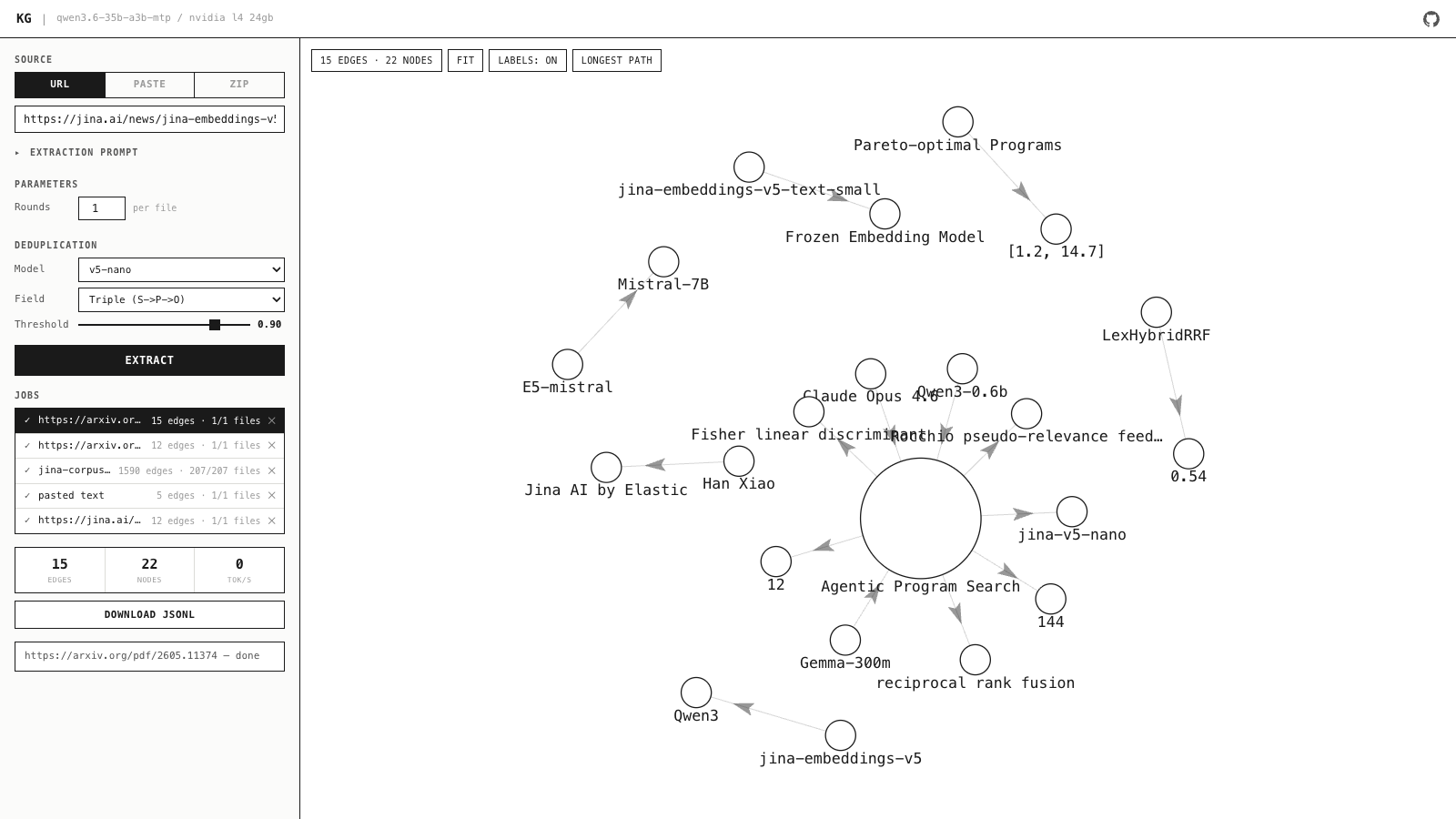
Each extracted fact is one graph edge: a (subject) --[predicate]--> (object)
triple plus a title, description, evidence span, confidence, tags, and source
file. Facts stream into a force-directed graph; hover an edge for the full card.
How it works
- Input — paste text, a URL (fetched to markdown via Jina Reader), or a
.zip(txt, md, html, pdf, docx, json, csv, code...). Oversized docs are chunked (not truncated) so the full text is processed. - Extract — the LLM emits atomic
(subject, predicate, object)triples. The prompt forces canonical entity/value subjects and objects so nodes connect instead of becoming prose dead-ends. - Dedup (on by default) — semantic dedup via jina-embeddings-v5-text-nano on CPU, across rounds and across files.
- Visualize — every unique fact is one edge; node names are normalized so variants merge. Download the result as JSONL.
Job queue
The L4 has one llama slot, so jobs run one at a time via a single-slot scheduler:
a new submission preempts the running job, which is persisted and auto-resumes
from where it left off when the slot frees. Jobs (meta + facts.jsonl + input)
persist under data/jobs/ so the list, JSONL reload, and resume survive
restarts.
Stack
- llama-server — llama.cpp with CUDA, serves the model over an OpenAI-compatible API (port 8080).
- app — FastAPI: extraction + scheduler + CPU dedup + UI (port 3000).
Setup
Single NVIDIA L4 24GB GPU (e.g. GCP g2-standard-8). Needs Docker + the NVIDIA
Container Toolkit.
git clone https://github.com/hanxiao/knowledge-graph-extractor.git
cd knowledge-graph-extractor

cp .env.example .env          # add your JINA_API_KEY (https://jina.ai/api-key)
bash scripts/setup.sh         # downloads the model (~17GB) and starts both services
Then open http://<your-ip>:3000.
Manual model download + run:
mkdir -p models
pip install -q huggingface-hub
python3 -c "from huggingface_hub import hf_hub_download; \
hf_hub_download('unsloth/Qwen3.6-35B-A3B-MTP-GGUF', \
'Qwen3.6-35B-A3B-UD-Q3_K_XL.gguf', local_dir='models')"
docker compose up -d --build
Configuration
llama-server flags live in docker-compose.yml. Key ones:
| Flag | Value | Why |
|---|---|---|
--ctx-size | 16384 | Input capacity vs VRAM |
--spec-type draft-mtp | — | MTP speculative decoding (large speedup on L4) |
--cache-reuse | 256 | KV cache reuse across rounds on the same doc |
--flash-attn | 1 | Flash attention |
--n-predict | 8192 | Max generation length |
UI parameters: rounds per doc, dedup model (on/off), dedup field, dedup
threshold. Benchmark notes on quantization and decoding live in
autoresearch/.
Layout
app.py             FastAPI app: extraction + UI + API
jobs.py            single-slot job scheduler (queue/preempt/backfill/persist)
Dockerfile         app container
docker-compose.yml both services + data volume
scripts/setup.sh   one-shot GCP L4 setup
autoresearch/      throughput benchmark notes
data/              persisted jobs (gitignored)
models/            model files (gitignored)
License
MIT
Contributors

67 commits
Similar repos


Languages
Python
94.4%
Jinja
3.9%
Shell
1.4%
Turn any document or a whole zip into an interactive knowledge graph, using a self-hosted Qwen3.6-35B-A3B-MTP on a single NVIDIA L4
See the codeREADME
Knowledge Graph Extractor
Turn any document, URL, or a zip of files into an interactive knowledge graph, using a self-hosted LLM (Qwen3.6-35B-A3B-MTP) on a single NVIDIA L4.
Live demo: https://hanxiao.io/knowledge-graph
Each extracted fact is one graph edge: a (subject) --[predicate]--> (object)
triple plus a title, description, evidence span, confidence, tags, and source
file. Facts stream into a force-directed graph; hover an edge for the full card.
How it works
- Input — paste text, a URL (fetched to markdown via Jina Reader), or a
.zip(txt, md, html, pdf, docx, json, csv, code...). Oversized docs are chunked (not truncated) so the full text is processed. - Extract — the LLM emits atomic
(subject, predicate, object)triples. The prompt forces canonical entity/value subjects and objects so nodes connect instead of becoming prose dead-ends. - Dedup (on by default) — semantic dedup via jina-embeddings-v5-text-nano on CPU, across rounds and across files.
- Visualize — every unique fact is one edge; node names are normalized so variants merge. Download the result as JSONL.
Job queue
The L4 has one llama slot, so jobs run one at a time via a single-slot scheduler:
a new submission preempts the running job, which is persisted and auto-resumes
from where it left off when the slot frees. Jobs (meta + facts.jsonl + input)
persist under data/jobs/ so the list, JSONL reload, and resume survive
restarts.
Stack
- llama-server — llama.cpp with CUDA, serves the model over an OpenAI-compatible API (port 8080).
- app — FastAPI: extraction + scheduler + CPU dedup + UI (port 3000).
Setup
Single NVIDIA L4 24GB GPU (e.g. GCP g2-standard-8). Needs Docker + the NVIDIA
Container Toolkit.
git clone https://github.com/hanxiao/knowledge-graph-extractor.git
cd knowledge-graph-extractor

cp .env.example .env          # add your JINA_API_KEY (https://jina.ai/api-key)
bash scripts/setup.sh         # downloads the model (~17GB) and starts both services
Then open http://<your-ip>:3000.
Manual model download + run:
mkdir -p models
pip install -q huggingface-hub
python3 -c "from huggingface_hub import hf_hub_download; \
hf_hub_download('unsloth/Qwen3.6-35B-A3B-MTP-GGUF', \
'Qwen3.6-35B-A3B-UD-Q3_K_XL.gguf', local_dir='models')"
docker compose up -d --build
Configuration
llama-server flags live in docker-compose.yml. Key ones:
| Flag | Value | Why |
|---|---|---|
--ctx-size | 16384 | Input capacity vs VRAM |
--spec-type draft-mtp | — | MTP speculative decoding (large speedup on L4) |
--cache-reuse | 256 | KV cache reuse across rounds on the same doc |
--flash-attn | 1 | Flash attention |
--n-predict | 8192 | Max generation length |
UI parameters: rounds per doc, dedup model (on/off), dedup field, dedup
threshold. Benchmark notes on quantization and decoding live in
autoresearch/.
Layout
app.py             FastAPI app: extraction + UI + API
jobs.py            single-slot job scheduler (queue/preempt/backfill/persist)
Dockerfile         app container
docker-compose.yml both services + data volume
scripts/setup.sh   one-shot GCP L4 setup
autoresearch/      throughput benchmark notes
data/              persisted jobs (gitignored)
models/            model files (gitignored)
License
MIT
Similar repos
Contributors
67 commits
Languages
Python
94.4%
Jinja
3.9%
Shell
1.4%