
An unofficial rules-compliant browser based version of Arkham Horror: The Card Game. Not produced, endorsed, or supported by, or affiliated with Fantasy Flight Games.
429
stars
11,100
commits
Haskell
primary language
Sep 12, 2026
updated
README
Arkham Horror LCG
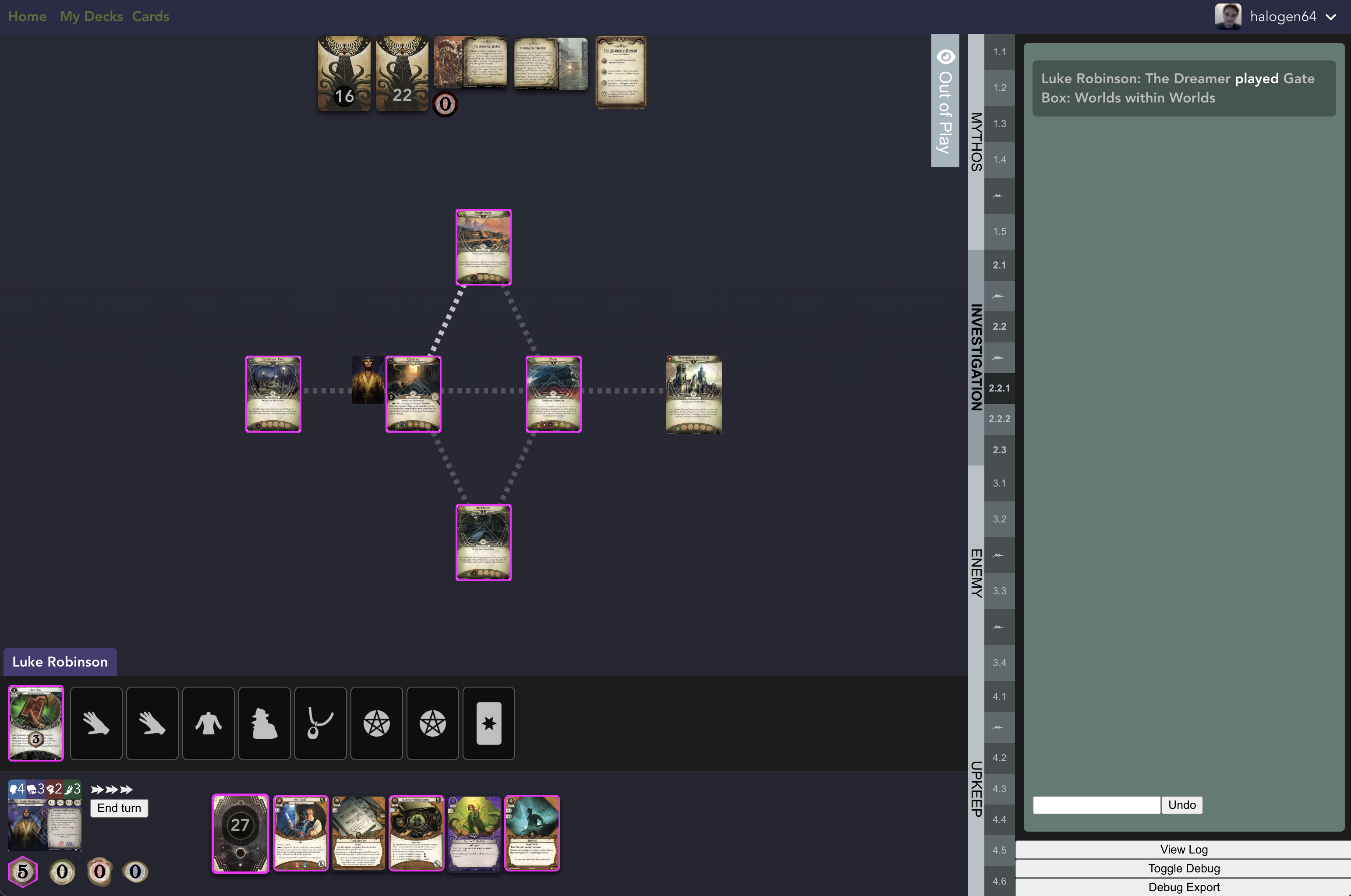
The goal of this project is to implement a web version of Arkham Horror with as many of the rules implemented as possible.
Warning
This is very much a work in progress. Things may break at any time, but if they do, please file a bug.
Features
- Multiplayer up to 4 players
- Multiplayer solitaire
- Tarot Readings
- Deck import from ArkhamDB and arkham.build
Finished Content
Player Cards
- All player cards before 2026
Campaigns
- Night of the Zealot
- Return to Night of the Zealot
- The Dunwich Legacy
- Return to The Dunwich Legacy
- The Path To Carcosa
- Return to The Path To Carcosa
- The Forgotten Age
- Return to The Forgotten Age
- The Circle Undone
- Return to The Circle Undone
- The Dream-Eaters
- The Innsmouth Conspiracy
- Edge of the Earth
- The Scarlet Keys
- The Feast of Hemlock Vale
- Brethren of Ash
- The Drowned City (Beta)
Side Stories
- The Curse of the Rougarou
- Carnevale of Horrors
- The Labyrinths of Lunacy (Beta)
- Murder at the Excelsior Hotel
- Guardians of the Abyss (Beta)
- The Blob That Ate Everything
- War of the Outer Gods (Beta)
- Machinations Through Time (Beta)
- Fortune and Folly
- The Midwinter Gala
- Film Fatale
Challenge Scenarios
- Read or Die
- All or Nothing
- Bad Blood
- By the Book
- Red Tide Rising
- Laid to Rest
- Relics of the Past
- Enthralling Encore
I just want to try this out on my computer
Linux Users
Install Docker, then run:
curl -fsSL https://raw.githubusercontent.com/halogenandtoast/ArkhamHorror/main/install.sh | bash
This creates an arkham-horror/ directory, downloads the required files, generates
a database password, and starts the app. Open http://localhost:3000 when it's done.
The script will ask if you want to download game images (~2.9 GB). If you skip this step, the app loads images from the CDN automatically — no extra setup needed.
Windows Users
- Install Docker, specifically the version of Docker known as Docker Desktop.
- Install a "terminal only" version of Ubuntu that can be run inside of Windows, for which the easiest available method is to install from the Microsoft Store. You may choose any Linux distro other than Ubuntu if you know what you are doing.
- In Docker Desktop, go to
Settings > Resources > WSL Integrationand enable integration with Ubuntu Linux distro that you installed in the previous step. This allows us to access Docker from inside Ubuntu. - Start the Ubuntu terminal and run:
curl -fsSL https://raw.githubusercontent.com/halogenandtoast/ArkhamHorror/main/install.sh | bash - The app should start being served at http://localhost:3000, if nothing went wrong.
- Every time you want to start the app, you can use
docker compose up - If you get around to figuring out how to use Docker Desktop, you could also press buttons to start and stop the app instead of typing commands to run it.
Things that can go wrong
If the app doesnt start at all, or it starts but you cannot create a user account, or any other issue due to Murphy's Law, you have to check the logs of the Docker container to find the error messages. In Docker Desktop, you can access this by clicking on the arkham-horror "compose stack" found in the Containers list.
Possible problems:
| Problem | Solution |
|---|---|
Error involving docker-credential-desktop.exe | Try restarting your computer |
When clicking on the "REGISTER" button, the error password authentication failed is logged | Stop the app using docker compose down and then refetch the app using docker compose pull |
Manual setup (alternative)
If you prefer not to use the install script, you'll need four files:
mkdir -p arkham-horror/config arkham-horror/scripts arkham-horror/frontend/public/img
cd arkham-horror
curl -fsSL https://raw.githubusercontent.com/halogenandtoast/ArkhamHorror/main/docker-compose.yml -o docker-compose.yml
curl -fsSL https://raw.githubusercontent.com/halogenandtoast/ArkhamHorror/main/setup.sql -o setup.sql
curl -fsSL https://raw.githubusercontent.com/halogenandtoast/ArkhamHorror/main/scripts/fetch-assets.sh -o scripts/fetch-assets.sh
# Generate a strong password
openssl rand -base64 32 > config/postgres_password.txt
docker compose up -d
The app automatically detects whether local images are present:
- No local images (default after install) → images load from the CDN automatically
- Local images present (after running the fetch service) → images served locally
To fetch images locally, use the fetch-images Docker service.
Once fetched, restart with docker compose restart web and the app will switch to local images.
# English only (~1.3 GB) — portraits, tokens, icons, card images
docker compose --profile fetch-images run --rm fetch-images en

# English + a specific language (recommended for non-English play)
docker compose --profile fetch-images run --rm fetch-images en+fr   # French
docker compose --profile fetch-images run --rm fetch-images en+es   # Spanish
docker compose --profile fetch-images run --rm fetch-images en+ita  # Italian
docker compose --profile fetch-images run --rm fetch-images en+ko   # Korean
docker compose --profile fetch-images run --rm fetch-images en+zh   # Chinese

# A single language's card translations only (English assets still load from CDN)
docker compose --profile fetch-images run --rm fetch-images fr

# Everything (~2.9 GB)
docker compose --profile fetch-images run --rm fetch-images all
Images are stored in frontend/public/img/ and mounted into the container.
After fetching, run docker compose restart web to pick them up.
To switch back to CDN at any time, add this to the web service environment in docker-compose.yml:
    environment:
      - ASSET_HOST=https://assets.arkhamhorror.app
Updating
Use the upgrade script. It auto-detects your install type (Docker or git checkout), refreshes control files, pulls the latest images, applies database migrations, recreates the containers, and re-syncs local images if you have them.
Run it from anywhere:
curl -fsSL https://raw.githubusercontent.com/halogenandtoast/ArkhamHorror/main/upgrade.sh | bash
Or, from inside your install directory (or a git checkout):
./upgrade.sh
Options (environment variables):
| Variable | Purpose |
|---|---|
ARKHAM_INSTALL_DIR | Install directory to upgrade (default: arkham-horror). Set this if you installed somewhere else. |
ARKHAM_IMAGE_TARGET | Force an image-sync target (e.g. en, en+fr, all) instead of auto-detecting from what's already on disk. |
# Upgrade an install in a custom directory
ARKHAM_INSTALL_DIR=~/games/arkham curl -fsSL https://raw.githubusercontent.com/halogenandtoast/ArkhamHorror/main/upgrade.sh | bash

# Force re-syncing English + French images
ARKHAM_IMAGE_TARGET=en+fr ./upgrade.sh
Local dev
Dependencies
- Stack for GHC
- Node
- Postgresql
- Sqitch (optional: for migrations)
Local Setup
Running via Docker
The image is setup to use an external database passed via the DATABASE_URL environment variable. Follow the steps below to setup the database and then run the following commands
docker build -t arkham .
docker run -t -i -e PORT=3000 -e DATABASE_URL="postgres://docker:docker@host.docker.internal:5432/arkham-horror-backend" -p 3000:3000 arkham
Backend
Run stack setup in the backend directory, then run stack build --fast (note: this will still take a long time)
Frontend
Run npm install in the frontend directory
Images
Image assets (~2.9 GB) are not stored in the git repository. They are hosted on CloudFront and the app loads them from the CDN by default in both development and production — no extra setup needed.
If you need local copies (e.g. for offline development), use the fetch script
(requires aws CLI and curl):
make fetch-images     # Everything (~2.9 GB)
make fetch-cards      # English card images only (~755 MB)

# Or use the script directly:
./scripts/fetch-assets.sh en        # All English/static images (~1.3 GB)
./scripts/fetch-assets.sh en+fr     # English + French (recommended for French play)
./scripts/fetch-assets.sh en+es     # English + Spanish
./scripts/fetch-assets.sh en+ita    # English + Italian
./scripts/fetch-assets.sh en+ko     # English + Korean
./scripts/fetch-assets.sh en+zh     # English + Chinese
./scripts/fetch-assets.sh fr        # French card translations only
If you only have Docker (no local AWS CLI), use the Docker-based targets instead:
make fetch-images-docker    # Everything via Docker (~2.9 GB)
make fetch-cards-docker     # English card images only via Docker

# Or run directly with the same targets as above:
docker compose --profile fetch-images run --rm fetch-images en
docker compose --profile fetch-images run --rm fetch-images en+fr
docker compose --profile fetch-images run --rm fetch-images fr
To use local images instead of CDN in local dev, create frontend/.env.development.local:
VITE_ASSET_HOST=
To revert to CDN, remove the file or set VITE_ASSET_HOST=https://assets.arkhamhorror.app.
If you add new images, sync them to S3 and regenerate the manifest:
make sync-and-manifest
To install a git hook that warns if you forget to update the manifest:
make install-hooks
Database
Create the local database:
createdb arkham-horror-backend
cd migrations
sqitch deploy db:pg:arkham-horror-backend
If you do not have sqitch you can cat migrations/deploy/* to see the create
table statements and run them manually, you will want to specifically run the
users and arkham_games create table statements first.
Running the server
- start the backend with
cd backend && make api.watch - start the frontend with
cd frontend && npm run dev
Homebrew content
Want to build your own campaign, scenario, or custom content? See Writing homebrew content — a hands-on guide to adding cards, campaigns, traits, actions, tokens, and more without touching the base game.
Copyright Disclaimer
The information presented in this app about Arkham Horror: The Card Game™, both textual and graphical, is © Fantasy Flight Games 2024. This app is a fan project and is not produced, endorsed, or supported by, or affiliated with Fantasy Flight Games.
All artwork and illustrations are the intellectual property of their respective creators. All Arkham Horror: The Card Game™ images and graphics are copyrighted by Fantasy Flight Games.
Contributors
(top 30 of 47)


Similar repos


Languages
Haskell
84.3%
Vue
10.4%
TypeScript
3.0%
An unofficial rules-compliant browser based version of Arkham Horror: The Card Game. Not produced, endorsed, or supported by, or affiliated with Fantasy Flight Games.
429
stars
11,100
commits
Haskell
primary language
Sep 12, 2026
updated
README
Arkham Horror LCG
The goal of this project is to implement a web version of Arkham Horror with as many of the rules implemented as possible.
Warning
This is very much a work in progress. Things may break at any time, but if they do, please file a bug.
Features
- Multiplayer up to 4 players
- Multiplayer solitaire
- Tarot Readings
- Deck import from ArkhamDB and arkham.build
Finished Content
Player Cards
- All player cards before 2026
Campaigns
- Night of the Zealot
- Return to Night of the Zealot
- The Dunwich Legacy
- Return to The Dunwich Legacy
- The Path To Carcosa
- Return to The Path To Carcosa
- The Forgotten Age
- Return to The Forgotten Age
- The Circle Undone
- Return to The Circle Undone
- The Dream-Eaters
- The Innsmouth Conspiracy
- Edge of the Earth
- The Scarlet Keys
- The Feast of Hemlock Vale
- Brethren of Ash
- The Drowned City (Beta)
Side Stories
- The Curse of the Rougarou
- Carnevale of Horrors
- The Labyrinths of Lunacy (Beta)
- Murder at the Excelsior Hotel
- Guardians of the Abyss (Beta)
- The Blob That Ate Everything
- War of the Outer Gods (Beta)
- Machinations Through Time (Beta)
- Fortune and Folly
- The Midwinter Gala
- Film Fatale
Challenge Scenarios
- Read or Die
- All or Nothing
- Bad Blood
- By the Book
- Red Tide Rising
- Laid to Rest
- Relics of the Past
- Enthralling Encore
I just want to try this out on my computer
Linux Users
Install Docker, then run:
curl -fsSL https://raw.githubusercontent.com/halogenandtoast/ArkhamHorror/main/install.sh | bash
This creates an arkham-horror/ directory, downloads the required files, generates
a database password, and starts the app. Open http://localhost:3000 when it's done.
The script will ask if you want to download game images (~2.9 GB). If you skip this step, the app loads images from the CDN automatically — no extra setup needed.
Windows Users
- Install Docker, specifically the version of Docker known as Docker Desktop.
- Install a "terminal only" version of Ubuntu that can be run inside of Windows, for which the easiest available method is to install from the Microsoft Store. You may choose any Linux distro other than Ubuntu if you know what you are doing.
- In Docker Desktop, go to
Settings > Resources > WSL Integrationand enable integration with Ubuntu Linux distro that you installed in the previous step. This allows us to access Docker from inside Ubuntu. - Start the Ubuntu terminal and run:
curl -fsSL https://raw.githubusercontent.com/halogenandtoast/ArkhamHorror/main/install.sh | bash - The app should start being served at http://localhost:3000, if nothing went wrong.
- Every time you want to start the app, you can use
docker compose up - If you get around to figuring out how to use Docker Desktop, you could also press buttons to start and stop the app instead of typing commands to run it.
Things that can go wrong
If the app doesnt start at all, or it starts but you cannot create a user account, or any other issue due to Murphy's Law, you have to check the logs of the Docker container to find the error messages. In Docker Desktop, you can access this by clicking on the arkham-horror "compose stack" found in the Containers list.
Possible problems:
| Problem | Solution |
|---|---|
Error involving docker-credential-desktop.exe | Try restarting your computer |
When clicking on the "REGISTER" button, the error password authentication failed is logged | Stop the app using docker compose down and then refetch the app using docker compose pull |
Manual setup (alternative)
If you prefer not to use the install script, you'll need four files:
mkdir -p arkham-horror/config arkham-horror/scripts arkham-horror/frontend/public/img
cd arkham-horror
curl -fsSL https://raw.githubusercontent.com/halogenandtoast/ArkhamHorror/main/docker-compose.yml -o docker-compose.yml
curl -fsSL https://raw.githubusercontent.com/halogenandtoast/ArkhamHorror/main/setup.sql -o setup.sql
curl -fsSL https://raw.githubusercontent.com/halogenandtoast/ArkhamHorror/main/scripts/fetch-assets.sh -o scripts/fetch-assets.sh
# Generate a strong password
openssl rand -base64 32 > config/postgres_password.txt
docker compose up -d
The app automatically detects whether local images are present:
- No local images (default after install) → images load from the CDN automatically
- Local images present (after running the fetch service) → images served locally
To fetch images locally, use the fetch-images Docker service.
Once fetched, restart with docker compose restart web and the app will switch to local images.
# English only (~1.3 GB) — portraits, tokens, icons, card images
docker compose --profile fetch-images run --rm fetch-images en

# English + a specific language (recommended for non-English play)
docker compose --profile fetch-images run --rm fetch-images en+fr   # French
docker compose --profile fetch-images run --rm fetch-images en+es   # Spanish
docker compose --profile fetch-images run --rm fetch-images en+ita  # Italian
docker compose --profile fetch-images run --rm fetch-images en+ko   # Korean
docker compose --profile fetch-images run --rm fetch-images en+zh   # Chinese

# A single language's card translations only (English assets still load from CDN)
docker compose --profile fetch-images run --rm fetch-images fr

# Everything (~2.9 GB)
docker compose --profile fetch-images run --rm fetch-images all
Images are stored in frontend/public/img/ and mounted into the container.
After fetching, run docker compose restart web to pick them up.
To switch back to CDN at any time, add this to the web service environment in docker-compose.yml:
    environment:
      - ASSET_HOST=https://assets.arkhamhorror.app
Updating
Use the upgrade script. It auto-detects your install type (Docker or git checkout), refreshes control files, pulls the latest images, applies database migrations, recreates the containers, and re-syncs local images if you have them.
Run it from anywhere:
curl -fsSL https://raw.githubusercontent.com/halogenandtoast/ArkhamHorror/main/upgrade.sh | bash
Or, from inside your install directory (or a git checkout):
./upgrade.sh
Options (environment variables):
| Variable | Purpose |
|---|---|
ARKHAM_INSTALL_DIR | Install directory to upgrade (default: arkham-horror). Set this if you installed somewhere else. |
ARKHAM_IMAGE_TARGET | Force an image-sync target (e.g. en, en+fr, all) instead of auto-detecting from what's already on disk. |
# Upgrade an install in a custom directory
ARKHAM_INSTALL_DIR=~/games/arkham curl -fsSL https://raw.githubusercontent.com/halogenandtoast/ArkhamHorror/main/upgrade.sh | bash

# Force re-syncing English + French images
ARKHAM_IMAGE_TARGET=en+fr ./upgrade.sh
Local dev
Dependencies
- Stack for GHC
- Node
- Postgresql
- Sqitch (optional: for migrations)
Local Setup
Running via Docker
The image is setup to use an external database passed via the DATABASE_URL environment variable. Follow the steps below to setup the database and then run the following commands
docker build -t arkham .
docker run -t -i -e PORT=3000 -e DATABASE_URL="postgres://docker:docker@host.docker.internal:5432/arkham-horror-backend" -p 3000:3000 arkham
Backend
Run stack setup in the backend directory, then run stack build --fast (note: this will still take a long time)
Frontend
Run npm install in the frontend directory
Images
Image assets (~2.9 GB) are not stored in the git repository. They are hosted on CloudFront and the app loads them from the CDN by default in both development and production — no extra setup needed.
If you need local copies (e.g. for offline development), use the fetch script
(requires aws CLI and curl):
make fetch-images     # Everything (~2.9 GB)
make fetch-cards      # English card images only (~755 MB)

# Or use the script directly:
./scripts/fetch-assets.sh en        # All English/static images (~1.3 GB)
./scripts/fetch-assets.sh en+fr     # English + French (recommended for French play)
./scripts/fetch-assets.sh en+es     # English + Spanish
./scripts/fetch-assets.sh en+ita    # English + Italian
./scripts/fetch-assets.sh en+ko     # English + Korean
./scripts/fetch-assets.sh en+zh     # English + Chinese
./scripts/fetch-assets.sh fr        # French card translations only
If you only have Docker (no local AWS CLI), use the Docker-based targets instead:
make fetch-images-docker    # Everything via Docker (~2.9 GB)
make fetch-cards-docker     # English card images only via Docker

# Or run directly with the same targets as above:
docker compose --profile fetch-images run --rm fetch-images en
docker compose --profile fetch-images run --rm fetch-images en+fr
docker compose --profile fetch-images run --rm fetch-images fr
To use local images instead of CDN in local dev, create frontend/.env.development.local:
VITE_ASSET_HOST=
To revert to CDN, remove the file or set VITE_ASSET_HOST=https://assets.arkhamhorror.app.
If you add new images, sync them to S3 and regenerate the manifest:
make sync-and-manifest
To install a git hook that warns if you forget to update the manifest:
make install-hooks
Database
Create the local database:
createdb arkham-horror-backend
cd migrations
sqitch deploy db:pg:arkham-horror-backend
If you do not have sqitch you can cat migrations/deploy/* to see the create
table statements and run them manually, you will want to specifically run the
users and arkham_games create table statements first.
Running the server
- start the backend with
cd backend && make api.watch - start the frontend with
cd frontend && npm run dev
Homebrew content
Want to build your own campaign, scenario, or custom content? See Writing homebrew content — a hands-on guide to adding cards, campaigns, traits, actions, tokens, and more without touching the base game.
Copyright Disclaimer
The information presented in this app about Arkham Horror: The Card Game™, both textual and graphical, is © Fantasy Flight Games 2024. This app is a fan project and is not produced, endorsed, or supported by, or affiliated with Fantasy Flight Games.
All artwork and illustrations are the intellectual property of their respective creators. All Arkham Horror: The Card Game™ images and graphics are copyrighted by Fantasy Flight Games.
Similar repos
Contributors
(top 30 of 47)
Languages
Haskell
84.3%
Vue
10.4%
TypeScript
3.0%