
See what people are saying (1)
README
🇺🇸 English 🇨🇳 中文 🇷🇺 русский 🇮🇳 हिंदी 🇪🇸 español
ESP-MQTTunnel




A working PoC that turns an ESP32 into a $3 hardware proxy that tunnels traffic over MQTT. Because it connects out to a broker, you can bypass firewalls/censorship without open ports or public IP.
What it does
The ESP32 is the actual TCP endpoint. The Python script acts as a local proxy on the laptop. MQTT is just the pipe between them.
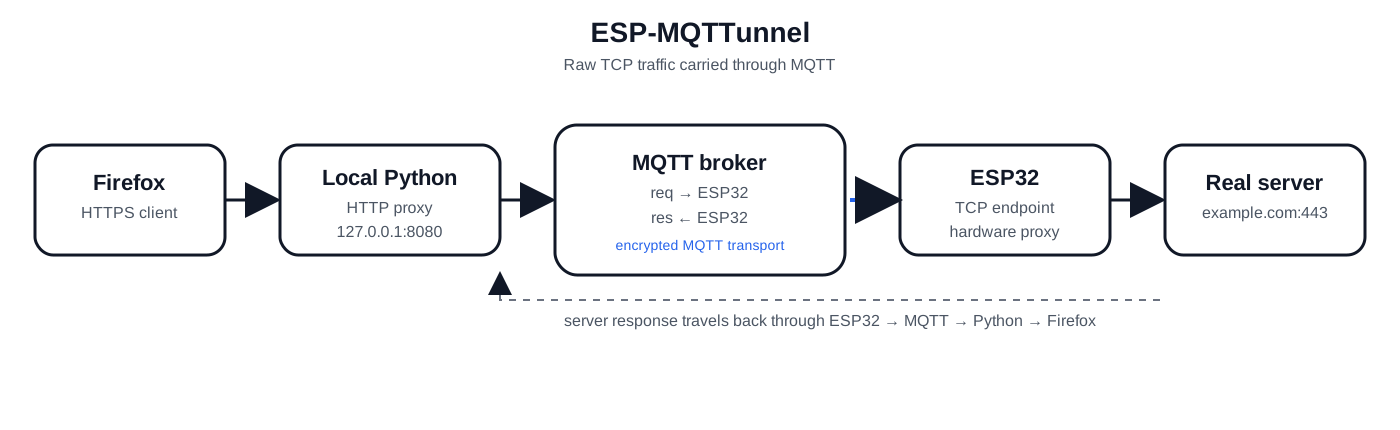 Tested with: Windows 10 Firefox / Python 3 <--> ESP32-S3 Dev Module <--> HiveMQ Cloud (free tier)
⚠️ The MQTT broker must be reachable from whichever country the laptop is in.
Confirmed working
- ✅ YouTube
- ✅ Gmail
- ✅ Twitter / X
- ✅ News sites
Known issues
- ❌ Instagram gets stuck
How it works
- The ESP32 connects to your Wi-Fi and subscribes to the MQTT
reqtopic. - The Python script runs a local HTTP proxy on the laptop (e.g.
127.0.0.1:8080). - Firefox is configured to use that local proxy.
- When Firefox requests a site, the Python proxy:
- Parses the
CONNECT host:portline. - Publishes an
openmessage over MQTT. - Streams the raw TLS bytes as
datamessages.
- Parses the
- The ESP32 receives those messages, opens a real TCP socket to the target host, and forwards the bytes.
- Responses from the real server come back through MQTT (
restopic), are received by the Python proxy, and written back to Firefox.
Notes
- All traffic is relayed raw — no TLS interception, no decryption.
- This is a PoC, not a hardened proxy. Expect rough edges under heavy parallel loads.
Limitations
The ESP32 has limited resources and no multithreading, so it can't handle too many simultaneous connections. Trying to load pages in multiple tabs will not work.
Images and video do work, but to save bandwidth (especially on a free MQTT account) and improve speed, consider using a content blocker such as Block Image Reloaded in Firefox.
Usage
1. MQTT broker
Create a free cluster at HiveMQ Cloud (or use any MQTT broker reachable from both devices).
Note the following:
- Hostname
- Port (typically
8883for TLS) - Username
- Password
2. Configure credentials
Edit both files and set your MQTT credentials:
server.py
broker = "your-cluster-id.s1.eu.hivemq.cloud"
user   = "your-username"
pw     = "your-password"
esp.ino
const char* ssid    = "your-wifi-ssid";
const char* pass    = "your-wifi-password";
const char* broker  = "your-cluster-id.s1.eu.hivemq.cloud";
const char* user    = "your-username";
const char* mpass   = "your-password";
3. Flash the ESP32
Open esp.ino in the Arduino IDE, select your ESP32 board, and upload. Open the Serial Monitor at 115200 baud to see activity. I prefer to use PuTTY so I can copy large amounts of output.
4. Run the python proxy server
pip install paho-mqtt
python server.py
You should see
Listening on 127.0.0.1:8080
Set Firefox HTTPS proxy to 127.0.0.1:8080
Press Ctrl+C to stop
5. Point Firefox at the proxy
In Firefox:
-
Go to Settings → General → Network Settings → Settings…
-
Select Manual proxy configuration
-
Set HTTPS Proxy to 127.0.0.1 port 8080
-
Make sure localhost and 127.0.0.1 are not in the "No proxy for" list
-
Click OK
Visit any HTTPS site. Traffic will relay through MQTT to the ESP32 and out to the real server.
MQTT topics
| Topic | Direction | Purpose |
|---|---|---|
| req | Python → ESP32 | Client-to-server bytes (open, data, close) |
| res | ESP32 → Python | Server-to-client bytes (data) |
Message format
All MQTT messages are JSON:
{
  "conn_id": 5,
  "host": "www.example.com",
  "port": 443,
  "type": "data",
  "data": "FgMBB2ABAAdc..."
}
-
type is one of open, data, close
-
data is base64-encoded raw bytes, or null for open/close
-
conn_id identifies the TCP connection (Firefox opens several in parallel)
Contributors

85 commits
Similar repos


Languages
C++
58.0%
Python
42.0%
See what people are saying (1)
README
🇺🇸 English 🇨🇳 中文 🇷🇺 русский 🇮🇳 हिंदी 🇪🇸 español
ESP-MQTTunnel
A working PoC that turns an ESP32 into a $3 hardware proxy that tunnels traffic over MQTT. Because it connects out to a broker, you can bypass firewalls/censorship without open ports or public IP.
What it does
The ESP32 is the actual TCP endpoint. The Python script acts as a local proxy on the laptop. MQTT is just the pipe between them.
Tested with: Windows 10 Firefox / Python 3 <--> ESP32-S3 Dev Module <--> HiveMQ Cloud (free tier)
⚠️ The MQTT broker must be reachable from whichever country the laptop is in.
Confirmed working
- ✅ YouTube
- ✅ Gmail
- ✅ Twitter / X
- ✅ News sites
Known issues
- ❌ Instagram gets stuck
How it works
- The ESP32 connects to your Wi-Fi and subscribes to the MQTT
reqtopic. - The Python script runs a local HTTP proxy on the laptop (e.g.
127.0.0.1:8080). - Firefox is configured to use that local proxy.
- When Firefox requests a site, the Python proxy:
- Parses the
CONNECT host:portline. - Publishes an
openmessage over MQTT. - Streams the raw TLS bytes as
datamessages.
- Parses the
- The ESP32 receives those messages, opens a real TCP socket to the target host, and forwards the bytes.
- Responses from the real server come back through MQTT (
restopic), are received by the Python proxy, and written back to Firefox.
Notes
- All traffic is relayed raw — no TLS interception, no decryption.
- This is a PoC, not a hardened proxy. Expect rough edges under heavy parallel loads.
Limitations
The ESP32 has limited resources and no multithreading, so it can't handle too many simultaneous connections. Trying to load pages in multiple tabs will not work.
Images and video do work, but to save bandwidth (especially on a free MQTT account) and improve speed, consider using a content blocker such as Block Image Reloaded in Firefox.
Usage
1. MQTT broker
Create a free cluster at HiveMQ Cloud (or use any MQTT broker reachable from both devices).
Note the following:
- Hostname
- Port (typically
8883for TLS) - Username
- Password
2. Configure credentials
Edit both files and set your MQTT credentials:
server.py
broker = "your-cluster-id.s1.eu.hivemq.cloud"
user   = "your-username"
pw     = "your-password"
esp.ino
const char* ssid    = "your-wifi-ssid";
const char* pass    = "your-wifi-password";
const char* broker  = "your-cluster-id.s1.eu.hivemq.cloud";
const char* user    = "your-username";
const char* mpass   = "your-password";
3. Flash the ESP32
Open esp.ino in the Arduino IDE, select your ESP32 board, and upload. Open the Serial Monitor at 115200 baud to see activity. I prefer to use PuTTY so I can copy large amounts of output.
4. Run the python proxy server
pip install paho-mqtt
python server.py
You should see
Listening on 127.0.0.1:8080
Set Firefox HTTPS proxy to 127.0.0.1:8080
Press Ctrl+C to stop
5. Point Firefox at the proxy
In Firefox:
-
Go to Settings → General → Network Settings → Settings…
-
Select Manual proxy configuration
-
Set HTTPS Proxy to 127.0.0.1 port 8080
-
Make sure localhost and 127.0.0.1 are not in the "No proxy for" list
-
Click OK
Visit any HTTPS site. Traffic will relay through MQTT to the ESP32 and out to the real server.
MQTT topics
| Topic | Direction | Purpose |
|---|---|---|
| req | Python → ESP32 | Client-to-server bytes (open, data, close) |
| res | ESP32 → Python | Server-to-client bytes (data) |
Message format
All MQTT messages are JSON:
{
  "conn_id": 5,
  "host": "www.example.com",
  "port": 443,
  "type": "data",
  "data": "FgMBB2ABAAdc..."
}
-
type is one of open, data, close
-
data is base64-encoded raw bytes, or null for open/close
-
conn_id identifies the TCP connection (Firefox opens several in parallel)
Similar repos
Contributors
85 commits
Languages
C++
58.0%
Python
42.0%