Application security agents for Claude Code, GitHub Copilot, and Codex — threat modeling, secrets, IaC, CI/CD, API, and auth audits. Supports Claude, OpenAI, GitHub Models, and LM Studio.
JavaScript
0
19 commits
updated Oct 18, 2026











 threatlint
The core idea, in one line: Threatlint finds the security bug while the code is still in your editor, and hands you the fix and the test.
It's Thursday, 4:40 pm. Your pull request has two approvals. Then the security scan comes back: 312 findings. Most are noise, a few are real, and none of them say which. Do you merge, or do you lose your Friday?
Here's what usually happens: the real one gets merged with the noise. In the code below, an AI assistant wrote a "quick" customer lookup in under a second:
customer_id = request.args["id"]
query = f"SELECT * FROM customers WHERE id = '{customer_id}'"    # api/customers.py:42
Any visitor who types ' OR '1'='1 into that id gets every customer record. The scanner flagged
it as finding #187 of 312. Nobody reached #187.
Threatlint is the colleague who reads your diff before anyone else does, and tells you one thing:
CR-001 · HIGH ·
api/customers.py:42— SQL built from request input. Fix:cursor.execute("SELECT * FROM customers WHERE id = %s", (customer_id,))Test:test_lookup_rejects_injection— passes' OR '1'='1, expects zero rows.
A file, a line, a fix, and a test. Then you can ask why: "Is this reachable without login?", "Where else do we do this?", and it answers from your actual code.
The surprise is what Threatlint doesn't do. It doesn't give you a longer list. It gives you a
shorter, verified one, and it never touches your code. Every agent is read-only, every finding
must point to a real path:line, and anything it couldn't verify is labeled as an assumption
instead of being dressed up as fact.
npm --prefix web ci && npm --prefix web run demo-app   # a weak app on 127.0.0.1:4010
npm --prefix web start                                  # open http://127.0.0.1:3000 → Scan running app
In about a minute you'll watch it sign in as an admin (OAuth), a developer, and an anonymous visitor, and catch the anonymous order leak,
the reflected CORS origin, the session cookie without HttpOnly, and the stack trace on /debug,
each drawn as an attack chain from who you are to what an attacker gets.
| Where you are | What Threatlint does there |
|---|---|
| Writing code with an AI assistant | threatlint ide install teaches Copilot, Cursor, Windsurf, and Claude Code to write secure code by default, and an offline guard makes the assistant rewrite insecure code as it types |
| Before you push | The workbench runs a playbook (PR review, AI-generated code, secrets, dependencies, APIs, auth…) with 22 specialists on your branch, local or from GitHub / Azure DevOps |
| Testing the running app | Authenticated runtime scans with every common login flow, including SSO/MFA by hand, and role-vs-role comparison to catch broken access control |
| In the pull request | CI templates post findings as a comment and warn by default (they don't block you until you choose). Reply /threatlint why is CR-001 high? and it answers in the thread |
| When you're stuck | Ask Threatlint in the app: a conversation grounded in your repository, with file:line answers |
| Proving progress | Metrics and dashboards that show risk going down, sprint over sprint |
Remember three words: find, fix, prove. Find the bug before it ships, fix it with the patch and test you were handed, and prove it with a dashboard instead of a spreadsheet.
Each video below has a voiceover and is also available offline in the app under Learn & videos. The GIFs are silent previews; click one to play the narrated MP4.
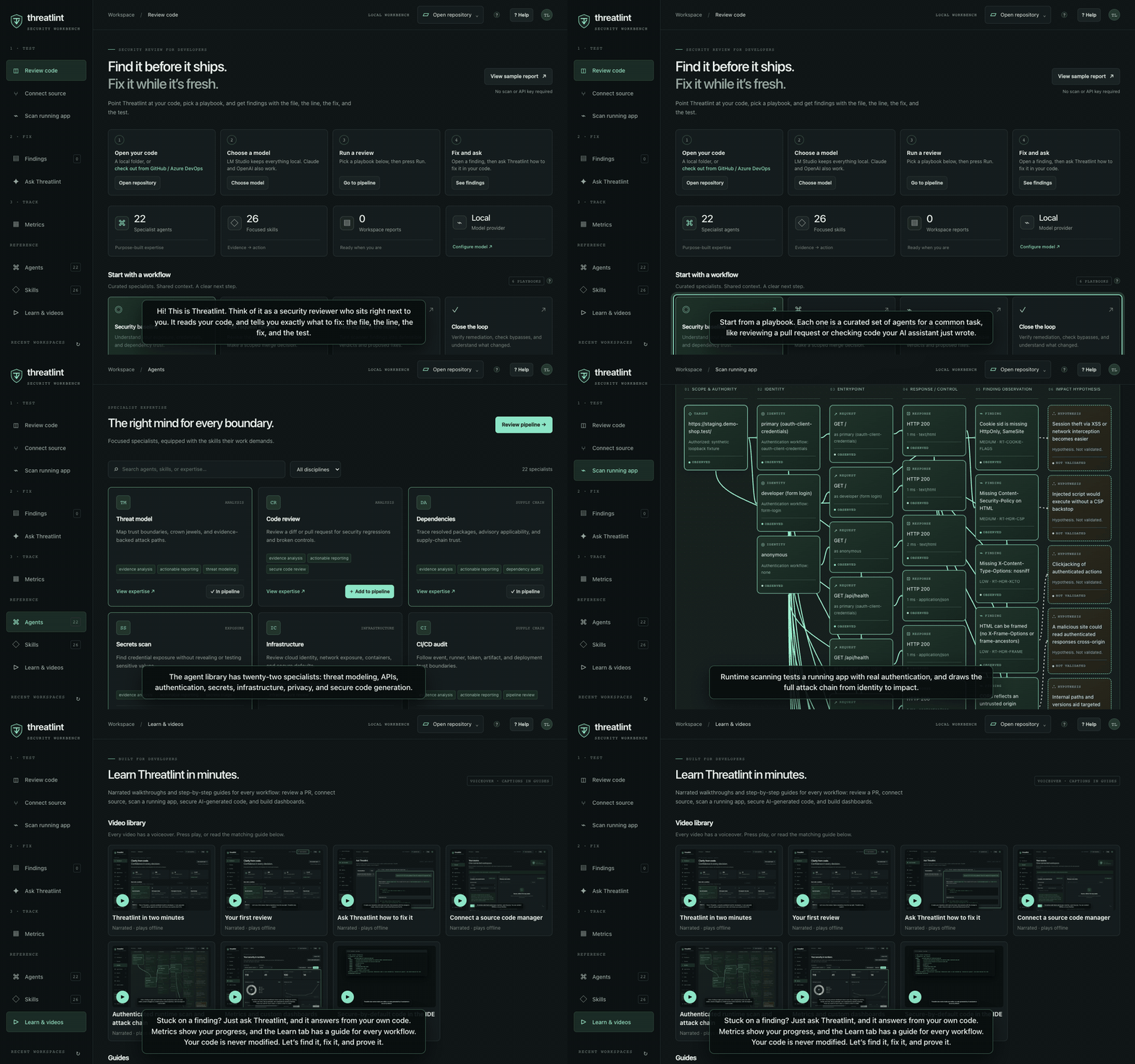 Threatlint in two minutes · ▶ narrated MP4 | 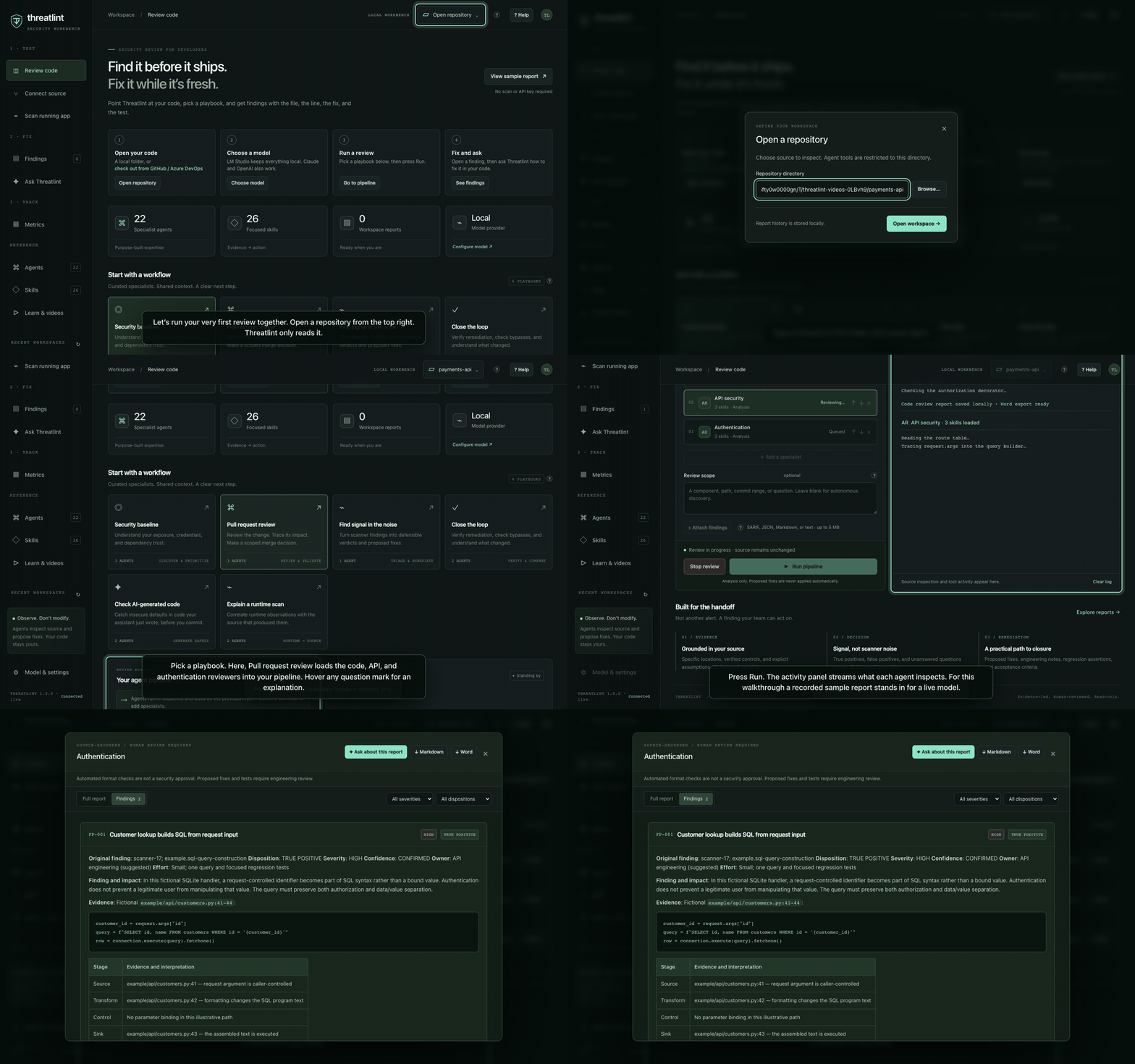 Your first review · ▶ narrated MP4 |
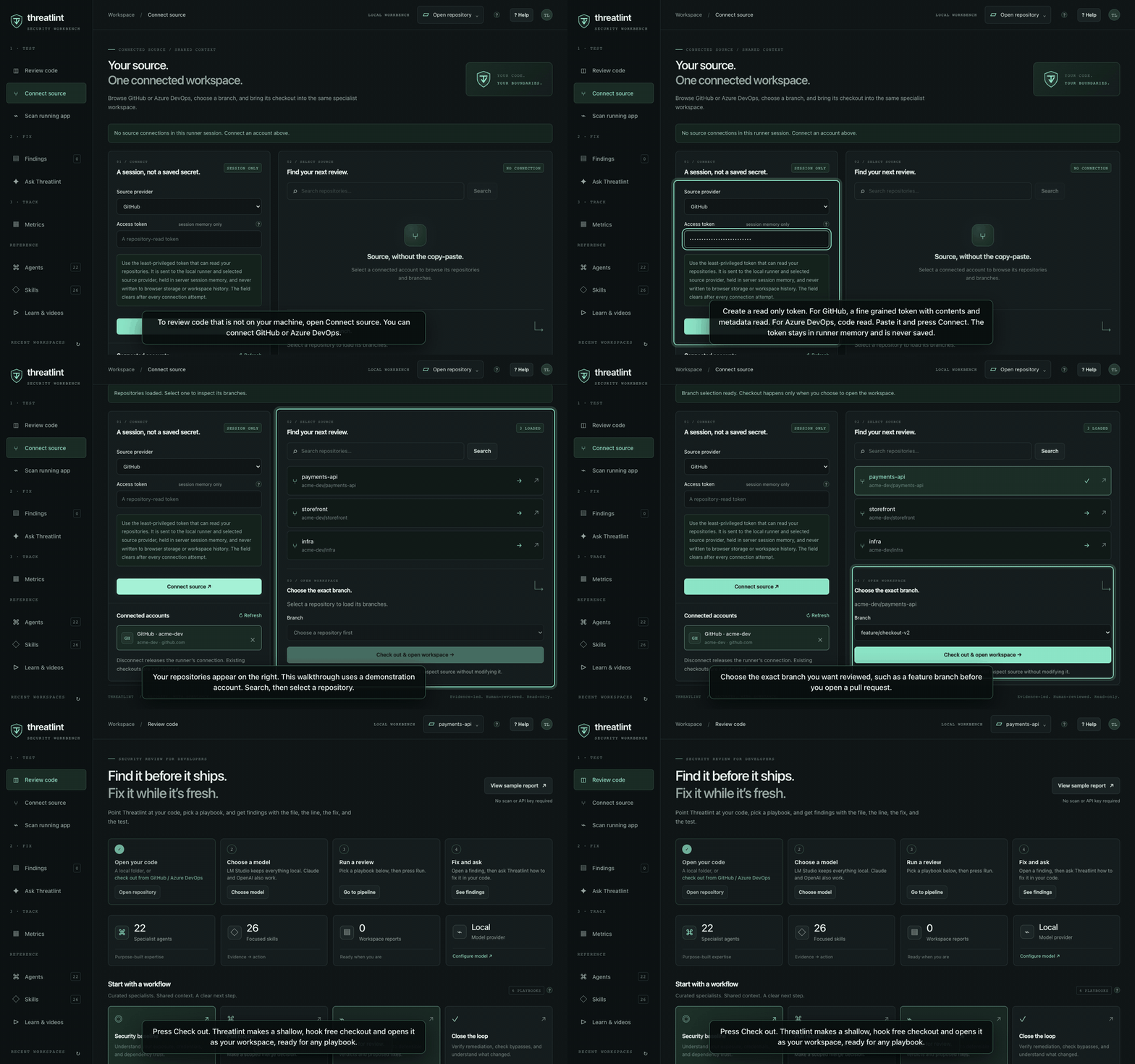 Connect GitHub / Azure DevOps · ▶ narrated MP4 | 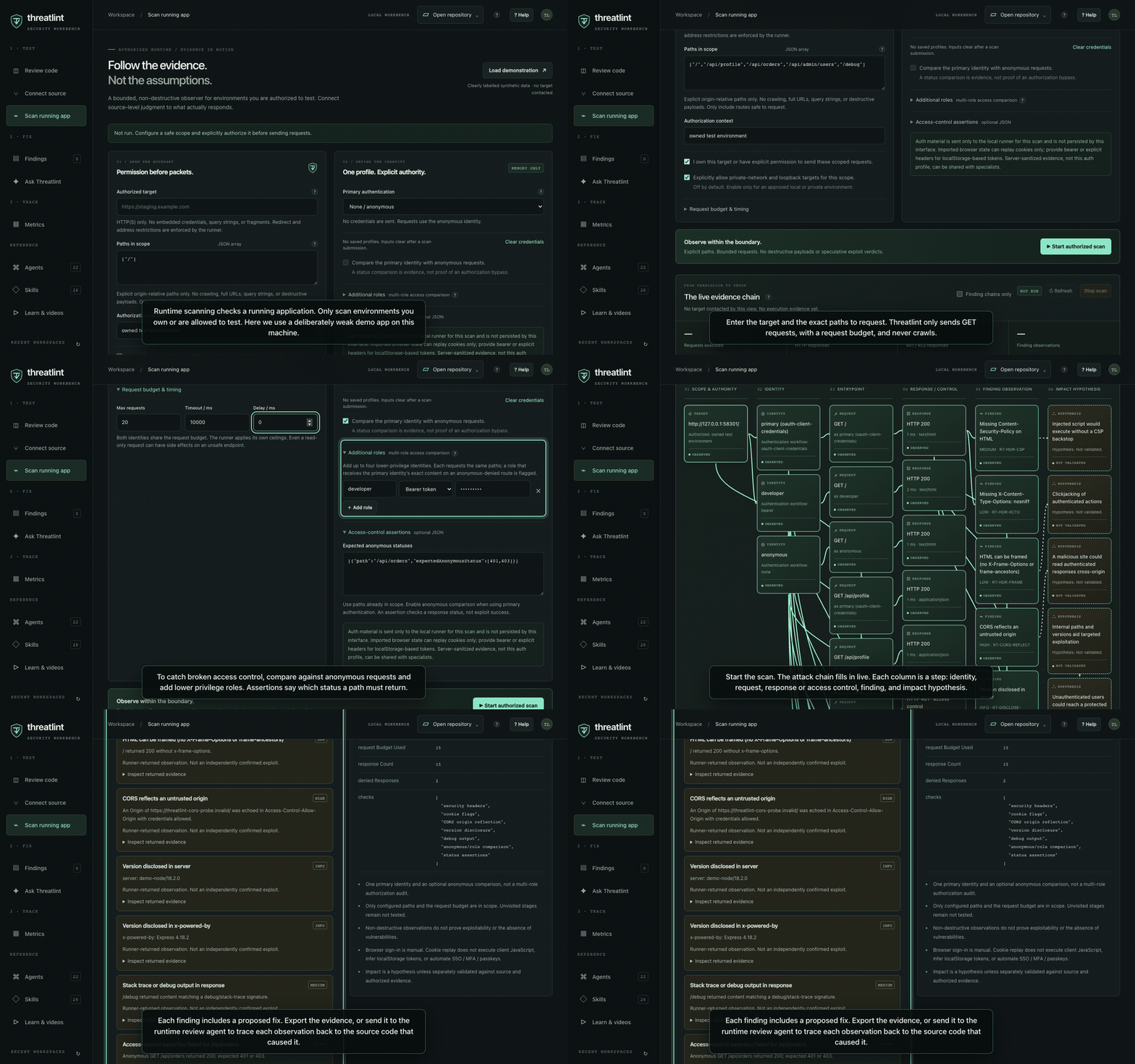 Authenticated runtime scan + attack chain · ▶ narrated MP4 |
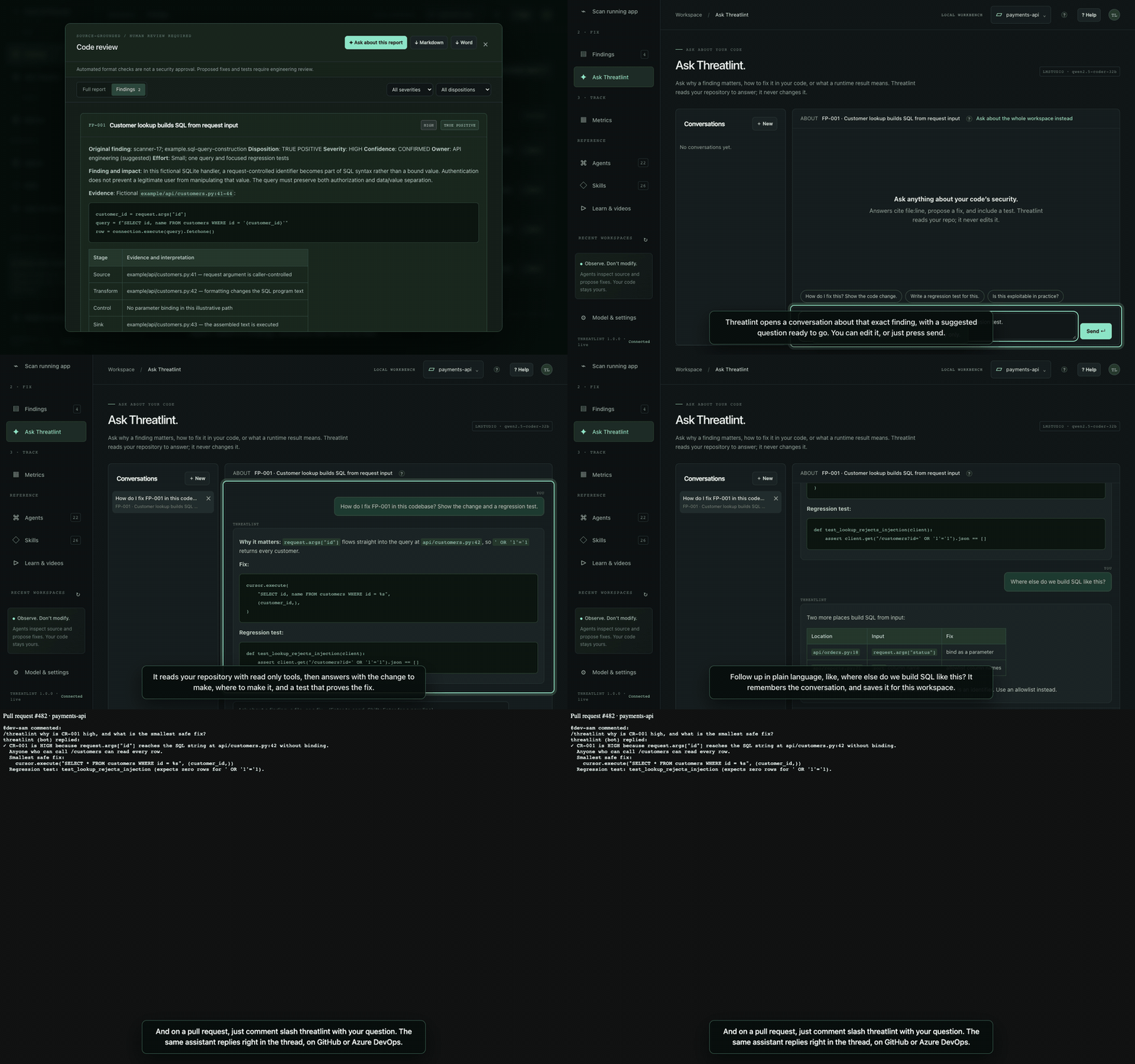 Ask Threatlint how to fix it · ▶ narrated MP4 | 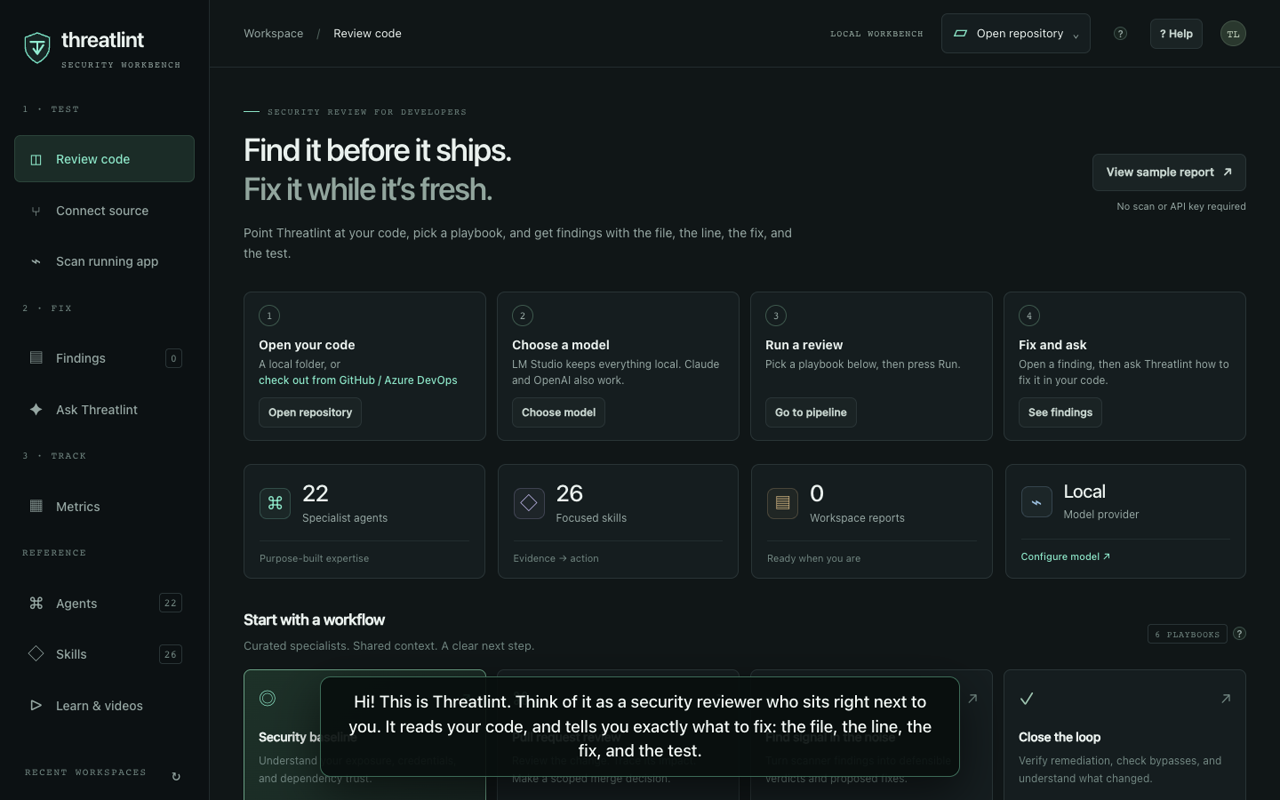 All videos are also in the app under Learn & videos |
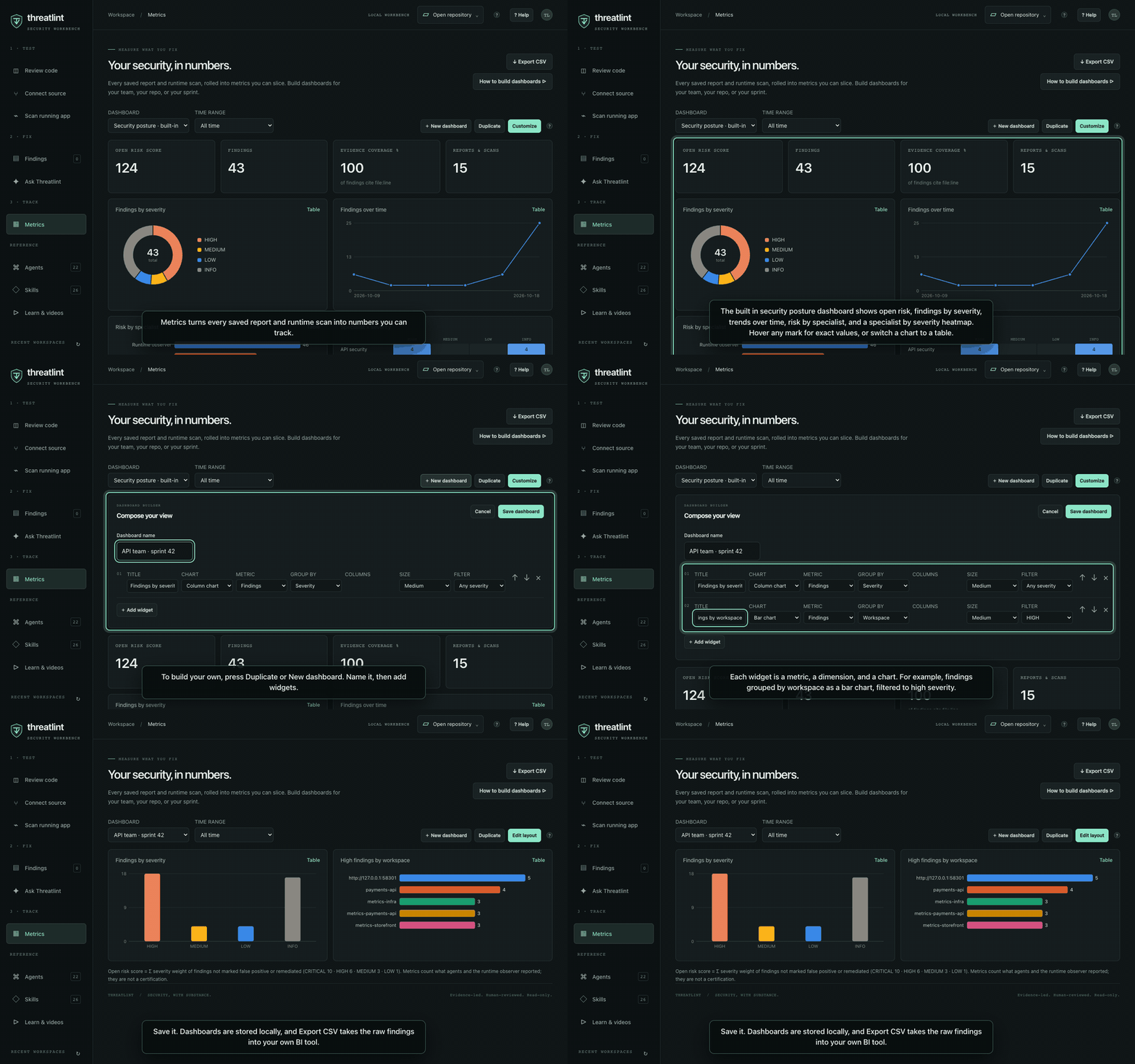 Metrics and custom dashboards · ▶ narrated MP4 | 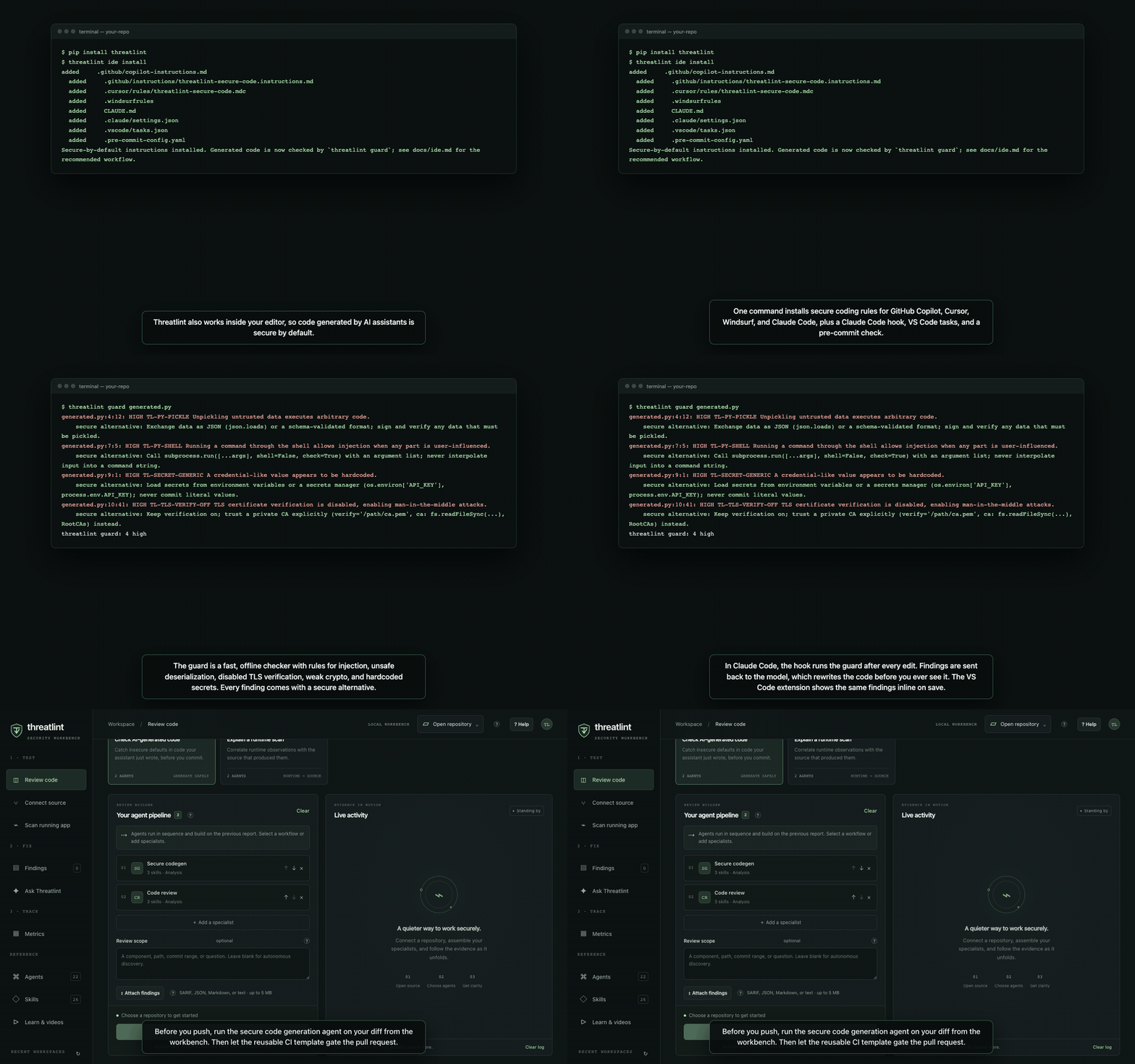 Secure-by-default code in the IDE · ▶ narrated MP4 |
Every frame is a real screenshot of the app, recorded against local fixtures: a deliberately weak
loopback demo app, a demonstration source account, and the bundled synthetic report. To re-record
after UI changes, run npm --prefix web run videos (needs Playwright Chromium, ffmpeg, and macOS
say or espeak-ng). The narrator is the friendly US-English female voice Samantha (Enhanced) when installed, falling back to Samantha; override with THREATLINT_VOICE.
# 1. Workbench (desktop or browser — same code, same features)
npm --prefix web ci
npm --prefix web run desktop          # or: npm --prefix web start → http://127.0.0.1:3000

# 2. Secure-by-default AI coding in your repo
pip install threatlint                # or: pip install -e . from this checkout
threatlint ide install                # Copilot, Cursor, Windsurf, Claude Code, VS Code, pre-commit
threatlint guard --staged             # offline check of what you are about to commit

# 3. Gate pull requests (GitHub) — .github/workflows/security.yml
#    jobs.threatlint.uses: InfoSec-Actions/threatlint/.github/workflows/threatlint-reusable.yml@<sha>
Then, in the workbench: open a repository → choose Pull request review → Run. No model yet? Use LM Studio for fully local analysis, or View sample report to see the output first.
| Capability | Where | Docs |
|---|---|---|
| Source code managers: connect GitHub (fine-grained PAT or app installation token) or Azure DevOps (PAT), browse repositories and branches, and open a hook-free shallow checkout with provider/branch/commit provenance | Workbench → Sources | Workbench guide |
| Runtime scanning with every common auth workflow, anonymous and multi-role comparison, status assertions, passive header/cookie/CORS/debug checks, and Markdown/HTML/JSON evidence export | Workbench → Runtime | Runtime scanning |
| Attack-chain visualization: target → identity → request → response/control → finding → impact hypothesis, with full-chain highlighting and a “finding chains only” filter | Workbench → Runtime | Attack chain |
| Metrics & dashboards: KPIs, severity/agent/workspace/time breakdowns, heatmaps, custom dashboards, CSV export | Workbench → Metrics | Dashboards guide |
Ask Threatlint: conversations grounded in your repository, started from a finding, report, or runtime scan; plus /threatlint replies on GitHub and Azure DevOps PRs | Workbench → Ask Threatlint, your PRs | Ask Threatlint |
Warn, don't block (by default): every pipeline template annotates findings and keeps the build green; set gate-mode: fail when you're ready | Your pipelines | CI templates |
| Developer-first navigation: Test → Fix → Track, with a get-started checklist | Workbench | Workbench guide |
In-app help: tooltips on every key control, task guides, glossary, and a narrated video library (? opens it) | Workbench → Learn & videos | Workbench guide |
IDE + secure-by-default code generation: threatlint ide install, threatlint guard (21 offline rules with CWE and secure alternative; text/JSON/SARIF), Claude Code hook, VS Code extension, pre-commit | Your editor | IDE guide |
| Reusable CI: GitHub reusable workflow + composite action; Azure DevOps job and steps templates; SARIF upload, PR comments, severity gate | Your pipelines | CI templates |
New specialists: appsec-secure-codegen-reviewer (SG) and appsec-privacy-reviewer (PD), plus runtime, business-logic, client, crypto, AI/LLM, and security-test-plan specialists | Everywhere | Agents |
One codebase for web and desktop: Electron loads the same server.js, lib/, and public/ as the browser runner, so every change ships to both | web/ | Shared architecture |
The Electron desktop app and the browser workbench are one codebase. web/desktop/main.cjs
starts the same createWorkbench() from web/server.js on a private loopback port and loads the
same web/public UI; there is no desktop-only engine or UI. Any change to server.js, lib/, or
public/ ships to both. The desktop shell only adds native pickers, sandboxing, and packaging.
Requirements: Node.js 22+ and npm. Python is optional (Word export needs python-docx).
npm --prefix web ci
npm --prefix web run desktop        # desktop app
npm --prefix web start              # browser: http://127.0.0.1:3000
| View | What you do there |
|---|---|
| Workbench | Open a repo, pick a playbook (PR review, AI-generated code, baseline, triage, verify, runtime → source), run, and follow live activity |
| Sources | Connect GitHub / Azure DevOps with a read-only token, search repositories, pick a branch, check out |
| Runtime | Authorize a target, choose an auth workflow, add roles, scan, and explore the attack chain |
| Agent library / Skills | Browse the 22 specialists and the exact skill workflows each one loads |
| Reports | Read findings with severity/disposition filters; download Markdown or Word |
| Metrics | Dashboards over every report and scan; build your own; export CSV |
| Learn & videos | Narrated walkthroughs, task guides, and a glossary. Press ? anywhere |
Hover any ? next to a control for a one-line explanation. In VS Code, Terminal → Run Task has browser, desktop, test, and packaging tasks. See the workbench guide.
The desktop app runs the shared code, so npm --prefix web run desktop always shows your latest
changes. Three mechanisms keep the packaged app (web/release) from falling behind:
| When | What happens | Command |
|---|---|---|
| While developing | Saving a file in web/public reloads the desktop window; saving server.js, web/lib, or web/desktop relaunches it | npm --prefix web run desktop:dev |
After git pull, checkout, commit, or rebase | A git hook rebuilds the local package in the background, but only if the code changed (log: web/release/desktop-sync.log) | npm --prefix web run hooks:install (once per clone) |
On every change to main or a PR touching web/ | CI tests and packages macOS, Windows, and Linux builds, verifies they match the source, and uploads them as artifacts | .github/workflows/desktop-build.yml |
Every package carries a build stamp (a hash of server.js, lib/, public/, desktop/,
examples, and agent data). npm --prefix web run desktop:verify exits non-zero when a package is
stale; npm --prefix web run desktop:sync rebuilds only if needed. The sidebar footer shows the
version and commit of the running build, or live when running from source. CI builds are
unsigned; signing and notarization still need your certificates.
Runtime scans only send GET requests to explicit paths you list, within a request budget, after
you confirm authorization. Private and loopback targets need a second opt-in, DNS answers are
validated and pinned, and redirects are not followed. Credentials stay in runner memory for one
scan and never appear in snapshots or exports.
| Auth workflow | Notes |
|---|---|
| None, Bearer, HTTP Basic, API key (header/query), custom headers, Cookie | Sent as configured |
| OAuth client credentials, refresh token, resource-owner password | Runner exchanges at your trusted token endpoint |
| Form login | Runner POSTs your login form once and replays the session cookie |
| Mutual TLS | PEM client certificate and key presented in the TLS handshake |
| Manual browser sign-in (SSO, SAML, MFA, passkeys) | A real browser opens; you sign in yourself; cookies are captured |
| Imported browser state | Cookies from a Playwright storageState file |
Checks: anonymous vs authenticated comparison, up to four extra roles (flags a lower role that
gets the primary identity's exact content on an anonymous-denied route), expected-status
assertions, security headers, cookie flags (including on the login response), CORS origin
reflection, version disclosure, and debug/stack-trace output. Each finding becomes a node in the
attack chain with its impact hypothesis. Click any node to highlight its full chain, or tick
Finding chains only. Send to runtime review hands the sanitized evidence to the
appsec-runtime-reviewer agent to correlate it with source.
Try it safely: npm --prefix web run demo-app starts a deliberately weak app on
http://127.0.0.1:4010 (accounts in web/examples/demo-app.cjs).
Privacy: API keys and tokens stay in memory and are never saved. Remote model providers receive prompts and source/tool results, so the UI asks for consent first. With a loopback LM Studio server, everything stays local. This is a single-user loopback application, not a hosted multi-user service, and its tool policy is not an OS-level sandbox for untrusted repositories.
In the app. Open Ask Threatlint, or press Ask how to fix this on any finding, Ask
about this report in the report reader, or Ask about this scan after a runtime scan. The
assistant uses your configured model (LM Studio, Claude, or OpenAI) and the same read-only Read /
Grep / Glob tools as the agents, so answers cite path:line, propose a change, and include a
regression test. Threads are saved locally per workspace and remember earlier turns. Reports,
findings, and scan evidence are passed to the model as clearly delimited untrusted data.
On pull requests. Comment /threatlint <question> (or mention @threatlint) on a GitHub or
Azure DevOps pull request, for example /threatlint suggest a fix for the SQL finding. The
configured model answers in the same thread using the PR diff and the latest Threatlint report.
Setup and the security model are in docs/ci-templates.md.
threatlint ide install # in your repository
This writes secure-by-default instructions for GitHub Copilot
(.github/copilot-instructions.md, .github/instructions/*.instructions.md), Cursor
(.cursor/rules/*.mdc), Windsurf (.windsurfrules), and Claude Code (CLAUDE.md), plus a
Claude Code PostToolUse hook, VS Code tasks, and a pre-commit hook. Re-running is idempotent.
How it keeps generated code secure by default:
threatlint guard after each edit. Findings
go back to the model, which rewrites the code. The VS Code extension (ide/vscode) shows the
same findings inline on open and save, with a CWE and a secure alternative.threatlint guard --staged or the pre-commit hook blocks HIGH findings.appsec-secure-codegen-reviewer + appsec-code-reviewer) on your diff, and let the reusable CI
template gate the PR.Suppressions must name the rule and give a reason (# threatlint-ignore: TL-PY-SHELL fixed argv).
See docs/ide.md for per-editor setup and the full rule list.
The Metrics view aggregates every saved report and runtime scan. The built-in Security posture dashboard shows open risk score, findings, evidence coverage, findings by severity and over time, risk by specialist, a specialist × severity heatmap, and risk by workspace.
To build your own: New dashboard (or Duplicate) → name it → Add widget → pick a metric (findings, risk score, unique findings, evidence coverage, reports), a dimension (severity, specialist, discipline, workspace, day, week, disposition, confidence, source, finding type), a chart (stat tile, column, bar, line, donut, table, heatmap), a size, and an optional filter → Save. Every chart has hover values and a table view. Export CSV gives you the raw findings for your own BI tool. Full guide: docs/dashboards.md.
The narrated videos (web/public/media/*.mp4, about 9 MB) and README previews
(docs/media/*.gif|png, about 4 MB) are binary files. Each time they are re-recorded, Git stores a
complete new copy, so history grows by about 13 MB per re-record, and every future clone downloads
all of it.
What Git LFS is. Git Large File Storage replaces chosen files in the repository with small text pointers (about 130 bytes each). The real files live in a separate LFS store on your Git host and are downloaded at checkout only for the commit you are on.
| Plain Git (current) | Git LFS | |
|---|---|---|
| Clone size over time | Grows ~13 MB per re-record, forever | Pointers only; you download media for your checkout |
| Setup for contributors | None | git lfs install once per machine; without it, they get pointer text instead of videos |
| GitHub README / PR display | GIFs and PNGs render | Still render: GitHub serves LFS images in READMEs |
| MP4 links in README | Play from the repo | Play from the repo |
| GitHub quota | Normal repository limits (warns at 50 MB per file) | Free tier ~1 GB storage and ~1 GB/month bandwidth, shared by the account; above that, paid data packs. Bandwidth counts each CI checkout and each clone |
| GitHub Actions | actions/checkout gets everything | Needs lfs: true (already set in desktop-build.yml); each run consumes LFS bandwidth |
| Azure DevOps | Works | Supported natively; enable "Checkout LFS objects" (lfs: true on the checkout step) |
| Forks and ZIP downloads | Include media | Forks need LFS on the host; "Download ZIP" may contain pointers unless the archive includes LFS objects (a repository setting on GitHub) |
| Desktop packaging | Works | Works, as long as the build machine has LFS objects checked out (otherwise the package ships pointer files instead of videos) |
| Reversibility | — | Moving files into LFS after they are already committed requires git lfs migrate, which rewrites history and force-pushes; everyone must re-clone |
Recommendation. Turn on LFS before the first commit of the media, so no history rewrite is needed:
brew install git-lfs        # or your package manager; not currently installed on this machine
git lfs install
mv .gitattributes.lfs-example .gitattributes
git add .gitattributes web/public/media docs/media
If you do not want contributors or CI to depend on LFS, the alternative is to keep media out of the repository and attach the MP4s to a GitHub Release (link them from the README) while committing only the small PNG posters.
All 22 agents are equipped with 26 focused skills. Every specialist receives evidence-led analysis and professional reporting/remediation workflows, plus its domain-specific skill. The false-positive reviewer also receives dedicated finding-triage and Semgrep-tuning skills.
The canonical registry maps agents to packaged workflows. The desktop, browser, Python CLI, CI snapshot runner, and Teams prompt loader inject actual skill content, not merely skill names. Native Claude/Copilot entry points are discoverable in the repository; installers copy complete skills into other repositories. Snapshot/Teams runs explicitly disclose their limited source visibility.
The FP reviewer now produces a professional three-tier report:
Ambiguous findings remain open with a specific evidence-resolution plan. Admin-only input, internal-looking names, or test/generated paths are not automatic false positives. A correct FP verdict does not automatically authorize a suppression. Proposed changes are not applied; unexecuted tests/rule checks are explicitly marked NOT RUN.
# Direct local triage, with source inspection and all assigned skills
threatlint run fp-review --findings ./results.sarif --model YOUR_LOCAL_MODEL

# Install complete agents and skills for native clients
threatlint install --local -y
threatlint install --copilot --local -y
threatlint install --lmstudio -y
Uninstall removes only bundled skill files and leaves third-party skills and custom additions untouched. Report-format warnings in the UI are structural checks, not verification that a finding, patch, or scanner rule is correct. Human review and real regression testing remain required.
Selling an AppSec tooling investment to leadership often requires a concise, visual summary of what the tool does and why it matters. build_pptx.py generates a 6-slide executive overview deck covering capabilities, integrations, compatibility, usage, and how to get started.
pip3 install python-pptx
python3 build_pptx.py
# → threatlint-executive-overview.pptx (excluded from git via .gitignore)
The generated deck is designed for:
| File | Use it for |
|---|---|
AGENTS.md | Cross-platform agent instructions for OpenAI Codex CLI, GitHub Copilot Coding Agent, Cursor, and any tool that reads AGENTS.md. Covers all 22 security agents with routing, protocols, and report formats. |
.claude/agents/appsec-threat-modeler.md | Claude Code subagent — evidence-based threat modeling with autonomous repository discovery, crown jewel analysis, attack chains, and MITRE ATT&CK/DREAD scoring. |
.claude/agents/appsec-code-reviewer.md | Claude Code subagent — security review of a diff or pull request with merge recommendation. |
.claude/agents/appsec-dependency-auditor.md | Claude Code subagent — supply chain security: CVEs, dependency confusion, typosquatting, malicious install hooks, abandoned packages, lockfile integrity. |
.claude/agents/appsec-secrets-scanner.md | Claude Code subagent — secrets detection: API keys, private keys, connection strings, high-entropy patterns, git history scanning. |
.claude/agents/appsec-iac-reviewer.md | Claude Code subagent — IaC security: Terraform, Kubernetes, Helm, Dockerfile, CloudFormation. |
.claude/agents/appsec-cicd-auditor.md | Claude Code subagent — CI/CD security: script injection, workflow permissions, action pinning, fork secret exposure, artifact integrity. |
.claude/agents/appsec-api-security-reviewer.md | Claude Code subagent — OWASP API Security Top 10 (2023): BOLA, broken auth, mass assignment, SSRF, resource consumption, and more. |
.claude/agents/appsec-auth-reviewer.md | Claude Code subagent — auth/authz deep-dive: OAuth 2.0/OIDC, JWT, sessions, CSRF, MFA, RBAC, multi-tenancy, password hashing, brute-force protection. |
.claude/agents/appsec-fp-reviewer.md | Claude Code subagent — false positive triage and Semgrep rule tuning. Accepts SARIF, Semgrep JSON, or pasted findings. |
.claude/agents/appsec-compliance-checker.md | Claude Code subagent — maps findings to OWASP ASVS 4.0, PCI-DSS v4, HIPAA, SOC 2 Type II, ISO 27001:2022, NIST CSF 2.0, CIS Controls v8. |
.claude/agents/appsec-attack-tree.md | Claude Code subagent — formal AND/OR attack tree with Mermaid rendering, bypass analysis per defense node, and leaf node ranking. |
.claude/agents/appsec-red-team.md | Claude Code subagent — 5 adversarial scenarios with ATT&CK-mapped kill chains, IoCs, detection gaps, and purple-team test cases. |
.claude/agents/appsec-threat-delta.md | Claude Code subagent — compares a prior report to the current codebase: RESOLVED / PARTIALLY FIXED / STILL PRESENT / REGRESSED / NEW. |
.claude/agents/appsec-verify-fix.md | Claude Code subagent — verifies a specific finding: REMEDIATED / PARTIALLY FIXED / STILL PRESENT / REGRESSED. |
web/ | Web UI with streaming terminal, chat panel, and multi-agent pipeline runner. Supports Claude, OpenAI, and local LLMs via LM Studio. |
teams-app/ | Microsoft Teams bot (Node.js + Bot Framework) that routes security commands to Claude AI agents via the Anthropic API. |
docs/agents.md | Comprehensive per-agent documentation: protocols, coverage areas, frameworks applied, and complete report format for all 22 agents. |
| Command | Description |
|---|---|
/threat-model | Threat model (cloud, + Word doc) |
/threat-model-deep | Deep-dive threat model with bypass chains and kill chains (cloud) |
/threat-model-local | Threat model via LM Studio (local, no API key) |
/threat-model-deep-local | Deep-dive threat model via LM Studio (local) |
/security-review | Security code review of a diff/branch/PR (cloud, + Word doc) |
/security-review-local | Security code review via LM Studio (local) |
/dependency-audit | Supply chain dependency audit (cloud, + Word doc) |
/dependency-audit-local | Dependency audit via LM Studio (local) |
/secrets-scan | Secrets and credential detection scan (cloud, + Word doc) |
/secrets-scan-local | Secrets scan via LM Studio (local) |
/iac-review | IaC security review — Terraform, K8s, Dockerfile (cloud, + Word doc) |
/iac-review-local | IaC review via LM Studio (local) |
/cicd-audit | CI/CD pipeline security audit (cloud, + Word doc) |
/cicd-audit-local | CI/CD audit via LM Studio (local) |
/api-security-review | OWASP API Security Top 10 review (cloud, + Word doc) |
/api-security-review-local | API security review via LM Studio (local) |
/auth-review | Auth/authz deep-dive review (cloud, + Word doc) |
/auth-review-local | Auth review via LM Studio (local) |
/compliance-check | Map findings to OWASP ASVS, PCI-DSS v4, HIPAA, SOC 2, ISO 27001, NIST CSF, CIS (cloud) |
/attack-tree | Formal AND/OR attack tree with bypass analysis and leaf node ranking (cloud) |
/attack-tree-local | Attack tree via LM Studio (local) |
/red-team | 5 adversarial scenarios with full kill chains and purple-team test cases (cloud) |
/red-team-local | Red team scenarios via LM Studio (local) |
/threat-delta | Compare previous report to current state: New/Resolved/Regressed/Unchanged (cloud) |
/verify-fix | Verify a specific finding was remediated: REMEDIATED/PARTIALLY FIXED/STILL PRESENT/REGRESSED (cloud) |
| File | Purpose |
|---|---|
.github/agents/ | 14 Copilot Chat agents — one per security domain |
.github/workflows/appsec-pr-review.yml | Every non-draft PR: security review + PR comment + SARIF + issues + gate |
.github/workflows/appsec-threat-model.yml | Manual: threat model + SARIF + issues + gate |
.github/workflows/appsec-scheduled.yml | Weekly + IaC push: threat model + issues + gate |
.github/workflows/appsec-dependency-audit.yml | Manifest/lockfile changes: dependency audit + issues + gate |
.github/workflows/appsec-iac-review.yml | IaC changes: IaC security review + issues + gate |
.github/workflows/appsec-secrets-scan.yml | Push to main: secrets scan + SARIF + issues + gate |
.github/workflows/appsec-cicd-audit.yml | Pipeline config changes: CI/CD audit + SARIF + issues + gate |
.github/workflows/appsec-api-security.yml | PR touching API paths: OWASP API Security review + SARIF + gate |
.github/workflows/appsec-auth-review.yml | PR touching auth paths: auth/authz review + SARIF + gate |
.github/workflows/appsec-compliance-check.yml | Manual + monthly: compliance mapping (ASVS/PCI/HIPAA/SOC 2/ISO/NIST/CIS) |
.github/workflows/appsec-attack-tree.yml | Manual: formal AND/OR attack tree for a named component |
.github/workflows/appsec-red-team.yml | Manual + quarterly: 5 ATT&CK kill chains + IoCs + purple-team tests |
.github/workflows/appsec-auto-fix.yml | Manual + /appsec-fix comment: AI-assisted remediation → PR |
.github/scripts/appsec_api.py | OpenAI / GitHub Models / LM Studio runner (13 modes, --gate flag) |
.github/scripts/gate_report.py | Exits 1 if findings at or above threshold severity exist |
.github/scripts/create_issues.py | Parses reports and opens deduplicated GitHub issues |
.github/scripts/to_sarif.py | Converts threatlint reports to SARIF 2.1.0 for GitHub Code Scanning |
.github/scripts/post_pr_comment.py | Posts risk summary as a PR comment with merge recommendation |
.claude/hooks/pre-commit | Optional git pre-commit hook: blocks secrets staged for commit |
docs/github-actions.md | Provider setup, issue configuration, and GitHub Actions troubleshooting |
~/.claude/scripts/md_to_docx.py converts reports to formatted .docx files. It is installed to the user's home directory — not checked into target repositories.
For Claude Code (cloud models):
pip3 install python-docx~/.claude/scripts/md_to_docx.py installed (see Word Document Output)For Claude Code (local models via LM Studio):
pip3 install openai python-docx~/.claude/scripts/appsec_api.py and ~/.claude/scripts/md_to_docx.py installed (see Local Models (LM Studio))For Codex / AGENTS.md tools:
AGENTS.mdpip3 install python-docx~/.claude/scripts/md_to_docx.py installedFor GitHub Copilot Chat:
.github/agents/ and .github/prompts/ filesNo project dependency, service account, or external scanner is required. threatlint is source-guided analysis — it is not a replacement for SAST, DAST, dependency scanning, penetration testing, or a formal security approval process.
The slash commands are the fastest way to get a report and a Word document.
# Threat modeling
/threat-model                        # auto-discover the repo
/threat-model src/api/auth           # specific component
/threat-model-deep                   # aggressive deep-dive (maximum coverage)

# Code review
/security-review                     # working-tree diff
/security-review main..feature       # branch comparison
/security-review 42                  # PR number

# Specialized audits
/dependency-audit                    # supply chain — all manifests
/secrets-scan                        # credential and API key detection
/iac-review                          # Terraform, Kubernetes, Dockerfile
/cicd-audit                          # GitHub Actions and CI pipeline
/api-security-review                 # OWASP API Security Top 10
/auth-review                         # OAuth, JWT, sessions, MFA, RBAC

# Analysis and scenario tooling
/compliance-check                    # OWASP ASVS, PCI-DSS, HIPAA, SOC 2, ISO 27001
/attack-tree <component>             # formal AND/OR attack tree
/red-team                            # 5 adversarial scenarios with kill chains
/threat-delta <previous-report.docx> # compare to a prior report
/verify-fix CR-042                   # confirm a specific finding was fixed
You can also address agents directly via the @ picker or --agent flag — this produces the report in chat but does not save a Word document.
Run all analysis entirely on your machine — no API key, no cloud, no data leaving your environment.
Before running: open LM Studio, load a model, then go to Developer → Local Server → Start Server.
# Threat modeling
/threat-model-local                  # auto-discover with local model
/threat-model-deep-local             # deep-dive with local model

# Code review
/security-review-local               # working-tree diff
/security-review-local main..feature # branch comparison

# Specialized audits (all local)
/dependency-audit-local
/secrets-scan-local
/iac-review-local
/cicd-audit-local
/api-security-review-local
/auth-review-local
/attack-tree-local <component>
/red-team-local
Commands auto-detect the loaded model. No model name needs to be specified.
When AGENTS.md is present in the repository (or globally), instruct the agent naturally:
threat model this repository
security review the current diff
review PR #42 for security regressions
threat model src/payments
The agent reads AGENTS.md, performs the analysis, and saves the report as a Word document using the converter script.
The .github/agents/ files register fourteen custom agents in Copilot Chat. The .github/prompts/ files register two slash commands. All are available as soon as the repository is open in a trusted VS Code workspace.
Open Copilot Chat and select an agent from the agent picker (the @ icon or the model selector):
Then describe what to analyze:
@AppSec Threat Modeler threat model the auth service in src/auth

@AppSec Code Reviewer review the changes in this PR for authentication
bypasses and privilege escalation
Type / in Copilot Chat to open the prompt picker:
/Discover Application Threat Model — no target needed; the agent inventories the repository and selects an evidence-supported initial scope automatically./Threat Model Report — supply a target in the chat after running the prompt to generate a standardized two-tier report.Copilot Chat does not save Word documents. The report is returned in the chat window only. To get a .docx file, use Claude Code (/threat-model, /threat-model-deep, /security-review) or Codex instead.
The teams-app/ directory contains a Microsoft Teams bot that routes security analysis commands to Claude AI agents using the Anthropic API.
ANTHROPIC_API_KEY)Step 1 — Register a bot in Azure
https://<your-domain>/api/messages.Step 2 — Deploy the bot
cd /path/to/threatlint/teams-app
npm install

export ANTHROPIC_API_KEY=sk-ant-...
export BOT_APP_ID=<azure-app-id>
export BOT_APP_PASSWORD=<azure-app-password>

node bot.js
Step 3 — Package and sideload into Teams
teams-app/manifest.json and replace {{BOT_APP_ID}} with your Azure App ID.icon-color.png and 32×32 icon-outline.png to teams-app/.manifest.json, icon-color.png, icon-outline.png.Mention the bot or send commands directly in any Teams channel where it is installed:
@threatlint /threat-model
@threatlint /security-review src/auth
@threatlint /compliance-check
@threatlint /red-team
@threatlint /help
All 22 agents are available. The bot uses Claude AI (configurable via CLAUDE_MODEL) and returns the full analysis report directly in the Teams conversation. Large reports are automatically split to stay within Teams' message size limit.
By default the bot uses claude-sonnet-5. Override with:
export CLAUDE_MODEL=claude-opus-5
There are six installation paths depending on tool, scope, and whether you want cloud or local models. Agents alone are not sufficient for Word document output in Claude Code — the commands wire up the conversion pipeline.
Agents and commands installed globally are available in every repository you open. This is already done on this machine. For a fresh setup:
mkdir -p ~/.claude/agents
cp /path/to/threatlint/.claude/agents/*.md ~/.claude/agents/

mkdir -p ~/.claude/commands
cp /path/to/threatlint/.claude/commands/*.md ~/.claude/commands/

mkdir -p ~/.claude/scripts
cp /path/to/threatlint/.claude/scripts/md_to_docx.py ~/.claude/scripts/
pip3 install python-docx
Open any repository in Claude Code. All 8 agents and all slash commands are immediately available.
Check the files into the target repository so every teammate gets the agents and commands when they open the repo.
cd /path/to/your-repo

mkdir -p .claude/agents .claude/commands

cp /path/to/threatlint/.claude/agents/*.md .claude/agents/
cp /path/to/threatlint/.claude/commands/*.md .claude/commands/

cat >> CLAUDE.md << 'EOF'

## Security Analysis

- Delegate threat-modeling requests to `appsec-threat-modeler`.
- Delegate security reviews of diffs and risky configuration changes to `appsec-code-reviewer`.
- Delegate dependency and supply chain audits to `appsec-dependency-auditor`.
- Delegate secrets and credential scanning to `appsec-secrets-scanner`.
- Delegate IaC security reviews (Terraform, Kubernetes, Dockerfile) to `appsec-iac-reviewer`.
- Delegate CI/CD pipeline audits to `appsec-cicd-auditor`.
- Delegate API security reviews to `appsec-api-security-reviewer`.
- Delegate authentication and authorization reviews to `appsec-auth-reviewer`.
- Delegate false positive triage and Semgrep rule tuning to `appsec-fp-reviewer`.
- Delegate compliance mapping (ASVS, PCI-DSS, HIPAA, SOC 2, ISO 27001, NIST CSF, CIS) to `appsec-compliance-checker`.
- Delegate formal attack tree construction to `appsec-attack-tree`.
- Delegate adversarial red-team scenario generation to `appsec-red-team`.
- Delegate comparison of a prior report to current state to `appsec-threat-delta`.
- Delegate verification of whether a specific finding was remediated to `appsec-verify-fix`.
- When no target is given, use `appsec-threat-modeler` — it will discover the repository automatically.
EOF

git add .claude CLAUDE.md
git commit -m "Add threatlint security agents and commands"
Each team member then does the personal setup once (not committed to the repo):
mkdir -p ~/.claude/scripts
cp /path/to/threatlint/.claude/scripts/md_to_docx.py ~/.claude/scripts/
pip3 install python-docx
The converter script is a local runtime tool — not source code — so it stays out of the repository.
What each piece does:
| What you copy | Effect |
|---|---|
.claude/agents/ only | @appsec-threat-modeler etc. appear in the @ picker; analysis runs; no Word document is saved |
.claude/agents/ + .claude/commands/ | Full pipeline: analysis runs and .docx is saved to the repo root |
CLAUDE.md routing | Claude Code automatically routes security requests to the right agent without needing @ |
Personal: md_to_docx.py + python-docx | Required for the commands to write the .docx file |
All local slash commands call appsec_api.py with --provider lmstudio. They use the model currently loaded in LM Studio — no API key is required.
Step 1 — Install LM Studio
Download and install LM Studio from https://lmstudio.ai. Load a model (models with at least 7B parameters and strong instruction-following capability work best for security analysis). Open LM Studio → Developer → Local Server → Start Server. The API becomes available at http://localhost:1234/v1.
Step 2 — Install the command files and scripts
mkdir -p ~/.claude/commands
cp /path/to/threatlint/.claude/commands/*-local.md ~/.claude/commands/

mkdir -p ~/.claude/scripts
cp /path/to/threatlint/.github/scripts/appsec_api.py ~/.claude/scripts/
cp /path/to/threatlint/.claude/scripts/md_to_docx.py ~/.claude/scripts/
pip3 install openai python-docx
Step 3 — Verify
curl -s http://localhost:1234/v1/models
The response should list the model currently loaded in LM Studio. Then open any repository in Claude Code and run /threat-model-local — the command will auto-detect the loaded model and begin the analysis.
Optional environment variables:
| Variable | Default | Effect |
|---|---|---|
LMSTUDIO_BASE_URL | http://localhost:1234/v1 | Override LM Studio server address |
LMSTUDIO_MODEL | auto-detected | Pin a specific model ID instead of using the first loaded model |
Copy AGENTS.md to the Codex user-level location. The agent reads it when working in any repository.
mkdir -p ~/.codex
cp /path/to/threatlint/AGENTS.md ~/.codex/AGENTS.md
Then do the personal converter setup:
mkdir -p ~/.claude/scripts
cp /path/to/threatlint/.claude/scripts/md_to_docx.py ~/.claude/scripts/
pip3 install python-docx
Copy AGENTS.md to the target repository root and commit it.
cp /path/to/threatlint/AGENTS.md /path/to/your-repo/AGENTS.md
Or append to an existing AGENTS.md:
cat /path/to/threatlint/AGENTS.md >> /path/to/your-repo/AGENTS.md
Each team member still needs the personal converter setup:
mkdir -p ~/.claude/scripts
cp /path/to/threatlint/.claude/scripts/md_to_docx.py ~/.claude/scripts/
pip3 install python-docx
Copy the .github/ files into the target repository and commit them:
cd /path/to/your-repo
mkdir -p .github/agents .github/prompts

cp /path/to/threatlint/.github/agents/*.agent.md .github/agents/
cp /path/to/threatlint/.github/prompts/discover-application-threat-model.prompt.md .github/prompts/
cp /path/to/threatlint/.github/prompts/threat-model-report.prompt.md .github/prompts/

git add .github
git commit -m "Add threatlint Copilot Chat security agents and prompts"
There is no global equivalent for Copilot Chat agents — the .github/ files must be present in the repository that VS Code has open as its workspace root. After committing, reload the VS Code window once to pick up the new agents and prompts.
The Teams bot runs as a service alongside your existing infrastructure. Deploy it once and connect it to your Microsoft Teams workspace.
cd /path/to/threatlint/teams-app
npm install

# Edit manifest.json: replace {{BOT_APP_ID}} with your Azure App ID
# Add icon-color.png (192x192) and icon-outline.png (32x32)

# Set required environment variables (in your hosting environment)
ANTHROPIC_API_KEY=sk-ant-...
BOT_APP_ID=<azure-app-id>
BOT_APP_PASSWORD=<azure-app-password>
See Quick Start With Microsoft Teams for the full registration and deployment steps.
@ — all 22 agents should appear. Type / — all slash commands should appear in the picker./ — threat-model-local, security-review-local, dependency-audit-local, secrets-scan-local, iac-review-local, cicd-audit-local, api-security-review-local, auth-review-local, attack-tree-local, red-team-local should appear. LM Studio must be running with a model loaded.AGENTS.md is present at the repo root or the global path. Ask "threat model this repository" — it should begin discovery immediately.@ — 22 agents should appear. Type / — Discover Application Threat Model and Threat Model Report should appear.@threatlint /help — the bot should respond with the list of 14 available commands./threat-model or /threat-model-local. A <repo-name>-<branch>-threat-model-YYYY-MM-DD.docx should appear in the current directory.Every report is saved as a formatted .docx file. The document opens with the repository name, date, and scope, then contains both the executive summary and the full technical report.
Install the python-docx dependency, then copy the converter script to ~/.claude/scripts/:
pip3 install python-docx
mkdir -p ~/.claude/scripts
cp /path/to/threatlint/.claude/scripts/md_to_docx.py ~/.claude/scripts/
For local model commands, also install the openai package and the API script:
pip3 install openai
cp /path/to/threatlint/.github/scripts/appsec_api.py ~/.claude/scripts/
This is a one-time personal setup. The scripts live in ~/.claude/scripts/ and are referenced by the Claude Code commands and the Codex AGENTS.md instructions.
All filenames are prefixed with <repo-name>-<branch>-, where <repo-name> is the lowercased repository directory name (spaces → hyphens) and <branch> is the current git branch name (lowercased, / → -). For example, running /threat-model on the myapp repo on branch main produces myapp-main-threat-model-YYYY-MM-DD.docx.
| Invocation | Filename | Directory |
|---|---|---|
/threat-model | <repo>-<branch>-threat-model-YYYY-MM-DD.docx | Current working directory |
/threat-model src/auth | <repo>-<branch>-threat-model-src-auth-YYYY-MM-DD.docx | Current working directory |
/threat-model-deep | <repo>-<branch>-threat-model-deep-YYYY-MM-DD.docx | Current working directory |
/threat-model-local | <repo>-<branch>-threat-model-local-YYYY-MM-DD.docx | Current working directory |
/threat-model-deep-local | <repo>-<branch>-threat-model-deep-local-YYYY-MM-DD.docx | Current working directory |
/security-review | <repo>-<branch>-security-review-YYYY-MM-DD.docx | Repository root |
/security-review main..feature | <repo>-<branch>-security-review-main-feature-YYYY-MM-DD.docx | Repository root |
/security-review 42 | <repo>-<branch>-security-review-pr42-YYYY-MM-DD.docx | Repository root |
/security-review-local | <repo>-<branch>-security-review-local-YYYY-MM-DD.docx | Repository root |
/dependency-audit | <repo>-<branch>-dependency-audit-YYYY-MM-DD.docx | Repository root |
/dependency-audit-local | <repo>-<branch>-dependency-audit-local-YYYY-MM-DD.docx | Repository root |
/secrets-scan | <repo>-<branch>-secrets-scan-YYYY-MM-DD.docx | Repository root |
/secrets-scan-local | <repo>-<branch>-secrets-scan-local-YYYY-MM-DD.docx | Repository root |
/iac-review | <repo>-<branch>-iac-review-YYYY-MM-DD.docx | Repository root |
/iac-review-local | <repo>-<branch>-iac-review-local-YYYY-MM-DD.docx | Repository root |
/cicd-audit | <repo>-<branch>-cicd-audit-YYYY-MM-DD.docx | Repository root |
/cicd-audit-local | <repo>-<branch>-cicd-audit-local-YYYY-MM-DD.docx | Repository root |
/api-security-review | <repo>-<branch>-api-security-review-YYYY-MM-DD.docx | Repository root |
/api-security-review-local | <repo>-<branch>-api-security-review-local-YYYY-MM-DD.docx | Repository root |
/auth-review | <repo>-<branch>-auth-review-YYYY-MM-DD.docx | Repository root |
/auth-review-local | <repo>-<branch>-auth-review-local-YYYY-MM-DD.docx | Repository root |
/compliance-check <framework> | <repo>-<branch>-compliance-<framework>-YYYY-MM-DD.docx | Repository root |
/attack-tree <asset> | <repo>-<branch>-attack-tree-<sanitized>-YYYY-MM-DD.docx | Current working directory |
/attack-tree-local <asset> | <repo>-<branch>-attack-tree-local-<sanitized>-YYYY-MM-DD.docx | Current working directory |
/red-team | <repo>-<branch>-red-team-YYYY-MM-DD.docx | Current working directory |
/red-team-local | <repo>-<branch>-red-team-local-YYYY-MM-DD.docx | Current working directory |
/threat-delta | <repo>-<branch>-threat-delta-YYYY-MM-DD.docx | Current working directory |
/verify-fix <ID> | <repo>-<branch>-verify-<finding-id>-YYYY-MM-DD.docx | Current working directory |
/fp-review [file] | <repo>-<branch>-fp-review-YYYY-MM-DD.docx | Repository root |
Codex follows the same filename and directory conventions defined in AGENTS.md.
Copilot Chat does not save Word documents. Reports stay in the chat window. Use Claude Code commands or Codex when a .docx file is required.
The converter (md_to_docx.py) renders the full report structure:
If the converter is not installed, the commands fall back to saving the report as a .md file and note the missing dependency.
All agents use an aggressive-by-default posture. The same posture is encoded in AGENTS.md for Codex and in appsec_api.py for the local-model commands.
Use /threat-model-deep or /threat-model-deep-local for maximum coverage: additionally requires bypass chain analysis per control, multi-step kill chains, per-category breadth coverage, and a runtime blindspot inventory.
Run /threat-model or /threat-model-local with no arguments, ask "threat model this repository" (Codex), or type /Discover Application Threat Model in Copilot Chat. The agent:
The report ends with Suggested Focused Follow-Ups: three to five ready-to-send prompts naming specific discovered components and asking narrow, high-value security questions.
threatlint includes 22 specialized security agents. Each is read-only and produces a structured two-tier report saved as a Word document. For full per-agent documentation, see docs/agents.md.
| Agent | Finding Prefix | Coverage |
|---|---|---|
appsec-threat-modeler | TM- | Full repository threat model: STRIDE, OWASP, CWE, ATT&CK, DREAD, crown jewel analysis, attack chains |
appsec-code-reviewer | CR- | Security review of code changes: regression detection, secrets, dependencies, merge recommendation |
appsec-dependency-auditor | DA- | Supply chain: CVEs, dependency confusion, typosquatting, malicious hooks, lockfile integrity |
appsec-secrets-scanner | SS- | Credential detection: API keys, private keys, connection strings, entropy analysis |
appsec-iac-reviewer | IC- | IaC misconfigurations: Terraform IAM/network, Kubernetes pod security, Dockerfile, CloudFormation |
appsec-cicd-auditor | CI- | CI/CD pipeline: script injection, workflow permissions, action pinning, fork secret exposure |
appsec-api-security-reviewer | AR- | OWASP API Security Top 10 (2023): BOLA, broken auth, mass assignment, SSRF, resource consumption |
appsec-auth-reviewer | AU- | Auth/authz deep-dive: OAuth 2.0/OIDC, JWT, sessions, CSRF, MFA, RBAC, multi-tenancy, brute-force |
appsec-fp-reviewer | FP- | False positive triage and Semgrep rule tuning; accepts SARIF, Semgrep JSON, or pasted findings |
appsec-compliance-checker | CC- | Compliance mapping: OWASP ASVS 4.0, PCI-DSS v4, HIPAA, SOC 2, ISO 27001:2022, NIST CSF 2.0, CIS v8 |
appsec-attack-tree | AT- | Formal AND/OR attack tree with Mermaid rendering, defense bypass analysis, leaf node ranking |
appsec-red-team | RT- | 5 adversarial scenarios with ATT&CK kill chains, IoCs, detection gaps, purple-team test cases |
appsec-threat-delta | TD- | Prior report vs current state: RESOLVED / PARTIALLY FIXED / STILL PRESENT / REGRESSED / NEW |
appsec-verify-fix | VF- | Single-finding verification: REMEDIATED / PARTIALLY FIXED / STILL PRESENT / REGRESSED |
appsec-runtime-reviewer | DX- | Correlates authorized runtime captures with source and authentication state |
appsec-business-logic-reviewer | BL- | Workflow invariants, entitlements, idempotency, races, async side effects |
appsec-client-security-reviewer | CL- | Browser, SPA, Electron, and mobile: DOM sinks, origins, IPC, storage |
appsec-crypto-reviewer | CY- | Algorithms, modes, key/nonce lifecycle, KDFs, signatures, TLS verification |
appsec-ai-security-reviewer | AI- | Prompt injection, RAG, tool/agent authority, memory and tenant boundaries |
appsec-security-test-planner | ST- | Evidence-grounded security regression and acceptance test plans |
appsec-secure-codegen-reviewer | SG- | Insecure defaults in AI-generated or new code, with secure rewrites and IDE guardrails |
appsec-privacy-reviewer | PD- | PII inventory, flows to logs/analytics/AI/third parties, retention, consent |
All agents are available in Claude Code (cloud), OpenAI, LM Studio (local), GitHub Copilot Chat, Microsoft Teams, and AGENTS.md-compatible tools.
All agents do not alter source files, install dependencies, stage changes, or create commits. Word document output is handled by the calling command (Claude Code) or by the agent itself running the converter script (Codex) — not by modifying any source file.
| Agent | Permitted shell commands |
|---|---|
| Threat modeler | git log, git show, git ls-files, git status, find, grep, cat, head, wc, ls |
| Code reviewer | Same as above plus git diff, git blame |
| Dependency auditor | Same as code reviewer |
| Secrets scanner | Same as code reviewer |
| IaC reviewer | Same as code reviewer |
| CI/CD auditor | Same as code reviewer |
| API security reviewer | Same as code reviewer |
| Auth reviewer | Same as code reviewer |
| False positive reviewer | Same as code reviewer |
| Compliance checker | Same as code reviewer |
| Attack tree | Same as code reviewer |
| Red team | Same as code reviewer |
| Threat delta | Same as code reviewer |
| Verify fix | Same as code reviewer |
Write and Edit are explicitly denied for Claude Code agents. For Codex, the same constraint is stated directly in AGENTS.md.
Reusable templates. To run Threatlint from any repository without copying workflows, call
InfoSec-Actions/threatlint/.github/workflows/threatlint-reusable.yml@<sha>withagents: appsec-code-reviewer,appsec-secrets-scanner, or use the composite action.github/actions/threatlint. Azure DevOps:azure-pipelines/templates/threatlint-job.yml@threatlint(one job per agent) orthreatlint-steps.yml. All support Claude, OpenAI, and GitHub Models, upload SARIF, comment on PRs, and gate withfail-on-severity(defaulthigh). See docs/ci-templates.md and the callers in docs/examples.
The per-agent workflows below also support three AI providers. Choose the one that fits your team.
| Provider | Authentication | Analysis depth |
|---|---|---|
claude (default) | ANTHROPIC_API_KEY secret | Fully agentic — reads any file, follows call chains, browses the whole codebase |
openai | OPENAI_API_KEY secret | Prompt-based — receives a curated snapshot as static context |
github-models | GITHUB_TOKEN (built-in, no extra secret) | Same as OpenAI; uses the GitHub Models API endpoint |
| Workflow | Trigger | Purpose |
|---|---|---|
appsec-pr-review.yml | Non-draft PRs from same-repo branches | Security code review + PR comment + SARIF + issues + gate |
appsec-threat-model.yml | Manual Actions dispatch | Threat model + SARIF + issues + gate |
appsec-scheduled.yml | Weekly (Monday 06:00 UTC) + IaC/Dockerfile push to main | Automated threat model + issues + gate |
appsec-dependency-audit.yml | Push/PR touching manifests or lockfiles | Dependency supply chain audit + issues + gate |
appsec-iac-review.yml | Push/PR touching Terraform, K8s, or Dockerfile | IaC security review + issues + gate |
appsec-secrets-scan.yml | Push to main touching source or config files | Secrets scan + SARIF + issues + gate |
appsec-cicd-audit.yml | Push touching pipeline config files | CI/CD audit + SARIF + issues + gate |
appsec-api-security.yml | PR touching API path directories | OWASP API Security review + SARIF + gate |
appsec-auth-review.yml | PR touching auth-related paths | Auth/authz deep-dive + SARIF + gate |
appsec-compliance-check.yml | Manual dispatch + monthly (first Monday) | Compliance mapping to 7 frameworks |
appsec-attack-tree.yml | Manual dispatch | Formal AND/OR attack tree for a named component |
appsec-red-team.yml | Manual dispatch + quarterly | 5 ATT&CK kill chains + IoCs + purple-team tests |
appsec-auto-fix.yml | Manual dispatch or /appsec-fix issue comment | AI-assisted remediation → branch → PR |
Every workflow includes a severity gate step. If any finding at or above the threshold severity (and at CONFIRMED or PLAUSIBLE confidence) exists in the report, the step exits 1 — failing the workflow. For PRs, mark the workflow as required in branch protection to block merges on security findings.
Configure the threshold with the APPSEC_GATE_SEVERITY repository variable:
| Value | Effect |
|---|---|
CRITICAL (default) | Fails only on critical findings |
HIGH | Fails on high or critical findings (recommended for gated pipelines) |
MEDIUM | Fails on medium, high, or critical findings |
| `` (empty string) | Disables gating — workflow always passes |
The gate is implemented in .github/scripts/gate_report.py. Run it standalone for local checks:
python3 .github/scripts/gate_report.py --report /path/to/report.md --severity HIGH
# exits 0 (PASS) or 1 (BLOCK)
appsec-auto-fix.yml implements security remediations automatically and opens a pull request for human review.
Trigger options:
workflow_dispatch — provide an artifact name from a prior scan or specific finding IDs to fix/appsec-fix CR-001,CR-003 on a GitHub issue to fix named findingsWhat it does:
appsec/auto-fix-<run-id> from main (configurable)All auto-fix PRs require human review before merge. The agent works on a branch and never commits directly to main.
On every analyzed PR, the workflow posts a summary comment with: risk level, per-severity finding counts (CONFIRMED / PLAUSIBLE / THEORETICAL), top 5 issues, and merge recommendation (BLOCK / MERGE WITH ACTION / MERGE).
All workflows convert the report to SARIF 2.1.0 and upload to GitHub Code Scanning. Findings appear in the Security tab, inline in PR diffs, and in the repository's code scanning alerts.
After each analysis, the workflow opens one GitHub issue per qualifying finding:
APPSEC_MIN_ISSUE_SEVERITY variable, default: HIGH)Each issue gets security and severity:<level> labels and includes the full finding block with evidence, exploit path, Remediation Guidance, and a link to the workflow run.
Fork pull requests are skipped to prevent secret exposure. See docs/github-actions.md for full setup and troubleshooting.
The azure-pipelines/ directory contains 12 reusable YAML templates that mirror the GitHub Actions workflows for teams running Azure DevOps.
Add threatlint as a repository resource:
resources:
  repositories:
    - repository: threatlint
      type: github
      name: h0p3sf4ll/threatlint
      ref: refs/heads/main
      endpoint: <your-github-service-connection>
Reference a template:
stages:
  - stage: Security
    jobs:
      - template: azure-pipelines/pr-review.yml@threatlint
        parameters:
          anthropicApiKey: $(ANTHROPIC_API_KEY)
          gateSeverity: HIGH   # fail pipeline on HIGH or CRITICAL findings
| Template | Purpose |
|---|---|
pr-review.yml | Security review of a PR diff |
threat-model.yml | Full threat model (supports deep: true) |
secrets-scan.yml | Secrets and credential scan |
iac-review.yml | IaC security review |
cicd-audit.yml | CI/CD pipeline audit |
dependency-audit.yml | Supply chain dependency audit |
api-security.yml | OWASP API Security Top 10 review |
auth-review.yml | Auth/authz deep-dive |
compliance-check.yml | Compliance mapping (7 frameworks) |
red-team.yml | Adversarial kill chain scenarios |
auto-fix.yml | AI-assisted remediation → branch → PR |
All templates support provider: claude / openai / github-models, gateSeverity, minIssueSeverity, and createWorkItems (opens Azure DevOps work items for findings). See azure-pipelines/README.md for the full parameter reference.
Before implementation — run /threat-model on the design or initial feature slice. Convert high-priority mitigations into acceptance criteria and record scope and residual risks with the design decision.
Before merge — run /security-review. Resolve BLOCK-level findings, document accepted residual risk, and run the recommended test cases before merging.
Before release — run /threat-model on production-facing paths. Use /threat-model-deep for high-value or regulated components. Compare with the original threat model to surface risk added during implementation.
Air-gapped or confidential repos — use /threat-model-local and /security-review-local so analysis runs entirely on-device with no data leaving the machine.
Supply chain and infrastructure checks — run /dependency-audit when adding or updating packages. Run /iac-review and /cicd-audit when changing Terraform, Kubernetes, or workflow files. Run /secrets-scan before committing sensitive configuration changes or onboarding new contributors.
Agent instruction files are Markdown. Edit them to fit your environment:
Keep each customization focused. Add instructions that improve scope or analysis quality — not instructions that turn the agents into code-generation or deployment agents.
.
├── AGENTS.md                                         ← Codex / AGENTS.md-compatible tools (all 22 agents)
├── CLAUDE.md                                         ← Claude Code routing for this project
├── web/                                              ← Workbench: one codebase for browser and Electron
│   ├── server.js                                     ← Shared runner (API, WebSocket, routes)
│   ├── lib/                                          ← agents, providers, tools, scm, runtime, metrics, help
│   ├── public/                                       ← UI (app.js, operations.js, charts.js, insights.js)
│   ├── public/media/                                 ← Narrated MP4 video library (in-app)
│   ├── desktop/                                      ← Electron shell (loads server.js + public/)
│   ├── scripts/desktop-sync.cjs                      ← Build stamp + stale-package check / rebuild
│   ├── examples/                                     ← Sample report, runtime example, weak demo app
│   └── scripts/build-videos.cjs                      ← Re-records narrated videos and screenshots
├── ide/vscode/                                       ← VS Code extension (inline guard diagnostics)
├── src/threatlint/guard.py                           ← Offline secure-code guard (threatlint guard)
├── src/threatlint/ide.py                             ← threatlint ide install
├── .github/workflows/threatlint-reusable.yml         ← Reusable GitHub workflow
├── .github/actions/threatlint/                       ← Composite action
├── azure-pipelines/templates/                        ← Reusable Azure DevOps job/steps templates
├── docs/media/                                       ← Logo, light/dark banners, GIF previews, screenshots
├── .githooks/                                        ← Optional hooks that rebuild the desktop package after pulls
├── .github/workflows/desktop-build.yml               ← Builds desktop app on every web/ change
├── LICENSE
├── .claude
│   ├── agents
│   │   ├── appsec-threat-modeler.md                 ← Threat modeling agent
│   │   ├── appsec-code-reviewer.md                  ← Code review agent
│   │   ├── appsec-dependency-auditor.md             ← Supply chain audit agent
│   │   ├── appsec-secrets-scanner.md                ← Secrets detection agent
│   │   ├── appsec-iac-reviewer.md                   ← IaC security agent
│   │   ├── appsec-cicd-auditor.md                   ← CI/CD audit agent
│   │   ├── appsec-api-security-reviewer.md          ← OWASP API Security agent
│   │   ├── appsec-auth-reviewer.md                  ← Auth/authz deep-dive agent
│   │   ├── appsec-fp-reviewer.md                    ← False positive triage agent
│   │   ├── appsec-compliance-checker.md             ← Compliance mapping agent
│   │   ├── appsec-attack-tree.md                    ← AND/OR attack tree agent
│   │   ├── appsec-red-team.md                       ← Red team scenario agent
│   │   ├── appsec-threat-delta.md                   ← Report delta comparison agent
│   │   └── appsec-verify-fix.md                     ← Fix verification agent
│   ├── commands
│   │   ├── threat-model.md                          ← /threat-model (cloud)
│   │   ├── threat-model-deep.md                     ← /threat-model-deep (cloud)
│   │   ├── threat-model-local.md                    ← /threat-model-local (LM Studio)
│   │   ├── threat-model-deep-local.md               ← /threat-model-deep-local (LM Studio)
│   │   ├── security-review.md                       ← /security-review (cloud)
│   │   ├── security-review-local.md                 ← /security-review-local (LM Studio)
│   │   ├── dependency-audit.md                      ← /dependency-audit (cloud)
│   │   ├── dependency-audit-local.md                ← /dependency-audit-local (LM Studio)
│   │   ├── secrets-scan.md                          ← /secrets-scan (cloud)
│   │   ├── secrets-scan-local.md                    ← /secrets-scan-local (LM Studio)
│   │   ├── iac-review.md                            ← /iac-review (cloud)
│   │   ├── iac-review-local.md                      ← /iac-review-local (LM Studio)
│   │   ├── cicd-audit.md                            ← /cicd-audit (cloud)
│   │   ├── cicd-audit-local.md                      ← /cicd-audit-local (LM Studio)
│   │   ├── api-security-review.md                   ← /api-security-review (cloud)
│   │   ├── api-security-review-local.md             ← /api-security-review-local (LM Studio)
│   │   ├── auth-review.md                           ← /auth-review (cloud)
│   │   ├── auth-review-local.md                     ← /auth-review-local (LM Studio)
│   │   ├── compliance-check.md                      ← /compliance-check (cloud)
│   │   ├── attack-tree.md                           ← /attack-tree (cloud)
│   │   ├── attack-tree-local.md                     ← /attack-tree-local (LM Studio)
│   │   ├── red-team.md                              ← /red-team (cloud)
│   │   ├── red-team-local.md                        ← /red-team-local (LM Studio)
│   │   ├── threat-delta.md                          ← /threat-delta (cloud)
│   │   └── verify-fix.md                            ← /verify-fix (cloud)
│   ├── hooks
│   │   └── pre-commit                               ← Optional git hook: blocks staged secrets
│   └── scripts
│       └── md_to_docx.py                            ← Markdown → Word converter
├── .github
│   ├── agents
│   │   ├── appsec-threat-modeler.agent.md           ← Copilot Chat threat modeling agent
│   │   ├── appsec-code-reviewer.agent.md            ← Copilot Chat code review agent
│   │   ├── appsec-dependency-auditor.agent.md       ← Copilot Chat dependency audit agent
│   │   ├── appsec-secrets-scanner.agent.md          ← Copilot Chat secrets scanner agent
│   │   ├── appsec-iac-reviewer.agent.md             ← Copilot Chat IaC review agent
│   │   ├── appsec-cicd-auditor.agent.md             ← Copilot Chat CI/CD audit agent
│   │   ├── appsec-api-security-reviewer.agent.md   ← Copilot Chat API security agent
│   │   ├── appsec-auth-reviewer.agent.md            ← Copilot Chat auth review agent
│   │   ├── appsec-fp-reviewer.agent.md              ← Copilot Chat false positive reviewer
│   │   ├── appsec-compliance-checker.agent.md       ← Copilot Chat compliance checker
│   │   ├── appsec-attack-tree.agent.md              ← Copilot Chat attack tree agent
│   │   ├── appsec-red-team.agent.md                 ← Copilot Chat red team agent
│   │   ├── appsec-threat-delta.agent.md             ← Copilot Chat threat delta agent
│   │   └── appsec-verify-fix.agent.md               ← Copilot Chat fix verifier
│   ├── prompts
│   │   ├── discover-application-threat-model.prompt.md
│   │   └── threat-model-report.prompt.md
│   ├── scripts
│   │   ├── appsec_api.py                            ← OpenAI / GitHub Models / LM Studio runner
│   │   ├── create_issues.py                         ← Findings → GitHub issues
│   │   ├── to_sarif.py                              ← Report → SARIF 2.1.0 (Code Scanning)
│   │   └── post_pr_comment.py                       ← Posts PR summary comment
│   └── workflows
│       ├── appsec-pr-review.yml                     ← PR security review
│       ├── appsec-threat-model.yml                  ← Manual threat model
│       ├── appsec-scheduled.yml                     ← Weekly automated threat model
│       ├── appsec-dependency-audit.yml              ← Manifest-triggered dependency audit
│       └── appsec-iac-review.yml                    ← IaC-triggered infrastructure review
├── teams-app
│   ├── bot.js                                       ← Teams bot (Node.js + Bot Framework)
│   ├── manifest.json                                ← Teams app manifest
│   └── package.json                                 ← Bot dependencies
├── web
│   ├── server.js                                    ← Web UI backend (Express + WebSocket)
│   ├── public/index.html                            ← Web UI frontend
│   └── tests/                                       ← Node.js test suite
├── docs
│   ├── agents.md                                    ← Per-agent documentation for all 22 agents
│   └── github-actions.md                            ← Provider setup and Actions troubleshooting
└── README.md

# Installed globally on each user's machine (not in any repo):
~/.claude/scripts/md_to_docx.py                      ← Markdown-to-Word converter
~/.claude/scripts/appsec_api.py                      ← Local-model analysis runner (LM Studio)
~/.claude/agents/                                    ← Global Claude Code agents (optional)
~/.claude/commands/                                  ← Global Claude Code commands (optional)
~/.codex/AGENTS.md                                   ← Global Codex instructions (optional)
/ picker.claude/commands/ (project) or ~/.claude/commands/ (global).~/.claude/commands/.@ picker.claude/agents/ (project) or ~/.claude/agents/ (global).The commands require both the converter script and the python-docx library. Check both:
ls -l ~/.claude/scripts/md_to_docx.py
python3 -c "import docx; print('ok')"
If either is missing:
pip3 install python-docx
mkdir -p ~/.claude/scripts
cp /path/to/threatlint/.claude/scripts/md_to_docx.py ~/.claude/scripts/
Test the converter directly (expected output: Usage: md_to_docx.py <input.md> <output.docx>):
python3 ~/.claude/scripts/md_to_docx.py
Verify LM Studio is running:
curl -s http://localhost:1234/v1/models
If the command fails or returns an empty list:
If LM Studio runs on a non-default port, set LMSTUDIO_BASE_URL:
export LMSTUDIO_BASE_URL=http://localhost:5678/v1
The local-model commands require ~/.claude/scripts/appsec_api.py:
ls -l ~/.claude/scripts/appsec_api.py
If missing:
mkdir -p ~/.claude/scripts
cp /path/to/threatlint/.github/scripts/appsec_api.py ~/.claude/scripts/
pip3 install openai
Using @appsec-threat-modeler or claude --agent appsec-threat-modeler runs the agent directly. The agent produces the report in chat but does not save a file — that step is owned by the commands. Use /threat-model or /security-review instead.
AGENTS.md is present at the repository root or the global path.AGENTS.md, ensure there is no conflicting instruction that overrides the security analysis sections..github/agents/ and .github/prompts/.Give the agent the relevant files, paths, diff, or architecture details. It marks missing information as an assumption or unknown rather than inventing implementation details. For a more exhaustive review, use /threat-model-deep or /threat-model-deep-local. Local models with fewer than 7B parameters may produce shorter, less detailed reports — try a larger model in LM Studio if output quality is insufficient.
Use the per-finding Validation step, inspect deployed configuration, and reproduce the attacker path in an authorized test environment. Treat the report as a high-signal review artifact, not automatic proof of exploitability.
See docs/github-actions.md for the full troubleshooting table covering provider authentication, issue creation, and workflow triggers.
Key points:
APPSEC_PROVIDER repository variable (PR review) or the dispatch input (threat model). No workflow edit is needed to switch.github-models requires no extra secret — the built-in GITHUB_TOKEN is sufficient.Application security agents for Claude Code, GitHub Copilot, and Codex — threat modeling, secrets, IaC, CI/CD, API, and auth audits. Supports Claude, OpenAI, GitHub Models, and LM Studio.
JavaScript
0
19 commits
updated Oct 18, 2026
threatlintThe core idea, in one line: Threatlint finds the security bug while the code is still in your editor, and hands you the fix and the test.
It's Thursday, 4:40 pm. Your pull request has two approvals. Then the security scan comes back: 312 findings. Most are noise, a few are real, and none of them say which. Do you merge, or do you lose your Friday?
Here's what usually happens: the real one gets merged with the noise. In the code below, an AI assistant wrote a "quick" customer lookup in under a second:
customer_id = request.args["id"]
query = f"SELECT * FROM customers WHERE id = '{customer_id}'"    # api/customers.py:42
Any visitor who types ' OR '1'='1 into that id gets every customer record. The scanner flagged
it as finding #187 of 312. Nobody reached #187.
Threatlint is the colleague who reads your diff before anyone else does, and tells you one thing:
CR-001 · HIGH ·
api/customers.py:42— SQL built from request input. Fix:cursor.execute("SELECT * FROM customers WHERE id = %s", (customer_id,))Test:test_lookup_rejects_injection— passes' OR '1'='1, expects zero rows.
A file, a line, a fix, and a test. Then you can ask why: "Is this reachable without login?", "Where else do we do this?", and it answers from your actual code.
The surprise is what Threatlint doesn't do. It doesn't give you a longer list. It gives you a
shorter, verified one, and it never touches your code. Every agent is read-only, every finding
must point to a real path:line, and anything it couldn't verify is labeled as an assumption
instead of being dressed up as fact.
npm --prefix web ci && npm --prefix web run demo-app   # a weak app on 127.0.0.1:4010
npm --prefix web start                                  # open http://127.0.0.1:3000 → Scan running app
In about a minute you'll watch it sign in as an admin (OAuth), a developer, and an anonymous visitor, and catch the anonymous order leak,
the reflected CORS origin, the session cookie without HttpOnly, and the stack trace on /debug,
each drawn as an attack chain from who you are to what an attacker gets.
| Where you are | What Threatlint does there |
|---|---|
| Writing code with an AI assistant | threatlint ide install teaches Copilot, Cursor, Windsurf, and Claude Code to write secure code by default, and an offline guard makes the assistant rewrite insecure code as it types |
| Before you push | The workbench runs a playbook (PR review, AI-generated code, secrets, dependencies, APIs, auth…) with 22 specialists on your branch, local or from GitHub / Azure DevOps |
| Testing the running app | Authenticated runtime scans with every common login flow, including SSO/MFA by hand, and role-vs-role comparison to catch broken access control |
| In the pull request | CI templates post findings as a comment and warn by default (they don't block you until you choose). Reply /threatlint why is CR-001 high? and it answers in the thread |
| When you're stuck | Ask Threatlint in the app: a conversation grounded in your repository, with file:line answers |
| Proving progress | Metrics and dashboards that show risk going down, sprint over sprint |
Remember three words: find, fix, prove. Find the bug before it ships, fix it with the patch and test you were handed, and prove it with a dashboard instead of a spreadsheet.
Each video below has a voiceover and is also available offline in the app under Learn & videos. The GIFs are silent previews; click one to play the narrated MP4.
Threatlint in two minutes · ▶ narrated MP4 | Your first review · ▶ narrated MP4 |
Connect GitHub / Azure DevOps · ▶ narrated MP4 | Authenticated runtime scan + attack chain · ▶ narrated MP4 |
Ask Threatlint how to fix it · ▶ narrated MP4 | All videos are also in the app under Learn & videos |
Metrics and custom dashboards · ▶ narrated MP4 | Secure-by-default code in the IDE · ▶ narrated MP4 |
Every frame is a real screenshot of the app, recorded against local fixtures: a deliberately weak
loopback demo app, a demonstration source account, and the bundled synthetic report. To re-record
after UI changes, run npm --prefix web run videos (needs Playwright Chromium, ffmpeg, and macOS
say or espeak-ng). The narrator is the friendly US-English female voice Samantha (Enhanced) when installed, falling back to Samantha; override with THREATLINT_VOICE.
# 1. Workbench (desktop or browser — same code, same features)
npm --prefix web ci
npm --prefix web run desktop          # or: npm --prefix web start → http://127.0.0.1:3000

# 2. Secure-by-default AI coding in your repo
pip install threatlint                # or: pip install -e . from this checkout
threatlint ide install                # Copilot, Cursor, Windsurf, Claude Code, VS Code, pre-commit
threatlint guard --staged             # offline check of what you are about to commit

# 3. Gate pull requests (GitHub) — .github/workflows/security.yml
#    jobs.threatlint.uses: InfoSec-Actions/threatlint/.github/workflows/threatlint-reusable.yml@<sha>
Then, in the workbench: open a repository → choose Pull request review → Run. No model yet? Use LM Studio for fully local analysis, or View sample report to see the output first.
| Capability | Where | Docs |
|---|---|---|
| Source code managers: connect GitHub (fine-grained PAT or app installation token) or Azure DevOps (PAT), browse repositories and branches, and open a hook-free shallow checkout with provider/branch/commit provenance | Workbench → Sources | Workbench guide |
| Runtime scanning with every common auth workflow, anonymous and multi-role comparison, status assertions, passive header/cookie/CORS/debug checks, and Markdown/HTML/JSON evidence export | Workbench → Runtime | Runtime scanning |
| Attack-chain visualization: target → identity → request → response/control → finding → impact hypothesis, with full-chain highlighting and a “finding chains only” filter | Workbench → Runtime | Attack chain |
| Metrics & dashboards: KPIs, severity/agent/workspace/time breakdowns, heatmaps, custom dashboards, CSV export | Workbench → Metrics | Dashboards guide |
Ask Threatlint: conversations grounded in your repository, started from a finding, report, or runtime scan; plus /threatlint replies on GitHub and Azure DevOps PRs | Workbench → Ask Threatlint, your PRs | Ask Threatlint |
Warn, don't block (by default): every pipeline template annotates findings and keeps the build green; set gate-mode: fail when you're ready | Your pipelines | CI templates |
| Developer-first navigation: Test → Fix → Track, with a get-started checklist | Workbench | Workbench guide |
In-app help: tooltips on every key control, task guides, glossary, and a narrated video library (? opens it) | Workbench → Learn & videos | Workbench guide |
IDE + secure-by-default code generation: threatlint ide install, threatlint guard (21 offline rules with CWE and secure alternative; text/JSON/SARIF), Claude Code hook, VS Code extension, pre-commit | Your editor | IDE guide |
| Reusable CI: GitHub reusable workflow + composite action; Azure DevOps job and steps templates; SARIF upload, PR comments, severity gate | Your pipelines | CI templates |
New specialists: appsec-secure-codegen-reviewer (SG) and appsec-privacy-reviewer (PD), plus runtime, business-logic, client, crypto, AI/LLM, and security-test-plan specialists | Everywhere | Agents |
One codebase for web and desktop: Electron loads the same server.js, lib/, and public/ as the browser runner, so every change ships to both | web/ | Shared architecture |
The Electron desktop app and the browser workbench are one codebase. web/desktop/main.cjs
starts the same createWorkbench() from web/server.js on a private loopback port and loads the
same web/public UI; there is no desktop-only engine or UI. Any change to server.js, lib/, or
public/ ships to both. The desktop shell only adds native pickers, sandboxing, and packaging.
Requirements: Node.js 22+ and npm. Python is optional (Word export needs python-docx).
npm --prefix web ci
npm --prefix web run desktop        # desktop app
npm --prefix web start              # browser: http://127.0.0.1:3000
| View | What you do there |
|---|---|
| Workbench | Open a repo, pick a playbook (PR review, AI-generated code, baseline, triage, verify, runtime → source), run, and follow live activity |
| Sources | Connect GitHub / Azure DevOps with a read-only token, search repositories, pick a branch, check out |
| Runtime | Authorize a target, choose an auth workflow, add roles, scan, and explore the attack chain |
| Agent library / Skills | Browse the 22 specialists and the exact skill workflows each one loads |
| Reports | Read findings with severity/disposition filters; download Markdown or Word |
| Metrics | Dashboards over every report and scan; build your own; export CSV |
| Learn & videos | Narrated walkthroughs, task guides, and a glossary. Press ? anywhere |
Hover any ? next to a control for a one-line explanation. In VS Code, Terminal → Run Task has browser, desktop, test, and packaging tasks. See the workbench guide.
The desktop app runs the shared code, so npm --prefix web run desktop always shows your latest
changes. Three mechanisms keep the packaged app (web/release) from falling behind:
| When | What happens | Command |
|---|---|---|
| While developing | Saving a file in web/public reloads the desktop window; saving server.js, web/lib, or web/desktop relaunches it | npm --prefix web run desktop:dev |
After git pull, checkout, commit, or rebase | A git hook rebuilds the local package in the background, but only if the code changed (log: web/release/desktop-sync.log) | npm --prefix web run hooks:install (once per clone) |
On every change to main or a PR touching web/ | CI tests and packages macOS, Windows, and Linux builds, verifies they match the source, and uploads them as artifacts | .github/workflows/desktop-build.yml |
Every package carries a build stamp (a hash of server.js, lib/, public/, desktop/,
examples, and agent data). npm --prefix web run desktop:verify exits non-zero when a package is
stale; npm --prefix web run desktop:sync rebuilds only if needed. The sidebar footer shows the
version and commit of the running build, or live when running from source. CI builds are
unsigned; signing and notarization still need your certificates.
Runtime scans only send GET requests to explicit paths you list, within a request budget, after
you confirm authorization. Private and loopback targets need a second opt-in, DNS answers are
validated and pinned, and redirects are not followed. Credentials stay in runner memory for one
scan and never appear in snapshots or exports.
| Auth workflow | Notes |
|---|---|
| None, Bearer, HTTP Basic, API key (header/query), custom headers, Cookie | Sent as configured |
| OAuth client credentials, refresh token, resource-owner password | Runner exchanges at your trusted token endpoint |
| Form login | Runner POSTs your login form once and replays the session cookie |
| Mutual TLS | PEM client certificate and key presented in the TLS handshake |
| Manual browser sign-in (SSO, SAML, MFA, passkeys) | A real browser opens; you sign in yourself; cookies are captured |
| Imported browser state | Cookies from a Playwright storageState file |
Checks: anonymous vs authenticated comparison, up to four extra roles (flags a lower role that
gets the primary identity's exact content on an anonymous-denied route), expected-status
assertions, security headers, cookie flags (including on the login response), CORS origin
reflection, version disclosure, and debug/stack-trace output. Each finding becomes a node in the
attack chain with its impact hypothesis. Click any node to highlight its full chain, or tick
Finding chains only. Send to runtime review hands the sanitized evidence to the
appsec-runtime-reviewer agent to correlate it with source.
Try it safely: npm --prefix web run demo-app starts a deliberately weak app on
http://127.0.0.1:4010 (accounts in web/examples/demo-app.cjs).
Privacy: API keys and tokens stay in memory and are never saved. Remote model providers receive prompts and source/tool results, so the UI asks for consent first. With a loopback LM Studio server, everything stays local. This is a single-user loopback application, not a hosted multi-user service, and its tool policy is not an OS-level sandbox for untrusted repositories.
In the app. Open Ask Threatlint, or press Ask how to fix this on any finding, Ask
about this report in the report reader, or Ask about this scan after a runtime scan. The
assistant uses your configured model (LM Studio, Claude, or OpenAI) and the same read-only Read /
Grep / Glob tools as the agents, so answers cite path:line, propose a change, and include a
regression test. Threads are saved locally per workspace and remember earlier turns. Reports,
findings, and scan evidence are passed to the model as clearly delimited untrusted data.
On pull requests. Comment /threatlint <question> (or mention @threatlint) on a GitHub or
Azure DevOps pull request, for example /threatlint suggest a fix for the SQL finding. The
configured model answers in the same thread using the PR diff and the latest Threatlint report.
Setup and the security model are in docs/ci-templates.md.
threatlint ide install # in your repository
This writes secure-by-default instructions for GitHub Copilot
(.github/copilot-instructions.md, .github/instructions/*.instructions.md), Cursor
(.cursor/rules/*.mdc), Windsurf (.windsurfrules), and Claude Code (CLAUDE.md), plus a
Claude Code PostToolUse hook, VS Code tasks, and a pre-commit hook. Re-running is idempotent.
How it keeps generated code secure by default:
threatlint guard after each edit. Findings
go back to the model, which rewrites the code. The VS Code extension (ide/vscode) shows the
same findings inline on open and save, with a CWE and a secure alternative.threatlint guard --staged or the pre-commit hook blocks HIGH findings.appsec-secure-codegen-reviewer + appsec-code-reviewer) on your diff, and let the reusable CI
template gate the PR.Suppressions must name the rule and give a reason (# threatlint-ignore: TL-PY-SHELL fixed argv).
See docs/ide.md for per-editor setup and the full rule list.
The Metrics view aggregates every saved report and runtime scan. The built-in Security posture dashboard shows open risk score, findings, evidence coverage, findings by severity and over time, risk by specialist, a specialist × severity heatmap, and risk by workspace.
To build your own: New dashboard (or Duplicate) → name it → Add widget → pick a metric (findings, risk score, unique findings, evidence coverage, reports), a dimension (severity, specialist, discipline, workspace, day, week, disposition, confidence, source, finding type), a chart (stat tile, column, bar, line, donut, table, heatmap), a size, and an optional filter → Save. Every chart has hover values and a table view. Export CSV gives you the raw findings for your own BI tool. Full guide: docs/dashboards.md.
The narrated videos (web/public/media/*.mp4, about 9 MB) and README previews
(docs/media/*.gif|png, about 4 MB) are binary files. Each time they are re-recorded, Git stores a
complete new copy, so history grows by about 13 MB per re-record, and every future clone downloads
all of it.
What Git LFS is. Git Large File Storage replaces chosen files in the repository with small text pointers (about 130 bytes each). The real files live in a separate LFS store on your Git host and are downloaded at checkout only for the commit you are on.
| Plain Git (current) | Git LFS | |
|---|---|---|
| Clone size over time | Grows ~13 MB per re-record, forever | Pointers only; you download media for your checkout |
| Setup for contributors | None | git lfs install once per machine; without it, they get pointer text instead of videos |
| GitHub README / PR display | GIFs and PNGs render | Still render: GitHub serves LFS images in READMEs |
| MP4 links in README | Play from the repo | Play from the repo |
| GitHub quota | Normal repository limits (warns at 50 MB per file) | Free tier ~1 GB storage and ~1 GB/month bandwidth, shared by the account; above that, paid data packs. Bandwidth counts each CI checkout and each clone |
| GitHub Actions | actions/checkout gets everything | Needs lfs: true (already set in desktop-build.yml); each run consumes LFS bandwidth |
| Azure DevOps | Works | Supported natively; enable "Checkout LFS objects" (lfs: true on the checkout step) |
| Forks and ZIP downloads | Include media | Forks need LFS on the host; "Download ZIP" may contain pointers unless the archive includes LFS objects (a repository setting on GitHub) |
| Desktop packaging | Works | Works, as long as the build machine has LFS objects checked out (otherwise the package ships pointer files instead of videos) |
| Reversibility | — | Moving files into LFS after they are already committed requires git lfs migrate, which rewrites history and force-pushes; everyone must re-clone |
Recommendation. Turn on LFS before the first commit of the media, so no history rewrite is needed:
brew install git-lfs        # or your package manager; not currently installed on this machine
git lfs install
mv .gitattributes.lfs-example .gitattributes
git add .gitattributes web/public/media docs/media
If you do not want contributors or CI to depend on LFS, the alternative is to keep media out of the repository and attach the MP4s to a GitHub Release (link them from the README) while committing only the small PNG posters.
All 22 agents are equipped with 26 focused skills. Every specialist receives evidence-led analysis and professional reporting/remediation workflows, plus its domain-specific skill. The false-positive reviewer also receives dedicated finding-triage and Semgrep-tuning skills.
The canonical registry maps agents to packaged workflows. The desktop, browser, Python CLI, CI snapshot runner, and Teams prompt loader inject actual skill content, not merely skill names. Native Claude/Copilot entry points are discoverable in the repository; installers copy complete skills into other repositories. Snapshot/Teams runs explicitly disclose their limited source visibility.
The FP reviewer now produces a professional three-tier report:
Ambiguous findings remain open with a specific evidence-resolution plan. Admin-only input, internal-looking names, or test/generated paths are not automatic false positives. A correct FP verdict does not automatically authorize a suppression. Proposed changes are not applied; unexecuted tests/rule checks are explicitly marked NOT RUN.
# Direct local triage, with source inspection and all assigned skills
threatlint run fp-review --findings ./results.sarif --model YOUR_LOCAL_MODEL

# Install complete agents and skills for native clients
threatlint install --local -y
threatlint install --copilot --local -y
threatlint install --lmstudio -y
Uninstall removes only bundled skill files and leaves third-party skills and custom additions untouched. Report-format warnings in the UI are structural checks, not verification that a finding, patch, or scanner rule is correct. Human review and real regression testing remain required.
Selling an AppSec tooling investment to leadership often requires a concise, visual summary of what the tool does and why it matters. build_pptx.py generates a 6-slide executive overview deck covering capabilities, integrations, compatibility, usage, and how to get started.
pip3 install python-pptx
python3 build_pptx.py
# → threatlint-executive-overview.pptx (excluded from git via .gitignore)
The generated deck is designed for:
| File | Use it for |
|---|---|
AGENTS.md | Cross-platform agent instructions for OpenAI Codex CLI, GitHub Copilot Coding Agent, Cursor, and any tool that reads AGENTS.md. Covers all 22 security agents with routing, protocols, and report formats. |
.claude/agents/appsec-threat-modeler.md | Claude Code subagent — evidence-based threat modeling with autonomous repository discovery, crown jewel analysis, attack chains, and MITRE ATT&CK/DREAD scoring. |
.claude/agents/appsec-code-reviewer.md | Claude Code subagent — security review of a diff or pull request with merge recommendation. |
.claude/agents/appsec-dependency-auditor.md | Claude Code subagent — supply chain security: CVEs, dependency confusion, typosquatting, malicious install hooks, abandoned packages, lockfile integrity. |
.claude/agents/appsec-secrets-scanner.md | Claude Code subagent — secrets detection: API keys, private keys, connection strings, high-entropy patterns, git history scanning. |
.claude/agents/appsec-iac-reviewer.md | Claude Code subagent — IaC security: Terraform, Kubernetes, Helm, Dockerfile, CloudFormation. |
.claude/agents/appsec-cicd-auditor.md | Claude Code subagent — CI/CD security: script injection, workflow permissions, action pinning, fork secret exposure, artifact integrity. |
.claude/agents/appsec-api-security-reviewer.md | Claude Code subagent — OWASP API Security Top 10 (2023): BOLA, broken auth, mass assignment, SSRF, resource consumption, and more. |
.claude/agents/appsec-auth-reviewer.md | Claude Code subagent — auth/authz deep-dive: OAuth 2.0/OIDC, JWT, sessions, CSRF, MFA, RBAC, multi-tenancy, password hashing, brute-force protection. |
.claude/agents/appsec-fp-reviewer.md | Claude Code subagent — false positive triage and Semgrep rule tuning. Accepts SARIF, Semgrep JSON, or pasted findings. |
.claude/agents/appsec-compliance-checker.md | Claude Code subagent — maps findings to OWASP ASVS 4.0, PCI-DSS v4, HIPAA, SOC 2 Type II, ISO 27001:2022, NIST CSF 2.0, CIS Controls v8. |
.claude/agents/appsec-attack-tree.md | Claude Code subagent — formal AND/OR attack tree with Mermaid rendering, bypass analysis per defense node, and leaf node ranking. |
.claude/agents/appsec-red-team.md | Claude Code subagent — 5 adversarial scenarios with ATT&CK-mapped kill chains, IoCs, detection gaps, and purple-team test cases. |
.claude/agents/appsec-threat-delta.md | Claude Code subagent — compares a prior report to the current codebase: RESOLVED / PARTIALLY FIXED / STILL PRESENT / REGRESSED / NEW. |
.claude/agents/appsec-verify-fix.md | Claude Code subagent — verifies a specific finding: REMEDIATED / PARTIALLY FIXED / STILL PRESENT / REGRESSED. |
web/ | Web UI with streaming terminal, chat panel, and multi-agent pipeline runner. Supports Claude, OpenAI, and local LLMs via LM Studio. |
teams-app/ | Microsoft Teams bot (Node.js + Bot Framework) that routes security commands to Claude AI agents via the Anthropic API. |
docs/agents.md | Comprehensive per-agent documentation: protocols, coverage areas, frameworks applied, and complete report format for all 22 agents. |
| Command | Description |
|---|---|
/threat-model | Threat model (cloud, + Word doc) |
/threat-model-deep | Deep-dive threat model with bypass chains and kill chains (cloud) |
/threat-model-local | Threat model via LM Studio (local, no API key) |
/threat-model-deep-local | Deep-dive threat model via LM Studio (local) |
/security-review | Security code review of a diff/branch/PR (cloud, + Word doc) |
/security-review-local | Security code review via LM Studio (local) |
/dependency-audit | Supply chain dependency audit (cloud, + Word doc) |
/dependency-audit-local | Dependency audit via LM Studio (local) |
/secrets-scan | Secrets and credential detection scan (cloud, + Word doc) |
/secrets-scan-local | Secrets scan via LM Studio (local) |
/iac-review | IaC security review — Terraform, K8s, Dockerfile (cloud, + Word doc) |
/iac-review-local | IaC review via LM Studio (local) |
/cicd-audit | CI/CD pipeline security audit (cloud, + Word doc) |
/cicd-audit-local | CI/CD audit via LM Studio (local) |
/api-security-review | OWASP API Security Top 10 review (cloud, + Word doc) |
/api-security-review-local | API security review via LM Studio (local) |
/auth-review | Auth/authz deep-dive review (cloud, + Word doc) |
/auth-review-local | Auth review via LM Studio (local) |
/compliance-check | Map findings to OWASP ASVS, PCI-DSS v4, HIPAA, SOC 2, ISO 27001, NIST CSF, CIS (cloud) |
/attack-tree | Formal AND/OR attack tree with bypass analysis and leaf node ranking (cloud) |
/attack-tree-local | Attack tree via LM Studio (local) |
/red-team | 5 adversarial scenarios with full kill chains and purple-team test cases (cloud) |
/red-team-local | Red team scenarios via LM Studio (local) |
/threat-delta | Compare previous report to current state: New/Resolved/Regressed/Unchanged (cloud) |
/verify-fix | Verify a specific finding was remediated: REMEDIATED/PARTIALLY FIXED/STILL PRESENT/REGRESSED (cloud) |
| File | Purpose |
|---|---|
.github/agents/ | 14 Copilot Chat agents — one per security domain |
.github/workflows/appsec-pr-review.yml | Every non-draft PR: security review + PR comment + SARIF + issues + gate |
.github/workflows/appsec-threat-model.yml | Manual: threat model + SARIF + issues + gate |
.github/workflows/appsec-scheduled.yml | Weekly + IaC push: threat model + issues + gate |
.github/workflows/appsec-dependency-audit.yml | Manifest/lockfile changes: dependency audit + issues + gate |
.github/workflows/appsec-iac-review.yml | IaC changes: IaC security review + issues + gate |
.github/workflows/appsec-secrets-scan.yml | Push to main: secrets scan + SARIF + issues + gate |
.github/workflows/appsec-cicd-audit.yml | Pipeline config changes: CI/CD audit + SARIF + issues + gate |
.github/workflows/appsec-api-security.yml | PR touching API paths: OWASP API Security review + SARIF + gate |
.github/workflows/appsec-auth-review.yml | PR touching auth paths: auth/authz review + SARIF + gate |
.github/workflows/appsec-compliance-check.yml | Manual + monthly: compliance mapping (ASVS/PCI/HIPAA/SOC 2/ISO/NIST/CIS) |
.github/workflows/appsec-attack-tree.yml | Manual: formal AND/OR attack tree for a named component |
.github/workflows/appsec-red-team.yml | Manual + quarterly: 5 ATT&CK kill chains + IoCs + purple-team tests |
.github/workflows/appsec-auto-fix.yml | Manual + /appsec-fix comment: AI-assisted remediation → PR |
.github/scripts/appsec_api.py | OpenAI / GitHub Models / LM Studio runner (13 modes, --gate flag) |
.github/scripts/gate_report.py | Exits 1 if findings at or above threshold severity exist |
.github/scripts/create_issues.py | Parses reports and opens deduplicated GitHub issues |
.github/scripts/to_sarif.py | Converts threatlint reports to SARIF 2.1.0 for GitHub Code Scanning |
.github/scripts/post_pr_comment.py | Posts risk summary as a PR comment with merge recommendation |
.claude/hooks/pre-commit | Optional git pre-commit hook: blocks secrets staged for commit |
docs/github-actions.md | Provider setup, issue configuration, and GitHub Actions troubleshooting |
~/.claude/scripts/md_to_docx.py converts reports to formatted .docx files. It is installed to the user's home directory — not checked into target repositories.
For Claude Code (cloud models):
pip3 install python-docx~/.claude/scripts/md_to_docx.py installed (see Word Document Output)For Claude Code (local models via LM Studio):
pip3 install openai python-docx~/.claude/scripts/appsec_api.py and ~/.claude/scripts/md_to_docx.py installed (see Local Models (LM Studio))For Codex / AGENTS.md tools:
AGENTS.mdpip3 install python-docx~/.claude/scripts/md_to_docx.py installedFor GitHub Copilot Chat:
.github/agents/ and .github/prompts/ filesNo project dependency, service account, or external scanner is required. threatlint is source-guided analysis — it is not a replacement for SAST, DAST, dependency scanning, penetration testing, or a formal security approval process.
The slash commands are the fastest way to get a report and a Word document.
# Threat modeling
/threat-model                        # auto-discover the repo
/threat-model src/api/auth           # specific component
/threat-model-deep                   # aggressive deep-dive (maximum coverage)

# Code review
/security-review                     # working-tree diff
/security-review main..feature       # branch comparison
/security-review 42                  # PR number

# Specialized audits
/dependency-audit                    # supply chain — all manifests
/secrets-scan                        # credential and API key detection
/iac-review                          # Terraform, Kubernetes, Dockerfile
/cicd-audit                          # GitHub Actions and CI pipeline
/api-security-review                 # OWASP API Security Top 10
/auth-review                         # OAuth, JWT, sessions, MFA, RBAC

# Analysis and scenario tooling
/compliance-check                    # OWASP ASVS, PCI-DSS, HIPAA, SOC 2, ISO 27001
/attack-tree <component>             # formal AND/OR attack tree
/red-team                            # 5 adversarial scenarios with kill chains
/threat-delta <previous-report.docx> # compare to a prior report
/verify-fix CR-042                   # confirm a specific finding was fixed
You can also address agents directly via the @ picker or --agent flag — this produces the report in chat but does not save a Word document.
Run all analysis entirely on your machine — no API key, no cloud, no data leaving your environment.
Before running: open LM Studio, load a model, then go to Developer → Local Server → Start Server.
# Threat modeling
/threat-model-local                  # auto-discover with local model
/threat-model-deep-local             # deep-dive with local model

# Code review
/security-review-local               # working-tree diff
/security-review-local main..feature # branch comparison

# Specialized audits (all local)
/dependency-audit-local
/secrets-scan-local
/iac-review-local
/cicd-audit-local
/api-security-review-local
/auth-review-local
/attack-tree-local <component>
/red-team-local
Commands auto-detect the loaded model. No model name needs to be specified.
When AGENTS.md is present in the repository (or globally), instruct the agent naturally:
threat model this repository
security review the current diff
review PR #42 for security regressions
threat model src/payments
The agent reads AGENTS.md, performs the analysis, and saves the report as a Word document using the converter script.
The .github/agents/ files register fourteen custom agents in Copilot Chat. The .github/prompts/ files register two slash commands. All are available as soon as the repository is open in a trusted VS Code workspace.
Open Copilot Chat and select an agent from the agent picker (the @ icon or the model selector):
Then describe what to analyze:
@AppSec Threat Modeler threat model the auth service in src/auth

@AppSec Code Reviewer review the changes in this PR for authentication
bypasses and privilege escalation
Type / in Copilot Chat to open the prompt picker:
/Discover Application Threat Model — no target needed; the agent inventories the repository and selects an evidence-supported initial scope automatically./Threat Model Report — supply a target in the chat after running the prompt to generate a standardized two-tier report.Copilot Chat does not save Word documents. The report is returned in the chat window only. To get a .docx file, use Claude Code (/threat-model, /threat-model-deep, /security-review) or Codex instead.
The teams-app/ directory contains a Microsoft Teams bot that routes security analysis commands to Claude AI agents using the Anthropic API.
ANTHROPIC_API_KEY)Step 1 — Register a bot in Azure
https://<your-domain>/api/messages.Step 2 — Deploy the bot
cd /path/to/threatlint/teams-app
npm install

export ANTHROPIC_API_KEY=sk-ant-...
export BOT_APP_ID=<azure-app-id>
export BOT_APP_PASSWORD=<azure-app-password>

node bot.js
Step 3 — Package and sideload into Teams
teams-app/manifest.json and replace {{BOT_APP_ID}} with your Azure App ID.icon-color.png and 32×32 icon-outline.png to teams-app/.manifest.json, icon-color.png, icon-outline.png.Mention the bot or send commands directly in any Teams channel where it is installed:
@threatlint /threat-model
@threatlint /security-review src/auth
@threatlint /compliance-check
@threatlint /red-team
@threatlint /help
All 22 agents are available. The bot uses Claude AI (configurable via CLAUDE_MODEL) and returns the full analysis report directly in the Teams conversation. Large reports are automatically split to stay within Teams' message size limit.
By default the bot uses claude-sonnet-5. Override with:
export CLAUDE_MODEL=claude-opus-5
There are six installation paths depending on tool, scope, and whether you want cloud or local models. Agents alone are not sufficient for Word document output in Claude Code — the commands wire up the conversion pipeline.
Agents and commands installed globally are available in every repository you open. This is already done on this machine. For a fresh setup:
mkdir -p ~/.claude/agents
cp /path/to/threatlint/.claude/agents/*.md ~/.claude/agents/

mkdir -p ~/.claude/commands
cp /path/to/threatlint/.claude/commands/*.md ~/.claude/commands/

mkdir -p ~/.claude/scripts
cp /path/to/threatlint/.claude/scripts/md_to_docx.py ~/.claude/scripts/
pip3 install python-docx
Open any repository in Claude Code. All 8 agents and all slash commands are immediately available.
Check the files into the target repository so every teammate gets the agents and commands when they open the repo.
cd /path/to/your-repo

mkdir -p .claude/agents .claude/commands

cp /path/to/threatlint/.claude/agents/*.md .claude/agents/
cp /path/to/threatlint/.claude/commands/*.md .claude/commands/

cat >> CLAUDE.md << 'EOF'

## Security Analysis

- Delegate threat-modeling requests to `appsec-threat-modeler`.
- Delegate security reviews of diffs and risky configuration changes to `appsec-code-reviewer`.
- Delegate dependency and supply chain audits to `appsec-dependency-auditor`.
- Delegate secrets and credential scanning to `appsec-secrets-scanner`.
- Delegate IaC security reviews (Terraform, Kubernetes, Dockerfile) to `appsec-iac-reviewer`.
- Delegate CI/CD pipeline audits to `appsec-cicd-auditor`.
- Delegate API security reviews to `appsec-api-security-reviewer`.
- Delegate authentication and authorization reviews to `appsec-auth-reviewer`.
- Delegate false positive triage and Semgrep rule tuning to `appsec-fp-reviewer`.
- Delegate compliance mapping (ASVS, PCI-DSS, HIPAA, SOC 2, ISO 27001, NIST CSF, CIS) to `appsec-compliance-checker`.
- Delegate formal attack tree construction to `appsec-attack-tree`.
- Delegate adversarial red-team scenario generation to `appsec-red-team`.
- Delegate comparison of a prior report to current state to `appsec-threat-delta`.
- Delegate verification of whether a specific finding was remediated to `appsec-verify-fix`.
- When no target is given, use `appsec-threat-modeler` — it will discover the repository automatically.
EOF

git add .claude CLAUDE.md
git commit -m "Add threatlint security agents and commands"
Each team member then does the personal setup once (not committed to the repo):
mkdir -p ~/.claude/scripts
cp /path/to/threatlint/.claude/scripts/md_to_docx.py ~/.claude/scripts/
pip3 install python-docx
The converter script is a local runtime tool — not source code — so it stays out of the repository.
What each piece does:
| What you copy | Effect |
|---|---|
.claude/agents/ only | @appsec-threat-modeler etc. appear in the @ picker; analysis runs; no Word document is saved |
.claude/agents/ + .claude/commands/ | Full pipeline: analysis runs and .docx is saved to the repo root |
CLAUDE.md routing | Claude Code automatically routes security requests to the right agent without needing @ |
Personal: md_to_docx.py + python-docx | Required for the commands to write the .docx file |
All local slash commands call appsec_api.py with --provider lmstudio. They use the model currently loaded in LM Studio — no API key is required.
Step 1 — Install LM Studio
Download and install LM Studio from https://lmstudio.ai. Load a model (models with at least 7B parameters and strong instruction-following capability work best for security analysis). Open LM Studio → Developer → Local Server → Start Server. The API becomes available at http://localhost:1234/v1.
Step 2 — Install the command files and scripts
mkdir -p ~/.claude/commands
cp /path/to/threatlint/.claude/commands/*-local.md ~/.claude/commands/

mkdir -p ~/.claude/scripts
cp /path/to/threatlint/.github/scripts/appsec_api.py ~/.claude/scripts/
cp /path/to/threatlint/.claude/scripts/md_to_docx.py ~/.claude/scripts/
pip3 install openai python-docx
Step 3 — Verify
curl -s http://localhost:1234/v1/models
The response should list the model currently loaded in LM Studio. Then open any repository in Claude Code and run /threat-model-local — the command will auto-detect the loaded model and begin the analysis.
Optional environment variables:
| Variable | Default | Effect |
|---|---|---|
LMSTUDIO_BASE_URL | http://localhost:1234/v1 | Override LM Studio server address |
LMSTUDIO_MODEL | auto-detected | Pin a specific model ID instead of using the first loaded model |
Copy AGENTS.md to the Codex user-level location. The agent reads it when working in any repository.
mkdir -p ~/.codex
cp /path/to/threatlint/AGENTS.md ~/.codex/AGENTS.md
Then do the personal converter setup:
mkdir -p ~/.claude/scripts
cp /path/to/threatlint/.claude/scripts/md_to_docx.py ~/.claude/scripts/
pip3 install python-docx
Copy AGENTS.md to the target repository root and commit it.
cp /path/to/threatlint/AGENTS.md /path/to/your-repo/AGENTS.md
Or append to an existing AGENTS.md:
cat /path/to/threatlint/AGENTS.md >> /path/to/your-repo/AGENTS.md
Each team member still needs the personal converter setup:
mkdir -p ~/.claude/scripts
cp /path/to/threatlint/.claude/scripts/md_to_docx.py ~/.claude/scripts/
pip3 install python-docx
Copy the .github/ files into the target repository and commit them:
cd /path/to/your-repo
mkdir -p .github/agents .github/prompts

cp /path/to/threatlint/.github/agents/*.agent.md .github/agents/
cp /path/to/threatlint/.github/prompts/discover-application-threat-model.prompt.md .github/prompts/
cp /path/to/threatlint/.github/prompts/threat-model-report.prompt.md .github/prompts/

git add .github
git commit -m "Add threatlint Copilot Chat security agents and prompts"
There is no global equivalent for Copilot Chat agents — the .github/ files must be present in the repository that VS Code has open as its workspace root. After committing, reload the VS Code window once to pick up the new agents and prompts.
The Teams bot runs as a service alongside your existing infrastructure. Deploy it once and connect it to your Microsoft Teams workspace.
cd /path/to/threatlint/teams-app
npm install

# Edit manifest.json: replace {{BOT_APP_ID}} with your Azure App ID
# Add icon-color.png (192x192) and icon-outline.png (32x32)

# Set required environment variables (in your hosting environment)
ANTHROPIC_API_KEY=sk-ant-...
BOT_APP_ID=<azure-app-id>
BOT_APP_PASSWORD=<azure-app-password>
See Quick Start With Microsoft Teams for the full registration and deployment steps.
@ — all 22 agents should appear. Type / — all slash commands should appear in the picker./ — threat-model-local, security-review-local, dependency-audit-local, secrets-scan-local, iac-review-local, cicd-audit-local, api-security-review-local, auth-review-local, attack-tree-local, red-team-local should appear. LM Studio must be running with a model loaded.AGENTS.md is present at the repo root or the global path. Ask "threat model this repository" — it should begin discovery immediately.@ — 22 agents should appear. Type / — Discover Application Threat Model and Threat Model Report should appear.@threatlint /help — the bot should respond with the list of 14 available commands./threat-model or /threat-model-local. A <repo-name>-<branch>-threat-model-YYYY-MM-DD.docx should appear in the current directory.Every report is saved as a formatted .docx file. The document opens with the repository name, date, and scope, then contains both the executive summary and the full technical report.
Install the python-docx dependency, then copy the converter script to ~/.claude/scripts/:
pip3 install python-docx
mkdir -p ~/.claude/scripts
cp /path/to/threatlint/.claude/scripts/md_to_docx.py ~/.claude/scripts/
For local model commands, also install the openai package and the API script:
pip3 install openai
cp /path/to/threatlint/.github/scripts/appsec_api.py ~/.claude/scripts/
This is a one-time personal setup. The scripts live in ~/.claude/scripts/ and are referenced by the Claude Code commands and the Codex AGENTS.md instructions.
All filenames are prefixed with <repo-name>-<branch>-, where <repo-name> is the lowercased repository directory name (spaces → hyphens) and <branch> is the current git branch name (lowercased, / → -). For example, running /threat-model on the myapp repo on branch main produces myapp-main-threat-model-YYYY-MM-DD.docx.
| Invocation | Filename | Directory |
|---|---|---|
/threat-model | <repo>-<branch>-threat-model-YYYY-MM-DD.docx | Current working directory |
/threat-model src/auth | <repo>-<branch>-threat-model-src-auth-YYYY-MM-DD.docx | Current working directory |
/threat-model-deep | <repo>-<branch>-threat-model-deep-YYYY-MM-DD.docx | Current working directory |
/threat-model-local | <repo>-<branch>-threat-model-local-YYYY-MM-DD.docx | Current working directory |
/threat-model-deep-local | <repo>-<branch>-threat-model-deep-local-YYYY-MM-DD.docx | Current working directory |
/security-review | <repo>-<branch>-security-review-YYYY-MM-DD.docx | Repository root |
/security-review main..feature | <repo>-<branch>-security-review-main-feature-YYYY-MM-DD.docx | Repository root |
/security-review 42 | <repo>-<branch>-security-review-pr42-YYYY-MM-DD.docx | Repository root |
/security-review-local | <repo>-<branch>-security-review-local-YYYY-MM-DD.docx | Repository root |
/dependency-audit | <repo>-<branch>-dependency-audit-YYYY-MM-DD.docx | Repository root |
/dependency-audit-local | <repo>-<branch>-dependency-audit-local-YYYY-MM-DD.docx | Repository root |
/secrets-scan | <repo>-<branch>-secrets-scan-YYYY-MM-DD.docx | Repository root |
/secrets-scan-local | <repo>-<branch>-secrets-scan-local-YYYY-MM-DD.docx | Repository root |
/iac-review | <repo>-<branch>-iac-review-YYYY-MM-DD.docx | Repository root |
/iac-review-local | <repo>-<branch>-iac-review-local-YYYY-MM-DD.docx | Repository root |
/cicd-audit | <repo>-<branch>-cicd-audit-YYYY-MM-DD.docx | Repository root |
/cicd-audit-local | <repo>-<branch>-cicd-audit-local-YYYY-MM-DD.docx | Repository root |
/api-security-review | <repo>-<branch>-api-security-review-YYYY-MM-DD.docx | Repository root |
/api-security-review-local | <repo>-<branch>-api-security-review-local-YYYY-MM-DD.docx | Repository root |
/auth-review | <repo>-<branch>-auth-review-YYYY-MM-DD.docx | Repository root |
/auth-review-local | <repo>-<branch>-auth-review-local-YYYY-MM-DD.docx | Repository root |
/compliance-check <framework> | <repo>-<branch>-compliance-<framework>-YYYY-MM-DD.docx | Repository root |
/attack-tree <asset> | <repo>-<branch>-attack-tree-<sanitized>-YYYY-MM-DD.docx | Current working directory |
/attack-tree-local <asset> | <repo>-<branch>-attack-tree-local-<sanitized>-YYYY-MM-DD.docx | Current working directory |
/red-team | <repo>-<branch>-red-team-YYYY-MM-DD.docx | Current working directory |
/red-team-local | <repo>-<branch>-red-team-local-YYYY-MM-DD.docx | Current working directory |
/threat-delta | <repo>-<branch>-threat-delta-YYYY-MM-DD.docx | Current working directory |
/verify-fix <ID> | <repo>-<branch>-verify-<finding-id>-YYYY-MM-DD.docx | Current working directory |
/fp-review [file] | <repo>-<branch>-fp-review-YYYY-MM-DD.docx | Repository root |
Codex follows the same filename and directory conventions defined in AGENTS.md.
Copilot Chat does not save Word documents. Reports stay in the chat window. Use Claude Code commands or Codex when a .docx file is required.
The converter (md_to_docx.py) renders the full report structure:
If the converter is not installed, the commands fall back to saving the report as a .md file and note the missing dependency.
All agents use an aggressive-by-default posture. The same posture is encoded in AGENTS.md for Codex and in appsec_api.py for the local-model commands.
Use /threat-model-deep or /threat-model-deep-local for maximum coverage: additionally requires bypass chain analysis per control, multi-step kill chains, per-category breadth coverage, and a runtime blindspot inventory.
Run /threat-model or /threat-model-local with no arguments, ask "threat model this repository" (Codex), or type /Discover Application Threat Model in Copilot Chat. The agent:
The report ends with Suggested Focused Follow-Ups: three to five ready-to-send prompts naming specific discovered components and asking narrow, high-value security questions.
threatlint includes 22 specialized security agents. Each is read-only and produces a structured two-tier report saved as a Word document. For full per-agent documentation, see docs/agents.md.
| Agent | Finding Prefix | Coverage |
|---|---|---|
appsec-threat-modeler | TM- | Full repository threat model: STRIDE, OWASP, CWE, ATT&CK, DREAD, crown jewel analysis, attack chains |
appsec-code-reviewer | CR- | Security review of code changes: regression detection, secrets, dependencies, merge recommendation |
appsec-dependency-auditor | DA- | Supply chain: CVEs, dependency confusion, typosquatting, malicious hooks, lockfile integrity |
appsec-secrets-scanner | SS- | Credential detection: API keys, private keys, connection strings, entropy analysis |
appsec-iac-reviewer | IC- | IaC misconfigurations: Terraform IAM/network, Kubernetes pod security, Dockerfile, CloudFormation |
appsec-cicd-auditor | CI- | CI/CD pipeline: script injection, workflow permissions, action pinning, fork secret exposure |
appsec-api-security-reviewer | AR- | OWASP API Security Top 10 (2023): BOLA, broken auth, mass assignment, SSRF, resource consumption |
appsec-auth-reviewer | AU- | Auth/authz deep-dive: OAuth 2.0/OIDC, JWT, sessions, CSRF, MFA, RBAC, multi-tenancy, brute-force |
appsec-fp-reviewer | FP- | False positive triage and Semgrep rule tuning; accepts SARIF, Semgrep JSON, or pasted findings |
appsec-compliance-checker | CC- | Compliance mapping: OWASP ASVS 4.0, PCI-DSS v4, HIPAA, SOC 2, ISO 27001:2022, NIST CSF 2.0, CIS v8 |
appsec-attack-tree | AT- | Formal AND/OR attack tree with Mermaid rendering, defense bypass analysis, leaf node ranking |
appsec-red-team | RT- | 5 adversarial scenarios with ATT&CK kill chains, IoCs, detection gaps, purple-team test cases |
appsec-threat-delta | TD- | Prior report vs current state: RESOLVED / PARTIALLY FIXED / STILL PRESENT / REGRESSED / NEW |
appsec-verify-fix | VF- | Single-finding verification: REMEDIATED / PARTIALLY FIXED / STILL PRESENT / REGRESSED |
appsec-runtime-reviewer | DX- | Correlates authorized runtime captures with source and authentication state |
appsec-business-logic-reviewer | BL- | Workflow invariants, entitlements, idempotency, races, async side effects |
appsec-client-security-reviewer | CL- | Browser, SPA, Electron, and mobile: DOM sinks, origins, IPC, storage |
appsec-crypto-reviewer | CY- | Algorithms, modes, key/nonce lifecycle, KDFs, signatures, TLS verification |
appsec-ai-security-reviewer | AI- | Prompt injection, RAG, tool/agent authority, memory and tenant boundaries |
appsec-security-test-planner | ST- | Evidence-grounded security regression and acceptance test plans |
appsec-secure-codegen-reviewer | SG- | Insecure defaults in AI-generated or new code, with secure rewrites and IDE guardrails |
appsec-privacy-reviewer | PD- | PII inventory, flows to logs/analytics/AI/third parties, retention, consent |
All agents are available in Claude Code (cloud), OpenAI, LM Studio (local), GitHub Copilot Chat, Microsoft Teams, and AGENTS.md-compatible tools.
All agents do not alter source files, install dependencies, stage changes, or create commits. Word document output is handled by the calling command (Claude Code) or by the agent itself running the converter script (Codex) — not by modifying any source file.
| Agent | Permitted shell commands |
|---|---|
| Threat modeler | git log, git show, git ls-files, git status, find, grep, cat, head, wc, ls |
| Code reviewer | Same as above plus git diff, git blame |
| Dependency auditor | Same as code reviewer |
| Secrets scanner | Same as code reviewer |
| IaC reviewer | Same as code reviewer |
| CI/CD auditor | Same as code reviewer |
| API security reviewer | Same as code reviewer |
| Auth reviewer | Same as code reviewer |
| False positive reviewer | Same as code reviewer |
| Compliance checker | Same as code reviewer |
| Attack tree | Same as code reviewer |
| Red team | Same as code reviewer |
| Threat delta | Same as code reviewer |
| Verify fix | Same as code reviewer |
Write and Edit are explicitly denied for Claude Code agents. For Codex, the same constraint is stated directly in AGENTS.md.
Reusable templates. To run Threatlint from any repository without copying workflows, call
InfoSec-Actions/threatlint/.github/workflows/threatlint-reusable.yml@<sha>withagents: appsec-code-reviewer,appsec-secrets-scanner, or use the composite action.github/actions/threatlint. Azure DevOps:azure-pipelines/templates/threatlint-job.yml@threatlint(one job per agent) orthreatlint-steps.yml. All support Claude, OpenAI, and GitHub Models, upload SARIF, comment on PRs, and gate withfail-on-severity(defaulthigh). See docs/ci-templates.md and the callers in docs/examples.
The per-agent workflows below also support three AI providers. Choose the one that fits your team.
| Provider | Authentication | Analysis depth |
|---|---|---|
claude (default) | ANTHROPIC_API_KEY secret | Fully agentic — reads any file, follows call chains, browses the whole codebase |
openai | OPENAI_API_KEY secret | Prompt-based — receives a curated snapshot as static context |
github-models | GITHUB_TOKEN (built-in, no extra secret) | Same as OpenAI; uses the GitHub Models API endpoint |
| Workflow | Trigger | Purpose |
|---|---|---|
appsec-pr-review.yml | Non-draft PRs from same-repo branches | Security code review + PR comment + SARIF + issues + gate |
appsec-threat-model.yml | Manual Actions dispatch | Threat model + SARIF + issues + gate |
appsec-scheduled.yml | Weekly (Monday 06:00 UTC) + IaC/Dockerfile push to main | Automated threat model + issues + gate |
appsec-dependency-audit.yml | Push/PR touching manifests or lockfiles | Dependency supply chain audit + issues + gate |
appsec-iac-review.yml | Push/PR touching Terraform, K8s, or Dockerfile | IaC security review + issues + gate |
appsec-secrets-scan.yml | Push to main touching source or config files | Secrets scan + SARIF + issues + gate |
appsec-cicd-audit.yml | Push touching pipeline config files | CI/CD audit + SARIF + issues + gate |
appsec-api-security.yml | PR touching API path directories | OWASP API Security review + SARIF + gate |
appsec-auth-review.yml | PR touching auth-related paths | Auth/authz deep-dive + SARIF + gate |
appsec-compliance-check.yml | Manual dispatch + monthly (first Monday) | Compliance mapping to 7 frameworks |
appsec-attack-tree.yml | Manual dispatch | Formal AND/OR attack tree for a named component |
appsec-red-team.yml | Manual dispatch + quarterly | 5 ATT&CK kill chains + IoCs + purple-team tests |
appsec-auto-fix.yml | Manual dispatch or /appsec-fix issue comment | AI-assisted remediation → branch → PR |
Every workflow includes a severity gate step. If any finding at or above the threshold severity (and at CONFIRMED or PLAUSIBLE confidence) exists in the report, the step exits 1 — failing the workflow. For PRs, mark the workflow as required in branch protection to block merges on security findings.
Configure the threshold with the APPSEC_GATE_SEVERITY repository variable:
| Value | Effect |
|---|---|
CRITICAL (default) | Fails only on critical findings |
HIGH | Fails on high or critical findings (recommended for gated pipelines) |
MEDIUM | Fails on medium, high, or critical findings |
| `` (empty string) | Disables gating — workflow always passes |
The gate is implemented in .github/scripts/gate_report.py. Run it standalone for local checks:
python3 .github/scripts/gate_report.py --report /path/to/report.md --severity HIGH
# exits 0 (PASS) or 1 (BLOCK)
appsec-auto-fix.yml implements security remediations automatically and opens a pull request for human review.
Trigger options:
workflow_dispatch — provide an artifact name from a prior scan or specific finding IDs to fix/appsec-fix CR-001,CR-003 on a GitHub issue to fix named findingsWhat it does:
appsec/auto-fix-<run-id> from main (configurable)All auto-fix PRs require human review before merge. The agent works on a branch and never commits directly to main.
On every analyzed PR, the workflow posts a summary comment with: risk level, per-severity finding counts (CONFIRMED / PLAUSIBLE / THEORETICAL), top 5 issues, and merge recommendation (BLOCK / MERGE WITH ACTION / MERGE).
All workflows convert the report to SARIF 2.1.0 and upload to GitHub Code Scanning. Findings appear in the Security tab, inline in PR diffs, and in the repository's code scanning alerts.
After each analysis, the workflow opens one GitHub issue per qualifying finding:
APPSEC_MIN_ISSUE_SEVERITY variable, default: HIGH)Each issue gets security and severity:<level> labels and includes the full finding block with evidence, exploit path, Remediation Guidance, and a link to the workflow run.
Fork pull requests are skipped to prevent secret exposure. See docs/github-actions.md for full setup and troubleshooting.
The azure-pipelines/ directory contains 12 reusable YAML templates that mirror the GitHub Actions workflows for teams running Azure DevOps.
Add threatlint as a repository resource:
resources:
  repositories:
    - repository: threatlint
      type: github
      name: h0p3sf4ll/threatlint
      ref: refs/heads/main
      endpoint: <your-github-service-connection>
Reference a template:
stages:
  - stage: Security
    jobs:
      - template: azure-pipelines/pr-review.yml@threatlint
        parameters:
          anthropicApiKey: $(ANTHROPIC_API_KEY)
          gateSeverity: HIGH   # fail pipeline on HIGH or CRITICAL findings
| Template | Purpose |
|---|---|
pr-review.yml | Security review of a PR diff |
threat-model.yml | Full threat model (supports deep: true) |
secrets-scan.yml | Secrets and credential scan |
iac-review.yml | IaC security review |
cicd-audit.yml | CI/CD pipeline audit |
dependency-audit.yml | Supply chain dependency audit |
api-security.yml | OWASP API Security Top 10 review |
auth-review.yml | Auth/authz deep-dive |
compliance-check.yml | Compliance mapping (7 frameworks) |
red-team.yml | Adversarial kill chain scenarios |
auto-fix.yml | AI-assisted remediation → branch → PR |
All templates support provider: claude / openai / github-models, gateSeverity, minIssueSeverity, and createWorkItems (opens Azure DevOps work items for findings). See azure-pipelines/README.md for the full parameter reference.
Before implementation — run /threat-model on the design or initial feature slice. Convert high-priority mitigations into acceptance criteria and record scope and residual risks with the design decision.
Before merge — run /security-review. Resolve BLOCK-level findings, document accepted residual risk, and run the recommended test cases before merging.
Before release — run /threat-model on production-facing paths. Use /threat-model-deep for high-value or regulated components. Compare with the original threat model to surface risk added during implementation.
Air-gapped or confidential repos — use /threat-model-local and /security-review-local so analysis runs entirely on-device with no data leaving the machine.
Supply chain and infrastructure checks — run /dependency-audit when adding or updating packages. Run /iac-review and /cicd-audit when changing Terraform, Kubernetes, or workflow files. Run /secrets-scan before committing sensitive configuration changes or onboarding new contributors.
Agent instruction files are Markdown. Edit them to fit your environment:
Keep each customization focused. Add instructions that improve scope or analysis quality — not instructions that turn the agents into code-generation or deployment agents.
.
├── AGENTS.md                                         ← Codex / AGENTS.md-compatible tools (all 22 agents)
├── CLAUDE.md                                         ← Claude Code routing for this project
├── web/                                              ← Workbench: one codebase for browser and Electron
│   ├── server.js                                     ← Shared runner (API, WebSocket, routes)
│   ├── lib/                                          ← agents, providers, tools, scm, runtime, metrics, help
│   ├── public/                                       ← UI (app.js, operations.js, charts.js, insights.js)
│   ├── public/media/                                 ← Narrated MP4 video library (in-app)
│   ├── desktop/                                      ← Electron shell (loads server.js + public/)
│   ├── scripts/desktop-sync.cjs                      ← Build stamp + stale-package check / rebuild
│   ├── examples/                                     ← Sample report, runtime example, weak demo app
│   └── scripts/build-videos.cjs                      ← Re-records narrated videos and screenshots
├── ide/vscode/                                       ← VS Code extension (inline guard diagnostics)
├── src/threatlint/guard.py                           ← Offline secure-code guard (threatlint guard)
├── src/threatlint/ide.py                             ← threatlint ide install
├── .github/workflows/threatlint-reusable.yml         ← Reusable GitHub workflow
├── .github/actions/threatlint/                       ← Composite action
├── azure-pipelines/templates/                        ← Reusable Azure DevOps job/steps templates
├── docs/media/                                       ← Logo, light/dark banners, GIF previews, screenshots
├── .githooks/                                        ← Optional hooks that rebuild the desktop package after pulls
├── .github/workflows/desktop-build.yml               ← Builds desktop app on every web/ change
├── LICENSE
├── .claude
│   ├── agents
│   │   ├── appsec-threat-modeler.md                 ← Threat modeling agent
│   │   ├── appsec-code-reviewer.md                  ← Code review agent
│   │   ├── appsec-dependency-auditor.md             ← Supply chain audit agent
│   │   ├── appsec-secrets-scanner.md                ← Secrets detection agent
│   │   ├── appsec-iac-reviewer.md                   ← IaC security agent
│   │   ├── appsec-cicd-auditor.md                   ← CI/CD audit agent
│   │   ├── appsec-api-security-reviewer.md          ← OWASP API Security agent
│   │   ├── appsec-auth-reviewer.md                  ← Auth/authz deep-dive agent
│   │   ├── appsec-fp-reviewer.md                    ← False positive triage agent
│   │   ├── appsec-compliance-checker.md             ← Compliance mapping agent
│   │   ├── appsec-attack-tree.md                    ← AND/OR attack tree agent
│   │   ├── appsec-red-team.md                       ← Red team scenario agent
│   │   ├── appsec-threat-delta.md                   ← Report delta comparison agent
│   │   └── appsec-verify-fix.md                     ← Fix verification agent
│   ├── commands
│   │   ├── threat-model.md                          ← /threat-model (cloud)
│   │   ├── threat-model-deep.md                     ← /threat-model-deep (cloud)
│   │   ├── threat-model-local.md                    ← /threat-model-local (LM Studio)
│   │   ├── threat-model-deep-local.md               ← /threat-model-deep-local (LM Studio)
│   │   ├── security-review.md                       ← /security-review (cloud)
│   │   ├── security-review-local.md                 ← /security-review-local (LM Studio)
│   │   ├── dependency-audit.md                      ← /dependency-audit (cloud)
│   │   ├── dependency-audit-local.md                ← /dependency-audit-local (LM Studio)
│   │   ├── secrets-scan.md                          ← /secrets-scan (cloud)
│   │   ├── secrets-scan-local.md                    ← /secrets-scan-local (LM Studio)
│   │   ├── iac-review.md                            ← /iac-review (cloud)
│   │   ├── iac-review-local.md                      ← /iac-review-local (LM Studio)
│   │   ├── cicd-audit.md                            ← /cicd-audit (cloud)
│   │   ├── cicd-audit-local.md                      ← /cicd-audit-local (LM Studio)
│   │   ├── api-security-review.md                   ← /api-security-review (cloud)
│   │   ├── api-security-review-local.md             ← /api-security-review-local (LM Studio)
│   │   ├── auth-review.md                           ← /auth-review (cloud)
│   │   ├── auth-review-local.md                     ← /auth-review-local (LM Studio)
│   │   ├── compliance-check.md                      ← /compliance-check (cloud)
│   │   ├── attack-tree.md                           ← /attack-tree (cloud)
│   │   ├── attack-tree-local.md                     ← /attack-tree-local (LM Studio)
│   │   ├── red-team.md                              ← /red-team (cloud)
│   │   ├── red-team-local.md                        ← /red-team-local (LM Studio)
│   │   ├── threat-delta.md                          ← /threat-delta (cloud)
│   │   └── verify-fix.md                            ← /verify-fix (cloud)
│   ├── hooks
│   │   └── pre-commit                               ← Optional git hook: blocks staged secrets
│   └── scripts
│       └── md_to_docx.py                            ← Markdown → Word converter
├── .github
│   ├── agents
│   │   ├── appsec-threat-modeler.agent.md           ← Copilot Chat threat modeling agent
│   │   ├── appsec-code-reviewer.agent.md            ← Copilot Chat code review agent
│   │   ├── appsec-dependency-auditor.agent.md       ← Copilot Chat dependency audit agent
│   │   ├── appsec-secrets-scanner.agent.md          ← Copilot Chat secrets scanner agent
│   │   ├── appsec-iac-reviewer.agent.md             ← Copilot Chat IaC review agent
│   │   ├── appsec-cicd-auditor.agent.md             ← Copilot Chat CI/CD audit agent
│   │   ├── appsec-api-security-reviewer.agent.md   ← Copilot Chat API security agent
│   │   ├── appsec-auth-reviewer.agent.md            ← Copilot Chat auth review agent
│   │   ├── appsec-fp-reviewer.agent.md              ← Copilot Chat false positive reviewer
│   │   ├── appsec-compliance-checker.agent.md       ← Copilot Chat compliance checker
│   │   ├── appsec-attack-tree.agent.md              ← Copilot Chat attack tree agent
│   │   ├── appsec-red-team.agent.md                 ← Copilot Chat red team agent
│   │   ├── appsec-threat-delta.agent.md             ← Copilot Chat threat delta agent
│   │   └── appsec-verify-fix.agent.md               ← Copilot Chat fix verifier
│   ├── prompts
│   │   ├── discover-application-threat-model.prompt.md
│   │   └── threat-model-report.prompt.md
│   ├── scripts
│   │   ├── appsec_api.py                            ← OpenAI / GitHub Models / LM Studio runner
│   │   ├── create_issues.py                         ← Findings → GitHub issues
│   │   ├── to_sarif.py                              ← Report → SARIF 2.1.0 (Code Scanning)
│   │   └── post_pr_comment.py                       ← Posts PR summary comment
│   └── workflows
│       ├── appsec-pr-review.yml                     ← PR security review
│       ├── appsec-threat-model.yml                  ← Manual threat model
│       ├── appsec-scheduled.yml                     ← Weekly automated threat model
│       ├── appsec-dependency-audit.yml              ← Manifest-triggered dependency audit
│       └── appsec-iac-review.yml                    ← IaC-triggered infrastructure review
├── teams-app
│   ├── bot.js                                       ← Teams bot (Node.js + Bot Framework)
│   ├── manifest.json                                ← Teams app manifest
│   └── package.json                                 ← Bot dependencies
├── web
│   ├── server.js                                    ← Web UI backend (Express + WebSocket)
│   ├── public/index.html                            ← Web UI frontend
│   └── tests/                                       ← Node.js test suite
├── docs
│   ├── agents.md                                    ← Per-agent documentation for all 22 agents
│   └── github-actions.md                            ← Provider setup and Actions troubleshooting
└── README.md

# Installed globally on each user's machine (not in any repo):
~/.claude/scripts/md_to_docx.py                      ← Markdown-to-Word converter
~/.claude/scripts/appsec_api.py                      ← Local-model analysis runner (LM Studio)
~/.claude/agents/                                    ← Global Claude Code agents (optional)
~/.claude/commands/                                  ← Global Claude Code commands (optional)
~/.codex/AGENTS.md                                   ← Global Codex instructions (optional)
/ picker.claude/commands/ (project) or ~/.claude/commands/ (global).~/.claude/commands/.@ picker.claude/agents/ (project) or ~/.claude/agents/ (global).The commands require both the converter script and the python-docx library. Check both:
ls -l ~/.claude/scripts/md_to_docx.py
python3 -c "import docx; print('ok')"
If either is missing:
pip3 install python-docx
mkdir -p ~/.claude/scripts
cp /path/to/threatlint/.claude/scripts/md_to_docx.py ~/.claude/scripts/
Test the converter directly (expected output: Usage: md_to_docx.py <input.md> <output.docx>):
python3 ~/.claude/scripts/md_to_docx.py
Verify LM Studio is running:
curl -s http://localhost:1234/v1/models
If the command fails or returns an empty list:
If LM Studio runs on a non-default port, set LMSTUDIO_BASE_URL:
export LMSTUDIO_BASE_URL=http://localhost:5678/v1
The local-model commands require ~/.claude/scripts/appsec_api.py:
ls -l ~/.claude/scripts/appsec_api.py
If missing:
mkdir -p ~/.claude/scripts
cp /path/to/threatlint/.github/scripts/appsec_api.py ~/.claude/scripts/
pip3 install openai
Using @appsec-threat-modeler or claude --agent appsec-threat-modeler runs the agent directly. The agent produces the report in chat but does not save a file — that step is owned by the commands. Use /threat-model or /security-review instead.
AGENTS.md is present at the repository root or the global path.AGENTS.md, ensure there is no conflicting instruction that overrides the security analysis sections..github/agents/ and .github/prompts/.Give the agent the relevant files, paths, diff, or architecture details. It marks missing information as an assumption or unknown rather than inventing implementation details. For a more exhaustive review, use /threat-model-deep or /threat-model-deep-local. Local models with fewer than 7B parameters may produce shorter, less detailed reports — try a larger model in LM Studio if output quality is insufficient.
Use the per-finding Validation step, inspect deployed configuration, and reproduce the attacker path in an authorized test environment. Treat the report as a high-signal review artifact, not automatic proof of exploitability.
See docs/github-actions.md for the full troubleshooting table covering provider authentication, issue creation, and workflow triggers.
Key points:
APPSEC_PROVIDER repository variable (PR review) or the dispatch input (threat model). No workflow edit is needed to switch.github-models requires no extra secret — the built-in GITHUB_TOKEN is sufficient.


