

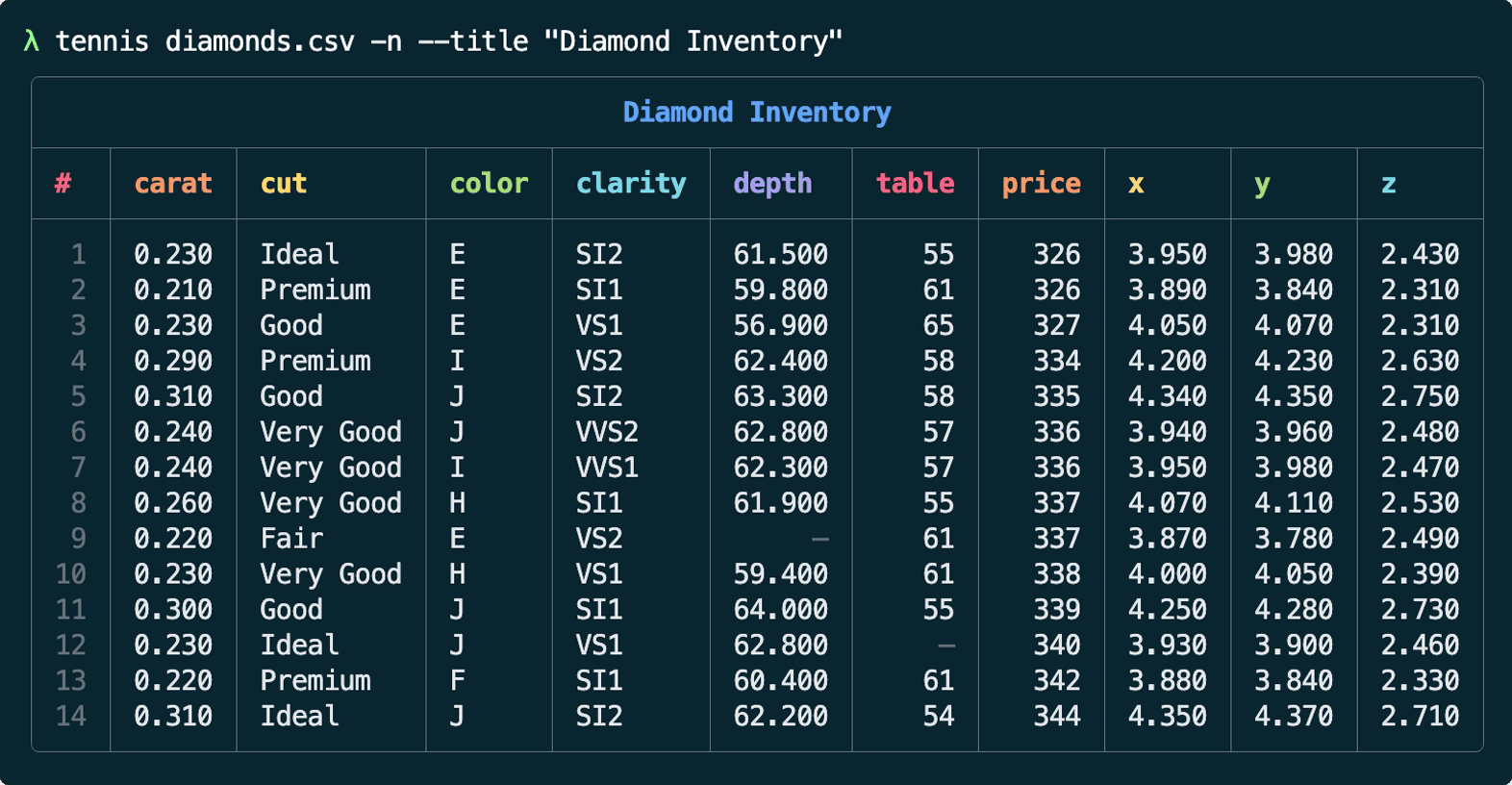
tennis is a small CLI for printing stylish CSV tables in your terminal. Rows will be truncated to fit, and it will automatically pick nice colors to match your terminal. Written in Rust. Demo:
$ brew install gurgeous/tap/tennis
Download a binary from https://github.com/gurgeous/tennis/releases. Copy it somewhere in your PATH. I like to use ~/.local/bin. Also see the optional bash/zsh completions and man page in extra/.
# this will build target/debug/tennis
$ mise trust && mise install
$ cargo build                  # or use `just build`
--peek to get a quick summaryUsage: tennis [OPTIONS] [FILE]
Popular options:
-n, --row-numbers Turn on row numbers
-t, --title <string> Add a title to the table
--border <border> Table border style (rounded|thin|double|...)
-p, --pager Send output through $PAGER or less
--peek Show csv shape, sample, and handy stats
-z, --zebra Turn on zebra stripes
Sort, filter, etc:
--deselect <headers> De-select comma-separated headers
--select <headers> Select or reorder comma-separated headers
--sort <headers> Sort rows by comma-separated headers
-r, --reverse Reverse rows (helpful for sorting)
--shuffle Shuffle rows into random order
--head <int> Show first N rows
--tail <int> Show last N rows
--filter <string> Only show rows that contain this text
Table layout:
-b <headers> Make these columns Bigger
-bb <headers> Make even BIGGER (p90)
-bbb <headers> Make BIGGEST (full width)
--width <width> Set table width, or try (min|max)
Other options:
--color <color> Turn color off and on (on|off|auto)
-d, --delimiter <char> Set CSV delim (can be any char or "tab")
--digits <int> Digits after decimal for float columns
--scale <headers> Add red-to-green color scale
--rscale <headers> Like --scale, but green-to-red
--table <table> Select the db table (for sqlite)
--theme <theme> Select color theme (auto|dark|light)
--vanilla Disable numeric formatting
-h, --help Get help
-v, --version Show version number and exit
Note that color defaults to on. Tennis likes to be colorful.
Tennis supports CSV-like, JSON, and SQLite. It will infer the format using both the filename (if present) and the first few bytes of input. When reading a CSV it tries to sniff the correct delimiter from the first few rows. JSON can be a full array of objects, JSONL/NDJSON, or even just a single JSON object, in which case the pairs become rows. Sqlite files are read through the external sqlite3 CLI. Use --table to pick a specific table; otherwise tennis chooses one automatically.
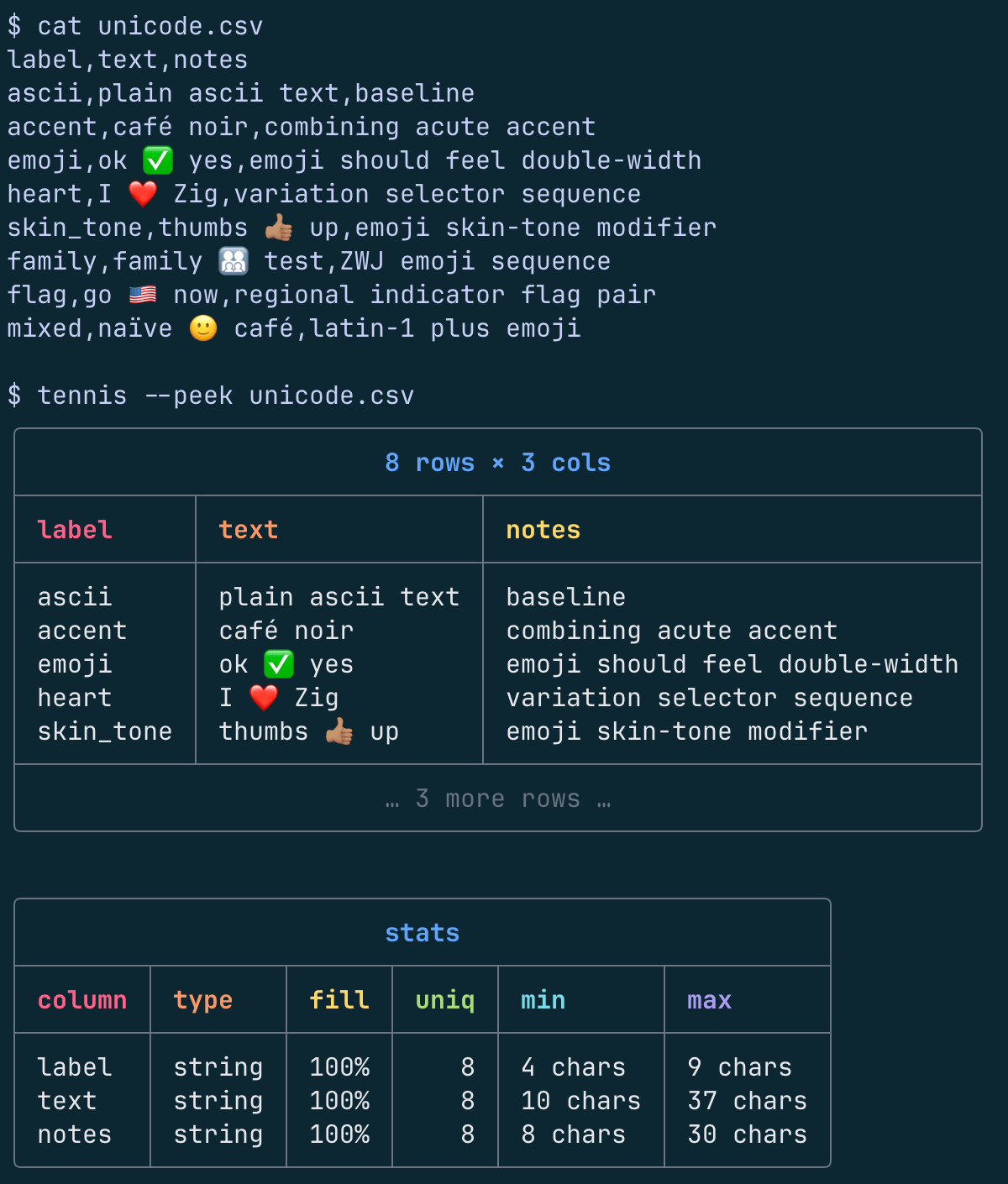
Tennis works fine with Unicode and emoji content. Calculating non-ASCII display width can be complicated, so tennis includes simple heuristics for common cases.
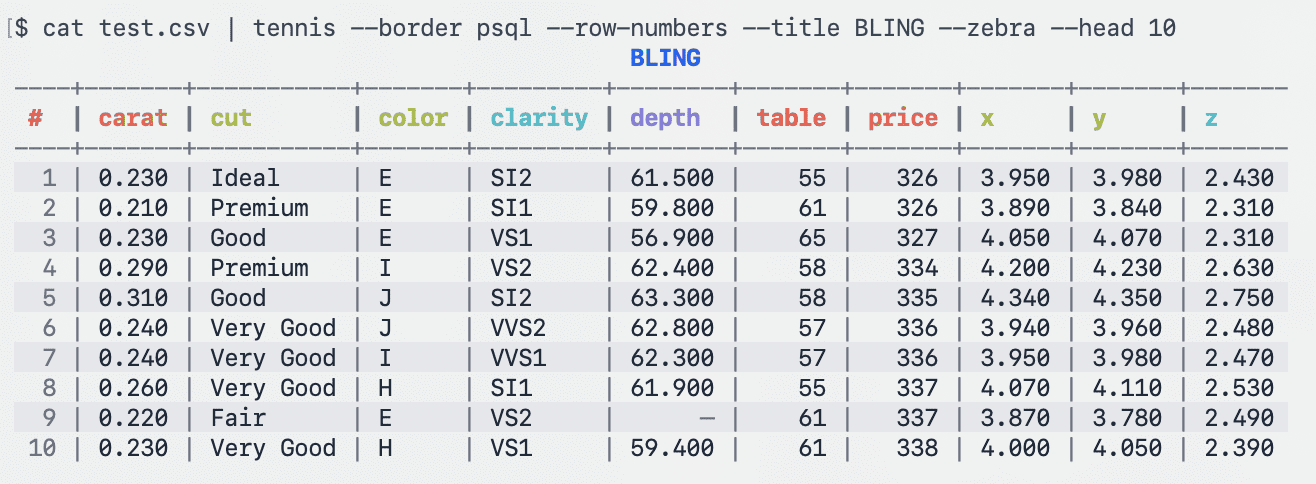
Tennis picks a color theme based on the color of your terminal. Color is on by default. It also honors NO_COLOR=1. Use --border, --row-numbers, --title, and --zebra for more bling. Tennis supports the same borders as nushell.
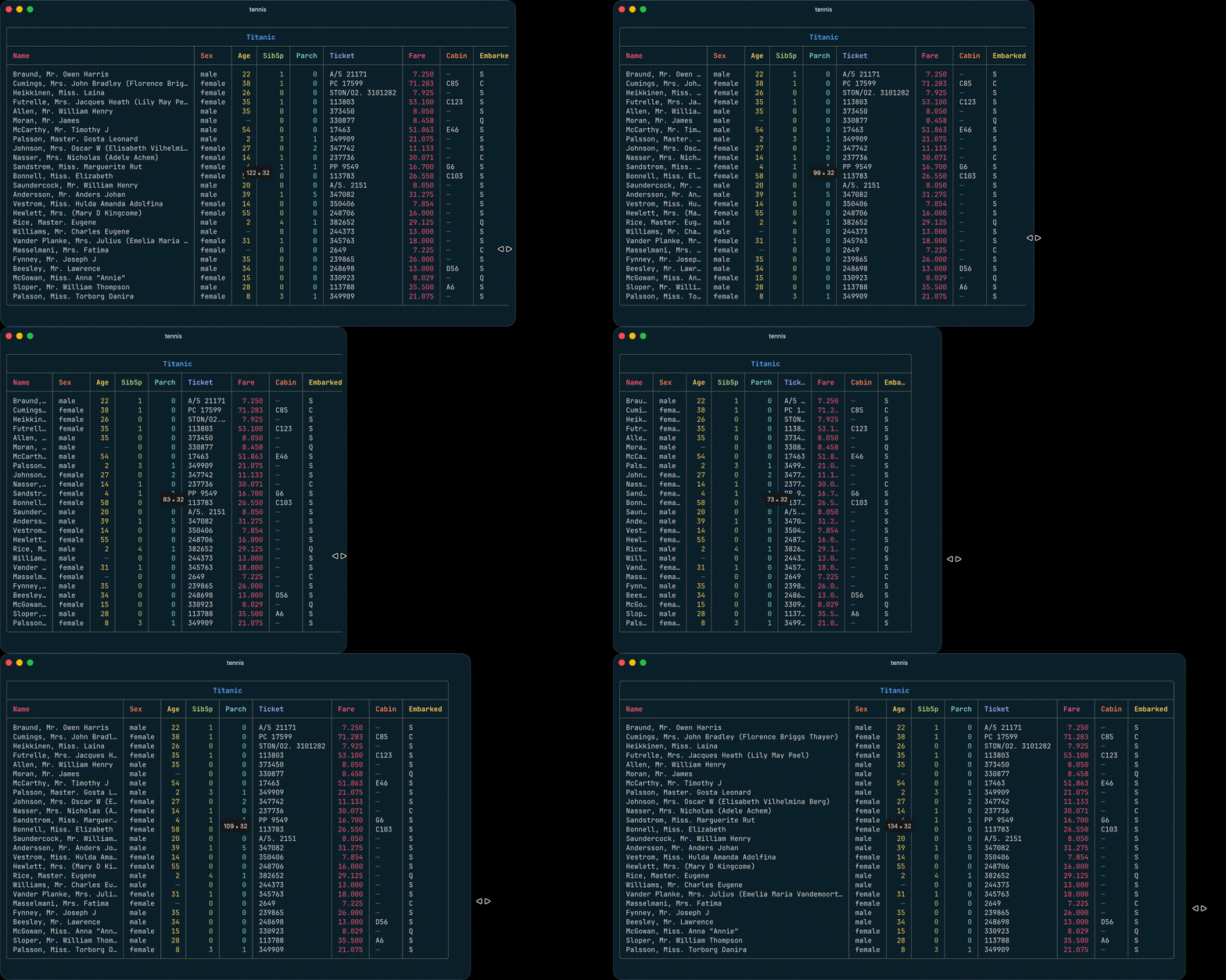
Terminal width is pulled from your terminal, or defaults to 80 if we can't figure it out. Use --width to override the table width, like --width 1000 or even --width max.
Use -b (big), -bb (bigger) and -bbb (biggest) to enlarge a specific column. With -b, the table will still fit into the terminal width, while -bb & -bbb usually cause the table to overflow.
It's common to use --pager / -p to turn on a pager. This is perfect for tables with many rows, or tables that overflow terminal width due to --width or -bb or -bbb.
Note how tennis works really hard to fit tables into the given width. See layout.rs if you want the hairy details on autolayout.
Tennis has a few ways to organize your data. Pick the display columns with --select or --deselect. Sort rows with --sort and an optional --reverse. Or maybe you want to --shuffle into a random order. Use --head and --tail to only show a few rows, or --filter to grep for data.
Numeric columns are detected and formatted/aligned. You can turn that off with --vanilla.
Sometimes you just want to get a quick look at a data file. Use --peek to get a sense of data shape, fill rate, and formats:
We love CSV tools and use them all the time! Here are a few that we rely on:
-b -bb -bbb to Biggify columns--pager / -p fixed--width min to layout based on header width, or --width max to disable truncation--border styles based on nushell / tabled crate.sqlite3 CLI--filter, --sort, --reverse, --shuffle, --zebra, --head and --tail--select and --deselect for choosing columns--pager to send output through your pager (usually less)--peek for shape, a few sample rows, and compact column statsdoomicode, best-effort Unicode width for emojis, etc--delimiter for tsv, semicolon, etc. #5 (@markhm)643 followers · starred Apr 2026
189 followers · starred Mar 2026
616 followers · starred Mar 2026
547 followers · starred Mar 2026
tennis is a small CLI for printing stylish CSV tables in your terminal. Rows will be truncated to fit, and it will automatically pick nice colors to match your terminal. Written in Rust. Demo:
$ brew install gurgeous/tap/tennis
Download a binary from https://github.com/gurgeous/tennis/releases. Copy it somewhere in your PATH. I like to use ~/.local/bin. Also see the optional bash/zsh completions and man page in extra/.
# this will build target/debug/tennis
$ mise trust && mise install
$ cargo build                  # or use `just build`
--peek to get a quick summaryUsage: tennis [OPTIONS] [FILE]
Popular options:
-n, --row-numbers Turn on row numbers
-t, --title <string> Add a title to the table
--border <border> Table border style (rounded|thin|double|...)
-p, --pager Send output through $PAGER or less
--peek Show csv shape, sample, and handy stats
-z, --zebra Turn on zebra stripes
Sort, filter, etc:
--deselect <headers> De-select comma-separated headers
--select <headers> Select or reorder comma-separated headers
--sort <headers> Sort rows by comma-separated headers
-r, --reverse Reverse rows (helpful for sorting)
--shuffle Shuffle rows into random order
--head <int> Show first N rows
--tail <int> Show last N rows
--filter <string> Only show rows that contain this text
Table layout:
-b <headers> Make these columns Bigger
-bb <headers> Make even BIGGER (p90)
-bbb <headers> Make BIGGEST (full width)
--width <width> Set table width, or try (min|max)
Other options:
--color <color> Turn color off and on (on|off|auto)
-d, --delimiter <char> Set CSV delim (can be any char or "tab")
--digits <int> Digits after decimal for float columns
--scale <headers> Add red-to-green color scale
--rscale <headers> Like --scale, but green-to-red
--table <table> Select the db table (for sqlite)
--theme <theme> Select color theme (auto|dark|light)
--vanilla Disable numeric formatting
-h, --help Get help
-v, --version Show version number and exit
Note that color defaults to on. Tennis likes to be colorful.
Tennis supports CSV-like, JSON, and SQLite. It will infer the format using both the filename (if present) and the first few bytes of input. When reading a CSV it tries to sniff the correct delimiter from the first few rows. JSON can be a full array of objects, JSONL/NDJSON, or even just a single JSON object, in which case the pairs become rows. Sqlite files are read through the external sqlite3 CLI. Use --table to pick a specific table; otherwise tennis chooses one automatically.
Tennis works fine with Unicode and emoji content. Calculating non-ASCII display width can be complicated, so tennis includes simple heuristics for common cases.
Tennis picks a color theme based on the color of your terminal. Color is on by default. It also honors NO_COLOR=1. Use --border, --row-numbers, --title, and --zebra for more bling. Tennis supports the same borders as nushell.
Terminal width is pulled from your terminal, or defaults to 80 if we can't figure it out. Use --width to override the table width, like --width 1000 or even --width max.
Use -b (big), -bb (bigger) and -bbb (biggest) to enlarge a specific column. With -b, the table will still fit into the terminal width, while -bb & -bbb usually cause the table to overflow.
It's common to use --pager / -p to turn on a pager. This is perfect for tables with many rows, or tables that overflow terminal width due to --width or -bb or -bbb.
Note how tennis works really hard to fit tables into the given width. See layout.rs if you want the hairy details on autolayout.
Tennis has a few ways to organize your data. Pick the display columns with --select or --deselect. Sort rows with --sort and an optional --reverse. Or maybe you want to --shuffle into a random order. Use --head and --tail to only show a few rows, or --filter to grep for data.
Numeric columns are detected and formatted/aligned. You can turn that off with --vanilla.
Sometimes you just want to get a quick look at a data file. Use --peek to get a sense of data shape, fill rate, and formats:
We love CSV tools and use them all the time! Here are a few that we rely on:
-b -bb -bbb to Biggify columns--pager / -p fixed--width min to layout based on header width, or --width max to disable truncation--border styles based on nushell / tabled crate.sqlite3 CLI--filter, --sort, --reverse, --shuffle, --zebra, --head and --tail--select and --deselect for choosing columns--pager to send output through your pager (usually less)--peek for shape, a few sample rows, and compact column statsdoomicode, best-effort Unicode width for emojis, etc--delimiter for tsv, semicolon, etc. #5 (@markhm)643 followers · starred Apr 2026
189 followers · starred Mar 2026
616 followers · starred Mar 2026
547 followers · starred Mar 2026



