
Open-source content assistant: plans, makes (with Claude Code) and schedules short videos, with a desktop companion called cc
JavaScript
0
6 commits
updated Oct 5, 2026
See what people are saying
README
cc-studio
Your own content team for short-form video, running on your computer. cc-studio plans a week of TikTok and Instagram posts, makes each video with Claude, asks you to approve it, and schedules the ones you approve. cc, a small desktop companion, keeps you in the loop the whole time.
Nothing is posted without your yes. You decide what videos may claim, which accounts they go to, and whether they post automatically or wait for you to press Post.
Contents
- What you get
- How a week works
- Before you start
- Setup, step by step
- Your first week
- Everyday use
- Troubleshooting
- Where your settings live
- Responsible use · Contributing · License
What you get
- A weekly plan per account. It reads each account's own analytics, your competitors' recent posts and current trends, then plans next week: hook, script, caption, hashtags, posting time and a different visual idea for every post.
- Finished videos. Claude builds each post into a 1080x1920 video from your real screenshots and footage (with HyperFrames, Remotion or ffmpeg), adds an ElevenLabs voiceover and music if you have a key, checks its own frames, and makes sure it doesn't look like your recent videos.
- Approval on your phone or desktop. Each video comes to you in Telegram or in cc's chat with three buttons: Approve, Redo (with your note) or Skip.
- Scheduling. Approved videos go through TikTok Studio's own scheduler, up to 7 days ahead, in your real Chrome with your own login. Instagram works through the browser or the official Graph API.
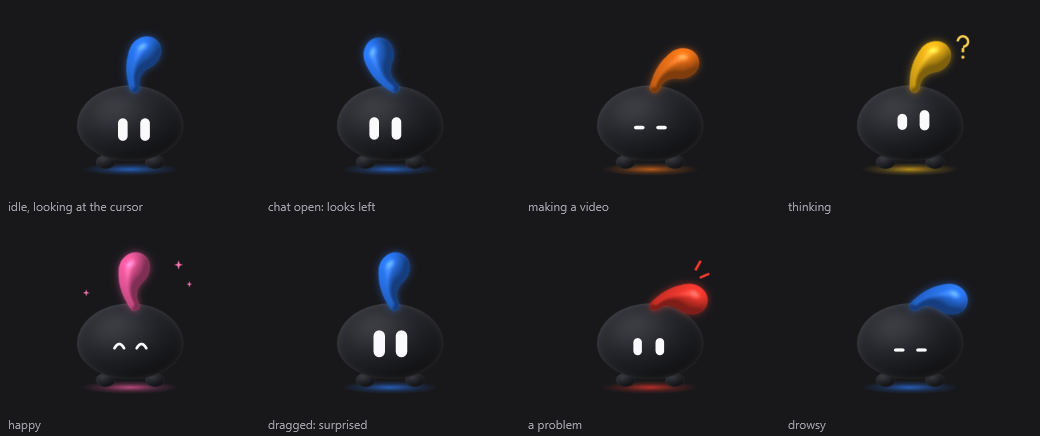
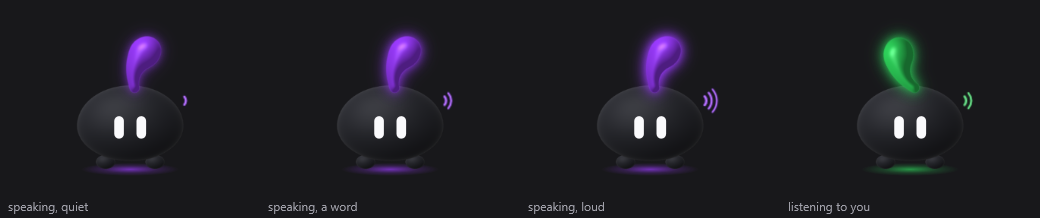
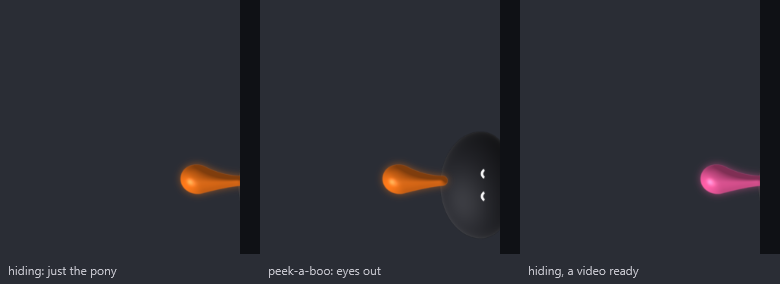
- cc on your desktop (Windows). Its ponytail shows what's happening (blue: all good, orange: making a video, pink: a video is waiting for you, red: a problem). Click it to chat, hear it talk in an offline voice, and use buttons for every action. When you leave it alone, it hides at the edge of your screen with just its ponytail poking out.
| cc talking | cc hiding at the edge |
|---|---|
 |  |
How a week works
 Saturday evening     every 30 minutes            you                 every 30 minutes
┌────────────────┐   ┌──────────────────┐   ┌──────────────┐   ┌──────────────────────┐
│ read analytics │──►│ make the next    │──►│ Approve /    │──►│ schedule it on       │
│ plan next week │   │ video (Claude)   │   │ Redo / Skip  │   │ TikTok or Instagram  │
└────────────────┘   └──────────────────┘   └──────────────┘   └──────────────────────┘
It makes one video at a time, so you're never flooded: when one is waiting for you, it waits too. Every step can be stopped at any point (a reboot, sleep, a crash) and simply continues on the next run.
Before you start
You need these on your computer. The commands are for Windows (run them in PowerShell); on a Mac use the links instead.
| What | Why | Install |
|---|---|---|
| Node.js 22.5 or newer | runs cc-studio | winget install OpenJS.NodeJS.LTS or nodejs.org |
| Git | downloads cc-studio | winget install Git.Git or git-scm.com |
| Google Chrome | posts with your own login | winget install Google.Chrome |
| FFmpeg | builds and checks videos | winget install Gyan.FFmpeg |
| Python 3.10 or newer | the "is this video too similar" check and cc's look | winget install Python.Python.3.12 |
| Claude Code | plans and makes the videos, and powers cc's chat | claude.com/claude-code, or npm install -g @anthropic-ai/claude-code |
After installing Claude Code, run claude once in a terminal and log in (a Claude
subscription or an API key both work). Close and reopen your terminal after the installs so
the new commands are found. To check everything at once later, run npm run doctor.
Optional, but recommended:
- A Telegram account, to approve videos from your phone. Setup walks you through making a bot; it takes two minutes.
- An ElevenLabs API key (elevenlabs.io, Profile > API keys) for spoken voiceovers and music. Without it, videos use on-screen text and your own music.
Which systems? Everything works on Windows 10 and 11. On macOS and Linux the pipeline runs (with cron instead of Task Scheduler), but cc, the desktop companion, is Windows-only, so you'd approve videos in Telegram.
Setup, step by step
1. Download and install
git clone https://github.com/gsl0001/cc-studio.git
cd cc-studio
npm install
2. Run setup
npm run setup
Your browser opens a chat with cc (a page served from your own computer, at
localhost:4829; nothing is sent anywhere). Keep the terminal window open until you finish.
Answer by typing or by tapping the buttons; pressing Enter on an empty box keeps the value
shown.
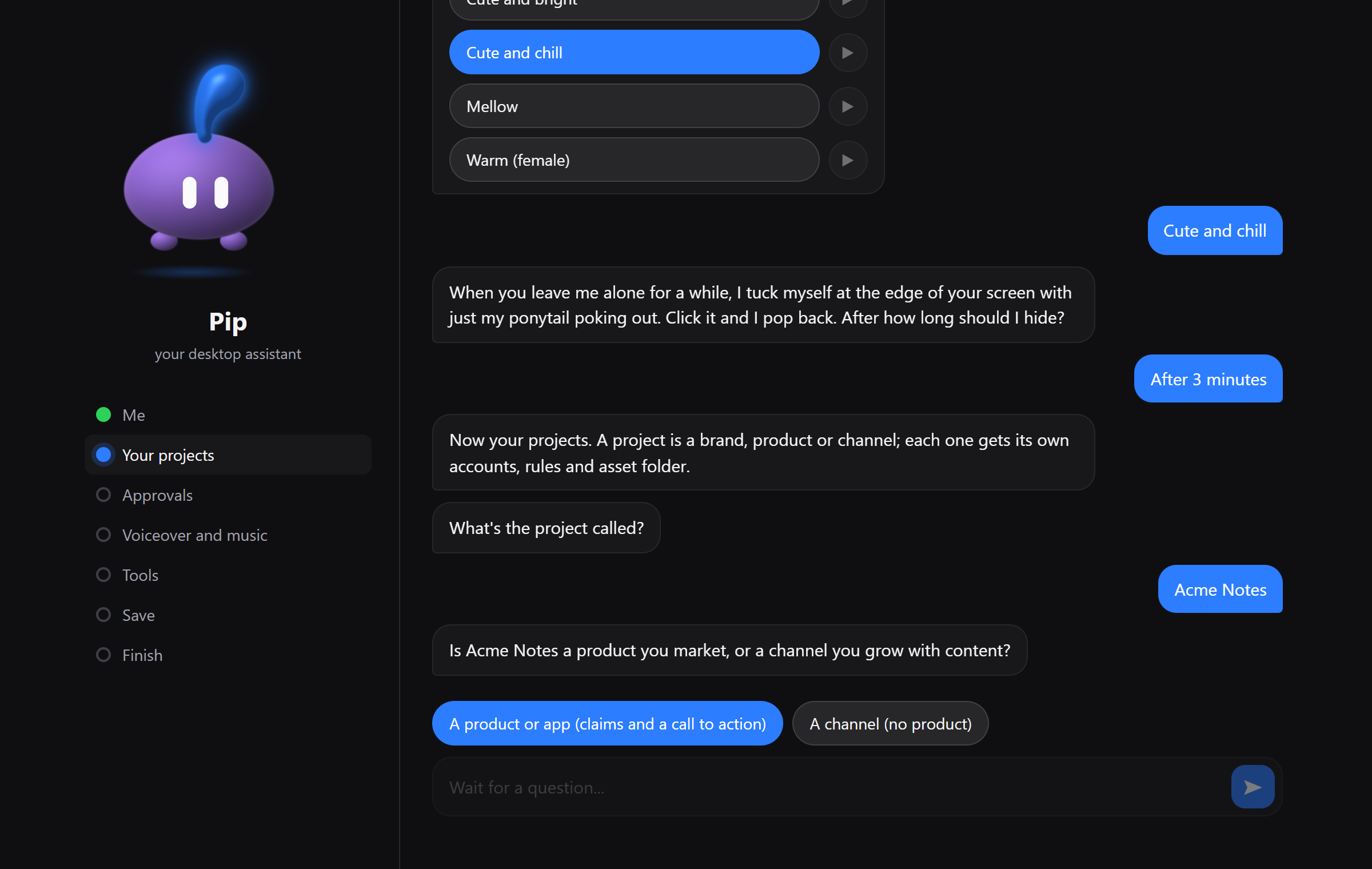
Here is everything it asks, in order:
| Section | Questions | Tips |
|---|---|---|
| Me | cc's name, colour, voice (press play to hear each) and when it hides | All changeable later from cc's right-click menu. |
| Your projects | name; product or channel; one-line description; audience; website; what videos may claim; the call to action; what they must never claim; language; video length; the folder for its assets; a word the voice says wrong | A project is one brand, app or channel. Only list claims you can prove: the creator never goes beyond them. |
| Accounts (per project) | platform; handle; a friendly name; posting times; post automatically or wait for you; what the account is about | Posting times are 24-hour, like 09:30, 18:00. Skip "what it's about" and the strategist proposes one from the numbers. |
| Approvals | set up a Telegram bot, or skip | Use a bot that only cc-studio uses: Telegram gives each bot's messages to one program. |
| Voiceover and music | your ElevenLabs key, or skip | Keys go only into the .env file on your computer. |
| Tools | your Python (it checks it and offers to install what's missing); how the creator gets permission; paid video APIs; local video models | Keep auto mode for permissions (see Security). |
| Save | a summary to check | Start over if something's wrong. |
Prefer the terminal? npm run setup:cli asks the same questions there.
3. The finishing steps
After saving, setup shows a list of buttons. Each runs right there and shows its progress:
- Log in to each account. A Chrome window opens on TikTok or Instagram. Log in by hand
(cc-studio never types a password), then close the window. That login is kept in
browser-profile/, so treat that folder like a password. - Build my look. Draws cc's avatar (needs Python).
- Install my voice. An offline voice for cc (downloads about 340 MB). Until then cc uses the Windows voice.
- Start the schedule. Registers the jobs in Windows Task Scheduler and starts cc, the desk server and the Telegram bot. No admin rights needed; they run while you're logged in.
- Health check. Lists anything still missing, each with the command that fixes it.
You can run any of them again later: npm run login -- <account-id>, npm run avatar,
npm run voice:install, npm run tasks:install, npm run doctor.
4. Give it real material
The better the material, the better the videos:
- Put your logos, app screenshots, screen recordings and photos in
workspaces/<project>/assets/. Add brand rules (colours, fonts, words to avoid) toworkspaces/<project>/README.md; the creator reads it before every video. - Fill in
content/CONTEXT.md: who each account is for and the words people search for. - Optionally edit
content/GUIDELINES.md, the house rules for every video.
Your first week
- Plan. The plan is made every Saturday evening. Don't want to wait? Run
npm run strategistto plan the coming week now. - Make. Every 30 minutes the pulse checks whether a video is needed and starts the creator. A video usually takes well under an hour (90 minutes at most).
- Approve. When it's ready, cc turns pink and Telegram pings you. Watch it, then Approve, Redo with a note ("make the hook shorter"), or Skip.
- Post. Approved videos are scheduled from 08:00 onward, at most one upload per run, at the times you set.
- Learn. Next Saturday it reads how the videos did, and the next plan builds on it.
Everyday use
With cc (click it to open the chat). These answer instantly:
| Say | It does |
|---|---|
status, what's next, this week, errors | tells you where things stand |
approve, skip, redo: <what to change> | answers the video that's waiting |
next, next <account> | makes the next video now |
publish now, check logins | uploads due videos now, checks every account is still logged in |
pause, resume (or pause <account>) | stops or restarts everything, or one account |
folders, open <folder> | opens the finished videos, a project's workspace, the week plans, the calendar or the latest report |
mute, size small, hide | cc itself |
help | all of the above as buttons |
Anything else goes to Claude, which answers from the live state of your pipeline. Right-click cc for its menu: voice, colour, size, auto-hide.
In Telegram: each new video arrives with Approve / Redo / Skip buttons, and pause,
resume, next and status work there too.
In a terminal: npm run status (the jobs), npm run logs -- --errors (recent problems),
npm run doctor (a health check), npm run registry (checks your project files).
Troubleshooting
Start with npm run doctor: it checks every part and says how to fix what's wrong.
| Problem | Fix |
|---|---|
| cc isn't on my screen | It's probably hiding at the edge: look for its ponytail on the left or right side and click it. If it isn't running, npm run cc starts it. |
| cc says it can't reach the desk | Another program is using port 4820 (or the desk stopped). Restart it with npm run tasks:install, or close the other program. |
| The Telegram bot doesn't answer | Each bot can be used by one program only. If another tool uses the same bot, make a new one with @BotFather and run setup again. |
| Uploads fail with a login page | The account's login expired. Run npm run login -- <account-id> and log in again. |
| Videos stop being made | Check npm run logs -- --errors. A Claude usage limit pauses the creator for two hours; an expired Claude login needs claude run once in a terminal. |
| I want everything to stop now | Say pause to cc or in Telegram. resume starts again. |
| I want to change an answer | Run npm run setup again (your current values are the defaults), or edit the files below by hand. |
| I want to remove it | npm run tasks:uninstall removes the scheduled jobs; then delete the folder. |
Reporting a bug? Include the lines from npm run logs -- --errors and the output of
npm run doctor.
Where your settings live
Everything is plain files you can open and edit. None of them are uploaded anywhere, and the ones with your details are kept out of git.
| File | What it holds |
|---|---|
studio.config.json | cc's name, look and voice; AI models; folders; creator rules |
.env | secrets: Telegram, ElevenLabs, Instagram API tokens |
apps/<project>/profile.json | one brand: claims, call to action, video length, accounts, posting times |
content/CONTEXT.md | facts per account: audience, search terms, what works |
content/GUIDELINES.md | the house rules for every video |
workspaces/<project>/ | your material, and each video's working folder |
finals/<project>/ | finished videos |
Every setting is explained in docs/configuration.md. How the parts
fit together is in docs/architecture.md, and Instagram's official
API setup is in docs/instagram-api-setup.md.
apps/example/ is a complete fictional project to copy from.
Responsible use
cc-studio automates your own accounts through your own logged-in browser. Platforms' terms of service limit automation and they change, so you're responsible for how you use it. It's built to stay on the right side of them: a person approves every video, you set the posting volume, the AI-content label matches what was actually made, and it never buys engagement, follows for follows, or uses unlicensed music.
The creator runs Claude Code on its own while it makes a video. Read SECURITY.md for what that means and how logins and secrets are kept.
Contributing
Issues and pull requests are welcome; see CONTRIBUTING.md. Run npm test
before you open a pull request.
License
Similar repos


Open-source content assistant: plans, makes (with Claude Code) and schedules short videos, with a desktop companion called cc
JavaScript
0
6 commits
updated Oct 5, 2026
See what people are saying
README
cc-studio
Your own content team for short-form video, running on your computer. cc-studio plans a week of TikTok and Instagram posts, makes each video with Claude, asks you to approve it, and schedules the ones you approve. cc, a small desktop companion, keeps you in the loop the whole time.
Nothing is posted without your yes. You decide what videos may claim, which accounts they go to, and whether they post automatically or wait for you to press Post.
Contents
- What you get
- How a week works
- Before you start
- Setup, step by step
- Your first week
- Everyday use
- Troubleshooting
- Where your settings live
- Responsible use · Contributing · License
What you get
- A weekly plan per account. It reads each account's own analytics, your competitors' recent posts and current trends, then plans next week: hook, script, caption, hashtags, posting time and a different visual idea for every post.
- Finished videos. Claude builds each post into a 1080x1920 video from your real screenshots and footage (with HyperFrames, Remotion or ffmpeg), adds an ElevenLabs voiceover and music if you have a key, checks its own frames, and makes sure it doesn't look like your recent videos.
- Approval on your phone or desktop. Each video comes to you in Telegram or in cc's chat with three buttons: Approve, Redo (with your note) or Skip.
- Scheduling. Approved videos go through TikTok Studio's own scheduler, up to 7 days ahead, in your real Chrome with your own login. Instagram works through the browser or the official Graph API.
- cc on your desktop (Windows). Its ponytail shows what's happening (blue: all good, orange: making a video, pink: a video is waiting for you, red: a problem). Click it to chat, hear it talk in an offline voice, and use buttons for every action. When you leave it alone, it hides at the edge of your screen with just its ponytail poking out.
| cc talking | cc hiding at the edge |
|---|---|
| |
How a week works
 Saturday evening     every 30 minutes            you                 every 30 minutes
┌────────────────┐   ┌──────────────────┐   ┌──────────────┐   ┌──────────────────────┐
│ read analytics │──►│ make the next    │──►│ Approve /    │──►│ schedule it on       │
│ plan next week │   │ video (Claude)   │   │ Redo / Skip  │   │ TikTok or Instagram  │
└────────────────┘   └──────────────────┘   └──────────────┘   └──────────────────────┘
It makes one video at a time, so you're never flooded: when one is waiting for you, it waits too. Every step can be stopped at any point (a reboot, sleep, a crash) and simply continues on the next run.
Before you start
You need these on your computer. The commands are for Windows (run them in PowerShell); on a Mac use the links instead.
| What | Why | Install |
|---|---|---|
| Node.js 22.5 or newer | runs cc-studio | winget install OpenJS.NodeJS.LTS or nodejs.org |
| Git | downloads cc-studio | winget install Git.Git or git-scm.com |
| Google Chrome | posts with your own login | winget install Google.Chrome |
| FFmpeg | builds and checks videos | winget install Gyan.FFmpeg |
| Python 3.10 or newer | the "is this video too similar" check and cc's look | winget install Python.Python.3.12 |
| Claude Code | plans and makes the videos, and powers cc's chat | claude.com/claude-code, or npm install -g @anthropic-ai/claude-code |
After installing Claude Code, run claude once in a terminal and log in (a Claude
subscription or an API key both work). Close and reopen your terminal after the installs so
the new commands are found. To check everything at once later, run npm run doctor.
Optional, but recommended:
- A Telegram account, to approve videos from your phone. Setup walks you through making a bot; it takes two minutes.
- An ElevenLabs API key (elevenlabs.io, Profile > API keys) for spoken voiceovers and music. Without it, videos use on-screen text and your own music.
Which systems? Everything works on Windows 10 and 11. On macOS and Linux the pipeline runs (with cron instead of Task Scheduler), but cc, the desktop companion, is Windows-only, so you'd approve videos in Telegram.
Setup, step by step
1. Download and install
git clone https://github.com/gsl0001/cc-studio.git
cd cc-studio
npm install
2. Run setup
npm run setup
Your browser opens a chat with cc (a page served from your own computer, at
localhost:4829; nothing is sent anywhere). Keep the terminal window open until you finish.
Answer by typing or by tapping the buttons; pressing Enter on an empty box keeps the value
shown.
Here is everything it asks, in order:
| Section | Questions | Tips |
|---|---|---|
| Me | cc's name, colour, voice (press play to hear each) and when it hides | All changeable later from cc's right-click menu. |
| Your projects | name; product or channel; one-line description; audience; website; what videos may claim; the call to action; what they must never claim; language; video length; the folder for its assets; a word the voice says wrong | A project is one brand, app or channel. Only list claims you can prove: the creator never goes beyond them. |
| Accounts (per project) | platform; handle; a friendly name; posting times; post automatically or wait for you; what the account is about | Posting times are 24-hour, like 09:30, 18:00. Skip "what it's about" and the strategist proposes one from the numbers. |
| Approvals | set up a Telegram bot, or skip | Use a bot that only cc-studio uses: Telegram gives each bot's messages to one program. |
| Voiceover and music | your ElevenLabs key, or skip | Keys go only into the .env file on your computer. |
| Tools | your Python (it checks it and offers to install what's missing); how the creator gets permission; paid video APIs; local video models | Keep auto mode for permissions (see Security). |
| Save | a summary to check | Start over if something's wrong. |
Prefer the terminal? npm run setup:cli asks the same questions there.
3. The finishing steps
After saving, setup shows a list of buttons. Each runs right there and shows its progress:
- Log in to each account. A Chrome window opens on TikTok or Instagram. Log in by hand
(cc-studio never types a password), then close the window. That login is kept in
browser-profile/, so treat that folder like a password. - Build my look. Draws cc's avatar (needs Python).
- Install my voice. An offline voice for cc (downloads about 340 MB). Until then cc uses the Windows voice.
- Start the schedule. Registers the jobs in Windows Task Scheduler and starts cc, the desk server and the Telegram bot. No admin rights needed; they run while you're logged in.
- Health check. Lists anything still missing, each with the command that fixes it.
You can run any of them again later: npm run login -- <account-id>, npm run avatar,
npm run voice:install, npm run tasks:install, npm run doctor.
4. Give it real material
The better the material, the better the videos:
- Put your logos, app screenshots, screen recordings and photos in
workspaces/<project>/assets/. Add brand rules (colours, fonts, words to avoid) toworkspaces/<project>/README.md; the creator reads it before every video. - Fill in
content/CONTEXT.md: who each account is for and the words people search for. - Optionally edit
content/GUIDELINES.md, the house rules for every video.
Your first week
- Plan. The plan is made every Saturday evening. Don't want to wait? Run
npm run strategistto plan the coming week now. - Make. Every 30 minutes the pulse checks whether a video is needed and starts the creator. A video usually takes well under an hour (90 minutes at most).
- Approve. When it's ready, cc turns pink and Telegram pings you. Watch it, then Approve, Redo with a note ("make the hook shorter"), or Skip.
- Post. Approved videos are scheduled from 08:00 onward, at most one upload per run, at the times you set.
- Learn. Next Saturday it reads how the videos did, and the next plan builds on it.
Everyday use
With cc (click it to open the chat). These answer instantly:
| Say | It does |
|---|---|
status, what's next, this week, errors | tells you where things stand |
approve, skip, redo: <what to change> | answers the video that's waiting |
next, next <account> | makes the next video now |
publish now, check logins | uploads due videos now, checks every account is still logged in |
pause, resume (or pause <account>) | stops or restarts everything, or one account |
folders, open <folder> | opens the finished videos, a project's workspace, the week plans, the calendar or the latest report |
mute, size small, hide | cc itself |
help | all of the above as buttons |
Anything else goes to Claude, which answers from the live state of your pipeline. Right-click cc for its menu: voice, colour, size, auto-hide.
In Telegram: each new video arrives with Approve / Redo / Skip buttons, and pause,
resume, next and status work there too.
In a terminal: npm run status (the jobs), npm run logs -- --errors (recent problems),
npm run doctor (a health check), npm run registry (checks your project files).
Troubleshooting
Start with npm run doctor: it checks every part and says how to fix what's wrong.
| Problem | Fix |
|---|---|
| cc isn't on my screen | It's probably hiding at the edge: look for its ponytail on the left or right side and click it. If it isn't running, npm run cc starts it. |
| cc says it can't reach the desk | Another program is using port 4820 (or the desk stopped). Restart it with npm run tasks:install, or close the other program. |
| The Telegram bot doesn't answer | Each bot can be used by one program only. If another tool uses the same bot, make a new one with @BotFather and run setup again. |
| Uploads fail with a login page | The account's login expired. Run npm run login -- <account-id> and log in again. |
| Videos stop being made | Check npm run logs -- --errors. A Claude usage limit pauses the creator for two hours; an expired Claude login needs claude run once in a terminal. |
| I want everything to stop now | Say pause to cc or in Telegram. resume starts again. |
| I want to change an answer | Run npm run setup again (your current values are the defaults), or edit the files below by hand. |
| I want to remove it | npm run tasks:uninstall removes the scheduled jobs; then delete the folder. |
Reporting a bug? Include the lines from npm run logs -- --errors and the output of
npm run doctor.
Where your settings live
Everything is plain files you can open and edit. None of them are uploaded anywhere, and the ones with your details are kept out of git.
| File | What it holds |
|---|---|
studio.config.json | cc's name, look and voice; AI models; folders; creator rules |
.env | secrets: Telegram, ElevenLabs, Instagram API tokens |
apps/<project>/profile.json | one brand: claims, call to action, video length, accounts, posting times |
content/CONTEXT.md | facts per account: audience, search terms, what works |
content/GUIDELINES.md | the house rules for every video |
workspaces/<project>/ | your material, and each video's working folder |
finals/<project>/ | finished videos |
Every setting is explained in docs/configuration.md. How the parts
fit together is in docs/architecture.md, and Instagram's official
API setup is in docs/instagram-api-setup.md.
apps/example/ is a complete fictional project to copy from.
Responsible use
cc-studio automates your own accounts through your own logged-in browser. Platforms' terms of service limit automation and they change, so you're responsible for how you use it. It's built to stay on the right side of them: a person approves every video, you set the posting volume, the AI-content label matches what was actually made, and it never buys engagement, follows for follows, or uses unlicensed music.
The creator runs Claude Code on its own while it makes a video. Read SECURITY.md for what that means and how logins and secrets are kept.
Contributing
Issues and pull requests are welcome; see CONTRIBUTING.md. Run npm test
before you open a pull request.