Sonia - Local Voice Assistant in less than 13GB of RAM, TTS/STT, No Dedicated GPU required, Skills supported
See the codeSonia is an LLM + STT + TTS voice assistant that needs no dedicated GPU and runs in less than 15 GB of RAM, entirely on a local computer. Multilingual and full-duplex: the mic stays open while the assistant talks — interrupt it (barge-in) and it pauses, resumes or cancels accordingly. It mirrors whichever language you speak (English/Italian tested).
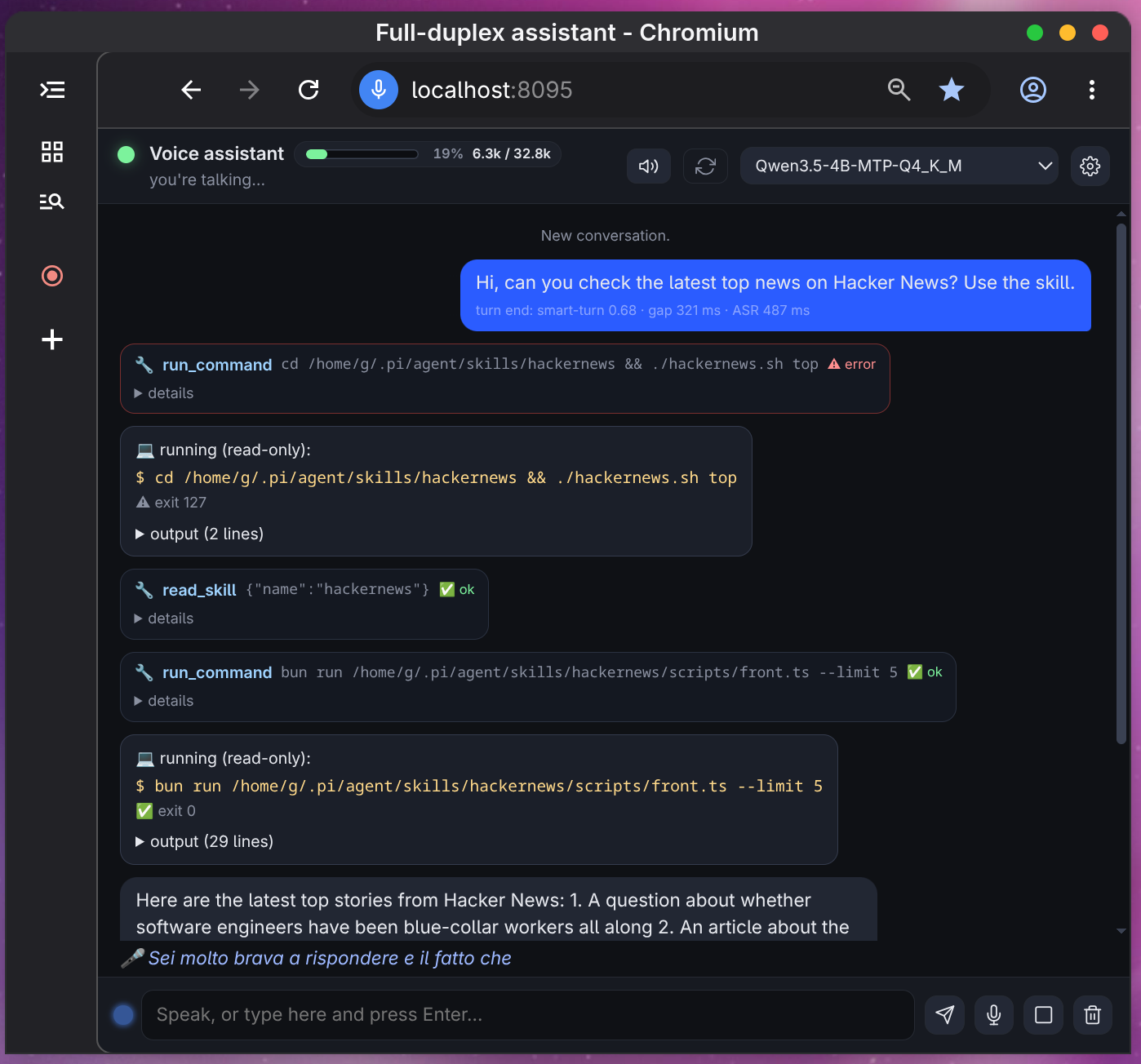
Everything is local; the only external piece is an OpenAI-compatible endpoint (an
already-running llama-server, managed outside this project). Optionally and
experimentally, an existing pi executable can replace it — see AI models used.
Contents — Features · Architecture · Models · Installation · Security · Inspiration · License
🎤 … line; a turn ends on Silero VAD + silence gaps + the Smart Turn classifier, with a 4-token LISTEN/REPLY prompt only when the pause is ambiguous.LOCALE=it|en localizes UI, spoken sentences and tool results, and a timer rings in the language of the request that set it.CMD_MODE=off|ask|auto for risky shell. The read-only skill tools (read_skill, list_skills) are exempt from the gate — they load context and act on nothing, while the run_command that uses them is still judged.SKILL.md packages are not owned by this project: point SKILLS_DIR at the directory you already use (pi's, opencode's, any other harness's) and activate each per-turn from the UI settings drawer.pi executable (LLM_VIA_PI=1, toggled at runtime) — plus a browser app-window UI and --cli/--text terminal modes.data/chat.json, so a restart resumes where you left off (CHAT_PERSIST=0 disables).One TypeScript hub process owns the 32 ms frame loop, the queues and the state machine.
The speech stack is three audio.cpp servers, the LLM is an external llama-server,
VAD runs in-process.
 mic (32 ms frames)
   │
   ├─► Silero VAD (in-process, ONNX)                    [src/vad.ts]
   ▼
 audio.cpp :8091  streaming ASR  ── partial + final transcript
   ▼
 HARNESS  src/harness/harness.ts — turn-end decision:
   │   pause ≥200ms → Smart Turn (:8093) ≥0.5 ⇒ end · pause ≥900ms + "not finished"
   │   → 4-token LLM prompt LISTEN/REPLY (prompts/decision.txt)
   ▼
 LLM leg  (src/clients/llm.ts / pi.ts — one interface, two backends)
   │   A) llama-server :8080 (OpenAI API)   B) `pi -c` CLI (experimental, optional)
   │   + tools + tool gate (prompts/tool-gate.txt) filtering each round
   ▼
 streamed text → SentenceSplitter → sentences
   ▼
 audio.cpp :8092  TTS ── SSE PCM16 → paced Player (20 ms slices)
   ▲ barge-in: pause / resume / flush within ~one buffer
| Port | Service | Started by |
|---|---|---|
:8080 | llama-server — OpenAI-compatible LLM (external) | you: systemctl --user start llama-server |
:8091 / :8092 / :8093 | audio.cpp ASR (Vulkan) / TTS / Smart Turn (CPU) | scripts/start-audio-servers.sh start |
:8095 | harness web UI — GET /, GET /ws (JSON events + binary PCM both ways) | bun run start (scripts/run.ts) |
src/, Bun + TypeScript)Entry points cli.ts (--web/--cli/--text/offline WAV), web.ts, config.ts (every
knob = env var), i18n.ts · event loop in harness/ · model clients in clients/
(audiocpp.ts, llm.ts, pi.ts, sse.ts, think.ts) · capabilities tools.ts,
command-policy.ts, shell-runner.ts, skills.ts, vad.ts · audio in audio/, UI in
static/index.html (single-file, localized) · prompts in prompts/.
| Model | Role | Served by / device | Size |
|---|---|---|---|
Qwen3.5-4B-MTP (Q4_K_M) | main LLM: replies, tools, turn judge, tool gate | external llama-server :8080, Vulkan | 2.7 GiB (not fetched by this repo) |
Voxtral Mini 4B Realtime 2602 (q4_k) | streaming ASR | audio.cpp :8091, Vulkan (B390 iGPU) | 2.9 GB |
Pocket TTS (bf16, 5 language packs, 26 voices) | streaming TTS | audio.cpp :8092, CPU | ~209 MiB/pack |
Smart Turn v3.2 (f32) | end-of-turn classifier | audio.cpp :8093, CPU | 31 MB |
Silero VAD v5 (onnx) | voice activity detection | in-process, CPU | 2.3 MB |
experimental + optional: any pi --list-models id | alternative LLM leg (LLM_VIA_PI=1); harness tools are off in this mode | pi CLI subprocess | — |
Speech models go to models/ via bun run models-download (~3.3 GiB total,
idempotent/resumable) from the audio.cpp GGUF mirror;
the LLM .gguf is never downloaded here — it belongs to your external llama-server.
No dedicated GPU: ASR uses whatever Vulkan device is available (an iGPU is fine) or
ASR_BACKEND=cpu; TTS, Smart Turn and the VAD are CPU-only.
Bun ≥ 1.x (runtime + tests, no build step) · llama-server on :8080 (the LLM
leg — not started by this repo, must answer /health) · cmake + Ninja + Vulkan SDK
for the one-time build of vendor/audio.cpp (no Vulkan device? -DENGINE_ENABLE_VULKAN=OFF
ASR_BACKEND=cpu) · Chromium in PATH for the browser UI (optional:
--no-browser + any browser) · PipeWire for mic/speaker in --cli mode (browser mode
uses the tab's audio).bun install # 1. dependencies
cp .env.example .env # 2. config — set SKILLS_DIR (see "Skills") and
# LLM_BASE_URL / LLM_MODEL, or LLM_VIA_PI=1 to use an existing `pi` executable
bun run fetch-and-compile-audio.cpp # 3. fetch + compile the latest audio.cpp release
# (clone → cmake → build, incremental; vendor/ is git-ignored. Or point
# AUDIOCPP_SERVER=/path/to/audiocpp_server at an existing binary)
Why compile instead of using the official prebuilt binaries? Upstream (
0xShug0/audio.cpp) ships Ubuntu/macOS/Windows binaries with every release, but they are built withENGINE_ENABLE_NATIVE_CPU=ON(i.e.-march=native) on AVX-512 CI runners, so the AVX-512 instructions end up inggml_cpu_inititself. On CPUs without AVX-512 (all Intel 12th-gen+) the process dies withSIGILLright after Vulkan init — with bothbackend: vulkanandbackend: cpu, since the CPU backend is always registered. Verified against releasev0.9.1(gdb:ggml_cpu_init+607: vpbroadcastd %edx,%ymm17, an AVX-512VL instruction). A local build works because-march=nativethen means plain AVX2/AVX-VNNI. (Not a Mesa/driver issue: neither binary bundles a driver — both link onlylibvulkan.so.1and use the host's ICD, and the official one did enumerate the iGPU correctly before crashing.) Revisit once upstream releases baseline-ISA binaries (e.g.GGML_NATIVE=OFFor-DENGINE_ENABLE_CPU_ALL_VARIANTS=ON): thenAUDIOCPP_SERVER=can just point at the downloaded release and thevendor/audio.cppclone (1.2 GB) can go away.
bun run models-download                 # 4. speech models (~3.3 GiB, resumable)
bun run models-download --check         # verify only: ✓/✗ per file, exit 1 if missing
bun run models-download --only vad      # one package only (asr|tts|turn|vad)

systemctl --user start llama-server     # 5. the LLM (external, your own unit/config)

bun run runtime-check                   # 6. verify everything answers
bun run start              # three audio.cpp servers + the harness → http://127.0.0.1:8095/
bun run stop               # …plus the audio servers
bun run start --no-browser # same, print the URL only
bun run start --cli        # terminal through PipeWire mic/speaker
bun run start --text       # typed input
bun run stop --all         # …plus llama-server (the systemd unit)
bun run stop --status      # what is running right now
bun run scripts/stop.ts    # only the harness + its Chromium window
scripts/run.ts checks llama-server, starts the audio servers (waiting on /health),
then the harness — which warms up (LLM + TTS rate + ASR Vulkan graph) before printing
ready, so a cold model load can take minutes. Everything private or regeneratable
lives in data/ (git-ignored): pid files, server configs, logs, the browser profile,
notes/skills/voice choices and the conversation (chat.json).
bun run test              # unit tests (pretest = tsc --noEmit, strict)
bun run test:all          # + the WebSocket suite (needs models/silero)
bun run typecheck
bun run runtime-check     # are llama-server + ASR + TTS + turn + harness up?
scripts/ui-test.sh        # browser-UI suite (headless Chromium)
CI (.github/workflows/ci.yml) is hermetic: llama-server and the audio.cpp servers are
mocked, temp dirs hold the state, and the only file fetched is the Silero VAD. The opt-in
job (WITH_MODELS=true repo variable) fetches the full ~3.3 GiB of speech models — also
checking the download plan still resolves — and re-runs the suite with them.
Env vars: .env.example documents all of them (defaults in
src/config.ts); the UI's ⚙ drawer overrides some at runtime.
Skills are plain SKILL.md packages (instructions + scripts/) read from a single
directory — Sonia owns none of them. Set SKILLS_DIR in .env to a folder your other
tooling already uses: ~/.pi/agent/skills (the pi coding agent, the default), your
opencode skills/plugins directory, or any dir with <name>/SKILL.md. Which are
active is chosen per-session in the UI drawer (persisted in data/skills.json); inactive
skills never reach the prompt and read_skill refuses them.
Everything is localhost by design — no login, no TLS: do not pass a non-loopback
--host without your own protection in front of it. run_command spawns bash -c as
your user with no sandbox; the policy in src/command-policy.ts
classes read-only commands as safe, while shell metacharacters and sensitive paths
(.ssh, keys, .env) always stop at the approval prompt in CMD_MODE=ask.
The /ws WebSocket — the control channel of the whole app — accepts a connection only
from this server's own origin (originAllowed in src/web.ts): browsers
do not apply the same-origin policy to WebSockets, so without that check any page you
visit could open ws://127.0.0.1:8095/ws, read the transcript and push commands at it.
A page served elsewhere is refused at the upgrade; a second window of your own takes the
single client slot over, telling the first one with a session_taken event.
Skills are out of this project's scope — verifying them is yours. Commands inside
SKILLS_DIR are implicitly trusted: they skip both the whitelist and the approval
prompt and run hands-free as your user. Before activating a skill, check what its
SKILL.md tells the model to do and which CLI commands it calls — Sonia only relays
them. Prefer CMD_MODE=ask while trying new ones.
This project answers Speakrail — a low-latency, fully-local voice assistant that listens while it talks, but requires CUDA/Nvidia hardware and more resources.
Released under the GNU General Public License v3.0 (GPL-3.0-only).
Copyright (C) 2025 the fullduplex-assistant authors. You may redistribute it and/or modify it under the terms of the GPLv3 as published by the Free Software Foundation.
This repository only holds our own source code (src/, scripts/, prompts/,
static/). Everything else it pulls in or talks to ships under its own, separate
terms — none GPL, none re-licensed by this project:
| Component | Where it lives | License |
|---|---|---|
audio.cpp (ASR/TTS/turn/VAD servers) | vendor/, fetched by scripts/fetch-and-compile-audio-cpp.ts | Apache-2.0 |
llama-server (main LLM leg) | external, you run it yourself | MIT |
onnxruntime-node, ws (runtime deps) | node_modules/ | MIT |
typescript, @types/*, dev deps | node_modules/ | Apache-2.0, MIT, ISC, BSD-3-Clause, CC0-1.0 |
| Voxtral Mini 4B Realtime 2602 (ASR) | models/ | Apache-2.0 (Mistral AI) |
| Pocket TTS (TTS + voices) | models/ | MIT (kyutai-labs/pocket-tts) |
| Smart Turn v3.2 (turn classifier) | models/ | BSD-2-Clause (pipecat-ai) |
| Silero VAD v5 (VAD) | models/ | MIT (snakers4/silero-vad) |
Qwen3.5-4B-MTP (main LLM .gguf) | never fetched here — external llama-server | see its own model card |
pi CLI (LLM_VIA_PI=1) | external executable | see the pi project |
Skills (SKILLS_DIR) | outside this repo | each skill's own terms |
The model licenses above are the upstream ones; the .gguf files under models/
are redistributed mirrors — check both the model card and the mirror before you
redistribute them. If a dependency's license conflicts with GPLv3 for your use case, that
component — not this project — is the one to review or replace.
Sonia - Local Voice Assistant in less than 13GB of RAM, TTS/STT, No Dedicated GPU required, Skills supported
See the codeSonia is an LLM + STT + TTS voice assistant that needs no dedicated GPU and runs in less than 15 GB of RAM, entirely on a local computer. Multilingual and full-duplex: the mic stays open while the assistant talks — interrupt it (barge-in) and it pauses, resumes or cancels accordingly. It mirrors whichever language you speak (English/Italian tested).
Everything is local; the only external piece is an OpenAI-compatible endpoint (an
already-running llama-server, managed outside this project). Optionally and
experimentally, an existing pi executable can replace it — see AI models used.
Contents — Features · Architecture · Models · Installation · Security · Inspiration · License
🎤 … line; a turn ends on Silero VAD + silence gaps + the Smart Turn classifier, with a 4-token LISTEN/REPLY prompt only when the pause is ambiguous.LOCALE=it|en localizes UI, spoken sentences and tool results, and a timer rings in the language of the request that set it.CMD_MODE=off|ask|auto for risky shell. The read-only skill tools (read_skill, list_skills) are exempt from the gate — they load context and act on nothing, while the run_command that uses them is still judged.SKILL.md packages are not owned by this project: point SKILLS_DIR at the directory you already use (pi's, opencode's, any other harness's) and activate each per-turn from the UI settings drawer.pi executable (LLM_VIA_PI=1, toggled at runtime) — plus a browser app-window UI and --cli/--text terminal modes.data/chat.json, so a restart resumes where you left off (CHAT_PERSIST=0 disables).One TypeScript hub process owns the 32 ms frame loop, the queues and the state machine.
The speech stack is three audio.cpp servers, the LLM is an external llama-server,
VAD runs in-process.
 mic (32 ms frames)
   │
   ├─► Silero VAD (in-process, ONNX)                    [src/vad.ts]
   ▼
 audio.cpp :8091  streaming ASR  ── partial + final transcript
   ▼
 HARNESS  src/harness/harness.ts — turn-end decision:
   │   pause ≥200ms → Smart Turn (:8093) ≥0.5 ⇒ end · pause ≥900ms + "not finished"
   │   → 4-token LLM prompt LISTEN/REPLY (prompts/decision.txt)
   ▼
 LLM leg  (src/clients/llm.ts / pi.ts — one interface, two backends)
   │   A) llama-server :8080 (OpenAI API)   B) `pi -c` CLI (experimental, optional)
   │   + tools + tool gate (prompts/tool-gate.txt) filtering each round
   ▼
 streamed text → SentenceSplitter → sentences
   ▼
 audio.cpp :8092  TTS ── SSE PCM16 → paced Player (20 ms slices)
   ▲ barge-in: pause / resume / flush within ~one buffer
| Port | Service | Started by |
|---|---|---|
:8080 | llama-server — OpenAI-compatible LLM (external) | you: systemctl --user start llama-server |
:8091 / :8092 / :8093 | audio.cpp ASR (Vulkan) / TTS / Smart Turn (CPU) | scripts/start-audio-servers.sh start |
:8095 | harness web UI — GET /, GET /ws (JSON events + binary PCM both ways) | bun run start (scripts/run.ts) |
src/, Bun + TypeScript)Entry points cli.ts (--web/--cli/--text/offline WAV), web.ts, config.ts (every
knob = env var), i18n.ts · event loop in harness/ · model clients in clients/
(audiocpp.ts, llm.ts, pi.ts, sse.ts, think.ts) · capabilities tools.ts,
command-policy.ts, shell-runner.ts, skills.ts, vad.ts · audio in audio/, UI in
static/index.html (single-file, localized) · prompts in prompts/.
| Model | Role | Served by / device | Size |
|---|---|---|---|
Qwen3.5-4B-MTP (Q4_K_M) | main LLM: replies, tools, turn judge, tool gate | external llama-server :8080, Vulkan | 2.7 GiB (not fetched by this repo) |
Voxtral Mini 4B Realtime 2602 (q4_k) | streaming ASR | audio.cpp :8091, Vulkan (B390 iGPU) | 2.9 GB |
Pocket TTS (bf16, 5 language packs, 26 voices) | streaming TTS | audio.cpp :8092, CPU | ~209 MiB/pack |
Smart Turn v3.2 (f32) | end-of-turn classifier | audio.cpp :8093, CPU | 31 MB |
Silero VAD v5 (onnx) | voice activity detection | in-process, CPU | 2.3 MB |
experimental + optional: any pi --list-models id | alternative LLM leg (LLM_VIA_PI=1); harness tools are off in this mode | pi CLI subprocess | — |
Speech models go to models/ via bun run models-download (~3.3 GiB total,
idempotent/resumable) from the audio.cpp GGUF mirror;
the LLM .gguf is never downloaded here — it belongs to your external llama-server.
No dedicated GPU: ASR uses whatever Vulkan device is available (an iGPU is fine) or
ASR_BACKEND=cpu; TTS, Smart Turn and the VAD are CPU-only.
Bun ≥ 1.x (runtime + tests, no build step) · llama-server on :8080 (the LLM
leg — not started by this repo, must answer /health) · cmake + Ninja + Vulkan SDK
for the one-time build of vendor/audio.cpp (no Vulkan device? -DENGINE_ENABLE_VULKAN=OFF
ASR_BACKEND=cpu) · Chromium in PATH for the browser UI (optional:
--no-browser + any browser) · PipeWire for mic/speaker in --cli mode (browser mode
uses the tab's audio).bun install # 1. dependencies
cp .env.example .env # 2. config — set SKILLS_DIR (see "Skills") and
# LLM_BASE_URL / LLM_MODEL, or LLM_VIA_PI=1 to use an existing `pi` executable
bun run fetch-and-compile-audio.cpp # 3. fetch + compile the latest audio.cpp release
# (clone → cmake → build, incremental; vendor/ is git-ignored. Or point
# AUDIOCPP_SERVER=/path/to/audiocpp_server at an existing binary)
Why compile instead of using the official prebuilt binaries? Upstream (
0xShug0/audio.cpp) ships Ubuntu/macOS/Windows binaries with every release, but they are built withENGINE_ENABLE_NATIVE_CPU=ON(i.e.-march=native) on AVX-512 CI runners, so the AVX-512 instructions end up inggml_cpu_inititself. On CPUs without AVX-512 (all Intel 12th-gen+) the process dies withSIGILLright after Vulkan init — with bothbackend: vulkanandbackend: cpu, since the CPU backend is always registered. Verified against releasev0.9.1(gdb:ggml_cpu_init+607: vpbroadcastd %edx,%ymm17, an AVX-512VL instruction). A local build works because-march=nativethen means plain AVX2/AVX-VNNI. (Not a Mesa/driver issue: neither binary bundles a driver — both link onlylibvulkan.so.1and use the host's ICD, and the official one did enumerate the iGPU correctly before crashing.) Revisit once upstream releases baseline-ISA binaries (e.g.GGML_NATIVE=OFFor-DENGINE_ENABLE_CPU_ALL_VARIANTS=ON): thenAUDIOCPP_SERVER=can just point at the downloaded release and thevendor/audio.cppclone (1.2 GB) can go away.
bun run models-download                 # 4. speech models (~3.3 GiB, resumable)
bun run models-download --check         # verify only: ✓/✗ per file, exit 1 if missing
bun run models-download --only vad      # one package only (asr|tts|turn|vad)

systemctl --user start llama-server     # 5. the LLM (external, your own unit/config)

bun run runtime-check                   # 6. verify everything answers
bun run start              # three audio.cpp servers + the harness → http://127.0.0.1:8095/
bun run stop               # …plus the audio servers
bun run start --no-browser # same, print the URL only
bun run start --cli        # terminal through PipeWire mic/speaker
bun run start --text       # typed input
bun run stop --all         # …plus llama-server (the systemd unit)
bun run stop --status      # what is running right now
bun run scripts/stop.ts    # only the harness + its Chromium window
scripts/run.ts checks llama-server, starts the audio servers (waiting on /health),
then the harness — which warms up (LLM + TTS rate + ASR Vulkan graph) before printing
ready, so a cold model load can take minutes. Everything private or regeneratable
lives in data/ (git-ignored): pid files, server configs, logs, the browser profile,
notes/skills/voice choices and the conversation (chat.json).
bun run test              # unit tests (pretest = tsc --noEmit, strict)
bun run test:all          # + the WebSocket suite (needs models/silero)
bun run typecheck
bun run runtime-check     # are llama-server + ASR + TTS + turn + harness up?
scripts/ui-test.sh        # browser-UI suite (headless Chromium)
CI (.github/workflows/ci.yml) is hermetic: llama-server and the audio.cpp servers are
mocked, temp dirs hold the state, and the only file fetched is the Silero VAD. The opt-in
job (WITH_MODELS=true repo variable) fetches the full ~3.3 GiB of speech models — also
checking the download plan still resolves — and re-runs the suite with them.
Env vars: .env.example documents all of them (defaults in
src/config.ts); the UI's ⚙ drawer overrides some at runtime.
Skills are plain SKILL.md packages (instructions + scripts/) read from a single
directory — Sonia owns none of them. Set SKILLS_DIR in .env to a folder your other
tooling already uses: ~/.pi/agent/skills (the pi coding agent, the default), your
opencode skills/plugins directory, or any dir with <name>/SKILL.md. Which are
active is chosen per-session in the UI drawer (persisted in data/skills.json); inactive
skills never reach the prompt and read_skill refuses them.
Everything is localhost by design — no login, no TLS: do not pass a non-loopback
--host without your own protection in front of it. run_command spawns bash -c as
your user with no sandbox; the policy in src/command-policy.ts
classes read-only commands as safe, while shell metacharacters and sensitive paths
(.ssh, keys, .env) always stop at the approval prompt in CMD_MODE=ask.
The /ws WebSocket — the control channel of the whole app — accepts a connection only
from this server's own origin (originAllowed in src/web.ts): browsers
do not apply the same-origin policy to WebSockets, so without that check any page you
visit could open ws://127.0.0.1:8095/ws, read the transcript and push commands at it.
A page served elsewhere is refused at the upgrade; a second window of your own takes the
single client slot over, telling the first one with a session_taken event.
Skills are out of this project's scope — verifying them is yours. Commands inside
SKILLS_DIR are implicitly trusted: they skip both the whitelist and the approval
prompt and run hands-free as your user. Before activating a skill, check what its
SKILL.md tells the model to do and which CLI commands it calls — Sonia only relays
them. Prefer CMD_MODE=ask while trying new ones.
This project answers Speakrail — a low-latency, fully-local voice assistant that listens while it talks, but requires CUDA/Nvidia hardware and more resources.
Released under the GNU General Public License v3.0 (GPL-3.0-only).
Copyright (C) 2025 the fullduplex-assistant authors. You may redistribute it and/or modify it under the terms of the GPLv3 as published by the Free Software Foundation.
This repository only holds our own source code (src/, scripts/, prompts/,
static/). Everything else it pulls in or talks to ships under its own, separate
terms — none GPL, none re-licensed by this project:
| Component | Where it lives | License |
|---|---|---|
audio.cpp (ASR/TTS/turn/VAD servers) | vendor/, fetched by scripts/fetch-and-compile-audio-cpp.ts | Apache-2.0 |
llama-server (main LLM leg) | external, you run it yourself | MIT |
onnxruntime-node, ws (runtime deps) | node_modules/ | MIT |
typescript, @types/*, dev deps | node_modules/ | Apache-2.0, MIT, ISC, BSD-3-Clause, CC0-1.0 |
| Voxtral Mini 4B Realtime 2602 (ASR) | models/ | Apache-2.0 (Mistral AI) |
| Pocket TTS (TTS + voices) | models/ | MIT (kyutai-labs/pocket-tts) |
| Smart Turn v3.2 (turn classifier) | models/ | BSD-2-Clause (pipecat-ai) |
| Silero VAD v5 (VAD) | models/ | MIT (snakers4/silero-vad) |
Qwen3.5-4B-MTP (main LLM .gguf) | never fetched here — external llama-server | see its own model card |
pi CLI (LLM_VIA_PI=1) | external executable | see the pi project |
Skills (SKILLS_DIR) | outside this repo | each skill's own terms |
The model licenses above are the upstream ones; the .gguf files under models/
are redistributed mirrors — check both the model card and the mirror before you
redistribute them. If a dependency's license conflicts with GPLv3 for your use case, that
component — not this project — is the one to review or replace.



