
Open source framework to vibecode and prototype voice agents with Gradium APIs
Rust
123
96 commits
updated Sep 19, 2026
README

Open-source voice agent framework.
~50 lines of code. Any OpenAI-compatible LLM.



Gradbot gives you the event loop for voice agents. You write the logic, it handles the rest.
At its core is a multiplexing engine written in Rust that coordinates three streams in real time: speech-to-text, LLM inference, and text-to-speech while managing conversational state, turn-taking, and interruptions. It works with any OpenAI-compatible LLM (GPT-4o, Claude, Groq, Ollama, LM Studio, etc.) and uses Gradium for streaming STT/TTS across multiple voices from the Gradium voice catalog and 5 languages.
Whether you're building a haggling game or a travel booking assistant, Gradbot lets you go from idea to working voice experience in under 50 lines of code.
Features
- STT, LLM, and TTS coordinated in one loop: Rust multiplexer streams all three concurrently
- Turn-taking, fillers, and barge-in handled automatically: graceful audio fade-out on interruption
- Bi-directional audio streaming: with VAD and silence detection out of the box
- Async tool calling: the AI keeps talking naturally while slow tools execute in the background; lost calls are tracked and recovered
- Live transcription and tool calls in the same cycle: define tools as JSON Schema, handle results sync or async
- Full Gradium voice library, 5 languages: English, French, German, Spanish, Portuguese; unlimited voices via cloning
- Mid-session reconfiguration: change voice, language, prompt, or tools without restarting
- MCP integration: connect any MCP server for instant tool access
- Remote mode: deploy
gradbot_servercentrally; clients connect over WebSocket with the same API - Config pinning: lock down LLM credentials server-side while clients control voice and prompt
Quick Start
Install from PyPI:
pip install gradbot
Or run a demo directly (builds from source):
cd demos/simple_chat
uv sync
Set your API keys:
export GRADIUM_API_KEY=your_gradium_key

# Any OpenAI-compatible endpoint (OpenAI, Groq, Ollama, LM Studio, etc.)
export LLM_API_KEY=your_llm_key
export LLM_BASE_URL=...  # optional, defaults to OpenAI
Run:
uv run uvicorn main:app --reload
# Open http://localhost:8000
Architecture
The multiplexer runs a state machine (Listening → Flushing → Processing) that handles concurrent audio streams, interruption detection, and turn management. Gradbot flushes trailing audio by pushing silence into the STT buffer so the LLM gets your complete utterance before replying. There is no extra latency from voice activity detection delays. If the user goes quiet, the LLM is prompted to re-engage naturally instead of creating dead air.
Who Should Use Gradbot
Gradbot is built for prototyping and experimentation. Use it to hack on ideas and build voice experiences without spending hours on infrastructure.
- Support agents and real-time assistants
- Coaching and educational apps
- Tool-using voice workflows
- Games and experimental interfaces
Build weird, fun stuff. Voice agents don't have to be boring.
For production, use Gradium's models through orchestrators like LiveKit and Pipecat for enterprise-grade reliability and scaling.
Demos
Every demo is a standalone FastAPI + WebSocket app. Pick one, uv sync, and run it.
| Demo | What it does | Key concepts |
|---|---|---|
| simple_chat | Basic voice conversation | Minimal starting point, dynamic voice/prompt switching |
| fantasy_shop | Haggling game: buy a sword from NPCs | Tool calling, multi-character, game state, deferred tools |
| hotel | Hotel booking agent for Paris, Bali, Dubai | Deferred tool results with natural chit-chat using Web Search API |
| paris_rental_agent (hosted demo) | Paris apartment search assistant that builds a renter profile and finds listings | Voice/text profile intake, Tavily web search, scoring, saved listings |
| business_bank | Banking agent with PIN auth and loan applications | Security flows, multi-step business logic |
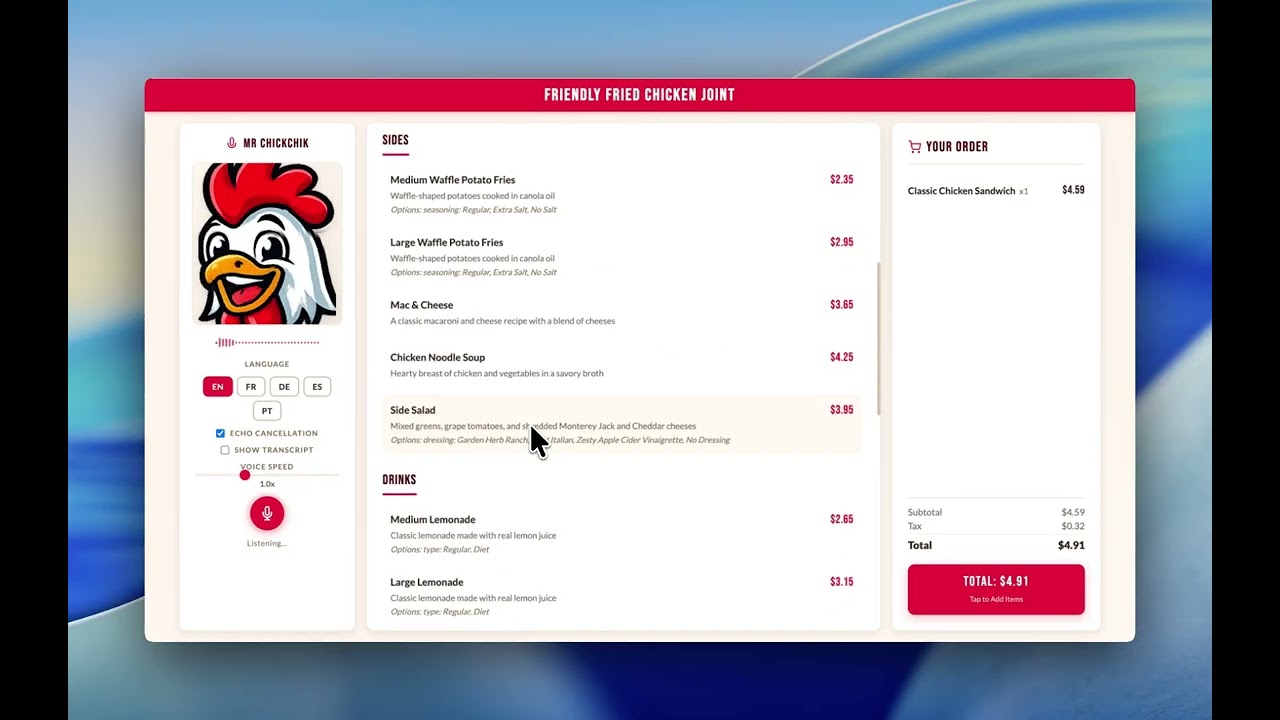
| restaurant_ordering | Multilingual voice ordering agent for a fast-food restaurant | Menu browsing, order customization, multilingual support |
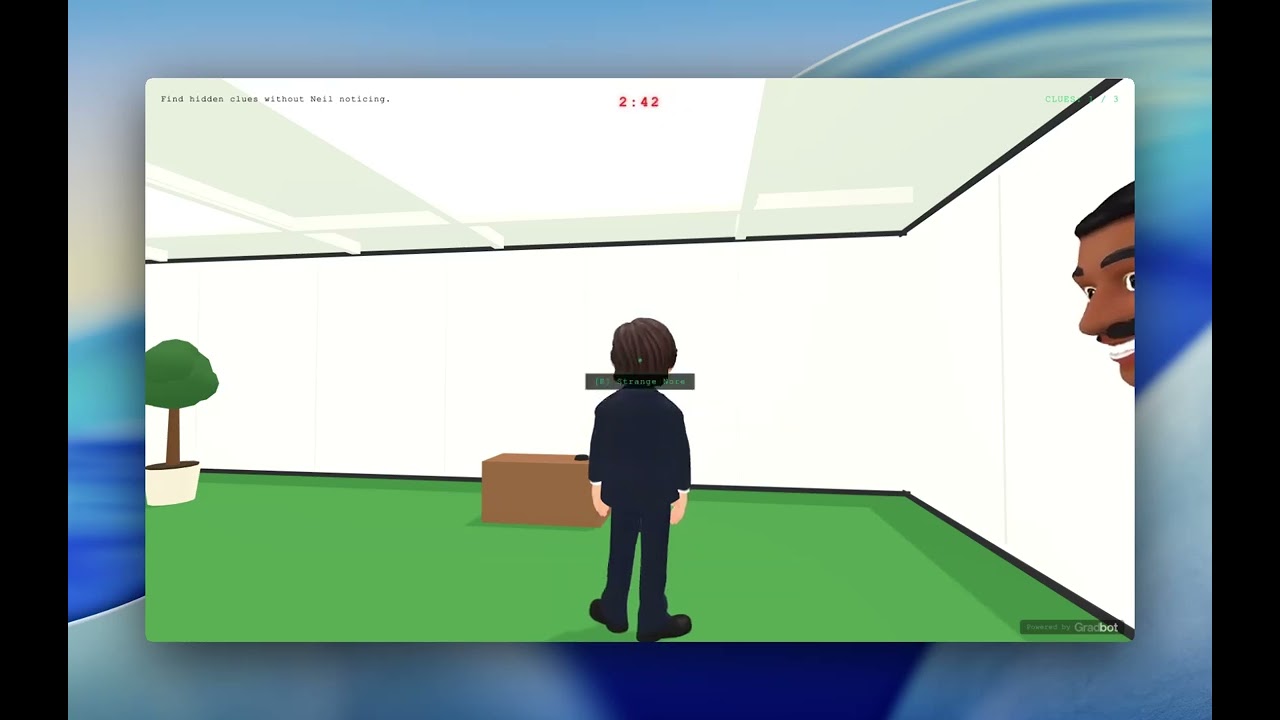
| npc_3d_game | 3D office exploration: solve voice riddles, handle NPC check-ins | Three.js, multi-session (clue + check-in), response classification |
Building a New Demo
Copy an existing demo and modify it yourself, or ask your AI coding assistants:
cp -r demos/simple_chat demos/my_demo
cd demos/my_demo
uv sync
Every demo has three files:
| File | What to edit | What it controls |
|---|---|---|
main.py | System prompt, tool definitions, tool handlers | The AI's personality and capabilities |
static/index.html | UI layout, colors, game state display | What the user sees |
config.yaml | TTS/STT/session settings | Voice tuning (optional) |
There is a shared demos/config.yaml that all demos inherit from. Each demo can override it with its own config.yaml.
The core pattern in every main.py:
# 1. Define tools
tools = [
    gradbot.ToolDef(
        "add_to_order",
        "Add a pizza to the order",
        '{"type": "object", "properties": {"pizza": {"type": "string"}}, "required": ["pizza"]}',
    ),
]

# 2. Configure the session via an on_start callback
def on_start(msg: dict) -> gradbot.SessionConfig:
    return gradbot.SessionConfig(
        voice_id="NbpkqMVS3CJeq2j8",
        instructions="You are Marco, a friendly pizzaiolo...",
        language=gradbot.Lang.En,
        tools=tools,
        assistant_speaks_first=True,
    )

# 3. Handle tool calls
async def on_tool_call(handle, input_handle, websocket):
    if handle.name == "add_to_order":
        order.append(handle.args["pizza"])
        await handle.send_json({"result": "Added!"})

# 4. Wire it up
@app.websocket("/ws/chat")
async def ws_chat(websocket: fastapi.WebSocket):
    await gradbot.websocket.handle_session(
        websocket,
        config=gradbot.config.from_env(),
        on_start=on_start,
        on_tool_call=on_tool_call,
    )
Tips
- Start from
simple_chatfor basic conversations, orfantasy_shopfor tool calling and game state. - Deferred tool calls: delay
tool_handle.send()and the AI keeps talking while waiting. Seehotelfor an example. - Voice selection: any voice from the Gradium voice library can be used by passing its
voice_idtoSessionConfig. - Mid-conversation changes:
input_handle.send_config(new_config)switches voice, language, or prompt without restarting.
Integrations
| Category | Services |
|---|---|
| STT | Gradium streaming ASR |
| TTS | Gradium streaming TTS (full voice library, 5 languages) |
| LLM | Any OpenAI-compatible API: OpenAI, Groq, OpenRouter, Ollama, LM Studio, etc. |
| Telephony | Twilio Media Streams |
| Tools | MCP (Model Context Protocol), Tavily web search, custom JSON Schema tools |
| Transport | WebSocket (OpenAI Realtime API compatible, Twilio protocol) |
Remote Mode
For hosted deployment, gradbot_server runs the STT/LLM/TTS loop on a central server while clients connect over WebSocket. This keeps LLM credentials server-side.
Running the server
cargo run -p gradbot_server -- --config server.toml
Example server.toml:
addr = "0.0.0.0"
port = 8080
gradium_base_url = "https://api.gradium.ai/api"

llm_base_url = "https://api.openai.com/v1"
llm_api_key = "$LLM_API_KEY"
llm_model_name = "gpt-4o"

[pinned]
# Fields listed here override client-provided values
# llm_extra_config = '{"reasoning": {"effort": "none"}}'
Connecting from Python
Add to config.yaml (no code changes needed):
gradbot_server:
  url: "wss://your-server.com/ws"
  api_key: "grd_..."
Or connect explicitly:
input_handle, output_handle = await gradbot.run(
    gradbot_url="wss://your-server.com/ws",
    gradbot_api_key="grd_...",
    session_config=config,
    input_format=gradbot.AudioFormat.OggOpus,
    output_format=gradbot.AudioFormat.OggOpus,
)
# Same handles, same API - tool calls, events, everything works identically
Configuration
Gradbot supports three layers of configuration, applied in order:
| Layer | Format | Used by |
|---|---|---|
| Environment variables | GRADIUM_API_KEY, LLM_API_KEY, LLM_BASE_URL, LLM_MODEL | All modes |
| YAML config | demos/config.yaml + per-demo overrides | Python demos |
| TOML config | configs/gradbot.toml | Rust server binary |
See demos/config.example.yaml for all available YAML options and gradbot_server/config.example.toml for server configuration.
Building from Source
Rust
cargo build              # debug
cargo build --release    # release
cargo clippy             # lint
cargo test               # tests
Python bindings
cd demos/simple_chat     # or any demo
uv sync                  # builds via maturin automatically
To rebuild after Rust changes:
uv sync --reinstall-package gradbot
Or use the Makefile:
make build DEMO=simple_chat   # build + install into one demo's venv
make build-all                # build + install into all demo venvs
make run DEMO=simple_chat     # run with uvicorn (auto-reload, excludes .venv)
Docker
docker build -t gradbot .
docker run -e GRADIUM_API_KEY=grd_... -e LLM_API_KEY=sk-... -p 8000:8000 gradbot
Project Structure
gradbot/
├── gradbot_lib/            # Core Rust library (STT/LLM/TTS multiplexing)
├── gradbot_py/             # Python bindings (PyO3 + maturin)
│   └── gradbot/            # Python package (fastapi helpers, config, audio worklet)
├── gradbot_server/         # Standalone WebSocket server (remote mode)
├── src/                    # Server binary (OpenAI & Twilio WebSocket protocols)
├── demos/                  # Example applications
│   ├── app.py              # Combined app mounting all demos (for Docker)
│   └── config.example.yaml # Configuration template
└── configs/                # TOML configs for the Rust server binary
Python API Reference
See gradbot_py/README.md for the full Python API documentation.
Community Contributions
Projects built by the community using Gradbot.
Dual-LLM Proxy (MiniMax): A Gradbot fork that runs two LLMs in parallel behind an OpenAI-compatible proxy — a fast "stall" model (MiniMax M2-her) streams an immediate acknowledgement while a slower "brain" model (MiniMax M2) produces the real reply with tool calls. Hides brain-model latency by filling the gap with natural-sounding stall speech.
EchoClaim: We built a call agent that knows the caller, and answers insurance related calls in human-like tone.
Built something with Gradbot? See COMMUNITY_CONTRIBUTIONS.md for instructions on how to open a PR to add your project to this list.
License
Dual-licensed under MIT or Apache-2.0, at your option.
Contributors


Similar repos



Languages
Rust
78.1%
JavaScript
11.1%
Python
10.0%
Open source framework to vibecode and prototype voice agents with Gradium APIs
Rust
123
96 commits
updated Sep 19, 2026
README
Open-source voice agent framework.
~50 lines of code. Any OpenAI-compatible LLM.
Gradbot gives you the event loop for voice agents. You write the logic, it handles the rest.
At its core is a multiplexing engine written in Rust that coordinates three streams in real time: speech-to-text, LLM inference, and text-to-speech while managing conversational state, turn-taking, and interruptions. It works with any OpenAI-compatible LLM (GPT-4o, Claude, Groq, Ollama, LM Studio, etc.) and uses Gradium for streaming STT/TTS across multiple voices from the Gradium voice catalog and 5 languages.
Whether you're building a haggling game or a travel booking assistant, Gradbot lets you go from idea to working voice experience in under 50 lines of code.
Features
- STT, LLM, and TTS coordinated in one loop: Rust multiplexer streams all three concurrently
- Turn-taking, fillers, and barge-in handled automatically: graceful audio fade-out on interruption
- Bi-directional audio streaming: with VAD and silence detection out of the box
- Async tool calling: the AI keeps talking naturally while slow tools execute in the background; lost calls are tracked and recovered
- Live transcription and tool calls in the same cycle: define tools as JSON Schema, handle results sync or async
- Full Gradium voice library, 5 languages: English, French, German, Spanish, Portuguese; unlimited voices via cloning
- Mid-session reconfiguration: change voice, language, prompt, or tools without restarting
- MCP integration: connect any MCP server for instant tool access
- Remote mode: deploy
gradbot_servercentrally; clients connect over WebSocket with the same API - Config pinning: lock down LLM credentials server-side while clients control voice and prompt
Quick Start
Install from PyPI:
pip install gradbot
Or run a demo directly (builds from source):
cd demos/simple_chat
uv sync
Set your API keys:
export GRADIUM_API_KEY=your_gradium_key

# Any OpenAI-compatible endpoint (OpenAI, Groq, Ollama, LM Studio, etc.)
export LLM_API_KEY=your_llm_key
export LLM_BASE_URL=...  # optional, defaults to OpenAI
Run:
uv run uvicorn main:app --reload
# Open http://localhost:8000
Architecture
The multiplexer runs a state machine (Listening → Flushing → Processing) that handles concurrent audio streams, interruption detection, and turn management. Gradbot flushes trailing audio by pushing silence into the STT buffer so the LLM gets your complete utterance before replying. There is no extra latency from voice activity detection delays. If the user goes quiet, the LLM is prompted to re-engage naturally instead of creating dead air.
Who Should Use Gradbot
Gradbot is built for prototyping and experimentation. Use it to hack on ideas and build voice experiences without spending hours on infrastructure.
- Support agents and real-time assistants
- Coaching and educational apps
- Tool-using voice workflows
- Games and experimental interfaces
Build weird, fun stuff. Voice agents don't have to be boring.
For production, use Gradium's models through orchestrators like LiveKit and Pipecat for enterprise-grade reliability and scaling.
Demos
Every demo is a standalone FastAPI + WebSocket app. Pick one, uv sync, and run it.
| Demo | What it does | Key concepts |
|---|---|---|
| simple_chat | Basic voice conversation | Minimal starting point, dynamic voice/prompt switching |
| fantasy_shop | Haggling game: buy a sword from NPCs | Tool calling, multi-character, game state, deferred tools |
| hotel | Hotel booking agent for Paris, Bali, Dubai | Deferred tool results with natural chit-chat using Web Search API |
| paris_rental_agent (hosted demo) | Paris apartment search assistant that builds a renter profile and finds listings | Voice/text profile intake, Tavily web search, scoring, saved listings |
| business_bank | Banking agent with PIN auth and loan applications | Security flows, multi-step business logic |
| restaurant_ordering | Multilingual voice ordering agent for a fast-food restaurant | Menu browsing, order customization, multilingual support |
| npc_3d_game | 3D office exploration: solve voice riddles, handle NPC check-ins | Three.js, multi-session (clue + check-in), response classification |
Building a New Demo
Copy an existing demo and modify it yourself, or ask your AI coding assistants:
cp -r demos/simple_chat demos/my_demo
cd demos/my_demo
uv sync
Every demo has three files:
| File | What to edit | What it controls |
|---|---|---|
main.py | System prompt, tool definitions, tool handlers | The AI's personality and capabilities |
static/index.html | UI layout, colors, game state display | What the user sees |
config.yaml | TTS/STT/session settings | Voice tuning (optional) |
There is a shared demos/config.yaml that all demos inherit from. Each demo can override it with its own config.yaml.
The core pattern in every main.py:
# 1. Define tools
tools = [
    gradbot.ToolDef(
        "add_to_order",
        "Add a pizza to the order",
        '{"type": "object", "properties": {"pizza": {"type": "string"}}, "required": ["pizza"]}',
    ),
]

# 2. Configure the session via an on_start callback
def on_start(msg: dict) -> gradbot.SessionConfig:
    return gradbot.SessionConfig(
        voice_id="NbpkqMVS3CJeq2j8",
        instructions="You are Marco, a friendly pizzaiolo...",
        language=gradbot.Lang.En,
        tools=tools,
        assistant_speaks_first=True,
    )

# 3. Handle tool calls
async def on_tool_call(handle, input_handle, websocket):
    if handle.name == "add_to_order":
        order.append(handle.args["pizza"])
        await handle.send_json({"result": "Added!"})

# 4. Wire it up
@app.websocket("/ws/chat")
async def ws_chat(websocket: fastapi.WebSocket):
    await gradbot.websocket.handle_session(
        websocket,
        config=gradbot.config.from_env(),
        on_start=on_start,
        on_tool_call=on_tool_call,
    )
Tips
- Start from
simple_chatfor basic conversations, orfantasy_shopfor tool calling and game state. - Deferred tool calls: delay
tool_handle.send()and the AI keeps talking while waiting. Seehotelfor an example. - Voice selection: any voice from the Gradium voice library can be used by passing its
voice_idtoSessionConfig. - Mid-conversation changes:
input_handle.send_config(new_config)switches voice, language, or prompt without restarting.
Integrations
| Category | Services |
|---|---|
| STT | Gradium streaming ASR |
| TTS | Gradium streaming TTS (full voice library, 5 languages) |
| LLM | Any OpenAI-compatible API: OpenAI, Groq, OpenRouter, Ollama, LM Studio, etc. |
| Telephony | Twilio Media Streams |
| Tools | MCP (Model Context Protocol), Tavily web search, custom JSON Schema tools |
| Transport | WebSocket (OpenAI Realtime API compatible, Twilio protocol) |
Remote Mode
For hosted deployment, gradbot_server runs the STT/LLM/TTS loop on a central server while clients connect over WebSocket. This keeps LLM credentials server-side.
Running the server
cargo run -p gradbot_server -- --config server.toml
Example server.toml:
addr = "0.0.0.0"
port = 8080
gradium_base_url = "https://api.gradium.ai/api"

llm_base_url = "https://api.openai.com/v1"
llm_api_key = "$LLM_API_KEY"
llm_model_name = "gpt-4o"

[pinned]
# Fields listed here override client-provided values
# llm_extra_config = '{"reasoning": {"effort": "none"}}'
Connecting from Python
Add to config.yaml (no code changes needed):
gradbot_server:
  url: "wss://your-server.com/ws"
  api_key: "grd_..."
Or connect explicitly:
input_handle, output_handle = await gradbot.run(
    gradbot_url="wss://your-server.com/ws",
    gradbot_api_key="grd_...",
    session_config=config,
    input_format=gradbot.AudioFormat.OggOpus,
    output_format=gradbot.AudioFormat.OggOpus,
)
# Same handles, same API - tool calls, events, everything works identically
Configuration
Gradbot supports three layers of configuration, applied in order:
| Layer | Format | Used by |
|---|---|---|
| Environment variables | GRADIUM_API_KEY, LLM_API_KEY, LLM_BASE_URL, LLM_MODEL | All modes |
| YAML config | demos/config.yaml + per-demo overrides | Python demos |
| TOML config | configs/gradbot.toml | Rust server binary |
See demos/config.example.yaml for all available YAML options and gradbot_server/config.example.toml for server configuration.
Building from Source
Rust
cargo build              # debug
cargo build --release    # release
cargo clippy             # lint
cargo test               # tests
Python bindings
cd demos/simple_chat     # or any demo
uv sync                  # builds via maturin automatically
To rebuild after Rust changes:
uv sync --reinstall-package gradbot
Or use the Makefile:
make build DEMO=simple_chat   # build + install into one demo's venv
make build-all                # build + install into all demo venvs
make run DEMO=simple_chat     # run with uvicorn (auto-reload, excludes .venv)
Docker
docker build -t gradbot .
docker run -e GRADIUM_API_KEY=grd_... -e LLM_API_KEY=sk-... -p 8000:8000 gradbot
Project Structure
gradbot/
├── gradbot_lib/            # Core Rust library (STT/LLM/TTS multiplexing)
├── gradbot_py/             # Python bindings (PyO3 + maturin)
│   └── gradbot/            # Python package (fastapi helpers, config, audio worklet)
├── gradbot_server/         # Standalone WebSocket server (remote mode)
├── src/                    # Server binary (OpenAI & Twilio WebSocket protocols)
├── demos/                  # Example applications
│   ├── app.py              # Combined app mounting all demos (for Docker)
│   └── config.example.yaml # Configuration template
└── configs/                # TOML configs for the Rust server binary
Python API Reference
See gradbot_py/README.md for the full Python API documentation.
Community Contributions
Projects built by the community using Gradbot.
Dual-LLM Proxy (MiniMax): A Gradbot fork that runs two LLMs in parallel behind an OpenAI-compatible proxy — a fast "stall" model (MiniMax M2-her) streams an immediate acknowledgement while a slower "brain" model (MiniMax M2) produces the real reply with tool calls. Hides brain-model latency by filling the gap with natural-sounding stall speech.
EchoClaim: We built a call agent that knows the caller, and answers insurance related calls in human-like tone.
Built something with Gradbot? See COMMUNITY_CONTRIBUTIONS.md for instructions on how to open a PR to add your project to this list.
License
Dual-licensed under MIT or Apache-2.0, at your option.
Similar repos
Contributors
Languages
Rust
78.1%
JavaScript
11.1%
Python
10.0%