Oh my tmux! My self-contained, pretty & versatile tmux configuration made with 💛🩷💙🖤❤️🤍
Shell
25,431
536 commits
updated Aug 8, 2026

˗ˏˋ ★ ˎˊ˗ My self-contained, pretty and versatile tmux configuration, made with ❤️ ˗ˏˋ ★ ˎˊ˗

Requirements:
>= 2.6 running on Linux, macOS, FreeBSD, OpenBSD, Windows
(WSL or Cygwin — not recommended)TERM environment variable must be set to
xterm-256color⚠️ Before installing, you may want to backup your existing configuration.
You can install Oh my tmux! at any of the following locations:
~$XDG_CONFIG_HOME/tmux~/.config/tmuxAutomatic installation
Copy the following command and paste it into your terminal.
curl -fsSL "https://github.com/gpakosz/.tmux/raw/refs/heads/master/install.sh#$(date +%s)" | bash
Manual installation in ~
$ cd
$ git clone --single-branch https://github.com/gpakosz/.tmux.git
$ ln -s -f .tmux/.tmux.conf
$ cp .tmux/.tmux.conf.local .
Manual installation in $XDG_CONFIG_HOME/tmux
$ git clone --single-branch https://github.com/gpakosz/.tmux.git "/path/to/oh-my-tmux"
$ mkdir -p "$XDG_CONFIG_HOME/tmux"
$ ln -s /path/to/oh-my-tmux/.tmux.conf "$XDG_CONFIG_HOME/tmux/tmux.conf"
$ cp /path/to/oh-my-tmux/.tmux.conf.local "$XDG_CONFIG_HOME/tmux/tmux.conf.local"
Manual installation in ~/.config/tmux
$ git clone --single-branch https://github.com/gpakosz/.tmux.git "/path/to/oh-my-tmux"
$ mkdir -p ~/.config/tmux
$ ln -s /path/to/oh-my-tmux/.tmux.conf ~/.config/tmux/tmux.conf
$ cp /path/to/oh-my-tmux/.tmux.conf.local ~/.config/tmux/tmux.conf.local
⚠️ When installing in $XDG_CONFIG_HOME/tmux or ~/.config/tmux, the
configuration file names don't have a leading . character.
🚨 You should never alter the main .tmux.conf or tmux.conf file. If you do,
you're on your own. Instead, every customization should happen in your
.tmux.conf.local or tmux.conf.local customization file copy.
If you're a Vim user, setting the VISUAL or EDITOR environment variable to
vim will enable and further customize the vi-style key bindings (see tmux
manual).
If you're new to tmux, I recommend reading the tmux getting started guide, as well as the tmux 3: Productive Mouse-Free Development book by @bphogan.
Now proceed to adjust your .local customization file copy.
I believe something's not quite right
Please make sure no tmux client or server process is currently running.
Then launch tmux with:
$ tmux -f /dev/null -L test
Which launches a new tmux client/server pair without loading any configuration.
If the issue is still reproducing, please reach out to the tmux project for support.
Otherwise, please open an issue describing what doesn't work and I'll do my best to address it.
I tried to use set, bind and unbind in my .local customization
file, but Oh my tmux! overwrites my preferences
When that happens append #!important to the line:
bind c new-window -c '#{pane_current_path}' #!important
set -g default-terminal "screen-256color" #!important
Status line is broken and/or gets duplicated at the bottom of the screen
This could happen on Linux when the distribution provides a version of glib
that received Unicode 9.0 upgrades (glib >= 2.50.1) while providing a
version of glibc that didn't (glibc < 2.26). Typically VTE-based terminal
emulators rely on glib's g_unichar_iswide() function while tmux relies on
glibc's wcwidth() function. When these two functions disagree, display
gets messed up. You may also configure LC_CTYPE to use a UTF-8 locale.
This can also happen on macOS when using iTerm2 and "Use Unicode version 9
character widths" is enabled in Preferences... > Profiles > Text.
For that reason, the sample .local customization file stopped using
Unicode characters for which width changed between Unicode 8.0 and 9.0
standards, as well as emojis.
I installed Powerline and/or (patched) fonts but I can't see the Powerline symbols
🤯 Please realize that you don't need to install Powerline.
You only need fonts patched with Powerline symbols or the standalone
PowerlineSymbols.otf font.
Then make sure your .local customization file copy uses the Powerline
code points for the
tmux_conf_theme_left_separator_main,
tmux_conf_theme_left_separator_sub,
tmux_conf_theme_right_separator_main
and tmux_conf_theme_right_separator_sub variables.
C-a acts as secondary prefix, while keeping default C-b prefix<prefix> +<prefix> mxsel, xclip, or wl-copy on Linux)\uXXXX (BMP) and \UXXXXXXXX (supplementary plane) Unicode
escapesThe "Maximize any pane to a new window with <prefix> +" feature is different
from the builtin resize-pane -Z command, as it allows you to further split a
maximized pane. It's also more flexible by allowing you to maximize a pane to a
new window, then change window, then go back and the pane is still in maximized
state in its own window. You can then minimize a pane by using <prefix> +
either from the source window or the maximized window.

Mouse mode allows you to set the active window, set the active pane, and resize panes. It also switches automatically to copy-mode when you select text.

tmux may be controlled from an attached client by using a key combination of a
prefix key, followed by a command key. This configuration uses C-a as a
secondary prefix while keeping C-b as the default prefix. In the following
list of key bindings:
<prefix> means you have to either hit Ctrl + a or Ctrl + b<prefix> c means you have to hit Ctrl + a or Ctrl + b followed by c<prefix> C-c means you have to hit Ctrl + a or Ctrl + b followed by Ctrl + cThis configuration uses the following bindings:
<prefix> e opens the .local customization file copy with the editor
defined by the VISUAL or EDITOR environment variable (defaults to vim
when empty)
<prefix> r reloads the configuration
C-l clears both the screen and the tmux history
<prefix> C-c creates a new session
<prefix> C-f lets you switch to another session by name
<prefix> BTab brings you to the last active session
<prefix> C-h and <prefix> C-l let you navigate windows left/right
(default <prefix> n is unbound and <prefix> p is repurposed)
<prefix> C-S-H and <prefix> C-S-L let you swap windows left/right
(requires extended-keys support)
<prefix> Tab brings you to the last active window
<prefix> - splits the current pane vertically
<prefix> _ splits the current pane horizontally
<prefix> h, <prefix> j, <prefix> k and <prefix> l let you navigate
panes à la Vim
<prefix> H, <prefix> J, <prefix> K, <prefix> L let you resize panes
<prefix> < and <prefix> > let you swap panes
<prefix> + maximizes the current pane to a new window
<prefix> m toggles mouse mode on or off
<prefix> U launches Urlscan (preferred) or Urlview, if available
<prefix> F launches Facebook PathPicker, if available
<prefix> Enter enters copy-mode
<prefix> b lists the paste-buffers
<prefix> p pastes from the top paste-buffer
<prefix> P lets you choose the paste-buffer to paste from
Additionally, copy-mode-vi matches my own Vim configuration.
Bindings for copy-mode-vi:
v begins selection / visual modeC-v toggles between blockwise visual mode and visual modeH jumps to the start of the lineL jumps to the end of the liney copies the selection to the top paste-bufferEscape cancels the current operationIt's also possible to preserve the tmux stock bindings by setting the
tmux_conf_preserve_stock_bindings variable to true in your .local
customization file copy.
While this configuration tries to bring sane default settings, you may want to customize it further to your needs.
🚨 Again, you should never alter the main .tmux.conf or tmux.conf file.
If you do, you're on your own.
Please refer to the sample .local customization file to know more about the
variables that allow you to alter different behaviors. Upon successful
installation, pressing <prefix> e will open your .local customization file
copy with the editor defined by the VISUAL or EDITOR environment variable
(defaults to vim when empty).
Powerline originated as a status-line plugin for Vim. Its popular eye-catching look is based on the use of special symbols:
To make use of these symbols, there are several options:
PowerlineSymbols.otf for non-ASCII symbols:
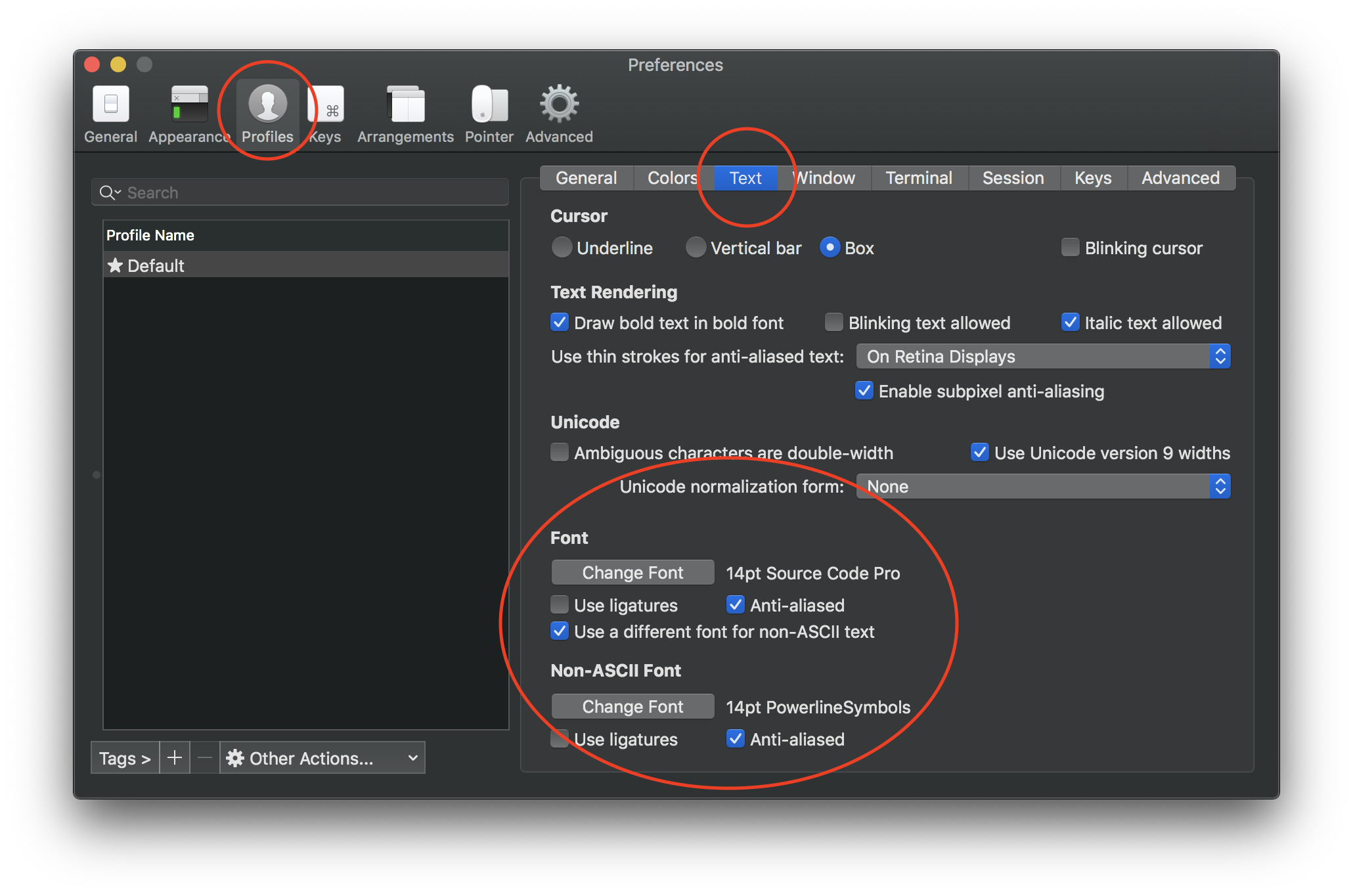
Then edit your .local customization file copy (with <prefix> e) and adjust
the following variables:
tmux_conf_theme_left_separator_main='\uE0B0'
tmux_conf_theme_left_separator_sub='\uE0B1'
tmux_conf_theme_right_separator_main='\uE0B2'
tmux_conf_theme_right_separator_sub='\uE0B3'
The Powerline manual contains further details on how to install fonts containing the Powerline symbols.
Edit your .local customization file copy (<prefix> e) and adjust the
tmux_conf_theme_status_left and tmux_conf_theme_status_right variables to
your liking.
This configuration supports the following builtin variables:
#{battery_bar}: horizontal battery charge bar#{battery_hbar}: 1 character wide, horizontal battery charge bar#{battery_vbar}: 1 character wide, vertical battery charge bar#{battery_percentage}: battery percentage#{battery_status}: is battery charging or discharging?#{circled_window_index}: circled window number (from ⓪ to ⑳)#{circled_session_name}: circled session number (from ⓪ to ⑳)#{hostname}: SSH/Mosh aware hostname information#{hostname_full}: SSH/Mosh aware fully qualified hostname#{hostname_ssh}: SSH/Mosh aware hostname information, blank when not
connected to a remote server through SSH/Mosh#{hostname_full_ssh}: SSH/Mosh aware fully qualified hostname, blank when
not connected to a remote server through SSH/Mosh#{loadavg}: load average#{mouse}: is mouse mode enabled?#{pairing}: is the current session attached to more than one client?#{pretty_pane_current_path}: prettified #{pane_current_path} when its
length is too long#{prefix}: is prefix being pressed?#{root}: is the current user root?#{synchronized}: are the panes synchronized?#{uptime_y}: uptime years#{uptime_d}: uptime days, modulo 365 when #{uptime_y} is used#{uptime_h}: uptime hours#{uptime_m}: uptime minutes#{uptime_s}: uptime seconds#{username}: SSH/Mosh aware username information#{username_ssh}: SSH/Mosh aware username information, blank when not
connected to a remote server through SSH/MoshBesides the variables mentioned above, the tmux_conf_theme_status_left and
tmux_conf_theme_status_right variables support the usual tmux syntax, e.g.
using #() to call an external command that inserts weather information
provided by wttr.in:
tmux_conf_theme_status_right='#{prefix}#{pairing}#{synchronized} #(curl -m 1 wttr.in?format=3 2>/dev/null; sleep 900) , %R , %d %b | #{username}#{root} | #{hostname} '
The sleep 900 call makes sure the network request is issued at most every 15
minutes regardless of the value of status-interval.

💡 You can also define your own custom variables by defining your own POSIX
shell functions, see the sample .local customization file for instructions.
Finally, remember that tmux_conf_theme_status_left and
tmux_conf_theme_status_right end up being given to tmux as status-left and
status-right which means they're passed through strftime(). As such, the %
character has a special meaning and needs to be escaped by doubling it, e.g.
tmux_conf_theme_status_right='#(echo foo %% bar)'
See also man 3 strftime.
This configuration comes with built-in TPM support:
set -g @plugin ... syntax to enable a pluginstatus-left or
status-right, you can use it in the tmux_conf_theme_status_left and
tmux_conf_theme_status_right variables, see instructions above 👆set -g @plugin 'tmux-plugins/tpm' to any configuration filerun '~/.tmux/plugins/tpm/tpm' to any configuration file⚠️ The TPM bindings differ slightly from upstream:
<prefix> I<prefix> M-u<prefix> uSee the sample .local customization file for further instructions.
⚠️ I don't recommend running this configuration with Cygwin anymore. Forking
under Cygwin is extremely slow and this configuration issues a fair amount of
run-shell commands under the hood. As such, you will experience high CPU
usage.
Instead, I recommend Windows Subsystem for Linux along with Windows Terminal. As an alternative, you may also consider using Mintty as a terminal for WSL.
(top 24 of 206)
153 followers · starred May 2017
44 followers · starred Jun 2021
95 followers · starred Sep 2018
1,108 followers · starred Aug 2025
Oh my tmux! My self-contained, pretty & versatile tmux configuration made with 💛🩷💙🖤❤️🤍
Shell
25,431
536 commits
updated Aug 8, 2026
˗ˏˋ ★ ˎˊ˗ My self-contained, pretty and versatile tmux configuration, made with ❤️ ˗ˏˋ ★ ˎˊ˗
Requirements:
>= 2.6 running on Linux, macOS, FreeBSD, OpenBSD, Windows
(WSL or Cygwin — not recommended)TERM environment variable must be set to
xterm-256color⚠️ Before installing, you may want to backup your existing configuration.
You can install Oh my tmux! at any of the following locations:
~$XDG_CONFIG_HOME/tmux~/.config/tmuxAutomatic installation
Copy the following command and paste it into your terminal.
curl -fsSL "https://github.com/gpakosz/.tmux/raw/refs/heads/master/install.sh#$(date +%s)" | bash
Manual installation in ~
$ cd
$ git clone --single-branch https://github.com/gpakosz/.tmux.git
$ ln -s -f .tmux/.tmux.conf
$ cp .tmux/.tmux.conf.local .
Manual installation in $XDG_CONFIG_HOME/tmux
$ git clone --single-branch https://github.com/gpakosz/.tmux.git "/path/to/oh-my-tmux"
$ mkdir -p "$XDG_CONFIG_HOME/tmux"
$ ln -s /path/to/oh-my-tmux/.tmux.conf "$XDG_CONFIG_HOME/tmux/tmux.conf"
$ cp /path/to/oh-my-tmux/.tmux.conf.local "$XDG_CONFIG_HOME/tmux/tmux.conf.local"
Manual installation in ~/.config/tmux
$ git clone --single-branch https://github.com/gpakosz/.tmux.git "/path/to/oh-my-tmux"
$ mkdir -p ~/.config/tmux
$ ln -s /path/to/oh-my-tmux/.tmux.conf ~/.config/tmux/tmux.conf
$ cp /path/to/oh-my-tmux/.tmux.conf.local ~/.config/tmux/tmux.conf.local
⚠️ When installing in $XDG_CONFIG_HOME/tmux or ~/.config/tmux, the
configuration file names don't have a leading . character.
🚨 You should never alter the main .tmux.conf or tmux.conf file. If you do,
you're on your own. Instead, every customization should happen in your
.tmux.conf.local or tmux.conf.local customization file copy.
If you're a Vim user, setting the VISUAL or EDITOR environment variable to
vim will enable and further customize the vi-style key bindings (see tmux
manual).
If you're new to tmux, I recommend reading the tmux getting started guide, as well as the tmux 3: Productive Mouse-Free Development book by @bphogan.
Now proceed to adjust your .local customization file copy.
I believe something's not quite right
Please make sure no tmux client or server process is currently running.
Then launch tmux with:
$ tmux -f /dev/null -L test
Which launches a new tmux client/server pair without loading any configuration.
If the issue is still reproducing, please reach out to the tmux project for support.
Otherwise, please open an issue describing what doesn't work and I'll do my best to address it.
I tried to use set, bind and unbind in my .local customization
file, but Oh my tmux! overwrites my preferences
When that happens append #!important to the line:
bind c new-window -c '#{pane_current_path}' #!important
set -g default-terminal "screen-256color" #!important
Status line is broken and/or gets duplicated at the bottom of the screen
This could happen on Linux when the distribution provides a version of glib
that received Unicode 9.0 upgrades (glib >= 2.50.1) while providing a
version of glibc that didn't (glibc < 2.26). Typically VTE-based terminal
emulators rely on glib's g_unichar_iswide() function while tmux relies on
glibc's wcwidth() function. When these two functions disagree, display
gets messed up. You may also configure LC_CTYPE to use a UTF-8 locale.
This can also happen on macOS when using iTerm2 and "Use Unicode version 9
character widths" is enabled in Preferences... > Profiles > Text.
For that reason, the sample .local customization file stopped using
Unicode characters for which width changed between Unicode 8.0 and 9.0
standards, as well as emojis.
I installed Powerline and/or (patched) fonts but I can't see the Powerline symbols
🤯 Please realize that you don't need to install Powerline.
You only need fonts patched with Powerline symbols or the standalone
PowerlineSymbols.otf font.
Then make sure your .local customization file copy uses the Powerline
code points for the
tmux_conf_theme_left_separator_main,
tmux_conf_theme_left_separator_sub,
tmux_conf_theme_right_separator_main
and tmux_conf_theme_right_separator_sub variables.
C-a acts as secondary prefix, while keeping default C-b prefix<prefix> +<prefix> mxsel, xclip, or wl-copy on Linux)\uXXXX (BMP) and \UXXXXXXXX (supplementary plane) Unicode
escapesThe "Maximize any pane to a new window with <prefix> +" feature is different
from the builtin resize-pane -Z command, as it allows you to further split a
maximized pane. It's also more flexible by allowing you to maximize a pane to a
new window, then change window, then go back and the pane is still in maximized
state in its own window. You can then minimize a pane by using <prefix> +
either from the source window or the maximized window.
Mouse mode allows you to set the active window, set the active pane, and resize panes. It also switches automatically to copy-mode when you select text.
tmux may be controlled from an attached client by using a key combination of a
prefix key, followed by a command key. This configuration uses C-a as a
secondary prefix while keeping C-b as the default prefix. In the following
list of key bindings:
<prefix> means you have to either hit Ctrl + a or Ctrl + b<prefix> c means you have to hit Ctrl + a or Ctrl + b followed by c<prefix> C-c means you have to hit Ctrl + a or Ctrl + b followed by Ctrl + cThis configuration uses the following bindings:
<prefix> e opens the .local customization file copy with the editor
defined by the VISUAL or EDITOR environment variable (defaults to vim
when empty)
<prefix> r reloads the configuration
C-l clears both the screen and the tmux history
<prefix> C-c creates a new session
<prefix> C-f lets you switch to another session by name
<prefix> BTab brings you to the last active session
<prefix> C-h and <prefix> C-l let you navigate windows left/right
(default <prefix> n is unbound and <prefix> p is repurposed)
<prefix> C-S-H and <prefix> C-S-L let you swap windows left/right
(requires extended-keys support)
<prefix> Tab brings you to the last active window
<prefix> - splits the current pane vertically
<prefix> _ splits the current pane horizontally
<prefix> h, <prefix> j, <prefix> k and <prefix> l let you navigate
panes à la Vim
<prefix> H, <prefix> J, <prefix> K, <prefix> L let you resize panes
<prefix> < and <prefix> > let you swap panes
<prefix> + maximizes the current pane to a new window
<prefix> m toggles mouse mode on or off
<prefix> U launches Urlscan (preferred) or Urlview, if available
<prefix> F launches Facebook PathPicker, if available
<prefix> Enter enters copy-mode
<prefix> b lists the paste-buffers
<prefix> p pastes from the top paste-buffer
<prefix> P lets you choose the paste-buffer to paste from
Additionally, copy-mode-vi matches my own Vim configuration.
Bindings for copy-mode-vi:
v begins selection / visual modeC-v toggles between blockwise visual mode and visual modeH jumps to the start of the lineL jumps to the end of the liney copies the selection to the top paste-bufferEscape cancels the current operationIt's also possible to preserve the tmux stock bindings by setting the
tmux_conf_preserve_stock_bindings variable to true in your .local
customization file copy.
While this configuration tries to bring sane default settings, you may want to customize it further to your needs.
🚨 Again, you should never alter the main .tmux.conf or tmux.conf file.
If you do, you're on your own.
Please refer to the sample .local customization file to know more about the
variables that allow you to alter different behaviors. Upon successful
installation, pressing <prefix> e will open your .local customization file
copy with the editor defined by the VISUAL or EDITOR environment variable
(defaults to vim when empty).
Powerline originated as a status-line plugin for Vim. Its popular eye-catching look is based on the use of special symbols:
To make use of these symbols, there are several options:
PowerlineSymbols.otf for non-ASCII symbols:
Then edit your .local customization file copy (with <prefix> e) and adjust
the following variables:
tmux_conf_theme_left_separator_main='\uE0B0'
tmux_conf_theme_left_separator_sub='\uE0B1'
tmux_conf_theme_right_separator_main='\uE0B2'
tmux_conf_theme_right_separator_sub='\uE0B3'
The Powerline manual contains further details on how to install fonts containing the Powerline symbols.
Edit your .local customization file copy (<prefix> e) and adjust the
tmux_conf_theme_status_left and tmux_conf_theme_status_right variables to
your liking.
This configuration supports the following builtin variables:
#{battery_bar}: horizontal battery charge bar#{battery_hbar}: 1 character wide, horizontal battery charge bar#{battery_vbar}: 1 character wide, vertical battery charge bar#{battery_percentage}: battery percentage#{battery_status}: is battery charging or discharging?#{circled_window_index}: circled window number (from ⓪ to ⑳)#{circled_session_name}: circled session number (from ⓪ to ⑳)#{hostname}: SSH/Mosh aware hostname information#{hostname_full}: SSH/Mosh aware fully qualified hostname#{hostname_ssh}: SSH/Mosh aware hostname information, blank when not
connected to a remote server through SSH/Mosh#{hostname_full_ssh}: SSH/Mosh aware fully qualified hostname, blank when
not connected to a remote server through SSH/Mosh#{loadavg}: load average#{mouse}: is mouse mode enabled?#{pairing}: is the current session attached to more than one client?#{pretty_pane_current_path}: prettified #{pane_current_path} when its
length is too long#{prefix}: is prefix being pressed?#{root}: is the current user root?#{synchronized}: are the panes synchronized?#{uptime_y}: uptime years#{uptime_d}: uptime days, modulo 365 when #{uptime_y} is used#{uptime_h}: uptime hours#{uptime_m}: uptime minutes#{uptime_s}: uptime seconds#{username}: SSH/Mosh aware username information#{username_ssh}: SSH/Mosh aware username information, blank when not
connected to a remote server through SSH/MoshBesides the variables mentioned above, the tmux_conf_theme_status_left and
tmux_conf_theme_status_right variables support the usual tmux syntax, e.g.
using #() to call an external command that inserts weather information
provided by wttr.in:
tmux_conf_theme_status_right='#{prefix}#{pairing}#{synchronized} #(curl -m 1 wttr.in?format=3 2>/dev/null; sleep 900) , %R , %d %b | #{username}#{root} | #{hostname} '
The sleep 900 call makes sure the network request is issued at most every 15
minutes regardless of the value of status-interval.
💡 You can also define your own custom variables by defining your own POSIX
shell functions, see the sample .local customization file for instructions.
Finally, remember that tmux_conf_theme_status_left and
tmux_conf_theme_status_right end up being given to tmux as status-left and
status-right which means they're passed through strftime(). As such, the %
character has a special meaning and needs to be escaped by doubling it, e.g.
tmux_conf_theme_status_right='#(echo foo %% bar)'
See also man 3 strftime.
This configuration comes with built-in TPM support:
set -g @plugin ... syntax to enable a pluginstatus-left or
status-right, you can use it in the tmux_conf_theme_status_left and
tmux_conf_theme_status_right variables, see instructions above 👆set -g @plugin 'tmux-plugins/tpm' to any configuration filerun '~/.tmux/plugins/tpm/tpm' to any configuration file⚠️ The TPM bindings differ slightly from upstream:
<prefix> I<prefix> M-u<prefix> uSee the sample .local customization file for further instructions.
⚠️ I don't recommend running this configuration with Cygwin anymore. Forking
under Cygwin is extremely slow and this configuration issues a fair amount of
run-shell commands under the hood. As such, you will experience high CPU
usage.
Instead, I recommend Windows Subsystem for Linux along with Windows Terminal. As an alternative, you may also consider using Mintty as a terminal for WSL.
(top 24 of 206)
153 followers · starred May 2017
44 followers · starred Jun 2021
95 followers · starred Sep 2018
1,108 followers · starred Aug 2025



