
README
Allium

Allium is a custom launcher for the Miyoo Mini, Miyoo Mini Plus, and Miyoo Mini Flip handheld devices, similar to OnionOS and MiniUI.
Project Goals
The goal of Allium is to replace MainUI (stock UI) with a faster and more user-friendly UI.
- Fast
- Clean, user-friendly UI
- RetroArch (with Netplay, achievements)
- Box art
- Support running on both Miyoo Mini, Miyoo Mini Plus, and Miyoo Mini Flip without changes
Help and Documentation
Please refer to this README.md and the Wiki for information on how to setup and use Allium.
Screenshots
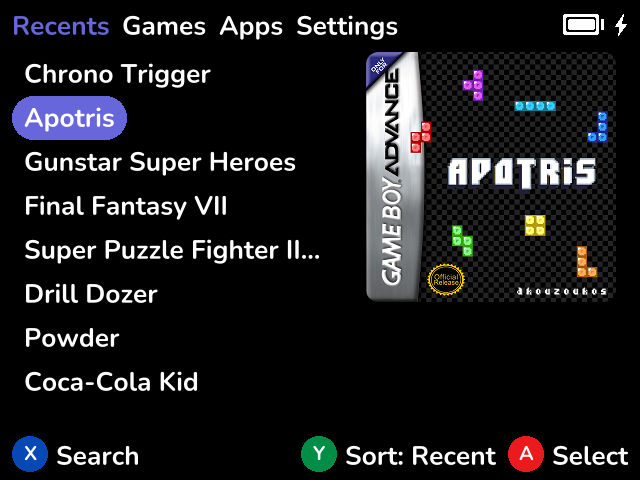
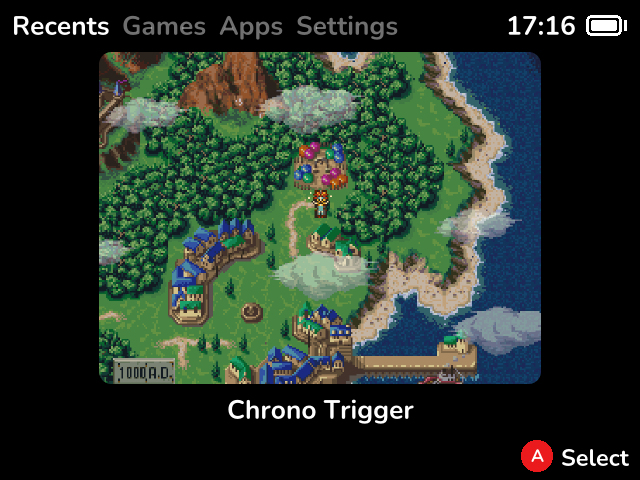
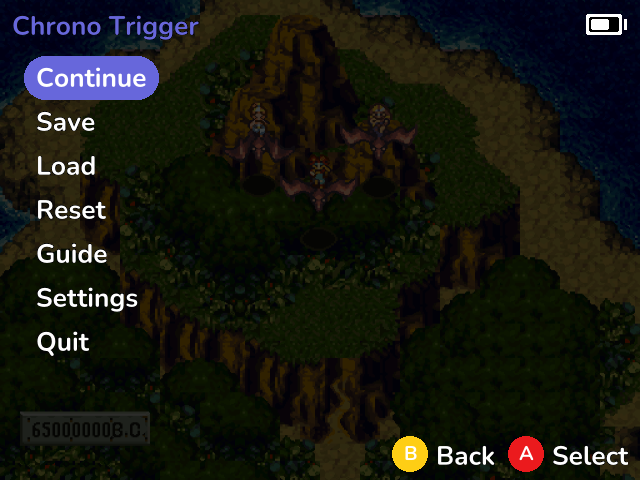
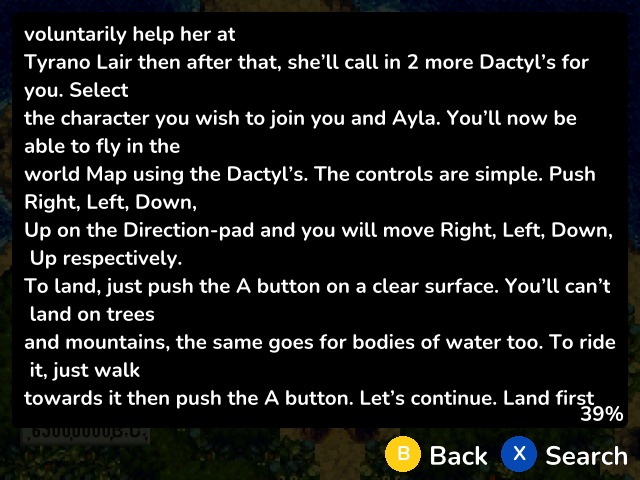
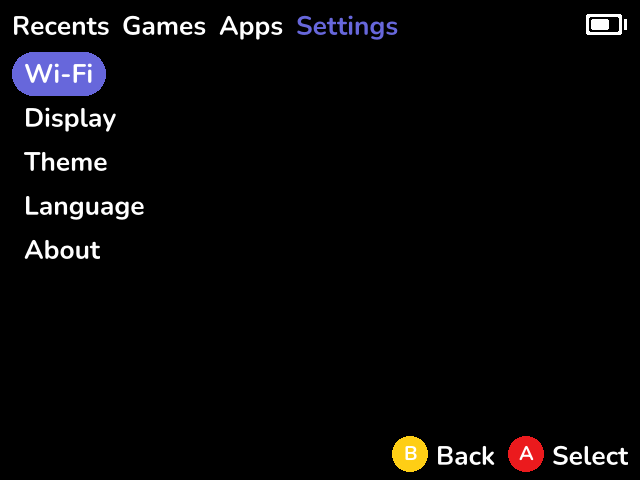
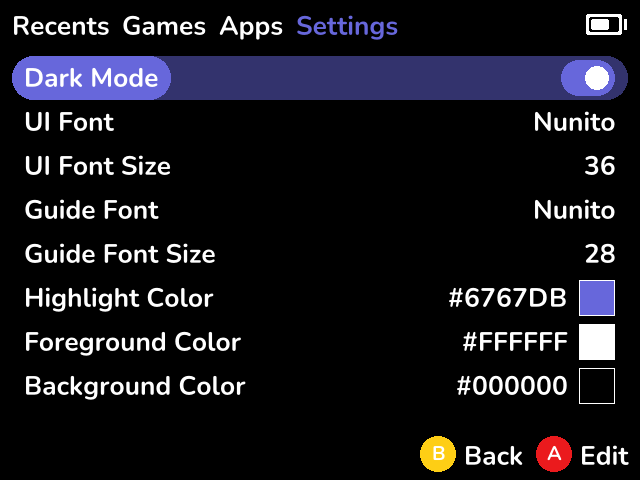
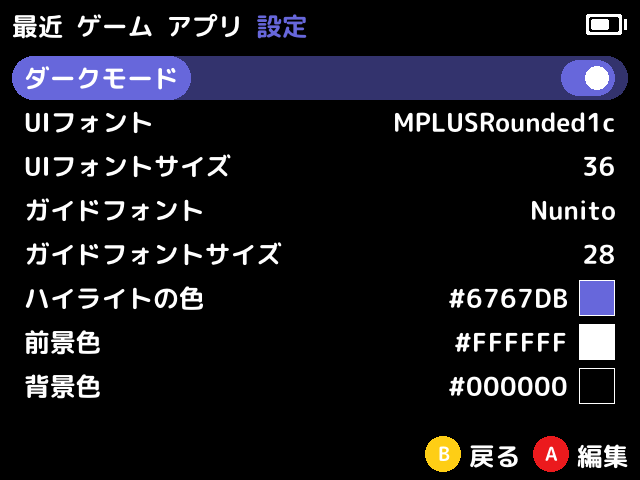
Installation
Allium supports both the Miyoo Mini, Miyoo Mini Plus,and Miyoo Mini Flip on the same SD card.
Check out the wiki page for a more detailed set of instructions.
First Install
- Format the SD card to FAT32.
- Download the latest release and extract into your SD card. e.g.
E:/. - Eject the disk (important!).
Updating
- Download the latest release and extract these folders into your SD card. e.g.
E:/:- .allium
- .tmp_update
- Apps
- RetroArch
- Eject the disk (important!).
Features
- Supports stock/Onion/DotUI SD card layout
- Works without configuration
- Box art (250px wide, PNG, JPG, GIF)
- Supports gameslist.xml with nested folders
- Favorites
- Recents list (sort by last played or playtime)
- Alternative recents view with save-state screenshot previews
- Search games by name
- Activity tracker
- RetroArch for all supported cores
- Volume & Brightness (menu + l/r/u/d) control
- In-game menu (save & load with screenshots, reset, access RetroArch menu, guide, disk changer, quit)
- Automatic resume when powering off/on
- Suspend
- Settings page
- OTA update
- WiFi (IP Address, NTP, Telnet, FTP, SyncThing)
- Date, time, timezone
- Change LCD settings
- Customize theme colours, font
- Change system language
- Theme manager
- Built-in themes
Planned Features
(roughly in order of priority)
- Metadata/box art scraper
- Activity tracker
- Track play sessions using RTC
- Battery history
- UI improvements:
- Folder icon
- Volume indicator
- Brightness indicator
- Error toast (e.g. no core found for game)
- Seamless netplay from ingame menu
Development
Allium comes with a simulator that can be used for development.
Requirements
make,cargo,zip,clang(libclang-dev),patchelf- cargo-zigbuild and
zig:pip install cargo-zigbuild
On Mac, quick set up with:
./scripts/setup-mac.sh
Architecture
Allium is split into several binaries:
alliumd(daemon that handles launcher/game/menu launching, vol/brightness hotkeys, poweroff)allium-launcher(main menu, including games, recents, settings)allium-menu(ingame menu, including guide reader)activity-tracker(gui for looking at game activity/playtime)screenshotsay(draws text onto the screen, using Allium's theme settings and exits)show(draws an image to screen, or darkens the screen and exits)show-hotkeys(draws a list of hotkeys onto the screen and exits)myctl(manipulates hardware like volume. This relies on the MM's proprietary libraries.)
Shared code is located in the common crate.
Simulator
There is no simulator for alliumd (no UI, only logic).
# Run main menu (allium-launcher)
make simulator bin=allium-launcher

# Run ingame menu (allium-menu)
make simulator bin=allium-menu
Building
Running make will build Allium and RetroArch, then copy the built and static files into dist/.
make all
Deploying to Hardware
For quick testing on real hardware, you can use the deployment targets:
- Create a
local.mkfile (git-ignored) in the project root:
cp local.mk.example local.mk
- Edit
local.mkand set your SD card path:
SDCARD_PATH=/path/to/sdcard # Adjust for your mount point
- Deploy just update files to existing Allium SD Card:
make deploy
Or deploy everything to a fresh SD Card:
make deploy-all
Alternatively, set SDCARD_PATH as an environment variable:
SDCARD_PATH=/path/to/sdcard make deploy
Acknowledgements
Allium is only possible thanks to the Miyoo Mini community, including but not limited to:
- eggs: RetroArch port, many code samples, answering questions on Discord
- Onion team (Aemiii91, Schmurtz, Totofaki, and more): Maintaining a sane-defaults RetroArch configuration, and the huge village
- kebabstorm: Miyoo Mini resources
- shauninman: Allium is heavily inspired by MiniUI's simplicity and clean design
- steward-fu: miraculous DraStic port
- Early adopters and testers of Allium
- Icons8.com for the icons used in the wiki.
Community
Need help? Want to contribute? Join the Allium community on Discord:
Contributors


Similar repos


Languages
Rust
77.3%
Shell
14.8%
Fluent
6.5%
README
Allium
Allium is a custom launcher for the Miyoo Mini, Miyoo Mini Plus, and Miyoo Mini Flip handheld devices, similar to OnionOS and MiniUI.
Project Goals
The goal of Allium is to replace MainUI (stock UI) with a faster and more user-friendly UI.
- Fast
- Clean, user-friendly UI
- RetroArch (with Netplay, achievements)
- Box art
- Support running on both Miyoo Mini, Miyoo Mini Plus, and Miyoo Mini Flip without changes
Help and Documentation
Please refer to this README.md and the Wiki for information on how to setup and use Allium.
Screenshots
Installation
Allium supports both the Miyoo Mini, Miyoo Mini Plus,and Miyoo Mini Flip on the same SD card.
Check out the wiki page for a more detailed set of instructions.
First Install
- Format the SD card to FAT32.
- Download the latest release and extract into your SD card. e.g.
E:/. - Eject the disk (important!).
Updating
- Download the latest release and extract these folders into your SD card. e.g.
E:/:- .allium
- .tmp_update
- Apps
- RetroArch
- Eject the disk (important!).
Features
- Supports stock/Onion/DotUI SD card layout
- Works without configuration
- Box art (250px wide, PNG, JPG, GIF)
- Supports gameslist.xml with nested folders
- Favorites
- Recents list (sort by last played or playtime)
- Alternative recents view with save-state screenshot previews
- Search games by name
- Activity tracker
- RetroArch for all supported cores
- Volume & Brightness (menu + l/r/u/d) control
- In-game menu (save & load with screenshots, reset, access RetroArch menu, guide, disk changer, quit)
- Automatic resume when powering off/on
- Suspend
- Settings page
- OTA update
- WiFi (IP Address, NTP, Telnet, FTP, SyncThing)
- Date, time, timezone
- Change LCD settings
- Customize theme colours, font
- Change system language
- Theme manager
- Built-in themes
Planned Features
(roughly in order of priority)
- Metadata/box art scraper
- Activity tracker
- Track play sessions using RTC
- Battery history
- UI improvements:
- Folder icon
- Volume indicator
- Brightness indicator
- Error toast (e.g. no core found for game)
- Seamless netplay from ingame menu
Development
Allium comes with a simulator that can be used for development.
Requirements
make,cargo,zip,clang(libclang-dev),patchelf- cargo-zigbuild and
zig:pip install cargo-zigbuild
On Mac, quick set up with:
./scripts/setup-mac.sh
Architecture
Allium is split into several binaries:
alliumd(daemon that handles launcher/game/menu launching, vol/brightness hotkeys, poweroff)allium-launcher(main menu, including games, recents, settings)allium-menu(ingame menu, including guide reader)activity-tracker(gui for looking at game activity/playtime)screenshotsay(draws text onto the screen, using Allium's theme settings and exits)show(draws an image to screen, or darkens the screen and exits)show-hotkeys(draws a list of hotkeys onto the screen and exits)myctl(manipulates hardware like volume. This relies on the MM's proprietary libraries.)
Shared code is located in the common crate.
Simulator
There is no simulator for alliumd (no UI, only logic).
# Run main menu (allium-launcher)
make simulator bin=allium-launcher

# Run ingame menu (allium-menu)
make simulator bin=allium-menu
Building
Running make will build Allium and RetroArch, then copy the built and static files into dist/.
make all
Deploying to Hardware
For quick testing on real hardware, you can use the deployment targets:
- Create a
local.mkfile (git-ignored) in the project root:
cp local.mk.example local.mk
- Edit
local.mkand set your SD card path:
SDCARD_PATH=/path/to/sdcard # Adjust for your mount point
- Deploy just update files to existing Allium SD Card:
make deploy
Or deploy everything to a fresh SD Card:
make deploy-all
Alternatively, set SDCARD_PATH as an environment variable:
SDCARD_PATH=/path/to/sdcard make deploy
Acknowledgements
Allium is only possible thanks to the Miyoo Mini community, including but not limited to:
- eggs: RetroArch port, many code samples, answering questions on Discord
- Onion team (Aemiii91, Schmurtz, Totofaki, and more): Maintaining a sane-defaults RetroArch configuration, and the huge village
- kebabstorm: Miyoo Mini resources
- shauninman: Allium is heavily inspired by MiniUI's simplicity and clean design
- steward-fu: miraculous DraStic port
- Early adopters and testers of Allium
- Icons8.com for the icons used in the wiki.
Community
Need help? Want to contribute? Join the Allium community on Discord:
Similar repos
Contributors
Languages
Rust
77.3%
Shell
14.8%
Fluent
6.5%