
README
Generic Erlang CoAP Client/Server
Pure Erlang implementation of the Constrained Application Protocol (CoAP), which aims to be conformant with:
- CoAP core protocol RFC 7252, including (since Erlang/OTP 19.2) the DTLS-Secured CoAP
- CoAP Observe option RFC 7641
- Block-wise transfers in CoAP draft-ietf-core-block-18
- CoRE link format RFC 6690
The following features are not (yet) implemented:
- Proxying and virtual servers (Uri-Host, Uri-Port, Proxy-Uri and Proxy-Scheme options)
It was tested with the following CoAP implementations:
Used in the following applications:
Let me know if you (intend to) use gen_coap. The API may change and some functions may not be implemented. Please add an Issue if you find a bug or miss a feature.
Usage
gen_coap enables you to integrate a CoAP server and/or CoAP client with your application. For demonstration purposes it also includes a simple CoAP client and server.

Client
Have a look at sample_client.erl. It implements a simple
command line utility for manipulation and observation of CoAP resources. It
shall demonstrate the use of the coap_client and coap_observer modules.
The tool accepts the following arguments:
| Argument | Description |
|---|---|
| -m Method | request method (get, put, post or delete), default is 'get' |
| -e Text | include text as payload |
| -s Duration | subscribe for given duration [seconds] |
| Uri | coap:// or coaps:// URI identifying the resource |
Run the example simply by:
$ ./coap-client.sh coap://127.0.0.1/.well-known/core
$ ./coap-client.sh coaps://127.0.0.1/.well-known/core?rt=core.ps
$ ./coap-client.sh coaps://127.0.0.1/resource
$ ./coap-client.sh coap://127.0.0.1/resource -s 1000
$ ./coap-client.sh -m put coap://127.0.0.1/resource -e data
$ ./coap-client.sh -m delete coap://127.0.0.1/resource
In an erlang program you can get a CoAP resource by:
{ok, content, Data} = coap_client:request(get, "coap://coap.me:5683")
No application need to be started to use the client.
Server
Have a look at sample_server.erl. It implements a simple
resource storage, which can be accessed using CoAP. It shall demonstrate the
use of the coap_server_registry and coap_responder modules. The server
requires no arguments. Run the sample server as follows and then access
it using any CoAP client (or the gen_coap sample client tool):
$ ./coap-server.sh
You can manually start the server from the Erlang command line by:
$ erl -pa _build/default/lib/gen_coap/ebin

1> application:ensure_all_started(gen_coap).
{ok,[crypto,asn1,public_key,ssl,gen_coap]}

2> coap_server:start_udp(coap_udp_socket).
{ok,<0.78.0>}
However, the server out of a box does not offer any resources. To offer CoAP access
to some server resources you need to implement the coap_resource behaviour,
which defines callbacks that the server invokes upon reception of a CoAP request.
coap_discoveris called when a CoAP client asks for the list of ".well-known/core" resources.coap_get,coap_post,coap_putorcoap_deleteis called when the server receives a GET, POST, PUT or DELETE request for a resource.coap_observeorcoap_unobserveis called upon a GET request with an Observe=0 or Observe=1 option.
Since Erlang 19.2 the DTLS transport is supported. To configure certificates for the sample coap-server do:
$ cd gen_coap
$ sudo openssl req -new > csr.pem
$ sudo openssl rsa -in privkey.pem -out key.pem
$ sudo openssl x509 -in csr.pem -out cert.pem -req -signkey key.pem
Architecture
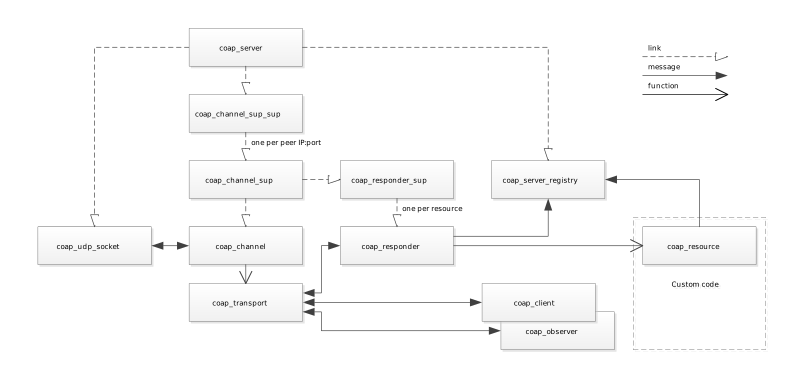
The following picture shows the gen_coap modules are their relationships:
Build Instructions
Linux
First, you need to have rebar installed. Please install the rebar package e.g. by
$ sudo yum install erlang-rebar
Then, you only need to run
$ git clone https://github.com/gotthardp/gen_coap.git
$ cd gen_coap
$ make
Windows
I recommend you install the Erlang IDE for Eclipse. Then, import the project:
- Run Eclipse, select File > New > Project..., select Erlang Project and click Next.
- Enter gen_coap as a Project name and select Location of gen_coap on your machine. Click Next.
- Review the following page and click Next.
- Set Source folders to
src;examplesand click Finish.
Run the Erlang application and then you should be able to run the client and server in your Console:
1> sample_server:start().
ok

2> sample_client:start(["coap://localhost/.well-known/core"]).
get "coap://localhost/.well-known/core"
{ok,content,{coap_content,<<"xyz">>,60,<<"application/link-format">>,<<>>}}
ok


Similar repos


Languages
Erlang
99.3%
README
Generic Erlang CoAP Client/Server
Pure Erlang implementation of the Constrained Application Protocol (CoAP), which aims to be conformant with:
- CoAP core protocol RFC 7252, including (since Erlang/OTP 19.2) the DTLS-Secured CoAP
- CoAP Observe option RFC 7641
- Block-wise transfers in CoAP draft-ietf-core-block-18
- CoRE link format RFC 6690
The following features are not (yet) implemented:
- Proxying and virtual servers (Uri-Host, Uri-Port, Proxy-Uri and Proxy-Scheme options)
It was tested with the following CoAP implementations:
Used in the following applications:
Let me know if you (intend to) use gen_coap. The API may change and some functions may not be implemented. Please add an Issue if you find a bug or miss a feature.
Usage
gen_coap enables you to integrate a CoAP server and/or CoAP client with your application. For demonstration purposes it also includes a simple CoAP client and server.
Client
Have a look at sample_client.erl. It implements a simple
command line utility for manipulation and observation of CoAP resources. It
shall demonstrate the use of the coap_client and coap_observer modules.
The tool accepts the following arguments:
| Argument | Description |
|---|---|
| -m Method | request method (get, put, post or delete), default is 'get' |
| -e Text | include text as payload |
| -s Duration | subscribe for given duration [seconds] |
| Uri | coap:// or coaps:// URI identifying the resource |
Run the example simply by:
$ ./coap-client.sh coap://127.0.0.1/.well-known/core
$ ./coap-client.sh coaps://127.0.0.1/.well-known/core?rt=core.ps
$ ./coap-client.sh coaps://127.0.0.1/resource
$ ./coap-client.sh coap://127.0.0.1/resource -s 1000
$ ./coap-client.sh -m put coap://127.0.0.1/resource -e data
$ ./coap-client.sh -m delete coap://127.0.0.1/resource
In an erlang program you can get a CoAP resource by:
{ok, content, Data} = coap_client:request(get, "coap://coap.me:5683")
No application need to be started to use the client.
Server
Have a look at sample_server.erl. It implements a simple
resource storage, which can be accessed using CoAP. It shall demonstrate the
use of the coap_server_registry and coap_responder modules. The server
requires no arguments. Run the sample server as follows and then access
it using any CoAP client (or the gen_coap sample client tool):
$ ./coap-server.sh
You can manually start the server from the Erlang command line by:
$ erl -pa _build/default/lib/gen_coap/ebin

1> application:ensure_all_started(gen_coap).
{ok,[crypto,asn1,public_key,ssl,gen_coap]}

2> coap_server:start_udp(coap_udp_socket).
{ok,<0.78.0>}
However, the server out of a box does not offer any resources. To offer CoAP access
to some server resources you need to implement the coap_resource behaviour,
which defines callbacks that the server invokes upon reception of a CoAP request.
coap_discoveris called when a CoAP client asks for the list of ".well-known/core" resources.coap_get,coap_post,coap_putorcoap_deleteis called when the server receives a GET, POST, PUT or DELETE request for a resource.coap_observeorcoap_unobserveis called upon a GET request with an Observe=0 or Observe=1 option.
Since Erlang 19.2 the DTLS transport is supported. To configure certificates for the sample coap-server do:
$ cd gen_coap
$ sudo openssl req -new > csr.pem
$ sudo openssl rsa -in privkey.pem -out key.pem
$ sudo openssl x509 -in csr.pem -out cert.pem -req -signkey key.pem
Architecture
The following picture shows the gen_coap modules are their relationships:
Build Instructions
Linux
First, you need to have rebar installed. Please install the rebar package e.g. by
$ sudo yum install erlang-rebar
Then, you only need to run
$ git clone https://github.com/gotthardp/gen_coap.git
$ cd gen_coap
$ make
Windows
I recommend you install the Erlang IDE for Eclipse. Then, import the project:
- Run Eclipse, select File > New > Project..., select Erlang Project and click Next.
- Enter gen_coap as a Project name and select Location of gen_coap on your machine. Click Next.
- Review the following page and click Next.
- Set Source folders to
src;examplesand click Finish.
Run the Erlang application and then you should be able to run the client and server in your Console:
1> sample_server:start().
ok

2> sample_client:start(["coap://localhost/.well-known/core"]).
get "coap://localhost/.well-known/core"
{ok,content,{coap_content,<<"xyz">>,60,<<"application/link-format">>,<<>>}}
ok
Similar repos
Languages
Erlang
99.3%