Overview | Installation | Quick Start | Reproduction | Custom Models
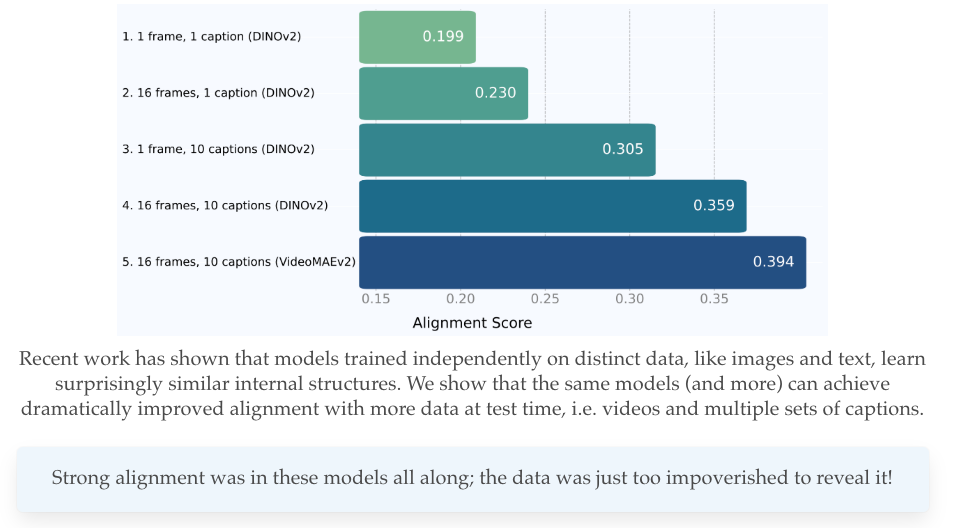
This repository provides the official implementation for the paper "Dynamic Reflections: Aligning Vision and Language Models through Temporal Representation Learning". We provide the necessary code to reproduce our key findings on video-text representation alignment.
The core idea of our work is to measure and improve the alignment between video and language representations. This codebase allows you to:
The project is structured to be extensible, allowing you to easily add your own models and datasets.
We recommend using uv for managing dependencies.
Initialize and sync the environment:
git clone [email protected]:google-deepmind/platonic-rep-video.git
cd platonic-rep-video
uv init
uv sync
Install ffmpeg: ffmpeg is required for video processing with
torchcodec. We recommend installing it via conda.
conda install ffmpeg
Our setup is tested with CUDA 12.4. If you are using a different CUDA version,
please adjust the torch and torchvision versions in pyproject.toml
accordingly.
We provide support for two datasets: VaTeX and PVD.
Instructions for downloading VaTeX can be found
here. We do not provide
the videos, but we provide a lightly processed subset of 1024 examples of the
train annotations which we use for our analysis for reproducibility.
Our dataloaders may need modifications depending on how the final videos are downloaded. We recommend processing the videos to speedup feature extraction.
Instructions for downloading PVD can be found
here. Similarly to VaTeX,
we provide a lightly processed subset of 1024 examples of the test annotations
which we used for our analysis. We also include our Gemini-2.5-Pro rephrased
captions, which expand each model caption with 10 individual captions in a
similar format to VaTeX.
We also provide a script for downloading the videos from huggingface in
misc/download_pvd.py which is compatible with our dataloaders.
The easiest way to get started is to run the provided pvd_sample experiment.
This will extract features for a small set of models on a sample of the VaTeX
dataset. Our configs are located in configs/experiments.
Run feature extraction: We recommend extracting language and vision features separately. LLMs are automatically sharded across all available devices, while most video models should fit on one GPU. We speed this up by parallelizing multiple video models across devices, which makes it incompatible to run language and video feature extraction together. Use the appropriate flag for each modality.
# Extract language features
uv run scripts/main_extract.py pvd_sample --llm_only

# Extract vision features
uv run scripts/main_extract.py pvd_sample --video_only
For multi-GPU execution, you can use the launcher.py script to parallelize
feature extraction (recommended for vision models):
uv run scripts/launcher.py pvd_sample --num-gpus 4 --video_only
Extracted features will be saved to the ./results/sample/pvd/ directory
by default. You may need to modify if you use python instead of uv.
Measure and plot alignment: Once features are extracted, you can measure the alignment between them:
uv run scripts/measure_alignment.py pvd_sample
uv run scripts/plot_alignment.py pvd_sample
This will compute the alignment scores and save the results to
./results/alignment/sample/.
The same is possible for the VaTeX dataset using the vatex_sample config.
The only difference is the data will need to be obtained according to
the original instructions. Our provided dataloader will not work
out of the box, as we preprocess out data into pickle files first.
To evaluate alignment on the full PVD dataset, you first need to run the
vatex experiment to extract features for all models.
# Extract language features (No parallelization as LLMs are sharded by default)
uv run scripts/main_extract.py pvd --llm_only

# Extract vision features (multi-GPU)
uv run scripts/launcher.py --num_gpus 8 pvd --video_only
After extraction, run the measure_alignment.py script with the same config,
and optionally plot the data as well.
uv run scripts/measure_alignment.py pvd
uv run scripts/plot_alignment.py pvd
The same is possible for the VaTeX dataset using the vatex config.
Finally, we also provide our retrieval accuracies for the video models on Kinetics-400 and SSv2, which should be enough to fully reproduce Figure 2 of our paper.
This project uses a modular, registry-based system to handle video and language models, making it easy to experiment with different architectures. Here are the core components:
Model Registries (LLM_REGISTRY, VIDEO_MODEL_REGISTRY): Central
dictionaries in registry/llm.py and registry/video.py that hold all
available models. Each model is mapped to a unique string name (e.g.,
'gemma2-2b-it', 'videomaev2_base'), allowing you to reference them
easily in your experiment configurations.
@register Decorator (for Video Models): A Python decorator that
simplifies adding new video models. By decorating a model's class with
@register('your-model-name'), you automatically add it to the
VIDEO_MODEL_REGISTRY.
VideoModelInterface (Abstract Base Class): This class in
registry/video.py defines a standard contract for all video models for
functions like initialize,preprocess, and forward_intermediates.
To add a new language model, add an entry to the LLM_REGISTRY dictionary in
registry/llm.py. You'll need to provide a unique name for your model and an
LLMConfig instance pointing to its Hugging Face identifier.
# In registry/llm.py

LLM_REGISTRY = {
    # ... existing models
    "my-custom-llm": LLMConfig(
        model_name="my-hf-organization/my-custom-llm-model",
        short_name="my-custom-llm",
        # Set the pad_token if necessary
        # pad_token="[PAD]",
    ),
    # ...
}
Adding a video model is slightly more involved, as video models tend to have many specialized processing components.
1. Define and Register the Model Class
In registry/video.py, create a new class that inherits from the most
appropriate base class (HuggingFaceModelBase, TimmModelBase, or
TimmImageAsVideoModelBase) and decorate it with the @register decorator.
Below is an example:
# registry/video.py

@register("my_awesome_video_model")
class MyAwesomeVideoModel(HuggingFaceModelBase):
    def __init__(self, short_name: Optional[str] = None):
        super().__init__(
            VideoModelConfig(
                # The full model name from the Hugging Face Hub or timm
                model_name="hf-hub-username/my-awesome-video-model",
                short_name="my-video-model",
                # --- Adjust configuration as needed ---
                # These values must match the model's requirements.
                clip_len=16,
                frame_sample_rate=2,
                native_num_frames=8,
                pool_types=["cls", "avg"],
            )
        )
    # --- Optional: Override methods for special cases ---
    # If your model requires custom logic for loading, preprocessing, or
    # feature extraction, you can override the base class methods.
You can test your model's implementation with uv run registry/video.py.
2. Use the Model in an Experiment
Once your model is registered, you can use it in any experiment config file
(e.g., configs/vatex_sample.py) by adding its registered name to
the llm_names or video_model_names list in the ScriptArgs.
# In an experiment file

config = (
    "Sample experiment with a custom model.",
    ScriptArgs(
        # ...
        video_model_names=[
            "videomaev2_base",
            "my_awesome_video_model", # <-- Your newly added model
        ],
        llm_names=[
            "gemma2-9b-it",
            "my-custom-llm", # <-- Your newly added model
        ]
        # ...
    ),
)
Then you can proceed as above again for feature extraction and alignment.
If you find our work useful, please cite our paper.
@misc{zhu2025dynamic,
    title={Dynamic Reflections: Probing Video Representations with Text Alignment},
    author={Tyler Zhu and Tengda Han and Leonidas Guibas and Viorica Pătrăucean and Maks Ovsjanikov},
    journal={arXiv preprint arXiv:2511.02767},
    year={2025},
}
Additionally, if this repository is useful, please also cite the original PRH authors from whom this repository is based on (https://github.com/minyoungg/platonic-rep).
@inproceedings{huh2024prh,
    title={The Platonic Representation Hypothesis},
    author={Huh, Minyoung and Cheung, Brian and Wang, Tongzhou, and Isola, Phillip},
    booktitle={International Conference on Machine Learning},
    year={2024}
}
Copyright 2026 Google LLC
All software is licensed under the Apache License, Version 2.0 (Apache 2.0); you may not use this file except in compliance with the Apache 2.0 license. You may obtain a copy of the Apache 2.0 license at: https://www.apache.org/licenses/LICENSE-2.0
All other materials are licensed under the Creative Commons Attribution 4.0 International License (CC-BY). You may obtain a copy of the CC-BY license at: https://creativecommons.org/licenses/by/4.0/legalcode
Unless required by applicable law or agreed to in writing, all software and materials distributed here under the Apache 2.0 or CC-BY licenses are distributed on an "AS IS" BASIS, WITHOUT WARRANTIES OR CONDITIONS OF ANY KIND, either express or implied. See the licenses for the specific language governing permissions and limitations under those licenses.
This is not an official Google product.
Overview | Installation | Quick Start | Reproduction | Custom Models
This repository provides the official implementation for the paper "Dynamic Reflections: Aligning Vision and Language Models through Temporal Representation Learning". We provide the necessary code to reproduce our key findings on video-text representation alignment.
The core idea of our work is to measure and improve the alignment between video and language representations. This codebase allows you to:
The project is structured to be extensible, allowing you to easily add your own models and datasets.
We recommend using uv for managing dependencies.
Initialize and sync the environment:
git clone [email protected]:google-deepmind/platonic-rep-video.git
cd platonic-rep-video
uv init
uv sync
Install ffmpeg: ffmpeg is required for video processing with
torchcodec. We recommend installing it via conda.
conda install ffmpeg
Our setup is tested with CUDA 12.4. If you are using a different CUDA version,
please adjust the torch and torchvision versions in pyproject.toml
accordingly.
We provide support for two datasets: VaTeX and PVD.
Instructions for downloading VaTeX can be found
here. We do not provide
the videos, but we provide a lightly processed subset of 1024 examples of the
train annotations which we use for our analysis for reproducibility.
Our dataloaders may need modifications depending on how the final videos are downloaded. We recommend processing the videos to speedup feature extraction.
Instructions for downloading PVD can be found
here. Similarly to VaTeX,
we provide a lightly processed subset of 1024 examples of the test annotations
which we used for our analysis. We also include our Gemini-2.5-Pro rephrased
captions, which expand each model caption with 10 individual captions in a
similar format to VaTeX.
We also provide a script for downloading the videos from huggingface in
misc/download_pvd.py which is compatible with our dataloaders.
The easiest way to get started is to run the provided pvd_sample experiment.
This will extract features for a small set of models on a sample of the VaTeX
dataset. Our configs are located in configs/experiments.
Run feature extraction: We recommend extracting language and vision features separately. LLMs are automatically sharded across all available devices, while most video models should fit on one GPU. We speed this up by parallelizing multiple video models across devices, which makes it incompatible to run language and video feature extraction together. Use the appropriate flag for each modality.
# Extract language features
uv run scripts/main_extract.py pvd_sample --llm_only

# Extract vision features
uv run scripts/main_extract.py pvd_sample --video_only
For multi-GPU execution, you can use the launcher.py script to parallelize
feature extraction (recommended for vision models):
uv run scripts/launcher.py pvd_sample --num-gpus 4 --video_only
Extracted features will be saved to the ./results/sample/pvd/ directory
by default. You may need to modify if you use python instead of uv.
Measure and plot alignment: Once features are extracted, you can measure the alignment between them:
uv run scripts/measure_alignment.py pvd_sample
uv run scripts/plot_alignment.py pvd_sample
This will compute the alignment scores and save the results to
./results/alignment/sample/.
The same is possible for the VaTeX dataset using the vatex_sample config.
The only difference is the data will need to be obtained according to
the original instructions. Our provided dataloader will not work
out of the box, as we preprocess out data into pickle files first.
To evaluate alignment on the full PVD dataset, you first need to run the
vatex experiment to extract features for all models.
# Extract language features (No parallelization as LLMs are sharded by default)
uv run scripts/main_extract.py pvd --llm_only

# Extract vision features (multi-GPU)
uv run scripts/launcher.py --num_gpus 8 pvd --video_only
After extraction, run the measure_alignment.py script with the same config,
and optionally plot the data as well.
uv run scripts/measure_alignment.py pvd
uv run scripts/plot_alignment.py pvd
The same is possible for the VaTeX dataset using the vatex config.
Finally, we also provide our retrieval accuracies for the video models on Kinetics-400 and SSv2, which should be enough to fully reproduce Figure 2 of our paper.
This project uses a modular, registry-based system to handle video and language models, making it easy to experiment with different architectures. Here are the core components:
Model Registries (LLM_REGISTRY, VIDEO_MODEL_REGISTRY): Central
dictionaries in registry/llm.py and registry/video.py that hold all
available models. Each model is mapped to a unique string name (e.g.,
'gemma2-2b-it', 'videomaev2_base'), allowing you to reference them
easily in your experiment configurations.
@register Decorator (for Video Models): A Python decorator that
simplifies adding new video models. By decorating a model's class with
@register('your-model-name'), you automatically add it to the
VIDEO_MODEL_REGISTRY.
VideoModelInterface (Abstract Base Class): This class in
registry/video.py defines a standard contract for all video models for
functions like initialize,preprocess, and forward_intermediates.
To add a new language model, add an entry to the LLM_REGISTRY dictionary in
registry/llm.py. You'll need to provide a unique name for your model and an
LLMConfig instance pointing to its Hugging Face identifier.
# In registry/llm.py

LLM_REGISTRY = {
    # ... existing models
    "my-custom-llm": LLMConfig(
        model_name="my-hf-organization/my-custom-llm-model",
        short_name="my-custom-llm",
        # Set the pad_token if necessary
        # pad_token="[PAD]",
    ),
    # ...
}
Adding a video model is slightly more involved, as video models tend to have many specialized processing components.
1. Define and Register the Model Class
In registry/video.py, create a new class that inherits from the most
appropriate base class (HuggingFaceModelBase, TimmModelBase, or
TimmImageAsVideoModelBase) and decorate it with the @register decorator.
Below is an example:
# registry/video.py

@register("my_awesome_video_model")
class MyAwesomeVideoModel(HuggingFaceModelBase):
    def __init__(self, short_name: Optional[str] = None):
        super().__init__(
            VideoModelConfig(
                # The full model name from the Hugging Face Hub or timm
                model_name="hf-hub-username/my-awesome-video-model",
                short_name="my-video-model",
                # --- Adjust configuration as needed ---
                # These values must match the model's requirements.
                clip_len=16,
                frame_sample_rate=2,
                native_num_frames=8,
                pool_types=["cls", "avg"],
            )
        )
    # --- Optional: Override methods for special cases ---
    # If your model requires custom logic for loading, preprocessing, or
    # feature extraction, you can override the base class methods.
You can test your model's implementation with uv run registry/video.py.
2. Use the Model in an Experiment
Once your model is registered, you can use it in any experiment config file
(e.g., configs/vatex_sample.py) by adding its registered name to
the llm_names or video_model_names list in the ScriptArgs.
# In an experiment file

config = (
    "Sample experiment with a custom model.",
    ScriptArgs(
        # ...
        video_model_names=[
            "videomaev2_base",
            "my_awesome_video_model", # <-- Your newly added model
        ],
        llm_names=[
            "gemma2-9b-it",
            "my-custom-llm", # <-- Your newly added model
        ]
        # ...
    ),
)
Then you can proceed as above again for feature extraction and alignment.
If you find our work useful, please cite our paper.
@misc{zhu2025dynamic,
    title={Dynamic Reflections: Probing Video Representations with Text Alignment},
    author={Tyler Zhu and Tengda Han and Leonidas Guibas and Viorica Pătrăucean and Maks Ovsjanikov},
    journal={arXiv preprint arXiv:2511.02767},
    year={2025},
}
Additionally, if this repository is useful, please also cite the original PRH authors from whom this repository is based on (https://github.com/minyoungg/platonic-rep).
@inproceedings{huh2024prh,
    title={The Platonic Representation Hypothesis},
    author={Huh, Minyoung and Cheung, Brian and Wang, Tongzhou, and Isola, Phillip},
    booktitle={International Conference on Machine Learning},
    year={2024}
}
Copyright 2026 Google LLC
All software is licensed under the Apache License, Version 2.0 (Apache 2.0); you may not use this file except in compliance with the Apache 2.0 license. You may obtain a copy of the Apache 2.0 license at: https://www.apache.org/licenses/LICENSE-2.0
All other materials are licensed under the Creative Commons Attribution 4.0 International License (CC-BY). You may obtain a copy of the CC-BY license at: https://creativecommons.org/licenses/by/4.0/legalcode
Unless required by applicable law or agreed to in writing, all software and materials distributed here under the Apache 2.0 or CC-BY licenses are distributed on an "AS IS" BASIS, WITHOUT WARRANTIES OR CONDITIONS OF ANY KIND, either express or implied. See the licenses for the specific language governing permissions and limitations under those licenses.
This is not an official Google product.