Enterprise-grade 2D graphics library for Go. Pure Go, zero CGO. Part of GoGPU ecosystem.
Go
167
529 commits
updated Sep 10, 2026
2D Graphics Library for Go
Pure Go | GPU Accelerated | Production Ready




Part of the GoGPU ecosystem
gg is a 2D graphics library for Go designed to power IDEs, browsers, and graphics-intensive applications. Built with modern patterns inspired by vello and tiny-skia, it delivers production-grade rendering with zero CGO dependencies.
Seven-Tier GPU Rendering: SDF shapes, convex polygons, stencil+cover paths, MSDF text, Vello compute pipeline, glyph mask cache
Six-tier GPU rendering: SDF shapes, convex polygons, stencil+cover paths, MSDF text, Vello compute, and glyph mask cache.
Pure Go, Vulkan/DX12/GLES backends, zero CGO. (source)
| Category | Capabilities |
|---|---|
| Rendering | Immediate and retained mode, seven-tier GPU acceleration (SDF, Convex, Stencil+Cover, Textured Quad, MSDF Text, Compute, Glyph Mask), per-context GPU isolation (Skia GrContext pattern), scene GPU auto-select, Skia AAA pixel-perfect rasterizer, pixel-perfect mode (SetAntiAlias(false) — dedicated NoAAFiller, Skia/Cairo/tiny-skia pattern), CPU fallback |
| Shapes | Rectangles, circles, ellipses, arcs, bezier curves, polygons, stars |
| Text | Pure Go font stack (own cmap/hmtx/GSUB/GPOS/gvar/avar/CFF1 parsers, TrueType bytecode interpreter — skrifa golden parity 624/624 diff=0), variable font support (WithVariations — weight/width/slant axes, own gvar/HVAR interpolation), MSDF + glyph mask dual-strategy rendering, TextMode auto-selection, text stroke/outline (StrokeString + TextPath, Skia/Cairo/HTML5 pattern), aliased text (TextModeAliased, Skia kAlias binary masks — GPU + CPU), per-glyph rendering (fractional advances, Skia linearMetrics pattern), OpenType font features (WithFeatures(TabularNums, NoLigatures) — own GSUB/GPOS shaper, 5-10x faster than HarfBuzz), DPI-aware HiDPI text, ClearType LCD auto-detection (Windows SPI + registry, macOS grayscale, Linux Xft/Wayland), CJK script-aware rendering (ADR-027: per-script hinting, exact-size rasterization, dual MSDF atlas 64/128px), font hinting (enterprise auto-hinter + TrueType bytecode interpreter), transform-aware CPU text (scale/rotate/shear), glyph outline caching, emoji support, bidirectional text, scene text via TagText glyph references (shape-once, Skia drawTextBlob pattern), atlas zoom resilience (size buckets + frame-based compaction) |
| Compositing | 29 blend modes (Porter-Duff, Advanced, HSL), layer isolation, alpha masks, zero-readback compositor (non-MSAA blit fast path, HiDPI-aware damage tracking (logical→physical scaling for OS compositor), damage-aware multi-rect sub-region updates, per-draw dynamic scissor ADR-028) |
| Images | 7 pixel formats, PNG/JPEG/WebP I/O, mipmaps, affine transforms |
| SVG | Full SVG renderer (gg/svg): parse + render SVG XML with color override for theming, retained scene lowering (RenderToScene — resolution-independent vector icons via scene graph), thin stroke hinting (pixel-grid snapping for crisp small icons), SVG path data parser (ParseSVGPath), transform-aware FillPath/StrokePath |
| Vector Export | Recording system with PDF and SVG backends |
| Rasterizer | Smart per-path algorithm selection (scanline, 4×4 tiles, 16×16 tiles, SDF, compute), text-aware area-based routing |
| Performance | Tile-based parallel rendering, LRU caching, four-level damage pipeline (ADR-021: object diff → tile dirty → GPU scissor → OS present), text batch coalescing (ADR-031: same-style DrawString calls merge into 1 GPU draw call, Skia TextBlob pattern), zero-copy buffer reuse (NewPixmapFromBuffer + ImageView for hot rendering loops), incremental Path.Bounds (Skia pattern), GOGPU_DEBUG_DAMAGE=overlay overlay |
go get github.com/gogpu/gg
Requirements: Go 1.25+
package main

import (
    "github.com/gogpu/gg"
    "github.com/gogpu/gg/text"
)

func main() {
    // Create drawing context
    dc := gg.NewContext(512, 512)
    defer dc.Close()

    dc.ClearWithColor(gg.White)

    // Draw shapes
    dc.SetHexColor("#3498db")
    dc.DrawCircle(256, 256, 100)
    dc.Fill()

    // Render text
    source, _ := text.NewFontSourceFromFile("arial.ttf")
    defer source.Close()

    dc.SetFont(source.Face(32))
    dc.SetColor(gg.Black)
    dc.DrawString("Hello, GoGPU!", 180, 260)

    dc.SavePNG("output.png")
}
// Fill AND stroke the same shape (use FillPreserve to keep the path):
dc.SetHexColor("#3498db")
dc.DrawRoundedRectangle(50, 50, 200, 100, 10)
dc.FillPreserve()               // fill WITHOUT clearing the path
dc.SetHexColor("#2c3e50")
dc.SetLineWidth(3)
dc.Stroke()                     // stroke the same path

// Clear canvas: Clear() fills transparent, ClearWithColor() fills with color:
dc.ClearWithColor(gg.White)     // white background (recommended)
dc.Clear()                      // transparent background (for compositing)

// Load a font (one-liner):
dc.LoadFontFace("arial.ttf", 24)
dc.DrawString("Hello!", 50, 50)

// Scale/rotate around a point:
dc.ScaleAbout(2, 2, 100, 100)   // 2x zoom centered at (100,100)
dc.RotateAbout(0.5, 200, 200)   // rotate 0.5 rad around (200,200)
The CPU rasterizer automatically selects the optimal algorithm per-path.
Curve edges use forward differencing with deviation-based subdivision by default
(ADR-063) -- native O(1)/step curve stepping with De Casteljau split for large
curves (deviation > 0.1px). Value-type QuadraticEdge/CubicEdge with zero
per-edge heap allocations.
| Algorithm | Tiles | Best For |
|---|---|---|
| AnalyticFiller (Skia AAA) | — | Simple paths, small shapes (< 32px). Forward-diff curve edges (Skia updateQuadratic/updateCubic). Pixel-perfect with Chrome/Android. |
| AnalyticFiller Convex | — | Convex shapes (rect, circle, triangle). 1.6x faster, kSnapDigit X snapping. |
| SparseStrips | 4×4 | Complex paths, CPU/SIMD workloads |
| TileCompute | 16×16 | Extreme complexity (10K+ segments) |
dc := gg.NewContext(800, 600)
defer dc.Close()

// Auto-selection (default) — optimal algorithm per-path
dc.DrawCircle(400, 300, 100)
dc.Fill()

// Force specific algorithm for benchmarking
dc.SetRasterizerMode(gg.RasterizerSparseStrips)
Disable anti-aliasing for crisp, aliased edges — useful for pixel art, retro graphics, technical drawings, and sharp grid lines:
dc.SetAntiAlias(false)          // binary coverage: inside=opaque, outside=transparent
dc.DrawRectangle(10, 10, 100, 50)
dc.Fill()                        // no gray edge pixels
dc.SetAntiAlias(true)           // back to smooth AA
Uses a dedicated integer scanline rasterizer (Skia/tiny-skia pattern) — ~2-3× faster
than analytic AA. Works on both CPU and GPU (all backends). Text AA is independent
(controlled via SetTextMode).
Stroke text outlines for outlined/bordered text effects (Skia/Cairo/HTML5 pattern):
dc.SetLineWidth(3)
dc.SetRGB(0, 0, 0)
dc.StrokeString("Hello", x, y)  // black outline
dc.SetRGB(1, 1, 1)
dc.DrawString("Hello", x, y)    // white fill on top

// Or get text as a Path for custom operations:
path := dc.TextPath("Hello", x, y)
Pixel-perfect text with binary coverage (Skia SkFont::Edging::kAlias).
Works on both GPU and CPU — no GPU required:
dc.SetTextMode(gg.TextModeAliased)  // no gray edge pixels on text
dc.DrawString("Pixel Perfect", x, y)
dc.SavePNG("aliased.png")           // works standalone, no import _ "gg/gpu" needed
Geometry AA (SetAntiAlias) and text AA (SetTextMode) are independent — matching
Skia and Cairo separation.
gg supports optional GPU acceleration through the GPUAccelerator interface with
a seven-tier rendering pipeline:
| Tier | Method | Best For |
|---|---|---|
| 1. SDF | Signed Distance Field | Circles, ellipses, rectangles, rounded rects |
| 2a. Convex | Direct vertex emission | Convex polygons, single draw call |
| 2b. Stencil+Cover | Fan tessellation + stencil buffer | Arbitrary complex paths, EvenOdd/NonZero fill |
| 3. Textured Quad | GPU image sampling | DrawImage, DrawGPUTexture (zero-readback compositing) |
| 4. MSDF Text | Multi-channel Signed Distance Field | Dynamic/animated text, resolution-independent |
| 5. Compute | 9-stage Vello compute pipeline | Full scenes with many paths (GPU parallel rasterization) |
| 6. Glyph Mask | CPU-rasterized R8 alpha atlas | Static UI text ≤64px, pixel-perfect quality |
Tiers 1–4, 6 use a render-pass pipeline; Tier 5 uses compute shaders dispatched
via PipelineMode (Auto/RenderPass/Compute). Text auto-selection routes horizontal
text ≤64px to Glyph Mask (Skia/Chrome pattern), else MSDF.
When no GPU is registered, rendering uses the high-quality CPU rasterizer (default).
import (
    "github.com/gogpu/gg"
    _ "github.com/gogpu/gg/gpu" // opt-in GPU acceleration
)

func main() {
    // GPU automatically used when available, falls back to CPU
    dc := gg.NewContext(800, 600)
    defer dc.Close()

    dc.DrawCircle(400, 300, 100)
    dc.Fill() // tries GPU first, falls back to CPU transparently
}
For zero-copy rendering directly to a GPU surface (e.g., in a gogpu window),
use ggcanvas.Canvas.RenderDirect — see the
gogpu integration example. The example uses
event-driven rendering with AnimationToken for power-efficient VSync (0% CPU when idle).
Compositor examples:
| Example | Description |
|---|---|
zero_readback/ | GPU-direct rendering — SDF shapes + text rendered to swapchain in a single MSAA pass, zero CPU readback |
blit_only/ | Non-MSAA compositor path — CPU pixmap uploaded via FlushPixmap, composited via DrawGPUTextureBase in a 1x render pass (93% bandwidth reduction, ADR-016) |
zero_readback_manual/ | Manual zero-readback pipeline — FlushPixmap + EnsureGPUTexture + DrawGPUTextureBase + FlushGPUWithView step-by-step |
// Use existing pixmap
pm := gg.NewPixmap(800, 600)
dc := gg.NewContext(800, 600, gg.WithPixmap(pm))
                        gg (Public API)
                             │
         ┌───────────────────┼───────────────────┐
         │                   │                   │
   Immediate Mode       Retained Mode        Resources
   (Context API)        (Scene Graph)     (Images, Fonts)
         │                   │                   │
         │              TagText (ADR-022)        │
         │          shape once → glyph refs      │
         └───────────────────┼───────────────────┘
                             │
              ┌──────────────┴──────────────┐
              │                             │
         CPU Raster                   GPUAccelerator
      (always available)            (opt-in via gg/gpu)
              │                             │
    internal/raster              ┌──────────┼──────────┐
                                 │          │          │
                           Render Pass   MSDF Text   Compute
                         (Tiers 1-4,6)  (Tier 4,6) (Tier 5)
| Component | Location | Description |
|---|---|---|
| CPU Raster | internal/raster/ | Skia AAA analytic anti-aliasing (pixel-perfect port of Chrome/Android rasterizer). General + convex fast path. Forward-diff curve edges with deviation-based subdivision (ADR-063), value-type QuadraticEdge/CubicEdge (zero per-edge heap allocs). |
| Tile Rasterizers | internal/gpu/ (4×4), internal/gpu/tilecompute/ (16×16) | SparseStrips + TileCompute, both ported from Vello |
| GPU Accelerator | internal/gpu | Seven-tier GPU pipeline (SDF, Convex, Stencil+Cover, Textured Quad, MSDF Text, Compute, Glyph Mask) |
| Scene Text | scene/ | TagText glyph references (ADR-022): shape once at recording, resolve at render via DrawShapedGlyphs → Tier 6/4. Atlas zoom resilience (Skia size buckets). |
| GPU + Tiles | gpu/ | Opt-in via import _ "github.com/gogpu/gg/gpu" (GPU + tile rasterizers) |
| Tiles Only | raster/ | Opt-in via import _ "github.com/gogpu/gg/raster" (CPU-only tiles) |
| Software | Root gg package | Default CPU renderer with smart algorithm selection |
Canvas-style drawing with transformation stack:
dc := gg.NewContext(800, 600)
defer dc.Close()

// Transforms
dc.Push()
dc.Translate(400, 300)
dc.Rotate(math.Pi / 4)
dc.DrawRectangle(-50, -50, 100, 100)
dc.SetRGB(0.2, 0.5, 0.8)
dc.Fill()
dc.Pop()

// Bezier paths
dc.MoveTo(100, 100)
dc.QuadraticTo(200, 50, 300, 100)
dc.CubicTo(350, 150, 350, 250, 300, 300)
dc.SetLineWidth(3)
dc.Stroke()
Type-safe path construction with method chaining:
path := gg.BuildPath().
    MoveTo(100, 100).
    LineTo(200, 100).
    QuadTo(250, 150, 200, 200).
    CubicTo(150, 250, 100, 250, 50, 200).
    Close().
    Circle(300, 150, 50).
    Star(400, 150, 40, 20, 5).
    Build()

dc.SetPath(path)
dc.Fill()
GPU-optimized scene graph with compact encoding. Text uses TagText glyph references (ADR-022) — shaped once at recording time, resolved at render time with full hinting and atlas batching:
import (
    "github.com/gogpu/gg"
    "github.com/gogpu/gg/scene"
    "github.com/gogpu/gg/text"
)

s := scene.NewScene()

// Shapes — encoded as compact binary commands
s.Fill(scene.FillNonZero, scene.IdentityAffine(),
    scene.SolidBrush(gg.RGBA{R: 1, A: 0.8}),
    scene.NewCircleShape(150, 200, 100))

// Text — stored as glyph references (10 bytes/glyph, not vector paths)
source, _ := text.NewFontSourceFromFile("Roboto.ttf")
face := source.Face(16)
s.DrawText("Hello Scene", face, 50, 50, scene.SolidBrush(gg.White))

// Render through GPU scene renderer (Tier 6/4 text, SDF shapes)
gpuR := scene.NewGPUSceneRenderer(dc)
gpuR.RenderScene(s)
Full Unicode support with font fallback and built-in GSUB/GPOS shaping:
// Font composition
mainFont, _ := text.NewFontSourceFromFile("Roboto.ttf")
emojiFont, _ := text.NewFontSourceFromFile("NotoEmoji.ttf")
defer mainFont.Close()
defer emojiFont.Close()

multiFace, _ := text.NewMultiFace(
    mainFont.Face(24),
    text.NewFilteredFace(emojiFont.Face(24), text.RangeEmoji),
)

dc.SetFont(multiFace)
dc.DrawString("Hello World! Nice day!", 50, 100)

// Built-in GSUB/GPOS shaping (ligatures, kerning) is enabled by default.
// No additional setup needed — OwnShaper handles liga, kern features automatically.

// Text layout with wrapping
opts := text.LayoutOptions{
    MaxWidth:  400,
    WrapMode:  text.WrapWordChar,
    Alignment: text.AlignCenter,
}
layout := text.LayoutText("Long text...", face, opts)
Text rendering respects the full transformation matrix (scale, rotation, shear):
dc.SetFont(source.Face(24))
dc.SetRGB(0, 0, 0)

// Scaled text — rendered at device resolution (no pixelation)
dc.Push()
dc.Scale(2, 2)
dc.DrawString("2x Scale", 50, 50)
dc.Pop()

// Rotated text — glyph outlines converted to vector paths
dc.Push()
dc.Translate(200, 200)
dc.Rotate(math.Pi / 6) // 30 degrees
dc.DrawString("Rotated", 0, 0)
dc.Pop()
Text rendering strategy is selectable per-Context via SetTextMode():
| Mode | Strategy | Best for |
|---|---|---|
TextModeAuto | Auto-select (default) | General use |
TextModeMSDF | GPU MSDF atlas | Games, animations, real-time scaling |
TextModeVector | Glyph outlines as paths | UI labels, quality-critical text |
TextModeBitmap | CPU bitmap rasterization | PNG/PDF export, static text |
The CPU text pipeline uses a three-tier strategy (modeled after Skia/Cairo/Vello):
translation-only → bitmap, uniform scale ≤256px → bitmap at device size,
everything else → glyph outlines as vector paths with cached outlines via GlyphCache.
Full color emoji support with CBDT/CBLC (bitmap) and COLR/CPAL (vector) formats:
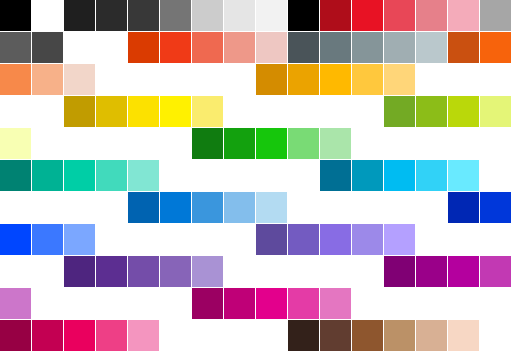
175 colors from Segoe UI Emoji COLR/CPAL palette
// Extract color emoji from font
extractor, _ := emoji.NewCBDTExtractor(cbdtData, cblcData)
glyph, _ := extractor.GetGlyph(glyphID, ppem)
img, _ := png.Decode(bytes.NewReader(glyph.Data))

// Parse COLR/CPAL vector layers
parser, _ := emoji.NewCOLRParser(colrData, cpalData)
glyph, _ := parser.GetGlyph(glyphID, paletteIndex)
for _, layer := range glyph.Layers {
    // Render each layer with layer.Color
}
See examples/color_emoji/ for a complete example.
29 W3C blend modes for direct Fill/Stroke operations:
// Per-operation blending (Skia/Cairo/Qt pattern):
dc.SetRGB(1, 0, 0) // red background
dc.DrawRectangle(0, 0, 200, 200)
dc.Fill()

dc.SetBlendMode(gg.BlendMultiply)
dc.SetRGB(0, 0, 1) // blue foreground
dc.DrawCircle(100, 100, 80)
dc.Fill() // uses Multiply blending

dc.SetBlendMode(gg.BlendNormal) // reset to default
For isolated compositing with opacity, use layers:
dc.PushLayer(gg.BlendOverlay, 0.7)
// ... draw content ...
dc.PopLayer()
Per-shape masking — each draw individually masked:
// Create a circular mask
dc.DrawCircle(200, 200, 100)
mask := dc.AsMask() // capture path as mask (before Fill!)
dc.ClearPath()

// Apply mask: only the circle area is visible
dc.SetMask(mask)
dc.SetRGB(0, 0, 1)
dc.DrawRectangle(0, 0, 400, 400)
dc.Fill() // blue only inside the circle
Per-layer masking — mask an entire group of draws:
mask := gg.NewMask(400, 400)
// ... fill mask with desired shape ...

dc.PushMaskLayer(mask)
dc.DrawCircle(100, 100, 50)
dc.Fill()
dc.DrawRectangle(200, 200, 80, 80)
dc.Fill()
dc.PopLayer() // entire layer masked, then composited
Record drawing operations and export to PDF or SVG:
import (
    "github.com/gogpu/gg/recording"
    _ "github.com/gogpu/gg-pdf" // Register PDF backend
    _ "github.com/gogpu/gg-svg" // Register SVG backend
)

// Create recorder
rec := recording.NewRecorder(800, 600)

// Draw using familiar API
rec.SetColor(gg.Blue)
rec.DrawCircle(400, 300, 100)
rec.Fill()

// Finish recording and play back to a raster backend
r := rec.FinishRecording()
backend := raster.NewBackend()
r.Playback(backend)
backend.SaveToFile("output.png")
The drawing type is named Context following industry conventions:
| Library | Drawing Type |
|---|---|
| HTML5 Canvas | CanvasRenderingContext2D |
| Cairo | cairo_t (context) |
| Apple CoreGraphics | CGContext |
| piet (Rust) | RenderContext |
In HTML5, Canvas is the element while Context performs drawing (canvas.getContext("2d")). The Context contains drawing state and provides the drawing API.
Convention: dc for drawing context, ctx for context.Context:
dc := gg.NewContext(512, 512) // dc = drawing context
| Operation | Time | Notes |
|---|---|---|
| sRGB to Linear | 0.16ns | 260x faster than math.Pow |
| LayerCache.Get | 90ns | Thread-safe LRU |
| DirtyRegion.Mark | 10.9ns | Lock-free atomic |
| MSDF lookup | <10ns | Zero-allocation |
| Path iteration | 23ns | SOA Iterate(), 0 allocs |
| FillRect 100×100 | 520µs | 0 allocs (zero-alloc pipeline) |
| FillCircle r100 | 1.7ms | 0 allocs (zero-alloc pipeline) |
| StrokePath 10seg | 219ns | 0 allocs (scratch path reuse, Skia pattern) |
| SetRGB/SetRGBA | <1ns | 0 allocs (inline solidColor, ADR-036) |
| Gradient ColorAt | 33ns | 0 allocs (pre-sorted stops) |
Visualize which regions are repainted each frame:
GOGPU_DEBUG_DAMAGE=overlay go run ./examples/gogpu_integration
Green flash-and-fade overlay shows damaged (repainted) regions. Useful for verifying that damage tracking works correctly and only dirty areas are repainted.
| Variable | Values | Description |
|---|---|---|
GOGPU_GRAPHICS_API | vulkan, dx12, metal, gles, software | Force specific GPU backend |
GOGPU_RENDER_MODE | auto, cpu, gpu | Force CPU or GPU rasterizer (ADR-020) |
GOGPU_DEBUG_DAMAGE | 1 | Show damage region overlay (flash-and-fade) |
gg is part of the GoGPU ecosystem.
| Project | Description |
|---|---|
| gogpu/gogpu | GPU framework with windowing and input |
| gogpu/wgpu | Pure Go WebGPU implementation |
| gogpu/naga | Shader compiler (WGSL to SPIR-V, MSL, GLSL) |
| gogpu/gg | 2D graphics (this repo) |
| gogpu/gg-pdf | PDF export backend for recording |
| gogpu/gg-svg | SVG export backend for recording |
| gogpu/ui | GUI toolkit (planned) |
We haven't written comprehensive tutorials yet, but the community has started:
🇨🇿 Pavel Tišnovský (root.cz) wrote two in-depth gg tutorials with 54 working examples:
Czech language — use Google Translate. Code examples are universal.
Contributions welcome! See CONTRIBUTING.md for guidelines.
Priority areas:
MIT License — see LICENSE for details.
gg — 2D Graphics for Go
341 followers · starred Dec 2025
427 followers · starred Apr 2026
160 followers · starred Sep 2026
11 followers · starred Apr 2026
Enterprise-grade 2D graphics library for Go. Pure Go, zero CGO. Part of GoGPU ecosystem.
Go
167
529 commits
updated Sep 10, 2026
2D Graphics Library for Go
Pure Go | GPU Accelerated | Production Ready
Part of the GoGPU ecosystem
gg is a 2D graphics library for Go designed to power IDEs, browsers, and graphics-intensive applications. Built with modern patterns inspired by vello and tiny-skia, it delivers production-grade rendering with zero CGO dependencies.
Seven-Tier GPU Rendering: SDF shapes, convex polygons, stencil+cover paths, MSDF text, Vello compute pipeline, glyph mask cache
Six-tier GPU rendering: SDF shapes, convex polygons, stencil+cover paths, MSDF text, Vello compute, and glyph mask cache.
Pure Go, Vulkan/DX12/GLES backends, zero CGO. (source)
| Category | Capabilities |
|---|---|
| Rendering | Immediate and retained mode, seven-tier GPU acceleration (SDF, Convex, Stencil+Cover, Textured Quad, MSDF Text, Compute, Glyph Mask), per-context GPU isolation (Skia GrContext pattern), scene GPU auto-select, Skia AAA pixel-perfect rasterizer, pixel-perfect mode (SetAntiAlias(false) — dedicated NoAAFiller, Skia/Cairo/tiny-skia pattern), CPU fallback |
| Shapes | Rectangles, circles, ellipses, arcs, bezier curves, polygons, stars |
| Text | Pure Go font stack (own cmap/hmtx/GSUB/GPOS/gvar/avar/CFF1 parsers, TrueType bytecode interpreter — skrifa golden parity 624/624 diff=0), variable font support (WithVariations — weight/width/slant axes, own gvar/HVAR interpolation), MSDF + glyph mask dual-strategy rendering, TextMode auto-selection, text stroke/outline (StrokeString + TextPath, Skia/Cairo/HTML5 pattern), aliased text (TextModeAliased, Skia kAlias binary masks — GPU + CPU), per-glyph rendering (fractional advances, Skia linearMetrics pattern), OpenType font features (WithFeatures(TabularNums, NoLigatures) — own GSUB/GPOS shaper, 5-10x faster than HarfBuzz), DPI-aware HiDPI text, ClearType LCD auto-detection (Windows SPI + registry, macOS grayscale, Linux Xft/Wayland), CJK script-aware rendering (ADR-027: per-script hinting, exact-size rasterization, dual MSDF atlas 64/128px), font hinting (enterprise auto-hinter + TrueType bytecode interpreter), transform-aware CPU text (scale/rotate/shear), glyph outline caching, emoji support, bidirectional text, scene text via TagText glyph references (shape-once, Skia drawTextBlob pattern), atlas zoom resilience (size buckets + frame-based compaction) |
| Compositing | 29 blend modes (Porter-Duff, Advanced, HSL), layer isolation, alpha masks, zero-readback compositor (non-MSAA blit fast path, HiDPI-aware damage tracking (logical→physical scaling for OS compositor), damage-aware multi-rect sub-region updates, per-draw dynamic scissor ADR-028) |
| Images | 7 pixel formats, PNG/JPEG/WebP I/O, mipmaps, affine transforms |
| SVG | Full SVG renderer (gg/svg): parse + render SVG XML with color override for theming, retained scene lowering (RenderToScene — resolution-independent vector icons via scene graph), thin stroke hinting (pixel-grid snapping for crisp small icons), SVG path data parser (ParseSVGPath), transform-aware FillPath/StrokePath |
| Vector Export | Recording system with PDF and SVG backends |
| Rasterizer | Smart per-path algorithm selection (scanline, 4×4 tiles, 16×16 tiles, SDF, compute), text-aware area-based routing |
| Performance | Tile-based parallel rendering, LRU caching, four-level damage pipeline (ADR-021: object diff → tile dirty → GPU scissor → OS present), text batch coalescing (ADR-031: same-style DrawString calls merge into 1 GPU draw call, Skia TextBlob pattern), zero-copy buffer reuse (NewPixmapFromBuffer + ImageView for hot rendering loops), incremental Path.Bounds (Skia pattern), GOGPU_DEBUG_DAMAGE=overlay overlay |
go get github.com/gogpu/gg
Requirements: Go 1.25+
package main

import (
    "github.com/gogpu/gg"
    "github.com/gogpu/gg/text"
)

func main() {
    // Create drawing context
    dc := gg.NewContext(512, 512)
    defer dc.Close()

    dc.ClearWithColor(gg.White)

    // Draw shapes
    dc.SetHexColor("#3498db")
    dc.DrawCircle(256, 256, 100)
    dc.Fill()

    // Render text
    source, _ := text.NewFontSourceFromFile("arial.ttf")
    defer source.Close()

    dc.SetFont(source.Face(32))
    dc.SetColor(gg.Black)
    dc.DrawString("Hello, GoGPU!", 180, 260)

    dc.SavePNG("output.png")
}
// Fill AND stroke the same shape (use FillPreserve to keep the path):
dc.SetHexColor("#3498db")
dc.DrawRoundedRectangle(50, 50, 200, 100, 10)
dc.FillPreserve()               // fill WITHOUT clearing the path
dc.SetHexColor("#2c3e50")
dc.SetLineWidth(3)
dc.Stroke()                     // stroke the same path

// Clear canvas: Clear() fills transparent, ClearWithColor() fills with color:
dc.ClearWithColor(gg.White)     // white background (recommended)
dc.Clear()                      // transparent background (for compositing)

// Load a font (one-liner):
dc.LoadFontFace("arial.ttf", 24)
dc.DrawString("Hello!", 50, 50)

// Scale/rotate around a point:
dc.ScaleAbout(2, 2, 100, 100)   // 2x zoom centered at (100,100)
dc.RotateAbout(0.5, 200, 200)   // rotate 0.5 rad around (200,200)
The CPU rasterizer automatically selects the optimal algorithm per-path.
Curve edges use forward differencing with deviation-based subdivision by default
(ADR-063) -- native O(1)/step curve stepping with De Casteljau split for large
curves (deviation > 0.1px). Value-type QuadraticEdge/CubicEdge with zero
per-edge heap allocations.
| Algorithm | Tiles | Best For |
|---|---|---|
| AnalyticFiller (Skia AAA) | — | Simple paths, small shapes (< 32px). Forward-diff curve edges (Skia updateQuadratic/updateCubic). Pixel-perfect with Chrome/Android. |
| AnalyticFiller Convex | — | Convex shapes (rect, circle, triangle). 1.6x faster, kSnapDigit X snapping. |
| SparseStrips | 4×4 | Complex paths, CPU/SIMD workloads |
| TileCompute | 16×16 | Extreme complexity (10K+ segments) |
dc := gg.NewContext(800, 600)
defer dc.Close()

// Auto-selection (default) — optimal algorithm per-path
dc.DrawCircle(400, 300, 100)
dc.Fill()

// Force specific algorithm for benchmarking
dc.SetRasterizerMode(gg.RasterizerSparseStrips)
Disable anti-aliasing for crisp, aliased edges — useful for pixel art, retro graphics, technical drawings, and sharp grid lines:
dc.SetAntiAlias(false)          // binary coverage: inside=opaque, outside=transparent
dc.DrawRectangle(10, 10, 100, 50)
dc.Fill()                        // no gray edge pixels
dc.SetAntiAlias(true)           // back to smooth AA
Uses a dedicated integer scanline rasterizer (Skia/tiny-skia pattern) — ~2-3× faster
than analytic AA. Works on both CPU and GPU (all backends). Text AA is independent
(controlled via SetTextMode).
Stroke text outlines for outlined/bordered text effects (Skia/Cairo/HTML5 pattern):
dc.SetLineWidth(3)
dc.SetRGB(0, 0, 0)
dc.StrokeString("Hello", x, y)  // black outline
dc.SetRGB(1, 1, 1)
dc.DrawString("Hello", x, y)    // white fill on top

// Or get text as a Path for custom operations:
path := dc.TextPath("Hello", x, y)
Pixel-perfect text with binary coverage (Skia SkFont::Edging::kAlias).
Works on both GPU and CPU — no GPU required:
dc.SetTextMode(gg.TextModeAliased)  // no gray edge pixels on text
dc.DrawString("Pixel Perfect", x, y)
dc.SavePNG("aliased.png")           // works standalone, no import _ "gg/gpu" needed
Geometry AA (SetAntiAlias) and text AA (SetTextMode) are independent — matching
Skia and Cairo separation.
gg supports optional GPU acceleration through the GPUAccelerator interface with
a seven-tier rendering pipeline:
| Tier | Method | Best For |
|---|---|---|
| 1. SDF | Signed Distance Field | Circles, ellipses, rectangles, rounded rects |
| 2a. Convex | Direct vertex emission | Convex polygons, single draw call |
| 2b. Stencil+Cover | Fan tessellation + stencil buffer | Arbitrary complex paths, EvenOdd/NonZero fill |
| 3. Textured Quad | GPU image sampling | DrawImage, DrawGPUTexture (zero-readback compositing) |
| 4. MSDF Text | Multi-channel Signed Distance Field | Dynamic/animated text, resolution-independent |
| 5. Compute | 9-stage Vello compute pipeline | Full scenes with many paths (GPU parallel rasterization) |
| 6. Glyph Mask | CPU-rasterized R8 alpha atlas | Static UI text ≤64px, pixel-perfect quality |
Tiers 1–4, 6 use a render-pass pipeline; Tier 5 uses compute shaders dispatched
via PipelineMode (Auto/RenderPass/Compute). Text auto-selection routes horizontal
text ≤64px to Glyph Mask (Skia/Chrome pattern), else MSDF.
When no GPU is registered, rendering uses the high-quality CPU rasterizer (default).
import (
    "github.com/gogpu/gg"
    _ "github.com/gogpu/gg/gpu" // opt-in GPU acceleration
)

func main() {
    // GPU automatically used when available, falls back to CPU
    dc := gg.NewContext(800, 600)
    defer dc.Close()

    dc.DrawCircle(400, 300, 100)
    dc.Fill() // tries GPU first, falls back to CPU transparently
}
For zero-copy rendering directly to a GPU surface (e.g., in a gogpu window),
use ggcanvas.Canvas.RenderDirect — see the
gogpu integration example. The example uses
event-driven rendering with AnimationToken for power-efficient VSync (0% CPU when idle).
Compositor examples:
| Example | Description |
|---|---|
zero_readback/ | GPU-direct rendering — SDF shapes + text rendered to swapchain in a single MSAA pass, zero CPU readback |
blit_only/ | Non-MSAA compositor path — CPU pixmap uploaded via FlushPixmap, composited via DrawGPUTextureBase in a 1x render pass (93% bandwidth reduction, ADR-016) |
zero_readback_manual/ | Manual zero-readback pipeline — FlushPixmap + EnsureGPUTexture + DrawGPUTextureBase + FlushGPUWithView step-by-step |
// Use existing pixmap
pm := gg.NewPixmap(800, 600)
dc := gg.NewContext(800, 600, gg.WithPixmap(pm))
                        gg (Public API)
                             │
         ┌───────────────────┼───────────────────┐
         │                   │                   │
   Immediate Mode       Retained Mode        Resources
   (Context API)        (Scene Graph)     (Images, Fonts)
         │                   │                   │
         │              TagText (ADR-022)        │
         │          shape once → glyph refs      │
         └───────────────────┼───────────────────┘
                             │
              ┌──────────────┴──────────────┐
              │                             │
         CPU Raster                   GPUAccelerator
      (always available)            (opt-in via gg/gpu)
              │                             │
    internal/raster              ┌──────────┼──────────┐
                                 │          │          │
                           Render Pass   MSDF Text   Compute
                         (Tiers 1-4,6)  (Tier 4,6) (Tier 5)
| Component | Location | Description |
|---|---|---|
| CPU Raster | internal/raster/ | Skia AAA analytic anti-aliasing (pixel-perfect port of Chrome/Android rasterizer). General + convex fast path. Forward-diff curve edges with deviation-based subdivision (ADR-063), value-type QuadraticEdge/CubicEdge (zero per-edge heap allocs). |
| Tile Rasterizers | internal/gpu/ (4×4), internal/gpu/tilecompute/ (16×16) | SparseStrips + TileCompute, both ported from Vello |
| GPU Accelerator | internal/gpu | Seven-tier GPU pipeline (SDF, Convex, Stencil+Cover, Textured Quad, MSDF Text, Compute, Glyph Mask) |
| Scene Text | scene/ | TagText glyph references (ADR-022): shape once at recording, resolve at render via DrawShapedGlyphs → Tier 6/4. Atlas zoom resilience (Skia size buckets). |
| GPU + Tiles | gpu/ | Opt-in via import _ "github.com/gogpu/gg/gpu" (GPU + tile rasterizers) |
| Tiles Only | raster/ | Opt-in via import _ "github.com/gogpu/gg/raster" (CPU-only tiles) |
| Software | Root gg package | Default CPU renderer with smart algorithm selection |
Canvas-style drawing with transformation stack:
dc := gg.NewContext(800, 600)
defer dc.Close()

// Transforms
dc.Push()
dc.Translate(400, 300)
dc.Rotate(math.Pi / 4)
dc.DrawRectangle(-50, -50, 100, 100)
dc.SetRGB(0.2, 0.5, 0.8)
dc.Fill()
dc.Pop()

// Bezier paths
dc.MoveTo(100, 100)
dc.QuadraticTo(200, 50, 300, 100)
dc.CubicTo(350, 150, 350, 250, 300, 300)
dc.SetLineWidth(3)
dc.Stroke()
Type-safe path construction with method chaining:
path := gg.BuildPath().
    MoveTo(100, 100).
    LineTo(200, 100).
    QuadTo(250, 150, 200, 200).
    CubicTo(150, 250, 100, 250, 50, 200).
    Close().
    Circle(300, 150, 50).
    Star(400, 150, 40, 20, 5).
    Build()

dc.SetPath(path)
dc.Fill()
GPU-optimized scene graph with compact encoding. Text uses TagText glyph references (ADR-022) — shaped once at recording time, resolved at render time with full hinting and atlas batching:
import (
    "github.com/gogpu/gg"
    "github.com/gogpu/gg/scene"
    "github.com/gogpu/gg/text"
)

s := scene.NewScene()

// Shapes — encoded as compact binary commands
s.Fill(scene.FillNonZero, scene.IdentityAffine(),
    scene.SolidBrush(gg.RGBA{R: 1, A: 0.8}),
    scene.NewCircleShape(150, 200, 100))

// Text — stored as glyph references (10 bytes/glyph, not vector paths)
source, _ := text.NewFontSourceFromFile("Roboto.ttf")
face := source.Face(16)
s.DrawText("Hello Scene", face, 50, 50, scene.SolidBrush(gg.White))

// Render through GPU scene renderer (Tier 6/4 text, SDF shapes)
gpuR := scene.NewGPUSceneRenderer(dc)
gpuR.RenderScene(s)
Full Unicode support with font fallback and built-in GSUB/GPOS shaping:
// Font composition
mainFont, _ := text.NewFontSourceFromFile("Roboto.ttf")
emojiFont, _ := text.NewFontSourceFromFile("NotoEmoji.ttf")
defer mainFont.Close()
defer emojiFont.Close()

multiFace, _ := text.NewMultiFace(
    mainFont.Face(24),
    text.NewFilteredFace(emojiFont.Face(24), text.RangeEmoji),
)

dc.SetFont(multiFace)
dc.DrawString("Hello World! Nice day!", 50, 100)

// Built-in GSUB/GPOS shaping (ligatures, kerning) is enabled by default.
// No additional setup needed — OwnShaper handles liga, kern features automatically.

// Text layout with wrapping
opts := text.LayoutOptions{
    MaxWidth:  400,
    WrapMode:  text.WrapWordChar,
    Alignment: text.AlignCenter,
}
layout := text.LayoutText("Long text...", face, opts)
Text rendering respects the full transformation matrix (scale, rotation, shear):
dc.SetFont(source.Face(24))
dc.SetRGB(0, 0, 0)

// Scaled text — rendered at device resolution (no pixelation)
dc.Push()
dc.Scale(2, 2)
dc.DrawString("2x Scale", 50, 50)
dc.Pop()

// Rotated text — glyph outlines converted to vector paths
dc.Push()
dc.Translate(200, 200)
dc.Rotate(math.Pi / 6) // 30 degrees
dc.DrawString("Rotated", 0, 0)
dc.Pop()
Text rendering strategy is selectable per-Context via SetTextMode():
| Mode | Strategy | Best for |
|---|---|---|
TextModeAuto | Auto-select (default) | General use |
TextModeMSDF | GPU MSDF atlas | Games, animations, real-time scaling |
TextModeVector | Glyph outlines as paths | UI labels, quality-critical text |
TextModeBitmap | CPU bitmap rasterization | PNG/PDF export, static text |
The CPU text pipeline uses a three-tier strategy (modeled after Skia/Cairo/Vello):
translation-only → bitmap, uniform scale ≤256px → bitmap at device size,
everything else → glyph outlines as vector paths with cached outlines via GlyphCache.
Full color emoji support with CBDT/CBLC (bitmap) and COLR/CPAL (vector) formats:
175 colors from Segoe UI Emoji COLR/CPAL palette
// Extract color emoji from font
extractor, _ := emoji.NewCBDTExtractor(cbdtData, cblcData)
glyph, _ := extractor.GetGlyph(glyphID, ppem)
img, _ := png.Decode(bytes.NewReader(glyph.Data))

// Parse COLR/CPAL vector layers
parser, _ := emoji.NewCOLRParser(colrData, cpalData)
glyph, _ := parser.GetGlyph(glyphID, paletteIndex)
for _, layer := range glyph.Layers {
    // Render each layer with layer.Color
}
See examples/color_emoji/ for a complete example.
29 W3C blend modes for direct Fill/Stroke operations:
// Per-operation blending (Skia/Cairo/Qt pattern):
dc.SetRGB(1, 0, 0) // red background
dc.DrawRectangle(0, 0, 200, 200)
dc.Fill()

dc.SetBlendMode(gg.BlendMultiply)
dc.SetRGB(0, 0, 1) // blue foreground
dc.DrawCircle(100, 100, 80)
dc.Fill() // uses Multiply blending

dc.SetBlendMode(gg.BlendNormal) // reset to default
For isolated compositing with opacity, use layers:
dc.PushLayer(gg.BlendOverlay, 0.7)
// ... draw content ...
dc.PopLayer()
Per-shape masking — each draw individually masked:
// Create a circular mask
dc.DrawCircle(200, 200, 100)
mask := dc.AsMask() // capture path as mask (before Fill!)
dc.ClearPath()

// Apply mask: only the circle area is visible
dc.SetMask(mask)
dc.SetRGB(0, 0, 1)
dc.DrawRectangle(0, 0, 400, 400)
dc.Fill() // blue only inside the circle
Per-layer masking — mask an entire group of draws:
mask := gg.NewMask(400, 400)
// ... fill mask with desired shape ...

dc.PushMaskLayer(mask)
dc.DrawCircle(100, 100, 50)
dc.Fill()
dc.DrawRectangle(200, 200, 80, 80)
dc.Fill()
dc.PopLayer() // entire layer masked, then composited
Record drawing operations and export to PDF or SVG:
import (
    "github.com/gogpu/gg/recording"
    _ "github.com/gogpu/gg-pdf" // Register PDF backend
    _ "github.com/gogpu/gg-svg" // Register SVG backend
)

// Create recorder
rec := recording.NewRecorder(800, 600)

// Draw using familiar API
rec.SetColor(gg.Blue)
rec.DrawCircle(400, 300, 100)
rec.Fill()

// Finish recording and play back to a raster backend
r := rec.FinishRecording()
backend := raster.NewBackend()
r.Playback(backend)
backend.SaveToFile("output.png")
The drawing type is named Context following industry conventions:
| Library | Drawing Type |
|---|---|
| HTML5 Canvas | CanvasRenderingContext2D |
| Cairo | cairo_t (context) |
| Apple CoreGraphics | CGContext |
| piet (Rust) | RenderContext |
In HTML5, Canvas is the element while Context performs drawing (canvas.getContext("2d")). The Context contains drawing state and provides the drawing API.
Convention: dc for drawing context, ctx for context.Context:
dc := gg.NewContext(512, 512) // dc = drawing context
| Operation | Time | Notes |
|---|---|---|
| sRGB to Linear | 0.16ns | 260x faster than math.Pow |
| LayerCache.Get | 90ns | Thread-safe LRU |
| DirtyRegion.Mark | 10.9ns | Lock-free atomic |
| MSDF lookup | <10ns | Zero-allocation |
| Path iteration | 23ns | SOA Iterate(), 0 allocs |
| FillRect 100×100 | 520µs | 0 allocs (zero-alloc pipeline) |
| FillCircle r100 | 1.7ms | 0 allocs (zero-alloc pipeline) |
| StrokePath 10seg | 219ns | 0 allocs (scratch path reuse, Skia pattern) |
| SetRGB/SetRGBA | <1ns | 0 allocs (inline solidColor, ADR-036) |
| Gradient ColorAt | 33ns | 0 allocs (pre-sorted stops) |
Visualize which regions are repainted each frame:
GOGPU_DEBUG_DAMAGE=overlay go run ./examples/gogpu_integration
Green flash-and-fade overlay shows damaged (repainted) regions. Useful for verifying that damage tracking works correctly and only dirty areas are repainted.
| Variable | Values | Description |
|---|---|---|
GOGPU_GRAPHICS_API | vulkan, dx12, metal, gles, software | Force specific GPU backend |
GOGPU_RENDER_MODE | auto, cpu, gpu | Force CPU or GPU rasterizer (ADR-020) |
GOGPU_DEBUG_DAMAGE | 1 | Show damage region overlay (flash-and-fade) |
gg is part of the GoGPU ecosystem.
| Project | Description |
|---|---|
| gogpu/gogpu | GPU framework with windowing and input |
| gogpu/wgpu | Pure Go WebGPU implementation |
| gogpu/naga | Shader compiler (WGSL to SPIR-V, MSL, GLSL) |
| gogpu/gg | 2D graphics (this repo) |
| gogpu/gg-pdf | PDF export backend for recording |
| gogpu/gg-svg | SVG export backend for recording |
| gogpu/ui | GUI toolkit (planned) |
We haven't written comprehensive tutorials yet, but the community has started:
🇨🇿 Pavel Tišnovský (root.cz) wrote two in-depth gg tutorials with 54 working examples:
Czech language — use Google Translate. Code examples are universal.
Contributions welcome! See CONTRIBUTING.md for guidelines.
Priority areas:
MIT License — see LICENSE for details.
gg — 2D Graphics for Go
341 followers · starred Dec 2025
427 followers · starred Apr 2026
160 followers · starred Sep 2026
11 followers · starred Apr 2026