
Traffic Monitor built with edge ML for object detection and radar for speed monitoring
See the codeREADME
Traffic Monitor



TrafficMonitor.ai, the Traffic Monitor, is an open source smart city traffic monitoring software built with commodity hardware to capture holistic roadway usage. Utilizing edge machine learning object detection and Doppler radar, it counts pedestrians, bicycles, and cars and measures vehicle speeds.
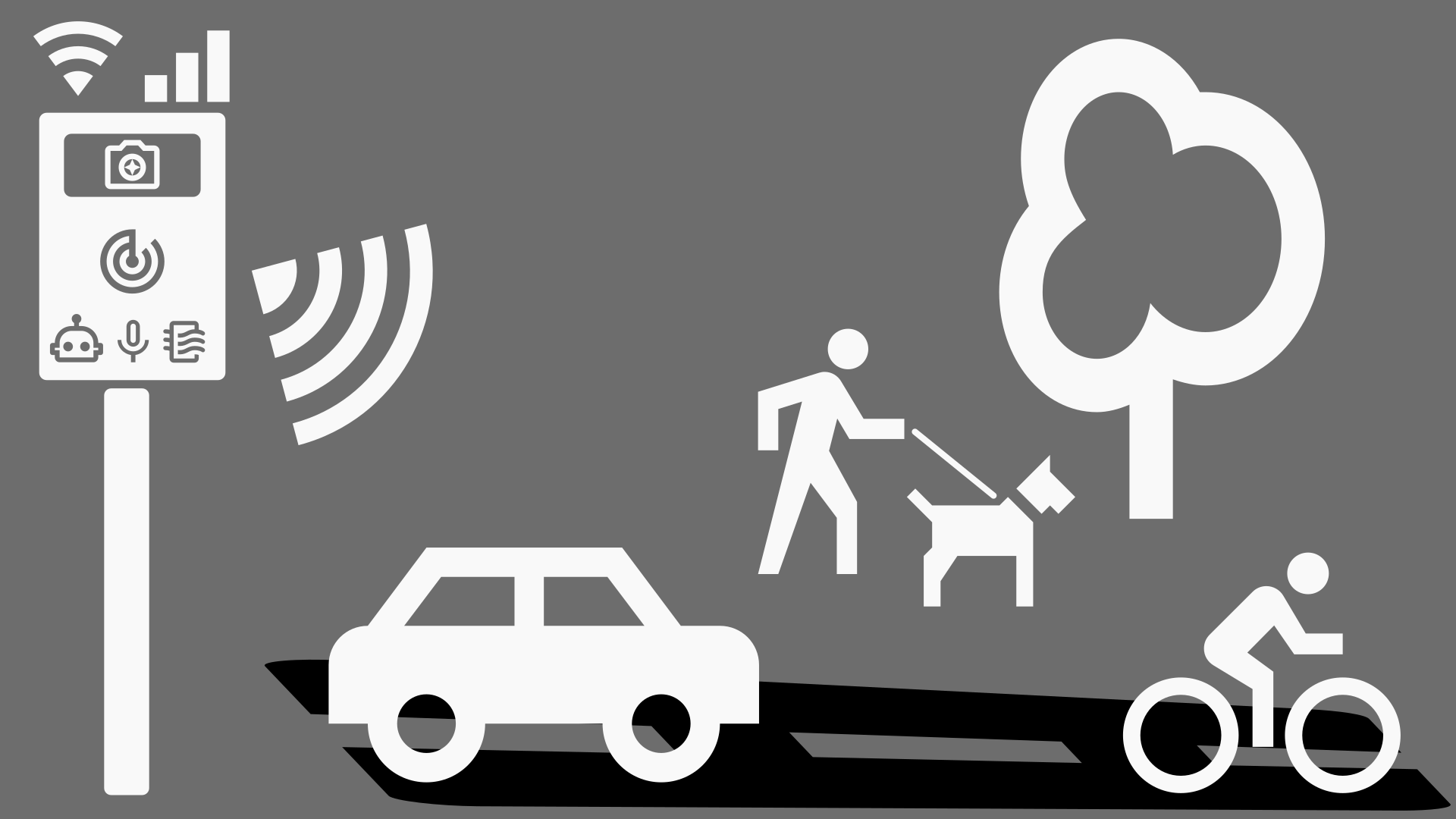
Highlights and capabilities
- 🧮 Reporting roadway utilization - counting cars 🚗, bicycles 🚲, pedestrians 🚶, and more! 🐕🐈🏍️🚜
- 🚨 Capturing roadway users' speeds - measuring speeds, capturing image and video of event.
- 📷 Privacy-focused, local inferencing (no cloud required) only collects and sends data you specify.
- 🐘 Permanent, long-term deployment on roadways to monitor roadway usage.
- 🐜 Temporary, remote deployments utilizing the low-power footprint and batteries.
- 💡 Extensible with any Raspberry Pi-compatible senosrs and components; e.g. Air Quality sensor for analog gas: RED, OX, NH3, noise, light, proximity, temperature, pressure, humidty and Particulate Matter (PM 5, 2.5, 1).
Documentation 📚
Visit our official documentation at docs.trafficmonitor.ai for an introduction, recommended hardware, deployment and mounting guide, setup guide, configuration, data payloads, and more.
Build your own device (DIY) 🧑🔬
Getting Started
See the Getting Started docs for full walkthrough.
Hardware Components
The Traffic Monitor is designed on the Raspberry Pi 5 and a variety of commidity hardware to keep it accessible, low-cost, upgradable, and repairable. See Recommended Hardware docs for more information.
Software Installation
- Install Raspberry Pi OS 64-bit Lite with RPi Imager
- Connect to your device via SSH and Install the TM Software.
sudo apt update && sudo apt install -y gitgit clone https://github.com/glossyio/traffic-monitorbash traffic-monitor/script/tmsetup.sh
- Deploy and mount your TM
- Set up zones, location, and enable sensors
- Start capturing roadway usage data!
Configuration ✅
See Setup Guide.
User Interfaces (UI) / port numbers references 🖥️
http://<device_ip_address>:1880/uiis the Node-RED dashboard and your primary device dashboard, use it to ensure it is capturing events, see the latest events, and see summarized stats.http://<device_ip_address>:5000to view the Frigate interface and make any configuration changes specific to your deploymenthttp://<device_ip_address>:1984shows the go2rtc configured camera settings on the Raspberri Pi. Use this if your cameras are giving errors in Frigate.http://<device_ip_address>:1880is the Node-RED flow editor used to develop the logic to connect events to speeds, create event records, capture radar readings, and more. This is primarily used by developers. The default admin login is admin/password.
Troubleshooting ⚠️
No events are being captured? Review the Setup Guide to ensure the zones are properly set up and the camera is enabled and detecting:
- In Frigate > Settings> Configuration Editor:
- Enable camera(s) (
cameras-->enabled: true) - Enable detection (
detect-->enabled: true)
- Enable camera(s) (
- In Node-RED:
- Enable camera(s) (
sensors-->cameras-->your_cam_name-->enabled: true)
- Enable camera(s) (
If you are having detection issues, review the Frigate Camera Setup documentation.
Screenshots
Device dashboard available at http://<device_ip_address>:1880/ui.
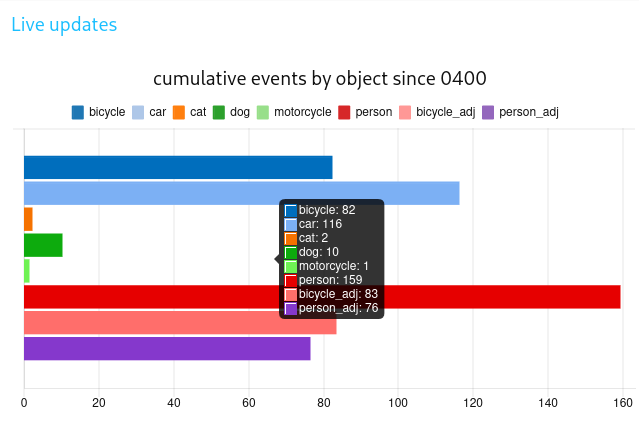
Cumulative events by object for the day (resets daily).
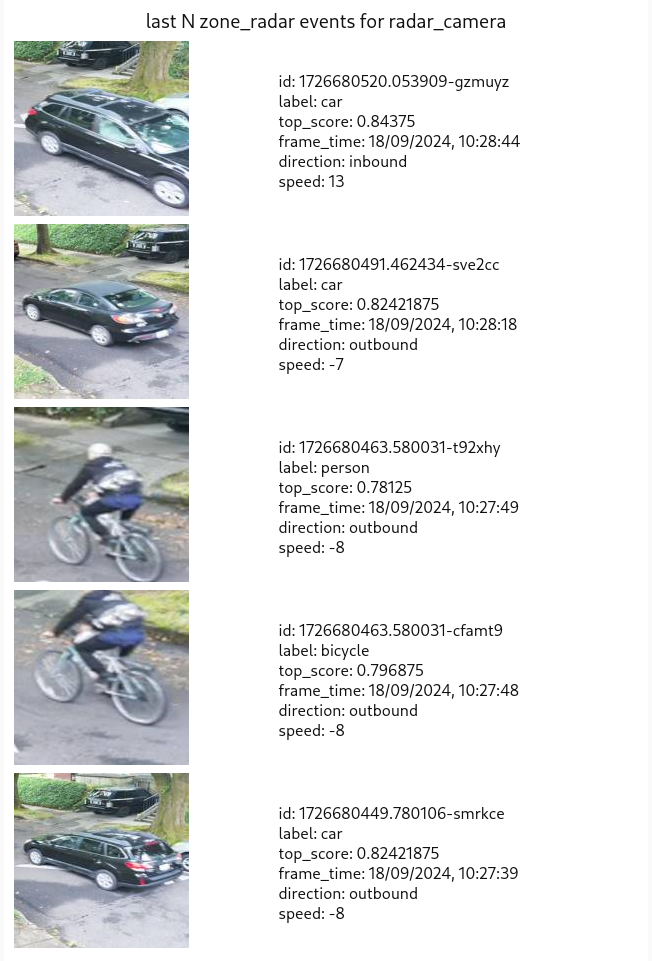
Last 5 events detected and confirmed by radar.
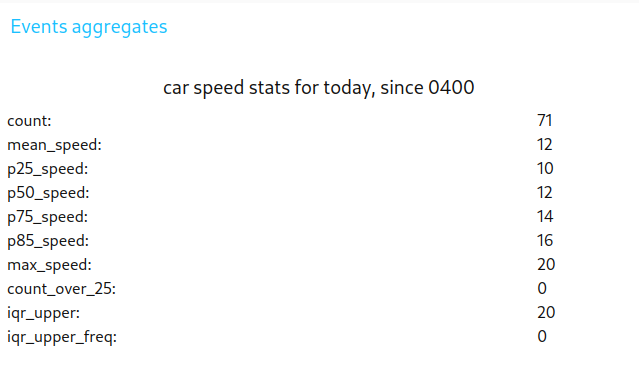
Car object speed statistics for the day (resets daily).
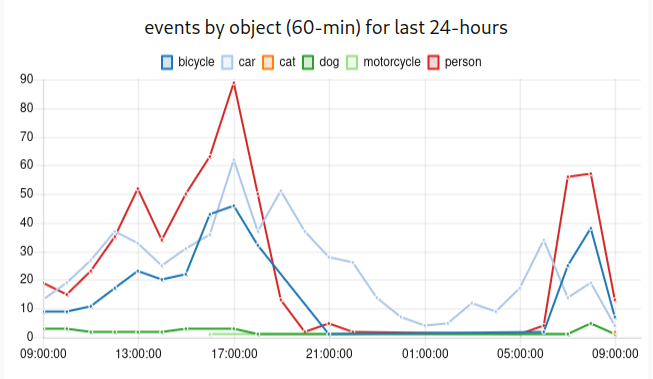
Hourly events count by object for the last 24-hours.
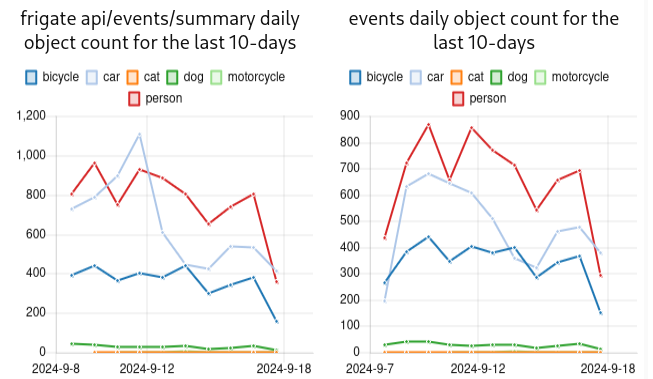
Daily events count by object for the last 10-days.
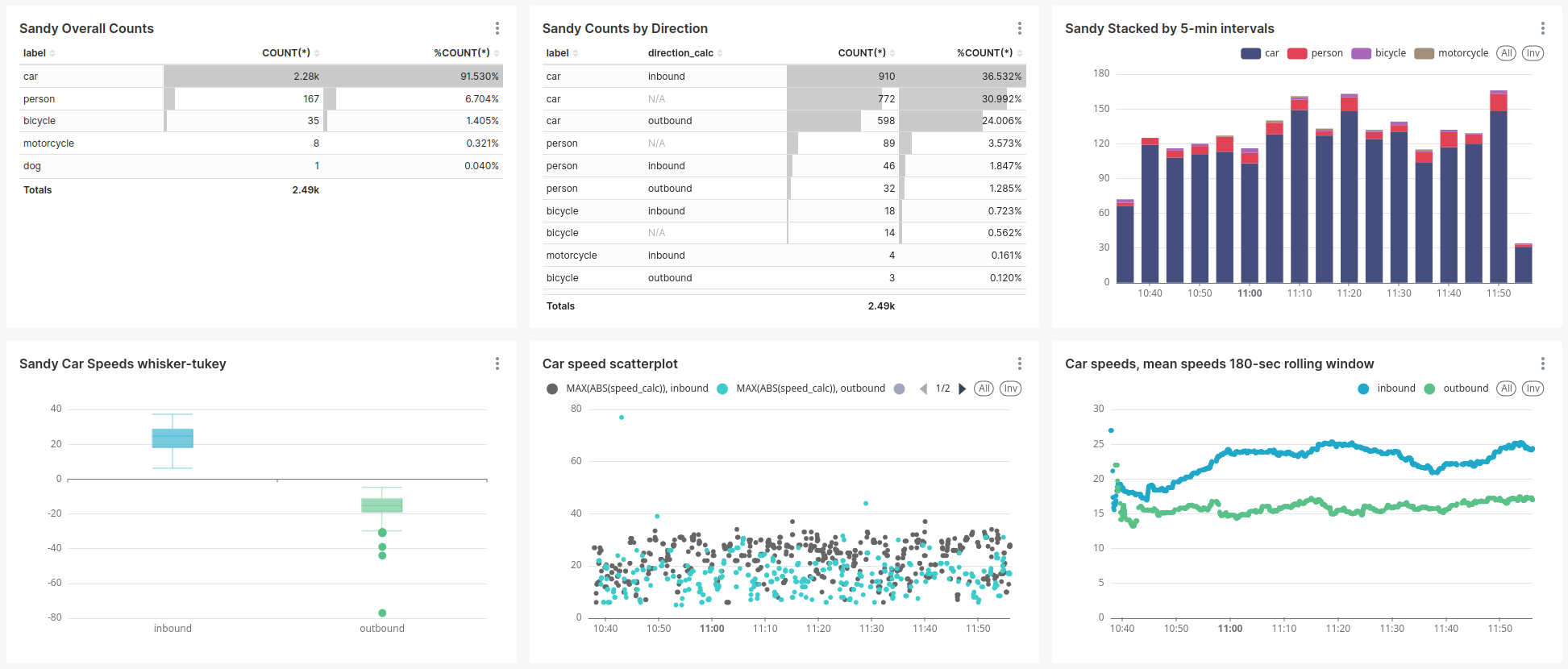
Dashboard sample, using the granular backend data
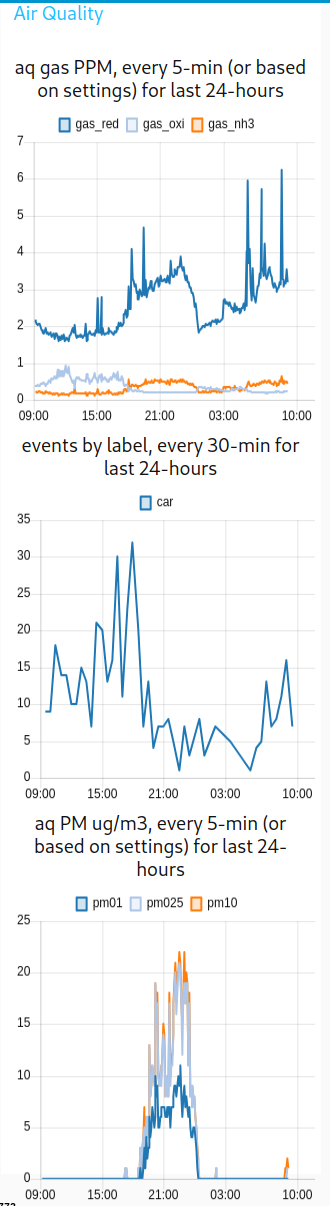
Air Quality sample
Contributors


Similar repos


Languages
Shell
45.5%
Jinja
24.8%
Python
23.9%
JavaScript
4.0%
Dockerfile
1.8%
Traffic Monitor built with edge ML for object detection and radar for speed monitoring
See the codeREADME
Traffic Monitor
TrafficMonitor.ai, the Traffic Monitor, is an open source smart city traffic monitoring software built with commodity hardware to capture holistic roadway usage. Utilizing edge machine learning object detection and Doppler radar, it counts pedestrians, bicycles, and cars and measures vehicle speeds.
Highlights and capabilities
- 🧮 Reporting roadway utilization - counting cars 🚗, bicycles 🚲, pedestrians 🚶, and more! 🐕🐈🏍️🚜
- 🚨 Capturing roadway users' speeds - measuring speeds, capturing image and video of event.
- 📷 Privacy-focused, local inferencing (no cloud required) only collects and sends data you specify.
- 🐘 Permanent, long-term deployment on roadways to monitor roadway usage.
- 🐜 Temporary, remote deployments utilizing the low-power footprint and batteries.
- 💡 Extensible with any Raspberry Pi-compatible senosrs and components; e.g. Air Quality sensor for analog gas: RED, OX, NH3, noise, light, proximity, temperature, pressure, humidty and Particulate Matter (PM 5, 2.5, 1).
Documentation 📚
Visit our official documentation at docs.trafficmonitor.ai for an introduction, recommended hardware, deployment and mounting guide, setup guide, configuration, data payloads, and more.
Build your own device (DIY) 🧑🔬
Getting Started
See the Getting Started docs for full walkthrough.
Hardware Components
The Traffic Monitor is designed on the Raspberry Pi 5 and a variety of commidity hardware to keep it accessible, low-cost, upgradable, and repairable. See Recommended Hardware docs for more information.
Software Installation
- Install Raspberry Pi OS 64-bit Lite with RPi Imager
- Connect to your device via SSH and Install the TM Software.
sudo apt update && sudo apt install -y gitgit clone https://github.com/glossyio/traffic-monitorbash traffic-monitor/script/tmsetup.sh
- Deploy and mount your TM
- Set up zones, location, and enable sensors
- Start capturing roadway usage data!
Configuration ✅
See Setup Guide.
User Interfaces (UI) / port numbers references 🖥️
http://<device_ip_address>:1880/uiis the Node-RED dashboard and your primary device dashboard, use it to ensure it is capturing events, see the latest events, and see summarized stats.http://<device_ip_address>:5000to view the Frigate interface and make any configuration changes specific to your deploymenthttp://<device_ip_address>:1984shows the go2rtc configured camera settings on the Raspberri Pi. Use this if your cameras are giving errors in Frigate.http://<device_ip_address>:1880is the Node-RED flow editor used to develop the logic to connect events to speeds, create event records, capture radar readings, and more. This is primarily used by developers. The default admin login is admin/password.
Troubleshooting ⚠️
No events are being captured? Review the Setup Guide to ensure the zones are properly set up and the camera is enabled and detecting:
- In Frigate > Settings> Configuration Editor:
- Enable camera(s) (
cameras-->enabled: true) - Enable detection (
detect-->enabled: true)
- Enable camera(s) (
- In Node-RED:
- Enable camera(s) (
sensors-->cameras-->your_cam_name-->enabled: true)
- Enable camera(s) (
If you are having detection issues, review the Frigate Camera Setup documentation.
Screenshots
Device dashboard available at http://<device_ip_address>:1880/ui.
Cumulative events by object for the day (resets daily).
Last 5 events detected and confirmed by radar.
Car object speed statistics for the day (resets daily).
Hourly events count by object for the last 24-hours.
Daily events count by object for the last 10-days.
Dashboard sample, using the granular backend data
Air Quality sample
Similar repos
Contributors
Languages
Shell
45.5%
Jinja
24.8%
Python
23.9%
JavaScript
4.0%
Dockerfile
1.8%