Reconstruct drone flight trajectories from video using VGGT: windowed inference, dense-point welding, GPS georeferencing, interactive 3D viewer
HTML
0
5 commits
updated Jul 29, 2026
Cloning this repo? The example video and point cloud are stored with Git LFS. Install it first (
git lfs install), then clone as usual — otherwiseexample/vid13.mp4andexample/pointcloud.plyarrive as tiny pointer files. Cloning code-only:GIT_LFS_SKIP_SMUDGE=1 git clone ...
Reconstructs the full 3D camera trajectory (and a coloured point cloud) of a drone
flight from nothing but its video, using Meta's VGGT
feed-forward 3D model. If you also have a GPS log (DJI .srt, .gpx, or a CSV),
the trajectory is georeferenced to UTM metres and lat/lon.
One command, one output folder:
python vggt_trajectory.py flight.mp4 -o out_flight --gps flight.srt
Accuracy note — read before relying on the output. This produces a rough initial estimate of the flight path: metres-level error under good conditions (≈4 m median on our validation flight), but up to >100 m on degraded sections (sky-dominated views, hovers) — usually, but not always, flagged as
suspect/low. That is useful for flight-path review, context maps, and as a starting point for refinement — it is not accurate enough for production, survey, or measurement use. When you need an accurate trajectory, use a photogrammetry suite such as RealityScan or Pix4D with ground control points (GCPs) — considerably more manual work, but survey-grade results. A cheaper middle step is bundle adjustment (see Failure modes below).
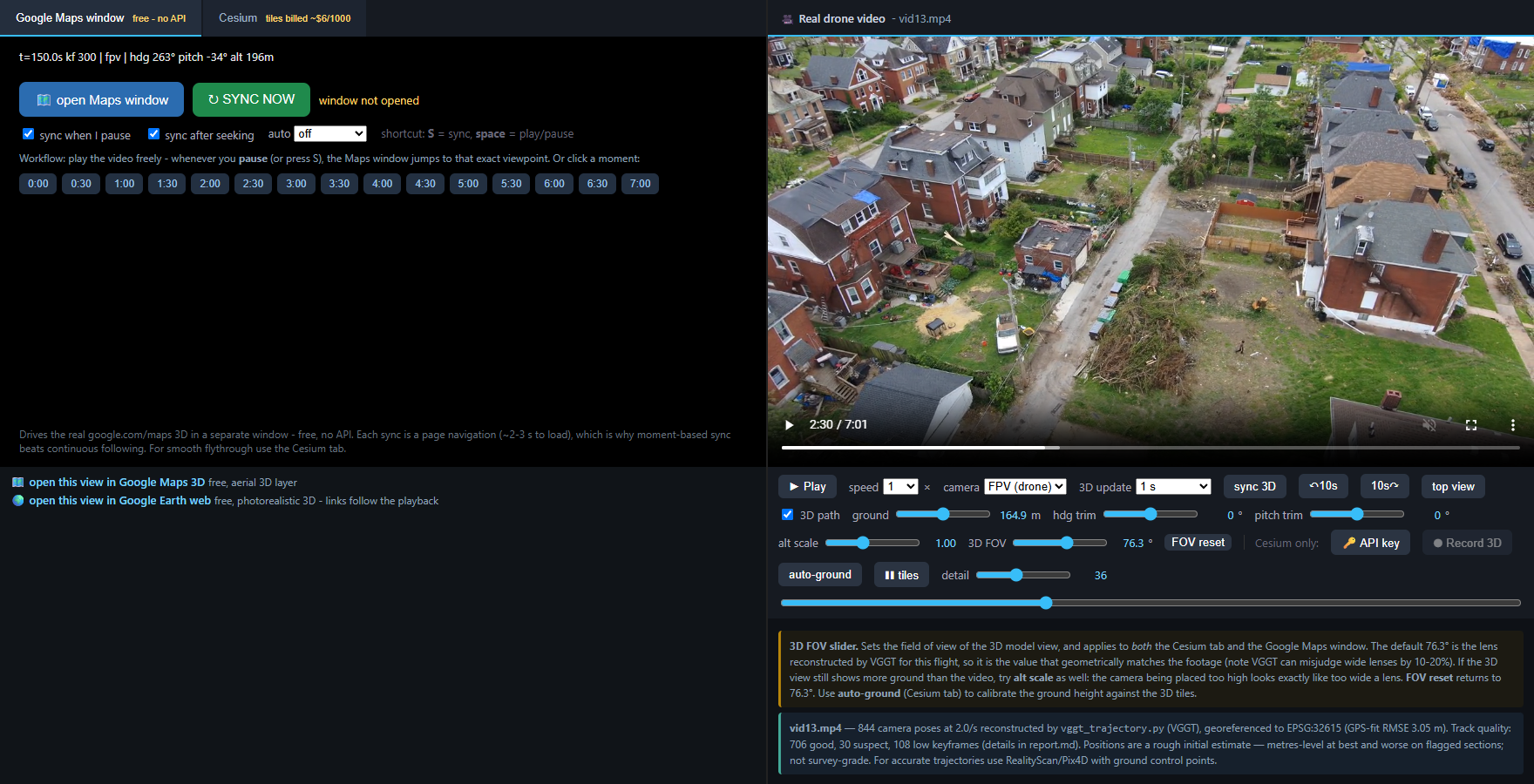
viewer.html: the flight video and the 3D replay in equal side-by-side
viewports. The free Google-Maps-window tab re-points a real google.com/maps 3D
window at the drone's viewpoint whenever you pause; the Cesium tab (your own
API key) gives smooth FPV/chase/orbit flythrough over photorealistic 3D tiles,
with the reconstructed lens FOV, ground auto-calibration, and .webm recording.
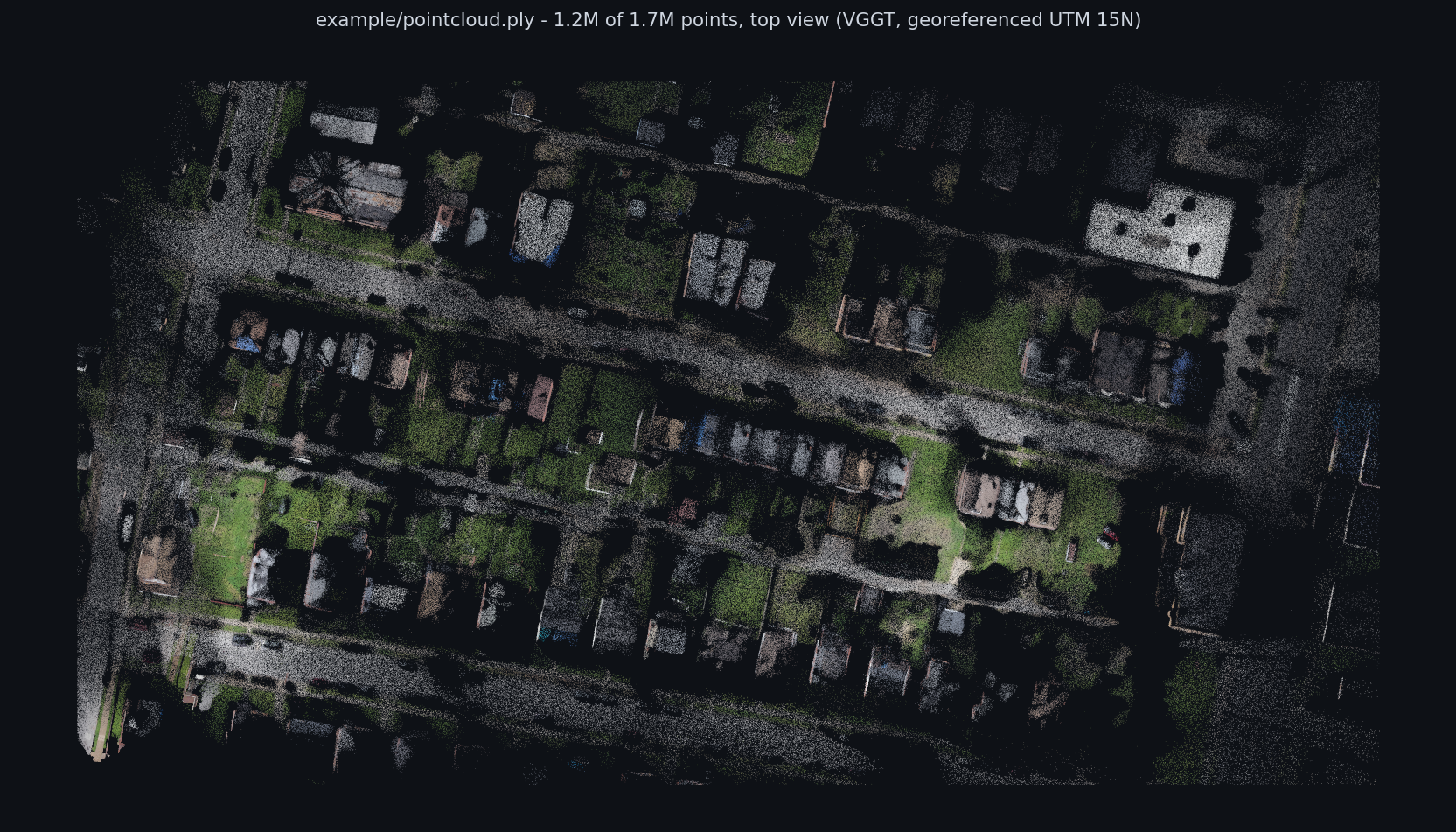
pointcloud.ply from the example flight — 1.2M of 1.7M points, top view.
VGGT can only look at ~30–60 frames at once, so a flight is processed as overlapping windows of keyframes:
# 1. a fresh environment (conda or venv), python >= 3.10
conda create -n vggt python=3.11 -y && conda activate vggt

# 2. pytorch with CUDA — pick your CUDA version at https://pytorch.org
pip install torch torchvision --index-url https://download.pytorch.org/whl/cu124

# 3. everything else
pip install -r requirements.txt
The VGGT-1B weights (~5 GB) download automatically from Hugging Face on first
run. If you cloned the VGGT repo instead of pip-installing it, point the script
at it with --vggt-repo /path/to/vggt.
Hardware: an NVIDIA GPU with ≥ 10 GB VRAM runs the defaults (windows of 38
keyframes ≈ 9.6 GB). With less VRAM, lower --window (e.g. 24 on 8 GB, with
--overlap 6). CPU works but takes minutes per window.
# minimal — relative trajectory in arbitrary units, levelled, z-up
python vggt_trajectory.py flight.mp4 -o out

# with a DJI subtitle GPS log -> UTM metres + lat/lon + KML/GeoJSON
python vggt_trajectory.py flight.mp4 -o out --gps flight.srt

# GPS in a CSV (columns: time_s or timestamp, lat, lon, optionally alt_m)
python vggt_trajectory.py flight.mp4 -o out --gps track.csv

# only part of the flight, denser sampling, smaller GPU
python vggt_trajectory.py flight.mp4 -o out --start 60 --end 180 --fps 4 --window 24 --overlap 6

# a directory of already-extracted, ordered frames (tell it the capture rate)
python vggt_trajectory.py frames_dir/ -o out --fps 2
Re-running the same command resumes: finished VGGT windows are cached in
out/windows/ and everything downstream is recomputed in seconds. So you can
kill it, add --gps later, or tweak export flags without re-running the GPU part.
(Changing --fps/--window/--model/--preprocess invalidates the cache — the
tool notices and tells you to use --force or a fresh --out.)
GPS time base: a numeric time_s column in a CSV is taken as seconds on the
video clock (0 = video start). ISO timestamps (CSV/GPX) and SRT timecodes are
rebased to the start of the track. If the log starts before the video (common:
logging begins at power-on/takeoff), shift with --gps-offset. DJI SRT altitude:
abs_alt is used as absolute; if only rel_alt/barometer heights exist, outputs
are flagged as height-above-takeoff and the KML switches to relativeToGround
so the track doesn't render underground.
| flag | default | when to change |
|---|---|---|
--fps | 2 | fast/low flights: raise to 3–4; slow high mapping flights: 1 is fine |
--window | 38 | lower it if you run out of VRAM; raise on a 24 GB+ GPU |
--overlap | 8 | more overlap = stronger welds, more compute |
--gps-offset | 0 | seconds the GPS log starts before the video (e.g. log begins at takeoff, recording starts 5 s later → --gps-offset 5) |
--scale | 1 | metres per unit if you know it (no GPS); e.g. from a known altitude |
--preprocess | crop | use pad for portrait video |
--min-conf / --max-points | 1.5 / 2M | point-cloud density/quality trade-off |
--force | — | re-extract and re-infer from scratch |
| file | contents |
|---|---|
trajectory.csv | one row per keyframe: time, position (UTM + lat/lon with GPS, else levelled x/y/z), heading/pitch/roll, quality flag. Without GPS the yaw column is named yaw_deg — its zero-azimuth is arbitrary (no compass); pitch/roll are still physical |
trajectory_tum.txt | poses in TUM format — evaluate against ground truth with evo |
cameras.npz | full camera-to-world rotations, positions, per-frame focals |
trajectory.geojson, .kml | (with --gps) drop into QGIS / Google Earth |
viewer.html + view.bat/view.sh | (with --gps) interactive replay: video + equal 3D viewport, free Google-Maps-window sync tab, Cesium 3D-tiles tab (your API key) |
pointcloud.ply | coloured, confidence-tagged scene points — CloudCompare / MeshLab |
overview.png | top view + vertical profile, quality issues highlighted |
report.md | per-window and per-weld quality tables, warnings, caveats |
windows/*.npz | raw VGGT output per window (the resume cache) |
Read report.md first. Every window gets a verdict (good / weak / unusable)
and every weld a residual; keyframes whose connection to the start is weak are
flagged suspect or low in trajectory.csv (track_quality column).
example/ holds the complete output of this tool for a real 422 s
urban flight (13.MP4, Skydio 2+, included as vid13.mp4), produced by:
python vggt_trajectory.py vid13.mp4 -o example --gps gps13.csv
Start with the interactive viewer example/viewer.html — double-click it,
or launch via view.bat (Windows) / ./view.sh (Mac/Linux). It pairs the
flight video with an equal-size 3D viewport, in the style of the original
drone13 analysis app: a Google Maps window tab (free, no API key — pause
the video, or press S, and a real google.com/maps 3D window jumps to the
drone's exact viewpoint) and a Cesium tab (continuous FPV / chase / orbit
flythrough over Google's photorealistic 3D tiles — needs your own Maps API
key and bills per tile). Controls cover the reconstructed-lens FOV, ground
height with auto-calibration, heading/pitch trims, playback-synced deep links
to Google Earth, and recording the 3D pane to .webm. One caveat: the Cesium
tab only renders when the page is served over http — that is exactly what
view.bat does; the Maps tab and the video work straight from disk. Then look at example/report.md for what the
quality tables look like in practice: this flight deliberately includes a hard
tail (near-horizon sky shots after t≈345 s) that the tool flags as unusable
rather than silently reconstructing. trajectory.csv/.kml/.geojson,
pointcloud.ply (1.7M points, open in CloudCompare) and overview.png are the
same run's other outputs. drone13_3d_reconstruction.html is the original
hand-tuned viewer for this flight (same app; its FOV and ground height were
calibrated by hand, so it is worth comparing against the generated defaults).
Two honest footnotes: the Skydio wrote no GPS track into this video, so
--gps was fed a track derived from a prior georeferencing of this same flight
against building footprints (accurate to several metres, like the results); and
on the good-flagged keyframes this run agrees with that independent prior
reconstruction to ~4 m median.
Only the Cesium tab needs a Google Maps API key (with the Map Tiles API
enabled): paste it into the panel that tab shows (it stays in your browser), or
copy key.js.example to key.js and put the key there — never share a
key.js containing a real key. The Google-Maps-window tab, the Earth/Maps deep
links, and the video need no key at all.
unusable and their keyframes
low. That footage is unreconstructable, not mis-reconstructed.suspect weld.demo_colmap.py --use_ba → COLMAP/pycolmap);
(2) a photogrammetry suite — RealityScan or Pix4D — with ground
control points (GCPs), which is the standard route to survey-grade
trajectories and maps, at the cost of manual GCP placement and processing
time.This script is MIT. VGGT's code is under Meta's VGGT License — commercial
use permitted since July 2025 (military applications excluded) — but the default
facebook/VGGT-1B checkpoint remains research-only. For commercial work,
request access to the gated
facebook/VGGT-1B-Commercial
checkpoint and pass --model facebook/VGGT-1B-Commercial.
If this ends up in a paper, cite VGGT:
Wang et al., VGGT: Visual Geometry Grounded Transformer, CVPR 2025.
Reconstruct drone flight trajectories from video using VGGT: windowed inference, dense-point welding, GPS georeferencing, interactive 3D viewer
HTML
0
5 commits
updated Jul 29, 2026
Cloning this repo? The example video and point cloud are stored with Git LFS. Install it first (
git lfs install), then clone as usual — otherwiseexample/vid13.mp4andexample/pointcloud.plyarrive as tiny pointer files. Cloning code-only:GIT_LFS_SKIP_SMUDGE=1 git clone ...
Reconstructs the full 3D camera trajectory (and a coloured point cloud) of a drone
flight from nothing but its video, using Meta's VGGT
feed-forward 3D model. If you also have a GPS log (DJI .srt, .gpx, or a CSV),
the trajectory is georeferenced to UTM metres and lat/lon.
One command, one output folder:
python vggt_trajectory.py flight.mp4 -o out_flight --gps flight.srt
Accuracy note — read before relying on the output. This produces a rough initial estimate of the flight path: metres-level error under good conditions (≈4 m median on our validation flight), but up to >100 m on degraded sections (sky-dominated views, hovers) — usually, but not always, flagged as
suspect/low. That is useful for flight-path review, context maps, and as a starting point for refinement — it is not accurate enough for production, survey, or measurement use. When you need an accurate trajectory, use a photogrammetry suite such as RealityScan or Pix4D with ground control points (GCPs) — considerably more manual work, but survey-grade results. A cheaper middle step is bundle adjustment (see Failure modes below).
viewer.html: the flight video and the 3D replay in equal side-by-side
viewports. The free Google-Maps-window tab re-points a real google.com/maps 3D
window at the drone's viewpoint whenever you pause; the Cesium tab (your own
API key) gives smooth FPV/chase/orbit flythrough over photorealistic 3D tiles,
with the reconstructed lens FOV, ground auto-calibration, and .webm recording.
pointcloud.ply from the example flight — 1.2M of 1.7M points, top view.
VGGT can only look at ~30–60 frames at once, so a flight is processed as overlapping windows of keyframes:
# 1. a fresh environment (conda or venv), python >= 3.10
conda create -n vggt python=3.11 -y && conda activate vggt

# 2. pytorch with CUDA — pick your CUDA version at https://pytorch.org
pip install torch torchvision --index-url https://download.pytorch.org/whl/cu124

# 3. everything else
pip install -r requirements.txt
The VGGT-1B weights (~5 GB) download automatically from Hugging Face on first
run. If you cloned the VGGT repo instead of pip-installing it, point the script
at it with --vggt-repo /path/to/vggt.
Hardware: an NVIDIA GPU with ≥ 10 GB VRAM runs the defaults (windows of 38
keyframes ≈ 9.6 GB). With less VRAM, lower --window (e.g. 24 on 8 GB, with
--overlap 6). CPU works but takes minutes per window.
# minimal — relative trajectory in arbitrary units, levelled, z-up
python vggt_trajectory.py flight.mp4 -o out

# with a DJI subtitle GPS log -> UTM metres + lat/lon + KML/GeoJSON
python vggt_trajectory.py flight.mp4 -o out --gps flight.srt

# GPS in a CSV (columns: time_s or timestamp, lat, lon, optionally alt_m)
python vggt_trajectory.py flight.mp4 -o out --gps track.csv

# only part of the flight, denser sampling, smaller GPU
python vggt_trajectory.py flight.mp4 -o out --start 60 --end 180 --fps 4 --window 24 --overlap 6

# a directory of already-extracted, ordered frames (tell it the capture rate)
python vggt_trajectory.py frames_dir/ -o out --fps 2
Re-running the same command resumes: finished VGGT windows are cached in
out/windows/ and everything downstream is recomputed in seconds. So you can
kill it, add --gps later, or tweak export flags without re-running the GPU part.
(Changing --fps/--window/--model/--preprocess invalidates the cache — the
tool notices and tells you to use --force or a fresh --out.)
GPS time base: a numeric time_s column in a CSV is taken as seconds on the
video clock (0 = video start). ISO timestamps (CSV/GPX) and SRT timecodes are
rebased to the start of the track. If the log starts before the video (common:
logging begins at power-on/takeoff), shift with --gps-offset. DJI SRT altitude:
abs_alt is used as absolute; if only rel_alt/barometer heights exist, outputs
are flagged as height-above-takeoff and the KML switches to relativeToGround
so the track doesn't render underground.
| flag | default | when to change |
|---|---|---|
--fps | 2 | fast/low flights: raise to 3–4; slow high mapping flights: 1 is fine |
--window | 38 | lower it if you run out of VRAM; raise on a 24 GB+ GPU |
--overlap | 8 | more overlap = stronger welds, more compute |
--gps-offset | 0 | seconds the GPS log starts before the video (e.g. log begins at takeoff, recording starts 5 s later → --gps-offset 5) |
--scale | 1 | metres per unit if you know it (no GPS); e.g. from a known altitude |
--preprocess | crop | use pad for portrait video |
--min-conf / --max-points | 1.5 / 2M | point-cloud density/quality trade-off |
--force | — | re-extract and re-infer from scratch |
| file | contents |
|---|---|
trajectory.csv | one row per keyframe: time, position (UTM + lat/lon with GPS, else levelled x/y/z), heading/pitch/roll, quality flag. Without GPS the yaw column is named yaw_deg — its zero-azimuth is arbitrary (no compass); pitch/roll are still physical |
trajectory_tum.txt | poses in TUM format — evaluate against ground truth with evo |
cameras.npz | full camera-to-world rotations, positions, per-frame focals |
trajectory.geojson, .kml | (with --gps) drop into QGIS / Google Earth |
viewer.html + view.bat/view.sh | (with --gps) interactive replay: video + equal 3D viewport, free Google-Maps-window sync tab, Cesium 3D-tiles tab (your API key) |
pointcloud.ply | coloured, confidence-tagged scene points — CloudCompare / MeshLab |
overview.png | top view + vertical profile, quality issues highlighted |
report.md | per-window and per-weld quality tables, warnings, caveats |
windows/*.npz | raw VGGT output per window (the resume cache) |
Read report.md first. Every window gets a verdict (good / weak / unusable)
and every weld a residual; keyframes whose connection to the start is weak are
flagged suspect or low in trajectory.csv (track_quality column).
example/ holds the complete output of this tool for a real 422 s
urban flight (13.MP4, Skydio 2+, included as vid13.mp4), produced by:
python vggt_trajectory.py vid13.mp4 -o example --gps gps13.csv
Start with the interactive viewer example/viewer.html — double-click it,
or launch via view.bat (Windows) / ./view.sh (Mac/Linux). It pairs the
flight video with an equal-size 3D viewport, in the style of the original
drone13 analysis app: a Google Maps window tab (free, no API key — pause
the video, or press S, and a real google.com/maps 3D window jumps to the
drone's exact viewpoint) and a Cesium tab (continuous FPV / chase / orbit
flythrough over Google's photorealistic 3D tiles — needs your own Maps API
key and bills per tile). Controls cover the reconstructed-lens FOV, ground
height with auto-calibration, heading/pitch trims, playback-synced deep links
to Google Earth, and recording the 3D pane to .webm. One caveat: the Cesium
tab only renders when the page is served over http — that is exactly what
view.bat does; the Maps tab and the video work straight from disk. Then look at example/report.md for what the
quality tables look like in practice: this flight deliberately includes a hard
tail (near-horizon sky shots after t≈345 s) that the tool flags as unusable
rather than silently reconstructing. trajectory.csv/.kml/.geojson,
pointcloud.ply (1.7M points, open in CloudCompare) and overview.png are the
same run's other outputs. drone13_3d_reconstruction.html is the original
hand-tuned viewer for this flight (same app; its FOV and ground height were
calibrated by hand, so it is worth comparing against the generated defaults).
Two honest footnotes: the Skydio wrote no GPS track into this video, so
--gps was fed a track derived from a prior georeferencing of this same flight
against building footprints (accurate to several metres, like the results); and
on the good-flagged keyframes this run agrees with that independent prior
reconstruction to ~4 m median.
Only the Cesium tab needs a Google Maps API key (with the Map Tiles API
enabled): paste it into the panel that tab shows (it stays in your browser), or
copy key.js.example to key.js and put the key there — never share a
key.js containing a real key. The Google-Maps-window tab, the Earth/Maps deep
links, and the video need no key at all.
unusable and their keyframes
low. That footage is unreconstructable, not mis-reconstructed.suspect weld.demo_colmap.py --use_ba → COLMAP/pycolmap);
(2) a photogrammetry suite — RealityScan or Pix4D — with ground
control points (GCPs), which is the standard route to survey-grade
trajectories and maps, at the cost of manual GCP placement and processing
time.This script is MIT. VGGT's code is under Meta's VGGT License — commercial
use permitted since July 2025 (military applications excluded) — but the default
facebook/VGGT-1B checkpoint remains research-only. For commercial work,
request access to the gated
facebook/VGGT-1B-Commercial
checkpoint and pass --model facebook/VGGT-1B-Commercial.
If this ends up in a paper, cite VGGT:
Wang et al., VGGT: Visual Geometry Grounded Transformer, CVPR 2025.



