
Confluence Cloud to Markdown crawler with incremental updates and local link rewriting
Go
32
92 commits
updated Sep 20, 2026
See what people are saying (1)
README
confluence2md - Confluence to Markdown crawler and converter


Turn your Confluence space into Markdown files on your hard drive and use that local copy to:
- build a second brain
- feed AI/RAG pipelines
- version docs in Git
- browse offline in your preferred Markdown editor
- power local full-text search across docs
- support onboarding with a portable docs snapshot
- preserve runbooks for incident response and disaster recovery
- export knowledge for compliance and audit evidence trails
- reduce vendor lock-in by keeping docs in an open format.
What you get:
- One local
.mdfile per crawled page, with stable filenames that include page IDs. - Deterministic YAML front matter on each page with source/provenance fields and
is_seed. - Links between crawled pages rewritten to relative local links.
- External or out-of-scope links preserved as original URLs.
- Page comments appended under a
## Commentssection. - A human-friendly
index.mdstart page with crawl summary and seed links. - A
metadata.jsonindex with page metadata plus incoming/outgoing link graph data.
Part of the confluence2md Platform
confluence2md is the first step in a three-tool local Confluence knowledge pipeline. Pair it with confluence2md-indexer to build a searchable SQLite index, and confluence2md-mcp to query it from any AI client. See docs/platform.md for the full architecture.
What It Does
- Starts from configured seed pages and traverses linked Confluence pages up to a configurable depth.
- Converts each page from Confluence storage format to Markdown and writes it to the local filesystem.
- Runs a second pass to rewrite links between crawled pages as relative local links.
- Leaves all other URLs unchanged — including links to uncrawled Confluence pages and external sites.
- Downloads page attachments and rewrites attachment references to point to the downloaded files.
- Appends page comments under a
## Commentssection in each page file. - Writes a single
metadata.jsonwith crawl metadata and a bidirectional link graph. - Persists configured seed page IDs at metadata root (
seed_page_ids) for stable seed semantics. - Supports two run modes:
- full: crawl all pages reachable from seeds up to max depth.
- updates: run the same seed-based traversal as full mode, but selectively re-process dirty pages while reusing clean-page artifacts.
- Supports a dry-run modifier (
--dry-run) for both modes to preview traversal and updates decisions without writing output artifacts.
In both full and updates modes, pages that Confluence reports as trashed or no longer found are treated as deleted rather than failed fetches. Their metadata and managed local artifacts are removed, and references to their page IDs are pruned from the stored crawl graph. A detected deletion does not count as a page error or block successful checkpoint advancement.
Download
Pre-built binaries are available on the Releases page.
- Download the archive for your platform.
- Extract the binary (
confluence2mdorconfluence2md.exe). - Run it from the directory containing your
config.yaml.
How To Use
Requirements
- Confluence Cloud only. This tool uses the Atlassian Document Format (ADF) API, which is exclusive to Confluence Cloud. Confluence Data Center and Server are not supported.
- A valid Atlassian API token with read access to the target spaces — either a classic (unrestricted) token or a scoped (least-privilege) token, see Credential styles below.
You can generate an Atlassian API token from your Atlassian account security page:
If you run into authentication issues, see Operations and Troubleshooting.
Credential styles
Atlassian issues two styles of API token, and this tool supports both:
- Classic (unrestricted) tokens inherit every permission the issuing account has. They are sent to your site's own domain (
https://your-org.atlassian.net). This is the tool's original, default behaviour. - Scoped (least-privilege) tokens are restricted to a set of scopes you pick when creating the token. Atlassian serves them from a separate gateway host (
https://api.atlassian.com/ex/confluence/<cloud-id>), not your site's own domain — a scoped token will not work if sent to your site's domain, and vice versa.
confluence.auth_mode in config.yaml controls which style is used:
| Value | Behaviour |
|---|---|
auto (default) | Detect automatically: try your site's domain first; on an authorization failure, resolve your site's cloud ID and retry against the gateway. An existing config.yaml with no auth_mode set behaves exactly as before — a classic token works with no changes. |
classic | Always use your site's own domain. |
scoped | Always use the Atlassian gateway. Requires resolving your site's cloud ID — done automatically from your seed URLs unless you set confluence.cloud_id yourself. |
The resolved style is reported in the summary line printed by confluence2md validate and by every crawl.
Both styles use the same confluence.username / confluence.token fields (and the same CONFLUENCE_USERNAME / CONFLUENCE_TOKEN environment variables) — only the routing differs, not how credentials are supplied. confluence.cloud_id is only ever used in scoped mode.
Scoped tokens expire. Atlassian requires you to set an expiry between 1 and 365 days (default one year) when creating a scoped token; classic tokens have no such expiry. If you run this tool unattended or on a schedule, plan to renew a scoped token before it expires — an expired token is reported as a rejected credential (see Operations and Troubleshooting), and this tool has no way to see or renew the token's expiry on your behalf.
Required scopes
If you use a scoped token, grant exactly these scopes for a full-capability crawl:
| Capability | Scope(s) required | Optional? |
|---|---|---|
Page content, metadata, and child-page traversal (follow_children) | read:page:confluence | No — core |
| Link discovery (internal CQL search) | search:confluence | No — used to find linked pages |
| Attachments | read:attachment:confluence and readonly:content.attachment:confluence | Yes — only needed with attachments.download: true |
| Comments | read:comment:confluence | Yes — omit to crawl without comments |
| Author name resolution | read:confluence-user | Yes — omit and author account IDs are kept, display names are omitted |
Notes:
- No space-read scope is needed — the space key comes from your seed URLs, not from a space-listing call.
follow_childrenneeds no scope beyondread:page:confluence.- Attachments need both listed scopes: one for discovery, one for the download itself. Granting only one gives successful discovery and failing downloads.
Configuration
Copy config.example.yaml to config.yaml and fill in the required values.
confluence:
  # Your Atlassian account email
  # Can also be set via env var: CONFLUENCE_USERNAME (takes precedence over this value)
  username: you@example.com
  # Atlassian API token (https://id.atlassian.com/manage-profile/security/api-tokens)
  # Can also be set via env var: CONFLUENCE_TOKEN (takes precedence over this value)
  token: ""
  # Credential style: auto (default) | classic | scoped — see "Credential styles" above
  auth_mode: auto
  # Atlassian cloud ID, used only in scoped mode. Leave empty to auto-resolve.
  cloud_id: ""

crawl:
  # One or more seed page URLs or page IDs to start from
  seeds:
    - https://your-org.atlassian.net/wiki/spaces/SPACE/pages/123456/Page+Title
  # Maximum link-follow depth from each seed (0 = seed pages only)
  max_depth: 3
  # Maximum concurrent API requests
  concurrency: 5
  # Target HTTP requests per minute across all Confluence API calls
  # (transport-level limiter; Confluence Cloud is ~300/min per token)
  rate_limit_rpm: 250
  # Maximum buffered discovered pages waiting to be processed
  queue_size: 10000

output:
  # Directory to write Markdown files, attachments, and metadata
  dir: ./output

post_crawl_hook:
  # Optional fire-and-forget command run after successful non-dry-run completion.
  # Command is argv-style (no shell parsing).
  # command:
  #   - ./scripts/reindex.sh
  #   - --output
  #   - ./output
  command: []

attachments:
  # Download attachments referenced by crawled pages
  download: true
  # Skip attachments larger than this size (0 = no limit)
  max_size_mb: 100

retry:
  # Maximum number of attempts for transient errors: 429/5xx responses and
  # transient network failures (timeouts, connection resets, EOF). Permanent
  # failures (TLS verification, unknown host, malformed requests) are not retried.
  max_attempts: 5
  # Initial backoff in milliseconds (doubles with each retry + jitter)
  initial_backoff_ms: 1000
Multi-host crawls
crawl.seeds may list pages across multiple Confluence Cloud hosts (for
example company1.atlassian.net and company2.atlassian.net). Each host is
crawled independently, and cross-host links are followed and deduplicated as a
single graph — every page is fetched and rendered exactly once, regardless of
how many seeds or links reach it.
Pages are keyed by host/page-id everywhere — metadata keys, front matter IDs,
link IDs and seed IDs are all host-qualified, including for single-host crawls,
so a page never has two identities. Filenames embed that key with the / (and
any port :) encoded as _, so they stay flat:
{title-slug}_{host}_{page-id}.md and
attachments/{host}_{page-id}_{filename}. Pages from different tenants that
share a numeric page ID therefore never collide.
One credential (confluence.username / confluence.token / auth_mode) is
shared across every host, so the same account/token must have read access on
all of them. Per-host credentials are not supported yet.
Quickstart
Now run a full crawl:
confluence2md --mode full
Note: full mode clears the configured output directory before crawling.
To preview impact without writing files:
confluence2md --mode full --dry-run
Once it completes, start at output/index.md for crawl summary and seed entrypoints.
CLI Usage
# Full crawl (crawls all pages reachable from seeds up to max depth)
confluence2md --mode full

# Incremental update (same seed traversal, selective page re-processing)
confluence2md --mode updates

# Full dry-run (no writes: pages/attachments/metadata/index/checkpoints)
confluence2md --mode full --dry-run

# Updates dry-run (same traversal + dirty/clean decisions, no writes)
confluence2md --mode updates --dry-run

# Validate config and Confluence API credentials without crawling
confluence2md validate
The tool looks for config.yaml in the current directory by default. Use --config to specify a different path:
confluence2md --config /path/to/config.yaml --mode full
confluence2md --config /path/to/config.yaml validate
Post-crawl hook
You can configure an optional post-crawl hook command in config.yaml to trigger follow-up automation after a successful crawl.
The primary use case is running confluence2md-indexer so the local search index is refreshed immediately after crawling.
Behavior:
- Hook runs only after successful non-dry-run completion.
- Hook is fire-and-forget: crawler starts the process and does not wait for completion.
- If the hook process cannot be started, crawler logs a warning and still exits successfully.
Hook command is argv-style to avoid shell quoting ambiguity.
Example:
post_crawl_hook:
  command:
    - confluence2md-indexer
    - index
    - ./output
    - --db
    - ./output/confluence2md-index.db
After each run a summary is printed to stdout:
=== Crawl Complete ===
Mode: full
Total pages crawled: 13
Pages written successfully: 13
Pages with errors: 0
Pages detected as deleted: 0
Internal crawl links discovered (edge count): 14
Unique internal target pages linked: 12
External links skipped (host filter): 5
Pages with rewritten links: 4/13
Markdown links rewritten to local paths: 14/25
Pages with comments appended: 1
Total comments fetched: 2
Pages with comment fetch warnings: 0
Output directory: ./output
All modes report pages detected as deleted. For updates mode, the summary additionally reports:
- Reachable pages
- Pages re-rendered
- Pages reused without full re-processing
- Re-render saves (count and percent)
- Managed files added/updated/deleted
- Attachments downloaded/reused
- Output commit status
- Checkpoint advanced status (successful-checkpoint advancement)
For dry-run mode, the summary indicates:
- Dry-run mode is active (no writes)
- Link rewrite pass is skipped
- File/attachment/deletion counts are reported as "would" or predicted outcomes
- Checkpoint advancement is suppressed
Note: current output commit behavior is direct-write (non-transactional).
How It Works
Filename Conventions
Every page is saved as:
{title-slug}_{host}_{page-id}.md
The host and page ID are always included so renames (title changes) are detectable and the file can be consistently identified across runs. Attachments are saved under an attachments/ directory alongside the pages, named {host}_{page-id}_{original-filename}. A host carrying a port has its : encoded as _ (e.g. 127.0.0.1_8080_123_diagram.png), so every output name stays a single path segment.
How link rewriting works — two passes:
- Crawl pass: all pages are fetched and written to disk with their original Confluence URLs still intact. As each page is saved, its page ID and local filename are recorded in
metadata.json. No links are rewritten yet. - Rewrite pass: once the full crawled set is known, every page is scanned. For each link, if the target page ID exists in
metadata.json(i.e. it was crawled), the URL is replaced with a relative local path. If not — whether it is a Confluence page that was out of scope, beyond max depth, or a completely different site — the original URL is left unchanged.
Because the rewrite pass only runs after crawling is complete, every decision is a simple lookup with no iteration or guesswork.
Output Layout
output/
├── index.md                      # start-here page: crawl summary + seed links
├── metadata.json                  # all-pages index: metadata + link graph
├── {title-slug}_{host}_{page-id}.md   # one file per page (front matter + page body + comments)
└── attachments/
  └── {host}_{page-id}_{original-filename}   # ports use "_": 127.0.0.1_8080_123_diagram.png
metadata.json Structure
The metadata.json file contains comprehensive page metadata and the bidirectional link graph:
-
Top-level fields:
crawl_started_at- Timestamp when current crawl run startedlast_completed_crawl_started_at/last_completed_crawl_completed_at- Last completed crawl timestampslast_successful_crawl_started_at/last_successful_crawl_completed_at- Last fully successful crawl timestampsseed_page_ids- Array of seed page IDs used for this crawlpages- Object mapping page IDs to page records
-
Per-page record fields:
- Core:
id,title,local_path,version,crawled_at,source_url,canonical_url,space_key,depth - Links:
outgoing_links(page IDs this page links to),incoming_links(page IDs linking to this page) - Temporal:
created_at,last_modified_at(ISO 8601 timestamps) - Authorship:
created_by_id,created_by_name,last_modified_by_id,last_modified_by_name - Hierarchy:
confluence_parent_id(parent page ID in Confluence tree structure) - Comments:
comment_count,comments_last_fetched,comments_fetch_error - Attachments:
attachments(array of filenames),attachment_signature - Diagnostics:
fetch_error,storage_format_sample(first 500 chars of storage XML)
- Core:
Author names are resolved via the Confluence REST API at crawl time with in-memory caching. If name resolution fails, the account ID is preserved and the name field is omitted.
Markdown Front Matter
Each exported page starts with deterministic YAML front matter:
- Required fields:
page_id- Numeric Confluence page IDtitle- Page titlesource_url- Original Confluence page URLcanonical_url- Canonical Confluence page URLspace_key- Alphanumeric Confluence space key (e.g., "SFD", "DS", "SPACE")is_seed- Boolean indicating whether this page was a configured seedcrawled_at- ISO 8601 timestamp when the page was crawled
- Temporal metadata (optional, omitted if not available):
created_at- ISO 8601 timestamp when the page was originally created in Confluencelast_modified_at- ISO 8601 timestamp when the page was last modified in Confluence
- Authorship metadata (optional, omitted if not available):
created_by- Display name of the user who created the pagelast_modified_by- Display name of the user who last modified the page
- Hierarchy metadata (optional, omitted if not available):
confluence_parent_id- Numeric page ID of the parent page in Confluence page hierarchy
- Other optional fields:
comment_count- Number of comments on the page (present only when greater than 0)comments_fetch_error- Error message if comment fetching failed (present only when non-empty)attachments- List of downloaded attachment filenames (present only when non-empty)
Seed semantics:
is_seedis derived from membership in metadata rootseed_page_ids.- Traversal
depthis still tracked inmetadata.json, but not surfaced in front matter.
Building, Testing, and Internals
Building
Install Task, then:
task build        # builds bin/confluence2md.exe
task test         # runs all tests
task lint         # runs golangci-lint
Release Artifacts
GitHub Releases publish platform binaries as compressed archives:
- Linux/macOS:
.tar.gz - Windows:
.zip
Supported release targets:
linux/amd64linux/arm64darwin/amd64darwin/arm64windows/amd64windows/arm64
Executable name inside archives:
- Linux/macOS:
confluence2md - Windows:
confluence2md.exe
Internals Documentation
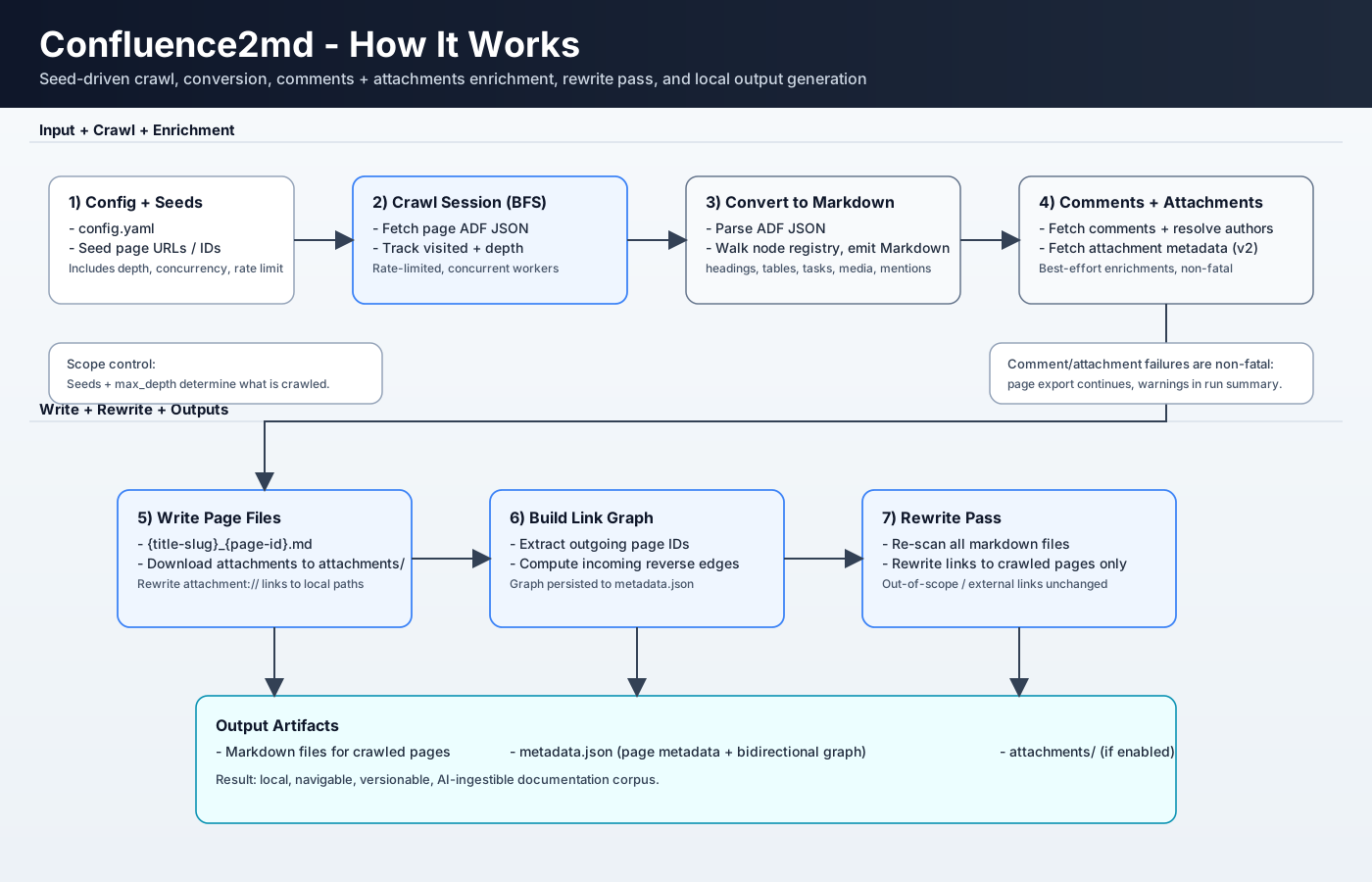
The diagram below shows how the full crawl mode works at a high level. For more details on specific parts of the implementation, see the linked docs:
- Operations and troubleshooting
- Markdown conversion internals
- Attachments retrieval internals
- Comments fetching internals
Project Structure
confluence2md/
├── .gitignore
├── .goreleaser.yaml
├── LICENSE
├── README.md
├── CHANGELOG.md
├── CONTRIBUTING.md
├── Taskfile.yml
├── config.example.yaml
├── config.yaml                      # local runtime config (gitignored)
├── go.mod / go.sum
├── bin/                             # compiled binaries (gitignored)
├── docs/                            # additional documentation
│
├── cmd/
│   └── crawler/
│       ├── main.go                  # CLI command wiring + thin run coordinator
│       ├── run_pipeline.go          # run phases, per-page handlers, finalization, summary output
│       ├── setup.go                 # config summary, client/auth checks, seed resolution
│       ├── link_utils.go            # markdown/link/attachment placeholder rewrites
│       ├── finalize.go              # graph rebuild + rewrite + artifact reconciliation
│       ├── helpers.go               # small shared helpers for run pipeline
│       └── main_test.go             # command/finalization/reconciliation tests
│
└── internal/
    ├── config/
    │   └── config.go                # struct, Load(), Validate()
    │
    ├── confluence/
    │   ├── client.go                # Confluence API client methods
    │   ├── attachments_client.go    # attachment metadata and download methods
    │   ├── comments_client.go       # comment fetch + author enrichment flow
    │   ├── http_helpers.go          # authenticated request/response helpers
    │   ├── rate_limit_transport.go  # HTTP transport with rate limiting
    │   ├── retry_transport.go       # HTTP transport with retry logic
    │   ├── parsing.go               # shared API parsing helpers
    │   └── models.go                # local types mapped from API responses
    │
    ├── crawl/
    │   └── full.go                  # crawl session orchestration and traversal
    │
    ├── convert/
    │   ├── markdown.go              # orchestrates page → markdown pipeline
    │   ├── parser.go                # XML parser for Confluence storage format
    │   ├── parser_macros.go         # macro renderers/handlers
    │   └── comments.go              # formats comments into ## Comments section
    │
    ├── links/
    │   ├── rewriter.go              # pass-2 link rewrite using metadata map
    │   └── extractor.go             # extracts page IDs from storage format links
    │
    ├── store/
    │   ├── fs.go                    # page writes + metadata.json persistence
    │   ├── frontmatter.go           # YAML front matter generation
    │   └── attachments.go           # attachment file download/persistence helpers
Backlog and Roadmap
- Optional Git integration to commit changes after each crawl with a configurable message template.
- Support for crawling Confluence Server/Data Center instances (currently only Cloud API is supported).
License
MIT
Contributors


Similar repos


Languages
Go
100.0%
Confluence Cloud to Markdown crawler with incremental updates and local link rewriting
Go
32
92 commits
updated Sep 20, 2026
See what people are saying (1)
README
confluence2md - Confluence to Markdown crawler and converter
Turn your Confluence space into Markdown files on your hard drive and use that local copy to:
- build a second brain
- feed AI/RAG pipelines
- version docs in Git
- browse offline in your preferred Markdown editor
- power local full-text search across docs
- support onboarding with a portable docs snapshot
- preserve runbooks for incident response and disaster recovery
- export knowledge for compliance and audit evidence trails
- reduce vendor lock-in by keeping docs in an open format.
What you get:
- One local
.mdfile per crawled page, with stable filenames that include page IDs. - Deterministic YAML front matter on each page with source/provenance fields and
is_seed. - Links between crawled pages rewritten to relative local links.
- External or out-of-scope links preserved as original URLs.
- Page comments appended under a
## Commentssection. - A human-friendly
index.mdstart page with crawl summary and seed links. - A
metadata.jsonindex with page metadata plus incoming/outgoing link graph data.
Part of the confluence2md Platform
confluence2md is the first step in a three-tool local Confluence knowledge pipeline. Pair it with confluence2md-indexer to build a searchable SQLite index, and confluence2md-mcp to query it from any AI client. See docs/platform.md for the full architecture.
What It Does
- Starts from configured seed pages and traverses linked Confluence pages up to a configurable depth.
- Converts each page from Confluence storage format to Markdown and writes it to the local filesystem.
- Runs a second pass to rewrite links between crawled pages as relative local links.
- Leaves all other URLs unchanged — including links to uncrawled Confluence pages and external sites.
- Downloads page attachments and rewrites attachment references to point to the downloaded files.
- Appends page comments under a
## Commentssection in each page file. - Writes a single
metadata.jsonwith crawl metadata and a bidirectional link graph. - Persists configured seed page IDs at metadata root (
seed_page_ids) for stable seed semantics. - Supports two run modes:
- full: crawl all pages reachable from seeds up to max depth.
- updates: run the same seed-based traversal as full mode, but selectively re-process dirty pages while reusing clean-page artifacts.
- Supports a dry-run modifier (
--dry-run) for both modes to preview traversal and updates decisions without writing output artifacts.
In both full and updates modes, pages that Confluence reports as trashed or no longer found are treated as deleted rather than failed fetches. Their metadata and managed local artifacts are removed, and references to their page IDs are pruned from the stored crawl graph. A detected deletion does not count as a page error or block successful checkpoint advancement.
Download
Pre-built binaries are available on the Releases page.
- Download the archive for your platform.
- Extract the binary (
confluence2mdorconfluence2md.exe). - Run it from the directory containing your
config.yaml.
How To Use
Requirements
- Confluence Cloud only. This tool uses the Atlassian Document Format (ADF) API, which is exclusive to Confluence Cloud. Confluence Data Center and Server are not supported.
- A valid Atlassian API token with read access to the target spaces — either a classic (unrestricted) token or a scoped (least-privilege) token, see Credential styles below.
You can generate an Atlassian API token from your Atlassian account security page:
If you run into authentication issues, see Operations and Troubleshooting.
Credential styles
Atlassian issues two styles of API token, and this tool supports both:
- Classic (unrestricted) tokens inherit every permission the issuing account has. They are sent to your site's own domain (
https://your-org.atlassian.net). This is the tool's original, default behaviour. - Scoped (least-privilege) tokens are restricted to a set of scopes you pick when creating the token. Atlassian serves them from a separate gateway host (
https://api.atlassian.com/ex/confluence/<cloud-id>), not your site's own domain — a scoped token will not work if sent to your site's domain, and vice versa.
confluence.auth_mode in config.yaml controls which style is used:
| Value | Behaviour |
|---|---|
auto (default) | Detect automatically: try your site's domain first; on an authorization failure, resolve your site's cloud ID and retry against the gateway. An existing config.yaml with no auth_mode set behaves exactly as before — a classic token works with no changes. |
classic | Always use your site's own domain. |
scoped | Always use the Atlassian gateway. Requires resolving your site's cloud ID — done automatically from your seed URLs unless you set confluence.cloud_id yourself. |
The resolved style is reported in the summary line printed by confluence2md validate and by every crawl.
Both styles use the same confluence.username / confluence.token fields (and the same CONFLUENCE_USERNAME / CONFLUENCE_TOKEN environment variables) — only the routing differs, not how credentials are supplied. confluence.cloud_id is only ever used in scoped mode.
Scoped tokens expire. Atlassian requires you to set an expiry between 1 and 365 days (default one year) when creating a scoped token; classic tokens have no such expiry. If you run this tool unattended or on a schedule, plan to renew a scoped token before it expires — an expired token is reported as a rejected credential (see Operations and Troubleshooting), and this tool has no way to see or renew the token's expiry on your behalf.
Required scopes
If you use a scoped token, grant exactly these scopes for a full-capability crawl:
| Capability | Scope(s) required | Optional? |
|---|---|---|
Page content, metadata, and child-page traversal (follow_children) | read:page:confluence | No — core |
| Link discovery (internal CQL search) | search:confluence | No — used to find linked pages |
| Attachments | read:attachment:confluence and readonly:content.attachment:confluence | Yes — only needed with attachments.download: true |
| Comments | read:comment:confluence | Yes — omit to crawl without comments |
| Author name resolution | read:confluence-user | Yes — omit and author account IDs are kept, display names are omitted |
Notes:
- No space-read scope is needed — the space key comes from your seed URLs, not from a space-listing call.
follow_childrenneeds no scope beyondread:page:confluence.- Attachments need both listed scopes: one for discovery, one for the download itself. Granting only one gives successful discovery and failing downloads.
Configuration
Copy config.example.yaml to config.yaml and fill in the required values.
confluence:
  # Your Atlassian account email
  # Can also be set via env var: CONFLUENCE_USERNAME (takes precedence over this value)
  username: you@example.com
  # Atlassian API token (https://id.atlassian.com/manage-profile/security/api-tokens)
  # Can also be set via env var: CONFLUENCE_TOKEN (takes precedence over this value)
  token: ""
  # Credential style: auto (default) | classic | scoped — see "Credential styles" above
  auth_mode: auto
  # Atlassian cloud ID, used only in scoped mode. Leave empty to auto-resolve.
  cloud_id: ""

crawl:
  # One or more seed page URLs or page IDs to start from
  seeds:
    - https://your-org.atlassian.net/wiki/spaces/SPACE/pages/123456/Page+Title
  # Maximum link-follow depth from each seed (0 = seed pages only)
  max_depth: 3
  # Maximum concurrent API requests
  concurrency: 5
  # Target HTTP requests per minute across all Confluence API calls
  # (transport-level limiter; Confluence Cloud is ~300/min per token)
  rate_limit_rpm: 250
  # Maximum buffered discovered pages waiting to be processed
  queue_size: 10000

output:
  # Directory to write Markdown files, attachments, and metadata
  dir: ./output

post_crawl_hook:
  # Optional fire-and-forget command run after successful non-dry-run completion.
  # Command is argv-style (no shell parsing).
  # command:
  #   - ./scripts/reindex.sh
  #   - --output
  #   - ./output
  command: []

attachments:
  # Download attachments referenced by crawled pages
  download: true
  # Skip attachments larger than this size (0 = no limit)
  max_size_mb: 100

retry:
  # Maximum number of attempts for transient errors: 429/5xx responses and
  # transient network failures (timeouts, connection resets, EOF). Permanent
  # failures (TLS verification, unknown host, malformed requests) are not retried.
  max_attempts: 5
  # Initial backoff in milliseconds (doubles with each retry + jitter)
  initial_backoff_ms: 1000
Multi-host crawls
crawl.seeds may list pages across multiple Confluence Cloud hosts (for
example company1.atlassian.net and company2.atlassian.net). Each host is
crawled independently, and cross-host links are followed and deduplicated as a
single graph — every page is fetched and rendered exactly once, regardless of
how many seeds or links reach it.
Pages are keyed by host/page-id everywhere — metadata keys, front matter IDs,
link IDs and seed IDs are all host-qualified, including for single-host crawls,
so a page never has two identities. Filenames embed that key with the / (and
any port :) encoded as _, so they stay flat:
{title-slug}_{host}_{page-id}.md and
attachments/{host}_{page-id}_{filename}. Pages from different tenants that
share a numeric page ID therefore never collide.
One credential (confluence.username / confluence.token / auth_mode) is
shared across every host, so the same account/token must have read access on
all of them. Per-host credentials are not supported yet.
Quickstart
Now run a full crawl:
confluence2md --mode full
Note: full mode clears the configured output directory before crawling.
To preview impact without writing files:
confluence2md --mode full --dry-run
Once it completes, start at output/index.md for crawl summary and seed entrypoints.
CLI Usage
# Full crawl (crawls all pages reachable from seeds up to max depth)
confluence2md --mode full

# Incremental update (same seed traversal, selective page re-processing)
confluence2md --mode updates

# Full dry-run (no writes: pages/attachments/metadata/index/checkpoints)
confluence2md --mode full --dry-run

# Updates dry-run (same traversal + dirty/clean decisions, no writes)
confluence2md --mode updates --dry-run

# Validate config and Confluence API credentials without crawling
confluence2md validate
The tool looks for config.yaml in the current directory by default. Use --config to specify a different path:
confluence2md --config /path/to/config.yaml --mode full
confluence2md --config /path/to/config.yaml validate
Post-crawl hook
You can configure an optional post-crawl hook command in config.yaml to trigger follow-up automation after a successful crawl.
The primary use case is running confluence2md-indexer so the local search index is refreshed immediately after crawling.
Behavior:
- Hook runs only after successful non-dry-run completion.
- Hook is fire-and-forget: crawler starts the process and does not wait for completion.
- If the hook process cannot be started, crawler logs a warning and still exits successfully.
Hook command is argv-style to avoid shell quoting ambiguity.
Example:
post_crawl_hook:
  command:
    - confluence2md-indexer
    - index
    - ./output
    - --db
    - ./output/confluence2md-index.db
After each run a summary is printed to stdout:
=== Crawl Complete ===
Mode: full
Total pages crawled: 13
Pages written successfully: 13
Pages with errors: 0
Pages detected as deleted: 0
Internal crawl links discovered (edge count): 14
Unique internal target pages linked: 12
External links skipped (host filter): 5
Pages with rewritten links: 4/13
Markdown links rewritten to local paths: 14/25
Pages with comments appended: 1
Total comments fetched: 2
Pages with comment fetch warnings: 0
Output directory: ./output
All modes report pages detected as deleted. For updates mode, the summary additionally reports:
- Reachable pages
- Pages re-rendered
- Pages reused without full re-processing
- Re-render saves (count and percent)
- Managed files added/updated/deleted
- Attachments downloaded/reused
- Output commit status
- Checkpoint advanced status (successful-checkpoint advancement)
For dry-run mode, the summary indicates:
- Dry-run mode is active (no writes)
- Link rewrite pass is skipped
- File/attachment/deletion counts are reported as "would" or predicted outcomes
- Checkpoint advancement is suppressed
Note: current output commit behavior is direct-write (non-transactional).
How It Works
Filename Conventions
Every page is saved as:
{title-slug}_{host}_{page-id}.md
The host and page ID are always included so renames (title changes) are detectable and the file can be consistently identified across runs. Attachments are saved under an attachments/ directory alongside the pages, named {host}_{page-id}_{original-filename}. A host carrying a port has its : encoded as _ (e.g. 127.0.0.1_8080_123_diagram.png), so every output name stays a single path segment.
How link rewriting works — two passes:
- Crawl pass: all pages are fetched and written to disk with their original Confluence URLs still intact. As each page is saved, its page ID and local filename are recorded in
metadata.json. No links are rewritten yet. - Rewrite pass: once the full crawled set is known, every page is scanned. For each link, if the target page ID exists in
metadata.json(i.e. it was crawled), the URL is replaced with a relative local path. If not — whether it is a Confluence page that was out of scope, beyond max depth, or a completely different site — the original URL is left unchanged.
Because the rewrite pass only runs after crawling is complete, every decision is a simple lookup with no iteration or guesswork.
Output Layout
output/
├── index.md                      # start-here page: crawl summary + seed links
├── metadata.json                  # all-pages index: metadata + link graph
├── {title-slug}_{host}_{page-id}.md   # one file per page (front matter + page body + comments)
└── attachments/
  └── {host}_{page-id}_{original-filename}   # ports use "_": 127.0.0.1_8080_123_diagram.png
metadata.json Structure
The metadata.json file contains comprehensive page metadata and the bidirectional link graph:
-
Top-level fields:
crawl_started_at- Timestamp when current crawl run startedlast_completed_crawl_started_at/last_completed_crawl_completed_at- Last completed crawl timestampslast_successful_crawl_started_at/last_successful_crawl_completed_at- Last fully successful crawl timestampsseed_page_ids- Array of seed page IDs used for this crawlpages- Object mapping page IDs to page records
-
Per-page record fields:
- Core:
id,title,local_path,version,crawled_at,source_url,canonical_url,space_key,depth - Links:
outgoing_links(page IDs this page links to),incoming_links(page IDs linking to this page) - Temporal:
created_at,last_modified_at(ISO 8601 timestamps) - Authorship:
created_by_id,created_by_name,last_modified_by_id,last_modified_by_name - Hierarchy:
confluence_parent_id(parent page ID in Confluence tree structure) - Comments:
comment_count,comments_last_fetched,comments_fetch_error - Attachments:
attachments(array of filenames),attachment_signature - Diagnostics:
fetch_error,storage_format_sample(first 500 chars of storage XML)
- Core:
Author names are resolved via the Confluence REST API at crawl time with in-memory caching. If name resolution fails, the account ID is preserved and the name field is omitted.
Markdown Front Matter
Each exported page starts with deterministic YAML front matter:
- Required fields:
page_id- Numeric Confluence page IDtitle- Page titlesource_url- Original Confluence page URLcanonical_url- Canonical Confluence page URLspace_key- Alphanumeric Confluence space key (e.g., "SFD", "DS", "SPACE")is_seed- Boolean indicating whether this page was a configured seedcrawled_at- ISO 8601 timestamp when the page was crawled
- Temporal metadata (optional, omitted if not available):
created_at- ISO 8601 timestamp when the page was originally created in Confluencelast_modified_at- ISO 8601 timestamp when the page was last modified in Confluence
- Authorship metadata (optional, omitted if not available):
created_by- Display name of the user who created the pagelast_modified_by- Display name of the user who last modified the page
- Hierarchy metadata (optional, omitted if not available):
confluence_parent_id- Numeric page ID of the parent page in Confluence page hierarchy
- Other optional fields:
comment_count- Number of comments on the page (present only when greater than 0)comments_fetch_error- Error message if comment fetching failed (present only when non-empty)attachments- List of downloaded attachment filenames (present only when non-empty)
Seed semantics:
is_seedis derived from membership in metadata rootseed_page_ids.- Traversal
depthis still tracked inmetadata.json, but not surfaced in front matter.
Building, Testing, and Internals
Building
Install Task, then:
task build        # builds bin/confluence2md.exe
task test         # runs all tests
task lint         # runs golangci-lint
Release Artifacts
GitHub Releases publish platform binaries as compressed archives:
- Linux/macOS:
.tar.gz - Windows:
.zip
Supported release targets:
linux/amd64linux/arm64darwin/amd64darwin/arm64windows/amd64windows/arm64
Executable name inside archives:
- Linux/macOS:
confluence2md - Windows:
confluence2md.exe
Internals Documentation
The diagram below shows how the full crawl mode works at a high level. For more details on specific parts of the implementation, see the linked docs:
- Operations and troubleshooting
- Markdown conversion internals
- Attachments retrieval internals
- Comments fetching internals
Project Structure
confluence2md/
├── .gitignore
├── .goreleaser.yaml
├── LICENSE
├── README.md
├── CHANGELOG.md
├── CONTRIBUTING.md
├── Taskfile.yml
├── config.example.yaml
├── config.yaml                      # local runtime config (gitignored)
├── go.mod / go.sum
├── bin/                             # compiled binaries (gitignored)
├── docs/                            # additional documentation
│
├── cmd/
│   └── crawler/
│       ├── main.go                  # CLI command wiring + thin run coordinator
│       ├── run_pipeline.go          # run phases, per-page handlers, finalization, summary output
│       ├── setup.go                 # config summary, client/auth checks, seed resolution
│       ├── link_utils.go            # markdown/link/attachment placeholder rewrites
│       ├── finalize.go              # graph rebuild + rewrite + artifact reconciliation
│       ├── helpers.go               # small shared helpers for run pipeline
│       └── main_test.go             # command/finalization/reconciliation tests
│
└── internal/
    ├── config/
    │   └── config.go                # struct, Load(), Validate()
    │
    ├── confluence/
    │   ├── client.go                # Confluence API client methods
    │   ├── attachments_client.go    # attachment metadata and download methods
    │   ├── comments_client.go       # comment fetch + author enrichment flow
    │   ├── http_helpers.go          # authenticated request/response helpers
    │   ├── rate_limit_transport.go  # HTTP transport with rate limiting
    │   ├── retry_transport.go       # HTTP transport with retry logic
    │   ├── parsing.go               # shared API parsing helpers
    │   └── models.go                # local types mapped from API responses
    │
    ├── crawl/
    │   └── full.go                  # crawl session orchestration and traversal
    │
    ├── convert/
    │   ├── markdown.go              # orchestrates page → markdown pipeline
    │   ├── parser.go                # XML parser for Confluence storage format
    │   ├── parser_macros.go         # macro renderers/handlers
    │   └── comments.go              # formats comments into ## Comments section
    │
    ├── links/
    │   ├── rewriter.go              # pass-2 link rewrite using metadata map
    │   └── extractor.go             # extracts page IDs from storage format links
    │
    ├── store/
    │   ├── fs.go                    # page writes + metadata.json persistence
    │   ├── frontmatter.go           # YAML front matter generation
    │   └── attachments.go           # attachment file download/persistence helpers
Backlog and Roadmap
- Optional Git integration to commit changes after each crawl with a configurable message template.
- Support for crawling Confluence Server/Data Center instances (currently only Cloud API is supported).
License
MIT
Similar repos
Contributors
Languages
Go
100.0%