Local LLM benchmarking for Apple Silicon. Compare how the same model performs across the major local inference frameworks (OMLX, MTPLX, MLX-VLM, MLX-Serve) and across harnesses — raw (a single one-shot API call, no agent), raw+ (raw with automatic continuation: when the reply hits the token cap, the streaming buffer is seamlessly continued so long artifacts finish), and the agent CLIs pi / opencode / aider / hart — with real throughput (TPS/TGS/PP), latency, and the actual artifact each cell produces, linked for your own review.
Everything runs locally against models already on your machine. No cloud, no
accounts, no telemetry. The backend is pure Python standard library — there is
nothing to pip install.
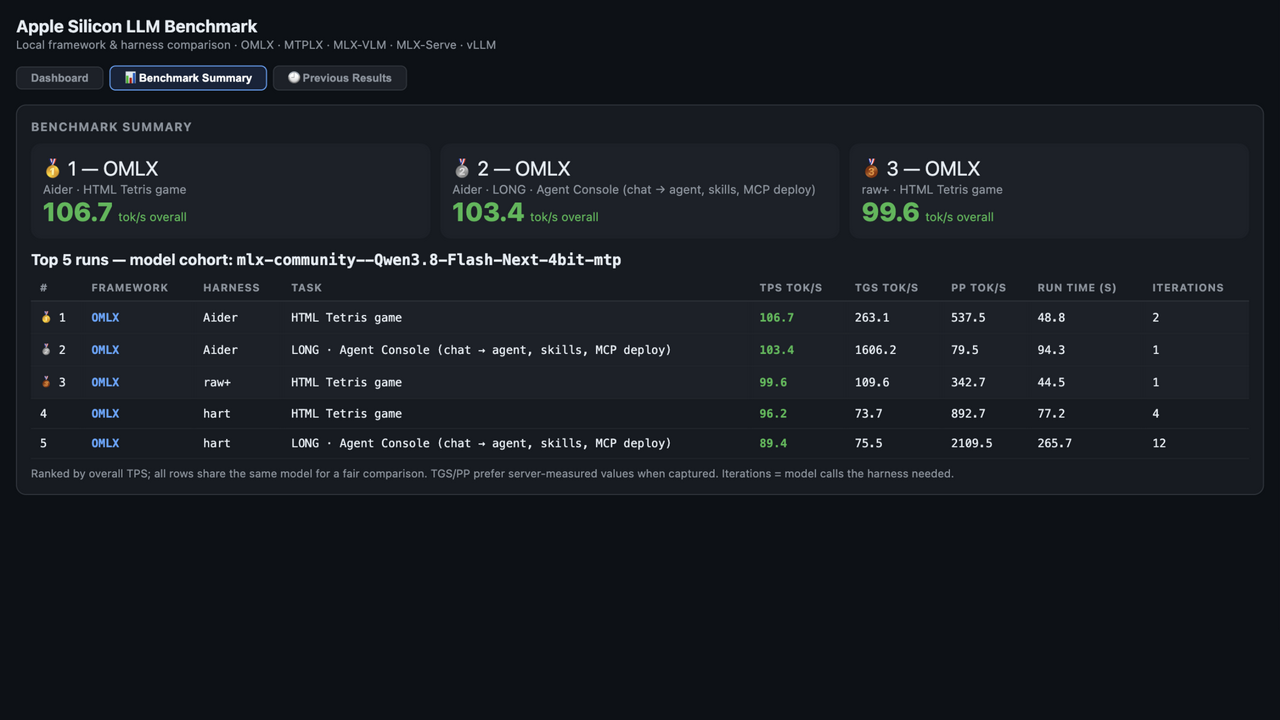
For every framework × harness cell on a chosen task, benchtest records:
| Metric | Meaning |
|---|---|
| TPS | Overall throughput — completion tokens / total wall time |
| TGS | Decode speed — tokens generated per second (server-measured where the framework exposes it) |
| PP | Prefill speed — prompt tokens processed per second |
| Run time | End-to-end wall time for the cell |
| Iter | Model requests the harness made (agent loops, raw+ continuations; raw = 1) |
| Tokens | Completion tokens produced |
| Output | The actual artifact (HTML/text), saved and viewable |
The dashboard shows a live activity feed, a per-cell streaming tail, a comparison
chart (TPS/TGS/PP per framework across harnesses), and a "winning combo" (best usable
result, soonest). Every completed run is saved to runs/*.json for later comparison.
pi and opencode run in their structured JSON event modes (--mode json /
--format json) — the same event stream their TUIs render — so the Live
Harness Activity feed shows real agent narration: tool calls with target
paths, thinking phases, chat replies, and per-step token counts. Their token totals are the
model's exact output tokens (not word-count estimates), and sibling files an
agent writes next to its HTML (e.g. app.js) are inlined into the collected
artifact so the Artifacts links show what was actually built.
Median decode speed, tokens/s, from the frozen datasets in results/
(3 tasks × up to 4 frameworks × 6 harnesses; agent rows use server-measured TGS):
| Framework | Qwen3.8-27B raw / agent | Flash-Next raw / agent | Flash-Next gain |
|---|---|---|---|
| MTPLX | 51.9 / 46.6 | 89.4 / 84.9 | ~1.7× |
| OMLX | 53.0 / 51.0 | 88.8 / 87.6 | ~1.7× |
| MLX-Serve | 52.2 / 49.6 | does not fit (needs ~112.5 GB) | — |
| MLX-VLM | 35.8 / 34.9 | 38.7 / 39.0 | ~none — its runtime doesn't exploit the MTP build |
Reliability: 72/72 cells on the Qwen set; 53/54 on Flash-Next (one honest thinking-cap error row). The finding that matters: Flash-Next is a ~1.7× win on MTPLX and OMLX but a wash on MLX-VLM — model choice alone doesn't decide speed; the framework does. Interactive charts: the benchtest Results Space (dataset: mlxbencher/benchtest-results).
Positioning: raw-performance Apple-Silicon benchmarks exist (apple-silicon-llm-bench); agent-harness leaderboards exist for cloud APIs. benchtest is the cross: local serving frameworks × real agent harnesses × real build artifacts, on one Mac — the "which framework should serve this model, and does the harness change the outcome?" tool.
The task suite — deliberately small, each task a different kind of work:
tetris (interactive game logic), codereview (find the planted defects in a
sample module), markdown (a CommonMark-subset compiler with spec tests),
agentconsole (chat → tool-calling agent with skills + MCP deploy), plus
✏️ Custom prompt for anything else — its template documents what models can
and cannot reach in this environment. Every done cell also gets a
reliability QA score (qa.py): deterministic artifact checks — delivered,
substantial, structurally complete, self-test result, untruncated — with the
breakdown one hover away. The judgment stays human; the score only measures
whether the delivery is sound.
Then in the browser: pick your frameworks and harnesses, choose a task (or edit the prompt), and hit ▶ Run Benchmark.
First run tip: the Model per Framework panel lists every model on your machine (HF cache + MTPLX store) with a live compatibility verdict (ready / tight / too-large / unknown) based on your current free RAM. Models a framework can't serve are greyed out (e.g. MTPLX-only models for OMLX/MLX-VLM/MLX-Serve). Pick a model and it's written straight into
config.json.
V1 (current release) — the MLX-native frameworks, on purpose. OMLX, MTPLX, MLX-VLM, and MLX-Serve × six harnesses (raw, raw+, pi, opencode, aider, hart) on the built-in task suite, with model discovery + RAM-fit validation, per-cell metrics, reliability QA, and frozen results for Qwen3.8-27B and Flash-Next. vLLM ships wired for standard HF repos with a reference model (Gemma) — the one framework where the Qwen MTP builds don't run yet.
V2 — widening the matrix.
Future releases. More agent harnesses as the ecosystem grows, and richer aggregate statistics across community submissions.
The published numbers are one machine; yours will differ, and that's the
point. Run benchtest on your Mac (16 / 32 / 64 / 128 GB — the model
picker only offers models that fit your RAM), then open a PR against
community-results/ adding your run JSONs under a
folder named <github-user>-<machine> (e.g. jdoe-m4-16gb/) with a
short README (chip, RAM, models, frameworks). Match the manifest format
in results/. The QA score keeps entries comparable:
deterministic checks, raw JSON for anyone to re-analyze.
V2's framework list (llama.cpp, Ollama, LM Studio, vLLM-for-Qwen-MTP) is the starting ballot, not the limit. Voting is open in the pinned Vote: shape V2 GitHub Discussion:
Anything with an OpenAI-compatible /v1 endpoint and a CLI-launchable
server is eligible; the bar for inclusion is that a community member can
reproduce the numbers on their own machine.
Already have one framework (e.g. OMLX) and a model downloaded?
You're three commands from a run — no config editing needed on the
default path: ./install.sh → python3 server.py → open
http://localhost:7090, pick your model in the dropdown, tick tasks,
Run. (Editing config.json is only for custom start commands, ports, or
model-set presets.)
# 1. Get the code
git clone https://github.com/gitmlxbench/benchtest.git
cd benchtest

# 2. Check prerequisites + seed config.json
./install.sh

# 3. Start the server — no config editing needed on the default path
#    (config.json is only for custom start commands, ports, or model-set presets)
python3 server.py            # or: make run
#    ➜ Open http://localhost:7090
PATH.| Framework | What it is | Install | Repo / site |
|---|---|---|---|
| OMLX | macOS app + omlx CLI | download the app from the site | omlx.ai · github.com/jundot/omlx |
| MTPLX | MTP speculative decoding for Qwen3-Next | brew tap youssofal/mtplx && brew install mtplx | github.com/youssofal/MTPLX |
| MLX-Serve | OpenAI/Anthropic-compatible server | brew tap ddalcu/mlx-serve && brew install mlx-serve | github.com/ddalcu/mlx-serve |
| MLX-VLM | VLM / omni inference via mlx_vlm | pip install mlx-vlm (into the python3 on your PATH) | github.com/Blaizzy/mlx-vlm |
| Harness | Install | Repo / site |
|---|---|---|
| pi | npm install -g @earendil-works/pi-coding-agent | github.com/earendil-works/pi |
| opencode | npm install -g opencode-ai | opencode.ai · github.com/anomalyco/opencode |
| aider | python3 -m pip install aider-chat | aider.chat |
| hart | bundled in this repo — no install | hart/ |
Models — already on your machine (benchtest auto-discovers them):
~/.cache/huggingface/hub).~/.mtplx/models).benchtest tags each model with the frameworks it can serve and tells you what fits in your free RAM. If you're starting fresh, these are good models to download first (all verified against the frameworks above):
| Model | Size | Good for | Link |
|---|---|---|---|
| Qwen3.8-27B-8bit | ~28 GB | OMLX / MLX-VLM / MLX-Serve (all-round starter) | mlx-community/Qwen3.8-27B-8bit |
| Qwen3.8-27B-MTP-8bit | ~0.5 GB | MTP draft — pairs with the 27B for speculative decoding, used for OMLX / MLX-VLM / MLX-Serve (all-round starter) | mlx-community/Qwen3.8-27B-MTP-8bit |
| Qwen3.8-27B-MTPLX-Optimized-Quality | ~28 GB | MTPLX (quality) | Youssofal/Qwen3.8-27B-MTPLX-Optimized-Quality |
| Qwen3.8-27B-bf16 | ~51 GB | OMLX / MLX-VLM / MLX-Serve — full-precision (bf16) reference for quality validation | mlx-community/Qwen3.8-27B-bf16 |
Quality validation (full-precision vs quantized): to check whether a quantized build (e.g. the 8-bit starter) is losing quality, run the same task with the bf16 model and compare throughput. Select
Qwen3.8-27B-bf16per framework in the Model per Framework panel, run the task, then repeat with the 8-bit model and diff the TPS / run-time columns, then compare artifacts side by side via the Artifacts links. The bf16 model needs ~51 GB of free RAM, so stop other framework servers (e.g. OMLX) first. It is an HF-cache model, so it is offered for OMLX / MLX-VLM / MLX-Serve; MTPLX uses its own store and would need a separate MTPLX build of the same weights.
Download any of these with
hf download <repo>(orhuggingface-cli download <repo>), or open the link and use the Files tab. MTPLX models are pulled into~/.mtplx/modelsby themtplxCLI itself.
install.sh checks all of the above and tells you exactly what's missing.
| Port | Used by | Notes |
|---|---|---|
| 7090 | Dashboard + HTTP API | The web UI you open in the browser (host/port in config.json). |
| 7005 | vLLM (5th framework) | Standard HF repos on the vLLM runtime — not MLX builds. Ships with google/gemma-4-31B-it as its reference model until vLLM supports the Qwen MTP builds. |
| 7010 | Measurement proxy (internal) | Must be free when route_via_proxy: true — agent harnesses (pi, opencode, aider, hart) send their model calls here; the proxy forwards to the framework under test and records per-request TTFT / prompt / completion tokens (the agent rows' PP/TGS and the token-cap-truncation warning). If 7010 is taken, set route_via_proxy: false (agent cells then rely on server-side metrics only) or free the port. |
| 7001–7004 | Framework servers | omlx 7001, mtplx 7002, mlxvlm (MLX-VLM) 7003, mlxserve (MLX-Serve) 7004 — per-framework frameworks.<id>.port in config.json; change freely as long as each is unique and free. |
The dashboard also exposes /api/relay/<port>/<path> so pages it serves
(e.g. an Agent Console artifact) can reach a framework that rejects
browser-originated requests.
All machine-specific settings live in config.json (seeded from
config.example.json on first run). The important knobs:
| Key | What it does |
|---|---|
host / port | Where the web UI listens. Keep host: 127.0.0.1 unless you know why you'd expose it. |
frameworks.<id>.model | The model id that framework serves / should serve. |
frameworks.<id>.model_source | Where the framework loads models from: hf (HF cache) or mtplx (~/.mtplx/models). Controls which models the picker offers for that framework. |
frameworks.<id>.start_cmd | The exact command to cold-start that framework's server. Supports {model}, {repo}, and {model_path} placeholders. |
frameworks.<id>.port | The port that framework's server listens on. |
frameworks.<id>.ctx_tokens | Configured context window (used for compatibility scoring + ctx-fill %). |
frameworks.<id>.model_gb | Approx weight size in GB (used for RAM-fit scoring). |
route_via_proxy | Route agent harnesses through the local measurement proxy (adds per-request PP/TGS/TTFT to agent rows). |
pi_thinking | pi thinking-level suffix for --model (e.g. :high). Empty = inherit server default. |
hart_path | Path to the hart agentic harness script. Defaults to the bundled ./hart/hart.py. |
See CONFIG.md for the full reference and ARCHITECTURE.md for how it all fits together.
/v1/models endpoint to answer.runs/.Frameworks are run one at a time so they never compete for RAM/GPU. You can Stop a run at any time — in-flight work is killed and partial results are kept.
Max cell run time. A cell is one framework × harness × task
combination. Every cell gets a hard wall-clock cap (default 2 h, set in
the dashboard's Max cell run time (min) field for dashboard runs, or the
cell_timeout_s key in config.json for campaigns; clamped 1 min–6 h):
if the harness is still working when the cap hits, it is stopped, any
artifact it already wrote is kept, and the cell is recorded as an error row
(timeout after ...s). This keeps one stuck cell from blocking a multi-day
campaign, and the timeouts themselves are honest data — a slow framework
burning the full budget is a real result. Agent harnesses budget their
per-call limits to fit inside the cap (e.g. hart splits it into 2–3 calls).
benchtest/
├── server.py            # the whole backend (stdlib only): HTTP API, orchestration, metrics
├── discovery.py         # model discovery + RAM/context compatibility scoring
├── index.html           # the dashboard (single-file frontend, no build step)
├── config.example.json  # the config template (copied to config.json on first run)
├── install.sh           # prerequisite check + config seeding
├── Makefile             # setup / run / check / clean
├── hart/                # the bundled `hart` agentic harness (hart.py + docs)
├── runs/                # saved runs (gitignored)
├── outputs/             # produced artifacts (gitignored)
├── logs/                # bench.log + per-framework server logs (gitignored)
├── work/                # scratch dirs for agent file artifacts (gitignored)
└── harness-configs/     # per-run harness configs, regenerated each run (gitignored)
Local LLM benchmarking for Apple Silicon. Compare how the same model performs across the major local inference frameworks (OMLX, MTPLX, MLX-VLM, MLX-Serve) and across harnesses — raw (a single one-shot API call, no agent), raw+ (raw with automatic continuation: when the reply hits the token cap, the streaming buffer is seamlessly continued so long artifacts finish), and the agent CLIs pi / opencode / aider / hart — with real throughput (TPS/TGS/PP), latency, and the actual artifact each cell produces, linked for your own review.
Everything runs locally against models already on your machine. No cloud, no
accounts, no telemetry. The backend is pure Python standard library — there is
nothing to pip install.
For every framework × harness cell on a chosen task, benchtest records:
| Metric | Meaning |
|---|---|
| TPS | Overall throughput — completion tokens / total wall time |
| TGS | Decode speed — tokens generated per second (server-measured where the framework exposes it) |
| PP | Prefill speed — prompt tokens processed per second |
| Run time | End-to-end wall time for the cell |
| Iter | Model requests the harness made (agent loops, raw+ continuations; raw = 1) |
| Tokens | Completion tokens produced |
| Output | The actual artifact (HTML/text), saved and viewable |
The dashboard shows a live activity feed, a per-cell streaming tail, a comparison
chart (TPS/TGS/PP per framework across harnesses), and a "winning combo" (best usable
result, soonest). Every completed run is saved to runs/*.json for later comparison.
pi and opencode run in their structured JSON event modes (--mode json /
--format json) — the same event stream their TUIs render — so the Live
Harness Activity feed shows real agent narration: tool calls with target
paths, thinking phases, chat replies, and per-step token counts. Their token totals are the
model's exact output tokens (not word-count estimates), and sibling files an
agent writes next to its HTML (e.g. app.js) are inlined into the collected
artifact so the Artifacts links show what was actually built.
Median decode speed, tokens/s, from the frozen datasets in results/
(3 tasks × up to 4 frameworks × 6 harnesses; agent rows use server-measured TGS):
| Framework | Qwen3.8-27B raw / agent | Flash-Next raw / agent | Flash-Next gain |
|---|---|---|---|
| MTPLX | 51.9 / 46.6 | 89.4 / 84.9 | ~1.7× |
| OMLX | 53.0 / 51.0 | 88.8 / 87.6 | ~1.7× |
| MLX-Serve | 52.2 / 49.6 | does not fit (needs ~112.5 GB) | — |
| MLX-VLM | 35.8 / 34.9 | 38.7 / 39.0 | ~none — its runtime doesn't exploit the MTP build |
Reliability: 72/72 cells on the Qwen set; 53/54 on Flash-Next (one honest thinking-cap error row). The finding that matters: Flash-Next is a ~1.7× win on MTPLX and OMLX but a wash on MLX-VLM — model choice alone doesn't decide speed; the framework does. Interactive charts: the benchtest Results Space (dataset: mlxbencher/benchtest-results).
Positioning: raw-performance Apple-Silicon benchmarks exist (apple-silicon-llm-bench); agent-harness leaderboards exist for cloud APIs. benchtest is the cross: local serving frameworks × real agent harnesses × real build artifacts, on one Mac — the "which framework should serve this model, and does the harness change the outcome?" tool.
The task suite — deliberately small, each task a different kind of work:
tetris (interactive game logic), codereview (find the planted defects in a
sample module), markdown (a CommonMark-subset compiler with spec tests),
agentconsole (chat → tool-calling agent with skills + MCP deploy), plus
✏️ Custom prompt for anything else — its template documents what models can
and cannot reach in this environment. Every done cell also gets a
reliability QA score (qa.py): deterministic artifact checks — delivered,
substantial, structurally complete, self-test result, untruncated — with the
breakdown one hover away. The judgment stays human; the score only measures
whether the delivery is sound.
Then in the browser: pick your frameworks and harnesses, choose a task (or edit the prompt), and hit ▶ Run Benchmark.
First run tip: the Model per Framework panel lists every model on your machine (HF cache + MTPLX store) with a live compatibility verdict (ready / tight / too-large / unknown) based on your current free RAM. Models a framework can't serve are greyed out (e.g. MTPLX-only models for OMLX/MLX-VLM/MLX-Serve). Pick a model and it's written straight into
config.json.
V1 (current release) — the MLX-native frameworks, on purpose. OMLX, MTPLX, MLX-VLM, and MLX-Serve × six harnesses (raw, raw+, pi, opencode, aider, hart) on the built-in task suite, with model discovery + RAM-fit validation, per-cell metrics, reliability QA, and frozen results for Qwen3.8-27B and Flash-Next. vLLM ships wired for standard HF repos with a reference model (Gemma) — the one framework where the Qwen MTP builds don't run yet.
V2 — widening the matrix.
Future releases. More agent harnesses as the ecosystem grows, and richer aggregate statistics across community submissions.
The published numbers are one machine; yours will differ, and that's the
point. Run benchtest on your Mac (16 / 32 / 64 / 128 GB — the model
picker only offers models that fit your RAM), then open a PR against
community-results/ adding your run JSONs under a
folder named <github-user>-<machine> (e.g. jdoe-m4-16gb/) with a
short README (chip, RAM, models, frameworks). Match the manifest format
in results/. The QA score keeps entries comparable:
deterministic checks, raw JSON for anyone to re-analyze.
V2's framework list (llama.cpp, Ollama, LM Studio, vLLM-for-Qwen-MTP) is the starting ballot, not the limit. Voting is open in the pinned Vote: shape V2 GitHub Discussion:
Anything with an OpenAI-compatible /v1 endpoint and a CLI-launchable
server is eligible; the bar for inclusion is that a community member can
reproduce the numbers on their own machine.
Already have one framework (e.g. OMLX) and a model downloaded?
You're three commands from a run — no config editing needed on the
default path: ./install.sh → python3 server.py → open
http://localhost:7090, pick your model in the dropdown, tick tasks,
Run. (Editing config.json is only for custom start commands, ports, or
model-set presets.)
# 1. Get the code
git clone https://github.com/gitmlxbench/benchtest.git
cd benchtest

# 2. Check prerequisites + seed config.json
./install.sh

# 3. Start the server — no config editing needed on the default path
#    (config.json is only for custom start commands, ports, or model-set presets)
python3 server.py            # or: make run
#    ➜ Open http://localhost:7090
PATH.| Framework | What it is | Install | Repo / site |
|---|---|---|---|
| OMLX | macOS app + omlx CLI | download the app from the site | omlx.ai · github.com/jundot/omlx |
| MTPLX | MTP speculative decoding for Qwen3-Next | brew tap youssofal/mtplx && brew install mtplx | github.com/youssofal/MTPLX |
| MLX-Serve | OpenAI/Anthropic-compatible server | brew tap ddalcu/mlx-serve && brew install mlx-serve | github.com/ddalcu/mlx-serve |
| MLX-VLM | VLM / omni inference via mlx_vlm | pip install mlx-vlm (into the python3 on your PATH) | github.com/Blaizzy/mlx-vlm |
| Harness | Install | Repo / site |
|---|---|---|
| pi | npm install -g @earendil-works/pi-coding-agent | github.com/earendil-works/pi |
| opencode | npm install -g opencode-ai | opencode.ai · github.com/anomalyco/opencode |
| aider | python3 -m pip install aider-chat | aider.chat |
| hart | bundled in this repo — no install | hart/ |
Models — already on your machine (benchtest auto-discovers them):
~/.cache/huggingface/hub).~/.mtplx/models).benchtest tags each model with the frameworks it can serve and tells you what fits in your free RAM. If you're starting fresh, these are good models to download first (all verified against the frameworks above):
| Model | Size | Good for | Link |
|---|---|---|---|
| Qwen3.8-27B-8bit | ~28 GB | OMLX / MLX-VLM / MLX-Serve (all-round starter) | mlx-community/Qwen3.8-27B-8bit |
| Qwen3.8-27B-MTP-8bit | ~0.5 GB | MTP draft — pairs with the 27B for speculative decoding, used for OMLX / MLX-VLM / MLX-Serve (all-round starter) | mlx-community/Qwen3.8-27B-MTP-8bit |
| Qwen3.8-27B-MTPLX-Optimized-Quality | ~28 GB | MTPLX (quality) | Youssofal/Qwen3.8-27B-MTPLX-Optimized-Quality |
| Qwen3.8-27B-bf16 | ~51 GB | OMLX / MLX-VLM / MLX-Serve — full-precision (bf16) reference for quality validation | mlx-community/Qwen3.8-27B-bf16 |
Quality validation (full-precision vs quantized): to check whether a quantized build (e.g. the 8-bit starter) is losing quality, run the same task with the bf16 model and compare throughput. Select
Qwen3.8-27B-bf16per framework in the Model per Framework panel, run the task, then repeat with the 8-bit model and diff the TPS / run-time columns, then compare artifacts side by side via the Artifacts links. The bf16 model needs ~51 GB of free RAM, so stop other framework servers (e.g. OMLX) first. It is an HF-cache model, so it is offered for OMLX / MLX-VLM / MLX-Serve; MTPLX uses its own store and would need a separate MTPLX build of the same weights.
Download any of these with
hf download <repo>(orhuggingface-cli download <repo>), or open the link and use the Files tab. MTPLX models are pulled into~/.mtplx/modelsby themtplxCLI itself.
install.sh checks all of the above and tells you exactly what's missing.
| Port | Used by | Notes |
|---|---|---|
| 7090 | Dashboard + HTTP API | The web UI you open in the browser (host/port in config.json). |
| 7005 | vLLM (5th framework) | Standard HF repos on the vLLM runtime — not MLX builds. Ships with google/gemma-4-31B-it as its reference model until vLLM supports the Qwen MTP builds. |
| 7010 | Measurement proxy (internal) | Must be free when route_via_proxy: true — agent harnesses (pi, opencode, aider, hart) send their model calls here; the proxy forwards to the framework under test and records per-request TTFT / prompt / completion tokens (the agent rows' PP/TGS and the token-cap-truncation warning). If 7010 is taken, set route_via_proxy: false (agent cells then rely on server-side metrics only) or free the port. |
| 7001–7004 | Framework servers | omlx 7001, mtplx 7002, mlxvlm (MLX-VLM) 7003, mlxserve (MLX-Serve) 7004 — per-framework frameworks.<id>.port in config.json; change freely as long as each is unique and free. |
The dashboard also exposes /api/relay/<port>/<path> so pages it serves
(e.g. an Agent Console artifact) can reach a framework that rejects
browser-originated requests.
All machine-specific settings live in config.json (seeded from
config.example.json on first run). The important knobs:
| Key | What it does |
|---|---|
host / port | Where the web UI listens. Keep host: 127.0.0.1 unless you know why you'd expose it. |
frameworks.<id>.model | The model id that framework serves / should serve. |
frameworks.<id>.model_source | Where the framework loads models from: hf (HF cache) or mtplx (~/.mtplx/models). Controls which models the picker offers for that framework. |
frameworks.<id>.start_cmd | The exact command to cold-start that framework's server. Supports {model}, {repo}, and {model_path} placeholders. |
frameworks.<id>.port | The port that framework's server listens on. |
frameworks.<id>.ctx_tokens | Configured context window (used for compatibility scoring + ctx-fill %). |
frameworks.<id>.model_gb | Approx weight size in GB (used for RAM-fit scoring). |
route_via_proxy | Route agent harnesses through the local measurement proxy (adds per-request PP/TGS/TTFT to agent rows). |
pi_thinking | pi thinking-level suffix for --model (e.g. :high). Empty = inherit server default. |
hart_path | Path to the hart agentic harness script. Defaults to the bundled ./hart/hart.py. |
See CONFIG.md for the full reference and ARCHITECTURE.md for how it all fits together.
/v1/models endpoint to answer.runs/.Frameworks are run one at a time so they never compete for RAM/GPU. You can Stop a run at any time — in-flight work is killed and partial results are kept.
Max cell run time. A cell is one framework × harness × task
combination. Every cell gets a hard wall-clock cap (default 2 h, set in
the dashboard's Max cell run time (min) field for dashboard runs, or the
cell_timeout_s key in config.json for campaigns; clamped 1 min–6 h):
if the harness is still working when the cap hits, it is stopped, any
artifact it already wrote is kept, and the cell is recorded as an error row
(timeout after ...s). This keeps one stuck cell from blocking a multi-day
campaign, and the timeouts themselves are honest data — a slow framework
burning the full budget is a real result. Agent harnesses budget their
per-call limits to fit inside the cap (e.g. hart splits it into 2–3 calls).
benchtest/
├── server.py            # the whole backend (stdlib only): HTTP API, orchestration, metrics
├── discovery.py         # model discovery + RAM/context compatibility scoring
├── index.html           # the dashboard (single-file frontend, no build step)
├── config.example.json  # the config template (copied to config.json on first run)
├── install.sh           # prerequisite check + config seeding
├── Makefile             # setup / run / check / clean
├── hart/                # the bundled `hart` agentic harness (hart.py + docs)
├── runs/                # saved runs (gitignored)
├── outputs/             # produced artifacts (gitignored)
├── logs/                # bench.log + per-framework server logs (gitignored)
├── work/                # scratch dirs for agent file artifacts (gitignored)
└── harness-configs/     # per-run harness configs, regenerated each run (gitignored)



