
Self-hosted, open-source email marketing and automation for Shopify. Campaigns, visual flows, subscribers and storefront forms. Developer preview.
TypeScript
0
6 commits
updated Sep 29, 2026
See what people are saying
README
Ermes
Open-source email marketing and automation for Shopify.



Ermes is a self-hosted, open-source email marketing application for Shopify. Build email campaigns, design automated customer journeys, manage subscribers and keep your messaging data on infrastructure you control.
One workspace for your audience, templates, campaigns and flows. Your own email provider. A community project you can inspect, extend and run yourself.
Early developer preview. The frontend, messaging engine and Shopify connector are available. Shopify syncing, storefront forms and email delivery require your own app/provider setup. This is a self-hosted project, not a Shopify App Store listing. See Shopify setup and the roadmap before planning a production installation.
Quick start · Onboarding · Server setup · Roadmap · Contributing
Why Ermes?
- Own your audience data. Subscriber records, consent, campaigns and delivery history live in your PostgreSQL database.
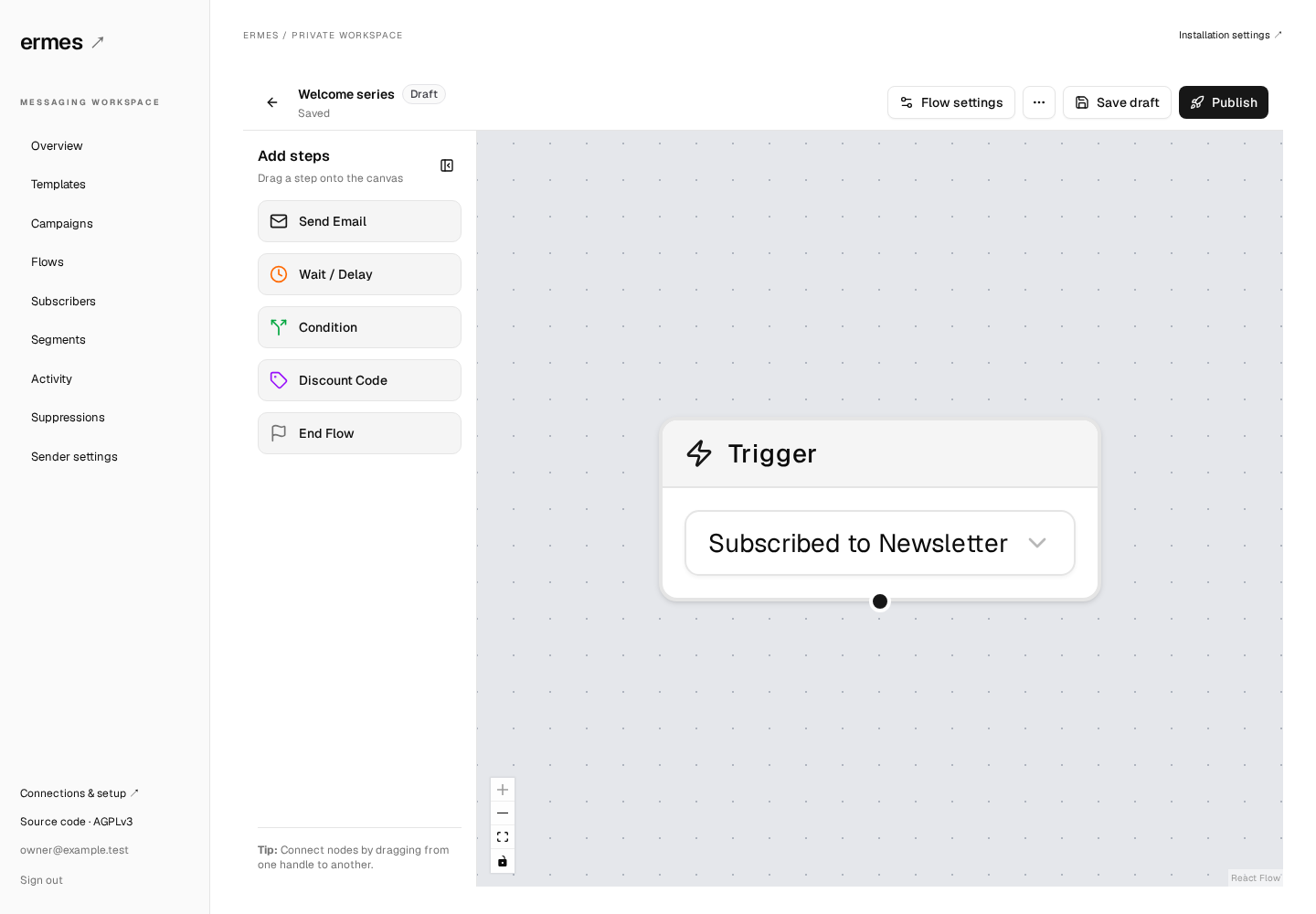
- Build customer journeys visually. Connect triggers, delays, conditions and email steps, then save drafts and publish versions deliberately.
- Use your own sending account. Resend is the first supported email provider.
- Run it with Docker. The web app, background worker and database run together with Docker Compose. No hosted Ermes account is required.
- Improve it with the community. The frontend, API and worker are available under AGPLv3. Hosting and email-provider costs are paid to the providers you choose.
Current capabilities
| Capability | Status |
|---|---|
| Owner setup, login and guided onboarding | Available |
| Template editing and previews | Available |
| Visual flow builder, drafts and versioned publishing | Available |
| Campaign management and scheduling | Available |
| Subscribers, segments, suppressions and activity | Available |
| Resend sending and signed delivery-event webhooks | Available; requires your provider configuration |
| Consent records, preferences and unsubscribe endpoints | Available |
| Encrypted integration credentials and a sending pause | Available |
| Image uploads and reusable image library | Available; requires your Cloudinary account |
| Guided Shopify connection and store import | Available for an app and store in the same Shopify organisation |
| Shopify order/customer/product syncing | Available; resumable imports and signed webhooks |
| Shopify abandoned-checkout ingestion and recovery checks | Available; current consent and purchase checks |
| Storefront visitor identification and cart tracking | Available for identified, consenting shoppers |
| Signup form editor and storefront extension | Available; published popup/flyout forms |
| SMS, multiple stores and hosted Ermes accounts | Not included |
The preview supports one store and one owner account per installation. If you are evaluating a self-hosted alternative to services such as Klaviyo, use the capability table above and the roadmap to assess whether Ermes fits your needs. This comparison does not imply feature parity or compatibility with Klaviyo-specific templates, flows or exports.
Quick start
You need Git and Docker with the Compose plugin. The commands below work in a Linux, macOS or WSL terminal. Docker builds the application from source; no npm registry account or prebuilt Ermes image is required.
git clone https://github.com/giaggiola/Ermes.git
cd Ermes

# Generate independent installation keys and a private .env file.
docker run --rm --user "$(id -u):$(id -g)" \
  -v "$PWD:/workspace" -w /workspace \
  node:22-alpine node scripts/setup.mjs

docker compose up --build -d
If you already have Node 22.12+, use node scripts/setup.mjs instead of the
docker run setup command. The helper preserves any existing .env file.
Open http://localhost:3025. The first build may take several minutes. Check startup with:
docker compose ps
docker compose logs --tail=100 web worker
Running on a remote server?
Keep the default APP_URL=http://localhost:3025 and open a tunnel from your own
computer, using the SSH destination you normally use:
ssh -N -L 3025:127.0.0.1:3025 user@your-server
Keep that terminal open and visit http://localhost:3025 in your local browser.
For a permanent domain, configure an HTTPS reverse proxy and set APP_URL to the
exact browser-facing origin. See self-hosting.
Onboard your store
- Create your owner account. Choose your email and a password of at least 12 characters. Registration closes automatically once the owner exists. Complete this step locally or through your SSH tunnel before exposing a new installation publicly.
- Connect Shopify with the guided setup. Follow the in-page app checklist, copy the supplied settings, and enter your store domain and app credentials. Connect store verifies access and imports your store details in one action. Review your sender, then choose Save and start syncing. Historical imports never send emails; delivery stays paused. You can also set up manually.
- Connect email delivery. Verify your sending domain in Resend, then enter
your API key. Configure the webhook at
https://your-ermes-domain/api/resend/webhookand save its signing secret. A local-only installation can explore the UI without these credentials. - Enable live events and storefront forms. Download the ready-made app configuration from setup and follow the Shopify guide to publish it with the theme extension. Open Shopify's theme editor from Ermes, enable Ermes signup forms, and save. Live callbacks need a public HTTPS Ermes address. Your app and store must belong to the same Shopify organisation.
- Explore with sending paused. Create templates, organise subscribers and save your first flow as a draft. Credentials are encrypted before storage and are never displayed again; blank credential fields preserve saved values.
- Enable delivery when ready. Confirm your sender domain is verified before enabling email delivery in setup. Published flows and due campaigns may then send real email. Test sends also require delivery to be enabled.
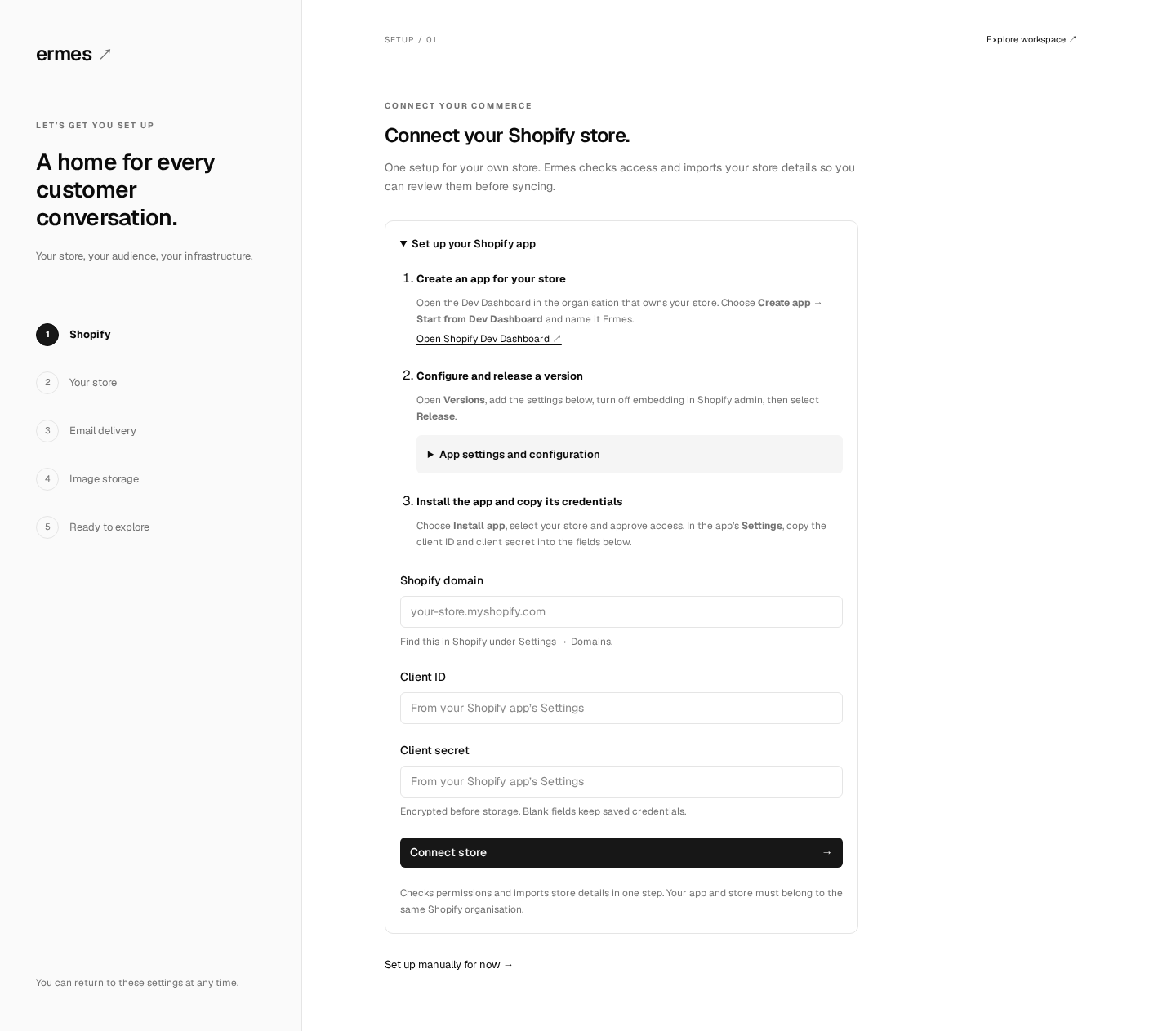
Read the onboarding guide for provider setup, configuration ownership and troubleshooting. Password reset, additional users and guided key rotation are not available yet.
To upload form images and sender logos, connect your Cloudinary account in the Image storage setup step. The image picker supports uploads and reuse from your Ermes image library. You can also keep using existing public image URLs.
Configuration
Deployment settings belong in .env; store and provider settings belong in the
onboarding UI. Start from the setup helper instead of inventing or reusing keys.
| Deployment variable | Purpose |
|---|---|
APP_URL | Exact browser-facing origin, such as https://messages.example.com |
ERMES_PORT | Local web port; defaults to 3025 |
POSTGRES_PASSWORD | Password for this installation's database |
ERMES_SETUP_TOKEN | Optional first-owner setup key; blank by default |
ERMES_ENCRYPTION_KEY | Encrypts stored provider credentials |
PREFERENCE_TOKEN_SECRET | Signs customer preference links |
OPS_MESSAGING_SHARED_SECRET | Internal admin API signing key; generated automatically |
COMMERCE_EVENT_WEBHOOK_SECRET | Commerce event API signing key; generated automatically |
DATABASE_URL is assembled by Compose. PostgreSQL is not exposed on a host port;
the web port binds to loopback by default. No credentials are included in this repo.
See .env.example and self-hosting.
Back up both the database and .env. Losing ERMES_ENCRYPTION_KEY makes stored
provider credentials unreadable. Replacing it is not a supported rotation procedure.
Architecture
apps/web       Next.js frontend, onboarding, sessions and HTTP API
apps/worker    Background automation and delivery workers
packages/core Flow contracts, templates, signing and queue definitions
packages/db   PostgreSQL persistence, migrations and installation settings
packages/ui   Reusable messaging screens and editors
packages/shopify Shopify API, imports, webhooks, recovery and consent
shopify-app    Source and assets for the Shopify theme extension
Ermes uses TypeScript, React, Next.js, PostgreSQL and pg-boss. The web process applies migrations before the worker starts. The UI can also be embedded in an existing application through a host-supplied API transport; see embedding.
Contributing
Ermes is being built as a self-hosted community project. Documentation improvements, reproducible bug reports and focused pull requests are welcome. Shopify event integration, onboarding and operational reliability are current priorities.
npm ci
npm test
npm run typecheck
npm run build
The database tests need a disposable database; see CONTRIBUTING.md for the full workflow, browser checks and contribution guidelines.
Use GitHub issues for bugs and feature
requests, and discussions for setup
questions and ideas. Report vulnerabilities privately as described in
SECURITY.md. Never attach .env, customer exports or provider keys.
License
Ermes is licensed under the GNU Affero General Public License v3.0 only
(AGPL-3.0-only). See LICENSE. Third-party components retain their own
licenses; see THIRD_PARTY_NOTICES.md.
Ermes is an independent community project. It is not affiliated with, endorsed by or sponsored by Klaviyo or Shopify. Third-party names are used to identify the respective products and services; their trademarks belong to their respective owners.
Similar repos


Languages
TypeScript
91.7%
JavaScript
5.7%
CSS
1.5%
Self-hosted, open-source email marketing and automation for Shopify. Campaigns, visual flows, subscribers and storefront forms. Developer preview.
TypeScript
0
6 commits
updated Sep 29, 2026
See what people are saying
README
Ermes
Open-source email marketing and automation for Shopify.
Ermes is a self-hosted, open-source email marketing application for Shopify. Build email campaigns, design automated customer journeys, manage subscribers and keep your messaging data on infrastructure you control.
One workspace for your audience, templates, campaigns and flows. Your own email provider. A community project you can inspect, extend and run yourself.
Early developer preview. The frontend, messaging engine and Shopify connector are available. Shopify syncing, storefront forms and email delivery require your own app/provider setup. This is a self-hosted project, not a Shopify App Store listing. See Shopify setup and the roadmap before planning a production installation.
Quick start · Onboarding · Server setup · Roadmap · Contributing
Why Ermes?
- Own your audience data. Subscriber records, consent, campaigns and delivery history live in your PostgreSQL database.
- Build customer journeys visually. Connect triggers, delays, conditions and email steps, then save drafts and publish versions deliberately.
- Use your own sending account. Resend is the first supported email provider.
- Run it with Docker. The web app, background worker and database run together with Docker Compose. No hosted Ermes account is required.
- Improve it with the community. The frontend, API and worker are available under AGPLv3. Hosting and email-provider costs are paid to the providers you choose.
Current capabilities
| Capability | Status |
|---|---|
| Owner setup, login and guided onboarding | Available |
| Template editing and previews | Available |
| Visual flow builder, drafts and versioned publishing | Available |
| Campaign management and scheduling | Available |
| Subscribers, segments, suppressions and activity | Available |
| Resend sending and signed delivery-event webhooks | Available; requires your provider configuration |
| Consent records, preferences and unsubscribe endpoints | Available |
| Encrypted integration credentials and a sending pause | Available |
| Image uploads and reusable image library | Available; requires your Cloudinary account |
| Guided Shopify connection and store import | Available for an app and store in the same Shopify organisation |
| Shopify order/customer/product syncing | Available; resumable imports and signed webhooks |
| Shopify abandoned-checkout ingestion and recovery checks | Available; current consent and purchase checks |
| Storefront visitor identification and cart tracking | Available for identified, consenting shoppers |
| Signup form editor and storefront extension | Available; published popup/flyout forms |
| SMS, multiple stores and hosted Ermes accounts | Not included |
The preview supports one store and one owner account per installation. If you are evaluating a self-hosted alternative to services such as Klaviyo, use the capability table above and the roadmap to assess whether Ermes fits your needs. This comparison does not imply feature parity or compatibility with Klaviyo-specific templates, flows or exports.
Quick start
You need Git and Docker with the Compose plugin. The commands below work in a Linux, macOS or WSL terminal. Docker builds the application from source; no npm registry account or prebuilt Ermes image is required.
git clone https://github.com/giaggiola/Ermes.git
cd Ermes

# Generate independent installation keys and a private .env file.
docker run --rm --user "$(id -u):$(id -g)" \
  -v "$PWD:/workspace" -w /workspace \
  node:22-alpine node scripts/setup.mjs

docker compose up --build -d
If you already have Node 22.12+, use node scripts/setup.mjs instead of the
docker run setup command. The helper preserves any existing .env file.
Open http://localhost:3025. The first build may take several minutes. Check startup with:
docker compose ps
docker compose logs --tail=100 web worker
Running on a remote server?
Keep the default APP_URL=http://localhost:3025 and open a tunnel from your own
computer, using the SSH destination you normally use:
ssh -N -L 3025:127.0.0.1:3025 user@your-server
Keep that terminal open and visit http://localhost:3025 in your local browser.
For a permanent domain, configure an HTTPS reverse proxy and set APP_URL to the
exact browser-facing origin. See self-hosting.
Onboard your store
- Create your owner account. Choose your email and a password of at least 12 characters. Registration closes automatically once the owner exists. Complete this step locally or through your SSH tunnel before exposing a new installation publicly.
- Connect Shopify with the guided setup. Follow the in-page app checklist, copy the supplied settings, and enter your store domain and app credentials. Connect store verifies access and imports your store details in one action. Review your sender, then choose Save and start syncing. Historical imports never send emails; delivery stays paused. You can also set up manually.
- Connect email delivery. Verify your sending domain in Resend, then enter
your API key. Configure the webhook at
https://your-ermes-domain/api/resend/webhookand save its signing secret. A local-only installation can explore the UI without these credentials. - Enable live events and storefront forms. Download the ready-made app configuration from setup and follow the Shopify guide to publish it with the theme extension. Open Shopify's theme editor from Ermes, enable Ermes signup forms, and save. Live callbacks need a public HTTPS Ermes address. Your app and store must belong to the same Shopify organisation.
- Explore with sending paused. Create templates, organise subscribers and save your first flow as a draft. Credentials are encrypted before storage and are never displayed again; blank credential fields preserve saved values.
- Enable delivery when ready. Confirm your sender domain is verified before enabling email delivery in setup. Published flows and due campaigns may then send real email. Test sends also require delivery to be enabled.
Read the onboarding guide for provider setup, configuration ownership and troubleshooting. Password reset, additional users and guided key rotation are not available yet.
To upload form images and sender logos, connect your Cloudinary account in the Image storage setup step. The image picker supports uploads and reuse from your Ermes image library. You can also keep using existing public image URLs.
Configuration
Deployment settings belong in .env; store and provider settings belong in the
onboarding UI. Start from the setup helper instead of inventing or reusing keys.
| Deployment variable | Purpose |
|---|---|
APP_URL | Exact browser-facing origin, such as https://messages.example.com |
ERMES_PORT | Local web port; defaults to 3025 |
POSTGRES_PASSWORD | Password for this installation's database |
ERMES_SETUP_TOKEN | Optional first-owner setup key; blank by default |
ERMES_ENCRYPTION_KEY | Encrypts stored provider credentials |
PREFERENCE_TOKEN_SECRET | Signs customer preference links |
OPS_MESSAGING_SHARED_SECRET | Internal admin API signing key; generated automatically |
COMMERCE_EVENT_WEBHOOK_SECRET | Commerce event API signing key; generated automatically |
DATABASE_URL is assembled by Compose. PostgreSQL is not exposed on a host port;
the web port binds to loopback by default. No credentials are included in this repo.
See .env.example and self-hosting.
Back up both the database and .env. Losing ERMES_ENCRYPTION_KEY makes stored
provider credentials unreadable. Replacing it is not a supported rotation procedure.
Architecture
apps/web       Next.js frontend, onboarding, sessions and HTTP API
apps/worker    Background automation and delivery workers
packages/core Flow contracts, templates, signing and queue definitions
packages/db   PostgreSQL persistence, migrations and installation settings
packages/ui   Reusable messaging screens and editors
packages/shopify Shopify API, imports, webhooks, recovery and consent
shopify-app    Source and assets for the Shopify theme extension
Ermes uses TypeScript, React, Next.js, PostgreSQL and pg-boss. The web process applies migrations before the worker starts. The UI can also be embedded in an existing application through a host-supplied API transport; see embedding.
Contributing
Ermes is being built as a self-hosted community project. Documentation improvements, reproducible bug reports and focused pull requests are welcome. Shopify event integration, onboarding and operational reliability are current priorities.
npm ci
npm test
npm run typecheck
npm run build
The database tests need a disposable database; see CONTRIBUTING.md for the full workflow, browser checks and contribution guidelines.
Use GitHub issues for bugs and feature
requests, and discussions for setup
questions and ideas. Report vulnerabilities privately as described in
SECURITY.md. Never attach .env, customer exports or provider keys.
License
Ermes is licensed under the GNU Affero General Public License v3.0 only
(AGPL-3.0-only). See LICENSE. Third-party components retain their own
licenses; see THIRD_PARTY_NOTICES.md.
Ermes is an independent community project. It is not affiliated with, endorsed by or sponsored by Klaviyo or Shopify. Third-party names are used to identify the respective products and services; their trademarks belong to their respective owners.
Similar repos
Languages
TypeScript
91.7%
JavaScript
5.7%
CSS
1.5%