You can search through GitHub (gh) and your GitHub Enterprise Cloud/self-hosted instance (ghe).
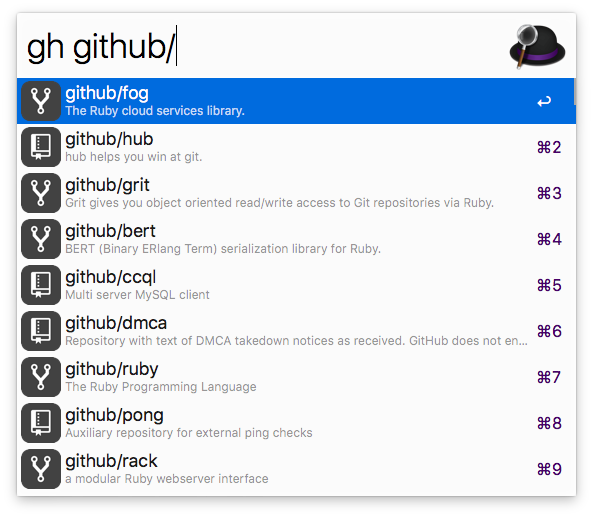
This workflow requires PHP, which is no longer pre-installed since macOS 12 Montery.
You can install it via Homebrew (brew install php).
In Alfred type gh > login to authenticate against your account. The login uses OAuth, so you do not have to enter your credentials.
ghe > url https://github.com/enterprises/<enterprise-slug>.ghe > generate token or https://github.com/settings/tokens). It only needs access to your repos. If your enterprise enforces SAML SSO, make sure to authorize the token for the relevant organizations.ghe > login <paste token here>)ghe your_enterprise_repo_nameghe > url https://github.mycompany.comghe > generate token or https://github.mycompany.com/settings/applications). It only needs access to your repos. Copy this token to your clipboard.ghe > login <paste token here>)ghe your_enterprise_repo_nameOrganizations must approve this app, otherwise private repositories of that organization can not be accessed. Access can be requested here.
| Key Combination | Action |
|---|---|
enter | Open entry in default browser |
cmd + c | Copy URL of the entry |
cmd + enter | Paste URL to front most app |
shift or cmd + y | Open URL in QuickLook |
To search through your GitHub Enterprise instance replace gh by ghe.
gh user/repogh user/repo #123gh user/repo @branchgh user/repo *commitgh user/repo /path/to/filegh user/repo actionsgh user/repo admingh user/repo clonegh user/repo devgh user/repo discussionsgh user/repo graphsgh user/repo issuesgh user/repo milestonesgh user/repo networkgh user/repo new issuegh user/repo new pullgh user/repo projectsgh user/repo pullsgh user/repo pulsegh user/repo releasesgh user/repo wikigh user/repo projectsgh @usergh @user overviewgh @user repositoriesgh @user starsgh @user gistsgh s repogh s @usergh my dashboardgh my notificationsgh my profilegh my issuesgh my issues createdgh my issues assignedgh my issues mentionedgh my pullsgh my pulls createdgh my pulls assignedgh my pulls mentionedgh my pulls review requestedgh my reposgh my repos newgh my settingsgh my starsgh my gistsgh > logingh > logoutgh > delete cachegh > delete databasegh > updategh > activate autoupdategh > deactivate autoupdategh > helpgh > changelogghe > url (GitHub Enterprise only)ghe > generate token (GitHub Enterprise only)ghe > enterprise reset (GitHub Enterprise only)(top 24 of 27)
306 followers · starred Dec 2017
472 followers · starred Feb 2014
1,930 followers · starred Jun 2022
572 followers · starred Feb 2019
You can search through GitHub (gh) and your GitHub Enterprise Cloud/self-hosted instance (ghe).
This workflow requires PHP, which is no longer pre-installed since macOS 12 Montery.
You can install it via Homebrew (brew install php).
In Alfred type gh > login to authenticate against your account. The login uses OAuth, so you do not have to enter your credentials.
ghe > url https://github.com/enterprises/<enterprise-slug>.ghe > generate token or https://github.com/settings/tokens). It only needs access to your repos. If your enterprise enforces SAML SSO, make sure to authorize the token for the relevant organizations.ghe > login <paste token here>)ghe your_enterprise_repo_nameghe > url https://github.mycompany.comghe > generate token or https://github.mycompany.com/settings/applications). It only needs access to your repos. Copy this token to your clipboard.ghe > login <paste token here>)ghe your_enterprise_repo_nameOrganizations must approve this app, otherwise private repositories of that organization can not be accessed. Access can be requested here.
| Key Combination | Action |
|---|---|
enter | Open entry in default browser |
cmd + c | Copy URL of the entry |
cmd + enter | Paste URL to front most app |
shift or cmd + y | Open URL in QuickLook |
To search through your GitHub Enterprise instance replace gh by ghe.
gh user/repogh user/repo #123gh user/repo @branchgh user/repo *commitgh user/repo /path/to/filegh user/repo actionsgh user/repo admingh user/repo clonegh user/repo devgh user/repo discussionsgh user/repo graphsgh user/repo issuesgh user/repo milestonesgh user/repo networkgh user/repo new issuegh user/repo new pullgh user/repo projectsgh user/repo pullsgh user/repo pulsegh user/repo releasesgh user/repo wikigh user/repo projectsgh @usergh @user overviewgh @user repositoriesgh @user starsgh @user gistsgh s repogh s @usergh my dashboardgh my notificationsgh my profilegh my issuesgh my issues createdgh my issues assignedgh my issues mentionedgh my pullsgh my pulls createdgh my pulls assignedgh my pulls mentionedgh my pulls review requestedgh my reposgh my repos newgh my settingsgh my starsgh my gistsgh > logingh > logoutgh > delete cachegh > delete databasegh > updategh > activate autoupdategh > deactivate autoupdategh > helpgh > changelogghe > url (GitHub Enterprise only)ghe > generate token (GitHub Enterprise only)ghe > enterprise reset (GitHub Enterprise only)(top 24 of 27)
306 followers · starred Dec 2017
472 followers · starred Feb 2014
1,930 followers · starred Jun 2022
572 followers · starred Feb 2019