An easy to use on-screen annotation software inspired by Epic Pen.
C#
2,602
289 commits
updated Feb 11, 2025
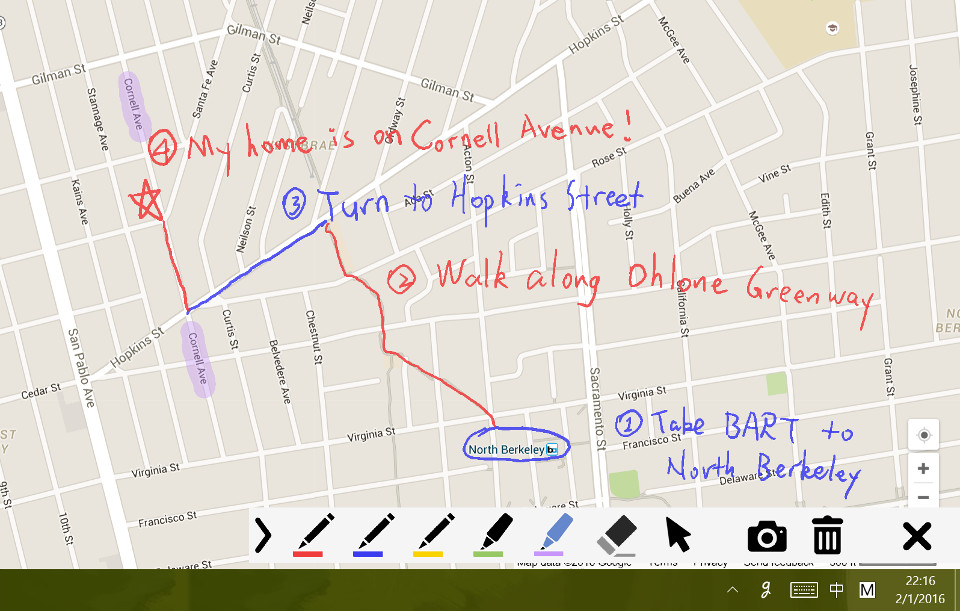
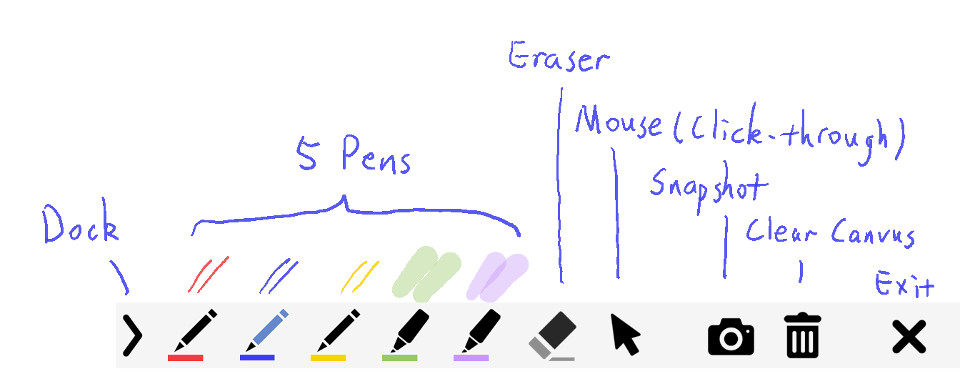
gInk is an on-screen annotation software under Windows, used to help improving my presentations and demonstrations, and to help working on temperary thoughts which need to be noted beside something on the screen. The features are greatly inspired by another screen annotation software Epic Pen, but even more easy to use. gInk is made with the idea kept in mind that the interface should be as simple as possible and should not distract attention of both the presenter and the audience when used for presentations. Unlike in many other softwares in the same category, you select from pens to draw things instead of changing individual settings of color, transparency and tip width everytime. Each pen is a combination of these attributes and is configurable to your need.
https://github.com/geovens/gInk/releases/
Start gInk and an icon will appear in the system tray. Click the icon (or use a hotkey) to start drawing on screen.
Click the exit button or press ESC to exit drawing.
gInk supports multiple languages now. Here is how you can contribute translation. Simply create a duplication of the file "en-us.txt" in "bin/lang" folder, rename it and then translate the strings in the file. Check in gInk to make sure your translation shows correctly, and then you can make a pull request to merge your translation to the next version of release for others to use.
gInk
https://github.com/geovens/gInk
Weizhi Nai @ 2020
210 followers · starred Mar 2025
185 followers · starred Oct 2020
36 followers · starred Mar 2021
214 followers · starred Mar 2018
An easy to use on-screen annotation software inspired by Epic Pen.
C#
2,602
289 commits
updated Feb 11, 2025
gInk is an on-screen annotation software under Windows, used to help improving my presentations and demonstrations, and to help working on temperary thoughts which need to be noted beside something on the screen. The features are greatly inspired by another screen annotation software Epic Pen, but even more easy to use. gInk is made with the idea kept in mind that the interface should be as simple as possible and should not distract attention of both the presenter and the audience when used for presentations. Unlike in many other softwares in the same category, you select from pens to draw things instead of changing individual settings of color, transparency and tip width everytime. Each pen is a combination of these attributes and is configurable to your need.
https://github.com/geovens/gInk/releases/
Start gInk and an icon will appear in the system tray. Click the icon (or use a hotkey) to start drawing on screen.
Click the exit button or press ESC to exit drawing.
gInk supports multiple languages now. Here is how you can contribute translation. Simply create a duplication of the file "en-us.txt" in "bin/lang" folder, rename it and then translate the strings in the file. Check in gInk to make sure your translation shows correctly, and then you can make a pull request to merge your translation to the next version of release for others to use.
gInk
https://github.com/geovens/gInk
Weizhi Nai @ 2020
210 followers · starred Mar 2025
185 followers · starred Oct 2020
36 followers · starred Mar 2021
214 followers · starred Mar 2018