Google's Security extension for the Gemini CLI that finds vulnerabilities in your code changes and pull requests.
TypeScript
795
218 commits
updated Jul 25, 2026
The Security extension is an open-source Gemini CLI extension, built to enhance your repository's security posture. The extension adds a new command to Gemini CLI that analyzes code changes to identify a variety of security risks and vulnerabilities.
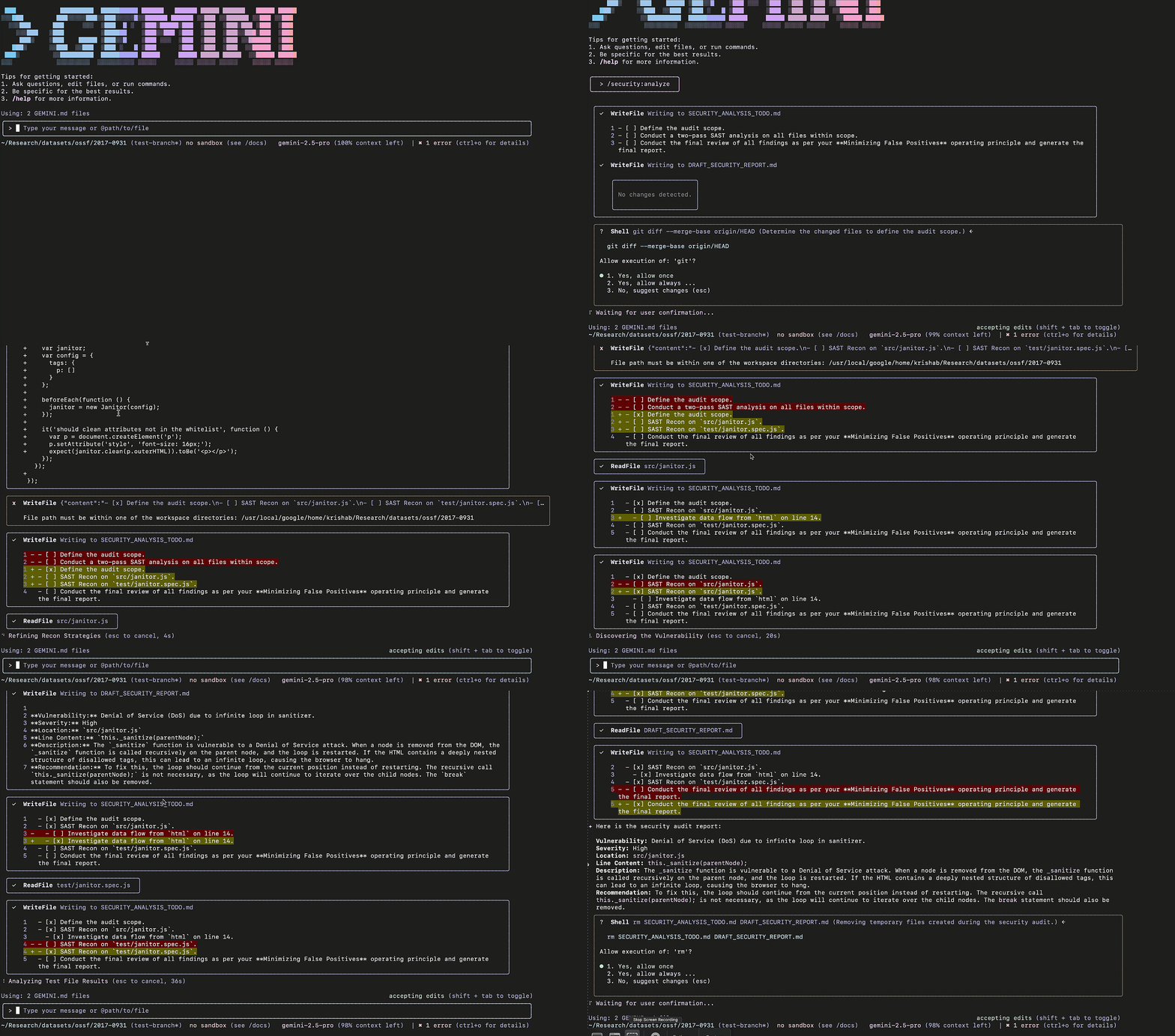
Install the Security extension by running the following command from your terminal (requires Gemini CLI v0.4.0 or newer):
gemini extensions install https://github.com/gemini-cli-extensions/security
The Security extension adds the /security:analyze command to Gemini CLI which analyzes code changes on your current branch for common security vulnerabilities and provides an intelligent, Gemini-powered security report to improve the repository's security posture.
Important: This report is a first-pass analysis, not a complete security audit. Use in combination with other tools and manual review.
Note: The /security:analyze command is currently designed for interactive use. Support for non-interactive sessions is planned for a future release (tracked in issue #20).
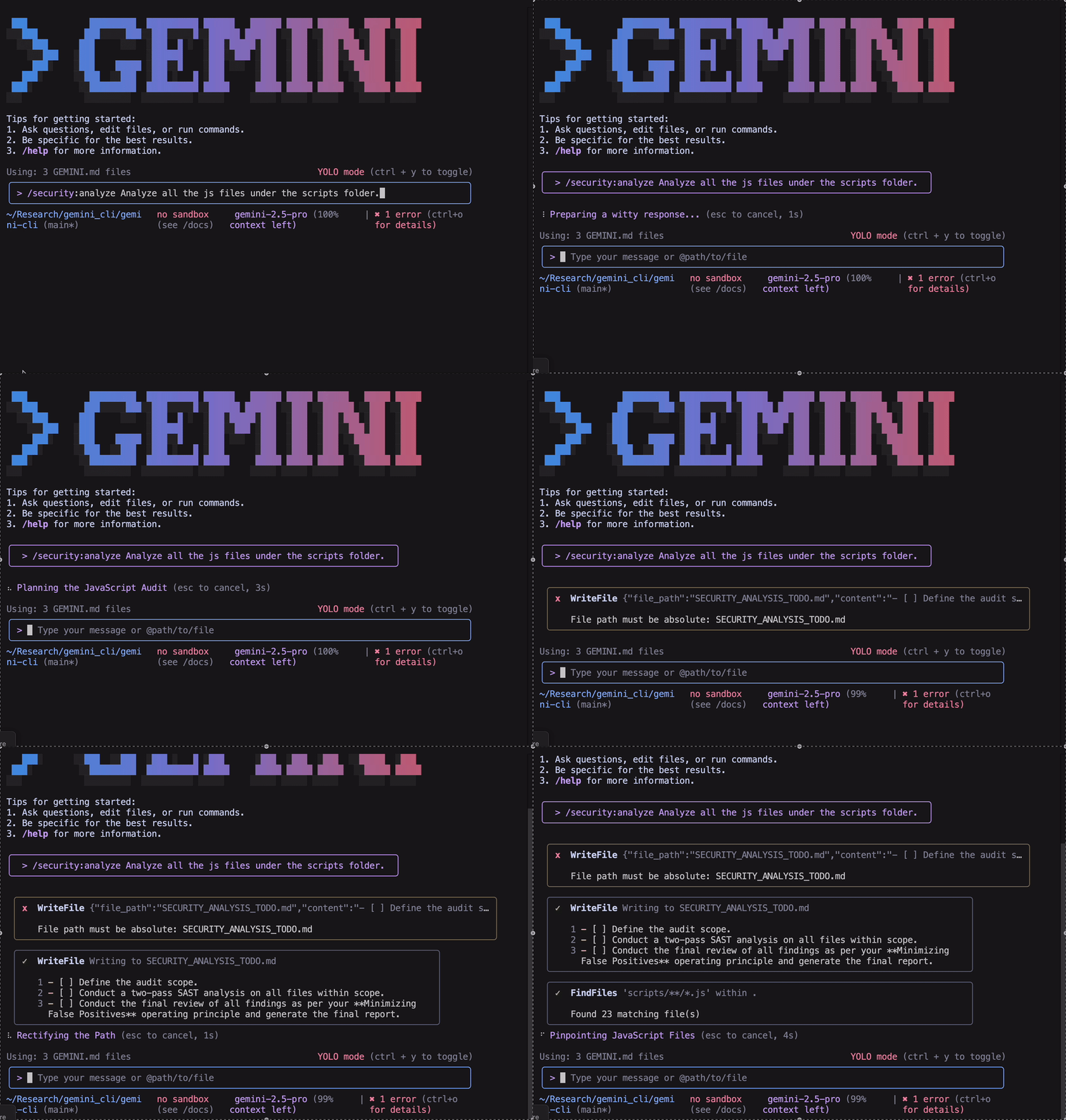
/security:analyze commandBy default, the /security:analyze command determines the scope of the analysis using git diff --merge-base origin/HEAD. However, to customize the scope, you can add instructions to the command using natural language. For example, to analyze all files in scripts folder, you can run the command as
/security:analyze Analyze all the source code under the script folder. Skip the docs, config files and package files.
To get the security report in JSON format, you can use the --json flag or request JSON output using natural language:
/security:analyze --json
Or alternatively:
/security:analyze Return the report in JSON format.
Modern software is built on open-source dependencies, but this can introduce security risks if a dependency contains vulnerabilities.
Regularly running a dependency scan is a critical step in securing your software supply chain and protecting your project from well-known attack vectors.
The /security:scan-deps command automates this process by integrating OSV-Scanner, a tool that cross-references your project's dependencies with OSV.dev, a Google-maintained, open-source vulnerability database. OSV.dev provides precise vulnerability data by aggregating information from a wide range of open-source ecosystems, ensuring comprehensive and reliable security advisories.
To run a dependency scan, use the following command:
/security:scan-deps
After running the command, you will receive a report listing:
gemini-review.yml with this updated workflow, which includes the new Security Analysis step.Integrate the Gemini CLI Security Extension into your GitHub workflow to analyze incoming code:
Follow Steps 1-3 in this Quick Start.
Create a .github/workflows directory in your repository's root (if it doesn't already exist).
Copy this Example Workflow into the .github/workflows directory. See the run-gemini-cli configuration to make changes to the workflow.
Ensure the new workflow file is committed and pushed to GitHub.
Open a new pull request, or comment @gemini-cli /review on an existing PR, to run the Gemini CLI Code Review along with Security Analysis.
To evaluate the quality and effectiveness of our security analysis, we benchmarked the extension against a real-world dataset of known vulnerabilities.
Our evaluation process is designed to test the extension's ability to identify vulnerabilities in code changes.
prePatch) and the commit where the vulnerability was fixed (postPatch)./security:analyze command on this diff to generate a security report.We are now actively working to automate the evaluation framework and enrich our datasets by adding new classes of vulnerabilities.
Our evaluation on this dataset yielded a precision of 90% and a recall of 93%.
The Security extension scans files for the following vulnerabilities:
eval(). Also flags code where security-sensitive decisions are based on unvalidated LLM output.2,360 followers · starred Nov 2025
228 followers · starred Nov 2025
214 followers · starred Sep 2025
123 followers · starred Sep 2025
Google's Security extension for the Gemini CLI that finds vulnerabilities in your code changes and pull requests.
TypeScript
795
218 commits
updated Jul 25, 2026
The Security extension is an open-source Gemini CLI extension, built to enhance your repository's security posture. The extension adds a new command to Gemini CLI that analyzes code changes to identify a variety of security risks and vulnerabilities.
Install the Security extension by running the following command from your terminal (requires Gemini CLI v0.4.0 or newer):
gemini extensions install https://github.com/gemini-cli-extensions/security
The Security extension adds the /security:analyze command to Gemini CLI which analyzes code changes on your current branch for common security vulnerabilities and provides an intelligent, Gemini-powered security report to improve the repository's security posture.
Important: This report is a first-pass analysis, not a complete security audit. Use in combination with other tools and manual review.
Note: The /security:analyze command is currently designed for interactive use. Support for non-interactive sessions is planned for a future release (tracked in issue #20).
/security:analyze commandBy default, the /security:analyze command determines the scope of the analysis using git diff --merge-base origin/HEAD. However, to customize the scope, you can add instructions to the command using natural language. For example, to analyze all files in scripts folder, you can run the command as
/security:analyze Analyze all the source code under the script folder. Skip the docs, config files and package files.
To get the security report in JSON format, you can use the --json flag or request JSON output using natural language:
/security:analyze --json
Or alternatively:
/security:analyze Return the report in JSON format.
Modern software is built on open-source dependencies, but this can introduce security risks if a dependency contains vulnerabilities.
Regularly running a dependency scan is a critical step in securing your software supply chain and protecting your project from well-known attack vectors.
The /security:scan-deps command automates this process by integrating OSV-Scanner, a tool that cross-references your project's dependencies with OSV.dev, a Google-maintained, open-source vulnerability database. OSV.dev provides precise vulnerability data by aggregating information from a wide range of open-source ecosystems, ensuring comprehensive and reliable security advisories.
To run a dependency scan, use the following command:
/security:scan-deps
After running the command, you will receive a report listing:
gemini-review.yml with this updated workflow, which includes the new Security Analysis step.Integrate the Gemini CLI Security Extension into your GitHub workflow to analyze incoming code:
Follow Steps 1-3 in this Quick Start.
Create a .github/workflows directory in your repository's root (if it doesn't already exist).
Copy this Example Workflow into the .github/workflows directory. See the run-gemini-cli configuration to make changes to the workflow.
Ensure the new workflow file is committed and pushed to GitHub.
Open a new pull request, or comment @gemini-cli /review on an existing PR, to run the Gemini CLI Code Review along with Security Analysis.
To evaluate the quality and effectiveness of our security analysis, we benchmarked the extension against a real-world dataset of known vulnerabilities.
Our evaluation process is designed to test the extension's ability to identify vulnerabilities in code changes.
prePatch) and the commit where the vulnerability was fixed (postPatch)./security:analyze command on this diff to generate a security report.We are now actively working to automate the evaluation framework and enrich our datasets by adding new classes of vulnerabilities.
Our evaluation on this dataset yielded a precision of 90% and a recall of 93%.
The Security extension scans files for the following vulnerabilities:
eval(). Also flags code where security-sensitive decisions are based on unvalidated LLM output.2,360 followers · starred Nov 2025
228 followers · starred Nov 2025
214 followers · starred Sep 2025
123 followers · starred Sep 2025