
See what people are saying
README

Skytail
An endless flight with the Coyotiv mascot.
One TypeScript codebase. Runs in the browser, and compiles ahead of time to native macOS and Xbox apps with no JavaScript engine.




Fly over a ring-shaped world that is generated as you go. Collect yellow stars to keep your energy up, dodge red bombs, and see how far you get. Each level is one full day: you take off at dawn and fly through noon, dusk and a starlit night before the sun comes up again.
Skytail builds on Karim Maaloul's 2016 Codrops tutorial The Aviator. It keeps the original game's idea and rebuilds everything else: a deterministic world generator, a mascot that moves on spring physics, a day-night sky, a reactive sound mix, and a native build pipeline.
Gallery
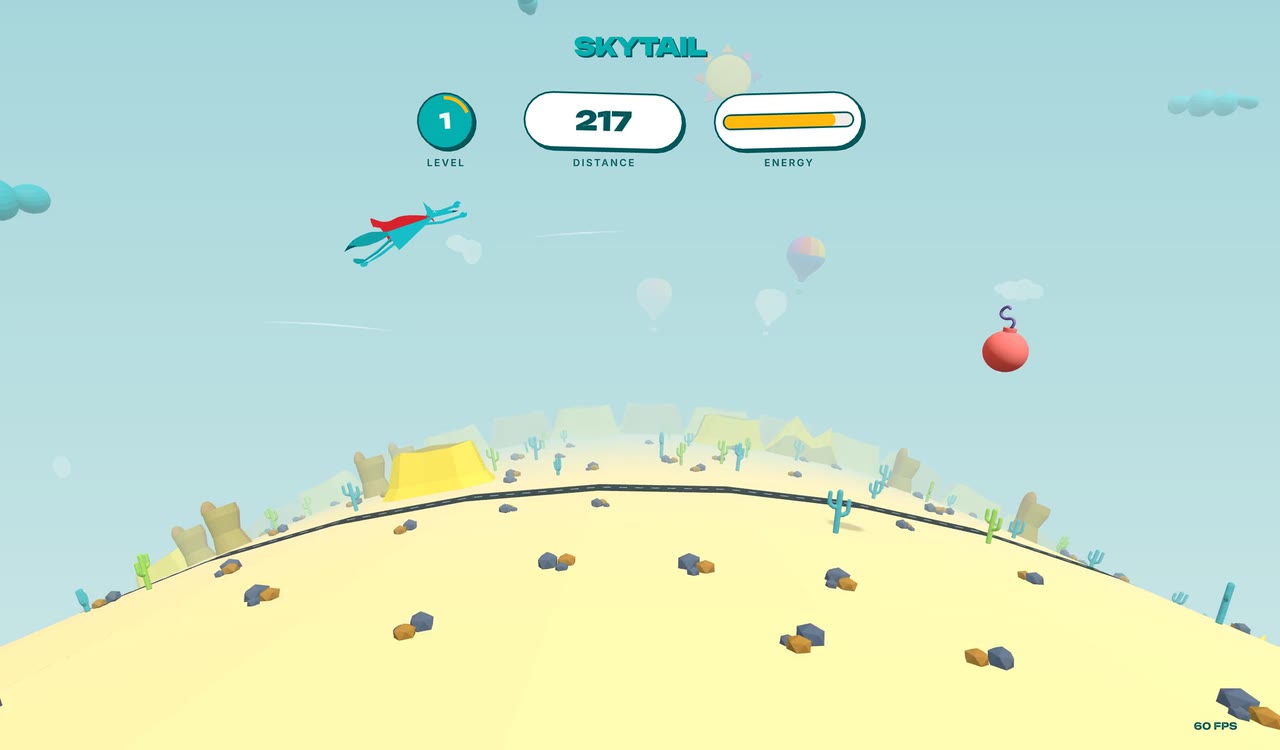 | 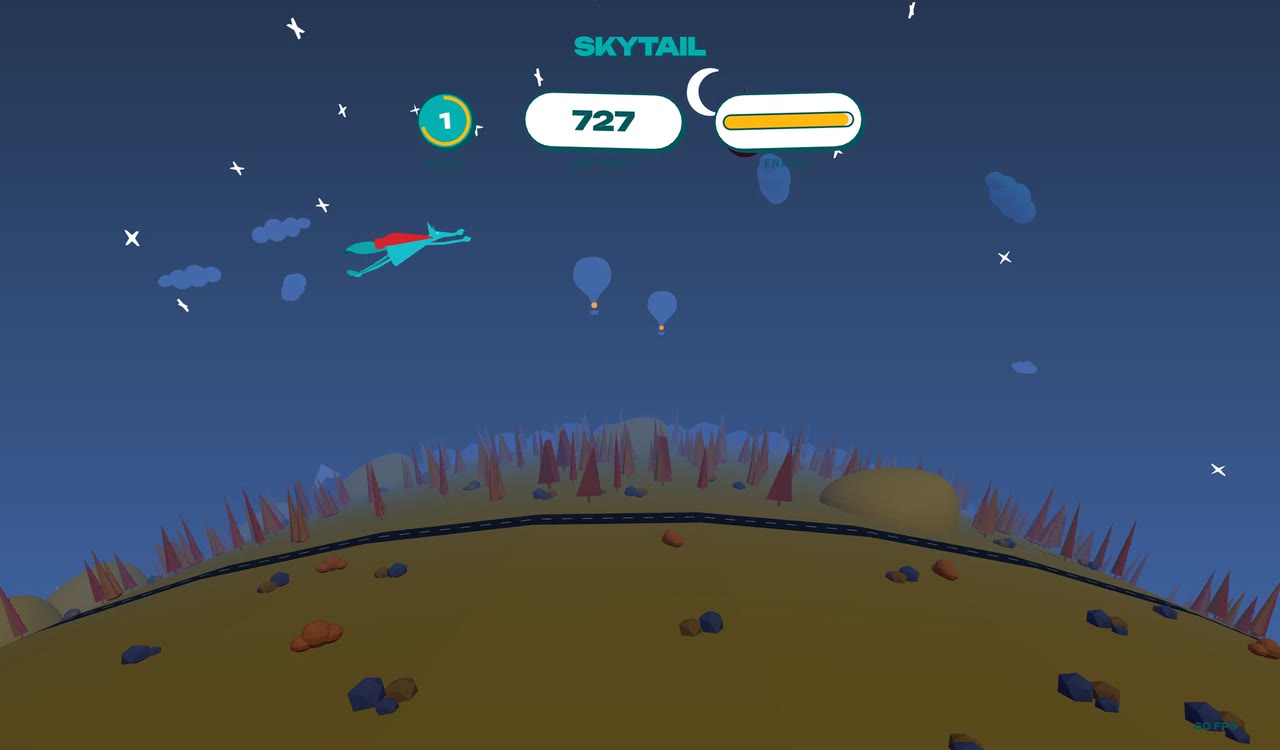 |
| Desert at noon | Midnight. The stars come out and the balloon burners glow. |
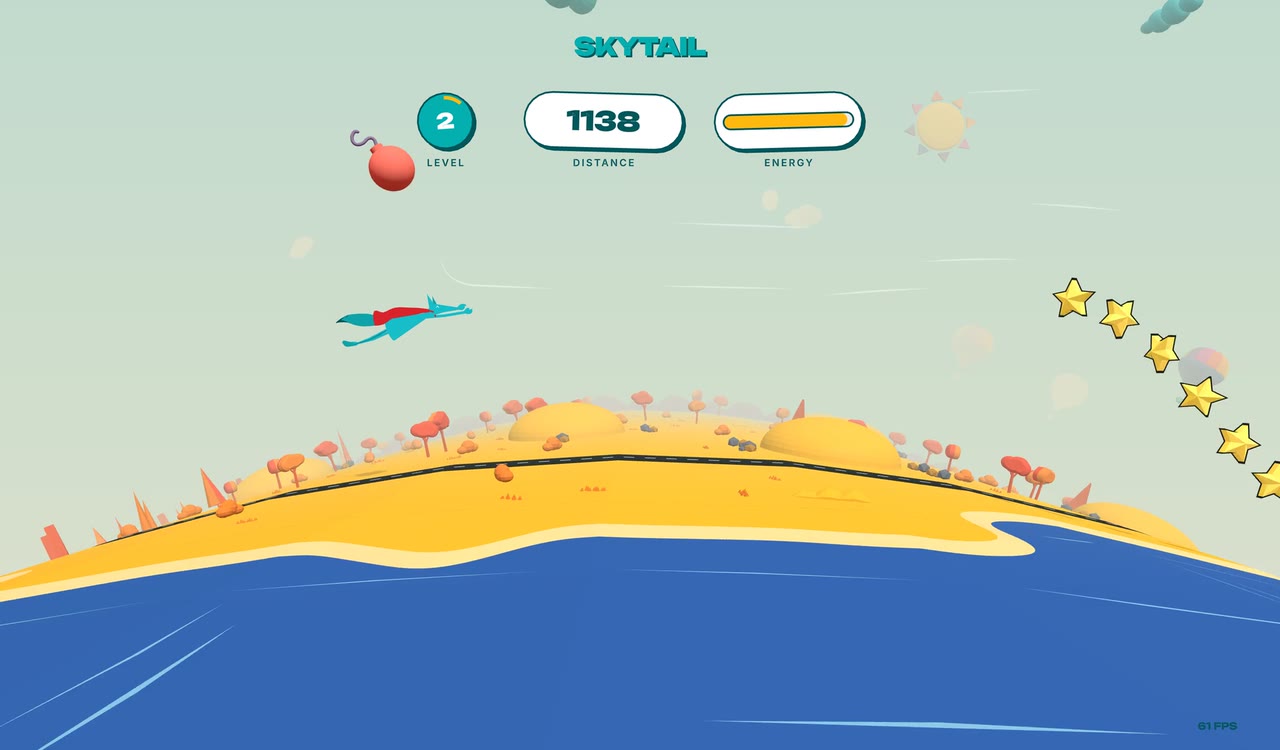 | 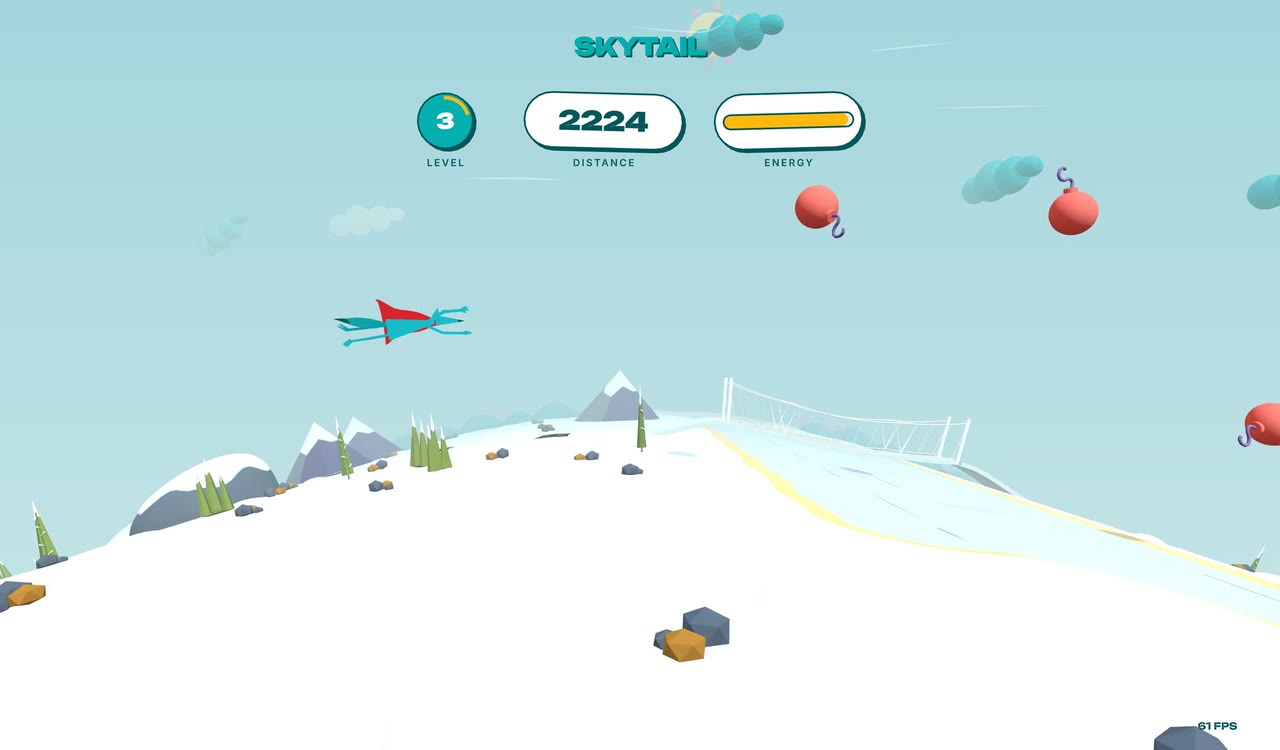 |
| An autumn coast on level 2 | Winter on level 3, with a suspension bridge on the right |
How to play
Your energy drains the whole time you fly. Each star gives back 3 points and each bomb you hit takes 10. When your energy runs out, the game ends.
- Steer with the mouse, the arrow keys or WASD, or a gamepad's left stick. Gamepads work in the browser and on Xbox. Release the stick before you switch to the mouse or keyboard.
- Start or replay with Space, Enter, R, a click or the A button.
- Do a barrel roll with F or the Y button. Collect every star in a wave and the mascot rolls on its own.
- Every 1,000 units of distance is a new level. Speed rises during a level, then resets to a slightly higher starting speed at the next one. Each level sends bigger bomb waves.
Under the hood
One codebase, three platforms
The game, world, HUD and render loop live in src/ and are shared by
every platform. Each platform only adds a thin entry point.
flowchart LR
  game["Game code in src/<br/>TypeScript + three.js"]
  game --> web["web/main.ts<br/>Vite build"] --> browser["Browser<br/>WebGL"]
  game --> mac["index.tsx<br/>gea build --target macos"] --> macos["macOS app<br/>C++ · ANGLE · Metal"]
  game --> xbox["xbox/index.ts<br/>npm run build:xbox"] --> console["Xbox app<br/>C++ · UWP · ANGLE"]
- The same three.js renderer on every platform. On native builds,
src/native-app.tscreates a native WebGL 2 context and passes it to the unmodified three.jsWebGLRenderer. GeaStack's@geastack/native-webgl-anglehost provides the context through ANGLE, which runs on Metal on macOS. - The window is TSX.
src/app.tsxbuilds the macOS view tree with<NSView>elements from@geastack/apple. - Web Audio without a browser. The sound code uses standard Web Audio calls.
On native builds, GeaStack provides a Web Audio-shaped graph engine: it renders
through
AVAudioSourceNodeon macOS and XAudio2 on Xbox. - Text without a browser. The browser version draws text with troika-three-text. Native builds swap in pre-baked glyph atlases for Inter and Unbounded.
- Xbox renders at 4K.
xbox/three_uwp_main.cppis a C++/CX app that renders at a fixed 3840×2160. It reads the gamepad throughWindows.Gaming.Input.
A world generated as you fly
src/worldgen/ builds the world one cell at a time, just before
it comes into view.
- Climate first. Four noise fields (temperature, moisture, relief and detail) come from a custom 2D simplex noise with no permutation table.
- Biomes in stretches. The world is a chain of stretches, each 32 to 48 columns wide. Temperature weights the biome choice: alpine leans cold and desert leans hot. An adjacency table keeps neighbours sensible, so desert never borders conifer forest. Borders wander along noise-warped lines, and the ground colour, tree density and species blend across them.
- Seasons roll across the map. Each season lasts 400 columns. Snow cover is computed from the climate temperature, the season and the biome.
- Regions with a plan. Every 64 columns there's a chance of a river with a suspension bridge where the road crosses it, and a campsite with tents, log seats and a campfire. The road winds through a dry corridor and joins up across region borders.
- A skyline that never breaks. Distant ridges and mesas are placed so that each border has exactly one owner, which leaves no gaps on the horizon.
Run it in your browser
You need Node.js 22.15 or later.
git clone https://github.com/coyotiv/skytail.git
cd skytail
npm ci
npm --prefix web ci
npm run dev
Open the local URL that Vite prints.
The browser version lives in web/ and has its own package.json. That
is why there are two install commands.
To make a production build in web/dist/ and preview it:
npm run build
npm run preview
Build the macOS app
You need the Xcode Command Line Tools (xcode-select --install). Run this from
the repository root:
npx gea build --target macos
open dist/macos/skytail/Skytail.app
gea is the GeaStack CLI. It compiles the game, three.js included, to C++ and
builds a native app. The first build can take 15 minutes or more.
Build for Xbox
Xbox builds run on a remote Windows build host and are installed on an Xbox in Developer Mode. The local machine needs bash, SSH, SCP and tar. The Windows build host needs:
- Visual Studio 2026 with the C++ and UWP tools
- clang-cl and CMake
- Windows SDK 10.0.26100.0
- The UWP ANGLE DLLs
libEGL.dll,libGLESv2.dllandd3dcompiler_47.dll
Build with your own host and directories:
npm run build:xbox -- --host build-host --remote-dir C:/skytail-build --angle-dir C:/uwp-angle
--hostis the SSH host of the Windows build machine.--remote-diris the build directory on that host. Use an absolute path with forward slashes and no spaces.--angle-diris the directory on that host that contains the UWP ANGLE DLLs.
You can also set GEA_XBOX_BUILD_HOST, GEA_XBOX_BUILD_DIR and
GEA_XBOX_ANGLE_DIR instead of passing the flags.
To only generate and stage the build inputs locally, without the remote build:
npm run build:xbox -- --stage-only
To install and start the game on your Xbox, set GEA_XBOX_AUTH to your Device
Portal credentials as username:password, then run:
npm run deploy:xbox -- --xbox xbox-address
You can set GEA_XBOX_HOST instead of passing --xbox.
Development
| Command | What it does |
|---|---|
npm run dev | Starts the browser version with live reload |
npm test | Runs the unit tests with Vitest |
npm run check | Type-checks the game |
npm run check:native | Type-checks the code used by the native builds |
npm --prefix web run check | Type-checks the browser entry point |
The code is in src/:
| Directory | Contents |
|---|---|
game/ | Game loop, energy, levels, and star and bomb waves |
actors/ | The flying mascot, stars, bombs and particles |
world/ | Terrain ring, sky, lighting, wind and the day-night cycle |
worldgen/ | Procedural generation of terrain, roads, rivers and scenery |
hud/ | Title screen, distance, energy and level display |
io/ | Input and audio |
kit/ | The 121 embedded low-poly models |
config.ts | Gameplay tuning values such as speed, distances and pools |
The browser entry point is web/main.ts. The native entry point
is index.tsx. The Xbox host code is in xbox/.
Credits
Skytail builds on The Aviator by Karim Maaloul, published with Codrops in 2016.
The models and favicon come from Coyotiv. The audio was generated with ElevenLabs. The native builds are made with GeaStack.
License
The code is MIT licensed. Third-party source credits and license terms are in LICENSE.third-party. The Inter and Unbounded font licenses are in LICENSE.fonts.
Similar repos


See what people are saying
README
Skytail
An endless flight with the Coyotiv mascot.
One TypeScript codebase. Runs in the browser, and compiles ahead of time to native macOS and Xbox apps with no JavaScript engine.
Fly over a ring-shaped world that is generated as you go. Collect yellow stars to keep your energy up, dodge red bombs, and see how far you get. Each level is one full day: you take off at dawn and fly through noon, dusk and a starlit night before the sun comes up again.
Skytail builds on Karim Maaloul's 2016 Codrops tutorial The Aviator. It keeps the original game's idea and rebuilds everything else: a deterministic world generator, a mascot that moves on spring physics, a day-night sky, a reactive sound mix, and a native build pipeline.
Gallery
| |
| Desert at noon | Midnight. The stars come out and the balloon burners glow. |
| |
| An autumn coast on level 2 | Winter on level 3, with a suspension bridge on the right |
How to play
Your energy drains the whole time you fly. Each star gives back 3 points and each bomb you hit takes 10. When your energy runs out, the game ends.
- Steer with the mouse, the arrow keys or WASD, or a gamepad's left stick. Gamepads work in the browser and on Xbox. Release the stick before you switch to the mouse or keyboard.
- Start or replay with Space, Enter, R, a click or the A button.
- Do a barrel roll with F or the Y button. Collect every star in a wave and the mascot rolls on its own.
- Every 1,000 units of distance is a new level. Speed rises during a level, then resets to a slightly higher starting speed at the next one. Each level sends bigger bomb waves.
Under the hood
One codebase, three platforms
The game, world, HUD and render loop live in src/ and are shared by
every platform. Each platform only adds a thin entry point.
flowchart LR
  game["Game code in src/<br/>TypeScript + three.js"]
  game --> web["web/main.ts<br/>Vite build"] --> browser["Browser<br/>WebGL"]
  game --> mac["index.tsx<br/>gea build --target macos"] --> macos["macOS app<br/>C++ · ANGLE · Metal"]
  game --> xbox["xbox/index.ts<br/>npm run build:xbox"] --> console["Xbox app<br/>C++ · UWP · ANGLE"]
- The same three.js renderer on every platform. On native builds,
src/native-app.tscreates a native WebGL 2 context and passes it to the unmodified three.jsWebGLRenderer. GeaStack's@geastack/native-webgl-anglehost provides the context through ANGLE, which runs on Metal on macOS. - The window is TSX.
src/app.tsxbuilds the macOS view tree with<NSView>elements from@geastack/apple. - Web Audio without a browser. The sound code uses standard Web Audio calls.
On native builds, GeaStack provides a Web Audio-shaped graph engine: it renders
through
AVAudioSourceNodeon macOS and XAudio2 on Xbox. - Text without a browser. The browser version draws text with troika-three-text. Native builds swap in pre-baked glyph atlases for Inter and Unbounded.
- Xbox renders at 4K.
xbox/three_uwp_main.cppis a C++/CX app that renders at a fixed 3840×2160. It reads the gamepad throughWindows.Gaming.Input.
A world generated as you fly
src/worldgen/ builds the world one cell at a time, just before
it comes into view.
- Climate first. Four noise fields (temperature, moisture, relief and detail) come from a custom 2D simplex noise with no permutation table.
- Biomes in stretches. The world is a chain of stretches, each 32 to 48 columns wide. Temperature weights the biome choice: alpine leans cold and desert leans hot. An adjacency table keeps neighbours sensible, so desert never borders conifer forest. Borders wander along noise-warped lines, and the ground colour, tree density and species blend across them.
- Seasons roll across the map. Each season lasts 400 columns. Snow cover is computed from the climate temperature, the season and the biome.
- Regions with a plan. Every 64 columns there's a chance of a river with a suspension bridge where the road crosses it, and a campsite with tents, log seats and a campfire. The road winds through a dry corridor and joins up across region borders.
- A skyline that never breaks. Distant ridges and mesas are placed so that each border has exactly one owner, which leaves no gaps on the horizon.
Run it in your browser
You need Node.js 22.15 or later.
git clone https://github.com/coyotiv/skytail.git
cd skytail
npm ci
npm --prefix web ci
npm run dev
Open the local URL that Vite prints.
The browser version lives in web/ and has its own package.json. That
is why there are two install commands.
To make a production build in web/dist/ and preview it:
npm run build
npm run preview
Build the macOS app
You need the Xcode Command Line Tools (xcode-select --install). Run this from
the repository root:
npx gea build --target macos
open dist/macos/skytail/Skytail.app
gea is the GeaStack CLI. It compiles the game, three.js included, to C++ and
builds a native app. The first build can take 15 minutes or more.
Build for Xbox
Xbox builds run on a remote Windows build host and are installed on an Xbox in Developer Mode. The local machine needs bash, SSH, SCP and tar. The Windows build host needs:
- Visual Studio 2026 with the C++ and UWP tools
- clang-cl and CMake
- Windows SDK 10.0.26100.0
- The UWP ANGLE DLLs
libEGL.dll,libGLESv2.dllandd3dcompiler_47.dll
Build with your own host and directories:
npm run build:xbox -- --host build-host --remote-dir C:/skytail-build --angle-dir C:/uwp-angle
--hostis the SSH host of the Windows build machine.--remote-diris the build directory on that host. Use an absolute path with forward slashes and no spaces.--angle-diris the directory on that host that contains the UWP ANGLE DLLs.
You can also set GEA_XBOX_BUILD_HOST, GEA_XBOX_BUILD_DIR and
GEA_XBOX_ANGLE_DIR instead of passing the flags.
To only generate and stage the build inputs locally, without the remote build:
npm run build:xbox -- --stage-only
To install and start the game on your Xbox, set GEA_XBOX_AUTH to your Device
Portal credentials as username:password, then run:
npm run deploy:xbox -- --xbox xbox-address
You can set GEA_XBOX_HOST instead of passing --xbox.
Development
| Command | What it does |
|---|---|
npm run dev | Starts the browser version with live reload |
npm test | Runs the unit tests with Vitest |
npm run check | Type-checks the game |
npm run check:native | Type-checks the code used by the native builds |
npm --prefix web run check | Type-checks the browser entry point |
The code is in src/:
| Directory | Contents |
|---|---|
game/ | Game loop, energy, levels, and star and bomb waves |
actors/ | The flying mascot, stars, bombs and particles |
world/ | Terrain ring, sky, lighting, wind and the day-night cycle |
worldgen/ | Procedural generation of terrain, roads, rivers and scenery |
hud/ | Title screen, distance, energy and level display |
io/ | Input and audio |
kit/ | The 121 embedded low-poly models |
config.ts | Gameplay tuning values such as speed, distances and pools |
The browser entry point is web/main.ts. The native entry point
is index.tsx. The Xbox host code is in xbox/.
Credits
Skytail builds on The Aviator by Karim Maaloul, published with Codrops in 2016.
The models and favicon come from Coyotiv. The audio was generated with ElevenLabs. The native builds are made with GeaStack.
License
The code is MIT licensed. Third-party source credits and license terms are in LICENSE.third-party. The Inter and Unbounded font licenses are in LICENSE.fonts.