
Agent-Pixels is a paperclip plugin implementation of 'Pixel-Agents' the VSCode extension by Pablo De Lucca (7k Stars). The plugin features new "Security Cameras" in Paperclip by Dotta (60k Stars)
TypeScript
110
14 commits
updated Jun 8, 2026
README
Agent Pixels
Agent Pixels is a Paperclip plugin that turns your company of AI agents into a live pixel-art office camera.
Learn more at agent-pixels.com.

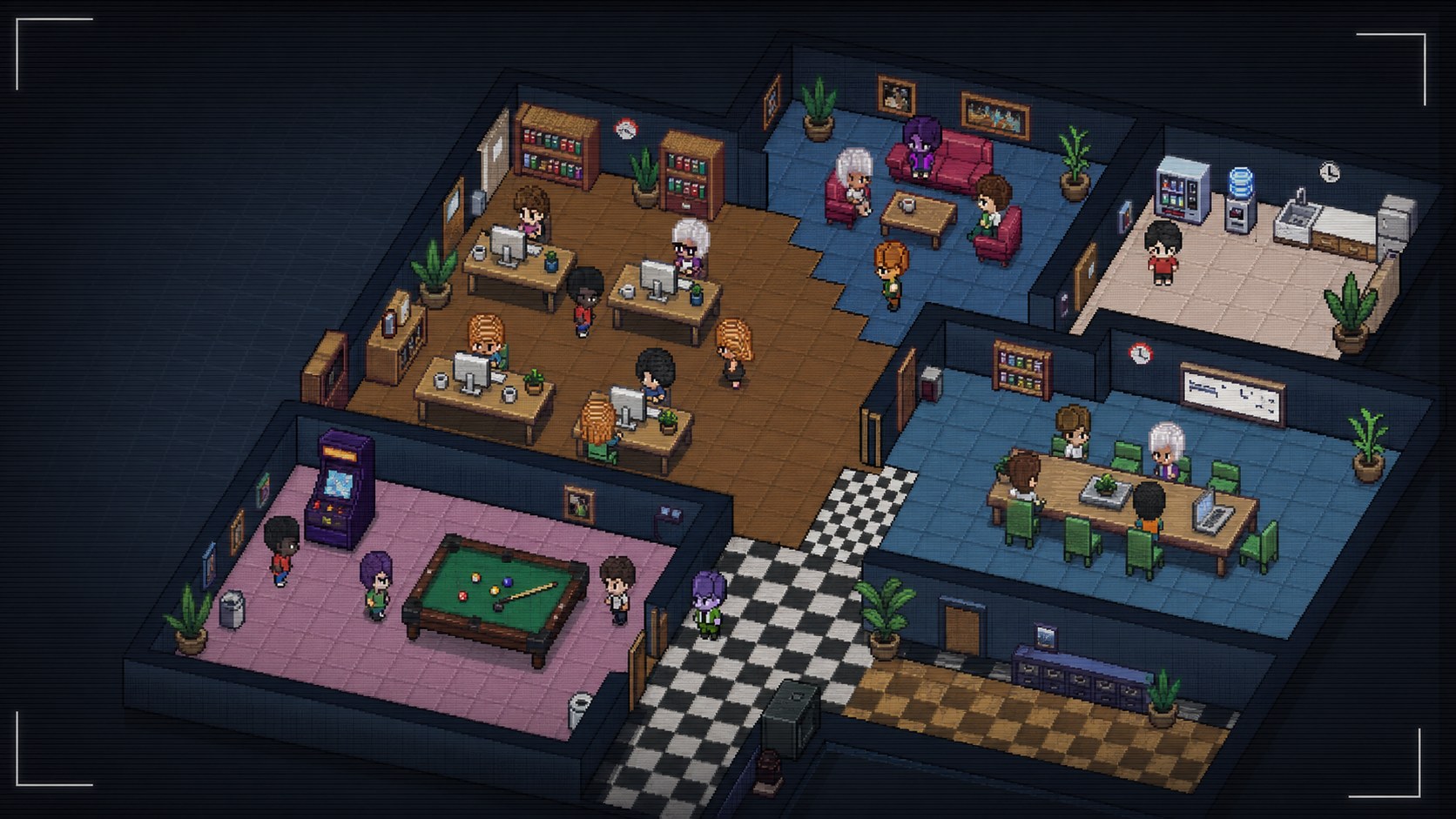
What It Does
- Shows Paperclip agents walking around a multi-room pixel office.
- Moves working agents toward desks and idle agents toward lounge, kitchen, boardroom, and games areas.
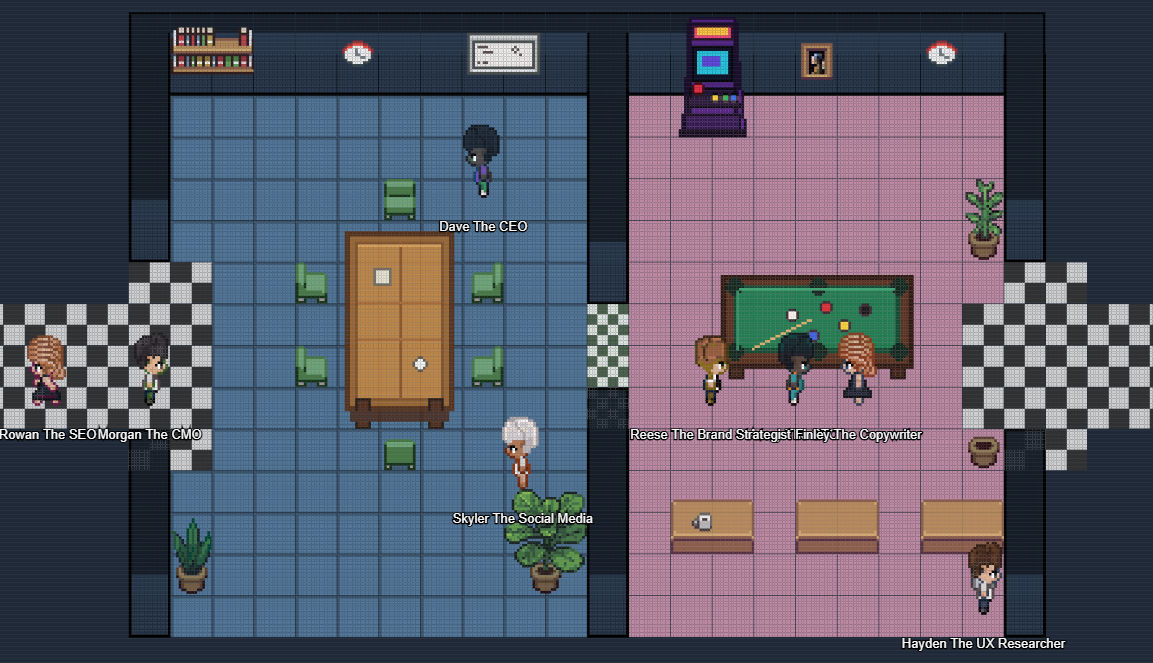
- Supports multiple camera views across the office layout.
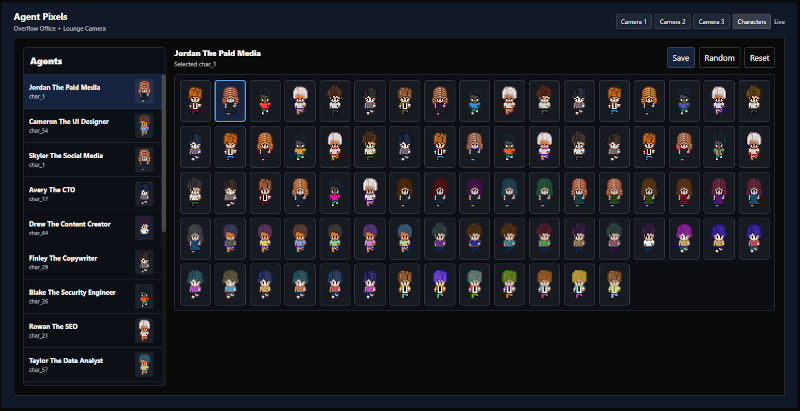
- Includes assignable character sprites so each agent can have a consistent look.
- Expands the original pixel-agent style into a denser company view for larger Paperclip teams.
Screenshots
Install
Release Version
Use the release version if you just want to install Agent Pixels. The release ZIP already contains the built plugin files, so you do not need the Paperclip source code or plugin SDK locally.
Prerequisites:
- Paperclip running
- The latest
agent-pixels-*.ziprelease file
Download the latest agent-pixels-*.zip from the GitHub Releases page, then unzip it into your Paperclip plugins folder:
~/.paperclip/plugins/
After unzipping, you should have a folder like this:
agent-pixels-0.1.0/
  package.json
  README.md
  dist/
    manifest.js
    worker.js
    ui/
For Docker installs, unzip the release into a bind-mounted folder and install the path as seen from inside the container, for example:
/paperclip/plugins/agent-pixels-0.1.0
Development Version
Use the development version if you want to edit Agent Pixels or build it from source.
Prerequisites:
- Node.js
- pnpm
- Paperclip running
- Paperclip source code cloned locally
- Built Paperclip plugin SDK
If you installed Paperclip from npm and do not have the Paperclip source code locally, use the release version instead. Building from source currently requires the Paperclip repo because the plugin SDK is not published separately.
To be more specific, make sure you:
git clone https://github.com/paperclipai/paperclip
Clone and build Agent Pixels:
git clone https://github.com/gcampton/Agent-Pixels
cd Agent-Pixels
pnpm install
pnpm run build
The build output is written to dist/.
If your Paperclip source is somewhere else, set the SDK path when building. This path should point to the built Paperclip plugin SDK:
PAPERCLIP_SDK_DIST=/path/to/paperclip/packages/plugins/sdk/dist pnpm run build
Then install the plugin in Paperclip using the local path to this repo.
To create a release ZIP after building:
pnpm run package:release
This requires the zip command-line tool. The ZIP is written to release/.
Development
Run checks before opening a pull request:
pnpm run typecheck
pnpm run build
Self-Hosted Docker Install
For self-hosted Paperclip, clone Agent Pixels into a folder that is visible inside the Paperclip container. The install API must receive the container path, not the host path.
Example host path:
git clone https://github.com/gcampton/Agent-Pixels /volume4/docker/paperclip/plugins/agent-pixels
Example container path:
/paperclip/plugins/agent-pixels
Agent Pixels currently builds against the Paperclip plugin SDK from the Paperclip monorepo. Build @paperclipai/shared and @paperclipai/plugin-sdk from the Paperclip source first:
cd /path/to/paperclip/packages/shared
npm install
npx tsc --noEmitOnError false

cd /path/to/paperclip/packages/plugins/sdk
npm install
npx tsc --noEmitOnError false
Then build Agent Pixels. If the plugin is not cloned under the Paperclip repo, set PAPERCLIP_SDK_DIST:
cd /path/to/Agent-Pixels
npm install
PAPERCLIP_SDK_DIST=/path/to/paperclip/packages/plugins/sdk/dist npm run build
In authenticated Paperclip deployments, create a CLI auth challenge and approve it as an instance admin:
curl -s -X POST http://<your-paperclip-host>/api/cli-auth/challenges \
  -H "Content-Type: application/json" \
  -d '{"requestedAccess":"instance_admin_required","command":"plugin install"}'
Open the returned approvalUrl, approve the request, then install using the returned boardApiToken:
curl -s -X POST http://<your-paperclip-host>/api/plugins/install \
  -H "Authorization: Bearer <boardApiToken>" \
  -H "Content-Type: application/json" \
  -d '{"packageName":"/paperclip/plugins/agent-pixels","isLocalPath":true}'
Assets
Character sprites live in:
public/assets/characters/
Add new sprites as char_81.png, char_82.png, etc. The build script auto-detects char_*.png files and adds them to the plugin asset index.
Asset Dimensions
Agent Pixels uses a 16px tile grid.
| Asset type | Location | Size |
|---|---|---|
| Character sprite sheet | public/assets/characters/char_*.png | 112x96 PNG |
| Character frame | inside each character sheet | 16x32 |
| Character sheet layout | inside each character sheet | 7 columns x 3 rows |
| Floor tile | public/assets/floors/floor_*.png | 16x16 |
| Wall tile sheet | public/assets/walls/wall_0.png | 64x128 |
| Furniture sprites | public/assets/furniture/** | Multiples of 16px |
| Office layout | public/assets/default-layout-1.json | 21x22 tiles (336x352px) |
| Boardroom/kitchen layout | public/assets/agent-pixels-layout-boardroom-kitchen.json | 22x15 tiles (352x240px) |
| Combined camera map | generated in the UI | 68x22 tiles (1088x352px) |
Character sheets use three direction rows: front, back, and side. The opposite side direction is mirrored by the renderer.
Common furniture sizes currently in use:
| Asset | Size |
|---|---|
| Desk front | 48x32 |
| Desk side | 16x64 |
| PC sprites | 16x32 |
| Wooden/cushioned chairs | 16x32 or 16x16 |
| Sofa front/back | 32x16 |
| Sofa side | 16x32 |
| Boardroom table | 48x80 |
| Pool table | 80x48 |
| Arcade machine | 32x48 |
| Paintings/whiteboard | 16x32 or 32x32 |
| Plants | 16x32 or 32x48 |
Ready-Made Paperclip Companies
Agent Pixels is free to use. It is also designed to work nicely with ready-made Paperclip company packs that are available at agent-pixels.com.
Paperclip company packs include:
- SEO agency
- Game dev agency
- SaaS company
- Full company
More company types are being explored. Agent Pixel Company packs are built from Garratt's personal agents developed over many months. Agents come with a Task Router Engine and extensive reference files to grep. Scraped from high quality web data, these make whatever AI you use on par with pretrained AI LLMs without having to do the work. For example, the Copywriter comes with over 7 reference files to grep and 6 different task files for the right job.
Support
For feature requests, bugs, or help using Agent Pixels, please submit a ticket at agent-pixels.com/support.
What's Next
Planned improvements include:
- More character models and customization options.
- More visual assets, props, and office interactions.
- Adjustable office scale, including desks, meeting rooms, lounges, and floors.
- Additional layouts such as co-working spaces, agency lofts, and high-rise offices.
- Better idle behaviors and animations, including talking, pacing, and coffee runs.
Contributing
Pull requests are welcome for bug fixes, plugin improvements, new room assets, furniture, and character sprites.
For commercial enquiries, ready-made Paperclip company packs, or larger collaboration ideas, start at agent-pixels.com.
Contributors

14 commits
Similar repos


Languages
TypeScript
94.3%
JavaScript
3.6%
Python
2.2%
Agent-Pixels is a paperclip plugin implementation of 'Pixel-Agents' the VSCode extension by Pablo De Lucca (7k Stars). The plugin features new "Security Cameras" in Paperclip by Dotta (60k Stars)
TypeScript
110
14 commits
updated Jun 8, 2026
README
Agent Pixels
Agent Pixels is a Paperclip plugin that turns your company of AI agents into a live pixel-art office camera.
Learn more at agent-pixels.com.
What It Does
- Shows Paperclip agents walking around a multi-room pixel office.
- Moves working agents toward desks and idle agents toward lounge, kitchen, boardroom, and games areas.
- Supports multiple camera views across the office layout.
- Includes assignable character sprites so each agent can have a consistent look.
- Expands the original pixel-agent style into a denser company view for larger Paperclip teams.
Screenshots
Install
Release Version
Use the release version if you just want to install Agent Pixels. The release ZIP already contains the built plugin files, so you do not need the Paperclip source code or plugin SDK locally.
Prerequisites:
- Paperclip running
- The latest
agent-pixels-*.ziprelease file
Download the latest agent-pixels-*.zip from the GitHub Releases page, then unzip it into your Paperclip plugins folder:
~/.paperclip/plugins/
After unzipping, you should have a folder like this:
agent-pixels-0.1.0/
  package.json
  README.md
  dist/
    manifest.js
    worker.js
    ui/
For Docker installs, unzip the release into a bind-mounted folder and install the path as seen from inside the container, for example:
/paperclip/plugins/agent-pixels-0.1.0
Development Version
Use the development version if you want to edit Agent Pixels or build it from source.
Prerequisites:
- Node.js
- pnpm
- Paperclip running
- Paperclip source code cloned locally
- Built Paperclip plugin SDK
If you installed Paperclip from npm and do not have the Paperclip source code locally, use the release version instead. Building from source currently requires the Paperclip repo because the plugin SDK is not published separately.
To be more specific, make sure you:
git clone https://github.com/paperclipai/paperclip
Clone and build Agent Pixels:
git clone https://github.com/gcampton/Agent-Pixels
cd Agent-Pixels
pnpm install
pnpm run build
The build output is written to dist/.
If your Paperclip source is somewhere else, set the SDK path when building. This path should point to the built Paperclip plugin SDK:
PAPERCLIP_SDK_DIST=/path/to/paperclip/packages/plugins/sdk/dist pnpm run build
Then install the plugin in Paperclip using the local path to this repo.
To create a release ZIP after building:
pnpm run package:release
This requires the zip command-line tool. The ZIP is written to release/.
Development
Run checks before opening a pull request:
pnpm run typecheck
pnpm run build
Self-Hosted Docker Install
For self-hosted Paperclip, clone Agent Pixels into a folder that is visible inside the Paperclip container. The install API must receive the container path, not the host path.
Example host path:
git clone https://github.com/gcampton/Agent-Pixels /volume4/docker/paperclip/plugins/agent-pixels
Example container path:
/paperclip/plugins/agent-pixels
Agent Pixels currently builds against the Paperclip plugin SDK from the Paperclip monorepo. Build @paperclipai/shared and @paperclipai/plugin-sdk from the Paperclip source first:
cd /path/to/paperclip/packages/shared
npm install
npx tsc --noEmitOnError false

cd /path/to/paperclip/packages/plugins/sdk
npm install
npx tsc --noEmitOnError false
Then build Agent Pixels. If the plugin is not cloned under the Paperclip repo, set PAPERCLIP_SDK_DIST:
cd /path/to/Agent-Pixels
npm install
PAPERCLIP_SDK_DIST=/path/to/paperclip/packages/plugins/sdk/dist npm run build
In authenticated Paperclip deployments, create a CLI auth challenge and approve it as an instance admin:
curl -s -X POST http://<your-paperclip-host>/api/cli-auth/challenges \
  -H "Content-Type: application/json" \
  -d '{"requestedAccess":"instance_admin_required","command":"plugin install"}'
Open the returned approvalUrl, approve the request, then install using the returned boardApiToken:
curl -s -X POST http://<your-paperclip-host>/api/plugins/install \
  -H "Authorization: Bearer <boardApiToken>" \
  -H "Content-Type: application/json" \
  -d '{"packageName":"/paperclip/plugins/agent-pixels","isLocalPath":true}'
Assets
Character sprites live in:
public/assets/characters/
Add new sprites as char_81.png, char_82.png, etc. The build script auto-detects char_*.png files and adds them to the plugin asset index.
Asset Dimensions
Agent Pixels uses a 16px tile grid.
| Asset type | Location | Size |
|---|---|---|
| Character sprite sheet | public/assets/characters/char_*.png | 112x96 PNG |
| Character frame | inside each character sheet | 16x32 |
| Character sheet layout | inside each character sheet | 7 columns x 3 rows |
| Floor tile | public/assets/floors/floor_*.png | 16x16 |
| Wall tile sheet | public/assets/walls/wall_0.png | 64x128 |
| Furniture sprites | public/assets/furniture/** | Multiples of 16px |
| Office layout | public/assets/default-layout-1.json | 21x22 tiles (336x352px) |
| Boardroom/kitchen layout | public/assets/agent-pixels-layout-boardroom-kitchen.json | 22x15 tiles (352x240px) |
| Combined camera map | generated in the UI | 68x22 tiles (1088x352px) |
Character sheets use three direction rows: front, back, and side. The opposite side direction is mirrored by the renderer.
Common furniture sizes currently in use:
| Asset | Size |
|---|---|
| Desk front | 48x32 |
| Desk side | 16x64 |
| PC sprites | 16x32 |
| Wooden/cushioned chairs | 16x32 or 16x16 |
| Sofa front/back | 32x16 |
| Sofa side | 16x32 |
| Boardroom table | 48x80 |
| Pool table | 80x48 |
| Arcade machine | 32x48 |
| Paintings/whiteboard | 16x32 or 32x32 |
| Plants | 16x32 or 32x48 |
Ready-Made Paperclip Companies
Agent Pixels is free to use. It is also designed to work nicely with ready-made Paperclip company packs that are available at agent-pixels.com.
Paperclip company packs include:
- SEO agency
- Game dev agency
- SaaS company
- Full company
More company types are being explored. Agent Pixel Company packs are built from Garratt's personal agents developed over many months. Agents come with a Task Router Engine and extensive reference files to grep. Scraped from high quality web data, these make whatever AI you use on par with pretrained AI LLMs without having to do the work. For example, the Copywriter comes with over 7 reference files to grep and 6 different task files for the right job.
Support
For feature requests, bugs, or help using Agent Pixels, please submit a ticket at agent-pixels.com/support.
What's Next
Planned improvements include:
- More character models and customization options.
- More visual assets, props, and office interactions.
- Adjustable office scale, including desks, meeting rooms, lounges, and floors.
- Additional layouts such as co-working spaces, agency lofts, and high-rise offices.
- Better idle behaviors and animations, including talking, pacing, and coffee runs.
Contributing
Pull requests are welcome for bug fixes, plugin improvements, new room assets, furniture, and character sprites.
For commercial enquiries, ready-made Paperclip company packs, or larger collaboration ideas, start at agent-pixels.com.
Similar repos
Contributors
14 commits
Languages
TypeScript
94.3%
JavaScript
3.6%
Python
2.2%