
README
slk
A blazingly fast Slack TUI. Keyboard-driven, beautifully themed, and under 20MB. One static binary. No Electron required.
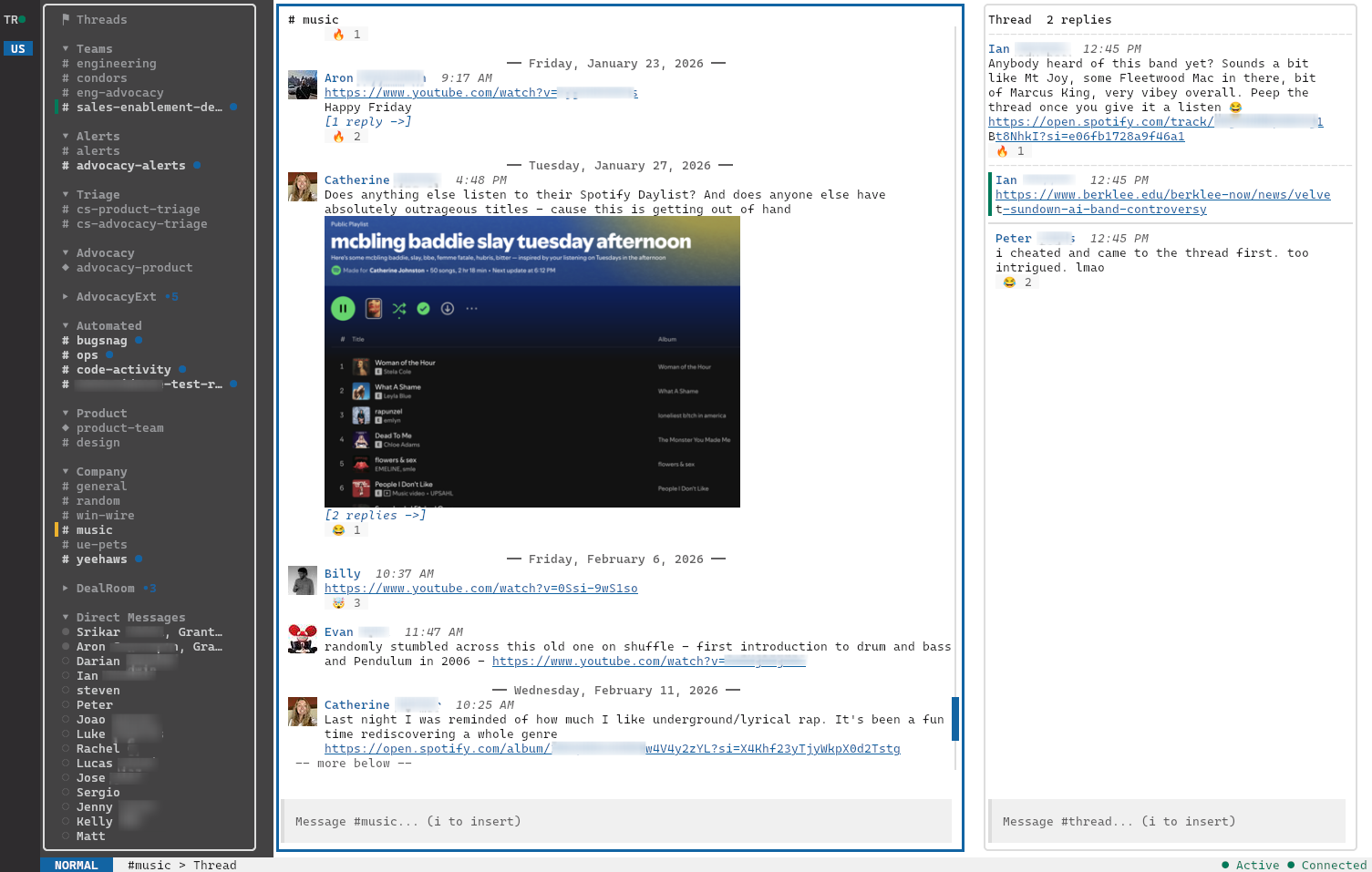
slk is a daily-driver replacement for the official Slack desktop client, built in Go with bubbletea and lipgloss.
Why slk?
- Fast. Cold start in milliseconds. Render-cached messages. SQLite-backed scrollback. Real-time over WebSocket.
- Tiny. ~19 MB on disk. ~60 MB RSS for a live multi-workspace session vs. 500 MB–1.5 GB for the official client. No node_modules, no Chromium, no 1Gb RAM tax.
- Keyboard-first. Vim-style modal editing.
j/k,h/l,i,Esc. - Pretty. 59 built-in themes, lipgloss-styled panels, true-pixel avatars on kitty (half-block fallback elsewhere), emoji shortcodes, day separators, and pill-style reactions.
- Multi-workspace. All your workspaces stay connected in parallel.
1–9to instantly jump between them, with live unread badges in the rail. - Yours. TOML config, custom themes, custom channel sections via glob, XDG-compliant paths.
Highlights
- Real-time messages, edits, deletes, reactions, typing indicators
- Inline images (kitty graphics / sixel / half-block fallback) with full-screen preview
- Threads side panel + a workspace-wide threads view
- Smart paste: clipboard images, file paths, or text — multiple attachments + caption in one send
- Slack-native sidebar sections, kept live; or glob-based config sections
- Automatic auth from the Slack desktop app — no tokens to copy, no Slack App required
- Vim-style modal keybindings, fuzzy channel finder, workspace picker
- 59 themes + drop-in custom themes, live theme switcher
- OS desktop notifications on DMs, mentions, and configurable keywords
Full feature breakdown: Features
Quick install
Homebrew (macOS and Linux):
brew install --cask gammons/tap/slk
Arch Linux (community-maintained AUR package):
yay -S slk
Go:
go install -ldflags="-s -w" -trimpath github.com/gammons/slk/cmd/slk@latest
For tarballs, .deb / .rpm / .apk packages, Windows, build-from-source, and the Homebrew formula→cask migration note, see the Installation wiki page.
Setup
slk reads your session directly from the Slack desktop app — no DevTools, no tokens to copy. Make sure you're signed in to the desktop app, then:
slk --add-workspace
slk lists the workspaces you're signed in to; pick the ones you want and you're done.
Full walkthrough: Setup wiki page.
Debugging
Set SLK_DEBUG=1 to enable a comprehensive debug log written to
slk-debug.log in the current working directory. The file is
truncated each run, so reproduce the issue, quit slk, then copy
the file before relaunching. Log lines are categorized
([cache], [imgfetch], [imgrender], [ws], [general]) so
grep '\[cache\]' slk-debug.log slices to one focus area.
Documentation
Everything lives in the wiki:
- Installation — prebuilt binaries, Go install, build from source
- Setup — desktop-app auth, adding workspaces
- Features — full feature breakdown
- Keybindings — every key, every mode
- Configuration —
config.toml, custom themes, XDG paths - Terminal Compatibility — what each terminal supports, including tmux setup (inline images, unread-title forwarding)
- Clipboard and OSC 52 — copy/paste setup notes
- Tradeoffs and Non-Goals — roadmap, caveats, TOS notice
- Architecture — service layout, data layer
Contributing
Contributions are welcome. A few ground rules:
- AI-assisted PRs are accepted — and in fact encouraged — but only if they're driven by a frontier model (e.g. Claude Opus, GPT-5, Gemini Pro) running with high thinking effort. Low-effort, small-model output that nobody reviewed tends to create more work than it saves, and will be closed.
- Ideally, drive the work with the superpowers framework (or an equivalent skills/TDD-disciplined workflow). Brainstorm the design first, write tests, then implement.
- For large feature additions, open an issue first. Before sinking time into a big change, file an issue to discuss the idea and approach so we can agree on direction. Bug fixes and small improvements can go straight to a PR.
- Whether human- or AI-written, you are responsible for your PR.
Understand the diff, make sure it builds and passes
go vet ./...andgo test ./..., and be ready to explain your choices in review.
Disclaimer
slk is an independent, unofficial project. It is not affiliated with, endorsed by, or sponsored by Slack Technologies, LLC or Salesforce, Inc. "Slack" is a trademark of Slack Technologies, LLC; it is used here only to describe the service this client interoperates with.
slk talks to Slack via the same internal browser protocol the official web client uses. This is unofficial and not sanctioned by Slack — see Tradeoffs and Non-Goals for details.
License
MIT © Grant Ammons
Contributors


See what people are saying
Similar repos


Languages
Go
100.0%
README
slk
A blazingly fast Slack TUI. Keyboard-driven, beautifully themed, and under 20MB. One static binary. No Electron required.
slk is a daily-driver replacement for the official Slack desktop client, built in Go with bubbletea and lipgloss.
Why slk?
- Fast. Cold start in milliseconds. Render-cached messages. SQLite-backed scrollback. Real-time over WebSocket.
- Tiny. ~19 MB on disk. ~60 MB RSS for a live multi-workspace session vs. 500 MB–1.5 GB for the official client. No node_modules, no Chromium, no 1Gb RAM tax.
- Keyboard-first. Vim-style modal editing.
j/k,h/l,i,Esc. - Pretty. 59 built-in themes, lipgloss-styled panels, true-pixel avatars on kitty (half-block fallback elsewhere), emoji shortcodes, day separators, and pill-style reactions.
- Multi-workspace. All your workspaces stay connected in parallel.
1–9to instantly jump between them, with live unread badges in the rail. - Yours. TOML config, custom themes, custom channel sections via glob, XDG-compliant paths.
Highlights
- Real-time messages, edits, deletes, reactions, typing indicators
- Inline images (kitty graphics / sixel / half-block fallback) with full-screen preview
- Threads side panel + a workspace-wide threads view
- Smart paste: clipboard images, file paths, or text — multiple attachments + caption in one send
- Slack-native sidebar sections, kept live; or glob-based config sections
- Automatic auth from the Slack desktop app — no tokens to copy, no Slack App required
- Vim-style modal keybindings, fuzzy channel finder, workspace picker
- 59 themes + drop-in custom themes, live theme switcher
- OS desktop notifications on DMs, mentions, and configurable keywords
Full feature breakdown: Features
Quick install
Homebrew (macOS and Linux):
brew install --cask gammons/tap/slk
Arch Linux (community-maintained AUR package):
yay -S slk
Go:
go install -ldflags="-s -w" -trimpath github.com/gammons/slk/cmd/slk@latest
For tarballs, .deb / .rpm / .apk packages, Windows, build-from-source, and the Homebrew formula→cask migration note, see the Installation wiki page.
Setup
slk reads your session directly from the Slack desktop app — no DevTools, no tokens to copy. Make sure you're signed in to the desktop app, then:
slk --add-workspace
slk lists the workspaces you're signed in to; pick the ones you want and you're done.
Full walkthrough: Setup wiki page.
Debugging
Set SLK_DEBUG=1 to enable a comprehensive debug log written to
slk-debug.log in the current working directory. The file is
truncated each run, so reproduce the issue, quit slk, then copy
the file before relaunching. Log lines are categorized
([cache], [imgfetch], [imgrender], [ws], [general]) so
grep '\[cache\]' slk-debug.log slices to one focus area.
Documentation
Everything lives in the wiki:
- Installation — prebuilt binaries, Go install, build from source
- Setup — desktop-app auth, adding workspaces
- Features — full feature breakdown
- Keybindings — every key, every mode
- Configuration —
config.toml, custom themes, XDG paths - Terminal Compatibility — what each terminal supports, including tmux setup (inline images, unread-title forwarding)
- Clipboard and OSC 52 — copy/paste setup notes
- Tradeoffs and Non-Goals — roadmap, caveats, TOS notice
- Architecture — service layout, data layer
Contributing
Contributions are welcome. A few ground rules:
- AI-assisted PRs are accepted — and in fact encouraged — but only if they're driven by a frontier model (e.g. Claude Opus, GPT-5, Gemini Pro) running with high thinking effort. Low-effort, small-model output that nobody reviewed tends to create more work than it saves, and will be closed.
- Ideally, drive the work with the superpowers framework (or an equivalent skills/TDD-disciplined workflow). Brainstorm the design first, write tests, then implement.
- For large feature additions, open an issue first. Before sinking time into a big change, file an issue to discuss the idea and approach so we can agree on direction. Bug fixes and small improvements can go straight to a PR.
- Whether human- or AI-written, you are responsible for your PR.
Understand the diff, make sure it builds and passes
go vet ./...andgo test ./..., and be ready to explain your choices in review.
Disclaimer
slk is an independent, unofficial project. It is not affiliated with, endorsed by, or sponsored by Slack Technologies, LLC or Salesforce, Inc. "Slack" is a trademark of Slack Technologies, LLC; it is used here only to describe the service this client interoperates with.
slk talks to Slack via the same internal browser protocol the official web client uses. This is unofficial and not sanctioned by Slack — see Tradeoffs and Non-Goals for details.
License
MIT © Grant Ammons
See what people are saying
Similar repos
Contributors
Languages
Go
100.0%