Computer Vision Framework for Human Motion Analysis
Vibrio is a computer vision framework designed to analyze human motion in video footage. The framework implements a modular pipeline approach for detecting, tracking, and analyzing humans in videos, with specific focus on motion analysis through multiple optical methods.
The Vibrio framework is structured as a modular pipeline with the following components:
┌───────────────┐      ┌───────────────┐      ┌───────────────┐      ┌───────────────┐
│  Human        │      │  Object       │      │  Speed        │      │  Physics      │
│  Detection    ├─────►│  Tracking     ├─────►│  Estimation   ├─────►│  Verification │
└───────────────┘      └───────────────┘      └───────────────┘      └───────────────┘
                                                                             │
        ┌────────────────────────────────────────────────────────────────────┘
        │
        ▼
┌───────────────┐      ┌───────────────┐      ┌───────────────┐
│  Optical      │      │  Pose         │      │  Result       │
│  Analysis     │◄─────┤  Detection    │      │  Visualization│
└───────────────┘      └───────────────┘      └───────────────┘
The framework processes videos through sequential stages:
modules/detector.py)The detection module uses YOLOv8, an object detection network, specifically configured to identify humans in video frames.
Technical Details:
Implementation:
detector = HumanDetector(
    model_path="yolov8n.pt",  # Smaller model for speed
    conf_threshold=0.5,
    device="cuda:0"  # Uses GPU if available
)
detections = detector.detect(frame)
modules/tracker.py)The tracking module implements a Kalman filter-based tracking system to maintain the identity of detected objects across frames.
Technical Details:
Mathematical Foundation:
State representation in the Kalman filter: $$x = [c_x, c_y, w, h, \dot{c_x}, \dot{c_y}, \dot{s}]^T$$
Where:
Implementation:
tracker = HumanTracker(
    max_age=30,       # Maximum frames to keep a track without matching
    min_hits=3,       # Minimum detections before track is established
    iou_threshold=0.3 # Threshold for detection-track association
)
tracks = tracker.update(detections, frame_idx)
modules/speed_estimator.py)The speed estimator calculates the velocity of tracked objects based on positional changes between frames.
Technical Details:
Mathematical Foundation:
The basic speed calculation follows: $$v = \frac{\Delta d}{\Delta t} = \frac{d_{pixels} \cdot r_{calibration}}{\Delta frames / fps}$$
Where:
For uncalibrated video, a default pixel-to-meter ratio is used, which may introduce systematic error in the absolute speed values.
Implementation:
speed_estimator = SpeedEstimator(calibration=None)
tracks = speed_estimator.estimate(tracks, frame_idx=frame_idx, fps=video_fps)
modules/physics_verifier.py)The physics verifier applies domain-specific constraints to validate speed estimates.
Technical Details:
Constraint Examples:
| Activity | Max Speed | Max Acceleration | Notes |
|---|---|---|---|
| Walking | 7 km/h | 2 m/s² | Normal walking pace |
| Running | 45 km/h | 10 m/s² | Elite sprinters |
| Cycling | 80 km/h | 4 m/s² | Racing cyclists on flat terrain |
Implementation:
verifier = PhysicsVerifier(context='general')
tracks = verifier.verify(tracks)
modules/optical_analysis.py)The optical analyzer implements advanced methods for detailed motion analysis using computer vision techniques.
Implemented Methods:
Optical Flow Analysis
Motion Energy Analysis
Neuromorphic Camera Simulation
Texture and Gradient Analysis
Shadow and Illumination Analysis
Mathematical Foundations:
For optical flow, the algorithm solves: $$I(x,y,t) = I(x+\Delta x, y+\Delta y, t+\Delta t)$$
Through Taylor expansion and additional constraints, this yields a flow field: $$\nabla I \cdot \mathbf{v} + I_t = 0$$
Where:
Implementation:
analyzer = OpticalAnalyzer(output_dir='results/optical_analysis')
results = analyzer.analyze_video(
    video_path,
    methods=['optical_flow', 'motion_energy']
)
# Basic analysis of a video
python main.py --input video.mp4 --output results/

# Batch processing of multiple videos
python batch_analyze.py --input_dir videos/ --output_dir results/batch --use_optical

# Analysis of results
python analyze_results.py --results_dir results/batch
# Analyze with specific optical methods
python batch_analyze.py --input_dir videos/ --use_optical --optical_methods optical_flow motion_energy

# Perform dedicated optical analysis
python analyze_optical.py --video_path video.mp4 --methods optical_flow neuromorphic texture_analysis
| Parameter | Description | Default |
|---|---|---|
--detector | Human detector model | yolov8n |
--confidence | Detection confidence threshold | 0.4 |
--use_pose | Enable pose estimation | False |
--use_optical | Enable optical analysis | False |
--device | Processing device | cuda:0 or cpu |
Vibrio generates several types of outputs that can be analyzed:
Annotated Videos
Quantitative Data
Visualizations

The plot above shows an example speed profile from tracking analysis, demonstrating the acceleration, steady-state, and deceleration phases of human motion. Statistical analysis of such profiles enables quantitative comparison between different subjects or activities.

Optical flow analysis reveals motion patterns not immediately obvious in the raw video. The color-coded visualization shows direction (hue) and magnitude (saturation) of motion, providing insights into the distribution and coherence of movement.
The following visualizations demonstrate the framework's capabilities on real-world footage:
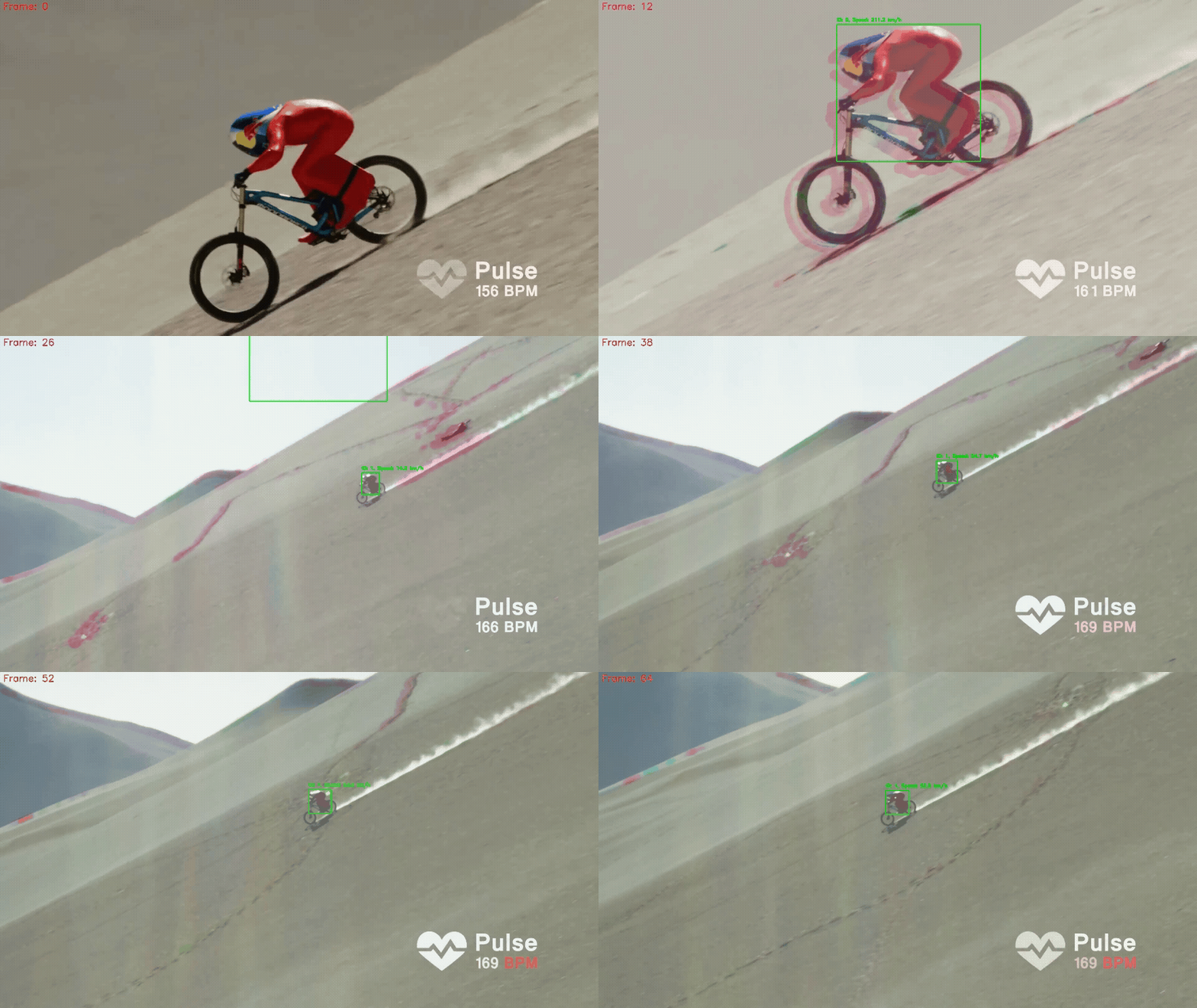
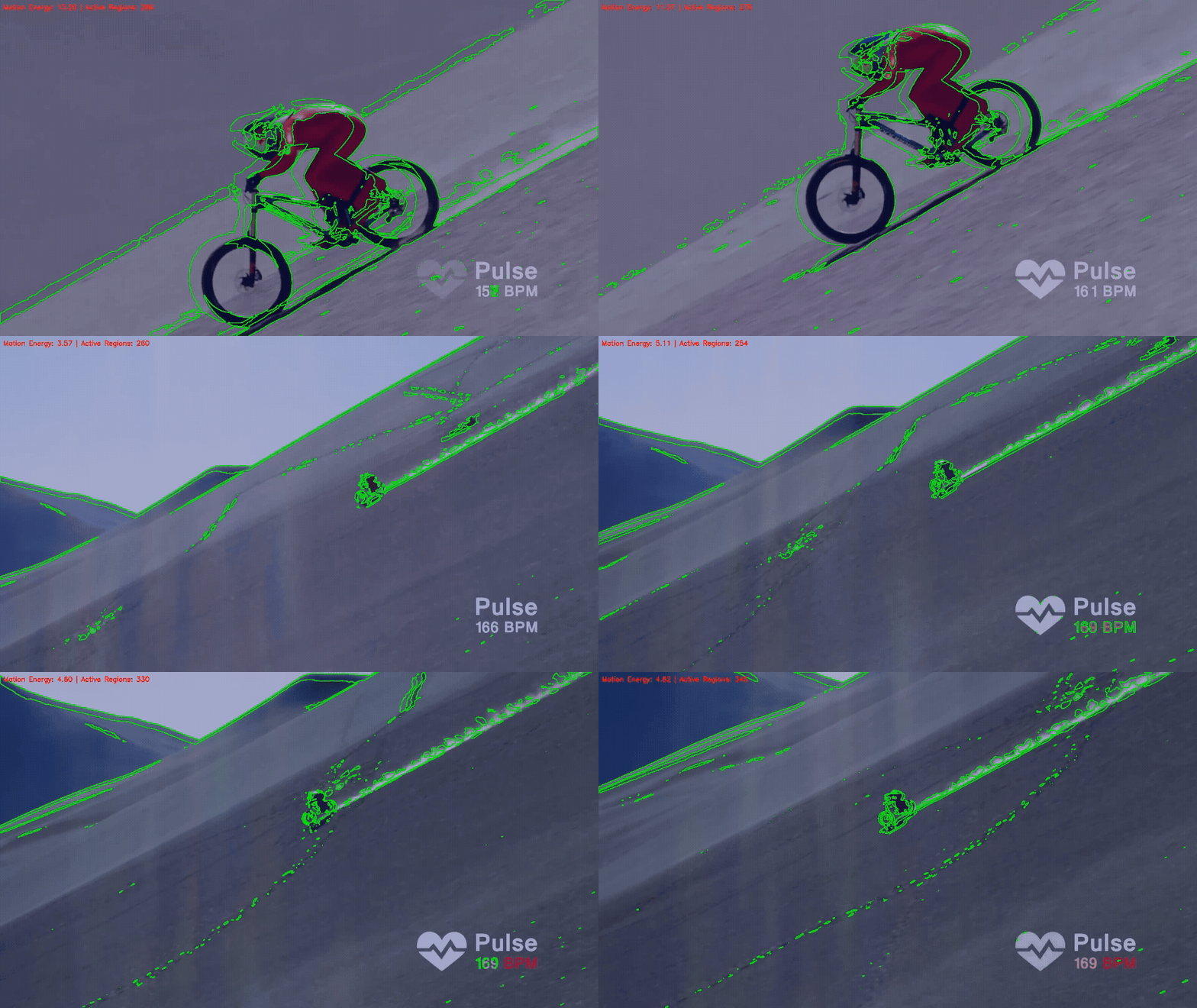
For the downhill mountain biking footage, we performed a comprehensive multi-method analysis, combining visual annotations, optical analysis methods, and quantitative metrics:
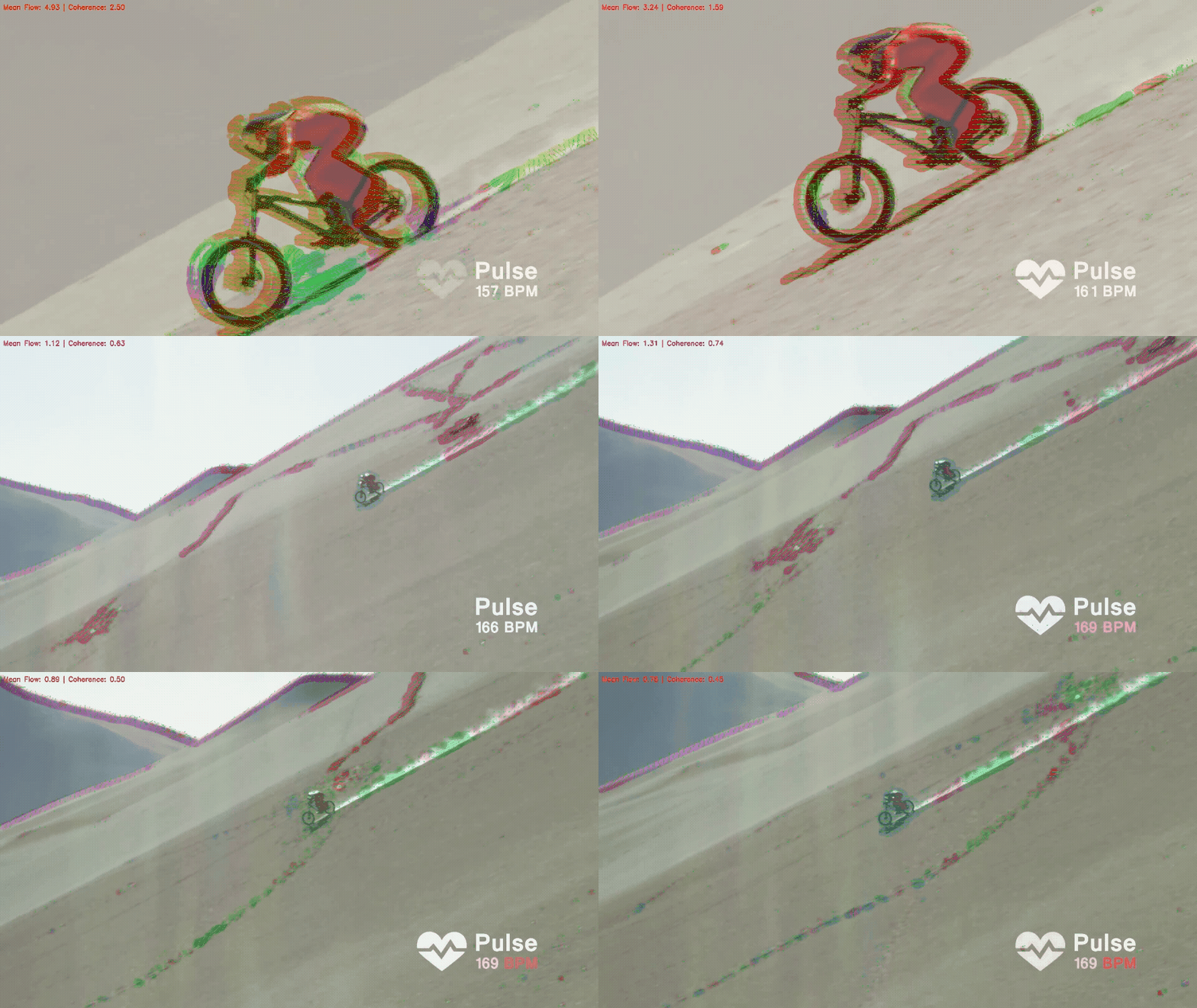
The optical flow analysis reveals detailed motion patterns:
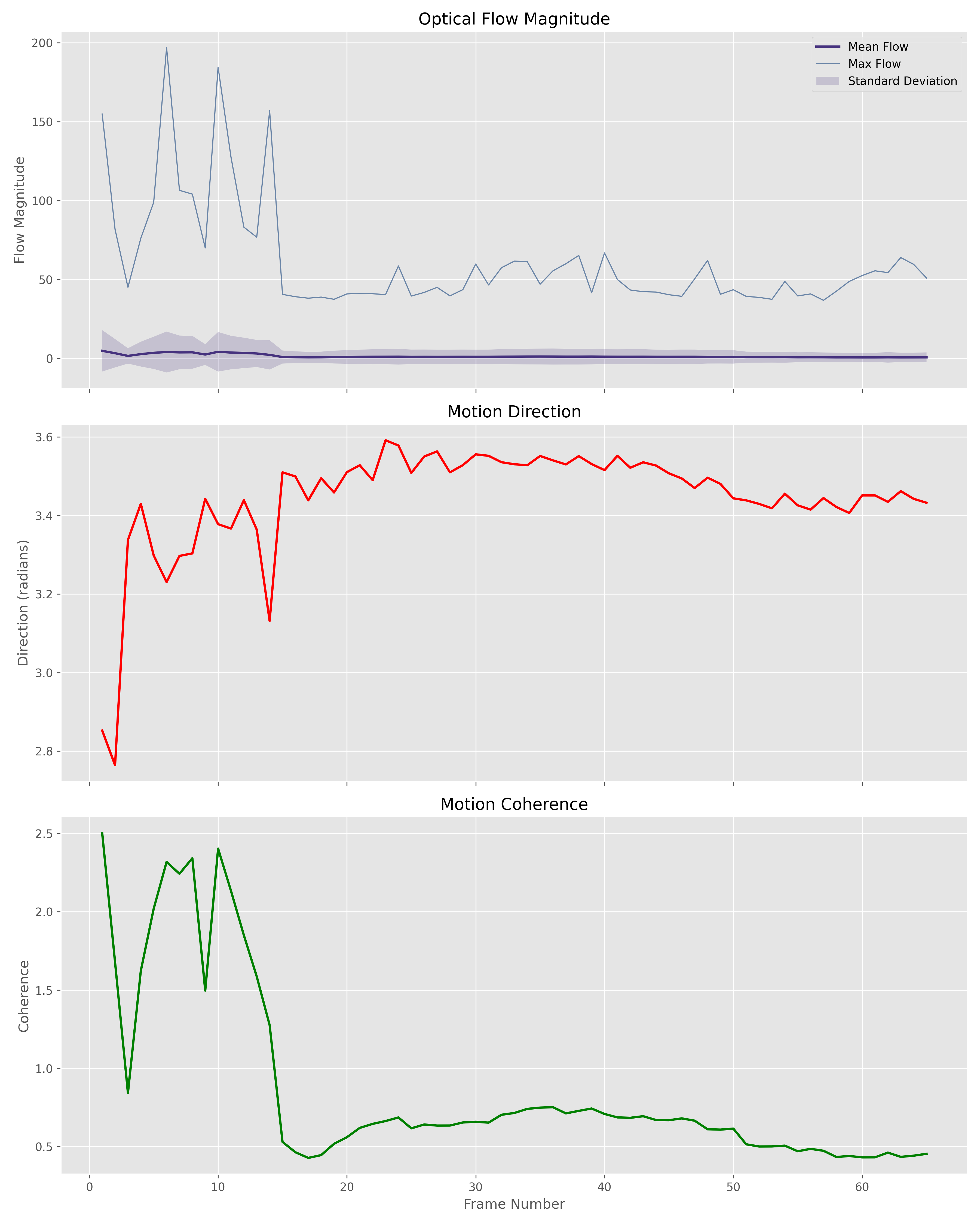
The plots show:
The motion energy metrics provide insights into activity intensity:
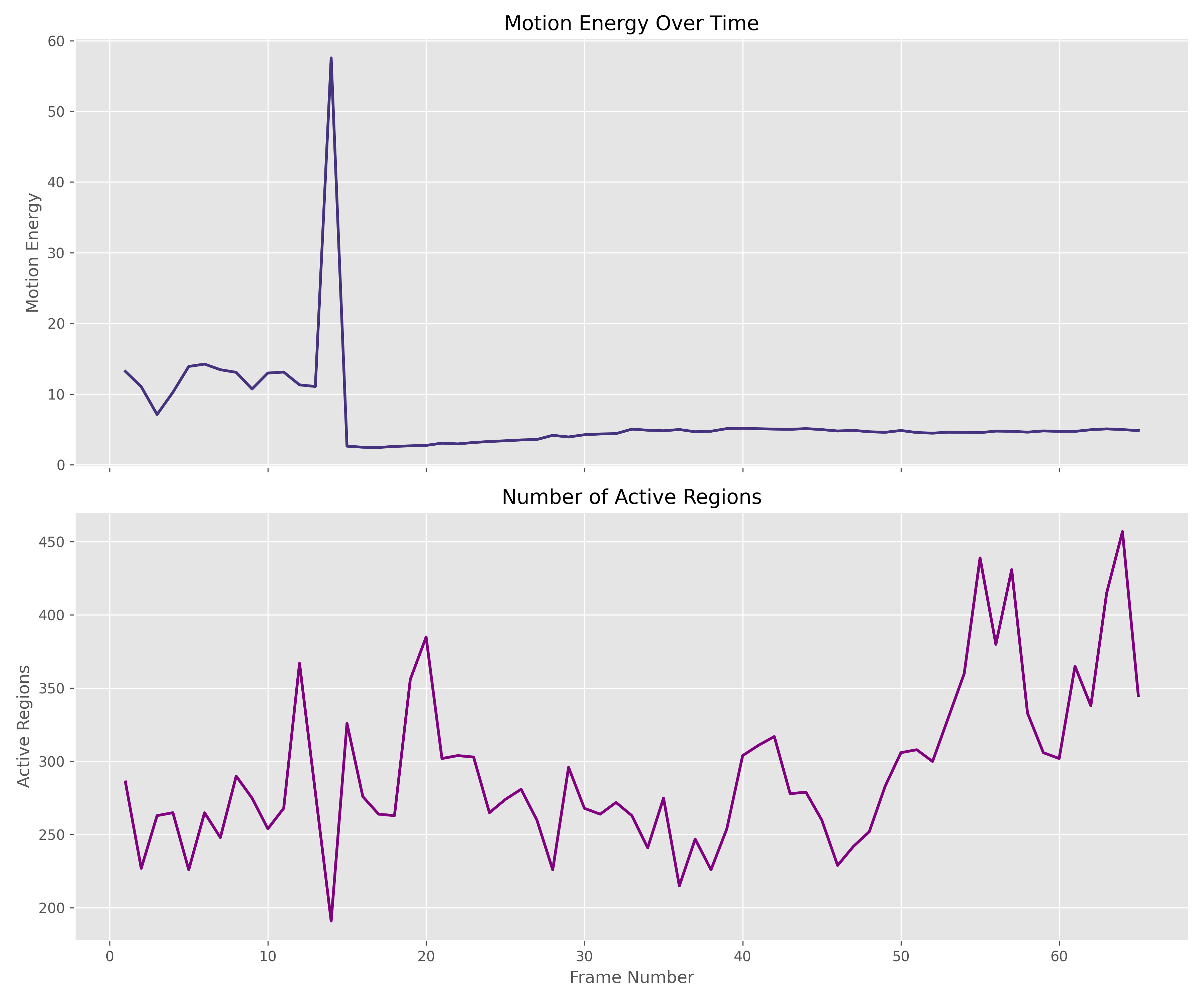
The plots demonstrate:
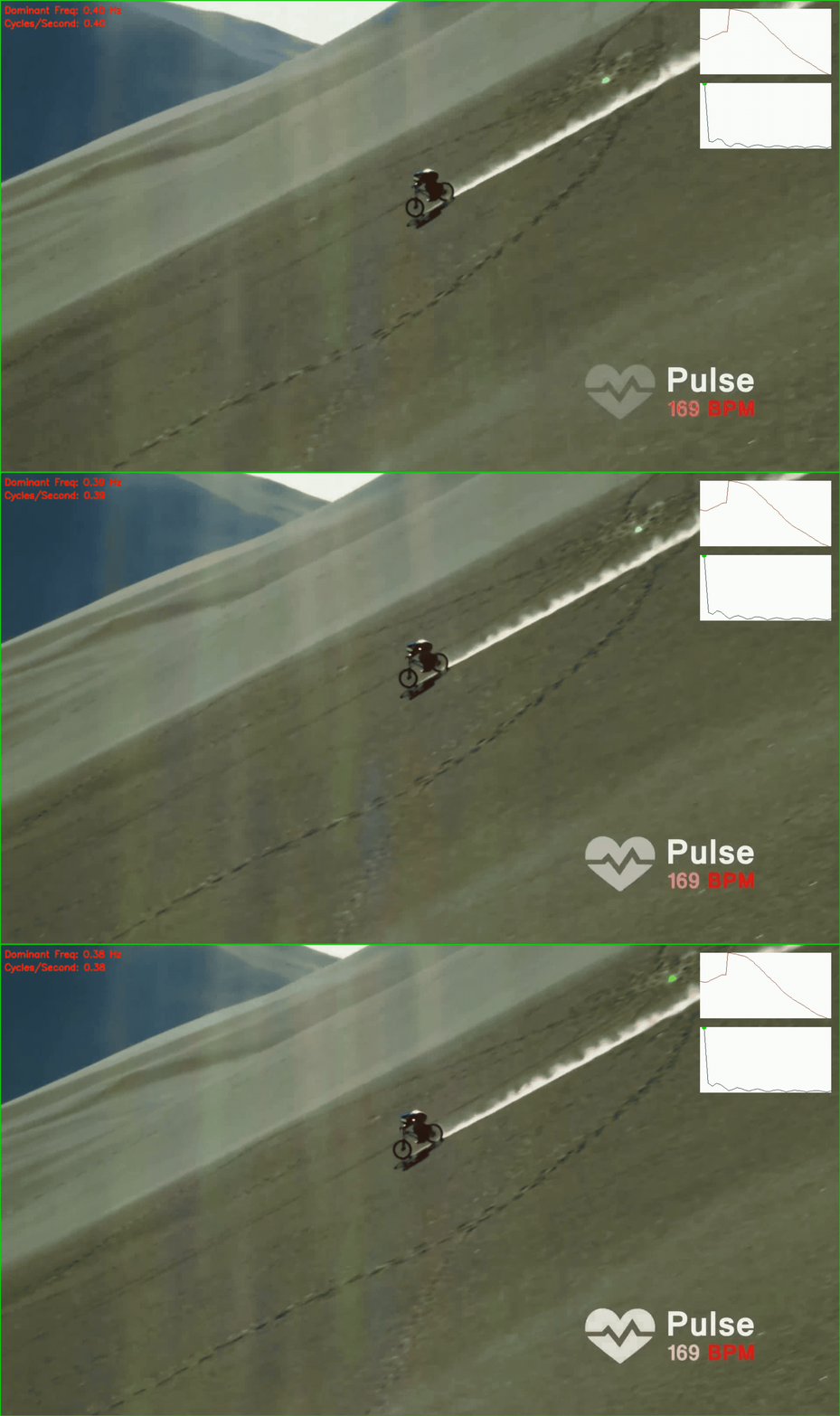
The frequency domain analysis quantifies motion patterns:
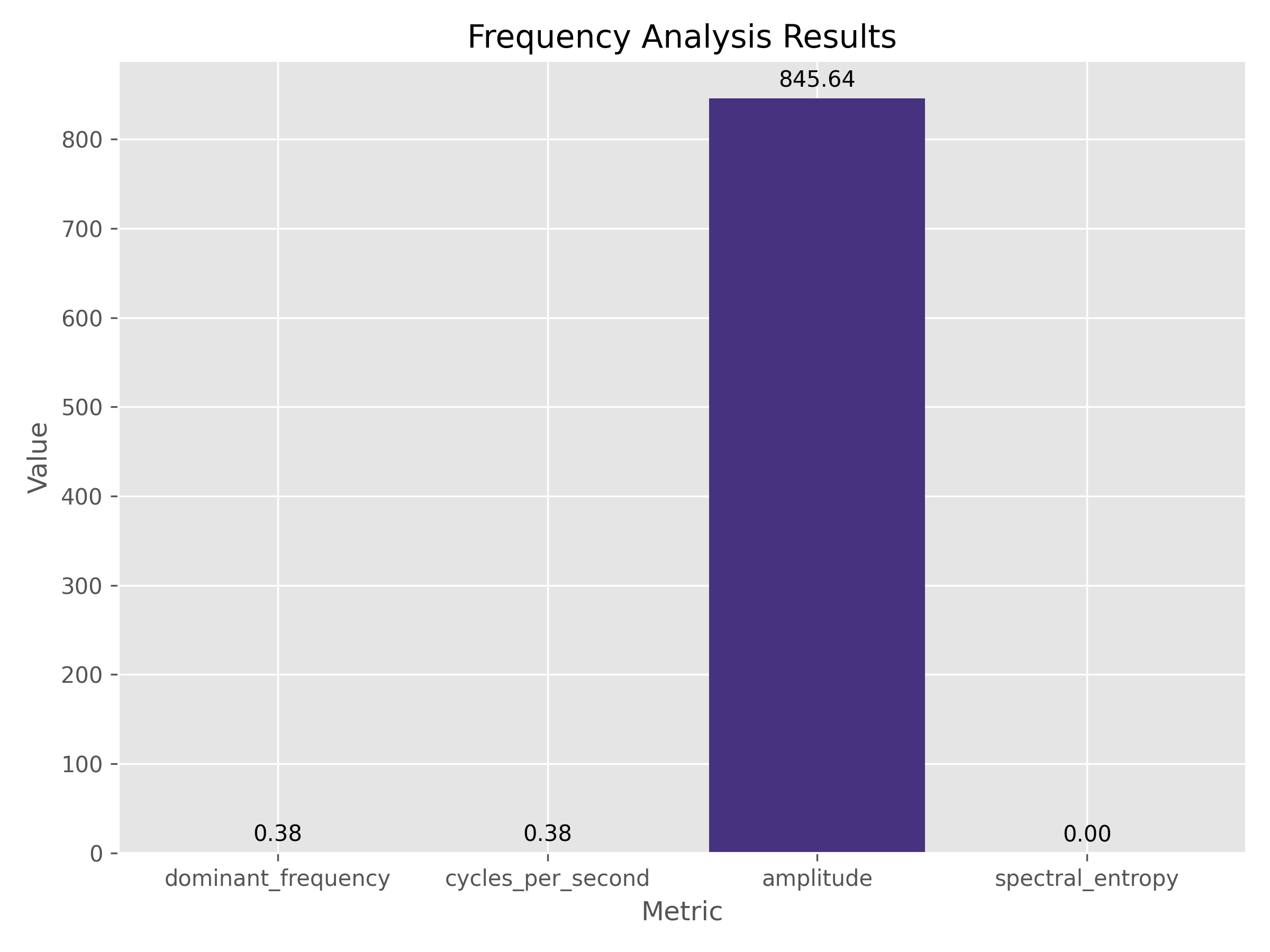
This chart shows dominant motion frequencies and amplitudes in the rider's movement.
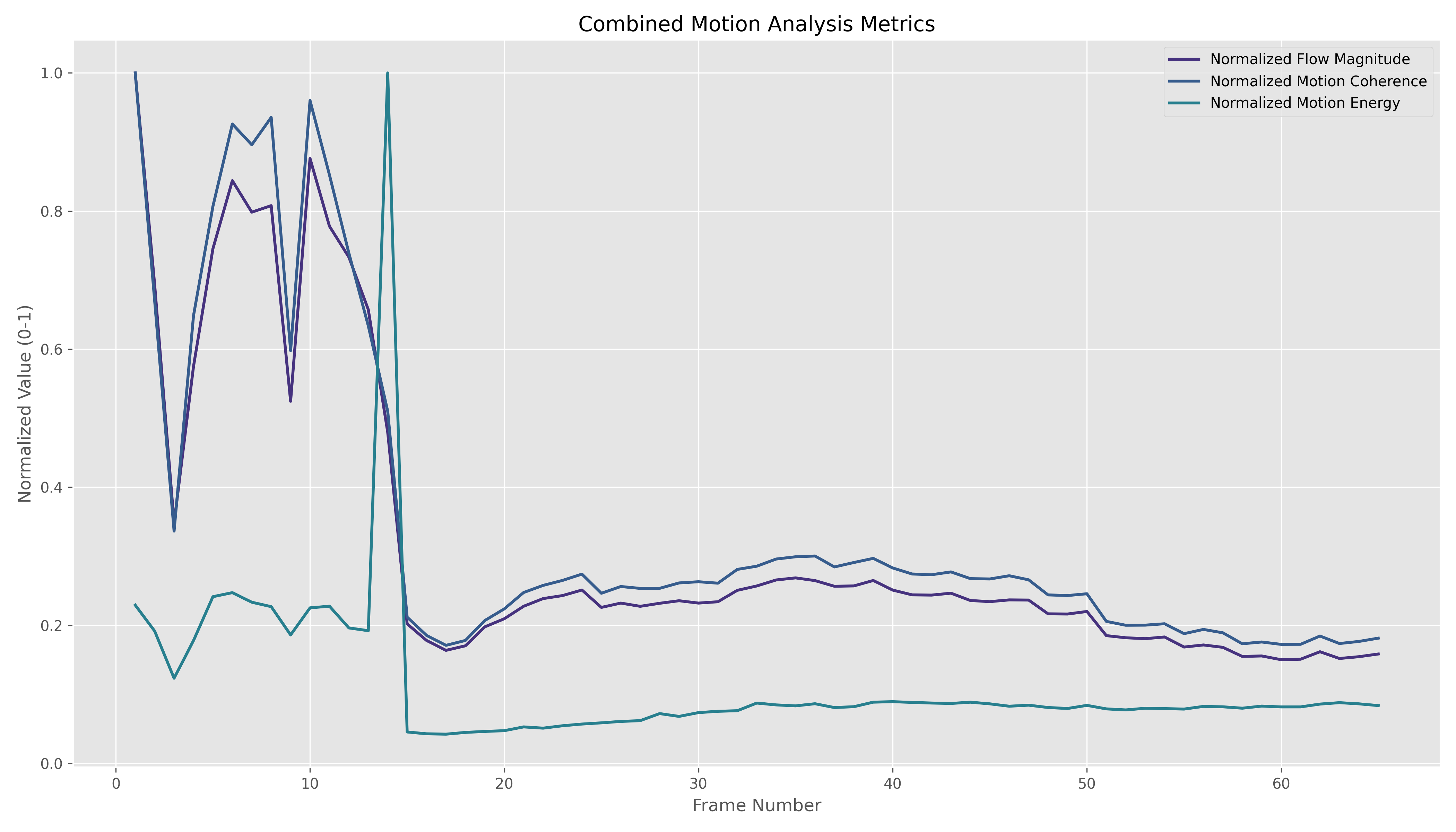
This visualization shows the normalized metrics from different analysis methods, allowing direct comparison between optical flow, motion coherence, and energy measurements, highlighting how these metrics correlate during different motion phases.
Vibrio has been tested on a variety of high-speed human activities, demonstrating its versatility:
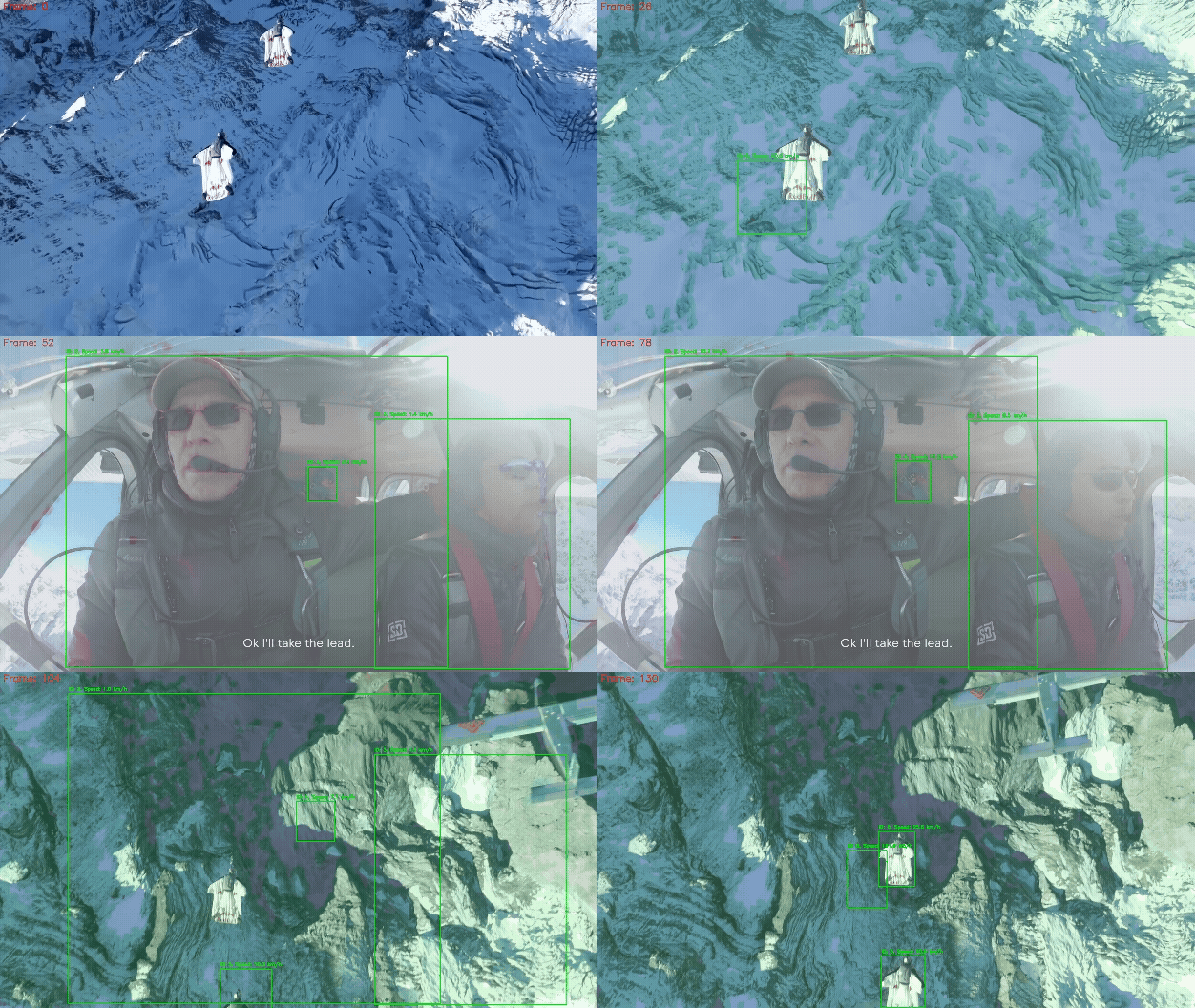
Key Findings: Smooth acceleration phases followed by high-G turns with distinctive weight shifts. Analysis detected characteristic patterns in the skier's weight distribution during turns and rapid direction changes.
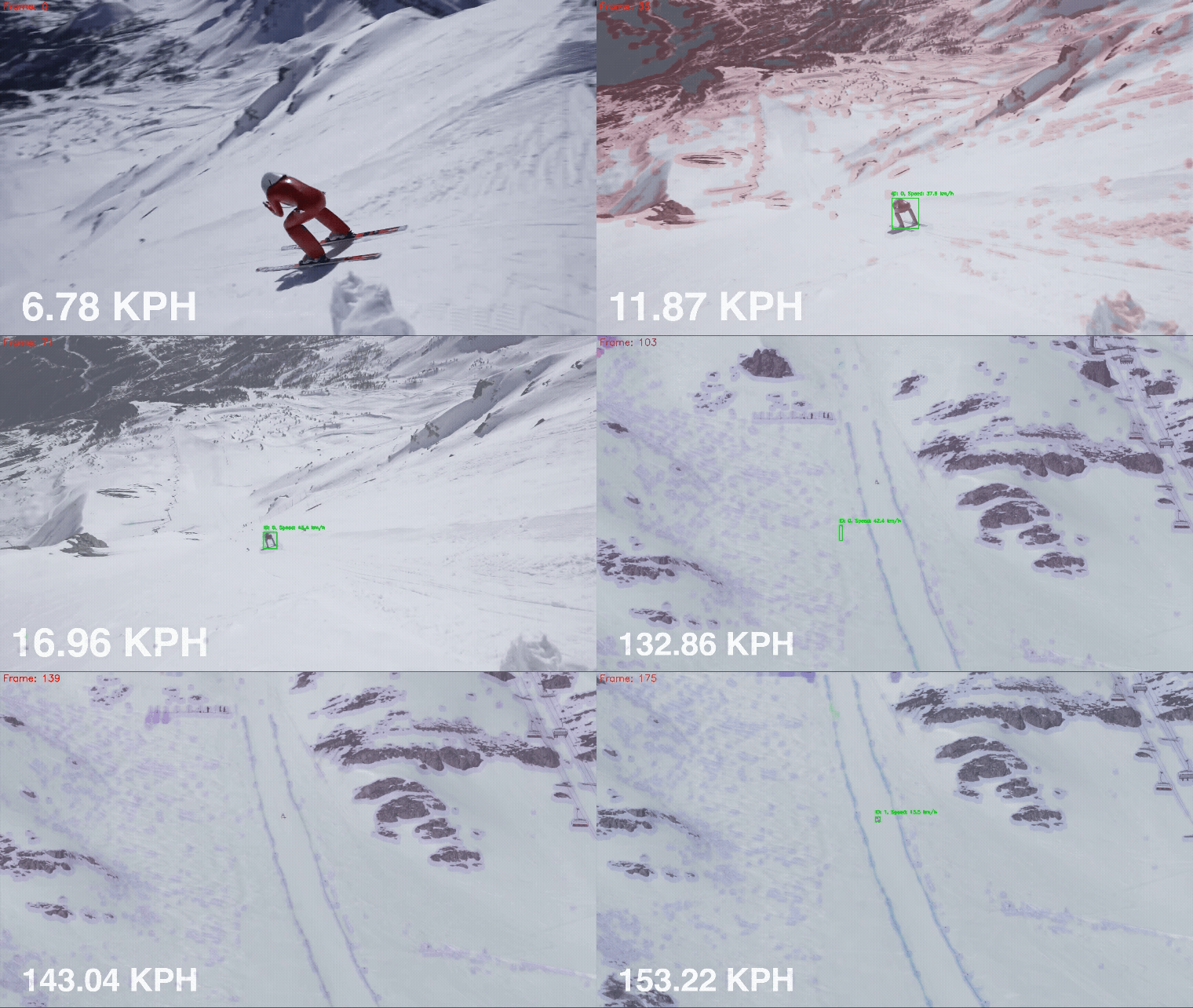
Key Findings: Extreme speeds (100+ km/h) with minimal lateral movement and tightly controlled body position. Optical analysis revealed exceptionally high motion coherence values indicating the precise technique required at these speeds.
These visualizations demonstrate how multiple optical methods can extract rich information about motion characteristics that go beyond simple speed measurements, revealing the biomechanical aspects of human performance across different activities.
The framework's performance depends on several factors:
Hardware Requirements
Model Selection Trade-offs
Processing Resolution
Speed Estimation Accuracy
Tracking Challenges
Optical Analysis Requirements
Jocher, G., Chaurasia, A., & Qiu, J. (2023). YOLO by Ultralytics [Computer software]. https://github.com/ultralytics/ultralytics
Welch, G., & Bishop, G. (1995). An introduction to the Kalman filter. University of North Carolina at Chapel Hill, Department of Computer Science.
Farnebäck, G. (2003). Two-frame motion estimation based on polynomial expansion. In Scandinavian conference on Image analysis (pp. 363-370).
Bradski, G., & Kaehler, A. (2008). Learning OpenCV: Computer vision with the OpenCV library. O'Reilly Media, Inc.
Kuhn, H. W. (1955). The Hungarian method for the assignment problem. Naval research logistics quarterly, 2(1‐2), 83-97.
This project is licensed under the MIT License - see the LICENSE file for details.
Computer Vision Framework for Human Motion Analysis
Vibrio is a computer vision framework designed to analyze human motion in video footage. The framework implements a modular pipeline approach for detecting, tracking, and analyzing humans in videos, with specific focus on motion analysis through multiple optical methods.
The Vibrio framework is structured as a modular pipeline with the following components:
┌───────────────┐      ┌───────────────┐      ┌───────────────┐      ┌───────────────┐
│  Human        │      │  Object       │      │  Speed        │      │  Physics      │
│  Detection    ├─────►│  Tracking     ├─────►│  Estimation   ├─────►│  Verification │
└───────────────┘      └───────────────┘      └───────────────┘      └───────────────┘
                                                                             │
        ┌────────────────────────────────────────────────────────────────────┘
        │
        ▼
┌───────────────┐      ┌───────────────┐      ┌───────────────┐
│  Optical      │      │  Pose         │      │  Result       │
│  Analysis     │◄─────┤  Detection    │      │  Visualization│
└───────────────┘      └───────────────┘      └───────────────┘
The framework processes videos through sequential stages:
modules/detector.py)The detection module uses YOLOv8, an object detection network, specifically configured to identify humans in video frames.
Technical Details:
Implementation:
detector = HumanDetector(
    model_path="yolov8n.pt",  # Smaller model for speed
    conf_threshold=0.5,
    device="cuda:0"  # Uses GPU if available
)
detections = detector.detect(frame)
modules/tracker.py)The tracking module implements a Kalman filter-based tracking system to maintain the identity of detected objects across frames.
Technical Details:
Mathematical Foundation:
State representation in the Kalman filter: $$x = [c_x, c_y, w, h, \dot{c_x}, \dot{c_y}, \dot{s}]^T$$
Where:
Implementation:
tracker = HumanTracker(
    max_age=30,       # Maximum frames to keep a track without matching
    min_hits=3,       # Minimum detections before track is established
    iou_threshold=0.3 # Threshold for detection-track association
)
tracks = tracker.update(detections, frame_idx)
modules/speed_estimator.py)The speed estimator calculates the velocity of tracked objects based on positional changes between frames.
Technical Details:
Mathematical Foundation:
The basic speed calculation follows: $$v = \frac{\Delta d}{\Delta t} = \frac{d_{pixels} \cdot r_{calibration}}{\Delta frames / fps}$$
Where:
For uncalibrated video, a default pixel-to-meter ratio is used, which may introduce systematic error in the absolute speed values.
Implementation:
speed_estimator = SpeedEstimator(calibration=None)
tracks = speed_estimator.estimate(tracks, frame_idx=frame_idx, fps=video_fps)
modules/physics_verifier.py)The physics verifier applies domain-specific constraints to validate speed estimates.
Technical Details:
Constraint Examples:
| Activity | Max Speed | Max Acceleration | Notes |
|---|---|---|---|
| Walking | 7 km/h | 2 m/s² | Normal walking pace |
| Running | 45 km/h | 10 m/s² | Elite sprinters |
| Cycling | 80 km/h | 4 m/s² | Racing cyclists on flat terrain |
Implementation:
verifier = PhysicsVerifier(context='general')
tracks = verifier.verify(tracks)
modules/optical_analysis.py)The optical analyzer implements advanced methods for detailed motion analysis using computer vision techniques.
Implemented Methods:
Optical Flow Analysis
Motion Energy Analysis
Neuromorphic Camera Simulation
Texture and Gradient Analysis
Shadow and Illumination Analysis
Mathematical Foundations:
For optical flow, the algorithm solves: $$I(x,y,t) = I(x+\Delta x, y+\Delta y, t+\Delta t)$$
Through Taylor expansion and additional constraints, this yields a flow field: $$\nabla I \cdot \mathbf{v} + I_t = 0$$
Where:
Implementation:
analyzer = OpticalAnalyzer(output_dir='results/optical_analysis')
results = analyzer.analyze_video(
    video_path,
    methods=['optical_flow', 'motion_energy']
)
# Basic analysis of a video
python main.py --input video.mp4 --output results/

# Batch processing of multiple videos
python batch_analyze.py --input_dir videos/ --output_dir results/batch --use_optical

# Analysis of results
python analyze_results.py --results_dir results/batch
# Analyze with specific optical methods
python batch_analyze.py --input_dir videos/ --use_optical --optical_methods optical_flow motion_energy

# Perform dedicated optical analysis
python analyze_optical.py --video_path video.mp4 --methods optical_flow neuromorphic texture_analysis
| Parameter | Description | Default |
|---|---|---|
--detector | Human detector model | yolov8n |
--confidence | Detection confidence threshold | 0.4 |
--use_pose | Enable pose estimation | False |
--use_optical | Enable optical analysis | False |
--device | Processing device | cuda:0 or cpu |
Vibrio generates several types of outputs that can be analyzed:
Annotated Videos
Quantitative Data
Visualizations
The plot above shows an example speed profile from tracking analysis, demonstrating the acceleration, steady-state, and deceleration phases of human motion. Statistical analysis of such profiles enables quantitative comparison between different subjects or activities.
Optical flow analysis reveals motion patterns not immediately obvious in the raw video. The color-coded visualization shows direction (hue) and magnitude (saturation) of motion, providing insights into the distribution and coherence of movement.
The following visualizations demonstrate the framework's capabilities on real-world footage:
For the downhill mountain biking footage, we performed a comprehensive multi-method analysis, combining visual annotations, optical analysis methods, and quantitative metrics:
The optical flow analysis reveals detailed motion patterns:
The plots show:
The motion energy metrics provide insights into activity intensity:
The plots demonstrate:
The frequency domain analysis quantifies motion patterns:
This chart shows dominant motion frequencies and amplitudes in the rider's movement.
This visualization shows the normalized metrics from different analysis methods, allowing direct comparison between optical flow, motion coherence, and energy measurements, highlighting how these metrics correlate during different motion phases.
Vibrio has been tested on a variety of high-speed human activities, demonstrating its versatility:
Key Findings: Smooth acceleration phases followed by high-G turns with distinctive weight shifts. Analysis detected characteristic patterns in the skier's weight distribution during turns and rapid direction changes.
Key Findings: Extreme speeds (100+ km/h) with minimal lateral movement and tightly controlled body position. Optical analysis revealed exceptionally high motion coherence values indicating the precise technique required at these speeds.
These visualizations demonstrate how multiple optical methods can extract rich information about motion characteristics that go beyond simple speed measurements, revealing the biomechanical aspects of human performance across different activities.
The framework's performance depends on several factors:
Hardware Requirements
Model Selection Trade-offs
Processing Resolution
Speed Estimation Accuracy
Tracking Challenges
Optical Analysis Requirements
Jocher, G., Chaurasia, A., & Qiu, J. (2023). YOLO by Ultralytics [Computer software]. https://github.com/ultralytics/ultralytics
Welch, G., & Bishop, G. (1995). An introduction to the Kalman filter. University of North Carolina at Chapel Hill, Department of Computer Science.
Farnebäck, G. (2003). Two-frame motion estimation based on polynomial expansion. In Scandinavian conference on Image analysis (pp. 363-370).
Bradski, G., & Kaehler, A. (2008). Learning OpenCV: Computer vision with the OpenCV library. O'Reilly Media, Inc.
Kuhn, H. W. (1955). The Hungarian method for the assignment problem. Naval research logistics quarterly, 2(1‐2), 83-97.
This project is licensed under the MIT License - see the LICENSE file for details.



