
Browse Civitai workflows & models inside ComfyUI and get any workflow ready in one click: load it, find missing models and download them into the right folders.
JavaScript
11
13 commits
updated Oct 3, 2026
See what people are saying
README
ComfyUI Civitai Browser
Browse Civitai workflows and models right inside ComfyUI, and get any workflow ready to run in one click.




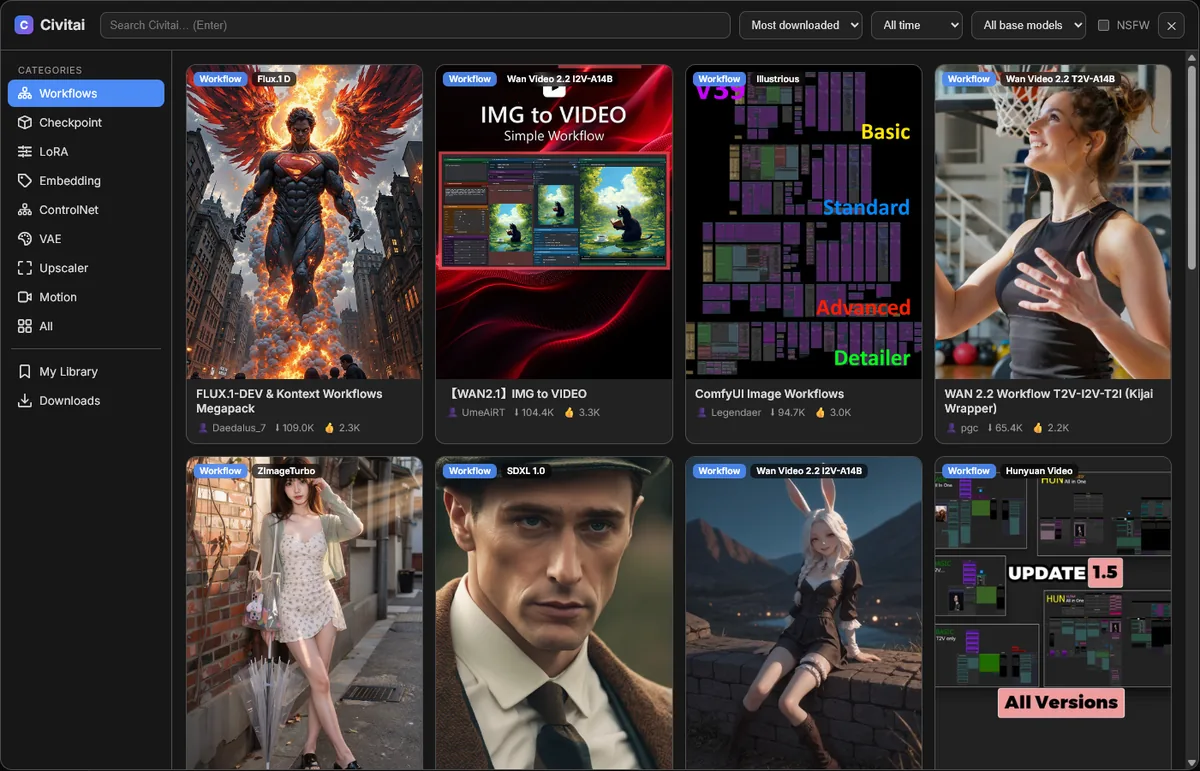
Finding a workflow on Civitai usually means downloading a zip, unpacking it, dragging the JSON into ComfyUI, and then hunting down every model it needs. Civitai Browser turns that into a single click.
It adds a Civitai tab to the ComfyUI sidebar, next to Templates, Workflows and Models. From there you can search Civitai, load a workflow onto the canvas, see which models you're missing, and download them straight into the correct folders.
It's a pure frontend + API extension. It adds no nodes, never modifies ComfyUI's core files, and if it ever fails to load, ComfyUI keeps starting normally. To uninstall, delete the folder.
Features
🔎 Browse Civitai inside ComfyUI
- Categories: Workflows, Checkpoints, LoRA, Embeddings, ControlNet, VAE, Upscalers, Motion modules, or everything at once
- Search, sort (most downloaded / highest rated / newest), time period and base model filters (the base model list comes live from Civitai, so new models like MiniMax H3 appear automatically)
- NSFW filter (off by default; NSFW previews are blurred)
- civitai.red support: mature models open on civitai.red; optionally open every link there (Settings → Civitai)
- Infinite scroll, image and video previews
- Detail view with gallery, versions, trigger words (click to copy), files, tags and description
⚡ Load & Set Up a workflow in one click
- Downloads the workflow from Civitai (
.zip,.jsonor a.pngwith an embedded workflow). If a pack contains several workflows, you pick one. - Loads it onto the canvas. UI-format and API-format workflows are both supported.
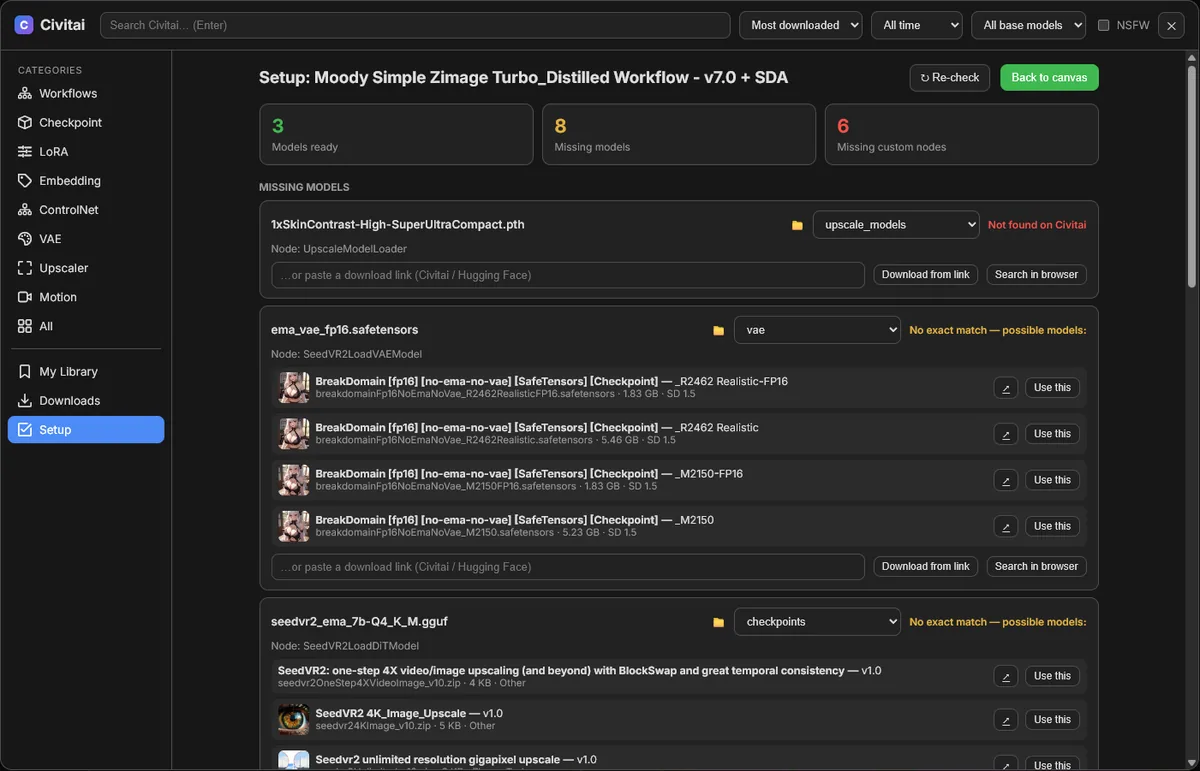
- Scans it for every model it references and compares that list with your own model folders (including
extra_model_paths.yaml). - For each missing model, it finds a source:
- a download URL embedded in the workflow (
properties.models), or - an exact file name match on Civitai, or
- a short list of likely candidates you can choose from, or
- any link you paste (Civitai or Hugging Face)
- or a model you already have: if you own a similar file (e.g.
juggernautXL_v10when the workflow asks forv9, or an fp8/GGUF variant), Use mine points the node at your file instead of downloading anything (with undo)
- a download URL embedded in the workflow (
- Download found models saves everything into the right folder, under the exact file name the workflow expects, so the loaders resolve without any manual re-selecting.
- Lists missing custom nodes and which pack provides each one (from ComfyUI-Manager's node list). Install with Manager opens Manager's missing-packs dialog, so the actual install is handled by Manager (folder, Python dependencies, security checks).
⬇️ Model downloads
- Each file goes to the folder that matches its type (
checkpoints,loras,vae,controlnet,embeddings,upscale_models, …). You can override the folder per file. - Live progress, speed and cancel. Downloads go to a temporary
.civitai_partfile first, so a broken download never leaves a half-written model behind. - Existing files are never overwritten.
- Model dropdowns refresh automatically when a download finishes.
- Add to canvas drops the matching loader node (Checkpoint, LoRA, VAE, ControlNet, Upscaler) on the canvas, with the new file already selected.
📚 My Library
- Every workflow you get from Civitai is saved automatically to
user/default/workflows/Civitai/. It shows up in ComfyUI's own Workflows panel too, so nothing is lost when you close a tab. - Re-open any of them later with Open or Open & Set Up.
- Safe delete: when you remove a workflow, you can also remove the models that were downloaded for that workflow (see Safety below).
Installation
Option 1: ComfyUI-Manager
Open Manager → Install via Git URL and paste:
https://github.com/fth1905-bot/ComfyUI-Civitai-Browser
Then restart ComfyUI.
Option 2: git
cd ComfyUI/custom_nodes
git clone https://github.com/fth1905-bot/ComfyUI-Civitai-Browser
Then restart ComfyUI.
Option 3: Manual
Download the latest ZIP and extract it into ComfyUI/custom_nodes/. Make sure you end up with custom_nodes/ComfyUI-Civitai-Browser/__init__.py, not a folder nested inside another folder. Then restart ComfyUI.
No extra Python packages are needed. The extension only uses aiohttp and Pillow, which ComfyUI already ships with. It works with the current ComfyUI frontend and with ComfyUI Desktop. On very old frontends without a sidebar API, a floating Civitai button appears instead.
Setting up your Civitai API key (recommended)
Browsing works without a key, but many models and workflows can only be downloaded by logged-in users.
- On civitai.com, open Account Settings → Security & Apps → API Keys and click Add API key.
- Leave Buzz spend limit off. This extension never spends Buzz.
- Copy the key. Civitai only shows it once.
- In ComfyUI, open Settings (⚙) → Civitai → Civitai API key and paste it.
Alternatively, set the key on the server side:
- with the environment variable
CIVITAI_API_KEY, or - with a
config.jsonfile next to__init__.pycontaining{"api_key": "..."}.
The key is only ever sent to
civitai.com. Downloads from other hosts, such as Hugging Face, never receive it. Treat it like a password. You can revoke it on Civitai at any time.
Usage
| Where | What |
|---|---|
| Sidebar → 🌐 Civitai | Opens the browser, plus quick category buttons and your download queue |
| Top menu → Workflow → Open Civitai Browser | Same thing, also available as a command |
| Workflow card → ⚡ Load & Set Up | Download, load, check models and offer downloads |
| Workflow card → Load only | Just put it on the canvas |
| Model card → ⬇ Download | Download a file into the matching folder |
| 📚 My Library | Every workflow you've downloaded, with Open / Set Up / Delete |
| Downloads | Progress, history, cancel |
🛡 Safety
Deleting files is the part that should never surprise you, so it follows strict rules.
When you delete a workflow from My Library, a confirmation screen lists the workflow and the models that could be removed along with it. Nothing is removed until you confirm, and you choose each model with a checkbox. A model is only offered for deletion if all of these are true:
- this extension downloaded and created the file. Models you already had, and files that were skipped because they already existed, are never touched.
- the file hasn't changed since. Its size is checked; a replaced or modified file is left alone.
- no other workflow uses it. Every workflow under
user/default/workflows/is scanned, and a model used anywhere else is shown as 🔒 Protected. - it is inside one of ComfyUI's model folders.
These checks run again on the server right before anything is deleted, so even a UI bug can't bypass them. Deleted models are removed permanently (not moved to the Recycle Bin), but you can always re-download them from Civitai.
Like ComfyUI itself, this extension trusts anyone who can reach your ComfyUI server. If you expose ComfyUI to a network (--listen), other people on that network can use the browser too, and can read the API key stored in your settings.
How it works
ComfyUI frontend (web/civitai_browser.js)
   │  sidebar tab, browser modal, setup panel, library
   ▼
ComfyUI server routes  /api/civitai_browser/*   (civitai_server.py)
   │  /models  /model/{id}         → proxy to Civitai API v1 (adds your key)
   │  /workflow/fetch              → download + unpack zip/json/png, save to library
   │  /analyze                     → find missing models in a workflow
   │  /download  /downloads        → background downloads into model folders
   │  /library  /library/models  /library/delete
   ▼
civitai.com/api/v1  ·  model folders (folder_paths)  ·  user/default/workflows/Civitai
Files the extension creates in its own folder (all git-ignored):
downloads_history.json: finished downloads, used for safe deletelibrary.json: metadata (thumbnail, model id) for saved workflowsconfig.json: optional server-side API key
Troubleshooting
| Problem | Fix |
|---|---|
| No Civitai tab in the sidebar | Check that the folder is custom_nodes/ComfyUI-Civitai-Browser/__init__.py and restart ComfyUI. Look for [Civitai Browser] routes registered in the console. |
| "Unauthorized (401/403)" or "Got an HTML page instead of a file" | Add your Civitai API key, and make sure your Civitai email is verified. Early-access models must be unlocked on civitai.com first. |
| A missing model wasn't found | Civitai's search works on model names, not file names. Use Search in browser, or paste a direct download link. |
| Library / delete buttons give an error after updating | Restart ComfyUI. Server-side changes need a restart, and a browser refresh isn't enough. |
Contributing
Issues and pull requests are welcome. If something breaks, please include your ComfyUI version, your frontend version and the console output (lines starting with [Civitai Browser]).
Support
If this extension saves you time, you can support my work on Patreon ❤️
License
MIT © 2026 Fatih Çakır
This project is not affiliated with, endorsed by, or sponsored by Civitai. "Civitai" is a trademark of its respective owner. Content you browse and download is subject to each creator's license and Civitai's terms.
Similar repos



Languages
JavaScript
57.2%
Python
33.1%
CSS
9.7%
Browse Civitai workflows & models inside ComfyUI and get any workflow ready in one click: load it, find missing models and download them into the right folders.
JavaScript
11
13 commits
updated Oct 3, 2026
See what people are saying
README
ComfyUI Civitai Browser
Browse Civitai workflows and models right inside ComfyUI, and get any workflow ready to run in one click.
Finding a workflow on Civitai usually means downloading a zip, unpacking it, dragging the JSON into ComfyUI, and then hunting down every model it needs. Civitai Browser turns that into a single click.
It adds a Civitai tab to the ComfyUI sidebar, next to Templates, Workflows and Models. From there you can search Civitai, load a workflow onto the canvas, see which models you're missing, and download them straight into the correct folders.
It's a pure frontend + API extension. It adds no nodes, never modifies ComfyUI's core files, and if it ever fails to load, ComfyUI keeps starting normally. To uninstall, delete the folder.
Features
🔎 Browse Civitai inside ComfyUI
- Categories: Workflows, Checkpoints, LoRA, Embeddings, ControlNet, VAE, Upscalers, Motion modules, or everything at once
- Search, sort (most downloaded / highest rated / newest), time period and base model filters (the base model list comes live from Civitai, so new models like MiniMax H3 appear automatically)
- NSFW filter (off by default; NSFW previews are blurred)
- civitai.red support: mature models open on civitai.red; optionally open every link there (Settings → Civitai)
- Infinite scroll, image and video previews
- Detail view with gallery, versions, trigger words (click to copy), files, tags and description
⚡ Load & Set Up a workflow in one click
- Downloads the workflow from Civitai (
.zip,.jsonor a.pngwith an embedded workflow). If a pack contains several workflows, you pick one. - Loads it onto the canvas. UI-format and API-format workflows are both supported.
- Scans it for every model it references and compares that list with your own model folders (including
extra_model_paths.yaml). - For each missing model, it finds a source:
- a download URL embedded in the workflow (
properties.models), or - an exact file name match on Civitai, or
- a short list of likely candidates you can choose from, or
- any link you paste (Civitai or Hugging Face)
- or a model you already have: if you own a similar file (e.g.
juggernautXL_v10when the workflow asks forv9, or an fp8/GGUF variant), Use mine points the node at your file instead of downloading anything (with undo)
- a download URL embedded in the workflow (
- Download found models saves everything into the right folder, under the exact file name the workflow expects, so the loaders resolve without any manual re-selecting.
- Lists missing custom nodes and which pack provides each one (from ComfyUI-Manager's node list). Install with Manager opens Manager's missing-packs dialog, so the actual install is handled by Manager (folder, Python dependencies, security checks).
⬇️ Model downloads
- Each file goes to the folder that matches its type (
checkpoints,loras,vae,controlnet,embeddings,upscale_models, …). You can override the folder per file. - Live progress, speed and cancel. Downloads go to a temporary
.civitai_partfile first, so a broken download never leaves a half-written model behind. - Existing files are never overwritten.
- Model dropdowns refresh automatically when a download finishes.
- Add to canvas drops the matching loader node (Checkpoint, LoRA, VAE, ControlNet, Upscaler) on the canvas, with the new file already selected.
📚 My Library
- Every workflow you get from Civitai is saved automatically to
user/default/workflows/Civitai/. It shows up in ComfyUI's own Workflows panel too, so nothing is lost when you close a tab. - Re-open any of them later with Open or Open & Set Up.
- Safe delete: when you remove a workflow, you can also remove the models that were downloaded for that workflow (see Safety below).
Installation
Option 1: ComfyUI-Manager
Open Manager → Install via Git URL and paste:
https://github.com/fth1905-bot/ComfyUI-Civitai-Browser
Then restart ComfyUI.
Option 2: git
cd ComfyUI/custom_nodes
git clone https://github.com/fth1905-bot/ComfyUI-Civitai-Browser
Then restart ComfyUI.
Option 3: Manual
Download the latest ZIP and extract it into ComfyUI/custom_nodes/. Make sure you end up with custom_nodes/ComfyUI-Civitai-Browser/__init__.py, not a folder nested inside another folder. Then restart ComfyUI.
No extra Python packages are needed. The extension only uses aiohttp and Pillow, which ComfyUI already ships with. It works with the current ComfyUI frontend and with ComfyUI Desktop. On very old frontends without a sidebar API, a floating Civitai button appears instead.
Setting up your Civitai API key (recommended)
Browsing works without a key, but many models and workflows can only be downloaded by logged-in users.
- On civitai.com, open Account Settings → Security & Apps → API Keys and click Add API key.
- Leave Buzz spend limit off. This extension never spends Buzz.
- Copy the key. Civitai only shows it once.
- In ComfyUI, open Settings (⚙) → Civitai → Civitai API key and paste it.
Alternatively, set the key on the server side:
- with the environment variable
CIVITAI_API_KEY, or - with a
config.jsonfile next to__init__.pycontaining{"api_key": "..."}.
The key is only ever sent to
civitai.com. Downloads from other hosts, such as Hugging Face, never receive it. Treat it like a password. You can revoke it on Civitai at any time.
Usage
| Where | What |
|---|---|
| Sidebar → 🌐 Civitai | Opens the browser, plus quick category buttons and your download queue |
| Top menu → Workflow → Open Civitai Browser | Same thing, also available as a command |
| Workflow card → ⚡ Load & Set Up | Download, load, check models and offer downloads |
| Workflow card → Load only | Just put it on the canvas |
| Model card → ⬇ Download | Download a file into the matching folder |
| 📚 My Library | Every workflow you've downloaded, with Open / Set Up / Delete |
| Downloads | Progress, history, cancel |
🛡 Safety
Deleting files is the part that should never surprise you, so it follows strict rules.
When you delete a workflow from My Library, a confirmation screen lists the workflow and the models that could be removed along with it. Nothing is removed until you confirm, and you choose each model with a checkbox. A model is only offered for deletion if all of these are true:
- this extension downloaded and created the file. Models you already had, and files that were skipped because they already existed, are never touched.
- the file hasn't changed since. Its size is checked; a replaced or modified file is left alone.
- no other workflow uses it. Every workflow under
user/default/workflows/is scanned, and a model used anywhere else is shown as 🔒 Protected. - it is inside one of ComfyUI's model folders.
These checks run again on the server right before anything is deleted, so even a UI bug can't bypass them. Deleted models are removed permanently (not moved to the Recycle Bin), but you can always re-download them from Civitai.
Like ComfyUI itself, this extension trusts anyone who can reach your ComfyUI server. If you expose ComfyUI to a network (--listen), other people on that network can use the browser too, and can read the API key stored in your settings.
How it works
ComfyUI frontend (web/civitai_browser.js)
   │  sidebar tab, browser modal, setup panel, library
   ▼
ComfyUI server routes  /api/civitai_browser/*   (civitai_server.py)
   │  /models  /model/{id}         → proxy to Civitai API v1 (adds your key)
   │  /workflow/fetch              → download + unpack zip/json/png, save to library
   │  /analyze                     → find missing models in a workflow
   │  /download  /downloads        → background downloads into model folders
   │  /library  /library/models  /library/delete
   ▼
civitai.com/api/v1  ·  model folders (folder_paths)  ·  user/default/workflows/Civitai
Files the extension creates in its own folder (all git-ignored):
downloads_history.json: finished downloads, used for safe deletelibrary.json: metadata (thumbnail, model id) for saved workflowsconfig.json: optional server-side API key
Troubleshooting
| Problem | Fix |
|---|---|
| No Civitai tab in the sidebar | Check that the folder is custom_nodes/ComfyUI-Civitai-Browser/__init__.py and restart ComfyUI. Look for [Civitai Browser] routes registered in the console. |
| "Unauthorized (401/403)" or "Got an HTML page instead of a file" | Add your Civitai API key, and make sure your Civitai email is verified. Early-access models must be unlocked on civitai.com first. |
| A missing model wasn't found | Civitai's search works on model names, not file names. Use Search in browser, or paste a direct download link. |
| Library / delete buttons give an error after updating | Restart ComfyUI. Server-side changes need a restart, and a browser refresh isn't enough. |
Contributing
Issues and pull requests are welcome. If something breaks, please include your ComfyUI version, your frontend version and the console output (lines starting with [Civitai Browser]).
Support
If this extension saves you time, you can support my work on Patreon ❤️
License
MIT © 2026 Fatih Çakır
This project is not affiliated with, endorsed by, or sponsored by Civitai. "Civitai" is a trademark of its respective owner. Content you browse and download is subject to each creator's license and Civitai's terms.
Similar repos
Languages
JavaScript
57.2%
Python
33.1%
CSS
9.7%