Performance metrics library for Android development (includes dagger2metrics)
Java
1,531
91 commits
updated Apr 26, 2019
(formerly dagger2metrics)
Performance metrics library for Android development.

The problem with performance is that it often decreases slowly so in day-by-day development it's hard to notice that our app (or Activity or any other view) launches 50ms longer. And another 150ms longer, and another 100ms...
With AndroidDevMetrics you will be able to see how performant are the most common operations like object initialization (in Dagger 2 graph), or Activity lifecycle methods (onCreate(), onStart(), onResume()).
It won't show you exact reason of performance issues or bottlenecks (yet!) but it can point out where you should start looking first.
AndroidDevMetrics currently includes:
onCreate(), onStart(), onResume())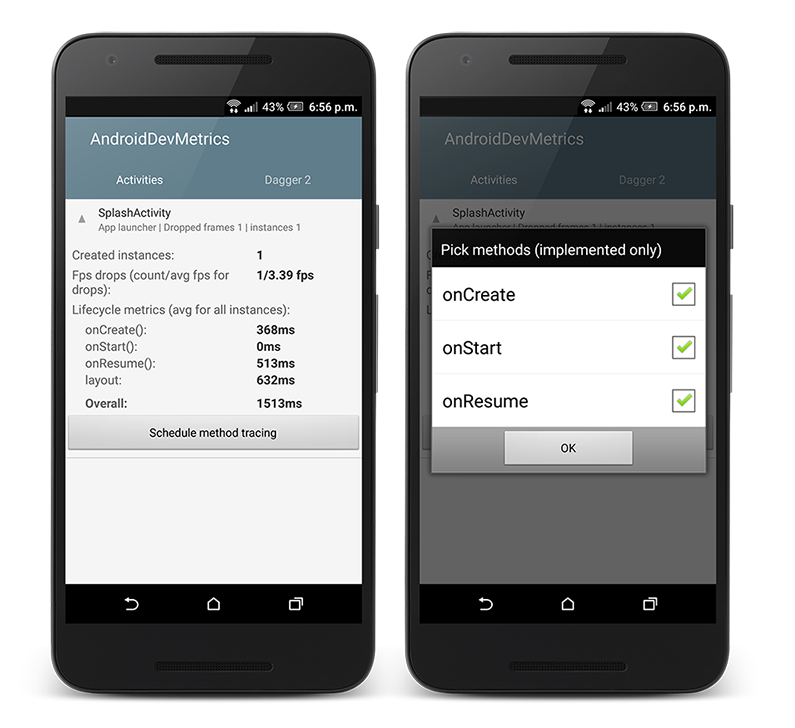
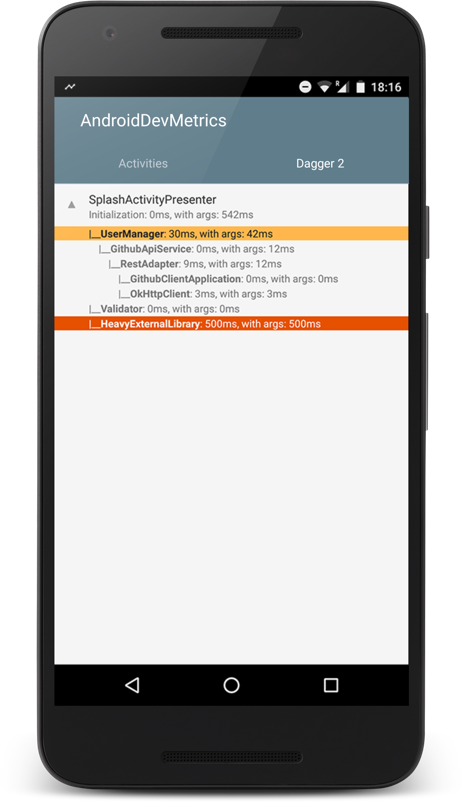
Script below shows how to enable all available metrics.
In your build.gradle:
 buildscript {
  repositories {
    jcenter()
  }

  dependencies {
    classpath 'com.frogermcs.androiddevmetrics:androiddevmetrics-plugin:0.7'
  }
}

apply plugin: 'com.android.application'
apply plugin: 'com.frogermcs.androiddevmetrics'
In your Application class:
public class ExampleApplication extends Application {

 @Override
 public void onCreate() {
     super.onCreate();
     //Use it only in debug builds
     if (BuildConfig.DEBUG) {
         AndroidDevMetrics.initWith(this);
     }
  }
 }
Detailed description how it works under the hood can be found on wiki pages:
There is no silver bullet for performance issues but here are a couple steps which can help you with potential bugs hunting.
If measured time of object initialization or method execution looks suspicious you should definitely give a try to TraceView. This tool logs method execution over time and shows execution data, per-thread timelines, and call stacks. Practical example of TraceView usage can be found in this blog post: Measuring Dagger 2 graph creation performance.
If it seems that layout or view can be a reason of performance issue you should start with those links from official Android documentation:
Finally, if you want to understand where most of performance issues come from, here is a collection of videos focused entirely on helping developers write faster, more performant Android Applications.
You can check GithubClient - example Android app which shows how to use Dagger 2. Most recent version uses AndroidDevMetrics for measuring performance.
Build AndroidDevMetrics plugin with [./gradlew clean build]. The tests can be run with
./gradlew clean test. To install the plugin in your local maven repository (usually located at
~/.m2/repository) use ./gradlew clean install. You can change VERSION_NAME value in gradle.properties
to easily recognise your version.
Copyright 2016 Miroslaw Stanek

Licensed under the Apache License, Version 2.0 (the "License");
you may not use this file except in compliance with the License.
You may obtain a copy of the License at

   http://www.apache.org/licenses/LICENSE-2.0

Unless required by applicable law or agreed to in writing, software
distributed under the License is distributed on an "AS IS" BASIS,
WITHOUT WARRANTIES OR CONDITIONS OF ANY KIND, either express or implied.
See the License for the specific language governing permissions and
limitations under the License.
2,620 followers · starred Feb 2016
64 followers · starred Sep 2017
245 followers · starred Sep 2019
154 followers · starred Feb 2016
Performance metrics library for Android development (includes dagger2metrics)
Java
1,531
91 commits
updated Apr 26, 2019
(formerly dagger2metrics)
Performance metrics library for Android development.
The problem with performance is that it often decreases slowly so in day-by-day development it's hard to notice that our app (or Activity or any other view) launches 50ms longer. And another 150ms longer, and another 100ms...
With AndroidDevMetrics you will be able to see how performant are the most common operations like object initialization (in Dagger 2 graph), or Activity lifecycle methods (onCreate(), onStart(), onResume()).
It won't show you exact reason of performance issues or bottlenecks (yet!) but it can point out where you should start looking first.
AndroidDevMetrics currently includes:
onCreate(), onStart(), onResume())
Script below shows how to enable all available metrics.
In your build.gradle:
 buildscript {
  repositories {
    jcenter()
  }

  dependencies {
    classpath 'com.frogermcs.androiddevmetrics:androiddevmetrics-plugin:0.7'
  }
}

apply plugin: 'com.android.application'
apply plugin: 'com.frogermcs.androiddevmetrics'
In your Application class:
public class ExampleApplication extends Application {

 @Override
 public void onCreate() {
     super.onCreate();
     //Use it only in debug builds
     if (BuildConfig.DEBUG) {
         AndroidDevMetrics.initWith(this);
     }
  }
 }
Detailed description how it works under the hood can be found on wiki pages:
There is no silver bullet for performance issues but here are a couple steps which can help you with potential bugs hunting.
If measured time of object initialization or method execution looks suspicious you should definitely give a try to TraceView. This tool logs method execution over time and shows execution data, per-thread timelines, and call stacks. Practical example of TraceView usage can be found in this blog post: Measuring Dagger 2 graph creation performance.
If it seems that layout or view can be a reason of performance issue you should start with those links from official Android documentation:
Finally, if you want to understand where most of performance issues come from, here is a collection of videos focused entirely on helping developers write faster, more performant Android Applications.
You can check GithubClient - example Android app which shows how to use Dagger 2. Most recent version uses AndroidDevMetrics for measuring performance.
Build AndroidDevMetrics plugin with [./gradlew clean build]. The tests can be run with
./gradlew clean test. To install the plugin in your local maven repository (usually located at
~/.m2/repository) use ./gradlew clean install. You can change VERSION_NAME value in gradle.properties
to easily recognise your version.
Copyright 2016 Miroslaw Stanek

Licensed under the Apache License, Version 2.0 (the "License");
you may not use this file except in compliance with the License.
You may obtain a copy of the License at

   http://www.apache.org/licenses/LICENSE-2.0

Unless required by applicable law or agreed to in writing, software
distributed under the License is distributed on an "AS IS" BASIS,
WITHOUT WARRANTIES OR CONDITIONS OF ANY KIND, either express or implied.
See the License for the specific language governing permissions and
limitations under the License.
2,620 followers · starred Feb 2016
64 followers · starred Sep 2017
245 followers · starred Sep 2019
154 followers · starred Feb 2016



