⌨️ KeyboardLayoutGuide, back from when it didn't exist.
Swift
1,210
91 commits
updated Sep 20, 2024
Apple's missing KeyboardLayoutGuide





UIKit FriendlysafeArea into account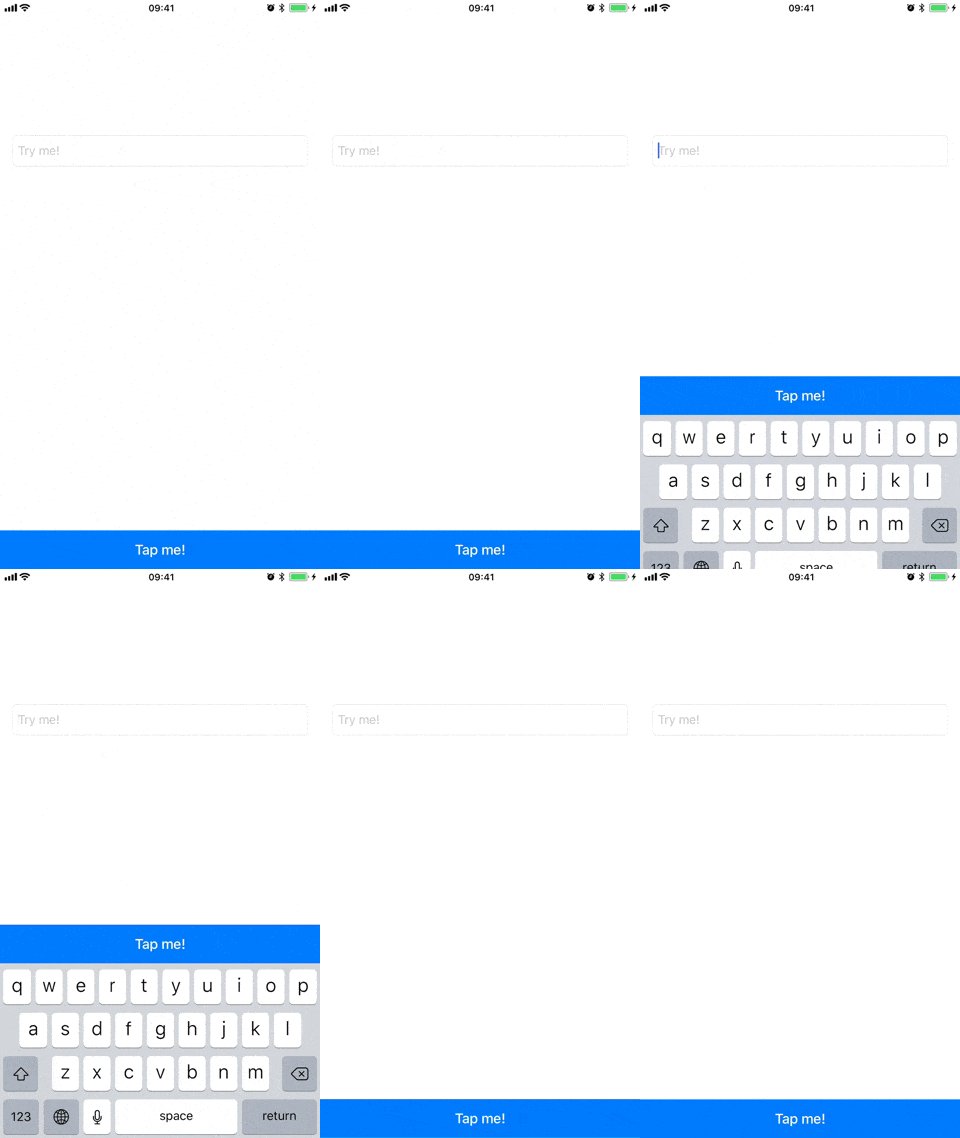
Simply constrain your views to the KeyboardLayoutGuide's top anchor the way you would do natively:
override func viewDidLoad() {
    super.viewDidLoad()

    // Pin your button to the keyboard
    button.bottomAnchor.constraint(equalTo: view.keyboardLayoutGuide.topAnchor).isActive = true
}
Bonus: if you're using Stevia, this gets even more concise \o/
button.Bottom == view.keyboardLayoutGuide.Top
If you add your view in Interface Builder, don't forget to enable the "Remove at build time" checkbox for the bottom constraint:
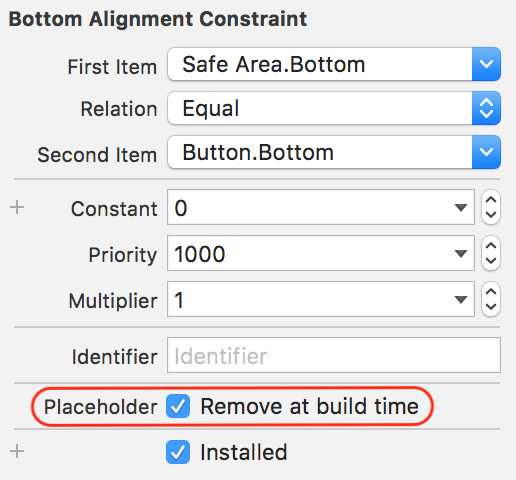
By default, KeyboardLayoutGuide will align your item with the bottom safe area.
This is a behaviour that can be opt out by using keyboardLayoutGuideNoSafeArea instead of keyboardLayoutGuide.
The Swift Package Manager (SPM) is now the official way to install KeyboardLayoutGuide. The other package managers are now deprecated as of 1.7.0 and won't be supported in future versions.
Xcode > File > Swift Packages > Add Package Dependency... > Paste https://github.com/freshOS/KeyboardLayoutGuide
To install KeyboardLayoutGuide via CocoaPods, add the following line to your Podfile:
target 'MyAppName' do
  pod 'Keyboard+LayoutGuide'
  use_frameworks!
end
To install KeyboardLayoutGuide via Carthage, add the following line to your Cartfile:
github "freshos/KeyboardLayoutGuide"
Just add Keyboard+LayoutGuide.swift to your Xcode project.
KeyboardLayoutGuide is available under the MIT license. See the LICENSE file for more info.
1,061 followers · starred Oct 2019
52 followers · starred Nov 2017
495 followers · starred Nov 2017
205 followers · starred Jul 2019
⌨️ KeyboardLayoutGuide, back from when it didn't exist.
Swift
1,210
91 commits
updated Sep 20, 2024
Apple's missing KeyboardLayoutGuide
UIKit FriendlysafeArea into account
Simply constrain your views to the KeyboardLayoutGuide's top anchor the way you would do natively:
override func viewDidLoad() {
    super.viewDidLoad()

    // Pin your button to the keyboard
    button.bottomAnchor.constraint(equalTo: view.keyboardLayoutGuide.topAnchor).isActive = true
}
Bonus: if you're using Stevia, this gets even more concise \o/
button.Bottom == view.keyboardLayoutGuide.Top
If you add your view in Interface Builder, don't forget to enable the "Remove at build time" checkbox for the bottom constraint:
By default, KeyboardLayoutGuide will align your item with the bottom safe area.
This is a behaviour that can be opt out by using keyboardLayoutGuideNoSafeArea instead of keyboardLayoutGuide.
The Swift Package Manager (SPM) is now the official way to install KeyboardLayoutGuide. The other package managers are now deprecated as of 1.7.0 and won't be supported in future versions.
Xcode > File > Swift Packages > Add Package Dependency... > Paste https://github.com/freshOS/KeyboardLayoutGuide
To install KeyboardLayoutGuide via CocoaPods, add the following line to your Podfile:
target 'MyAppName' do
  pod 'Keyboard+LayoutGuide'
  use_frameworks!
end
To install KeyboardLayoutGuide via Carthage, add the following line to your Cartfile:
github "freshos/KeyboardLayoutGuide"
Just add Keyboard+LayoutGuide.swift to your Xcode project.
KeyboardLayoutGuide is available under the MIT license. See the LICENSE file for more info.
1,061 followers · starred Oct 2019
52 followers · starred Nov 2017
495 followers · starred Nov 2017
205 followers · starred Jul 2019



