
README

So Novel




概述
So Novel 是一款通用的网页内容处理与导出工具,它致力于帮助用户高效地从网页中提取结构化信息,并将其灵活导出为 EPUB、TXT、PDF 等多种标准电子文档格式。适用于学习采集、格式转换、电子书制作等场景。
预览
点击查看图片
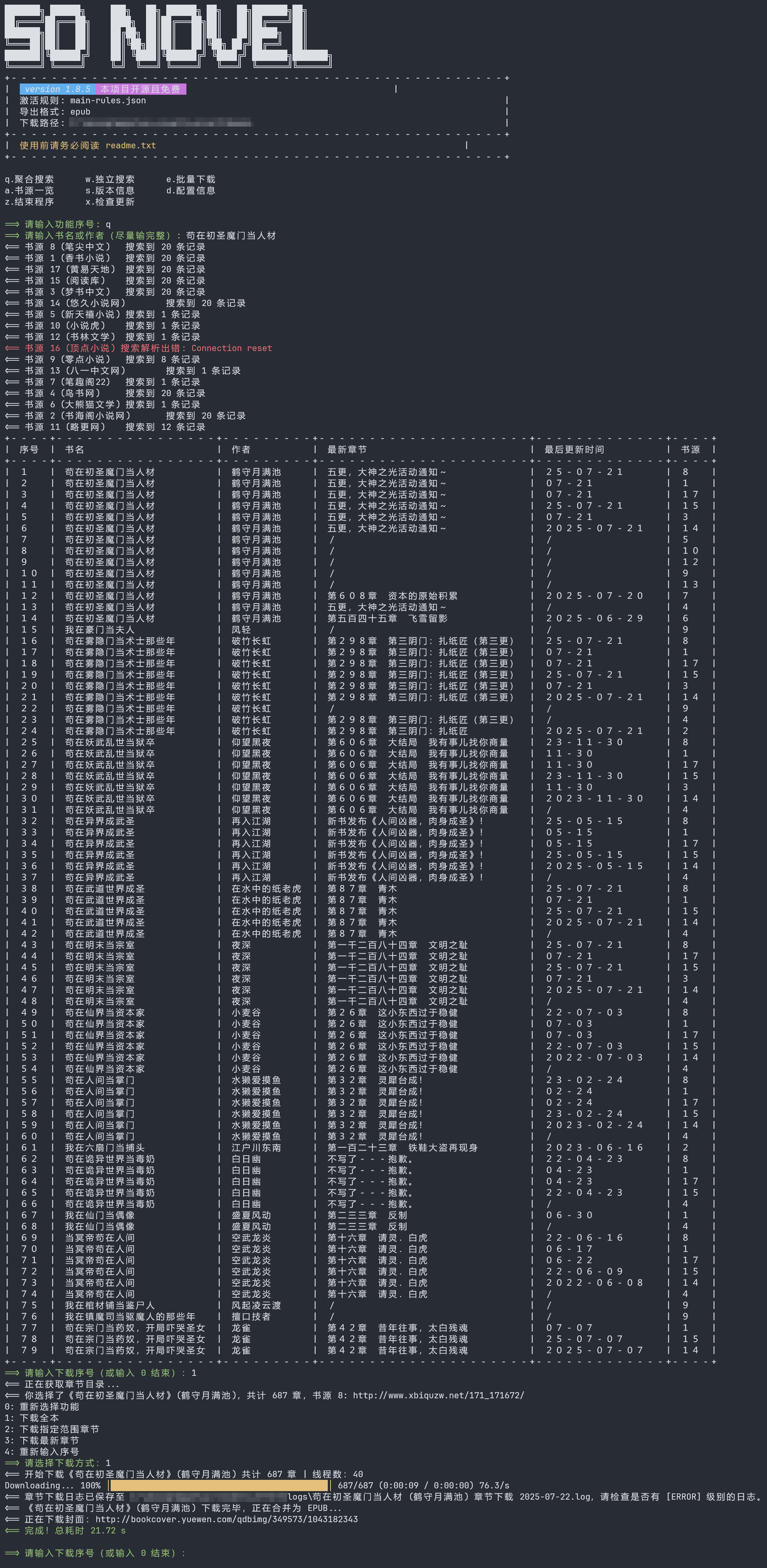
TUI 预览 (Text-based User Interface)
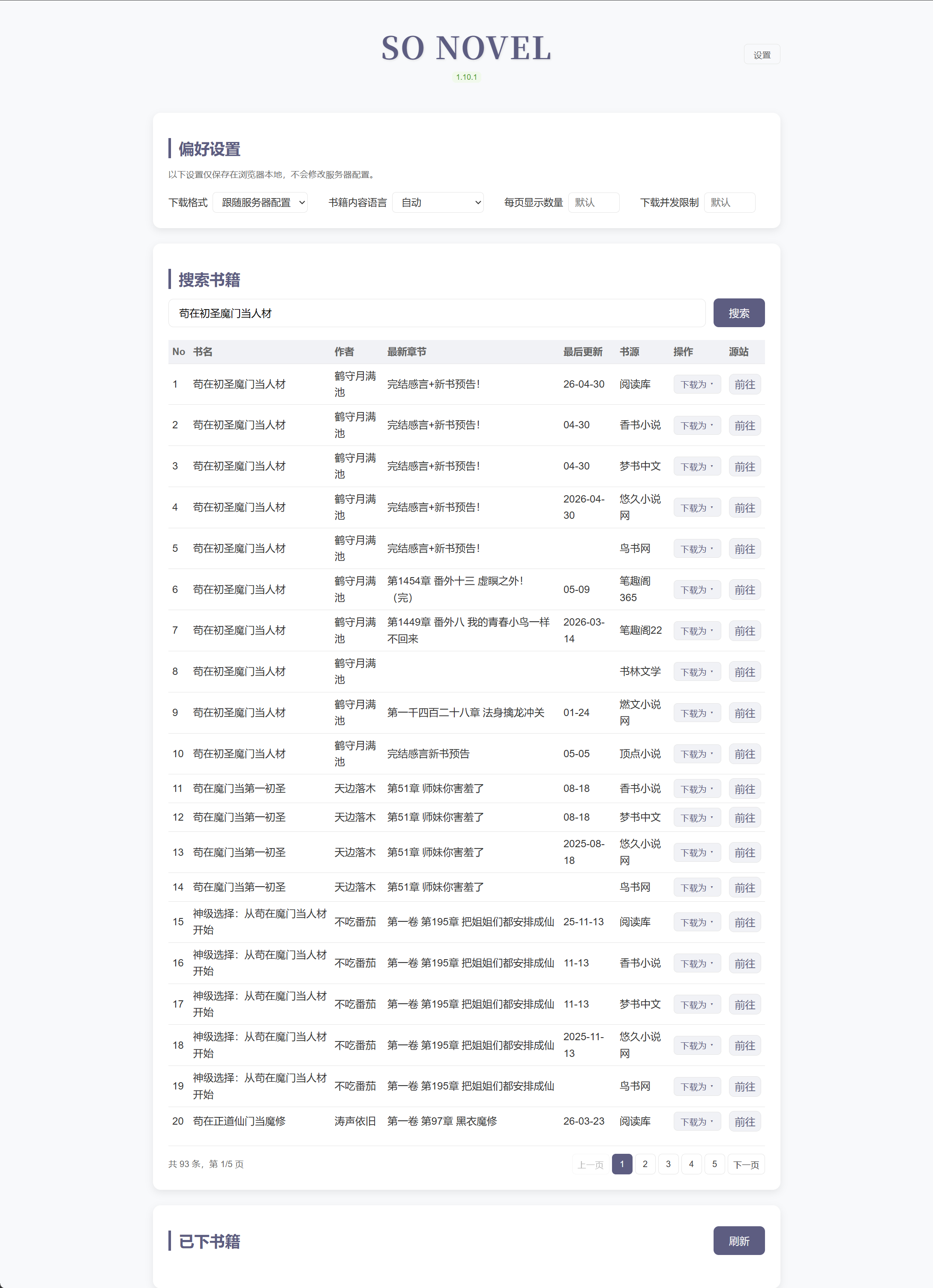
WebUI 预览 (网页版)
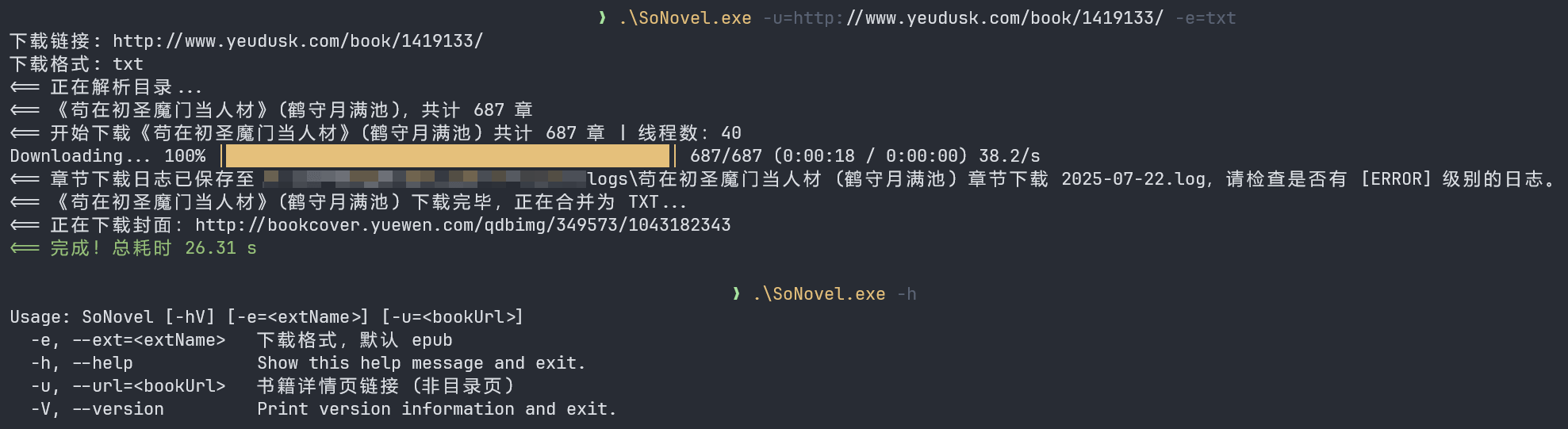
CLI 预览 (Command Line Interface)
安装
📦 手动下载压缩包
https://github.com/freeok/so-novel/releases
🪟 Windows
1. PowerShell
# powershell
irm https://raw.githubusercontent.com/freeok/so-novel/main/bin/windows-install.ps1 | iex
2. CMD (命令提示符)
powershell -NoProfile -ExecutionPolicy Bypass -Command "irm https://raw.githubusercontent.com/freeok/so-novel/main/bin/windows-install.ps1 | iex"
🐧 Linux
bash <(curl -sSL https://raw.githubusercontent.com/freeok/so-novel/main/bin/linux-install.sh)
🍺 Homebrew
brew tap ownia/homebrew-ownia
# https://docs.brew.sh/Tap-Trust#why-tap-trust-exists
brew trust --formula ownia/homebrew-ownia/so-novel
brew install so-novel
🍨 Scoop
scoop bucket add freeok https://github.com/freeok/scoop-bucket
scoop install freeok/so-novel
🐳 Docker
方式 1: 脚本一键安装
curl -sSL https://raw.githubusercontent.com/freeok/so-novel/main/bin/docker-install.sh | bash
方式 2: Docker Compose (NAS 首选)
services:
  sonovel:
    image: ghcr.io/freeok/sonovel:latest
    container_name: sonovel
    ports:
      - "7765:7765"
    environment:
      JAVA_OPTS: "-Dmode=web"
    volumes:
      - sonovel_data:/sonovel
    restart: unless-stopped

volumes:
  sonovel_data:
方式 3: Docker Run
# 如需挂载,请提前准备好 config.ini 文件、rules 目录
docker run -d \
  --name sonovel \
  -v /sonovel/config.ini:/sonovel/config.ini \
  -v /sonovel/rules:/sonovel/rules \
  -v /sonovel/downloads:/sonovel/downloads \
  -p 7765:7765 \
  -e JAVA_OPTS='-Dmode=web' \
  ghcr.io/freeok/sonovel:latest
从源码构建 Docker 镜像
# 确保已安装 git、jdk 21、maven
sudo apt update
sudo apt install -y git
sudo apt install -y openjdk-21-jdk
sudo apt install -y maven

# 验证安装
git -v
javac -version
mvn -v

# 构建项目
git clone https://github.com/freeok/so-novel.git && cd so-novel
# arch: [x64|arm64]
sh bin/release-linux.sh [arch]

# 构建 Docker 镜像
cp -r target/sonovel-linux_[arch]/{app.jar,config.ini,rules} .
docker build -t sonovel .
[!TIP]
为获得最佳阅读体验,建议使用以下电子书阅读器:
桌面端
移动端
如需转换为其它电子书格式,可使用:
修复 WPS、掌阅等软件无法打开 so-novel 下载的 EPUB:https://github.com/freeok/so-novel/discussions/199
自定义 JVM 系统属性
| 参数 | 说明 | 默认值 |
|---|---|---|
| -Dmode | 启动模式,可选值:tui|cli|web | tui |
| -Dconfig.file | 配置文件路径 | ./config.ini |
用法
[!NOTE]
Windows 修改 sonovel.l4j.ini
Linux 修改 run-linux.sh
macOS 修改 run-macos.sh
使用本地 JDK / JRE 启动
如果你不想使用内置 JRE(runtime 目录),可以通过本地 JDK / JRE 启动程序
Windows 使用脚本 start-custom-jre.cmd:
REM --------------------------------------------------
REM 高级用户使用自定义 JRE 启动程序
REM 将 "your_path\java.exe" 替换为你的 JRE 路径,例如:
REM "C:\Java\jdk-21\bin\java.exe"
REM --------------------------------------------------
@echo off
your_path\java.exe ^
  -XX:+UseZGC ^
  -XX:+ZGenerational ^
  -Dconfig.file=config.ini ^
  -Dmode=tui ^
  -Dfile.encoding=GBK|Big5 ^
  -jar app.jar
Linux / macOS:run-linux.sh / run-macos.sh 修改 java 路径
常见问题
https://github.com/freeok/so-novel/issues?q=label%3A%22usage%20question%22
讨论
https://github.com/freeok/so-novel/discussions?discussions_q=
支持 & 赞助
如果觉得有所帮助,欢迎扫码赞助☕、点击项目主页顶部的⭐Star 按钮支持!
🚀这将是我们持续更新的动力源泉!同时,你也能第一时间获取到最新的更新动态。💡❤️
| 支付宝赞助 | 微信赞助 |
|---|---|
 |  |
免责声明
在使用本工具前,请务必仔细阅读我们的法律免责声明。使用本工具即表示您已阅读、理解并同意遵守所有条款。
Star History
Contributors


Similar repos


Languages
Java
73.2%
HTML
14.4%
JavaScript
7.6%
Shell
3.9%
README
So Novel
概述
So Novel 是一款通用的网页内容处理与导出工具,它致力于帮助用户高效地从网页中提取结构化信息,并将其灵活导出为 EPUB、TXT、PDF 等多种标准电子文档格式。适用于学习采集、格式转换、电子书制作等场景。
预览
点击查看图片
TUI 预览 (Text-based User Interface)
WebUI 预览 (网页版)
CLI 预览 (Command Line Interface)
安装
📦 手动下载压缩包
https://github.com/freeok/so-novel/releases
🪟 Windows
1. PowerShell
# powershell
irm https://raw.githubusercontent.com/freeok/so-novel/main/bin/windows-install.ps1 | iex
2. CMD (命令提示符)
powershell -NoProfile -ExecutionPolicy Bypass -Command "irm https://raw.githubusercontent.com/freeok/so-novel/main/bin/windows-install.ps1 | iex"
🐧 Linux
bash <(curl -sSL https://raw.githubusercontent.com/freeok/so-novel/main/bin/linux-install.sh)
🍺 Homebrew
brew tap ownia/homebrew-ownia
# https://docs.brew.sh/Tap-Trust#why-tap-trust-exists
brew trust --formula ownia/homebrew-ownia/so-novel
brew install so-novel
🍨 Scoop
scoop bucket add freeok https://github.com/freeok/scoop-bucket
scoop install freeok/so-novel
🐳 Docker
方式 1: 脚本一键安装
curl -sSL https://raw.githubusercontent.com/freeok/so-novel/main/bin/docker-install.sh | bash
方式 2: Docker Compose (NAS 首选)
services:
  sonovel:
    image: ghcr.io/freeok/sonovel:latest
    container_name: sonovel
    ports:
      - "7765:7765"
    environment:
      JAVA_OPTS: "-Dmode=web"
    volumes:
      - sonovel_data:/sonovel
    restart: unless-stopped

volumes:
  sonovel_data:
方式 3: Docker Run
# 如需挂载,请提前准备好 config.ini 文件、rules 目录
docker run -d \
  --name sonovel \
  -v /sonovel/config.ini:/sonovel/config.ini \
  -v /sonovel/rules:/sonovel/rules \
  -v /sonovel/downloads:/sonovel/downloads \
  -p 7765:7765 \
  -e JAVA_OPTS='-Dmode=web' \
  ghcr.io/freeok/sonovel:latest
从源码构建 Docker 镜像
# 确保已安装 git、jdk 21、maven
sudo apt update
sudo apt install -y git
sudo apt install -y openjdk-21-jdk
sudo apt install -y maven

# 验证安装
git -v
javac -version
mvn -v

# 构建项目
git clone https://github.com/freeok/so-novel.git && cd so-novel
# arch: [x64|arm64]
sh bin/release-linux.sh [arch]

# 构建 Docker 镜像
cp -r target/sonovel-linux_[arch]/{app.jar,config.ini,rules} .
docker build -t sonovel .
[!TIP]
为获得最佳阅读体验,建议使用以下电子书阅读器:
桌面端
移动端
如需转换为其它电子书格式,可使用:
修复 WPS、掌阅等软件无法打开 so-novel 下载的 EPUB:https://github.com/freeok/so-novel/discussions/199
自定义 JVM 系统属性
| 参数 | 说明 | 默认值 |
|---|---|---|
| -Dmode | 启动模式,可选值:tui|cli|web | tui |
| -Dconfig.file | 配置文件路径 | ./config.ini |
用法
[!NOTE]
Windows 修改 sonovel.l4j.ini
Linux 修改 run-linux.sh
macOS 修改 run-macos.sh
使用本地 JDK / JRE 启动
如果你不想使用内置 JRE(runtime 目录),可以通过本地 JDK / JRE 启动程序
Windows 使用脚本 start-custom-jre.cmd:
REM --------------------------------------------------
REM 高级用户使用自定义 JRE 启动程序
REM 将 "your_path\java.exe" 替换为你的 JRE 路径,例如:
REM "C:\Java\jdk-21\bin\java.exe"
REM --------------------------------------------------
@echo off
your_path\java.exe ^
  -XX:+UseZGC ^
  -XX:+ZGenerational ^
  -Dconfig.file=config.ini ^
  -Dmode=tui ^
  -Dfile.encoding=GBK|Big5 ^
  -jar app.jar
Linux / macOS:run-linux.sh / run-macos.sh 修改 java 路径
常见问题
https://github.com/freeok/so-novel/issues?q=label%3A%22usage%20question%22
讨论
https://github.com/freeok/so-novel/discussions?discussions_q=
支持 & 赞助
如果觉得有所帮助,欢迎扫码赞助☕、点击项目主页顶部的⭐Star 按钮支持!
🚀这将是我们持续更新的动力源泉!同时,你也能第一时间获取到最新的更新动态。💡❤️
| 支付宝赞助 | 微信赞助 |
|---|---|
| |
免责声明
在使用本工具前,请务必仔细阅读我们的法律免责声明。使用本工具即表示您已阅读、理解并同意遵守所有条款。
Star History
Similar repos
Contributors
Languages
Java
73.2%
HTML
14.4%
JavaScript
7.6%
Shell
3.9%