
Your agent stops paying to read files. Content-addressed editing for coding agents: lines, not files. ~25,000 tokens per edit, down to ~50.
See the codeSee what people are saying (1)
README
💿 RAP
Real Apply Patch — the file-editing tool for coding agents



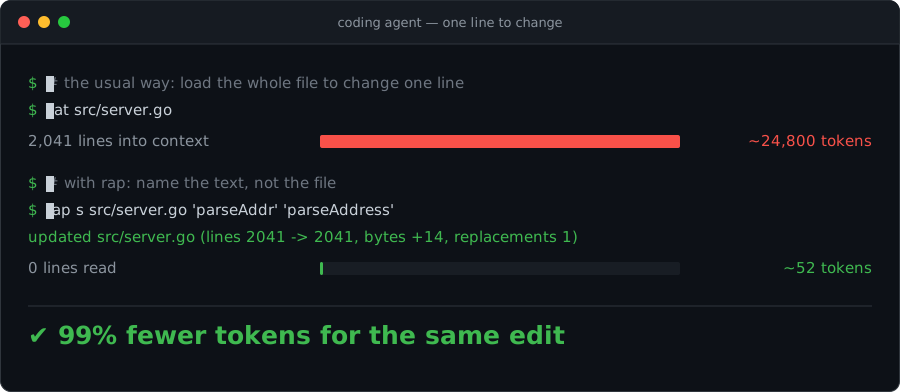
💸 Your agent is paying to read files it barely changes
🧠 To change one line, the usual loop loads all 2,000 into the context window — and keeps carrying them, turn after turn.
⚡ RAP does the same edit for ~50 tokens. The file is never opened.
🎯 Why it works, in three words:
lines, not files. RAP addresses code by content, not by coordinates — so the unit of work is the handful of lines your agent already knows, never a file it has to load.🛑 And when a target is ambiguous, it refuses instead of guessing. A failure costs a dozen tokens; a wrong
sed -icosts the rest of the session.
Why it works
Your agent has to change three lines in a 2,000-line file.
The usual way: it reads all 2,000 lines into its context window, thinks, writes the change back, and often reads the file again to check the edit landed. The whole file is carried into the model — twice. The agent just paid for 1,997 lines it did not care about, and every later turn keeps carrying them.
With RAP: it names the text to change, and RAP finds it.
$ rap s app.go 'oldName' 'newName'
updated app.go (lines 1697 -> 1699, bytes +133, replacements 1)
The file was never opened by the agent. That one line is the entire answer: the edit landed, exactly once, and the file is now two lines longer. Nothing to re-read, nothing to verify.
That is the whole trick. RAP addresses code by content, not by coordinates — so the unit of work is a few lines you already know, never a file you have to load.
"But the agent needs to see the file"
It needs to see the lines it is changing. It already has those — from a grep, from the task, from the code it just wrote a minute ago. It does not need the other 1,997.
And when it genuinely needs to look, RAP hands it a window, not the building:
| The agent's question | What it costs |
|---|---|
| Is this target unique? | rap m FILE 'text' → matches: 1 — one line back |
| What will it look like after? | rap preview -n FILE 40 60 -- s OLD NEW — 20 lines back |
| How do I pass this messy text? | rap q -token @file → @b64:… — one line back |
| Did it work? | the command's own receipt — one line back |
Four questions an agent asks constantly. None of them costs a file read.
And when it is not sure, it stops
$ rap s app.go 'count' 'total'
rap: OLD matched 3 times; use -all or a more specific OLD
Nothing was written. A failure costing a dozen tokens beats a sed -i that confidently edits the wrong occurrence — and gets discovered three steps later, after the agent has built reasoning on top of a corrupted file.
The token math
| Task | Conventional agent loop | With RAP |
|---|---|---|
| Change one line in a 2,000-line file | read the file (~25,000 tk) → emit a rewrite (~25,000 tk) | rap s FILE OLD NEW (~40 tk in, ~20 tk out) |
| Confirm the edit landed | re-read the file or a full diff (~25,000 tk) | the command's own receipt line (~20 tk) |
| Check a target is unique before editing | read and scan the file | rap m FILE TEXT → matches: 1 |
| Inspect the result of an edit | -dry-run dumping the whole file | rap preview -n FILE 40 60 -- s OLD NEW — only the lines that moved |
| Pass text full of quotes, JSON, newlines | escape, fail, re-escape, fail again | rap q -token → @b64:…, done in one shot |
Figures are arithmetic from file size at roughly 4 characters per token, not a measured benchmark — a published one is on the roadmap. The ratio moves with your file sizes; the mechanism does not.
The savings are not the point by themselves. The point is what the savings buy: a context window spent on reasoning about the code instead of on transporting the code.
Output designed for a process, not for a reader
Three rules govern everything RAP prints:
- One line, and it is the state change. Counts, line deltas, byte deltas. Facts an agent can branch on, not prose it has to parse.
- Ambiguity is an error, never a guess. Zero matches and three matches both fail. The agent gets a specific instruction — use a more specific
OLD, use-all, add context — not a silent wrong edit. - Nothing is printed that the caller did not ask for. Want to see the result? Ask for exactly the lines you care about with
preview. RAP never volunteers a file dump.
This is why RAP makes agents behave more intelligently: not because the model got better, but because every tool response is a clean, unambiguous signal instead of noise the model has to interpret.
Install
🤖 From inside your coding agent
The shortest path: paste this into Claude Code, Codex, Cursor, or whatever agent you already have open.
Install this https://github.com/francescobianco/rap
It reads this page, picks the binary for your platform, installs it, and drops the instruction file it needs into your repository. Which is the point — the tool is for the agent, so let the agent set it up.
One line, no toolchain
curl -fsSL https://raw.githubusercontent.com/francescobianco/rap/main/install.sh | sh
Detects your OS and architecture, downloads the prebuilt binary from the latest
GitHub release, verifies its SHA-256 checksum, and installs it to ~/.local/bin (or /usr/local/bin when run as root).
# Pin a version, or choose the directory
RAP_VERSION=v1.0.1 RAP_BINDIR=/usr/local/bin curl -fsSL https://raw.githubusercontent.com/francescobianco/rap/main/install.sh | sh
Direct download
Grab the binary for your platform from the releases page:
curl -fsSLo rap https://github.com/francescobianco/rap/releases/latest/download/rap_linux_amd64
chmod +x rap && mv rap ~/.local/bin/
Available assets: rap_linux_amd64, rap_linux_arm64, rap_darwin_amd64, rap_darwin_arm64, rap_windows_amd64.exe, plus SHA256SUMS.
With Go
go install github.com/francescobianco/rap@latest
From source
git clone https://github.com/francescobianco/rap && cd rap
make install          # builds and installs to ~/.local/bin/rap
make install PREFIX=/usr/local
Verify:
rap version
Teach it to your agent in 30 seconds
RAP is meant to be discovered without a human repeating the same instruction in every prompt. Drop the instruction file your agent already reads into the repository:
| Agent | File |
|---|---|
| Claude Code | CLAUDE.md |
| Codex / OpenAI-style agents | AGENTS.md |
| Anything else that scans project docs | this README.md |
The rule fits in one sentence: inspect with rap m, control quoting with rap q, reuse snippets with rap inv, edit with a RAP command, undo with rap revert.
Quick start
rap m src/app.go 'func main() {'          # is this target unique?
rap q -token @/tmp/generated.txt          # how should I pass this text?
rap s src/app.go 'old()' 'new()'          # edit it
rap preview -n src/app.go 10 20 -- s 'a' 'b'   # look before you leap
rap revert src/app.go                     # undo the last edit
Core syntax
rap [global flags] <command> [command flags] ...
Global flags:
-dry-run       print the resulting file instead of writing it
-no-backup     do not create a $HOME/.rap/backup copy before writing
Text arguments — the quoting escape hatch
Every text argument in every command accepts the same input forms:
text           literal text
@path          read text from a file
@-             read text from stdin
@b64:BASE64    decode text from base64
@inv:NAME      read text from this project's inventory
@i:NAME        shorthand for @inv:NAME
@@text         literal text that starts with @
This is the single most important feature for an agent. Text containing quotes, backslashes, JSON, shell fragments, or newlines never has to survive a shell escaping round trip — put it in a file or pipe it on stdin and pass @path or @-. No heredocs, no doubled backslashes, no burned retries.
Commands
q — quoting preflight
rap q TEXT
rap q -token TEXT
Inspects a text argument before you build a command with it. Reports byte count, line count, shell risk, the recommended input form, and a ready-to-use token. With -token, prints only the safest argument form.
$ rap q 'simple-value'
bytes: 12
lines: 1
shell-risk: low
reason: safe as a bare shell argument
recommended: bare literal
token: simple-value

$ rap q -token @/tmp/messy.json
@b64:eyJhIjogIlwiYlwiIn0K
For shell-hostile text, q -token returns a @b64: token that can be passed directly to any RAP command without quotes, heredocs, or a small religious service for escaping punctuation.
TOKEN=$(rap q -token @/tmp/replacement.txt)
rap s app.json @/tmp/old.json "$TOKEN"
m — match preflight
rap m FILE TEXT
Prints every literal match location and a final count. Run it before s, ia, ib, or br when uniqueness is not obvious — it costs one line instead of a file read.
$ rap m src/app.go 'logger'
src/app.go:2:1
src/app.go:48:9
matches: 2
s — literal replacement
rap s [-all] [-pad N] [-trim] [-indent N] FILE OLD NEW
Replaces one exact literal match. If OLD matches zero times or more than once, RAP exits with an error rather than guessing. Use -all only when replacing every match is intentional.
Pass an empty NEW (or @b64: from rap q -token "") to delete a match. OLD must not be empty, since it would match every position in the file.
rap s README.md 'old text' 'new text'
rap s -pad 4 app.go 'old()' 'new()'
rap s -all app.go @/tmp/old.txt @/tmp/new.txt
rb — replace inside required context
rap rb [-pad N] [-trim] [-indent N] FILE BEFORE OLD AFTER NEW
Replaces OLD only when the full literal context BEFORE + OLD + AFTER exists exactly once. OLD must be non-empty, and at least one of BEFORE or AFTER must be non-empty, so prefix-only or suffix-only anchors are allowed when they are still unique.
Safer than line ranges when nearby lines may shift, and far more compact than building a giant OLD block when only the middle should change — which is exactly where agents waste tokens.
rap rb app.go @/tmp/before.txt @/tmp/old.txt @/tmp/after.txt @/tmp/new.txt
rap p -n app.go 40 55 -- rb @i:before @i:old @i:after @/tmp/new.txt
ia / ib — insert after or before a marker
rap ia [-pad N] [-trim] [-indent N] FILE NEEDLE TEXT
rap ib [-pad N] [-trim] [-indent N] FILE NEEDLE TEXT
ia inserts after a unique marker, ib before it. When the insertion point is a line boundary and TEXT does not provide its own newline, RAP terminates the inserted block so adjacent lines are not fused.
rap ia main.go 'func main() {' @/tmp/insert.txt
rap ib README.md '## Commands' $'## Quick Start\n\n'
br — replace a block between markers
rap br [-pad N] [-trim] [-indent N] FILE START END TEXT
Replaces the content between START and END while keeping both markers. The pair must identify exactly one block. This is the right shape for regenerated sections.
rap br config.yml '# rap:start' '# rap:end' @/tmp/generated.yml
rap br -indent 20 main.go '// rap:start generated' '// rap:end generated' @/tmp/new.go
mark — add stable manipulation handles
rap mark FILE FROM TO NAME
Wraps a line range with language-aware rap:start NAME / rap:end NAME comments, turning anonymous code into a stable target for later br, m, mv, trim, or indent operations. Line numbers drift; a named handle does not.
rap mark main.go 80 110 generated-loader
rap br main.go '// rap:start generated-loader' '// rap:end generated-loader' @/tmp/new-loader.go
Comment style follows the file type: <!-- … --> for Markdown and HTML, // for Go/JS/C-family, # for Python/YAML/shell, /* … */ for CSS.
preview / p — see only what matters
rap preview [-n] [-o OUT] FILE FROM TO -- COMMAND [ARGS...]
rap p       [-n] [-o OUT] FILE FROM TO -- COMMAND [ARGS...]
Runs a RAP edit against a temporary copy of FILE, then prints only the selected line range of the result. The source file is never touched. The command after -- is written like the normal operation but without repeating FILE. Add -n for a line-number gutter showing edited-result numbers; add -o OUT to save the block.
This is the token-saving counterpart to -dry-run: inspect a 20-line neighbourhood instead of dumping a 2 000-line file.
rap preview app.go 10 20 -- s 'oldName' 'newName'
rap preview -n app.go 10 20 -- s -pad 4 'old()' 'new()'
rap preview -n -o /tmp/snippet.go app.go 10 20 -- ia 'func main() {' @/tmp/insert.go
rap preview README.md 40 65 -- mv -indent 12 80 95 45
Useful for:
- reviewing the local effect of a replacement in a large file
- reading edited-result line numbers after insertions, deletions, or moves shift the structure
- saving a numbered before/after snippet for a PR comment or another tool
- testing
-pad,-trim, or-indentcombinations before applying them - inspecting the destination area after a move or a generated block insertion
inv / i — project inventory
rap inv put NAME TEXT      # or: rap i put NAME TEXT
rap inv get NAME
rap inv list
rap inv rm NAME
rap inv path [NAME]
Stores reusable snippets for the current project under $HOME/.rap/project/<pwd-with-dashes>/inventory. Use it for markers, boilerplate, and generated blocks an agent would otherwise re-quote — and re-pay for — on every single call.
rap inv put start '<!-- generated:start -->'
rap inv put end '<!-- generated:end -->'
rap br README.md @inv:start @inv:end @/tmp/generated.md
write / append / prepend — create and grow files
rap write   [-pad N] [-trim] FILE TEXT
rap append  [-pad N] [-trim] [-indent N] FILE TEXT
rap prepend [-pad N] [-trim] [-indent N] FILE TEXT
write creates a new file and refuses to overwrite an existing one. append and prepend add text at the end or start without needing a marker. Together they replace heredocs and throwaway helper scripts when preparing payload files.
rap write /tmp/payload @b64:aGVsbG8K
rap append CHANGELOG.md @/tmp/generated-entry.md
rap prepend notes.md $'# Title\n\n'
lr / dl — replace or delete line ranges
rap lr [-pad N] [-trim] [-indent N] FILE FROM TO TEXT
rap dl FILE FROM TO
Line numbers are 1-based and inclusive. lr treats TEXT as a line block and adds a missing trailing newline for non-empty replacements, preventing fusion with the following line.
Line numbers are intentionally the least stable selector in RAP: if the file changes between inspection and application, the same range points at different text. Prefer s, rb, br, or mark whenever the target can be named by content or context.
rap lr README.md 10 12 @/tmp/replacement.md
rap lr -indent 9 main.go 20 30 @/tmp/replacement.go
rap dl debug.log 1 20
mv / trim / indent — move and normalize
rap mv [-trim] [-indent N] FILE FROM TO DEST
rap trim FILE [FROM TO]
rap indent FILE FROM TO REF
mv moves the inclusive range FROM..TO before line DEST in the same file, using coordinates from the original file; -indent N reindents the block during the move.
trim strips trailing spaces and tabs, normalizes dirty line endings, and leaves a clean final newline. With FROM TO, it cleans only that range.
indent reindents a range using line REF as the base while preserving relative indentation inside the block.
rap mv README.md 40 52 20
rap mv -indent 79 main.go 80 95 120
rap trim README.md
rap indent main.go 80 95 79
Edit flags
Replacement, insertion, block, line, append/prepend, and move commands accept the same transform flags:
-pad N        prepend N spaces to each non-empty inserted or replacement line
-trim         clean trailing whitespace and the final newline after the edit
-indent N     reindent inserted/replaced/appended/moved text using the indentation of line N
-pad affects inserted or replacement text only — never OLD, NEEDLE, or marker text used for matching.
rap s -pad 4 app.go 'old()' 'new()'
rap ia -trim README.md '<!-- rap:start -->' @/tmp/block.md
rap mv -indent 12 main.go 80 95 100
revert — undo
rap revert FILE
rap revert FILE BACKUP
Before every write, RAP stores the previous version under $HOME/.rap/backup. rap revert FILE restores the latest backup; passing an explicit path restores that snapshot instead.
Backup directories are derived from absolute paths by replacing separators with dashes — /home/user/project/src/app.go is stored under $HOME/.rap/backup/-home-user-project-src-app.go.
version
rap version
rap --version
Prints the RAP version string — useful in agent logs and reproducible bug reports.
When to reach for RAP
Use RAP when the edit is one of these shapes:
- create a file from a text argument
- append or prepend text without a marker
- replace this exact text with that exact text
- replace text inside a required literal context
- insert text before or after a unique marker
- replace generated content inside stable markers
- replace, move, or delete a known line range
- preview a line range after an edit without touching the source
- combine an edit with padding, trimming, or reindentation
- undo the last edit to a file
If that sounds like most edits a coding agent performs, that is exactly the point. Agents do not need another opportunity to rediscover how many escaping layers sit between JSON, the shell, regex syntax, and a source file. They need a small deterministic command that either edits the file or refuses to guess.
Use apply_patch when you genuinely want a patch. Use RAP when you want the file changed. Use sed and perl -i when you miss debugging punctuation.
Design notes
Line fingerprints
Line-number commands are convenient, but line numbers are coordinates, not identity. A future RAP locator could print a short per-line fingerprint next to preview output, then accept that fingerprint as a guard when applying a range edit. The useful idea is not "replace line 42"; it is "replace the line that used to be line 42 and still has this content fingerprint".
A four-character CRC is a good human-facing hint, but it must not be the only authority — with many lines, short hashes collide. RAP should treat fingerprints as checked selectors: fail on zero matches, fail on multiple matches, and ideally combine the fingerprint with nearby context. That preserves the property RAP cares about most: deterministic edits that refuse to guess.
A practical shape could be:
rap preview -n --hash FILE FROM TO -- s OLD NEW
rap lrh FILE FROM_HASH TO_HASH @/tmp/replacement.txt
The command names are open; the rule stays simple — hashes make moved unchanged lines findable, while ambiguity still fails loudly.
See ROADMAP.md for what is planned next.
Contributing
Issues and pull requests are welcome. Before opening a PR:
make check # go vet, gofmt check, and the test suite
RAP has zero runtime dependencies and intends to keep it that way. New commands should earn their place by removing a class of agent failure, not by adding a convenience that a composition of existing commands already covers.
License
MIT © Francesco Bianco
Contributors

16 commits
Similar repos


Languages
Go
90.3%
Shell
8.0%
Makefile
1.6%
Your agent stops paying to read files. Content-addressed editing for coding agents: lines, not files. ~25,000 tokens per edit, down to ~50.
See the codeSee what people are saying (1)
README
💿 RAP
Real Apply Patch — the file-editing tool for coding agents
💸 Your agent is paying to read files it barely changes
🧠 To change one line, the usual loop loads all 2,000 into the context window — and keeps carrying them, turn after turn.
⚡ RAP does the same edit for ~50 tokens. The file is never opened.
🎯 Why it works, in three words:
lines, not files. RAP addresses code by content, not by coordinates — so the unit of work is the handful of lines your agent already knows, never a file it has to load.🛑 And when a target is ambiguous, it refuses instead of guessing. A failure costs a dozen tokens; a wrong
sed -icosts the rest of the session.
Why it works
Your agent has to change three lines in a 2,000-line file.
The usual way: it reads all 2,000 lines into its context window, thinks, writes the change back, and often reads the file again to check the edit landed. The whole file is carried into the model — twice. The agent just paid for 1,997 lines it did not care about, and every later turn keeps carrying them.
With RAP: it names the text to change, and RAP finds it.
$ rap s app.go 'oldName' 'newName'
updated app.go (lines 1697 -> 1699, bytes +133, replacements 1)
The file was never opened by the agent. That one line is the entire answer: the edit landed, exactly once, and the file is now two lines longer. Nothing to re-read, nothing to verify.
That is the whole trick. RAP addresses code by content, not by coordinates — so the unit of work is a few lines you already know, never a file you have to load.
"But the agent needs to see the file"
It needs to see the lines it is changing. It already has those — from a grep, from the task, from the code it just wrote a minute ago. It does not need the other 1,997.
And when it genuinely needs to look, RAP hands it a window, not the building:
| The agent's question | What it costs |
|---|---|
| Is this target unique? | rap m FILE 'text' → matches: 1 — one line back |
| What will it look like after? | rap preview -n FILE 40 60 -- s OLD NEW — 20 lines back |
| How do I pass this messy text? | rap q -token @file → @b64:… — one line back |
| Did it work? | the command's own receipt — one line back |
Four questions an agent asks constantly. None of them costs a file read.
And when it is not sure, it stops
$ rap s app.go 'count' 'total'
rap: OLD matched 3 times; use -all or a more specific OLD
Nothing was written. A failure costing a dozen tokens beats a sed -i that confidently edits the wrong occurrence — and gets discovered three steps later, after the agent has built reasoning on top of a corrupted file.
The token math
| Task | Conventional agent loop | With RAP |
|---|---|---|
| Change one line in a 2,000-line file | read the file (~25,000 tk) → emit a rewrite (~25,000 tk) | rap s FILE OLD NEW (~40 tk in, ~20 tk out) |
| Confirm the edit landed | re-read the file or a full diff (~25,000 tk) | the command's own receipt line (~20 tk) |
| Check a target is unique before editing | read and scan the file | rap m FILE TEXT → matches: 1 |
| Inspect the result of an edit | -dry-run dumping the whole file | rap preview -n FILE 40 60 -- s OLD NEW — only the lines that moved |
| Pass text full of quotes, JSON, newlines | escape, fail, re-escape, fail again | rap q -token → @b64:…, done in one shot |
Figures are arithmetic from file size at roughly 4 characters per token, not a measured benchmark — a published one is on the roadmap. The ratio moves with your file sizes; the mechanism does not.
The savings are not the point by themselves. The point is what the savings buy: a context window spent on reasoning about the code instead of on transporting the code.
Output designed for a process, not for a reader
Three rules govern everything RAP prints:
- One line, and it is the state change. Counts, line deltas, byte deltas. Facts an agent can branch on, not prose it has to parse.
- Ambiguity is an error, never a guess. Zero matches and three matches both fail. The agent gets a specific instruction — use a more specific
OLD, use-all, add context — not a silent wrong edit. - Nothing is printed that the caller did not ask for. Want to see the result? Ask for exactly the lines you care about with
preview. RAP never volunteers a file dump.
This is why RAP makes agents behave more intelligently: not because the model got better, but because every tool response is a clean, unambiguous signal instead of noise the model has to interpret.
Install
🤖 From inside your coding agent
The shortest path: paste this into Claude Code, Codex, Cursor, or whatever agent you already have open.
Install this https://github.com/francescobianco/rap
It reads this page, picks the binary for your platform, installs it, and drops the instruction file it needs into your repository. Which is the point — the tool is for the agent, so let the agent set it up.
One line, no toolchain
curl -fsSL https://raw.githubusercontent.com/francescobianco/rap/main/install.sh | sh
Detects your OS and architecture, downloads the prebuilt binary from the latest
GitHub release, verifies its SHA-256 checksum, and installs it to ~/.local/bin (or /usr/local/bin when run as root).
# Pin a version, or choose the directory
RAP_VERSION=v1.0.1 RAP_BINDIR=/usr/local/bin curl -fsSL https://raw.githubusercontent.com/francescobianco/rap/main/install.sh | sh
Direct download
Grab the binary for your platform from the releases page:
curl -fsSLo rap https://github.com/francescobianco/rap/releases/latest/download/rap_linux_amd64
chmod +x rap && mv rap ~/.local/bin/
Available assets: rap_linux_amd64, rap_linux_arm64, rap_darwin_amd64, rap_darwin_arm64, rap_windows_amd64.exe, plus SHA256SUMS.
With Go
go install github.com/francescobianco/rap@latest
From source
git clone https://github.com/francescobianco/rap && cd rap
make install          # builds and installs to ~/.local/bin/rap
make install PREFIX=/usr/local
Verify:
rap version
Teach it to your agent in 30 seconds
RAP is meant to be discovered without a human repeating the same instruction in every prompt. Drop the instruction file your agent already reads into the repository:
| Agent | File |
|---|---|
| Claude Code | CLAUDE.md |
| Codex / OpenAI-style agents | AGENTS.md |
| Anything else that scans project docs | this README.md |
The rule fits in one sentence: inspect with rap m, control quoting with rap q, reuse snippets with rap inv, edit with a RAP command, undo with rap revert.
Quick start
rap m src/app.go 'func main() {'          # is this target unique?
rap q -token @/tmp/generated.txt          # how should I pass this text?
rap s src/app.go 'old()' 'new()'          # edit it
rap preview -n src/app.go 10 20 -- s 'a' 'b'   # look before you leap
rap revert src/app.go                     # undo the last edit
Core syntax
rap [global flags] <command> [command flags] ...
Global flags:
-dry-run       print the resulting file instead of writing it
-no-backup     do not create a $HOME/.rap/backup copy before writing
Text arguments — the quoting escape hatch
Every text argument in every command accepts the same input forms:
text           literal text
@path          read text from a file
@-             read text from stdin
@b64:BASE64    decode text from base64
@inv:NAME      read text from this project's inventory
@i:NAME        shorthand for @inv:NAME
@@text         literal text that starts with @
This is the single most important feature for an agent. Text containing quotes, backslashes, JSON, shell fragments, or newlines never has to survive a shell escaping round trip — put it in a file or pipe it on stdin and pass @path or @-. No heredocs, no doubled backslashes, no burned retries.
Commands
q — quoting preflight
rap q TEXT
rap q -token TEXT
Inspects a text argument before you build a command with it. Reports byte count, line count, shell risk, the recommended input form, and a ready-to-use token. With -token, prints only the safest argument form.
$ rap q 'simple-value'
bytes: 12
lines: 1
shell-risk: low
reason: safe as a bare shell argument
recommended: bare literal
token: simple-value

$ rap q -token @/tmp/messy.json
@b64:eyJhIjogIlwiYlwiIn0K
For shell-hostile text, q -token returns a @b64: token that can be passed directly to any RAP command without quotes, heredocs, or a small religious service for escaping punctuation.
TOKEN=$(rap q -token @/tmp/replacement.txt)
rap s app.json @/tmp/old.json "$TOKEN"
m — match preflight
rap m FILE TEXT
Prints every literal match location and a final count. Run it before s, ia, ib, or br when uniqueness is not obvious — it costs one line instead of a file read.
$ rap m src/app.go 'logger'
src/app.go:2:1
src/app.go:48:9
matches: 2
s — literal replacement
rap s [-all] [-pad N] [-trim] [-indent N] FILE OLD NEW
Replaces one exact literal match. If OLD matches zero times or more than once, RAP exits with an error rather than guessing. Use -all only when replacing every match is intentional.
Pass an empty NEW (or @b64: from rap q -token "") to delete a match. OLD must not be empty, since it would match every position in the file.
rap s README.md 'old text' 'new text'
rap s -pad 4 app.go 'old()' 'new()'
rap s -all app.go @/tmp/old.txt @/tmp/new.txt
rb — replace inside required context
rap rb [-pad N] [-trim] [-indent N] FILE BEFORE OLD AFTER NEW
Replaces OLD only when the full literal context BEFORE + OLD + AFTER exists exactly once. OLD must be non-empty, and at least one of BEFORE or AFTER must be non-empty, so prefix-only or suffix-only anchors are allowed when they are still unique.
Safer than line ranges when nearby lines may shift, and far more compact than building a giant OLD block when only the middle should change — which is exactly where agents waste tokens.
rap rb app.go @/tmp/before.txt @/tmp/old.txt @/tmp/after.txt @/tmp/new.txt
rap p -n app.go 40 55 -- rb @i:before @i:old @i:after @/tmp/new.txt
ia / ib — insert after or before a marker
rap ia [-pad N] [-trim] [-indent N] FILE NEEDLE TEXT
rap ib [-pad N] [-trim] [-indent N] FILE NEEDLE TEXT
ia inserts after a unique marker, ib before it. When the insertion point is a line boundary and TEXT does not provide its own newline, RAP terminates the inserted block so adjacent lines are not fused.
rap ia main.go 'func main() {' @/tmp/insert.txt
rap ib README.md '## Commands' $'## Quick Start\n\n'
br — replace a block between markers
rap br [-pad N] [-trim] [-indent N] FILE START END TEXT
Replaces the content between START and END while keeping both markers. The pair must identify exactly one block. This is the right shape for regenerated sections.
rap br config.yml '# rap:start' '# rap:end' @/tmp/generated.yml
rap br -indent 20 main.go '// rap:start generated' '// rap:end generated' @/tmp/new.go
mark — add stable manipulation handles
rap mark FILE FROM TO NAME
Wraps a line range with language-aware rap:start NAME / rap:end NAME comments, turning anonymous code into a stable target for later br, m, mv, trim, or indent operations. Line numbers drift; a named handle does not.
rap mark main.go 80 110 generated-loader
rap br main.go '// rap:start generated-loader' '// rap:end generated-loader' @/tmp/new-loader.go
Comment style follows the file type: <!-- … --> for Markdown and HTML, // for Go/JS/C-family, # for Python/YAML/shell, /* … */ for CSS.
preview / p — see only what matters
rap preview [-n] [-o OUT] FILE FROM TO -- COMMAND [ARGS...]
rap p       [-n] [-o OUT] FILE FROM TO -- COMMAND [ARGS...]
Runs a RAP edit against a temporary copy of FILE, then prints only the selected line range of the result. The source file is never touched. The command after -- is written like the normal operation but without repeating FILE. Add -n for a line-number gutter showing edited-result numbers; add -o OUT to save the block.
This is the token-saving counterpart to -dry-run: inspect a 20-line neighbourhood instead of dumping a 2 000-line file.
rap preview app.go 10 20 -- s 'oldName' 'newName'
rap preview -n app.go 10 20 -- s -pad 4 'old()' 'new()'
rap preview -n -o /tmp/snippet.go app.go 10 20 -- ia 'func main() {' @/tmp/insert.go
rap preview README.md 40 65 -- mv -indent 12 80 95 45
Useful for:
- reviewing the local effect of a replacement in a large file
- reading edited-result line numbers after insertions, deletions, or moves shift the structure
- saving a numbered before/after snippet for a PR comment or another tool
- testing
-pad,-trim, or-indentcombinations before applying them - inspecting the destination area after a move or a generated block insertion
inv / i — project inventory
rap inv put NAME TEXT      # or: rap i put NAME TEXT
rap inv get NAME
rap inv list
rap inv rm NAME
rap inv path [NAME]
Stores reusable snippets for the current project under $HOME/.rap/project/<pwd-with-dashes>/inventory. Use it for markers, boilerplate, and generated blocks an agent would otherwise re-quote — and re-pay for — on every single call.
rap inv put start '<!-- generated:start -->'
rap inv put end '<!-- generated:end -->'
rap br README.md @inv:start @inv:end @/tmp/generated.md
write / append / prepend — create and grow files
rap write   [-pad N] [-trim] FILE TEXT
rap append  [-pad N] [-trim] [-indent N] FILE TEXT
rap prepend [-pad N] [-trim] [-indent N] FILE TEXT
write creates a new file and refuses to overwrite an existing one. append and prepend add text at the end or start without needing a marker. Together they replace heredocs and throwaway helper scripts when preparing payload files.
rap write /tmp/payload @b64:aGVsbG8K
rap append CHANGELOG.md @/tmp/generated-entry.md
rap prepend notes.md $'# Title\n\n'
lr / dl — replace or delete line ranges
rap lr [-pad N] [-trim] [-indent N] FILE FROM TO TEXT
rap dl FILE FROM TO
Line numbers are 1-based and inclusive. lr treats TEXT as a line block and adds a missing trailing newline for non-empty replacements, preventing fusion with the following line.
Line numbers are intentionally the least stable selector in RAP: if the file changes between inspection and application, the same range points at different text. Prefer s, rb, br, or mark whenever the target can be named by content or context.
rap lr README.md 10 12 @/tmp/replacement.md
rap lr -indent 9 main.go 20 30 @/tmp/replacement.go
rap dl debug.log 1 20
mv / trim / indent — move and normalize
rap mv [-trim] [-indent N] FILE FROM TO DEST
rap trim FILE [FROM TO]
rap indent FILE FROM TO REF
mv moves the inclusive range FROM..TO before line DEST in the same file, using coordinates from the original file; -indent N reindents the block during the move.
trim strips trailing spaces and tabs, normalizes dirty line endings, and leaves a clean final newline. With FROM TO, it cleans only that range.
indent reindents a range using line REF as the base while preserving relative indentation inside the block.
rap mv README.md 40 52 20
rap mv -indent 79 main.go 80 95 120
rap trim README.md
rap indent main.go 80 95 79
Edit flags
Replacement, insertion, block, line, append/prepend, and move commands accept the same transform flags:
-pad N        prepend N spaces to each non-empty inserted or replacement line
-trim         clean trailing whitespace and the final newline after the edit
-indent N     reindent inserted/replaced/appended/moved text using the indentation of line N
-pad affects inserted or replacement text only — never OLD, NEEDLE, or marker text used for matching.
rap s -pad 4 app.go 'old()' 'new()'
rap ia -trim README.md '<!-- rap:start -->' @/tmp/block.md
rap mv -indent 12 main.go 80 95 100
revert — undo
rap revert FILE
rap revert FILE BACKUP
Before every write, RAP stores the previous version under $HOME/.rap/backup. rap revert FILE restores the latest backup; passing an explicit path restores that snapshot instead.
Backup directories are derived from absolute paths by replacing separators with dashes — /home/user/project/src/app.go is stored under $HOME/.rap/backup/-home-user-project-src-app.go.
version
rap version
rap --version
Prints the RAP version string — useful in agent logs and reproducible bug reports.
When to reach for RAP
Use RAP when the edit is one of these shapes:
- create a file from a text argument
- append or prepend text without a marker
- replace this exact text with that exact text
- replace text inside a required literal context
- insert text before or after a unique marker
- replace generated content inside stable markers
- replace, move, or delete a known line range
- preview a line range after an edit without touching the source
- combine an edit with padding, trimming, or reindentation
- undo the last edit to a file
If that sounds like most edits a coding agent performs, that is exactly the point. Agents do not need another opportunity to rediscover how many escaping layers sit between JSON, the shell, regex syntax, and a source file. They need a small deterministic command that either edits the file or refuses to guess.
Use apply_patch when you genuinely want a patch. Use RAP when you want the file changed. Use sed and perl -i when you miss debugging punctuation.
Design notes
Line fingerprints
Line-number commands are convenient, but line numbers are coordinates, not identity. A future RAP locator could print a short per-line fingerprint next to preview output, then accept that fingerprint as a guard when applying a range edit. The useful idea is not "replace line 42"; it is "replace the line that used to be line 42 and still has this content fingerprint".
A four-character CRC is a good human-facing hint, but it must not be the only authority — with many lines, short hashes collide. RAP should treat fingerprints as checked selectors: fail on zero matches, fail on multiple matches, and ideally combine the fingerprint with nearby context. That preserves the property RAP cares about most: deterministic edits that refuse to guess.
A practical shape could be:
rap preview -n --hash FILE FROM TO -- s OLD NEW
rap lrh FILE FROM_HASH TO_HASH @/tmp/replacement.txt
The command names are open; the rule stays simple — hashes make moved unchanged lines findable, while ambiguity still fails loudly.
See ROADMAP.md for what is planned next.
Contributing
Issues and pull requests are welcome. Before opening a PR:
make check # go vet, gofmt check, and the test suite
RAP has zero runtime dependencies and intends to keep it that way. New commands should earn their place by removing a class of agent failure, not by adding a convenience that a composition of existing commands already covers.
License
MIT © Francesco Bianco
Similar repos
Contributors
16 commits
Languages
Go
90.3%
Shell
8.0%
Makefile
1.6%