Create and keep multiple backup versions of your running Raspberries
See the code



raspiBackup is supported only for RaspberryOS and Ubuntu as operating system and only for Raspberry hardware. raspiBackup runs successfully also on other Raspberry compatible hardware and other Linux distros but any support request on these unsupported environments will be rejected. Just give it a try and be happy if it works but don't ask for any support. For details see here.
Support is also given only for raspiBackup specific issues. For general Linux related questions please use other information sources.
This README was translated into French. Credits to mgrafr for his translation work.
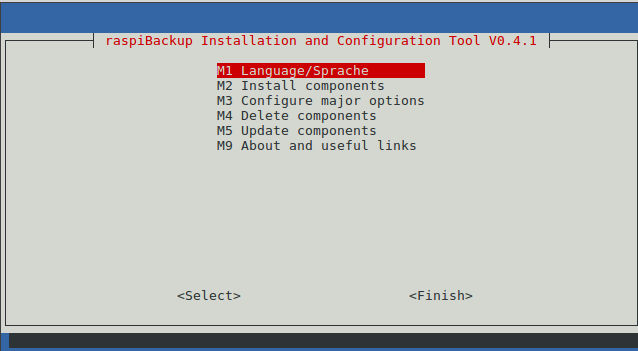
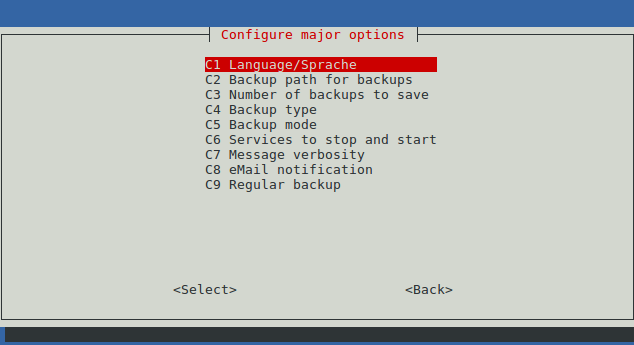
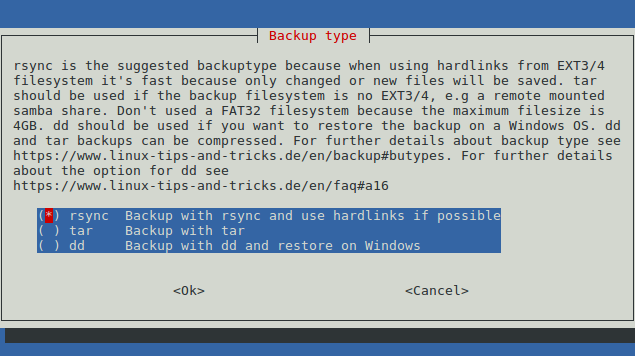
The installer uses menus, checklists and radiolists similar to raspi-config and helps to install and configure major options of raspiBackup and in 5 minutes the first backup can be created.

Installation of raspiBackup is started with following command:
curl -o install -L https://raw.githubusercontent.com/framps/raspiBackup/master/installation/install.sh; sudo bash ./install
raspiBackup is maintained just by me - framp. If you find raspiBackup useful please donate to support future development and acknowledge support. For details how to donate see here
Convenient helper script to backup and restore a backup. (Code)
Sample wrapper scripts to add any activities before and after backup (Code)
Sample wrapper script which checks whether a nfsserver is online, mounts one exported directory and invokes raspiBackup. If the nfsserver is not online no backup is started. (Code)
Sample script which restores an existing tar or rsync backup created by raspiBackup into an image file and then shrinks the image with pishrink. Result is the smallest possible dd image backup. When this image is restored via dd or windisk32imager it's expanding the root partition to the maximum possible size. (Code)
There exist sample extensions for raspiBackup which report for example memory usage, CPU temperature, disk usage and more. There exist also user provided extensions.
69 followers · starred May 2025
356 followers · starred Dec 2023
56 followers · starred Dec 2024
15 followers · starred Nov 2021
Create and keep multiple backup versions of your running Raspberries
See the code
raspiBackup is supported only for RaspberryOS and Ubuntu as operating system and only for Raspberry hardware. raspiBackup runs successfully also on other Raspberry compatible hardware and other Linux distros but any support request on these unsupported environments will be rejected. Just give it a try and be happy if it works but don't ask for any support. For details see here.
Support is also given only for raspiBackup specific issues. For general Linux related questions please use other information sources.
This README was translated into French. Credits to mgrafr for his translation work.
The installer uses menus, checklists and radiolists similar to raspi-config and helps to install and configure major options of raspiBackup and in 5 minutes the first backup can be created.
Installation of raspiBackup is started with following command:
curl -o install -L https://raw.githubusercontent.com/framps/raspiBackup/master/installation/install.sh; sudo bash ./install
raspiBackup is maintained just by me - framp. If you find raspiBackup useful please donate to support future development and acknowledge support. For details how to donate see here
Convenient helper script to backup and restore a backup. (Code)
Sample wrapper scripts to add any activities before and after backup (Code)
Sample wrapper script which checks whether a nfsserver is online, mounts one exported directory and invokes raspiBackup. If the nfsserver is not online no backup is started. (Code)
Sample script which restores an existing tar or rsync backup created by raspiBackup into an image file and then shrinks the image with pishrink. Result is the smallest possible dd image backup. When this image is restored via dd or windisk32imager it's expanding the root partition to the maximum possible size. (Code)
There exist sample extensions for raspiBackup which report for example memory usage, CPU temperature, disk usage and more. There exist also user provided extensions.
69 followers · starred May 2025
356 followers · starred Dec 2023
56 followers · starred Dec 2024
15 followers · starred Nov 2021



