database-backed, app-internal exception tracker for Rails applications
Ruby
496
328 commits
updated Oct 19, 2026







Solid Errors is a DB-based, app-internal exception tracker for Rails applications, designed with simplicity and performance in mind. It uses the new Rails error reporting API to store uncaught exceptions in the database, and provides a simple UI for viewing and managing exceptions.
Install the gem and add to the application's Gemfile by executing:
$ bundle add solid_errors
If bundler is not being used to manage dependencies, install the gem by executing:
$ gem install solid_errors
After installing the gem, run the installer:
$ rails generate solid_errors:install
This will create the db/errors_schema.rb file.
You will then have to add the configuration for the errors database in config/database.yml. If you're using sqlite, it'll look something like this:
production:
  primary:
    <<: *default
    database: storage/production.sqlite3
  errors:
    <<: *default
    database: storage/production_errors.sqlite3
    migrations_paths: db/errors_migrate
...or if you're using MySQL/PostgreSQL/Trilogy:
production:
  primary: &primary_production
    <<: *default
    database: app_production
    username: app
    password: <%= ENV["APP_DATABASE_PASSWORD"] %>
  errors:
    <<: *primary_production
    database: app_production_errors
    migrations_paths: db/errors_migrate
[!NOTE] Calling
bin/rails generate solid_errors:installwill automatically addconfig.solid_errors.connects_to = { database: { writing: :errors } }toconfig/environments/production.rb, so no additional configuration is needed there (although you must make sure that you use theerrorsname indatabase.ymlfor this to match!). But if you want to use Solid Errors in a different environment (like staging or even development), you'll have to manually add thatconfig.solid_errors.connects_toline to the respective environment file. And, as always, make sure that the name you're using for the database inconfig/database.ymlmatches the name you use inconfig.solid_errors.connects_to.
Then run db:prepare in production to ensure the database is created and the schema is loaded.
[!WARNING] Use
db:prepare, notdb:createfollowed bydb:migrate. Solid Errors ships a schema rather than migrations, sodb:migrateleaves the errors database empty and then dumps that empty schema overdb/errors_schema.rb. If that has happened, copy the schema back from the install template and rundb:prepareagain.
Then mount the engine in your config/routes.rb file:
authenticate :user, -> (user) { user.admin? } do
  mount SolidErrors::Engine, at: "/solid_errors"
end
[!NOTE] Be sure to secure the dashboard in production.
All exceptions are recorded automatically. No additional code required.
You can add default additional information to the context of the error by adding this line to your application controller:
before_action { Rails.error.set_context(request_url: request.original_url, params: params, session: session.inspect) }
The additional context information will be automatically displayed on the occurence details page.
Please consult the official guides for an introduction to the error reporting API.
There are intentionally few features; you can view and resolve errors. That’s it. The goal is to provide a simple, lightweight, and performant solution for tracking exceptions in your Rails application. If you need more features, you should probably use a 3rd party service like Honeybadger, whose MIT-licensed Ruby agent gem provided a couple of critical pieces of code for this project.
Errors can be added to Solid Errors via the Rails error reporter.
There are three ways you can use the error reporter:
Rails.error.handle will report any error raised within the block. It will then swallow the error, and the rest of your code outside the block will continue as normal.
result = Rails.error.handle do
  1 + '1' # raises TypeError
end
result # => nil
1 + 1 # This will be executed
Rails.error.record will report errors to all registered subscribers and then re-raise the error, meaning that the rest of your code won't execute.
Rails.error.record do
  1 + '1' # raises TypeError
end
1 + 1 # This won't be executed
You can also manually report errors by calling Rails.error.report:
begin
  # code
rescue StandardError => e
  Rails.error.report(e)
end
All 3 reporting APIs (#handle, #record, and #report) support the following options, which are then passed along to all registered subscribers:
handled: a Boolean to indicate if the error was handled. This is set to true by default. #record sets this to false.severity: a Symbol describing the severity of the error. Expected values are: :error, :warning, and :info. #handle sets this to :warning, while #record sets it to :error.context: a Hash to provide more context about the error, like request or user detailssource: a String about the source of the error. The default source is "application". Errors reported by internal libraries may set other sources; the Redis cache library may use "redis_cache_store.active_support", for instance. Your subscriber can use the source to ignore errors you aren't interested in.Rails.error.handle(context: { user_id: user.id }, severity: :info) do
# ...
end
Every occurrence stores the backtrace and the error's context. Rails adds the current request or job to that context, and Solid Errors records it as:
UsersController#show) and its params, with your config.filter_parameters applied.Any Active Record object in the context is stored as its GlobalID (gid://my-app/User/1), so you can tell which record was involved. Add your own context with Rails.error.set_context(...) or the context: option shown above.
Errors raised in background jobs reach Solid Errors when your job backend runs jobs inside the Rails executor, as Solid Queue, Sidekiq and GoodJob do. You don't need any extra setup for this.
You can configure Solid Errors via the Rails configuration object, under the solid_errors key. Currently, the following configuration options are available:
enabled - Enable or disable error tracking. Defaults to true. See Disabling error tracking for more information.connects_to - The database configuration to use for the Solid Errors database. See Database Configuration for more information.username - The username to use for HTTP authentication. See Authentication for more information.password - The password to use for HTTP authentication. See Authentication for more information.sends_email - Whether or not to send emails when an error occurs. See Email notifications for more information.email_from - The email address to send a notification from. See Email notifications for more information.email_to - The email address(es) to send a notification to. See Email notifications for more information.email_every_occurrence - Whether to email every occurrence (the default), or only new errors and resolved errors that occur again. See Email notifications for more information.email_subject_prefix - Prefix added to the subject line for email notifications. See Email notifications for more information.email_subject - A proc that builds the subject line for email notifications. See Email notifications for more information.base_controller_class - Specify a different controller as the base class for the Solid Errors controller. See Authentication for more information.destroy_after - If set, Solid Errors will periodically destroy resolved records that are older than the value specified. See Automatically destroying old records for more information.ignored_errors - Error classes, or their names, to never record, in addition to the built-in list in SolidErrors::Subscriber::IGNORED_ERRORS. For example, config.solid_errors.ignored_errors = ["ActiveStorage::FileNotFoundError"].config.solid_errors.connects_to takes a custom database configuration hash that will be used in the abstract SolidErrors::Record Active Record model. This is required to use a different database than the main app (but the primary database can also be used). For example:
# Use a single separate DB for Solid Errors
config.solid_errors.connects_to = { database: { writing: :solid_errors, reading: :solid_errors } }
or
# Use a separate primary/replica pair for Solid Errors
config.solid_errors.connects_to = { database: { writing: :solid_errors_primary, reading: :solid_errors_replica } }
Running Solid Errors in a separate database is recommended, but it's also possible to use one single database for both the app and the errors. Just follow these steps to add errors to the primary database:
db/errors_schema.rb into a normal migration and delete db/errors_schema.rbconfig.solid_errors.connects_to from your configuration files.You won't have multiple databases, so database.yml doesn't need to have the errors database configuration.
schema_format = :sqlThe installer writes db/errors_schema.rb, but an app with config.active_record.schema_format = :sql looks for db/errors_structure.sql for the errors database.
On Rails 8.1 and later, keep the Ruby schema for the errors database only by setting schema_format on it in config/database.yml:
production:
  errors:
    <<: *default
    database: storage/production_errors.sqlite3
    migrations_paths: db/errors_migrate
    schema_format: ruby
On earlier Rails versions, create the errors database, load the Ruby schema into it, and dump it as SQL for your database adapter:
bin/rails db:create:errors
bin/rails runner 'ActiveRecord::Tasks::DatabaseTasks.load_schema(ActiveRecord::Base.configurations.configs_for(env_name: Rails.env, name: "errors"), :ruby, "db/errors_schema.rb")'
bin/rails db:schema:dump:errors
This writes db/errors_structure.sql, which you commit in place of db/errors_schema.rb.
Solid Errors is enabled by default. If you want to disable error tracking in a specific environment, you can set enabled to false:
# config/environments/development.rb
config.solid_errors.enabled = false
When disabled, Solid Errors will not subscribe to the Rails error reporter and no errors will be recorded.
Disable it in every environment that loads the gem but has no errors database, such as development or test. Otherwise Solid Errors records errors to the primary database, fails with Could not find table 'solid_errors', and in development and test that failure can hide the error you were looking for.
Configuration belongs in config/environments/<environment>.rb, not in config/<environment>.rb, which Rails does not load.
Solid Errors does not restrict access out of the box. You must secure the dashboard yourself. However, it does provide basic HTTP authentication that can be used with basic authentication or Devise. All you need to do is setup a username and password.
There are two ways to setup a username and password. First, you can use the SOLIDERRORS_USERNAME and SOLIDERRORS_PASSWORD environment variables:
ENV["SOLIDERRORS_USERNAME"] = "frodo"
ENV["SOLIDERRORS_PASSWORD"] = "ikeptmysecrets"
Second, you can set the SolidErrors.username and SolidErrors.password variables in an initializer:
# Set authentication credentials for Solid Errors
config.solid_errors.username = Rails.application.credentials.solid_errors.username
config.solid_errors.password = Rails.application.credentials.solid_errors.password
Either way, if you have set a username and password, Solid Errors will use basic HTTP authentication. If you have not set a username and password, Solid Errors will not require any authentication to view the dashboard.
If you use Devise for authentication in your app, you can also restrict access to the dashboard by using their authenticate constraint in your routes file:
authenticate :user, -> (user) { user.admin? } do
  mount SolidErrors::Engine, at: "/solid_errors"
end
You can also specify a different controller to use as the Solid Errors controller base class:
# Override the base controller class with your own controller
config.solid_errors.base_controller_class = "YourAdminController"
Solid Errors can send email notifications whenever an error occurs, if your application has ActionMailer already properly setup to send emails. However, in order to activate this feature you must define the email address(es) to send the notifications to. Optionally, you can also define the email address to send the notifications from (useful if your email provider only allows emails to be sent from a predefined list of addresses) or simply turn off this feature altogether. You can also define a subject prefix for the email notifications to quickly identify the source of the error.
There are two ways to configure email notifications. First, you can use environment variables:
SOLIDERRORS_SEND_EMAILS=true # defaults to false
[email protected] # defaults to [email protected]
[email protected] # no default, must be set
SOLIDERRORS_EMAIL_SUBJECT_PREFIX="[Application name][Environment]" # no default, optional
Second, you can set the values via the configuration object, which takes precedence over the environment variables:
# Set authentication credentials and optional subject prefix for Solid Errors
config.solid_errors.send_emails = true
config.solid_errors.email_from = "[email protected]"
config.solid_errors.email_to = "[email protected]"
config.solid_errors.email_subject_prefix = "[#{Rails.application.name}][#{Rails.env}]"
If you have set send_emails to true and have set an email_to address, Solid Errors will send an email notification whenever an error occurs. If you have not set send_emails to true or have not set an email_to address, Solid Errors will not send any email notifications.
To be emailed only when an error is new, or when a resolved error occurs again, rather than for every occurrence:
config.solid_errors.email_every_occurrence = false # defaults to true
The subject names the error, and says when a resolved error has occurred again (🔥 TimeoutError (reopened)). To build it yourself, set email_subject to a proc. It is called with the error, the occurrence, and reason: :created or :reopened when the occurrence opened its error, nil for any other. email_subject_prefix is still added in front of what it returns.
config.solid_errors.email_subject = ->(error:, occurrence:, reason:) {
  # Counting up to this occurrence, rather than all of them, gives the same answer however late the email is sent
  count = error.occurrences.where(id: ..occurrence.id).count
  subject = "#{error.severity_emoji} #{error.exception_class}"

  case reason
  when :reopened then "🔄 REOPENED: #{subject}"
  when :resolved then "✅ RESOLVED: #{error.exception_class}"
  else count.in?([10, 100, 1_000]) ? "#{subject} (#{count.ordinalize} occurrence)" : subject
  end
}
The error email can also be sent for events of your own, such as an error being resolved or occurring unusually often. Whatever reason you pass reaches email_subject, as :resolved does in the example above:
# config/initializers/solid_errors.rb
ActiveSupport::Notifications.subscribe("error_resolved.solid_errors") do |event|
  occurrence = event.payload[:error].occurrences.last
  SolidErrors::ErrorMailer.error_occurred(occurrence, :resolved).deliver_later if occurrence && SolidErrors.send_emails?
end
Solid Errors publishes Active Support notifications once each change is committed, so you can send errors to Slack, a webhook or anywhere else:
| Event | When | Payload |
|---|---|---|
error_created.solid_errors | An error is recorded for the first time | :error, :occurrence |
error_reopened.solid_errors | A resolved error occurs again | :error, :occurrence |
error_resolved.solid_errors | An error is marked as resolved | :error |
occurrence_created.solid_errors | Any occurrence is recorded, including those above | :error, :occurrence |
# config/initializers/solid_errors.rb
ActiveSupport::Notifications.subscribe(/\Aerror_(created|reopened)\.solid_errors\z/) do |event|
  error = event.payload[:error]
  SlackNotifier.post("#{error.exception_class}: #{error.message}")
end
Setting destroy_after to a duration will allow Solid Errors to be self-maintaining by peridically destroying resolved records that are older than that value. The value provided must respond to .ago.
# Automatically destroy records older than 30 days
config.solid_errors.destroy_after = 30.days
# Automatically destroy records older than 6 months
config.solid_errors.destroy_after = 6.months
When a release changes the schema, UPGRADE.md describes the migration. To have your test suite fail until you've applied it, assert that the errors database has everything the installed version uses:
# test/solid_errors_test.rb
require "test_helper"

class SolidErrorsTest < ActiveSupport::TestCase
  test "the errors database is up to date" do
    assert SolidErrors.migrated?
  end
end
There are only two screens in the dashboard.

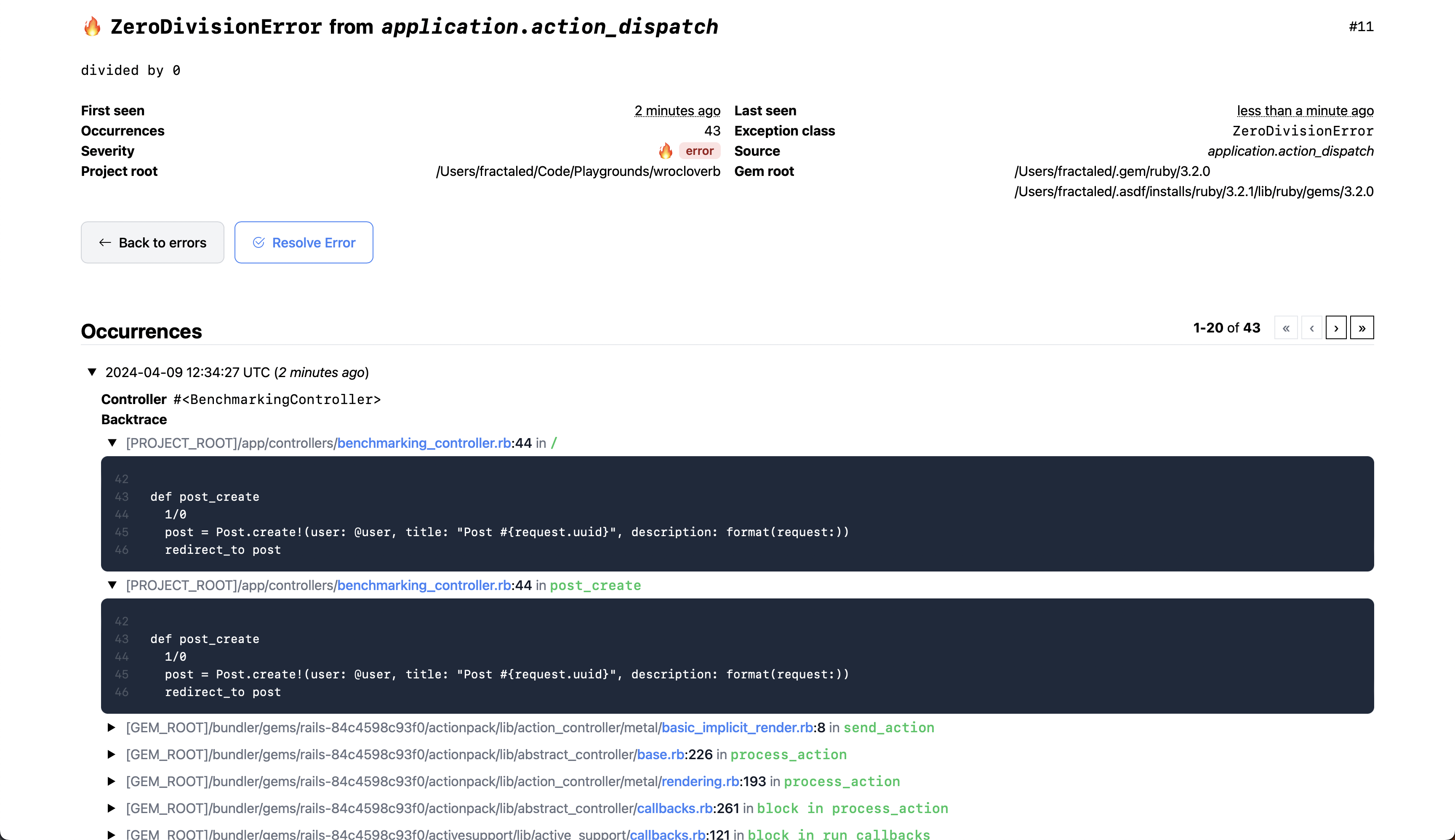
If your Rails application is an API-only application (generated with the rails new --api command), you will need to add the following middleware to your config/application.rb file in order to use the dashboard UI provided by Solid Errors:
# /config/application.rb
config.middleware.use ActionDispatch::Cookies
config.middleware.use ActionDispatch::Session::CookieStore
config.middleware.use ActionDispatch::Flash
You can find the views in app/views.
app/views/
├── layouts
│   └── solid_errors
│       ├── _style.html
│       └── application.html.erb
└── solid_errors
    ├── error_mailer
    │   ├── error_occurred.html.erb
    │   └── error_occurred.text.erb
    ├── errors
    │   ├── _actions.html.erb
    │   ├── _error.html.erb
    │   ├── _row.html.erb
    │   ├── index.html.erb
    │   └── show.html.erb
    └── occurrences
        ├── _collection.html.erb
        └── _occurrence.html.erb
You can always take control of the views by creating your own views and/or partials at these paths in your application. For example, if you wanted to overwrite the application layout, you could create a file at app/views/layouts/solid_errors/application.html.erb. If you wanted to remove the footer and the automatically disappearing flash messages, as one concrete example, you could define that file as:
<!DOCTYPE html>
<html>
  <head>
    <title>Solid Errors</title>
    <%= csrf_meta_tags %>
    <%= csp_meta_tag %>

    <%= render "layouts/solid_errors/style" %>
  </head>
  <body class="pb-4">
    <main class="container mx-auto mt-4">
      <%= content_for?(:content) ? yield(:content) : yield %>
    </main>

    <div class="fixed top-0 left-0 right-0 text-center py-2">
      <% if notice.present? %>
        <p class="py-2 px-3 bg-green-50 text-green-500 font-medium rounded-lg inline-block">
          <%= notice %>
        </p>
      <% end %>

      <% if alert.present? %>
        <p class="py-2 px-3 bg-red-50 text-red-500 font-medium rounded-lg inline-block">
          <%= alert %>
        </p>
      <% end %>
    </div>
  </body>
</html>
The dashboard is written in English and renders in English whenever your app allows the :en locale. If config.i18n.available_locales leaves out :en, the dashboard renders in your app's locale instead, and you will need to provide the datetime.distance_in_words.short translations from config/locales/en.yml in that locale.
Proudly sponsored by

After checking out the repo, run bin/setup to install dependencies. Then, run rake test to run the tests. You can also run bin/console for an interactive prompt that will allow you to experiment. If you want to set up a local development database, run rake db:migrate.
To install this gem onto your local machine, run bundle exec rake install. To release a new version, update the version number in version.rb, and then run bundle exec rake release, which will create a git tag for the version, push git commits and the created tag, and push the .gem file to rubygems.org.
Bug reports and pull requests are welcome on GitHub at https://github.com/fractaledmind/solid_errors. This project is intended to be a safe, welcoming space for collaboration, and contributors are expected to adhere to the code of conduct.
The gem is available as open source under the terms of the MIT License.
Everyone interacting in the SolidErrors project's codebases, issue trackers, chat rooms and mailing lists is expected to follow the code of conduct.
391 followers · starred Dec 2024
820 followers · starred Jun 2025
836 followers · starred Jan 2024
474 followers · starred Jan 2024
database-backed, app-internal exception tracker for Rails applications
Ruby
496
328 commits
updated Oct 19, 2026
Solid Errors is a DB-based, app-internal exception tracker for Rails applications, designed with simplicity and performance in mind. It uses the new Rails error reporting API to store uncaught exceptions in the database, and provides a simple UI for viewing and managing exceptions.
Install the gem and add to the application's Gemfile by executing:
$ bundle add solid_errors
If bundler is not being used to manage dependencies, install the gem by executing:
$ gem install solid_errors
After installing the gem, run the installer:
$ rails generate solid_errors:install
This will create the db/errors_schema.rb file.
You will then have to add the configuration for the errors database in config/database.yml. If you're using sqlite, it'll look something like this:
production:
  primary:
    <<: *default
    database: storage/production.sqlite3
  errors:
    <<: *default
    database: storage/production_errors.sqlite3
    migrations_paths: db/errors_migrate
...or if you're using MySQL/PostgreSQL/Trilogy:
production:
  primary: &primary_production
    <<: *default
    database: app_production
    username: app
    password: <%= ENV["APP_DATABASE_PASSWORD"] %>
  errors:
    <<: *primary_production
    database: app_production_errors
    migrations_paths: db/errors_migrate
[!NOTE] Calling
bin/rails generate solid_errors:installwill automatically addconfig.solid_errors.connects_to = { database: { writing: :errors } }toconfig/environments/production.rb, so no additional configuration is needed there (although you must make sure that you use theerrorsname indatabase.ymlfor this to match!). But if you want to use Solid Errors in a different environment (like staging or even development), you'll have to manually add thatconfig.solid_errors.connects_toline to the respective environment file. And, as always, make sure that the name you're using for the database inconfig/database.ymlmatches the name you use inconfig.solid_errors.connects_to.
Then run db:prepare in production to ensure the database is created and the schema is loaded.
[!WARNING] Use
db:prepare, notdb:createfollowed bydb:migrate. Solid Errors ships a schema rather than migrations, sodb:migrateleaves the errors database empty and then dumps that empty schema overdb/errors_schema.rb. If that has happened, copy the schema back from the install template and rundb:prepareagain.
Then mount the engine in your config/routes.rb file:
authenticate :user, -> (user) { user.admin? } do
  mount SolidErrors::Engine, at: "/solid_errors"
end
[!NOTE] Be sure to secure the dashboard in production.
All exceptions are recorded automatically. No additional code required.
You can add default additional information to the context of the error by adding this line to your application controller:
before_action { Rails.error.set_context(request_url: request.original_url, params: params, session: session.inspect) }
The additional context information will be automatically displayed on the occurence details page.
Please consult the official guides for an introduction to the error reporting API.
There are intentionally few features; you can view and resolve errors. That’s it. The goal is to provide a simple, lightweight, and performant solution for tracking exceptions in your Rails application. If you need more features, you should probably use a 3rd party service like Honeybadger, whose MIT-licensed Ruby agent gem provided a couple of critical pieces of code for this project.
Errors can be added to Solid Errors via the Rails error reporter.
There are three ways you can use the error reporter:
Rails.error.handle will report any error raised within the block. It will then swallow the error, and the rest of your code outside the block will continue as normal.
result = Rails.error.handle do
  1 + '1' # raises TypeError
end
result # => nil
1 + 1 # This will be executed
Rails.error.record will report errors to all registered subscribers and then re-raise the error, meaning that the rest of your code won't execute.
Rails.error.record do
  1 + '1' # raises TypeError
end
1 + 1 # This won't be executed
You can also manually report errors by calling Rails.error.report:
begin
  # code
rescue StandardError => e
  Rails.error.report(e)
end
All 3 reporting APIs (#handle, #record, and #report) support the following options, which are then passed along to all registered subscribers:
handled: a Boolean to indicate if the error was handled. This is set to true by default. #record sets this to false.severity: a Symbol describing the severity of the error. Expected values are: :error, :warning, and :info. #handle sets this to :warning, while #record sets it to :error.context: a Hash to provide more context about the error, like request or user detailssource: a String about the source of the error. The default source is "application". Errors reported by internal libraries may set other sources; the Redis cache library may use "redis_cache_store.active_support", for instance. Your subscriber can use the source to ignore errors you aren't interested in.Rails.error.handle(context: { user_id: user.id }, severity: :info) do
# ...
end
Every occurrence stores the backtrace and the error's context. Rails adds the current request or job to that context, and Solid Errors records it as:
UsersController#show) and its params, with your config.filter_parameters applied.Any Active Record object in the context is stored as its GlobalID (gid://my-app/User/1), so you can tell which record was involved. Add your own context with Rails.error.set_context(...) or the context: option shown above.
Errors raised in background jobs reach Solid Errors when your job backend runs jobs inside the Rails executor, as Solid Queue, Sidekiq and GoodJob do. You don't need any extra setup for this.
You can configure Solid Errors via the Rails configuration object, under the solid_errors key. Currently, the following configuration options are available:
enabled - Enable or disable error tracking. Defaults to true. See Disabling error tracking for more information.connects_to - The database configuration to use for the Solid Errors database. See Database Configuration for more information.username - The username to use for HTTP authentication. See Authentication for more information.password - The password to use for HTTP authentication. See Authentication for more information.sends_email - Whether or not to send emails when an error occurs. See Email notifications for more information.email_from - The email address to send a notification from. See Email notifications for more information.email_to - The email address(es) to send a notification to. See Email notifications for more information.email_every_occurrence - Whether to email every occurrence (the default), or only new errors and resolved errors that occur again. See Email notifications for more information.email_subject_prefix - Prefix added to the subject line for email notifications. See Email notifications for more information.email_subject - A proc that builds the subject line for email notifications. See Email notifications for more information.base_controller_class - Specify a different controller as the base class for the Solid Errors controller. See Authentication for more information.destroy_after - If set, Solid Errors will periodically destroy resolved records that are older than the value specified. See Automatically destroying old records for more information.ignored_errors - Error classes, or their names, to never record, in addition to the built-in list in SolidErrors::Subscriber::IGNORED_ERRORS. For example, config.solid_errors.ignored_errors = ["ActiveStorage::FileNotFoundError"].config.solid_errors.connects_to takes a custom database configuration hash that will be used in the abstract SolidErrors::Record Active Record model. This is required to use a different database than the main app (but the primary database can also be used). For example:
# Use a single separate DB for Solid Errors
config.solid_errors.connects_to = { database: { writing: :solid_errors, reading: :solid_errors } }
or
# Use a separate primary/replica pair for Solid Errors
config.solid_errors.connects_to = { database: { writing: :solid_errors_primary, reading: :solid_errors_replica } }
Running Solid Errors in a separate database is recommended, but it's also possible to use one single database for both the app and the errors. Just follow these steps to add errors to the primary database:
db/errors_schema.rb into a normal migration and delete db/errors_schema.rbconfig.solid_errors.connects_to from your configuration files.You won't have multiple databases, so database.yml doesn't need to have the errors database configuration.
schema_format = :sqlThe installer writes db/errors_schema.rb, but an app with config.active_record.schema_format = :sql looks for db/errors_structure.sql for the errors database.
On Rails 8.1 and later, keep the Ruby schema for the errors database only by setting schema_format on it in config/database.yml:
production:
  errors:
    <<: *default
    database: storage/production_errors.sqlite3
    migrations_paths: db/errors_migrate
    schema_format: ruby
On earlier Rails versions, create the errors database, load the Ruby schema into it, and dump it as SQL for your database adapter:
bin/rails db:create:errors
bin/rails runner 'ActiveRecord::Tasks::DatabaseTasks.load_schema(ActiveRecord::Base.configurations.configs_for(env_name: Rails.env, name: "errors"), :ruby, "db/errors_schema.rb")'
bin/rails db:schema:dump:errors
This writes db/errors_structure.sql, which you commit in place of db/errors_schema.rb.
Solid Errors is enabled by default. If you want to disable error tracking in a specific environment, you can set enabled to false:
# config/environments/development.rb
config.solid_errors.enabled = false
When disabled, Solid Errors will not subscribe to the Rails error reporter and no errors will be recorded.
Disable it in every environment that loads the gem but has no errors database, such as development or test. Otherwise Solid Errors records errors to the primary database, fails with Could not find table 'solid_errors', and in development and test that failure can hide the error you were looking for.
Configuration belongs in config/environments/<environment>.rb, not in config/<environment>.rb, which Rails does not load.
Solid Errors does not restrict access out of the box. You must secure the dashboard yourself. However, it does provide basic HTTP authentication that can be used with basic authentication or Devise. All you need to do is setup a username and password.
There are two ways to setup a username and password. First, you can use the SOLIDERRORS_USERNAME and SOLIDERRORS_PASSWORD environment variables:
ENV["SOLIDERRORS_USERNAME"] = "frodo"
ENV["SOLIDERRORS_PASSWORD"] = "ikeptmysecrets"
Second, you can set the SolidErrors.username and SolidErrors.password variables in an initializer:
# Set authentication credentials for Solid Errors
config.solid_errors.username = Rails.application.credentials.solid_errors.username
config.solid_errors.password = Rails.application.credentials.solid_errors.password
Either way, if you have set a username and password, Solid Errors will use basic HTTP authentication. If you have not set a username and password, Solid Errors will not require any authentication to view the dashboard.
If you use Devise for authentication in your app, you can also restrict access to the dashboard by using their authenticate constraint in your routes file:
authenticate :user, -> (user) { user.admin? } do
  mount SolidErrors::Engine, at: "/solid_errors"
end
You can also specify a different controller to use as the Solid Errors controller base class:
# Override the base controller class with your own controller
config.solid_errors.base_controller_class = "YourAdminController"
Solid Errors can send email notifications whenever an error occurs, if your application has ActionMailer already properly setup to send emails. However, in order to activate this feature you must define the email address(es) to send the notifications to. Optionally, you can also define the email address to send the notifications from (useful if your email provider only allows emails to be sent from a predefined list of addresses) or simply turn off this feature altogether. You can also define a subject prefix for the email notifications to quickly identify the source of the error.
There are two ways to configure email notifications. First, you can use environment variables:
SOLIDERRORS_SEND_EMAILS=true # defaults to false
[email protected] # defaults to [email protected]
[email protected] # no default, must be set
SOLIDERRORS_EMAIL_SUBJECT_PREFIX="[Application name][Environment]" # no default, optional
Second, you can set the values via the configuration object, which takes precedence over the environment variables:
# Set authentication credentials and optional subject prefix for Solid Errors
config.solid_errors.send_emails = true
config.solid_errors.email_from = "[email protected]"
config.solid_errors.email_to = "[email protected]"
config.solid_errors.email_subject_prefix = "[#{Rails.application.name}][#{Rails.env}]"
If you have set send_emails to true and have set an email_to address, Solid Errors will send an email notification whenever an error occurs. If you have not set send_emails to true or have not set an email_to address, Solid Errors will not send any email notifications.
To be emailed only when an error is new, or when a resolved error occurs again, rather than for every occurrence:
config.solid_errors.email_every_occurrence = false # defaults to true
The subject names the error, and says when a resolved error has occurred again (🔥 TimeoutError (reopened)). To build it yourself, set email_subject to a proc. It is called with the error, the occurrence, and reason: :created or :reopened when the occurrence opened its error, nil for any other. email_subject_prefix is still added in front of what it returns.
config.solid_errors.email_subject = ->(error:, occurrence:, reason:) {
  # Counting up to this occurrence, rather than all of them, gives the same answer however late the email is sent
  count = error.occurrences.where(id: ..occurrence.id).count
  subject = "#{error.severity_emoji} #{error.exception_class}"

  case reason
  when :reopened then "🔄 REOPENED: #{subject}"
  when :resolved then "✅ RESOLVED: #{error.exception_class}"
  else count.in?([10, 100, 1_000]) ? "#{subject} (#{count.ordinalize} occurrence)" : subject
  end
}
The error email can also be sent for events of your own, such as an error being resolved or occurring unusually often. Whatever reason you pass reaches email_subject, as :resolved does in the example above:
# config/initializers/solid_errors.rb
ActiveSupport::Notifications.subscribe("error_resolved.solid_errors") do |event|
  occurrence = event.payload[:error].occurrences.last
  SolidErrors::ErrorMailer.error_occurred(occurrence, :resolved).deliver_later if occurrence && SolidErrors.send_emails?
end
Solid Errors publishes Active Support notifications once each change is committed, so you can send errors to Slack, a webhook or anywhere else:
| Event | When | Payload |
|---|---|---|
error_created.solid_errors | An error is recorded for the first time | :error, :occurrence |
error_reopened.solid_errors | A resolved error occurs again | :error, :occurrence |
error_resolved.solid_errors | An error is marked as resolved | :error |
occurrence_created.solid_errors | Any occurrence is recorded, including those above | :error, :occurrence |
# config/initializers/solid_errors.rb
ActiveSupport::Notifications.subscribe(/\Aerror_(created|reopened)\.solid_errors\z/) do |event|
  error = event.payload[:error]
  SlackNotifier.post("#{error.exception_class}: #{error.message}")
end
Setting destroy_after to a duration will allow Solid Errors to be self-maintaining by peridically destroying resolved records that are older than that value. The value provided must respond to .ago.
# Automatically destroy records older than 30 days
config.solid_errors.destroy_after = 30.days
# Automatically destroy records older than 6 months
config.solid_errors.destroy_after = 6.months
When a release changes the schema, UPGRADE.md describes the migration. To have your test suite fail until you've applied it, assert that the errors database has everything the installed version uses:
# test/solid_errors_test.rb
require "test_helper"

class SolidErrorsTest < ActiveSupport::TestCase
  test "the errors database is up to date" do
    assert SolidErrors.migrated?
  end
end
There are only two screens in the dashboard.
If your Rails application is an API-only application (generated with the rails new --api command), you will need to add the following middleware to your config/application.rb file in order to use the dashboard UI provided by Solid Errors:
# /config/application.rb
config.middleware.use ActionDispatch::Cookies
config.middleware.use ActionDispatch::Session::CookieStore
config.middleware.use ActionDispatch::Flash
You can find the views in app/views.
app/views/
├── layouts
│   └── solid_errors
│       ├── _style.html
│       └── application.html.erb
└── solid_errors
    ├── error_mailer
    │   ├── error_occurred.html.erb
    │   └── error_occurred.text.erb
    ├── errors
    │   ├── _actions.html.erb
    │   ├── _error.html.erb
    │   ├── _row.html.erb
    │   ├── index.html.erb
    │   └── show.html.erb
    └── occurrences
        ├── _collection.html.erb
        └── _occurrence.html.erb
You can always take control of the views by creating your own views and/or partials at these paths in your application. For example, if you wanted to overwrite the application layout, you could create a file at app/views/layouts/solid_errors/application.html.erb. If you wanted to remove the footer and the automatically disappearing flash messages, as one concrete example, you could define that file as:
<!DOCTYPE html>
<html>
  <head>
    <title>Solid Errors</title>
    <%= csrf_meta_tags %>
    <%= csp_meta_tag %>

    <%= render "layouts/solid_errors/style" %>
  </head>
  <body class="pb-4">
    <main class="container mx-auto mt-4">
      <%= content_for?(:content) ? yield(:content) : yield %>
    </main>

    <div class="fixed top-0 left-0 right-0 text-center py-2">
      <% if notice.present? %>
        <p class="py-2 px-3 bg-green-50 text-green-500 font-medium rounded-lg inline-block">
          <%= notice %>
        </p>
      <% end %>

      <% if alert.present? %>
        <p class="py-2 px-3 bg-red-50 text-red-500 font-medium rounded-lg inline-block">
          <%= alert %>
        </p>
      <% end %>
    </div>
  </body>
</html>
The dashboard is written in English and renders in English whenever your app allows the :en locale. If config.i18n.available_locales leaves out :en, the dashboard renders in your app's locale instead, and you will need to provide the datetime.distance_in_words.short translations from config/locales/en.yml in that locale.
Proudly sponsored by
After checking out the repo, run bin/setup to install dependencies. Then, run rake test to run the tests. You can also run bin/console for an interactive prompt that will allow you to experiment. If you want to set up a local development database, run rake db:migrate.
To install this gem onto your local machine, run bundle exec rake install. To release a new version, update the version number in version.rb, and then run bundle exec rake release, which will create a git tag for the version, push git commits and the created tag, and push the .gem file to rubygems.org.
Bug reports and pull requests are welcome on GitHub at https://github.com/fractaledmind/solid_errors. This project is intended to be a safe, welcoming space for collaboration, and contributors are expected to adhere to the code of conduct.
The gem is available as open source under the terms of the MIT License.
Everyone interacting in the SolidErrors project's codebases, issue trackers, chat rooms and mailing lists is expected to follow the code of conduct.
391 followers · starred Dec 2024
820 followers · starred Jun 2025
836 followers · starred Jan 2024
474 followers · starred Jan 2024



