Susper Decentralised Search Engine https://susper.com
See the code
master:  development:





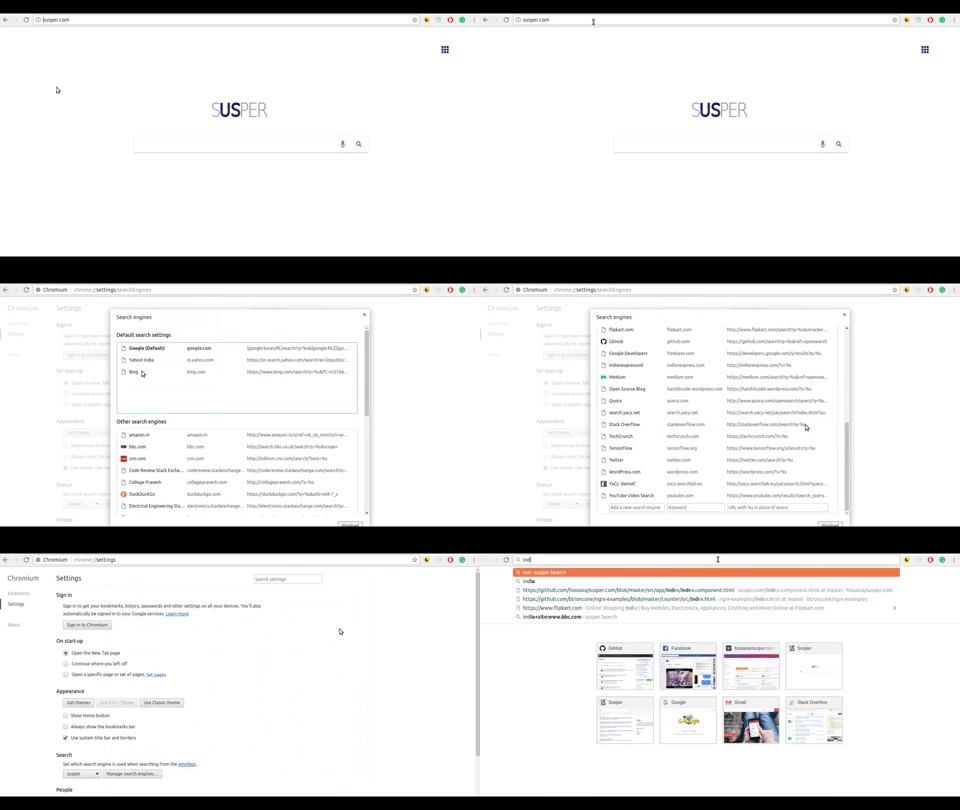
Susper is a decentralized Search Engine that uses the peer to peer system YaCy and Apache Solr to crawl and index search results.
You can test the branches of susper here:
Our chat channel is on gitter: https://gitter.im/fossasia/susper.com
This is a front-end for Susper running on YaCy server. The retrieval of search results is done using YaCy search API.
Search results are displayed using Solr server which is embedded into YaCy. All search results must be provided by a YaCy search server which includes a Solr with a specialized JSON result writer. When a search request is made in one of the search templates, an HTTP request is made to YaCy. The response is done in JSON because that can much better be parsed than XML in JavaScript. To overcome the same origin policy in JavaScript, the result is capsuled into a JSONP response.
First, we will need to install angular-cli by using the following command:
npm install -g @angular/cli@latest


npm installng serveWith these very simple steps you can have susper deployed:
git checkout masterng build and then npm run deployhttps://yourusername.github.io/susper and you should see the Susper search runningSurge will automatically generate a deployment link whenever a pull request passes CI.
Suppose pull request number is 200 and it passes Travis CI. The deployment link can be found here: https://pr-200-fossasia-susper.surge.sh
This is an Open Source project and we would be happy to see contributors who report bugs and file feature requests submitting pull requests as well. Please report issues here https://github.com/fossasia/susper.com/issues
Commits
Feature Requests and Bug Reports
Join the development
Do read the Open Source Developer Guide and Best Practices at FOSSASIA.
Before making a pull request, please file an issue so that other developers have the chance to give feedback or discuss details. Please match every pull request with an issue and add the issue number in description e.g. like "Fixes #123".
We have the following branches:
The repository is licensed under Creative Commons Attribution 2.0 License (CC-BY 2.0).
The project is maintained by
Run ng serve for a dev server. Navigate to localhost:4200. The app will automatically reload if you change any of the source files.
Run ng g component component-name to generate a new component. You can also use ng g directive/pipe/service/class.
Run ng build to build the project. The build artefacts will be stored in the dist/ directory. Use the -prod flag for a production build.
Run ng test to execute the unit tests via Karma.
Run ng e2e to execute the end-to-end tests via Protractor.
Before running the tests make sure you are serving the app via ng serve.
To update Angular-CLI to a new version, you must update both the global package and your project's local package.
Global package
npm uninstall -g @angular/cli
npm cache clean
npm install -g @angular/cli@latest
Local package
rm -rf node_modules dist # use rmdir /S/Q node_modules dist in Windows Command Prompt; use rm -r -fo node_modules,dist in Windows PowerShell
npm install --save-dev @angular/cli@latest
npm install
2,153 followers · starred Nov 2017
298 followers · starred Dec 2017
59 followers · starred Aug 2019
136 followers · starred Feb 2018
Susper Decentralised Search Engine https://susper.com
See the code
master:
development:
Susper is a decentralized Search Engine that uses the peer to peer system YaCy and Apache Solr to crawl and index search results.
You can test the branches of susper here:
Our chat channel is on gitter: https://gitter.im/fossasia/susper.com
This is a front-end for Susper running on YaCy server. The retrieval of search results is done using YaCy search API.
Search results are displayed using Solr server which is embedded into YaCy. All search results must be provided by a YaCy search server which includes a Solr with a specialized JSON result writer. When a search request is made in one of the search templates, an HTTP request is made to YaCy. The response is done in JSON because that can much better be parsed than XML in JavaScript. To overcome the same origin policy in JavaScript, the result is capsuled into a JSONP response.
First, we will need to install angular-cli by using the following command:
npm install -g @angular/cli@latest
npm installng serveWith these very simple steps you can have susper deployed:
git checkout masterng build and then npm run deployhttps://yourusername.github.io/susper and you should see the Susper search runningSurge will automatically generate a deployment link whenever a pull request passes CI.
Suppose pull request number is 200 and it passes Travis CI. The deployment link can be found here: https://pr-200-fossasia-susper.surge.sh
This is an Open Source project and we would be happy to see contributors who report bugs and file feature requests submitting pull requests as well. Please report issues here https://github.com/fossasia/susper.com/issues
Commits
Feature Requests and Bug Reports
Join the development
Do read the Open Source Developer Guide and Best Practices at FOSSASIA.
Before making a pull request, please file an issue so that other developers have the chance to give feedback or discuss details. Please match every pull request with an issue and add the issue number in description e.g. like "Fixes #123".
We have the following branches:
The repository is licensed under Creative Commons Attribution 2.0 License (CC-BY 2.0).
The project is maintained by
Run ng serve for a dev server. Navigate to localhost:4200. The app will automatically reload if you change any of the source files.
Run ng g component component-name to generate a new component. You can also use ng g directive/pipe/service/class.
Run ng build to build the project. The build artefacts will be stored in the dist/ directory. Use the -prod flag for a production build.
Run ng test to execute the unit tests via Karma.
Run ng e2e to execute the end-to-end tests via Protractor.
Before running the tests make sure you are serving the app via ng serve.
To update Angular-CLI to a new version, you must update both the global package and your project's local package.
Global package
npm uninstall -g @angular/cli
npm cache clean
npm install -g @angular/cli@latest
Local package
rm -rf node_modules dist # use rmdir /S/Q node_modules dist in Windows Command Prompt; use rm -r -fo node_modules,dist in Windows PowerShell
npm install --save-dev @angular/cli@latest
npm install
2,153 followers · starred Nov 2017
298 followers · starred Dec 2017
59 followers · starred Aug 2019
136 followers · starred Feb 2018



