
Visit your twitter account and tweet to @SusiAI1 with your query and enjoy a tweet back from the Susi AI bot account!
Also, you can enjoy personal chatting with Susi. Follow the SUSI AI account on twitter here and have a personal chat with it.

We will make a Susi messenger bot account on Twitter. This account will tweet back when it's name is mentioned in a tweet. Also, 1-on-1 auto chat will be inculcated to our account.
Make a new account, which you want to use as the bot account. You can make one from here.
To create your account on -:
Fork this repository.
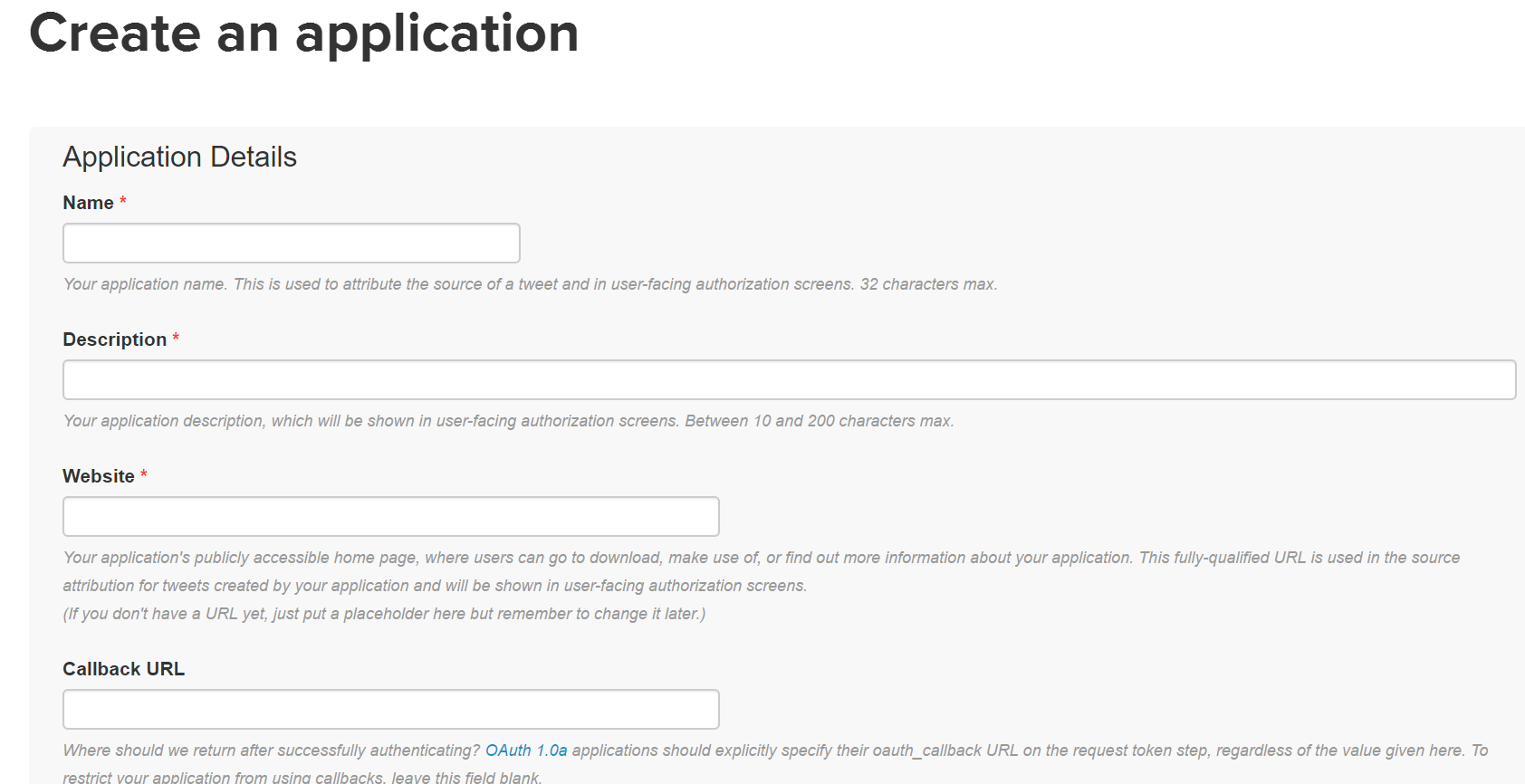
Make a new app here, to know the access token and other properties for our application. These properties will help us communicate with Twitter.
Click "modify the app permissions" link, as shown here:

Select the Read, Write and Access direct messages option:

Don't forget to click the update settings button at the bottom.
Click the Generate My Access Token and Token Secret button.
This app will accept the requests from Twitter and Susi api.

Create a config variable by switching to settings page of your app.
The name of your first config variable should be HEROKU_URL and its value is the url address of the heroku app created by you.
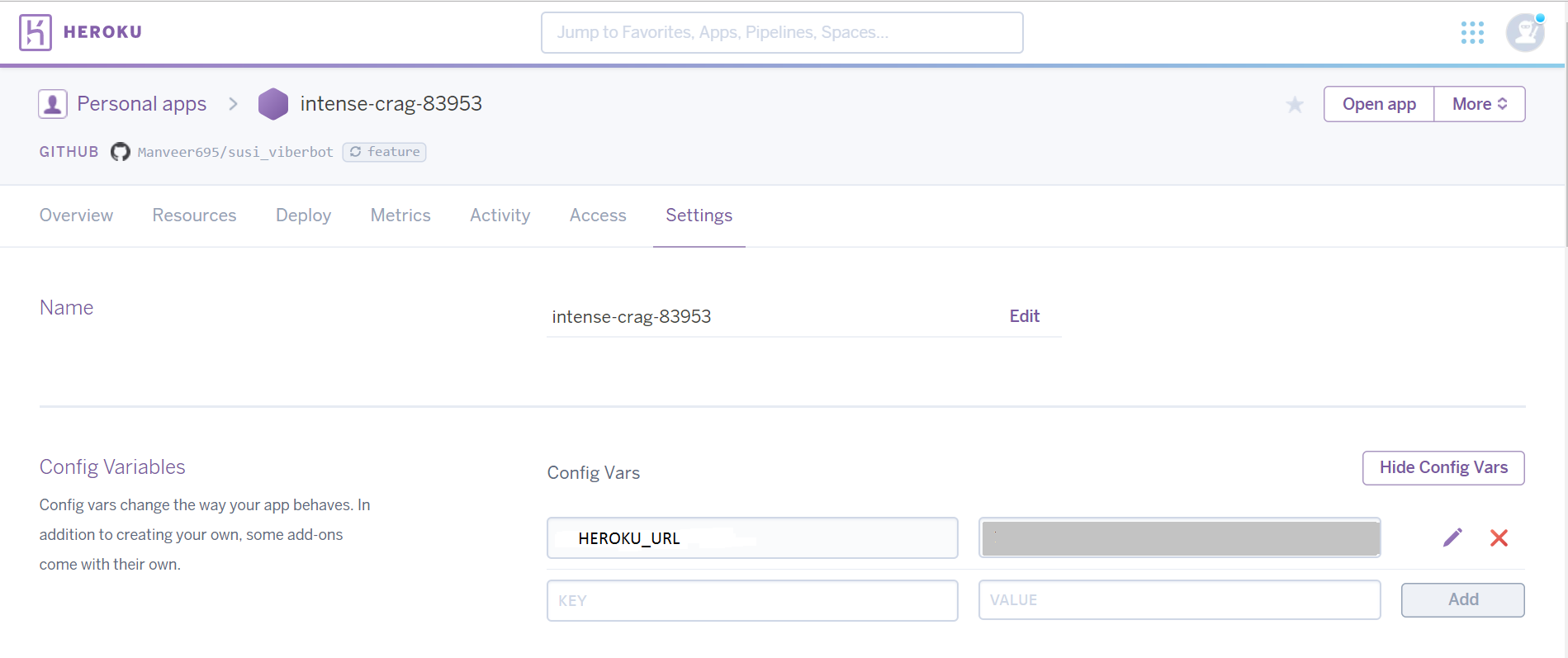
The other config variables that need to be created will be these:

The corresponding names of these variables in the same order are:
We need to visit our app from here, the keys and access tokens tab will help us with the values of these variables.
Connect the heroku app to the forked repository.
Connect the app to Github by selecting the name of this forked repository.

Branch Deployment.

Successful Deployment.

Visit your own personal account and tweet to this new bot account with your query and enjoy a tweet back from the bot account!
Also, you can enjoy personal chatting with Susi.
Feel free to play around with the already made SUSI AI account on twitter here. Follow it, to have a personal chat with it.
2,153 followers · starred Nov 2017
298 followers · starred Dec 2017
136 followers · starred Feb 2018
107 followers · starred Sep 2018
Visit your twitter account and tweet to @SusiAI1 with your query and enjoy a tweet back from the Susi AI bot account!
Also, you can enjoy personal chatting with Susi. Follow the SUSI AI account on twitter here and have a personal chat with it.
We will make a Susi messenger bot account on Twitter. This account will tweet back when it's name is mentioned in a tweet. Also, 1-on-1 auto chat will be inculcated to our account.
Make a new account, which you want to use as the bot account. You can make one from here.
To create your account on -:
Fork this repository.
Make a new app here, to know the access token and other properties for our application. These properties will help us communicate with Twitter.
Click "modify the app permissions" link, as shown here:
Select the Read, Write and Access direct messages option:
Don't forget to click the update settings button at the bottom.
Click the Generate My Access Token and Token Secret button.
This app will accept the requests from Twitter and Susi api.
Create a config variable by switching to settings page of your app.
The name of your first config variable should be HEROKU_URL and its value is the url address of the heroku app created by you.
The other config variables that need to be created will be these:
The corresponding names of these variables in the same order are:
We need to visit our app from here, the keys and access tokens tab will help us with the values of these variables.
Connect the heroku app to the forked repository.
Connect the app to Github by selecting the name of this forked repository.
Branch Deployment.
Successful Deployment.
Visit your own personal account and tweet to this new bot account with your query and enjoy a tweet back from the bot account!
Also, you can enjoy personal chatting with Susi.
Feel free to play around with the already made SUSI AI account on twitter here. Follow it, to have a personal chat with it.
2,153 followers · starred Nov 2017
298 followers · starred Dec 2017
136 followers · starred Feb 2018
107 followers · starred Sep 2018



