
KATT (Klarna API Testing Tool) is an HTTP-based API testing tool for Erlang.
See the codeREADME
KATT  Docs
Docs
KATT (Klarna API Testing Tool) is an HTTP-based API testing tool for Erlang, , though it can work just as well as a CLI tool.
Use for shooting HTTP requests in a sequential order and verifying the response. Any relevant difference between expected and actual responses will cause a failure.
Install from git or https://hex.pm/packages/katt .
For convenience, available as a Docker image too: docker run --rm -it -v $PWD:$PWD -w $PWD ysoftwareab/katt ....
And whalebrew package: brew install whalebrew && sudo whalebrew install ysoftwareab/katt; katt ...
Quick start on KATT and APIB files
Example
An example is worth a 1000 words. Have a look!
Params
If some values are static (constants) and you want to reuse them across multiple requests, you can add one or more params like below
PARAM a_string="with some text"
PARAM a_boolean=true
PARAM a_null=null
PARAM a_float=1.1
PARAM an_integer=1
Validator
The builtin validator supports
- basic text validation
- more advanced validation of HTTP headers
- JSON validation
application/json,application/*+json - URL-encoded validation
application/x-www-form-urlencoded
Tags
The validator makes use of a few tags with special meaning:
"{{_}}"
Match anything including undefined (i.e. no real validation).
"{{expected}}"
Match anything but undefined (i.e. no real validation, only check existence).
"{{unexpected}}"
Match nothing (i.e. no real validation, only check lack of existence)
"{{>key}}"
Store value of the whole string (key must be unique within testcase)
"{{<key}}"
Recall stored value.
The "{{_}}" tag can also be used as a JSON object's property in order to
validate any other additional properties.
By default, the builtin validator will allow additional properties in an object
structure, or additional items in an array structure. To counteract that
default, one can do {..., "{{_}}": "{{unexpected}}"} or
[..., "{{unexpected}}"], effectively making a rule that no properties/items
are expected beyond the ones defined.
Headers
A request can also be configured via HTTP request headers:
x-katt-content-typewould set a request content-type, without sending acontent-typeHTTP headerx-katt-descriptionwould take precedence over the transaction's descriptionx-katt-request-timeoutwould take precedence over therequest_timeoutparamx-katt-request-sleepwould delay the request for a specific amount of millisecondsx-katt-transformwould call thetranformcallback with its value asid
A response can also be configured via HTTP response headers:
x-katt-content-typewould set a response (expected and actual) content-type, without expecting/receiving acontent-typeHTTP headerx-katt-transformwould call thetranformcallback with its value asid
set extension
set will ignore the order of an array's items, and just check for existence:
{
  "some_array": {
    "{{type}}": "set",
    "value": [1, 2, 3]
  }
}
So the above would validate against JSON instances such as
{"some_array": [1, 3, 2]}, or {"some_array": [3, 2, 1]},
or even {"some_array": [4, 3, 2, 1]} unless we add {{unexpected}}.
runtime_value extension
runtime_value would just run code (only erlang and shell supported for now),
while having access to ParentKey, Actual, ItemsMode and Callbacks,
and return the expected value and matched against the actual one.
{
  "rfc1123": {
    "{{type}}": "runtime_value",
    "erlang": "list_to_binary(httpd_util:rfc1123_date(calendar:now_to_datetime(erlang:now())))"
  }
}
or in array format
{
  "rfc1123": {
    "{{type}}": "runtime_value",
    "erlang": ["list_to_binary(",
               "  httpd_util:rfc1123_date(",
               "    calendar:now_to_datetime(",
               "      erlang:now()",
               ")))"
              ]
  }
}
runtime_validation extension
runtime_validation would just run code (only erlang and shell supported for now),
while having access to ParentKey, Actual, ItemsMode and Callbacks,
and return
{pass, [{"Key", "Value"}]}i.e. validation passed, store new param "Key" with value "Value"{not_equal, {Key, Expected, Actual}}{not_equal, {Key, Expected, Actual, [{"more", "info"}]}}
{
  "rfc1123": {
    "{{type}}": "runtime_validation",
    "erlang": "Expected = httpd_util:rfc1123_date(calendar:now_to_datetime(erlang:now())), case Actual =:= Expected of true -> {pass, []}; false -> {not_equal, {ParentKey, Expected, Actual}} end"
  }
}
or in array format
{
  "rfc1123": {
    "{{type}}": "runtime_validation",
    "erlang": ["Expected = httpd_util:rfc1123_date(calendar:now_to_datetime(erlang:now())),",
               "case Actual =:= Expected of",
               "  true ->",
               "    {pass, []};",
               "  false ->",
               "    {not_equal, {ParentKey, Expected, Actual}}",
               "end"
              ]
  }
}
Command-Line Interface
You can either build the bin/katt executable yourself (just type make),
or you can use a Docker image a call it with docker run ysoftwareab/katt.
You can fire up katt from the CLI, with
bin/katt base_url=http://httpbin.org my_name=Joe your_name=Mike -- doc/example-httpbin.apib
If you want non-string params, use := as a separator e.g. my_int:=123.
You can also output the result in JSON format, with --json, and beautify it e.g. with python
bin/katt --json base_url=http://httpbin.org my_name=Joe your_name=Mike -- doc/example-httpbin.apib | python -m json.tool
Check bin/katt --help for a full list of arguments.
Erlang Interface
A simple example that will make requests to a third party server:
ERL_LIBS=_build/default/deps erl $(for f in _build/default/lib/*/ebin; do echo "-pa $f"; done) -noshell -eval '
  application:ensure_all_started(katt),
  BlueprintFile = "doc/example-httpbin.apib",
  Params = [{base_url, "http://httpbin.org"}, {my_name, "Joe"}, {your_name, "Mike"}],
  io:format("~p~n", [katt:run(BlueprintFile, Params)]).
' -s init stop
... or run the code passed to -eval from the Erlang shell, assuming that you
have started the Erlang shell from the repo's root directory with
ERL_LIBS=_build/default/deps erl $(for f in _build/default/lib/*/ebin; do echo "-pa $f"; done) .
katt:run is to be called with
filenameparams(optional)base_url, alternatively you can use the legacyprotocolhostnameportbase_path
request_timeoutscenario_timeout
callbacks(optional)extto be called withscope(recall_body, parse, validate_body, validate_type)recallto be called withsyntax,text,params,callbacksparseto be called withheaders,body,params,callbacksrequestto be called withrequest,params,callbacksvalidateto be called withexpected,actual,params,callbacksprogressto be called withtransaction_resulttext_diffto be called withtext,texttransformto be called withid,katt_requestor{katt_response, actual_response},params,callbacks
If you would like to convert a HAR file to an APIB file
The HTTP Archive format or HAR, is a JSON-formatted archive file format for logging of a web browser's interaction with a site, standardized by the Web Performance Working Group of the World Wide Web Consortium (W3C).
For example, to convert doc/example-teapot.har into doc/example-teapot.apib, run:
bin/katt from-har --apib -- doc/example-teapot.har > doc/example-teapot.apib
If you would like to disable JSON support
OnlyText = fun(_Scope) -> [] end,
katt:run("text_only_scenario.apib", [], [{ext, OnlyText}]).
If you would like to add XML support
PlusXml =
  fun(recall_body) ->
    [ fun custom_callbacks_xml:recall_body/4
    ] ++ katt_callbacks:ext(recall_body);
  fun(parse) ->
    [ fun custom_callbacks_xml:parse/5
    ] ++ katt_callbacks:ext(parse);
  fun(validate_body) ->
    [ fun custom_callbacks_xml:validate_body/3
    ] ++ katt_callbacks:ext(validate_body),
  fun(validate_type) ->
    [ fun custom_callbacks_xml:validate_type/7
    ] ++ katt_callbacks:ext(validate_type),
katt:run("xml_scenario.apib", [], [{ext, PlusXml}]).
See src/katt_callbacks_json.erl to see how your
custom_callbacks_xml module should be implemented.
If you would like to build KATT with almost no dependencies
export KATT_BARE_MODE=true
# or
touch _build/BARE_MODE
Contributing
A pull-request is most welcome. Please make sure that the following criteria are fulfilled before making your pull-request:
- Include a description regarding what has been changed and why.
- Make sure that the changed or added functionality (if you modify code) is covered by unit tests.
- Make sure that all unit tests pass.
License
* Despite the "Klarna" mention, this repository is not affiliated with Klarna AB. KATT was indeed born at Klarna, and Klarna AB holds copyright for parts of the code, but it is now being maintained outside the company, by its original authors and new contributors.
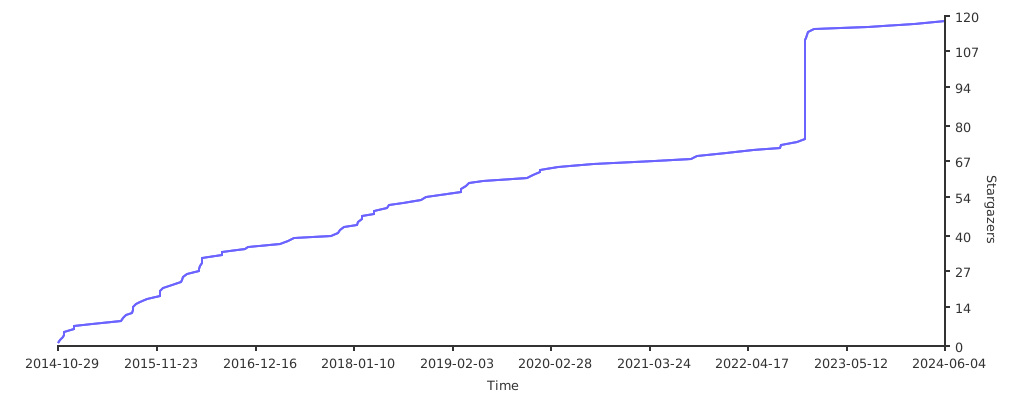
Stargazers over time
Contributors


Similar repos


Languages
Erlang
96.5%
Makefile
2.9%
KATT (Klarna API Testing Tool) is an HTTP-based API testing tool for Erlang.
See the codeREADME
KATT Docs
KATT (Klarna API Testing Tool) is an HTTP-based API testing tool for Erlang, , though it can work just as well as a CLI tool.
Use for shooting HTTP requests in a sequential order and verifying the response. Any relevant difference between expected and actual responses will cause a failure.
Install from git or https://hex.pm/packages/katt .
For convenience, available as a Docker image too: docker run --rm -it -v $PWD:$PWD -w $PWD ysoftwareab/katt ....
And whalebrew package: brew install whalebrew && sudo whalebrew install ysoftwareab/katt; katt ...
Quick start on KATT and APIB files
Example
An example is worth a 1000 words. Have a look!
Params
If some values are static (constants) and you want to reuse them across multiple requests, you can add one or more params like below
PARAM a_string="with some text"
PARAM a_boolean=true
PARAM a_null=null
PARAM a_float=1.1
PARAM an_integer=1
Validator
The builtin validator supports
- basic text validation
- more advanced validation of HTTP headers
- JSON validation
application/json,application/*+json - URL-encoded validation
application/x-www-form-urlencoded
Tags
The validator makes use of a few tags with special meaning:
"{{_}}"
Match anything including undefined (i.e. no real validation).
"{{expected}}"
Match anything but undefined (i.e. no real validation, only check existence).
"{{unexpected}}"
Match nothing (i.e. no real validation, only check lack of existence)
"{{>key}}"
Store value of the whole string (key must be unique within testcase)
"{{<key}}"
Recall stored value.
The "{{_}}" tag can also be used as a JSON object's property in order to
validate any other additional properties.
By default, the builtin validator will allow additional properties in an object
structure, or additional items in an array structure. To counteract that
default, one can do {..., "{{_}}": "{{unexpected}}"} or
[..., "{{unexpected}}"], effectively making a rule that no properties/items
are expected beyond the ones defined.
Headers
A request can also be configured via HTTP request headers:
x-katt-content-typewould set a request content-type, without sending acontent-typeHTTP headerx-katt-descriptionwould take precedence over the transaction's descriptionx-katt-request-timeoutwould take precedence over therequest_timeoutparamx-katt-request-sleepwould delay the request for a specific amount of millisecondsx-katt-transformwould call thetranformcallback with its value asid
A response can also be configured via HTTP response headers:
x-katt-content-typewould set a response (expected and actual) content-type, without expecting/receiving acontent-typeHTTP headerx-katt-transformwould call thetranformcallback with its value asid
set extension
set will ignore the order of an array's items, and just check for existence:
{
  "some_array": {
    "{{type}}": "set",
    "value": [1, 2, 3]
  }
}
So the above would validate against JSON instances such as
{"some_array": [1, 3, 2]}, or {"some_array": [3, 2, 1]},
or even {"some_array": [4, 3, 2, 1]} unless we add {{unexpected}}.
runtime_value extension
runtime_value would just run code (only erlang and shell supported for now),
while having access to ParentKey, Actual, ItemsMode and Callbacks,
and return the expected value and matched against the actual one.
{
  "rfc1123": {
    "{{type}}": "runtime_value",
    "erlang": "list_to_binary(httpd_util:rfc1123_date(calendar:now_to_datetime(erlang:now())))"
  }
}
or in array format
{
  "rfc1123": {
    "{{type}}": "runtime_value",
    "erlang": ["list_to_binary(",
               "  httpd_util:rfc1123_date(",
               "    calendar:now_to_datetime(",
               "      erlang:now()",
               ")))"
              ]
  }
}
runtime_validation extension
runtime_validation would just run code (only erlang and shell supported for now),
while having access to ParentKey, Actual, ItemsMode and Callbacks,
and return
{pass, [{"Key", "Value"}]}i.e. validation passed, store new param "Key" with value "Value"{not_equal, {Key, Expected, Actual}}{not_equal, {Key, Expected, Actual, [{"more", "info"}]}}
{
  "rfc1123": {
    "{{type}}": "runtime_validation",
    "erlang": "Expected = httpd_util:rfc1123_date(calendar:now_to_datetime(erlang:now())), case Actual =:= Expected of true -> {pass, []}; false -> {not_equal, {ParentKey, Expected, Actual}} end"
  }
}
or in array format
{
  "rfc1123": {
    "{{type}}": "runtime_validation",
    "erlang": ["Expected = httpd_util:rfc1123_date(calendar:now_to_datetime(erlang:now())),",
               "case Actual =:= Expected of",
               "  true ->",
               "    {pass, []};",
               "  false ->",
               "    {not_equal, {ParentKey, Expected, Actual}}",
               "end"
              ]
  }
}
Command-Line Interface
You can either build the bin/katt executable yourself (just type make),
or you can use a Docker image a call it with docker run ysoftwareab/katt.
You can fire up katt from the CLI, with
bin/katt base_url=http://httpbin.org my_name=Joe your_name=Mike -- doc/example-httpbin.apib
If you want non-string params, use := as a separator e.g. my_int:=123.
You can also output the result in JSON format, with --json, and beautify it e.g. with python
bin/katt --json base_url=http://httpbin.org my_name=Joe your_name=Mike -- doc/example-httpbin.apib | python -m json.tool
Check bin/katt --help for a full list of arguments.
Erlang Interface
A simple example that will make requests to a third party server:
ERL_LIBS=_build/default/deps erl $(for f in _build/default/lib/*/ebin; do echo "-pa $f"; done) -noshell -eval '
  application:ensure_all_started(katt),
  BlueprintFile = "doc/example-httpbin.apib",
  Params = [{base_url, "http://httpbin.org"}, {my_name, "Joe"}, {your_name, "Mike"}],
  io:format("~p~n", [katt:run(BlueprintFile, Params)]).
' -s init stop
... or run the code passed to -eval from the Erlang shell, assuming that you
have started the Erlang shell from the repo's root directory with
ERL_LIBS=_build/default/deps erl $(for f in _build/default/lib/*/ebin; do echo "-pa $f"; done) .
katt:run is to be called with
filenameparams(optional)base_url, alternatively you can use the legacyprotocolhostnameportbase_path
request_timeoutscenario_timeout
callbacks(optional)extto be called withscope(recall_body, parse, validate_body, validate_type)recallto be called withsyntax,text,params,callbacksparseto be called withheaders,body,params,callbacksrequestto be called withrequest,params,callbacksvalidateto be called withexpected,actual,params,callbacksprogressto be called withtransaction_resulttext_diffto be called withtext,texttransformto be called withid,katt_requestor{katt_response, actual_response},params,callbacks
If you would like to convert a HAR file to an APIB file
The HTTP Archive format or HAR, is a JSON-formatted archive file format for logging of a web browser's interaction with a site, standardized by the Web Performance Working Group of the World Wide Web Consortium (W3C).
For example, to convert doc/example-teapot.har into doc/example-teapot.apib, run:
bin/katt from-har --apib -- doc/example-teapot.har > doc/example-teapot.apib
If you would like to disable JSON support
OnlyText = fun(_Scope) -> [] end,
katt:run("text_only_scenario.apib", [], [{ext, OnlyText}]).
If you would like to add XML support
PlusXml =
  fun(recall_body) ->
    [ fun custom_callbacks_xml:recall_body/4
    ] ++ katt_callbacks:ext(recall_body);
  fun(parse) ->
    [ fun custom_callbacks_xml:parse/5
    ] ++ katt_callbacks:ext(parse);
  fun(validate_body) ->
    [ fun custom_callbacks_xml:validate_body/3
    ] ++ katt_callbacks:ext(validate_body),
  fun(validate_type) ->
    [ fun custom_callbacks_xml:validate_type/7
    ] ++ katt_callbacks:ext(validate_type),
katt:run("xml_scenario.apib", [], [{ext, PlusXml}]).
See src/katt_callbacks_json.erl to see how your
custom_callbacks_xml module should be implemented.
If you would like to build KATT with almost no dependencies
export KATT_BARE_MODE=true
# or
touch _build/BARE_MODE
Contributing
A pull-request is most welcome. Please make sure that the following criteria are fulfilled before making your pull-request:
- Include a description regarding what has been changed and why.
- Make sure that the changed or added functionality (if you modify code) is covered by unit tests.
- Make sure that all unit tests pass.
License
* Despite the "Klarna" mention, this repository is not affiliated with Klarna AB. KATT was indeed born at Klarna, and Klarna AB holds copyright for parts of the code, but it is now being maintained outside the company, by its original authors and new contributors.
Stargazers over time
Similar repos
Contributors
Languages
Erlang
96.5%
Makefile
2.9%