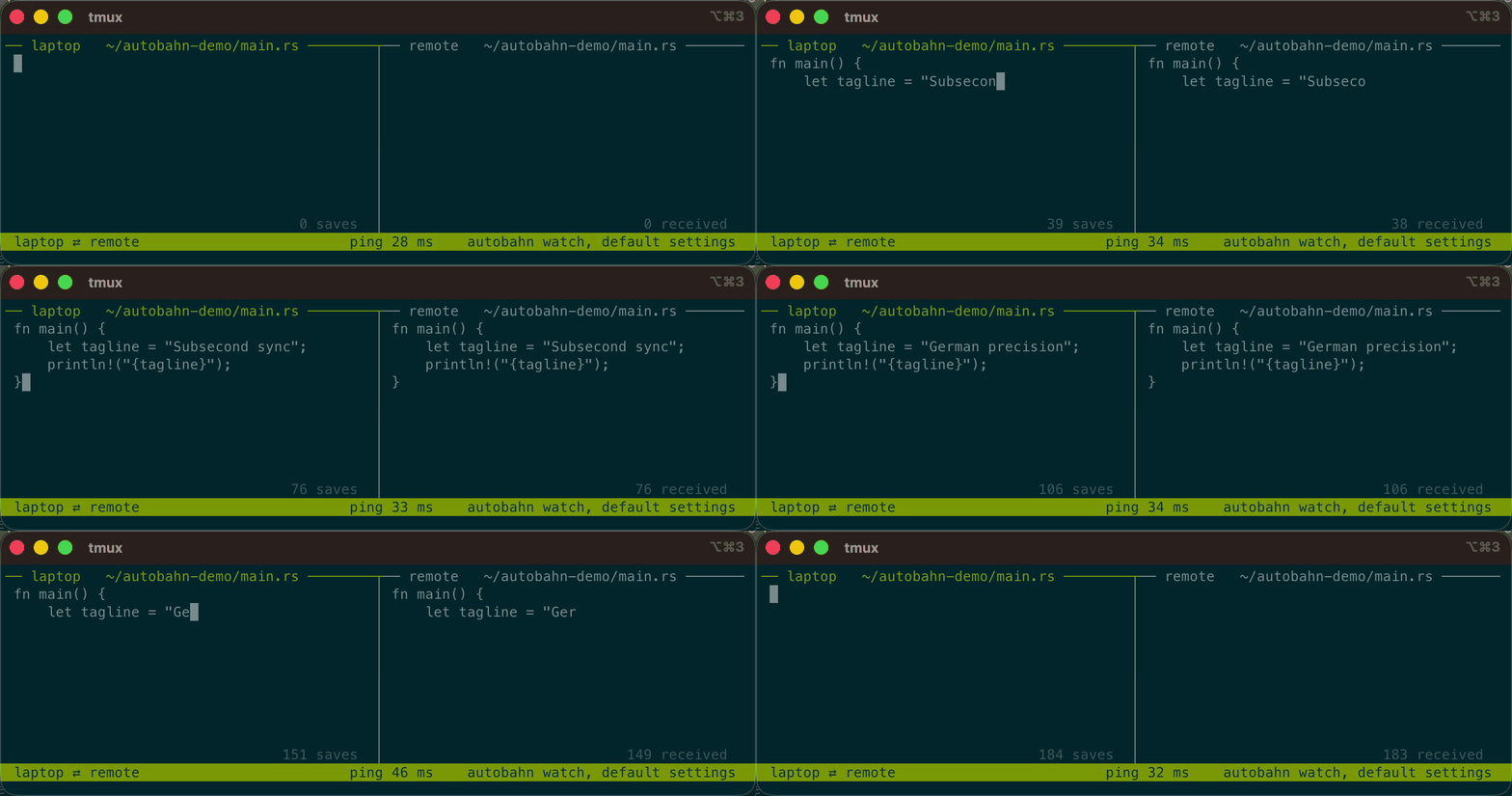
Autobahn gives you two-way sync between machines faster than you can type. In this demo, I'm saving the left file after each key stroke. Even though the file lives in a tree of 100K files syncing a barrage of other edits, these changes propagate instantly.
Other tools require gigs of RAM for big trees, or a cloud account, or both.
Other tools are also slow.
You want to run agents --dangerously on your local files but you should do it somewhere else.
Unhinged solution: sync everything in realtime with a "benchmaxxed" tool so editing local files is practically the same as editing remote ones.
Why Autobahn?
Fast as hell. Delivers sub-30ms propagation times for updates across trees containing hundreds of thousands of files.
Lightweight. Employs immutable shared-tree structures in memory, requiring significantly less RAM and idle CPU than conventional sync daemons.
Safe. Choose a sync policy per group that matches your risk profile, backed by tests and bounded formal models. See Safety for the guarantees and their limits.
Reviewed to death. GLM 5.3, KIMI 3, Astra, and Fable were used to perform correctness and security reviews.
Privacy first. No cloud service, no account, no third party.
Getting Started with the CLI
Install the CLI by hand or by telling an LLM to read INSTALL.md:
curl -fsSL https://github.com/fny/autobahn/releases/latest/download/install.sh | sh
Afterwards, you need to set up your configuration. By default, the configuration is written to ~/.autobahn/config.toml. You can edit it by hand or use the desktop app.
Each group connects one root, the primary, to one or more destinations, the replicas. Sync can be one-way or bidirectional (see Sync Modes below). For full configuration details, see Configuration.
# ~/.autobahn/config.toml

[defaults]
mode = "two-way-conflict"                   # sync modes explained below
ignores = ["file:Essential.gitignore"]      # you can include ignores by file
                                            # or written explicitly
                                            # this one is from ~/.autobahn/ignores/

[groups.work]
primary = "~/Workspace"
replicas = [                                # sync targets
  "dev@build.audi.de:/home/dev/workspace",  #  - fully specified
  "laptop.bmw.de",                          #  - inherits the primary path
]
ignores = ["target", "node_modules"]        # appended to the defaults'

[groups.backup]
mode = "one-way-primary"                    # the disk is made identical
primary = "~/Workspace"
replicas = ["/Volumes/Backup/Workspace"]    #  - local paths work too
Finally, run autobahn install to install the login service. See the Commands page for more details about the CLI.
Make sure you have your SSH configuration set up so you can connect to your remote machines!
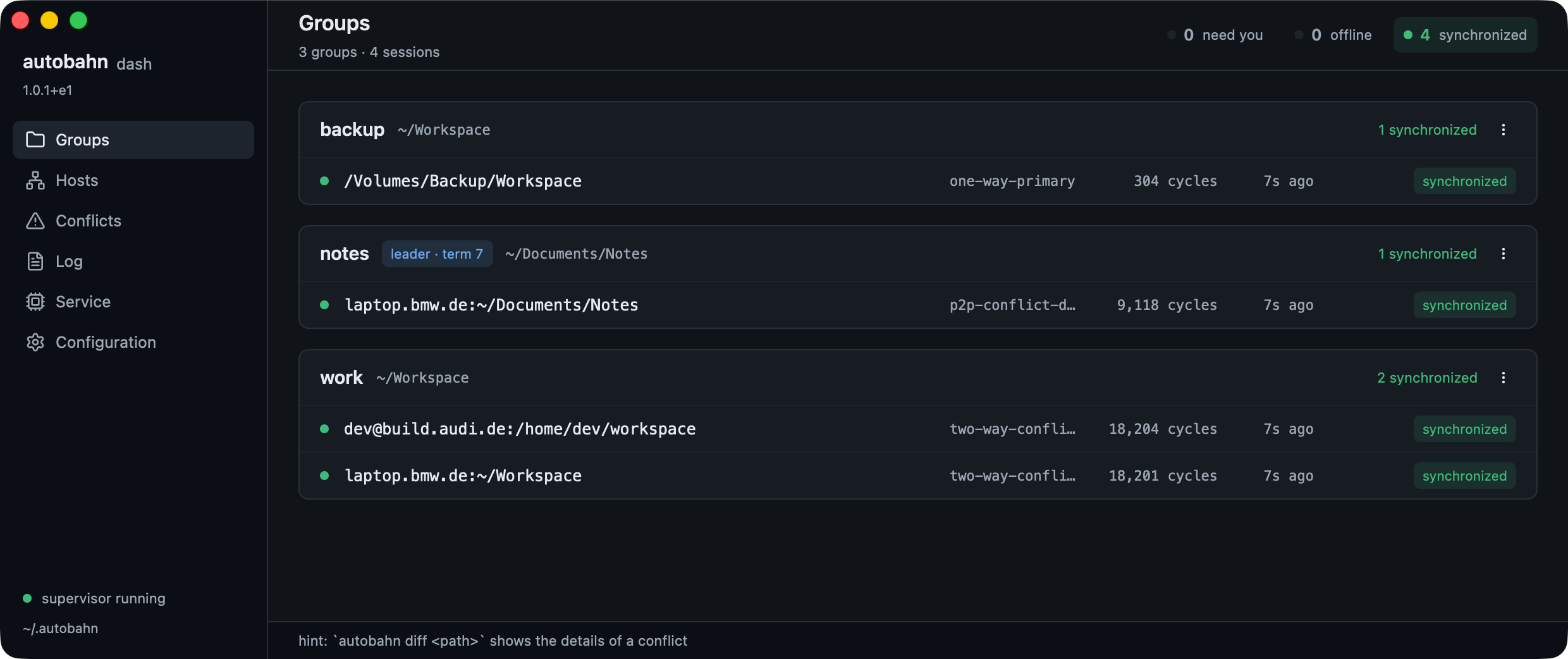
Desktop App
Autobahn ships with a desktop app and menu bar item that are about as well tested as a macOS point release.
On Linux, extract the archive and run ./autobahn-app. You need a graphical session (Wayland or X11), a Vulkan driver, and the packages listed in the archive's APT_REQUIREMENTS.txt.
Autobahn guarantees data integrity as much as possible. Programs holding files open, network mounts, and mucking with metadata can cause problems. Autobahn will break some programs (e.g. git) not due to correctness but rather due to syncing machine-specific files. You can use ignores to prevent these issues, and there are clever ways to keep things like git in sync.
Empirically
I have been running this on my own fleet every day: 20 sessions across five hosts. One of them is a 13 GB, 215,000-file tree. Autobahn has also undergone a battery of tests and benchmarks including a 24-hour soak test.
Formally
Autobahn prevents data loss through strict operational invariants:
Three-Way Reconciliation: Tracks a shared ancestor to accurately distinguish deletions, modifications, and concurrent edits.
Atomic File Transitions: All file writes stage content to temporary paths and swap into place using atomic filesystem operations.
Fail-Closed Guarantees: Any ambiguous state, communication failure, or unexpected filesystem mutation results in a pause rather than accidental overwrites.
See Safety for guarantees and the related invariants in Correctness.
UI Goodness
In addition to the standard CLI, several user interfaces are available:
Alert Hooks: Event notification script support (on_alert).
on_alert = "~/.autobahn/on-alert.sh" # written for you by `autobahn init`
None of this has undergone nearly the same level of testing as autobahn itself, so consider it experimental.
AI Disclaimer
With great vibe coding comes great responsibility. As such, I have scanned every line in this repo, run extensive soak testing, used Autobahn myself for weeks, had guardrail-free models run security scans, and put it through thousands of benchmark runs. While all of the documentation was drafted by LLMs, I've rewritten much of it. Please forgive any lingering Claudeisms.
Contributing
I will rarely accept PRs unless I know you. I prefer my slop over your slop, so instead file an issue for a bug report or feature request.
Bug reports should come with detailed context from a human or LLM.
Supported Platforms: Linux (x86_64, aarch64) and macOS (Intel and Apple Silicon). The desktop apps are Apple Silicon only.
Filesystems: Requires local POSIX filesystems. Network filesystems (NFS, SMB, CIFS) receive best-effort support only.
Editor Saves on macOS: On macOS, atomic save operations (write-temporary and rename) lack immediate completion events from the kernel, occasionally requiring an extra polling cycle compared to Linux. Details are available in Architecture.
License
Autobahn is dual licensed: AGPL-3.0-or-later OR LicenseRef-Commercial.
Autobahn gives you two-way sync between machines faster than you can type. In this demo, I'm saving the left file after each key stroke. Even though the file lives in a tree of 100K files syncing a barrage of other edits, these changes propagate instantly.
Other tools require gigs of RAM for big trees, or a cloud account, or both.
Other tools are also slow.
You want to run agents --dangerously on your local files but you should do it somewhere else.
Unhinged solution: sync everything in realtime with a "benchmaxxed" tool so editing local files is practically the same as editing remote ones.
Why Autobahn?
Fast as hell. Delivers sub-30ms propagation times for updates across trees containing hundreds of thousands of files.
Lightweight. Employs immutable shared-tree structures in memory, requiring significantly less RAM and idle CPU than conventional sync daemons.
Safe. Choose a sync policy per group that matches your risk profile, backed by tests and bounded formal models. See Safety for the guarantees and their limits.
Reviewed to death. GLM 5.3, KIMI 3, Astra, and Fable were used to perform correctness and security reviews.
Privacy first. No cloud service, no account, no third party.
Getting Started with the CLI
Install the CLI by hand or by telling an LLM to read INSTALL.md:
curl -fsSL https://github.com/fny/autobahn/releases/latest/download/install.sh | sh
Afterwards, you need to set up your configuration. By default, the configuration is written to ~/.autobahn/config.toml. You can edit it by hand or use the desktop app.
Each group connects one root, the primary, to one or more destinations, the replicas. Sync can be one-way or bidirectional (see Sync Modes below). For full configuration details, see Configuration.
# ~/.autobahn/config.toml

[defaults]
mode = "two-way-conflict"                   # sync modes explained below
ignores = ["file:Essential.gitignore"]      # you can include ignores by file
                                            # or written explicitly
                                            # this one is from ~/.autobahn/ignores/

[groups.work]
primary = "~/Workspace"
replicas = [                                # sync targets
  "dev@build.audi.de:/home/dev/workspace",  #  - fully specified
  "laptop.bmw.de",                          #  - inherits the primary path
]
ignores = ["target", "node_modules"]        # appended to the defaults'

[groups.backup]
mode = "one-way-primary"                    # the disk is made identical
primary = "~/Workspace"
replicas = ["/Volumes/Backup/Workspace"]    #  - local paths work too
Finally, run autobahn install to install the login service. See the Commands page for more details about the CLI.
Make sure you have your SSH configuration set up so you can connect to your remote machines!
Desktop App
Autobahn ships with a desktop app and menu bar item that are about as well tested as a macOS point release.
On Linux, extract the archive and run ./autobahn-app. You need a graphical session (Wayland or X11), a Vulkan driver, and the packages listed in the archive's APT_REQUIREMENTS.txt.
Autobahn guarantees data integrity as much as possible. Programs holding files open, network mounts, and mucking with metadata can cause problems. Autobahn will break some programs (e.g. git) not due to correctness but rather due to syncing machine-specific files. You can use ignores to prevent these issues, and there are clever ways to keep things like git in sync.
Empirically
I have been running this on my own fleet every day: 20 sessions across five hosts. One of them is a 13 GB, 215,000-file tree. Autobahn has also undergone a battery of tests and benchmarks including a 24-hour soak test.
Formally
Autobahn prevents data loss through strict operational invariants:
Three-Way Reconciliation: Tracks a shared ancestor to accurately distinguish deletions, modifications, and concurrent edits.
Atomic File Transitions: All file writes stage content to temporary paths and swap into place using atomic filesystem operations.
Fail-Closed Guarantees: Any ambiguous state, communication failure, or unexpected filesystem mutation results in a pause rather than accidental overwrites.
See Safety for guarantees and the related invariants in Correctness.
UI Goodness
In addition to the standard CLI, several user interfaces are available:
Alert Hooks: Event notification script support (on_alert).
on_alert = "~/.autobahn/on-alert.sh" # written for you by `autobahn init`
None of this has undergone nearly the same level of testing as autobahn itself, so consider it experimental.
AI Disclaimer
With great vibe coding comes great responsibility. As such, I have scanned every line in this repo, run extensive soak testing, used Autobahn myself for weeks, had guardrail-free models run security scans, and put it through thousands of benchmark runs. While all of the documentation was drafted by LLMs, I've rewritten much of it. Please forgive any lingering Claudeisms.
Contributing
I will rarely accept PRs unless I know you. I prefer my slop over your slop, so instead file an issue for a bug report or feature request.
Bug reports should come with detailed context from a human or LLM.
Supported Platforms: Linux (x86_64, aarch64) and macOS (Intel and Apple Silicon). The desktop apps are Apple Silicon only.
Filesystems: Requires local POSIX filesystems. Network filesystems (NFS, SMB, CIFS) receive best-effort support only.
Editor Saves on macOS: On macOS, atomic save operations (write-temporary and rename) lack immediate completion events from the kernel, occasionally requiring an extra polling cycle compared to Linux. Details are available in Architecture.
License
Autobahn is dual licensed: AGPL-3.0-or-later OR LicenseRef-Commercial.