Production-shaped MLOps Python package and reference implementation of the MLOps Coding Course: MLflow, scikit-learn, Pydantic, Pandera, uv, and mise.
See the code



This repository contains a Python code base with best practices designed to support your MLOps initiatives.
The package leverages several tools and tips to make your MLOps experience as flexible, robust, productive as possible.
You can use this package as part of your MLOps toolkit or platform (e.g., Model Registry, Experiment Tracking, Realtime Inference, ...).
Related Resources:
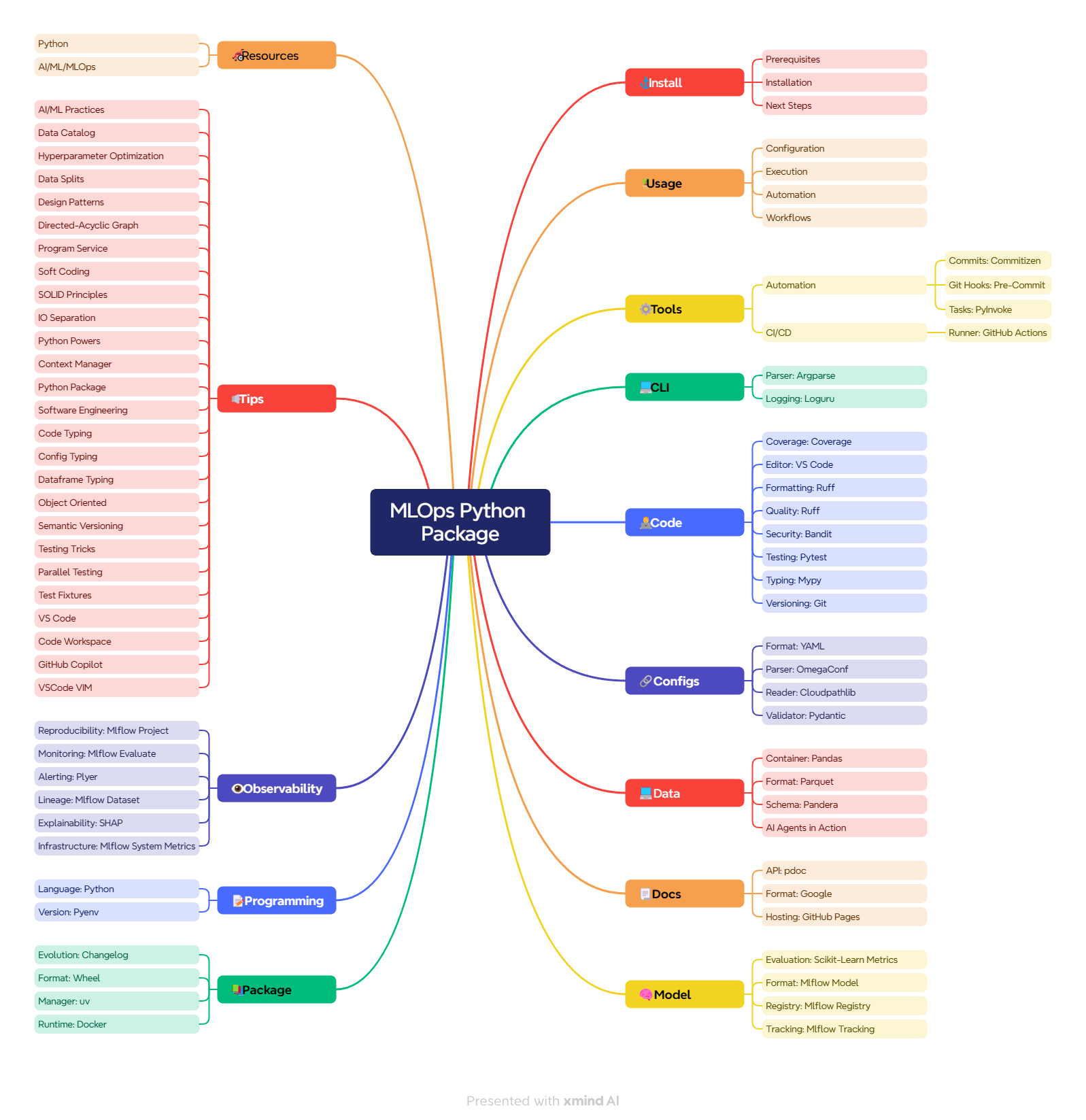
This section details the requirements, actions, and next steps to kickstart your MLOps project.
install, format, check, test, build, and all) shared by git hooks and CI# with ssh (recommended)
$ git clone [email protected]:fmind/mlops-python-package
# with https
$ git clone https://github.com/fmind/mlops-python-package
cd mlops-python-package/
mise trust && mise install
mise run install
Going from there, there are dozens of ways to integrate this package to your MLOps platform.
For instance, you can use Databricks or AWS as your compute platform and model registry.
It's up to you to adapt the package code to the solution you target. Good luck champ!
The bundled data comes from the UCI Bike Sharing dataset (data/hour.csv; attribution is in data/Readme.txt). The target cnt is the number of rentals per hour. casual and registered add up to the target and remain only in the raw CSV for analysis. The processing notebook removes them from every input Parquet file, so training and serving share a feature-only InputsSchema. Existing registered models keep their original signatures: retrain and register a new version before serving count-free inputs. Keep chronological splits and use only the training period for tuning and diagnostic curves.
The PipelineJob in confs/pipeline.yaml passes the full tuned model configuration and selected parameters into training, records the tuning run ID on the training run, and evaluates the exact registered candidate version on heldout data. It changes the Champion alias only after the thresholds pass. Inference and explanations then use that same version, even if another run registers a newer candidate.
Targets and predictions remain unsigned counts in the domain schemas. Evaluation converts them to floating point at the metric boundary so negative residuals cannot wrap into large positive errors.
This section explains how to configure the project code and execute it on your system.
You can add or edit config files in the confs/ folder to change the program behavior.
# confs/training.yaml
job:
  KIND: TrainingJob
  inputs:
    KIND: ParquetReader
    path: data/inputs_train.parquet
  targets:
    KIND: ParquetReader
    path: data/targets_train.parquet
This config file instructs the program to start a TrainingJob with 2 parameters:
inputs: dataset that contains the model inputstargets: dataset that contains the model targetYou can find all the parameters of your program in the src/bikes/jobs/*.py files.
You can also print the full schema supported by this package using uv run bikes --schema.
MLflow URI precedence is explicit YAML configuration, then MLFLOW_TRACKING_URI / MLFLOW_REGISTRY_URI, then local SQLite. Without a registry override, the registry follows the effective tracking URI. Copy .env.example to .env when using mise tasks. For Docker Compose, use mise run docker:compose: it initializes the SQLite file before mounting it; direct Compose startup requires mise run mlflow:db first.
Run notebooks with notebooks/ as the working directory and the project's .venv as the kernel. Run training before indicators.ipynb, and the explanations job before explain.ipynb. The indicators notebook follows the MLflow URI environment variables and defaults to the project's SQLite database.
The project code can be executed with uv during your development:
uv run bikes confs/pipeline.yaml
# Standalone stages remain available. Evaluate the recorded candidate first.
uv run bikes confs/training.yaml
uv run bikes confs/evaluations.yaml --extras '{"job": {"alias_or_version": 1}}'
MODEL_VERSION=1 uv run bikes confs/promotion.yaml
In production, you can build, ship, and run the project as a Python package:
uv build
uv publish # optional
python -m pip install dist/bikes-*.whl
bikes confs/inference.yaml
You can also use this package as a library. This example expects the bundled Parquet inputs (regenerate them with notebooks/processing.ipynb when needed):
from bikes import jobs

from bikes.io import datasets

job = jobs.TrainingJob(
    inputs=datasets.ParquetReader(path="data/inputs_train.parquet"),
    targets=datasets.ParquetReader(path="data/targets_train.parquet"),
)
with job as runner:
    runner.run()
Additional tips:
--extras flag
This project includes several automation tasks to easily repeat common actions.
AI agents: read
AGENTS.mdfor the full stack, task vocabulary, and conventions before contributing.
You can run the tasks from the command-line or VS Code extension.
# execute the project DAG
$ mise run project
# build a code archive
$ mise run build
# list other actions
$ mise tasks
Use mise tasks for the current list. The task definitions live in mise.toml.
This package supports three GitHub Workflows in .github/workflows:
ci.yml: run mise run all (format, check, test, build) and a clean-tree check on each push to main and Pull Requestcd.yml: run the complete release gate, publish API docs to GitHub Pages, and scan a candidate Docker image before assigning the release and latest tags to its immutable digest.security.yml: scan the full Git history and checkout with gitleaks and trivy every weekYou can use and extend these workflows to automate repetitive package management tasks.
This sections motivates the use of developer tools to improve your coding experience.
Pre-defined actions to automate your project development.
mise run tasksExecution of automated workflows on code push and releases.
mise run all, so CI and local hooks cannot disagreeactionlint checks their schema, expressions, and embedded shellzizmor audits them for security (template injection, credential persistence, cache poisoning)mise run check:actions, so a broken workflow fails before it is pushedzizmor policymainIntegrations with the Command-Line Interface (CLI) of your system.
Edition, validation, and versioning of your project source code.
--cov-fail-under=100)S rules are based onManage the configs files of your project to change executions.
Define the datasets to provide data inputs and outputs.
Generate and share the project documentations.
Toolkit to handle machine learning models.
MLflow 3: This package uses SQLite (
sqlite:///mlflow.db) for tracking and registry metadata, with artifacts under./mlruns. The file-store backend is disabled by default in current MLflow releases. Browse local runs withmise run mlflow:serve. Moving to a shared service also requires artifact access, authentication, and database operations; changing the URI configures the client connection.
Define and build modern Python package.
cliff.tomluv_build backend)The runtime image contains the installed package and locked dependencies. It omits pip and its bootstrap wheels; rebuild the image when dependencies change.
mise run check:dockerfiletrivy scans the checkout and the release workflow scans the built image before promoting its digestSelect your programming environment.
.python-version (read by uv) and in the mise.toml toolchainRun an MLflow Project job with
mise run project:run <job>(e.g.mise run project:run training); it passes--env-manager=localto reuse the uv-managed environment instead of creating a new one.
This sections gives some tips and tricks to enrich the develop experience.
You should decouple the pointer to your data from how to access it.
In your code, you can refer to your dataset with a tag (e.g., inputs, targets).
This tag can then be associated to a reader/writer implementation in a configuration file:
inputs:
  KIND: ParquetReader
  path: data/inputs_train.parquet
targets:
  KIND: ParquetReader
  path: data/targets_train.parquet
In this package, the implementation are described in src/bikes/io/datasets.py and selected by KIND.
You should select the best hyperparameters for your model using optimization search.
The simplest projects can use a sklearn.model_selection.GridSearchCV to scan the whole search space.
This package provides a simple interface to this hyperparameter search facility in src/bikes/utils/searchers.py.
For more complex project, we recommend to use more complex strategy (e.g., Bayesian) and software package (e.g., Optuna).
You should properly split your dataset into a training, validation, and testing sets.
The sets should be exclusive, and the testing set should never be used as training inputs!
This package provides a simple deterministic strategy implemented in src/bikes/utils/splitters.py.
You should use Directed-Acyclic Graph (DAG) to connect the steps of your ML pipeline.
A DAG can express the dependencies between steps while keeping the individual step independent.
The project task in mise.toml runs PipelineJob from confs/pipeline.yaml: tuning → training → holdout evaluation → promotion → inference → explanations. Stage failures propagate; a failed evaluation preserves the existing champion. Selected parameters are saved as selected_params.json in the tuning run. Standalone promotion requires a positive explicit version; it never selects the latest version implicitly.
In production, we recommend to use a scalable system such as Airflow, Dagster, Prefect, Metaflow, or ZenML.
You should provide a global context for the execution of your program.
There are several approaches such as Singleton, Global Variable, or Component.
This package takes inspiration from Clojure mount. It provides an implementation in src/bikes/io/services.py.
You should separate the program implementation from the program configuration.
Exposing configurations to users allow them to influence the execution behavior without code changes.
This package seeks to expose as much parameter as possible to the users in configurations stored in the confs/ folder.
You should implement the SOLID principles to make your code as flexible as possible.
In practice, this mean you can implement software contracts with interface and swap the implementation.
For instance, you can implement several jobs in src/bikes/jobs/*.py and swap them in your configuration.
To learn more about the mechanism select for this package, you can check the documentation for Pydantic Tagged Unions.
You should separate the code interacting with the external world from the rest.
The external is messy and full of risks: missing files, permission issue, out of disk ...
To isolate these risks, you can put all the related code in an io package and use interfaces.
You should use Python context manager to control and enhance an execution.
Python provides contexts that can be used to extend a code block. For instance:
# in src/bikes/scripts.py
with setting.job as runner:  # validated configuration
    runner.run()  # run in context
This pattern has the same benefit as Monad, a powerful programming pattern.
The package uses src/bikes/jobs/*.py to handle exception and services.
You should create Python package to create both library and application for others.
Using Python package for your AI/ML project has the following benefits:
To build a Python package with uv, you simply have to type in a terminal:
# for all uv project
uv build
# for this project only
mise run build
You should type your Python code to make it more robust and explicit for your user.
Python provides the typing module for adding type hints and ty to checking them.
# in src/bikes/core/models.py
@abc.abstractmethod
def fit(self, inputs: schemas.Inputs, targets: schemas.Targets) -> T.Self:
    """Fit the model on the given inputs and target."""


@abc.abstractmethod
def predict(self, inputs: schemas.Inputs) -> schemas.Outputs:
    """Generate an output with the model for the given inputs."""
This code snippet clearly state the inputs and outputs of the method, both for the developer and the type checker.
The package aims to type every functions and classes to facilitate the developer experience and fix mistakes before execution.
You should type your configuration to avoid exceptions during the program execution.
Pydantic allows to define classes that can validate your configs during the program startup.
# in src/bikes/utils/splitters.py
class TrainTestSplitter(Splitter):
    shuffle: bool = False  # required (time sensitive)
    test_size: int | float = 24 * 30 * 2  # 2 months
    random_state: int = 42
This code snippet allows to communicate the values expected and avoid error that could be avoided.
The package combines both OmegaConf and Pydantic to parse YAML files and validate them as soon as possible.
You should type your dataframe to communicate and validate their fields.
Pandera supports dataframe typing for Pandas and other library like PySpark:
Selected fields from the complete schemas:
class InputsSchema(Schema):
    instant: papd.Index[papd.UInt32] = pa.Field(ge=0, unique=True)
    hr: papd.Series[papd.UInt8] = pa.Field(ge=0, le=23)
    temp: papd.Series[papd.Float16] = pa.Field(ge=0, le=1)
The shared schema parsers reject fractional or overflowing integer values and invalid booleans before coercion. This excerpt needs the module's imports and base schema.
This code snippet defines the fields of the dataframe and some of its constraint.
The package encourages to type every dataframe used in src/bikes/core/schemas.py.
You should use the Objected Oriented programming to benefit from polymorphism.
Polymorphism combined with SOLID Principles allows to easily swap your code components.
class Reader(abc.ABC, pdt.BaseModel):
    @abc.abstractmethod
    def read(self) -> pd.DataFrame:
        """Read a dataframe from a dataset."""
This code snippet uses the abc module to define code interfaces for a dataset with a read/write method.
The package defines class interface whenever possible to provide intuitive and replaceable parts for your AI/ML project.
You should use semantic versioning to communicate the level of compatibility of your releases.
Semantic Versioning (SemVer) provides a simple schema to communicate code changes. For package X.Y.Z:
Uv and this package leverage Semantic Versioning to let developers control the speed of adoption for new releases.
You can run your tests in parallel to speed up the validation of your code base.
Pytest can be extended with the pytest-xdist plugin for this purpose.
This package runs it with mise run test:parallel (no coverage); the test gate stays serial because pytest-cov and pytest-xdist deadlock on this suite.
You should define reusable objects and actions for your tests with fixtures.
Fixture can prepare objects for your test cases, such as dataframes, models, files.
This package defines fixtures in tests/conftest.py to improve your testing experience.
You can use VS Code workspace to define configurations for your project.
Code Workspace can enable features (e.g. formatting) and set the default interpreter.
{
  "settings": {
    "editor.formatOnSave": true,
    "python.defaultInterpreterPath": "${workspaceFolder}/.venv/bin/python"
  }
}
This package defines a workspace file that you can load from mlops-python-package.code-workspace.
GitHub Copilot has been a huge productivity boost thanks to its smart completion.
You should become familiar with the solution in less than a single coding session.
You can use VIM keybindings to more efficiently navigate and modify your code.
Compared to GitHub Copilot, VIM can take much more time to master. Measure whether the navigation gains repay the learning time for your work.
This section provides resources for building packages for Python and AI/ML/MLOps.
mise run clean removes caches and build outputs while preserving MLflow databases, run artifacts, and predictions. Back up experiment state before any deliberate manual reset.
Use mise run mlflow:serve to browse experiments created by local jobs: their artifact URIs contain host paths. Compose can serve metadata from the same SQLite file, but those host paths are not automatically available inside the container. For new HTTP-first experiments, configure clients to reach the server and choose server-accessible artifact storage.
The release image gate checks vulnerabilities, secrets and misconfigurations. It records license classifications separately: the Debian base includes reciprocal licenses that require an inventory, rather than a blanket license prohibition.
97 followers · starred Mar 2024
34 followers · starred Dec 2024
58 followers · starred Feb 2025
634 followers · starred May 2025
Production-shaped MLOps Python package and reference implementation of the MLOps Coding Course: MLflow, scikit-learn, Pydantic, Pandera, uv, and mise.
See the code
This repository contains a Python code base with best practices designed to support your MLOps initiatives.
The package leverages several tools and tips to make your MLOps experience as flexible, robust, productive as possible.
You can use this package as part of your MLOps toolkit or platform (e.g., Model Registry, Experiment Tracking, Realtime Inference, ...).
Related Resources:
This section details the requirements, actions, and next steps to kickstart your MLOps project.
install, format, check, test, build, and all) shared by git hooks and CI# with ssh (recommended)
$ git clone [email protected]:fmind/mlops-python-package
# with https
$ git clone https://github.com/fmind/mlops-python-package
cd mlops-python-package/
mise trust && mise install
mise run install
Going from there, there are dozens of ways to integrate this package to your MLOps platform.
For instance, you can use Databricks or AWS as your compute platform and model registry.
It's up to you to adapt the package code to the solution you target. Good luck champ!
The bundled data comes from the UCI Bike Sharing dataset (data/hour.csv; attribution is in data/Readme.txt). The target cnt is the number of rentals per hour. casual and registered add up to the target and remain only in the raw CSV for analysis. The processing notebook removes them from every input Parquet file, so training and serving share a feature-only InputsSchema. Existing registered models keep their original signatures: retrain and register a new version before serving count-free inputs. Keep chronological splits and use only the training period for tuning and diagnostic curves.
The PipelineJob in confs/pipeline.yaml passes the full tuned model configuration and selected parameters into training, records the tuning run ID on the training run, and evaluates the exact registered candidate version on heldout data. It changes the Champion alias only after the thresholds pass. Inference and explanations then use that same version, even if another run registers a newer candidate.
Targets and predictions remain unsigned counts in the domain schemas. Evaluation converts them to floating point at the metric boundary so negative residuals cannot wrap into large positive errors.
This section explains how to configure the project code and execute it on your system.
You can add or edit config files in the confs/ folder to change the program behavior.
# confs/training.yaml
job:
  KIND: TrainingJob
  inputs:
    KIND: ParquetReader
    path: data/inputs_train.parquet
  targets:
    KIND: ParquetReader
    path: data/targets_train.parquet
This config file instructs the program to start a TrainingJob with 2 parameters:
inputs: dataset that contains the model inputstargets: dataset that contains the model targetYou can find all the parameters of your program in the src/bikes/jobs/*.py files.
You can also print the full schema supported by this package using uv run bikes --schema.
MLflow URI precedence is explicit YAML configuration, then MLFLOW_TRACKING_URI / MLFLOW_REGISTRY_URI, then local SQLite. Without a registry override, the registry follows the effective tracking URI. Copy .env.example to .env when using mise tasks. For Docker Compose, use mise run docker:compose: it initializes the SQLite file before mounting it; direct Compose startup requires mise run mlflow:db first.
Run notebooks with notebooks/ as the working directory and the project's .venv as the kernel. Run training before indicators.ipynb, and the explanations job before explain.ipynb. The indicators notebook follows the MLflow URI environment variables and defaults to the project's SQLite database.
The project code can be executed with uv during your development:
uv run bikes confs/pipeline.yaml
# Standalone stages remain available. Evaluate the recorded candidate first.
uv run bikes confs/training.yaml
uv run bikes confs/evaluations.yaml --extras '{"job": {"alias_or_version": 1}}'
MODEL_VERSION=1 uv run bikes confs/promotion.yaml
In production, you can build, ship, and run the project as a Python package:
uv build
uv publish # optional
python -m pip install dist/bikes-*.whl
bikes confs/inference.yaml
You can also use this package as a library. This example expects the bundled Parquet inputs (regenerate them with notebooks/processing.ipynb when needed):
from bikes import jobs

from bikes.io import datasets

job = jobs.TrainingJob(
    inputs=datasets.ParquetReader(path="data/inputs_train.parquet"),
    targets=datasets.ParquetReader(path="data/targets_train.parquet"),
)
with job as runner:
    runner.run()
Additional tips:
--extras flag
This project includes several automation tasks to easily repeat common actions.
AI agents: read
AGENTS.mdfor the full stack, task vocabulary, and conventions before contributing.
You can run the tasks from the command-line or VS Code extension.
# execute the project DAG
$ mise run project
# build a code archive
$ mise run build
# list other actions
$ mise tasks
Use mise tasks for the current list. The task definitions live in mise.toml.
This package supports three GitHub Workflows in .github/workflows:
ci.yml: run mise run all (format, check, test, build) and a clean-tree check on each push to main and Pull Requestcd.yml: run the complete release gate, publish API docs to GitHub Pages, and scan a candidate Docker image before assigning the release and latest tags to its immutable digest.security.yml: scan the full Git history and checkout with gitleaks and trivy every weekYou can use and extend these workflows to automate repetitive package management tasks.
This sections motivates the use of developer tools to improve your coding experience.
Pre-defined actions to automate your project development.
mise run tasksExecution of automated workflows on code push and releases.
mise run all, so CI and local hooks cannot disagreeactionlint checks their schema, expressions, and embedded shellzizmor audits them for security (template injection, credential persistence, cache poisoning)mise run check:actions, so a broken workflow fails before it is pushedzizmor policymainIntegrations with the Command-Line Interface (CLI) of your system.
Edition, validation, and versioning of your project source code.
--cov-fail-under=100)S rules are based onManage the configs files of your project to change executions.
Define the datasets to provide data inputs and outputs.
Generate and share the project documentations.
Toolkit to handle machine learning models.
MLflow 3: This package uses SQLite (
sqlite:///mlflow.db) for tracking and registry metadata, with artifacts under./mlruns. The file-store backend is disabled by default in current MLflow releases. Browse local runs withmise run mlflow:serve. Moving to a shared service also requires artifact access, authentication, and database operations; changing the URI configures the client connection.
Define and build modern Python package.
cliff.tomluv_build backend)The runtime image contains the installed package and locked dependencies. It omits pip and its bootstrap wheels; rebuild the image when dependencies change.
mise run check:dockerfiletrivy scans the checkout and the release workflow scans the built image before promoting its digestSelect your programming environment.
.python-version (read by uv) and in the mise.toml toolchainRun an MLflow Project job with
mise run project:run <job>(e.g.mise run project:run training); it passes--env-manager=localto reuse the uv-managed environment instead of creating a new one.
This sections gives some tips and tricks to enrich the develop experience.
You should decouple the pointer to your data from how to access it.
In your code, you can refer to your dataset with a tag (e.g., inputs, targets).
This tag can then be associated to a reader/writer implementation in a configuration file:
inputs:
  KIND: ParquetReader
  path: data/inputs_train.parquet
targets:
  KIND: ParquetReader
  path: data/targets_train.parquet
In this package, the implementation are described in src/bikes/io/datasets.py and selected by KIND.
You should select the best hyperparameters for your model using optimization search.
The simplest projects can use a sklearn.model_selection.GridSearchCV to scan the whole search space.
This package provides a simple interface to this hyperparameter search facility in src/bikes/utils/searchers.py.
For more complex project, we recommend to use more complex strategy (e.g., Bayesian) and software package (e.g., Optuna).
You should properly split your dataset into a training, validation, and testing sets.
The sets should be exclusive, and the testing set should never be used as training inputs!
This package provides a simple deterministic strategy implemented in src/bikes/utils/splitters.py.
You should use Directed-Acyclic Graph (DAG) to connect the steps of your ML pipeline.
A DAG can express the dependencies between steps while keeping the individual step independent.
The project task in mise.toml runs PipelineJob from confs/pipeline.yaml: tuning → training → holdout evaluation → promotion → inference → explanations. Stage failures propagate; a failed evaluation preserves the existing champion. Selected parameters are saved as selected_params.json in the tuning run. Standalone promotion requires a positive explicit version; it never selects the latest version implicitly.
In production, we recommend to use a scalable system such as Airflow, Dagster, Prefect, Metaflow, or ZenML.
You should provide a global context for the execution of your program.
There are several approaches such as Singleton, Global Variable, or Component.
This package takes inspiration from Clojure mount. It provides an implementation in src/bikes/io/services.py.
You should separate the program implementation from the program configuration.
Exposing configurations to users allow them to influence the execution behavior without code changes.
This package seeks to expose as much parameter as possible to the users in configurations stored in the confs/ folder.
You should implement the SOLID principles to make your code as flexible as possible.
In practice, this mean you can implement software contracts with interface and swap the implementation.
For instance, you can implement several jobs in src/bikes/jobs/*.py and swap them in your configuration.
To learn more about the mechanism select for this package, you can check the documentation for Pydantic Tagged Unions.
You should separate the code interacting with the external world from the rest.
The external is messy and full of risks: missing files, permission issue, out of disk ...
To isolate these risks, you can put all the related code in an io package and use interfaces.
You should use Python context manager to control and enhance an execution.
Python provides contexts that can be used to extend a code block. For instance:
# in src/bikes/scripts.py
with setting.job as runner:  # validated configuration
    runner.run()  # run in context
This pattern has the same benefit as Monad, a powerful programming pattern.
The package uses src/bikes/jobs/*.py to handle exception and services.
You should create Python package to create both library and application for others.
Using Python package for your AI/ML project has the following benefits:
To build a Python package with uv, you simply have to type in a terminal:
# for all uv project
uv build
# for this project only
mise run build
You should type your Python code to make it more robust and explicit for your user.
Python provides the typing module for adding type hints and ty to checking them.
# in src/bikes/core/models.py
@abc.abstractmethod
def fit(self, inputs: schemas.Inputs, targets: schemas.Targets) -> T.Self:
    """Fit the model on the given inputs and target."""


@abc.abstractmethod
def predict(self, inputs: schemas.Inputs) -> schemas.Outputs:
    """Generate an output with the model for the given inputs."""
This code snippet clearly state the inputs and outputs of the method, both for the developer and the type checker.
The package aims to type every functions and classes to facilitate the developer experience and fix mistakes before execution.
You should type your configuration to avoid exceptions during the program execution.
Pydantic allows to define classes that can validate your configs during the program startup.
# in src/bikes/utils/splitters.py
class TrainTestSplitter(Splitter):
    shuffle: bool = False  # required (time sensitive)
    test_size: int | float = 24 * 30 * 2  # 2 months
    random_state: int = 42
This code snippet allows to communicate the values expected and avoid error that could be avoided.
The package combines both OmegaConf and Pydantic to parse YAML files and validate them as soon as possible.
You should type your dataframe to communicate and validate their fields.
Pandera supports dataframe typing for Pandas and other library like PySpark:
Selected fields from the complete schemas:
class InputsSchema(Schema):
    instant: papd.Index[papd.UInt32] = pa.Field(ge=0, unique=True)
    hr: papd.Series[papd.UInt8] = pa.Field(ge=0, le=23)
    temp: papd.Series[papd.Float16] = pa.Field(ge=0, le=1)
The shared schema parsers reject fractional or overflowing integer values and invalid booleans before coercion. This excerpt needs the module's imports and base schema.
This code snippet defines the fields of the dataframe and some of its constraint.
The package encourages to type every dataframe used in src/bikes/core/schemas.py.
You should use the Objected Oriented programming to benefit from polymorphism.
Polymorphism combined with SOLID Principles allows to easily swap your code components.
class Reader(abc.ABC, pdt.BaseModel):
    @abc.abstractmethod
    def read(self) -> pd.DataFrame:
        """Read a dataframe from a dataset."""
This code snippet uses the abc module to define code interfaces for a dataset with a read/write method.
The package defines class interface whenever possible to provide intuitive and replaceable parts for your AI/ML project.
You should use semantic versioning to communicate the level of compatibility of your releases.
Semantic Versioning (SemVer) provides a simple schema to communicate code changes. For package X.Y.Z:
Uv and this package leverage Semantic Versioning to let developers control the speed of adoption for new releases.
You can run your tests in parallel to speed up the validation of your code base.
Pytest can be extended with the pytest-xdist plugin for this purpose.
This package runs it with mise run test:parallel (no coverage); the test gate stays serial because pytest-cov and pytest-xdist deadlock on this suite.
You should define reusable objects and actions for your tests with fixtures.
Fixture can prepare objects for your test cases, such as dataframes, models, files.
This package defines fixtures in tests/conftest.py to improve your testing experience.
You can use VS Code workspace to define configurations for your project.
Code Workspace can enable features (e.g. formatting) and set the default interpreter.
{
  "settings": {
    "editor.formatOnSave": true,
    "python.defaultInterpreterPath": "${workspaceFolder}/.venv/bin/python"
  }
}
This package defines a workspace file that you can load from mlops-python-package.code-workspace.
GitHub Copilot has been a huge productivity boost thanks to its smart completion.
You should become familiar with the solution in less than a single coding session.
You can use VIM keybindings to more efficiently navigate and modify your code.
Compared to GitHub Copilot, VIM can take much more time to master. Measure whether the navigation gains repay the learning time for your work.
This section provides resources for building packages for Python and AI/ML/MLOps.
mise run clean removes caches and build outputs while preserving MLflow databases, run artifacts, and predictions. Back up experiment state before any deliberate manual reset.
Use mise run mlflow:serve to browse experiments created by local jobs: their artifact URIs contain host paths. Compose can serve metadata from the same SQLite file, but those host paths are not automatically available inside the container. For new HTTP-first experiments, configure clients to reach the server and choose server-accessible artifact storage.
The release image gate checks vulnerabilities, secrets and misconfigurations. It records license classifications separately: the Debian base includes reciprocal licenses that require an inventory, rather than a blanket license prohibition.
97 followers · starred Mar 2024
34 followers · starred Dec 2024
58 followers · starred Feb 2025
634 followers · starred May 2025



