Android library that provides an extension to ImageView that creates an immersive experience by animating its drawable using the Ken Burns Effect.
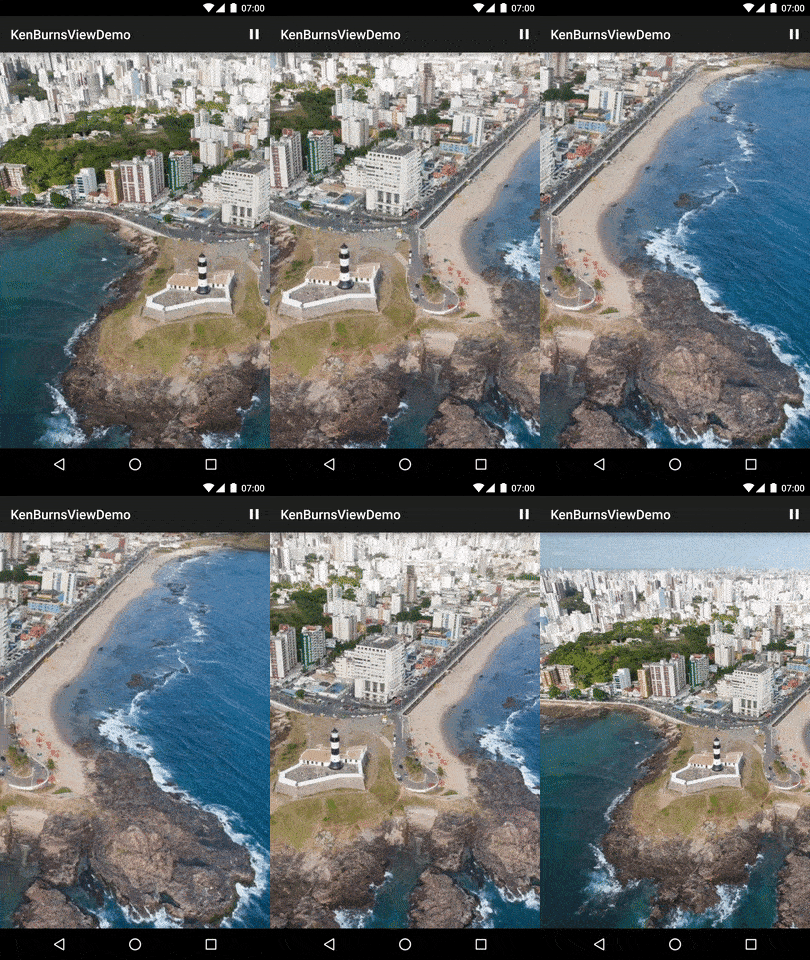
KenBurnsView provides the following advantages:
Latest version: 1.0.7
If you're using Gradle, you can declare this library as a dependency:
dependencies {
    compile 'com.flaviofaria:kenburnsview:1.0.7'
}
For a working implementation, see the sample/ folder.
The simplest way to use KenBurnsView is by dropping the library JAR file into your project adding a view to an XML layout file:
<com.flaviofaria.kenburnsview.KenBurnsView
    android:id="@+id/image"
    android:layout_width="match_parent"
    android:layout_height="match_parent"
    android:src="@drawable/your_drawable" />
KenBurnsView kbv = (KenBurnsView) findViewById(R.id.image);
kbv.setTransitionListener(new TransitionListener() {
    @Override
    public void onTransitionStart(Transition transition) {

    }
    @Override
    public void onTransitionEnd(Transition transition) {

    }
});
You can pause the animation by calling kbv.pause() and resume it
by calling kbv.resume();
You can change the duration and the interpolator of transitions:
RandomTransitionGenerator generator = new RandomTransitionGenerator(duration, interpolator);
kbv.setTransitionGenerator(generator);
TransitionGenerator.You can ask any question on Stack Overflow using the android-kenburnsview tag.
18,957 followers · starred Mar 2014
1,162 followers · starred Jan 2019
21 followers · starred Apr 2021
1 followers · starred Sep 2019
Android library that provides an extension to ImageView that creates an immersive experience by animating its drawable using the Ken Burns Effect.
KenBurnsView provides the following advantages:
Latest version: 1.0.7
If you're using Gradle, you can declare this library as a dependency:
dependencies {
    compile 'com.flaviofaria:kenburnsview:1.0.7'
}
For a working implementation, see the sample/ folder.
The simplest way to use KenBurnsView is by dropping the library JAR file into your project adding a view to an XML layout file:
<com.flaviofaria.kenburnsview.KenBurnsView
    android:id="@+id/image"
    android:layout_width="match_parent"
    android:layout_height="match_parent"
    android:src="@drawable/your_drawable" />
KenBurnsView kbv = (KenBurnsView) findViewById(R.id.image);
kbv.setTransitionListener(new TransitionListener() {
    @Override
    public void onTransitionStart(Transition transition) {

    }
    @Override
    public void onTransitionEnd(Transition transition) {

    }
});
You can pause the animation by calling kbv.pause() and resume it
by calling kbv.resume();
You can change the duration and the interpolator of transitions:
RandomTransitionGenerator generator = new RandomTransitionGenerator(duration, interpolator);
kbv.setTransitionGenerator(generator);
TransitionGenerator.You can ask any question on Stack Overflow using the android-kenburnsview tag.
18,957 followers · starred Mar 2014
1,162 followers · starred Jan 2019
21 followers · starred Apr 2021
1 followers · starred Sep 2019



