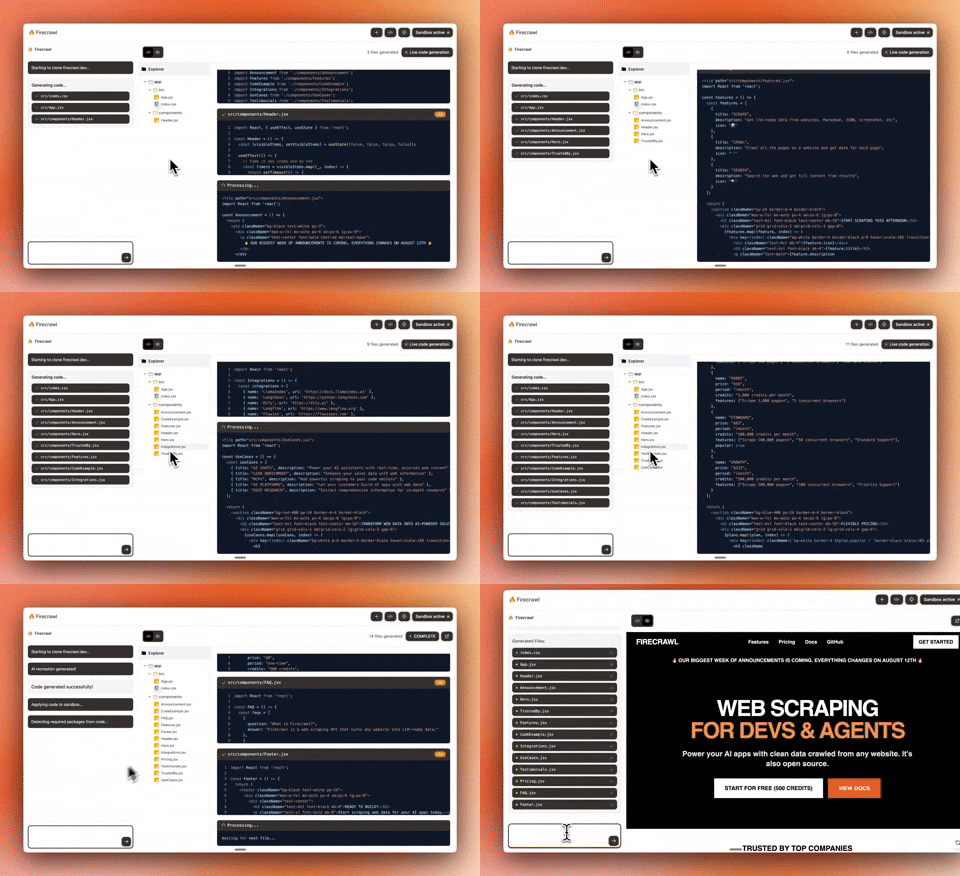
🔥 Clone and recreate any website as a modern React app in seconds
TypeScript
28,663
61 commits
updated Oct 9, 2026
Chat with AI to build React apps instantly. An example app made by the Firecrawl team. For a complete cloud solution, check out Lovable.dev ❤️.
git clone https://github.com/firecrawl/open-lovable.git
cd open-lovable
pnpm install  # or npm install / yarn install
.env.local# =================================================================
# REQUIRED
# =================================================================
FIRECRAWL_API_KEY=your_firecrawl_api_key # https://firecrawl.dev
# =================================================================
# AI PROVIDER - Choose your LLM
# =================================================================
GEMINI_API_KEY=your_gemini_api_key # https://aistudio.google.com/app/apikey
ANTHROPIC_API_KEY=your_anthropic_api_key # https://console.anthropic.com
OPENAI_API_KEY=your_openai_api_key # https://platform.openai.com
GROQ_API_KEY=your_groq_api_key # https://console.groq.com
# =================================================================
# FAST APPLY (Optional - for faster edits)
# =================================================================
MORPH_API_KEY=your_morphllm_api_key # https://morphllm.com/dashboard
# =================================================================
# SANDBOX PROVIDER - Choose ONE: Vercel (default) or E2B
# =================================================================
SANDBOX_PROVIDER=vercel # or 'e2b'
# Option 1: Vercel Sandbox (default)
# Choose one authentication method:
# Method A: OIDC Token (recommended for development)
# Run `vercel link` then `vercel env pull` to get VERCEL_OIDC_TOKEN automatically
VERCEL_OIDC_TOKEN=auto_generated_by_vercel_env_pull
# Method B: Personal Access Token (for production or when OIDC unavailable)
# VERCEL_TEAM_ID=team_xxxxxxxxx # Your Vercel team ID
# VERCEL_PROJECT_ID=prj_xxxxxxxxx # Your Vercel project ID
# VERCEL_TOKEN=vercel_xxxxxxxxxxxx # Personal access token from Vercel dashboard
# Option 2: E2B Sandbox
# E2B_API_KEY=your_e2b_api_key # https://e2b.dev
pnpm dev # or npm run dev / yarn dev
MIT
(top 24 of 147)
3,910 followers · starred Aug 2025
57 followers · starred Aug 2025
153 followers · starred Jul 2026
496 followers · starred Aug 2025
🔥 Clone and recreate any website as a modern React app in seconds
TypeScript
28,663
61 commits
updated Oct 9, 2026
Chat with AI to build React apps instantly. An example app made by the Firecrawl team. For a complete cloud solution, check out Lovable.dev ❤️.
git clone https://github.com/firecrawl/open-lovable.git
cd open-lovable
pnpm install  # or npm install / yarn install
.env.local# =================================================================
# REQUIRED
# =================================================================
FIRECRAWL_API_KEY=your_firecrawl_api_key # https://firecrawl.dev
# =================================================================
# AI PROVIDER - Choose your LLM
# =================================================================
GEMINI_API_KEY=your_gemini_api_key # https://aistudio.google.com/app/apikey
ANTHROPIC_API_KEY=your_anthropic_api_key # https://console.anthropic.com
OPENAI_API_KEY=your_openai_api_key # https://platform.openai.com
GROQ_API_KEY=your_groq_api_key # https://console.groq.com
# =================================================================
# FAST APPLY (Optional - for faster edits)
# =================================================================
MORPH_API_KEY=your_morphllm_api_key # https://morphllm.com/dashboard
# =================================================================
# SANDBOX PROVIDER - Choose ONE: Vercel (default) or E2B
# =================================================================
SANDBOX_PROVIDER=vercel # or 'e2b'
# Option 1: Vercel Sandbox (default)
# Choose one authentication method:
# Method A: OIDC Token (recommended for development)
# Run `vercel link` then `vercel env pull` to get VERCEL_OIDC_TOKEN automatically
VERCEL_OIDC_TOKEN=auto_generated_by_vercel_env_pull
# Method B: Personal Access Token (for production or when OIDC unavailable)
# VERCEL_TEAM_ID=team_xxxxxxxxx # Your Vercel team ID
# VERCEL_PROJECT_ID=prj_xxxxxxxxx # Your Vercel project ID
# VERCEL_TOKEN=vercel_xxxxxxxxxxxx # Personal access token from Vercel dashboard
# Option 2: E2B Sandbox
# E2B_API_KEY=your_e2b_api_key # https://e2b.dev
pnpm dev # or npm run dev / yarn dev
MIT
(top 24 of 147)
3,910 followers · starred Aug 2025
57 followers · starred Aug 2025
153 followers · starred Jul 2026
496 followers · starred Aug 2025



