🔥 Visual workflow builder for AI agents powered by Firecrawl - drag-and-drop web scraping pipelines with real-time execution
TypeScript
2,639
14 commits
updated Oct 20, 2025
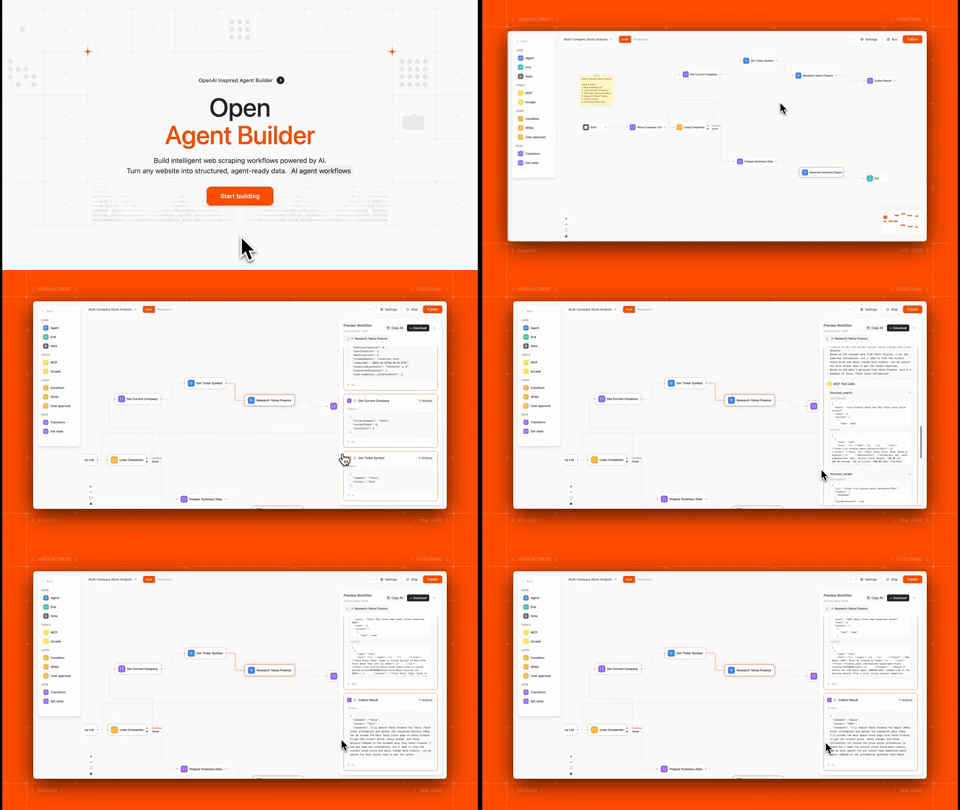
Open Agent Builder is a visual workflow builder for creating AI agent pipelines powered by Firecrawl. Design complex agent workflows with a drag-and-drop interface, then execute them with real-time streaming updates.
Perfect for:
Note: This project is actively under development. Some features are still in progress and we welcome contributions and PRs!
| Technology | Purpose |
|---|---|
| Firecrawl | Web scraping API for converting websites into LLM-ready data |
| Next.js 16 (canary) | React framework with App Router for frontend and API routes |
| TypeScript | Type-safe development across the stack |
| LangGraph | Workflow orchestration engine with state management, conditional routing, and human-in-the-loop support |
| Convex | Real-time database with automatic reactivity for workflows, executions, and user data |
| Clerk | Authentication and user management with JWT integration |
| Tailwind CSS | Utility-first CSS framework for responsive UI |
| React Flow | Visual workflow builder canvas with drag-and-drop nodes |
| Anthropic | Claude AI integration with native MCP support (Claude Haiku 4.5 & Sonnet 4.5) |
| OpenAI | gpt-5 integration (MCP support coming soon) |
| Groq | Fast inference for open models (MCP support coming soon) |
| E2B | Sandboxed code execution for secure transform nodes |
| Vercel | Deployment platform with edge functions |
Before you begin, you'll need:
Note: LLM API keys can be added directly in the UI via Settings → API Keys after setup. For MCP tool support, Anthropic Claude (Haiku 4.5 or Sonnet 4.5) is currently recommended as the default option.
git clone https://github.com/firecrawl/open-agent-builder.git
cd open-agent-builder
npm install
Convex handles all workflow and execution data persistence.
# Install Convex CLI globally
npm install -g convex

# Initialize Convex project
npx convex dev
This will:
NEXT_PUBLIC_CONVEX_URL in your .env.localKeep the Convex dev server running in a separate terminal.
Clerk provides secure user authentication and management.
Add to your .env.local:
# Clerk Authentication
NEXT_PUBLIC_CLERK_PUBLISHABLE_KEY=pk_test_...
CLERK_SECRET_KEY=sk_test_...

# Clerk + Convex Integration
CLERK_JWT_ISSUER_DOMAIN=https://your-clerk-domain.clerk.accounts.dev
Edit convex/auth.config.ts and update the domain:
export default {
  providers: [
    {
      domain: "https://your-clerk-domain.clerk.accounts.dev", // Your Clerk issuer URL
      applicationID: "convex",
    },
  ],
};
Then push the auth config to Convex:
npx convex dev
Firecrawl is the core web scraping engine that powers most workflows.
.env.local:# Firecrawl API (REQUIRED)
FIRECRAWL_API_KEY=fc-...
Note: Users can also add their own Firecrawl keys in Settings → API Keys, but having a default key in
.env.localenables the template workflows.
While users can add their own LLM API keys through the UI (Settings → API Keys), you can optionally set a default provider in .env.local:
# Optional: Choose one as default

# Anthropic Claude (Recommended - Native MCP support with Haiku 4.5 & Sonnet 4.5)
ANTHROPIC_API_KEY=sk-ant-...

# OpenAI GPT-5 (MCP support coming soon)
OPENAI_API_KEY=sk-...

# Groq (MCP support coming soon)
GROQ_API_KEY=gsk_...
Important: For workflows using MCP tools (like Firecrawl integration), Anthropic Claude is currently the recommended provider as it has native MCP support. OpenAI and Groq MCP support is coming soon.
For advanced transform nodes with sandboxed code execution:
# E2B Code Interpreter (Optional)
E2B_API_KEY=e2b_...
Get your key at e2b.dev
# Terminal 1: Convex dev server
npx convex dev

# Terminal 2: Next.js dev server
npm run dev
Or run both with one command:
npm run dev:all
Visit http://localhost:3000
npm run build
npm start
http://localhost:3000| Node Type | Purpose | Example Use |
|---|---|---|
| Start | Workflow entry point | Define input variables |
| Agent | AI reasoning with LLMs | Analyze data, make decisions |
| MCP Tool | External tool calls | Firecrawl scraping, APIs |
| Transform | Data manipulation | Parse JSON, filter arrays |
| If/Else | Conditional logic | Route based on conditions |
| While Loop | Iteration | Process multiple pages |
| User Approval | Human-in-the-loop | Review before posting |
| End | Workflow completion | Return final output |
Anthropic Claude - Full native MCP support
Anthropic's MCP implementation provides MCP support, other providers are currently in progress.
MCP tools enable agents to interact with external services like Firecrawl:
scrape, search, crawlExample workflow with MCP:
Start → Agent (with Firecrawl MCP) → End
The agent can intelligently decide when to scrape pages, search the web, or crawl sites based on your instructions.
What it does: Scrape any website and get an AI summary
Nodes: Start → Firecrawl Scrape → Agent Summary → End
Try it:
Input: https://firecrawl.dev
Output: "Firecrawl is a web scraping API that converts websites into LLM-ready markdown..."
What it does: Search web, scrape top results, synthesize findings
Nodes: Start → Firecrawl Search → Loop (Scrape Each) → Agent Synthesis → End
What it does: Research companies, extract structured data, generate report
Nodes: Start → Parse Companies → Loop (Research + Extract) → Approval → Export → End
Features used:
What it does: Track product prices across multiple sites
Nodes: Start → Loop (Scrape + Extract Price) → Compare → Notify → End
Users can add their own API keys via Settings → API Keys:
This allows:
Add custom MCP servers in Settings → MCP Registry:
Supported MCP Servers:
{API_KEY}Push your code to GitHub
Deploy to Vercel:
# Install Vercel CLI
npm i -g vercel

# Deploy
vercel
Set environment variables in Vercel dashboard:
NEXT_PUBLIC_CONVEX_URL (from Convex)FIRECRAWL_API_KEY (Required)Deploy Convex to production:
npx convex deploy
Update Clerk settings:
Required:
NEXT_PUBLIC_CONVEX_URL - Convex databaseNEXT_PUBLIC_CLERK_PUBLISHABLE_KEY - Clerk authCLERK_SECRET_KEY - Clerk authCLERK_JWT_ISSUER_DOMAIN - Clerk + Convex integrationFIRECRAWL_API_KEY - Web scrapingOptional (can be added in UI instead):
ANTHROPIC_API_KEY - Default Claude provider (Recommended for MCP)OPENAI_API_KEY - Default gpt-5 provider (MCP coming soon)GROQ_API_KEY - Default Groq provider (MCP coming soon)E2B_API_KEY - Sandboxed code executionGenerate an API key in Settings → API Keys, then:
curl -X POST https://your-domain.com/api/workflows/my-workflow-id/execute-stream \
  -H "Authorization: Bearer sk_live_..." \
  -H "Content-Type: application/json" \
  -d '{"url": "https://example.com"}'
Response: Server-Sent Events (SSE) stream with real-time updates
%%{init: {'flowchart': {'htmlLabels': false}} }%%
flowchart TD
  subgraph Frontend
    A["Next.js Frontend\n(React + Tailwind)"]
    A_desc["Visual workflow builder, real-time execution display, user settings and API key management"]
    A --> A_desc
  end

  subgraph Backend
    B["API Routes (Next.js)"]
    B_desc["Workflow execution, authentication middleware, streaming SSE responses"]
    C["LangGraph Executor (Server-side only)"]
    C_desc["StateGraph orchestration, conditional routing, loop handling, human-in-the-loop interrupts"]
    B --> B_desc
    C --> C_desc
    A_desc --> B
    B_desc --> C
  end

  subgraph Integrations
    D1["Firecrawl API"]
    D2["LLMs (Claude, gpt-5, Groq)"]
    D3["MCP Servers"]
    C_desc --> D1
    C_desc --> D2
    C_desc --> D3
  end

  D_common["Convex Database"]
  D_common_desc["Workflows, executions, user settings, MCP configurations"]
  D1 --> D_common
  D2 --> D_common
  D3 --> D_common
  D_common --> D_common_desc
We welcome contributions and PRs to help build these features!
This project is licensed under the MIT License
Star us on GitHub | Try Firecrawl
Made with love by the Firecrawl team
166 followers · starred Oct 2025
203 followers · starred Oct 2025
1,022 followers · starred Oct 2025
193 followers · starred Oct 2025
🔥 Visual workflow builder for AI agents powered by Firecrawl - drag-and-drop web scraping pipelines with real-time execution
TypeScript
2,639
14 commits
updated Oct 20, 2025
Open Agent Builder is a visual workflow builder for creating AI agent pipelines powered by Firecrawl. Design complex agent workflows with a drag-and-drop interface, then execute them with real-time streaming updates.
Perfect for:
Note: This project is actively under development. Some features are still in progress and we welcome contributions and PRs!
| Technology | Purpose |
|---|---|
| Firecrawl | Web scraping API for converting websites into LLM-ready data |
| Next.js 16 (canary) | React framework with App Router for frontend and API routes |
| TypeScript | Type-safe development across the stack |
| LangGraph | Workflow orchestration engine with state management, conditional routing, and human-in-the-loop support |
| Convex | Real-time database with automatic reactivity for workflows, executions, and user data |
| Clerk | Authentication and user management with JWT integration |
| Tailwind CSS | Utility-first CSS framework for responsive UI |
| React Flow | Visual workflow builder canvas with drag-and-drop nodes |
| Anthropic | Claude AI integration with native MCP support (Claude Haiku 4.5 & Sonnet 4.5) |
| OpenAI | gpt-5 integration (MCP support coming soon) |
| Groq | Fast inference for open models (MCP support coming soon) |
| E2B | Sandboxed code execution for secure transform nodes |
| Vercel | Deployment platform with edge functions |
Before you begin, you'll need:
Note: LLM API keys can be added directly in the UI via Settings → API Keys after setup. For MCP tool support, Anthropic Claude (Haiku 4.5 or Sonnet 4.5) is currently recommended as the default option.
git clone https://github.com/firecrawl/open-agent-builder.git
cd open-agent-builder
npm install
Convex handles all workflow and execution data persistence.
# Install Convex CLI globally
npm install -g convex

# Initialize Convex project
npx convex dev
This will:
NEXT_PUBLIC_CONVEX_URL in your .env.localKeep the Convex dev server running in a separate terminal.
Clerk provides secure user authentication and management.
Add to your .env.local:
# Clerk Authentication
NEXT_PUBLIC_CLERK_PUBLISHABLE_KEY=pk_test_...
CLERK_SECRET_KEY=sk_test_...

# Clerk + Convex Integration
CLERK_JWT_ISSUER_DOMAIN=https://your-clerk-domain.clerk.accounts.dev
Edit convex/auth.config.ts and update the domain:
export default {
  providers: [
    {
      domain: "https://your-clerk-domain.clerk.accounts.dev", // Your Clerk issuer URL
      applicationID: "convex",
    },
  ],
};
Then push the auth config to Convex:
npx convex dev
Firecrawl is the core web scraping engine that powers most workflows.
.env.local:# Firecrawl API (REQUIRED)
FIRECRAWL_API_KEY=fc-...
Note: Users can also add their own Firecrawl keys in Settings → API Keys, but having a default key in
.env.localenables the template workflows.
While users can add their own LLM API keys through the UI (Settings → API Keys), you can optionally set a default provider in .env.local:
# Optional: Choose one as default

# Anthropic Claude (Recommended - Native MCP support with Haiku 4.5 & Sonnet 4.5)
ANTHROPIC_API_KEY=sk-ant-...

# OpenAI GPT-5 (MCP support coming soon)
OPENAI_API_KEY=sk-...

# Groq (MCP support coming soon)
GROQ_API_KEY=gsk_...
Important: For workflows using MCP tools (like Firecrawl integration), Anthropic Claude is currently the recommended provider as it has native MCP support. OpenAI and Groq MCP support is coming soon.
For advanced transform nodes with sandboxed code execution:
# E2B Code Interpreter (Optional)
E2B_API_KEY=e2b_...
Get your key at e2b.dev
# Terminal 1: Convex dev server
npx convex dev

# Terminal 2: Next.js dev server
npm run dev
Or run both with one command:
npm run dev:all
Visit http://localhost:3000
npm run build
npm start
http://localhost:3000| Node Type | Purpose | Example Use |
|---|---|---|
| Start | Workflow entry point | Define input variables |
| Agent | AI reasoning with LLMs | Analyze data, make decisions |
| MCP Tool | External tool calls | Firecrawl scraping, APIs |
| Transform | Data manipulation | Parse JSON, filter arrays |
| If/Else | Conditional logic | Route based on conditions |
| While Loop | Iteration | Process multiple pages |
| User Approval | Human-in-the-loop | Review before posting |
| End | Workflow completion | Return final output |
Anthropic Claude - Full native MCP support
Anthropic's MCP implementation provides MCP support, other providers are currently in progress.
MCP tools enable agents to interact with external services like Firecrawl:
scrape, search, crawlExample workflow with MCP:
Start → Agent (with Firecrawl MCP) → End
The agent can intelligently decide when to scrape pages, search the web, or crawl sites based on your instructions.
What it does: Scrape any website and get an AI summary
Nodes: Start → Firecrawl Scrape → Agent Summary → End
Try it:
Input: https://firecrawl.dev
Output: "Firecrawl is a web scraping API that converts websites into LLM-ready markdown..."
What it does: Search web, scrape top results, synthesize findings
Nodes: Start → Firecrawl Search → Loop (Scrape Each) → Agent Synthesis → End
What it does: Research companies, extract structured data, generate report
Nodes: Start → Parse Companies → Loop (Research + Extract) → Approval → Export → End
Features used:
What it does: Track product prices across multiple sites
Nodes: Start → Loop (Scrape + Extract Price) → Compare → Notify → End
Users can add their own API keys via Settings → API Keys:
This allows:
Add custom MCP servers in Settings → MCP Registry:
Supported MCP Servers:
{API_KEY}Push your code to GitHub
Deploy to Vercel:
# Install Vercel CLI
npm i -g vercel

# Deploy
vercel
Set environment variables in Vercel dashboard:
NEXT_PUBLIC_CONVEX_URL (from Convex)FIRECRAWL_API_KEY (Required)Deploy Convex to production:
npx convex deploy
Update Clerk settings:
Required:
NEXT_PUBLIC_CONVEX_URL - Convex databaseNEXT_PUBLIC_CLERK_PUBLISHABLE_KEY - Clerk authCLERK_SECRET_KEY - Clerk authCLERK_JWT_ISSUER_DOMAIN - Clerk + Convex integrationFIRECRAWL_API_KEY - Web scrapingOptional (can be added in UI instead):
ANTHROPIC_API_KEY - Default Claude provider (Recommended for MCP)OPENAI_API_KEY - Default gpt-5 provider (MCP coming soon)GROQ_API_KEY - Default Groq provider (MCP coming soon)E2B_API_KEY - Sandboxed code executionGenerate an API key in Settings → API Keys, then:
curl -X POST https://your-domain.com/api/workflows/my-workflow-id/execute-stream \
  -H "Authorization: Bearer sk_live_..." \
  -H "Content-Type: application/json" \
  -d '{"url": "https://example.com"}'
Response: Server-Sent Events (SSE) stream with real-time updates
%%{init: {'flowchart': {'htmlLabels': false}} }%%
flowchart TD
  subgraph Frontend
    A["Next.js Frontend\n(React + Tailwind)"]
    A_desc["Visual workflow builder, real-time execution display, user settings and API key management"]
    A --> A_desc
  end

  subgraph Backend
    B["API Routes (Next.js)"]
    B_desc["Workflow execution, authentication middleware, streaming SSE responses"]
    C["LangGraph Executor (Server-side only)"]
    C_desc["StateGraph orchestration, conditional routing, loop handling, human-in-the-loop interrupts"]
    B --> B_desc
    C --> C_desc
    A_desc --> B
    B_desc --> C
  end

  subgraph Integrations
    D1["Firecrawl API"]
    D2["LLMs (Claude, gpt-5, Groq)"]
    D3["MCP Servers"]
    C_desc --> D1
    C_desc --> D2
    C_desc --> D3
  end

  D_common["Convex Database"]
  D_common_desc["Workflows, executions, user settings, MCP configurations"]
  D1 --> D_common
  D2 --> D_common
  D3 --> D_common
  D_common --> D_common_desc
We welcome contributions and PRs to help build these features!
This project is licensed under the MIT License
Star us on GitHub | Try Firecrawl
Made with love by the Firecrawl team
166 followers · starred Oct 2025
203 followers · starred Oct 2025
1,022 followers · starred Oct 2025
193 followers · starred Oct 2025






